CD changer SUBARU WRX 2016 Owners Manual
[x] Cancel search | Manufacturer: SUBARU, Model Year: 2016, Model line: WRX, Model: SUBARU WRX 2016Pages: 594, PDF Size: 19.43 MB
Page 29 of 594

Item Function Possible settings Default setting
Battery drainage prevention function Battery drainage prevention function Operation/Non-operation Operation
Seatbelt warning Sounds a chime while driving Operation/Non-operation Operation
Auto on/off headlights (if equipped)* Sensitivity of the operation of the auto on/off headlights Low/Normal/High/Very high Normal
Welcome lighting* Approaching (operation of timer) OFF/30 seconds/60 sec-
onds/90 seconds 30 seconds
Exiting (operation of timer)
One-touch lane changer Operation of the one-touch lane changer Operation/Non-operation Operation
*: The settings can be changed by the customer using the multi function display.
24
Page 131 of 594
Instruments and controls
Warning chimes and warning indicator of the
keyless access with push-button start system (if
equipped) ......................................................... 3-28
Security indicator light ....................................... 3-33
SI-DRIVE indicator (if equipped) .......................... 3-34
Shift-up indicator (STI) ........................................ 3-34
Select lever/gear position indicator (CVT
models). ........................................................... 3-34
Turn signal indicator lights ................................. 3-35
High beam indicator light ................................... 3-35
Cruise control indicator ...................................... 3-35
Cruise control set indicator ................................ 3-35
Automatic headlight beam leveler warning light
(models with LED headlights) ........................... 3-35
Front fog light indicator light (if equipped) .......... 3-35
Headlight indicator light ..................................... 3-35
Driver ’ s control center differential auto indicator
(STI) ................................................................. 3-35
Driver ’ s control center differential indicator and
warning (STI) .................................................... 3-36
REV indicator light (STI) ..................................... 3-37
Steering responsive fog lights warning indicator/
Steering responsive fog lights OFF indicator (if
equipped) ......................................................... 3-37
BSD/RCTA warning indicator (if equipped) .......... 3-37
BSD/RCTA OFF indicator (if equipped) ................ 3-37
Multi information display ................................... 3-37
Basic operation .................................................. 3-38
Welcome screen ................................................. 3-38
Good-bye screen ................................................ 3-39
Warning screen .................................................. 3-39
Basic screens .................................................... 3-44 Menu screens .................................................... 3-45
Multi function display ........................................ 3-48Basic operation ................................................. 3-49
Welcome screen ................................................ 3-49
Date screen ....................................................... 3-50
Ending screen ................................................... 3-50
Self-check screen .............................................. 3-50
Interruption screen ............................................ 3-52
Basic screens .................................................... 3-52
Selection screen ................................................ 3-58
Date and time settings ....................................... 3-62
Image quality and volume settings ..................... 3-69
Screen settings. ................................................. 3-71
Maintenance settings ......................................... 3-79
Driving history registration ................................. 3-82
Car settings ....................................................... 3-83
Initialize ............................................................. 3-92
Light control switch ........................................... 3-94Headlights ......................................................... 3-95
High/low beam change (dimmer) ... ..................... 3-96
Headlight flasher ............................................... 3-96
Daytime running light system ............................. 3-97
Turn signal lever ................................................ 3-97
One-touch lane changer ..................................... 3-98
Illumination brightness control ......................... 3-98
Headlight beam leveler (if equipped) ............... 3-99
Automatic headlight beam leveler (models with
LED headlights) ............................................... 3-99
Fog light switch (if equipped) ........................... 3-99
Steering responsive fog lights system (models
with EyeSight system) ..................................... 3-99
Page 227 of 594
Instruments and controls/Illumination brightness control
& One-touch lane changerTo flash the turn signal and turn signal
indicator light three times, push the turn
signal lever up or down slightly and
immediately release it.
The operational/non-operational setting of
the one-touch lane changer ’ s can be
changed by a SUBARU dealer. Contact
the nearest SUBARU dealer for details. Illumination brightness con-
trol
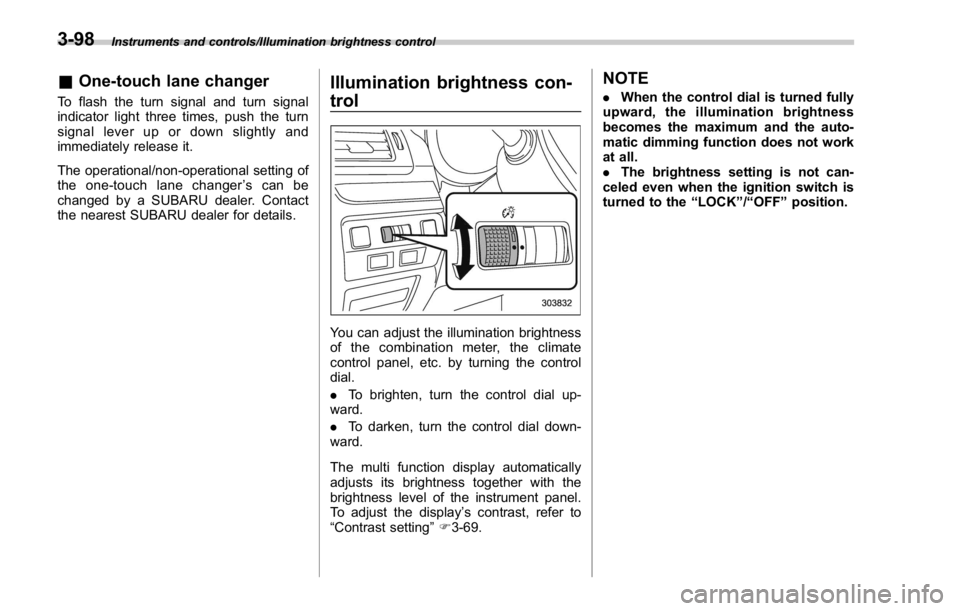
You can adjust the illumination brightness
of the combination meter, the climate
control panel, etc. by turning the control
dial.
. To brighten, turn the control dial up-
ward.
. To darken, turn the control dial down-
ward.
The multi function display automatically
adjusts its brightness together with the
brightness level of the instrument panel.
To adjust the display ’ s contrast, refer to
“ Contrast setting ” F 3-69. NOTE . When the control dial is turned fully
upward, the illumination brightness
becomes the maximum and the auto-
matic dimming function does not work
at all.
. The brightness setting is not can-
celed even when the ignition switch is
turned to the “ LOCK ” / “ OFF ” position.3-98