engine SUBARU WRX 2018 Owners Manual
[x] Cancel search | Manufacturer: SUBARU, Model Year: 2018, Model line: WRX, Model: SUBARU WRX 2018Pages: 578, PDF Size: 33.21 MB
Page 388 of 578
(401,1)
北米Model "A1700BE-B" EDITED: 2017/ 10/ 11
system unable to operate correctly.&Vehicle Dynamics Control
system monitorRefer to“Vehicle Dynamics Control warn-
ing light/Vehicle Dynamics Control opera-
tion indicator light”F3-26 and“Vehicle
Dynamics Control OFF indicator light/
Traction mode indicator light /”F3-27.&Vehicle Dynamics Control
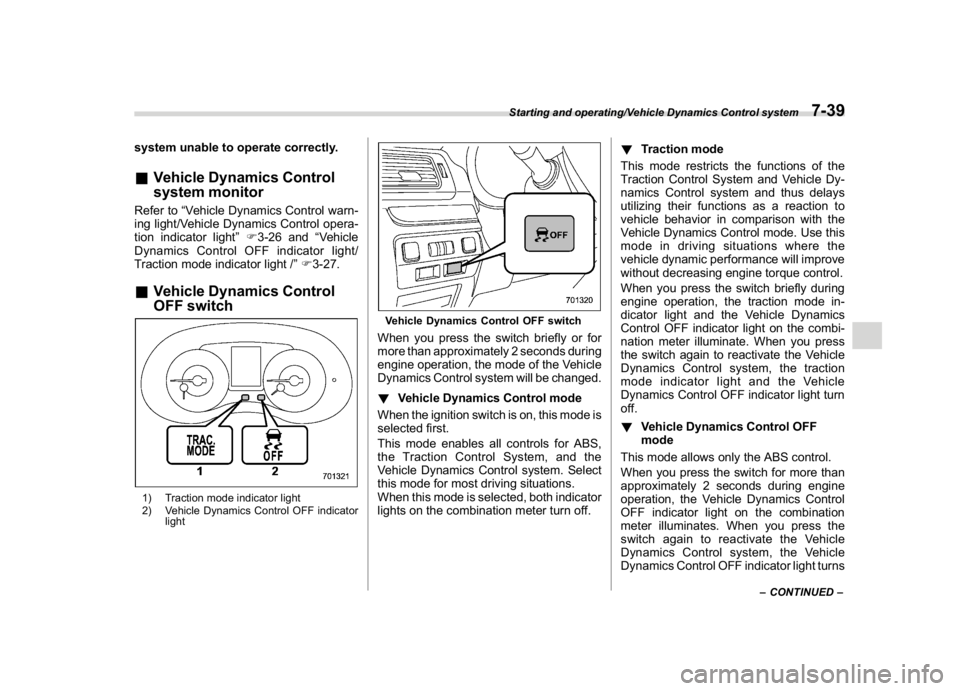
OFF switch1) Traction mode indicator light
2) Vehicle Dynamics Control OFF indicator
light
Vehicle Dynamics Control OFF switchWhen you press the switch briefly or for
more than approximately 2 seconds during
engine operation, the mode of the Vehicle
Dynamics Control system will be changed.
!Vehicle Dynamics Control mode
When the ignition switch is on, this mode is
selected first.
This mode enables all controls for ABS,
the Traction Control System, and the
Vehicle Dynamics Control system. Select
this mode for most driving situations.
When this mode is selected, both indicator
lights on the combination meter turn off.!Traction mode
This mode restricts the functions of the
Traction Control System and Vehicle Dy-
namics Control system and thus delays
utilizing their functions as a reaction to
vehicle behavior in comparison with the
Vehicle Dynamics Control mode. Use this
mode in driving situations where the
vehicle dynamic performance will improve
without decreasing engine torque control.
When you press the switch briefly during
engine operation, the traction mode in-
dicator light and the Vehicle Dynamics
Control OFF indicator light on the combi-
nation meter illuminate. When you press
the switch again to reactivate the Vehicle
Dynamics Control system, the traction
mode indicator light and the Vehicle
Dynamics Control OFF indicator light turn
off.
!Vehicle Dynamics Control OFF
mode
This mode allows only the ABS control.
When you press the switch for more than
approximately 2 seconds during engine
operation, the Vehicle Dynamics Control
OFF indicator light on the combination
meter illuminates. When you press the
switch again to reactivate the Vehicle
Dynamics Control system, the Vehicle
Dynamics Control OFF indicator light turns
–CONTINUED–
Starting and operating/Vehicle Dynamics Control system
7-39
7
Page 389 of 578
(402,1)
北米Model "A1700BE-B" EDITED: 2017/ 10/ 11
off.
Creating an adequate driving wheel slip by
deactivating the Vehicle Dynamics Control
system temporarily may help to escape
from the following situations. Use the
Vehicle Dynamics Control OFF mode as
necessary.
.a standing start on a steeply sloping
road with a snowy, gravel-covered, or
otherwise slippery surface
.extrication of the vehicle when its
wheels are stuck in mud or deep snow
You should not deactivate the Vehicle
Dynamics Control system except under
the above-mentioned situations.NOTE.If you turn the ignition switch to the
“LOCK”/“OFF”position with the Vehi-
cle Dynamics Control system deacti-
vated, the system will be automatically
reactivated the next time the engine is
started.
.If you press and hold the switch for
30 seconds or longer, the Vehicle
Dynamics Control OFF indicator light
turns off, the Vehicle Dynamics Control
system is activated, and the system
ignores any further pressing of the
switch. To make the switch usable
again, turn the ignition switch to the“LOCK”/“OFF”position and restart the
engine.
.When the Vehicle Dynamics Control
OFF mode is selected, the vehicle’s
running performance is comparable
with that of a vehicle that does not have
a Vehicle Dynamics Control system. Do
not deactivate the Vehicle Dynamics
Control system except when absolutely
necessary.
.Even when the Vehicle Dynamics
Control OFF mode is selected, compo-
nents of the brake control system may
still activate. When the brake control
system is activated, the Vehicle Dy-
namics Control operation indicator
light illuminates.
Tire pressure monitoring
system (TPMS) (U.S.-spec.
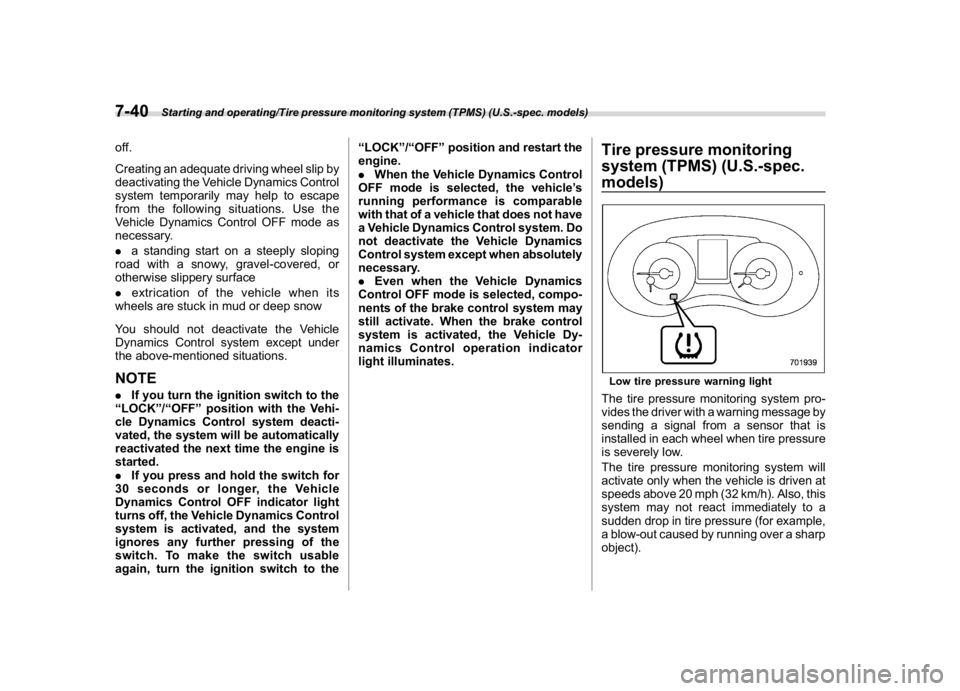
models)Low tire pressure warning lightThe tire pressure monitoring system pro-
vides the driver with a warning message by
sending a signal from a sensor that is
installed in each wheel when tire pressure
is severely low.
The tire pressure monitoring system will
activate only when the vehicle is driven at
speeds above 20 mph (32 km/h). Also, this
system may not react immediately to a
sudden drop in tire pressure (for example,
a blow-out caused by running over a sharp
object).
Starting and operating/Tire pressure monitoring system (TPMS) (U.S.-spec. models)
7-40
Page 391 of 578
(404,1)
北米Model "A1700BE-B" EDITED: 2017/ 10/ 11
NOTEThis device complies with part 15 of the
FCC Rules. Operation is subject to the
following two conditions: (1) This de-
vice may not cause harmful interfer-
ence, and (2) this device must accept
any interference received, including
interference that may cause undesired
operation.
FCC CAUTION
Changes or modifications not ex-
pressly approved by the party respon-
sible for compliance could void the
user’s authority to operate the equip-
ment.
Parking your vehicle
WARNING
.Never leave unattended children
or pets in the vehicle. They could
accidentally injure themselves or
others through inadvertent op-
eration of the vehicle. Also, on
hot or sunny days, the tempera-
ture in a closed vehicle could
quickly become high enough to
cause severe or possibly fatal
injuries to them.
.Do not park the vehicle over
flammable materials such as dry
grass, waste paper or rags, as
they may burn easily if they come
near hot engine or exhaust sys-
tem parts.
.Be sure to stop the engine if you
take a nap in the vehicle. If engine
exhaust gas enters the passen-
ger compartment, occupants in
the vehicle could die from carbon
monoxide (CO) contained in the
exhaust gas.
CAUTION
TYPE RA: When parking the vehicle,
be careful not to contact a wheel
stop, etc. Doing so may damage the
bumpers, underside of the vehicle,
etc.&Parking brake (models with-
out electronic parking brake
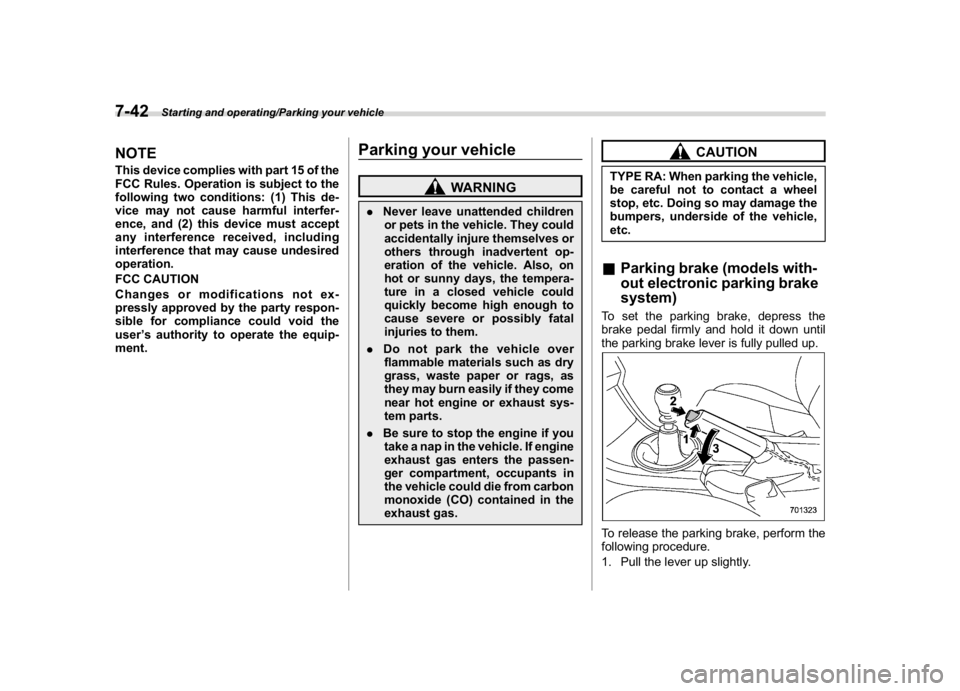
system)To set the parking brake, depress the
brake pedal firmly and hold it down until
the parking brake lever is fully pulled up.To release the parking brake, perform the
following procedure.
1. Pull the lever up slightly.
Starting and operating/Parking your vehicle
7-42
Page 392 of 578
(405,1)
北米Model "A1700BE-B" EDITED: 2017/ 10/ 11
2. Press the release button.
3. Lower the lever while keeping the
button pressed.
When the parking brake is set while the
engine is running, the parking brake
warning light illuminates. Be sure that the
warning light is turned off before driving off.
Refer to“Parking brake indicator (models
without electronic parking brake system)”
F3-21.
CAUTION
Never drive while the parking brake
is set because this will cause un-
necessary wear on the brake linings.
Make sure that the parking brake has
been fully released before driving
off.
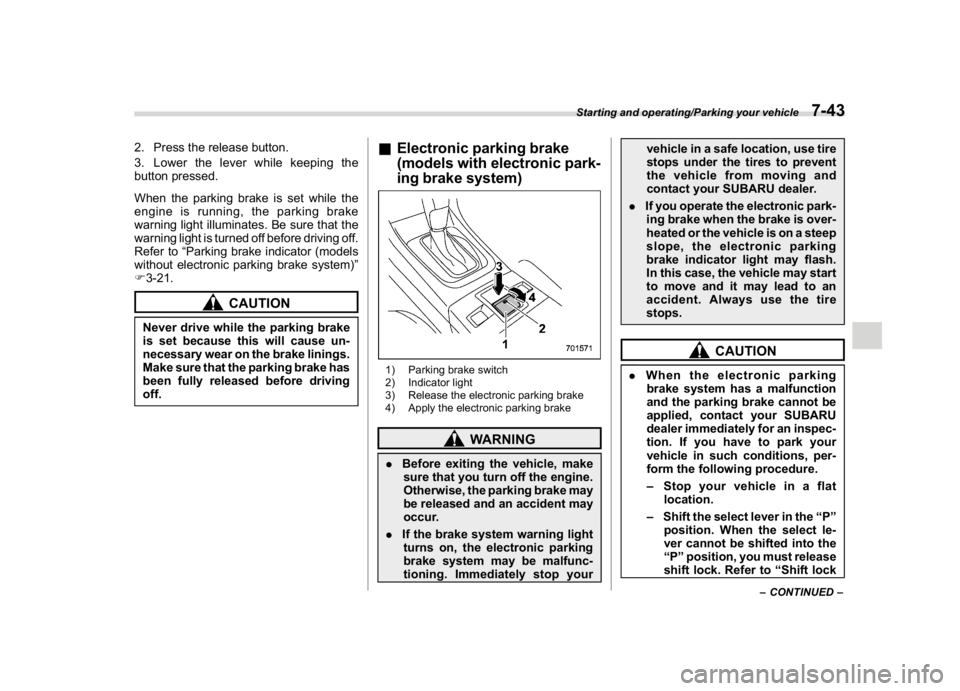
&Electronic parking brake
(models with electronic park-
ing brake system)1) Parking brake switch
2) Indicator light
3) Release the electronic parking brake
4) Apply the electronic parking brake
WARNING
.Before exiting the vehicle, make
sure that you turn off the engine.
Otherwise, the parking brake may
be released and an accident may
occur.
.If the brake system warning light
turns on, the electronic parking
brake system may be malfunc-
tioning. Immediately stop yourvehicle in a safe location, use tire
stops under the tires to prevent
the vehicle from moving and
contact your SUBARU dealer.
.If you operate the electronic park-
ing brake when the brake is over-
heated or the vehicle is on a steep
slope, the electronic parking
brake indicator light may flash.
In this case, the vehicle may start
to move and it may lead to an
accident. Always use the tire
stops.
CAUTION
.When the electronic parking
brake system has a malfunction
and the parking brake cannot be
applied, contact your SUBARU
dealer immediately for an inspec-
tion. If you have to park your
vehicle in such conditions, per-
form the following procedure.
–Stop your vehicle in a flat
location.
–Shift the select lever in the“P”
position. When the select le-
ver cannot be shifted into the
“P”position, you must release
shift lock. Refer to“Shift lock
–CONTINUED–
Starting and operating/Parking your vehicle
7-43
7
Page 394 of 578
(407,1)
北米Model "A1700BE-B" EDITED: 2017/ 10/ 11
–If the electronic parking brake is
applied after the ignition switch is
turned OFF.
This is a normal operating sound under
any of these conditions.
!Automatic release function by ac-
celerator pedal
The parking brake will be automatically
released by depressing the accelerator
pedal. However, the automatic release
function does not operate under the
following conditions.
.Any door (other than the trunk lid) is
open.
.The driver’s seatbelt is not fastened.
If the parking brake is automatically
released, the electronic parking brake
indicator light and the indicator light on
the parking brake switch turn off.
!Emergency brake
CAUTION
Use the emergency brake only in
case of an emergency. If the emer-
gency brake is excessively used, the
brake parts will wear down faster or
the brake may not work sufficiently
due to brake overheating.
NOTEWhile using the emergency brake:
.The electronic parking brake indica-
tor light and the indicator light on the
parking brake switch illuminate and a
chirp sounds.
.A sound may be heard from the
engine compartment. This is the oper-
ating sound of the brake that is acti-
vated by the Vehicle Dynamics Control
system, and does not indicate a mal-
function.
If the foot brake has a malfunction, you can
stop the vehicle by pulling the parking
brake switch continuously.
While applying the emergency brake, the
electronic parking brake indicator light and
the indicator light on the parking brake
switch illuminate and a chirp sounds.
!Electronic parking brake system
warning
CAUTION
If the brake system warning light
turns on, the electronic parking
brake system may be malfunction-
ing. Immediately stop your vehicle in
the nearest safe location and con-
tact your SUBARU dealer.If a malfunction occurs in the electronic
parking brake system, the brake system
warning light turns on. Refer to“Electronic
parking brake indicator light (models with
electronic parking brake system)”F3-23.
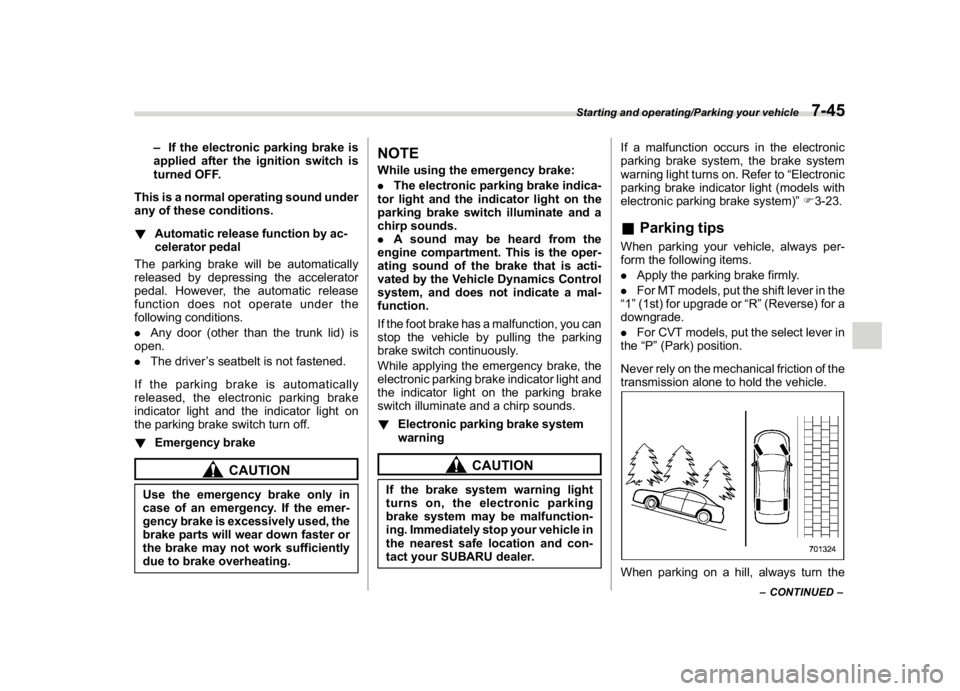
&Parking tipsWhen parking your vehicle, always per-
form the following items.
.Apply the parking brake firmly.
.For MT models, put the shift lever in the
“1”(1st) for upgrade or“R”(Reverse) for a
downgrade.
.For CVT models, put the select lever in
the“P”(Park) position.
Never rely on the mechanical friction of the
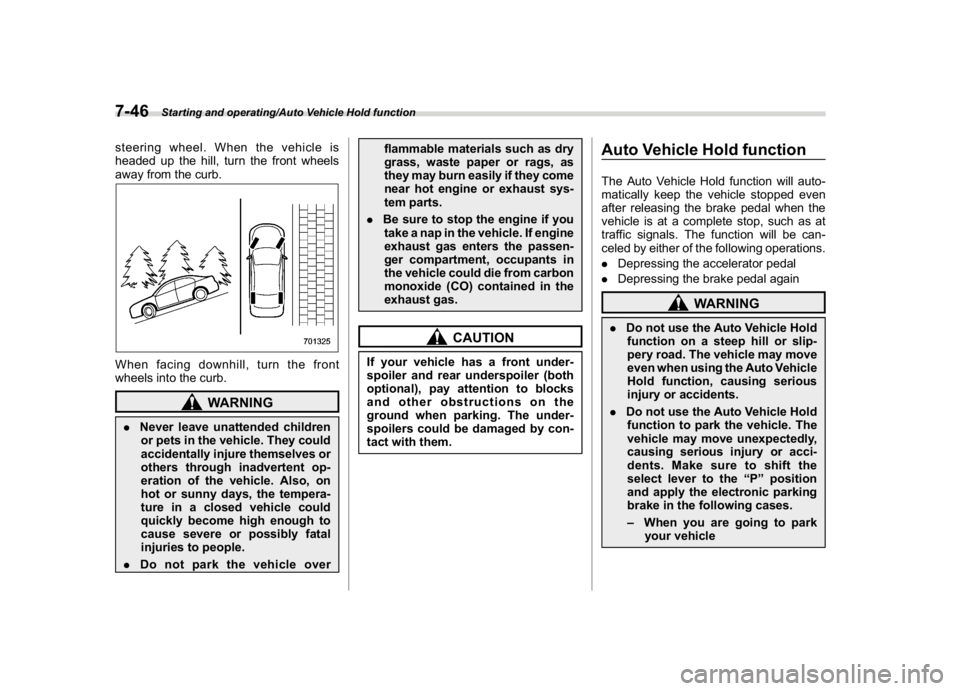
transmission alone to hold the vehicle.When parking on a hill, always turn the
–CONTINUED–
Starting and operating/Parking your vehicle
7-45
7
Page 395 of 578
(408,1)
北米Model "A1700BE-B" EDITED: 2017/ 10/ 11
steering wheel. When the vehicle is
headed up the hill, turn the front wheels
away from the curb.When facing downhill, turn the front
wheels into the curb.
WARNING
.Never leave unattended children
or pets in the vehicle. They could
accidentally injure themselves or
others through inadvertent op-
eration of the vehicle. Also, on
hot or sunny days, the tempera-
ture in a closed vehicle could
quickly become high enough to
cause severe or possibly fatal
injuries to people.
.Do not park the vehicle overflammable materials such as dry
grass, waste paper or rags, as
they may burn easily if they come
near hot engine or exhaust sys-
tem parts.
.Be sure to stop the engine if you
take a nap in the vehicle. If engine
exhaust gas enters the passen-
ger compartment, occupants in
the vehicle could die from carbon
monoxide (CO) contained in the
exhaust gas.
CAUTION
If your vehicle has a front under-
spoiler and rear underspoiler (both
optional), pay attention to blocks
and other obstructions on the
ground when parking. The under-
spoilers could be damaged by con-
tact with them.
Auto Vehicle Hold functionThe Auto Vehicle Hold function will auto-
matically keep the vehicle stopped even
after releasing the brake pedal when the
vehicle is at a complete stop, such as at
traffic signals. The function will be can-
celed by either of the following operations.
.Depressing the accelerator pedal
.Depressing the brake pedal again
WARNING
.Do not use the Auto Vehicle Hold
function on a steep hill or slip-
pery road. The vehicle may move
even when using the Auto Vehicle
Hold function, causing serious
injury or accidents.
.Do not use the Auto Vehicle Hold
function to park the vehicle. The
vehicle may move unexpectedly,
causing serious injury or acci-
dents. Make sure to shift the
select lever to the“P”position
and apply the electronic parking
brake in the following cases.
–When you are going to park
your vehicle
Starting and operating/Auto Vehicle Hold function
7-46
Page 397 of 578
(410,1)
北米Model "A1700BE-B" EDITED: 2017/ 10/ 11
NOTE.IfyoupressandholdtheAuto
Vehicle Hold switch for more than 30
seconds, the Auto Vehicle Hold ON
indicator light will turn off, and the
system will ignore any further pressing
of the switch. To activate the switch
again, restart the engine.
.When the Auto Vehicle Hold function
is deactivated while the Auto Vehicle
Hold function has a malfunction, if you
press the Auto Vehicle Hold switch, a
chirp will sound&To operate the Auto Vehicle
Hold functionStop the vehicle by depressing the brake
pedal when all of the following conditions
are met. Then the Auto Vehicle Hold
function will operate.
.All doors are closed.
.The driver’s seatbelt is fastened.
.The select lever is in a position other
than the“P”position.
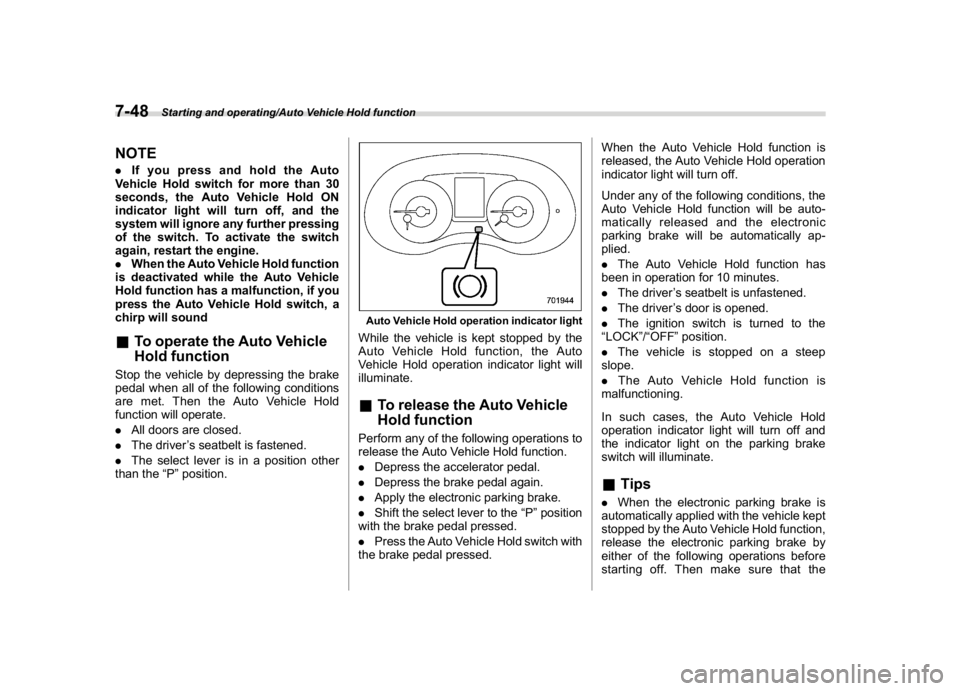
Auto Vehicle Hold operation indicator lightWhile the vehicle is kept stopped by the
Auto Vehicle Hold function, the Auto
Vehicle Hold operation indicator light will
illuminate.&To release the Auto Vehicle
Hold functionPerform any of the following operations to
release the Auto Vehicle Hold function.
.Depress the accelerator pedal.
.Depress the brake pedal again.
.Apply the electronic parking brake.
.Shift the select lever to the“P”position
with the brake pedal pressed.
.Press the Auto Vehicle Hold switch with
the brake pedal pressed.When the Auto Vehicle Hold function is
released, the Auto Vehicle Hold operation
indicator light will turn off.
Under any of the following conditions, the
Auto Vehicle Hold function will be auto-
matically released and the electronic
parking brake will be automatically ap-
plied.
.The Auto Vehicle Hold function has
been in operation for 10 minutes.
.The driver’s seatbelt is unfastened.
.The driver’s door is opened.
.The ignition switch is turned to the
“LOCK”/“OFF”position.
.The vehicle is stopped on a steep
slope.
.The Auto Vehicle Hold function is
malfunctioning.
In such cases, the Auto Vehicle Hold
operation indicator light will turn off and
the indicator light on the parking brake
switch will illuminate.
&Tips.When the electronic parking brake is
automatically applied with the vehicle kept
stopped by the Auto Vehicle Hold function,
release the electronic parking brake by
either of the following operations before
starting off. Then make sure that the
Starting and operating/Auto Vehicle Hold function
7-48
Page 401 of 578
(414,1)
北米Model "A1700BE-B" EDITED: 2017/ 10/ 11
NOTEIf you make an error when performing
any steps in the following procedure,
place the ignition switch in the“LOCK”/
“OFF”position once and then start
over again.
!To deactivate
1. Park your vehicle in a flat and safe
location and apply the parking brake.
2. Turn the ignition switch to the“LOCK”/
“OFF”position.
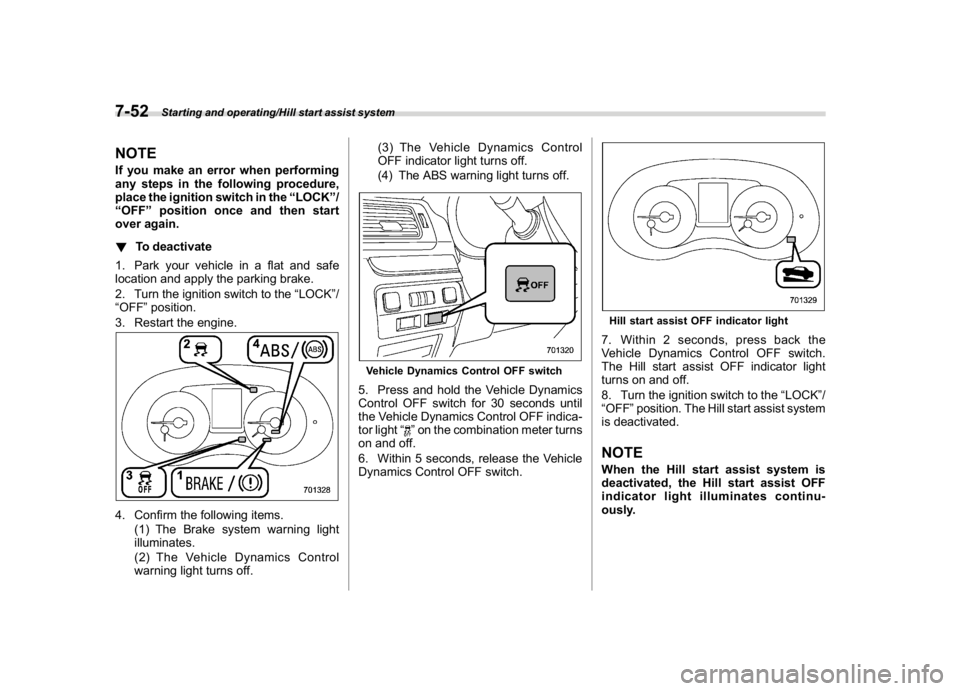
3. Restart the engine.4. Confirm the following items.
(1) The Brake system warning light
illuminates.
(2) The Vehicle Dynamics Control
warning light turns off.(3) The Vehicle Dynamics Control
OFF indicator light turns off.
(4) The ABS warning light turns off.
Vehicle Dynamics Control OFF switch5. Press and hold the Vehicle Dynamics
Control OFF switch for 30 seconds until
the Vehicle Dynamics Control OFF indica-
tor light“
”on the combination meter turns
on and off.
6. Within 5 seconds, release the Vehicle
Dynamics Control OFF switch.
Hill start assist OFF indicator light7. Within 2 seconds, press back the
Vehicle Dynamics Control OFF switch.
The Hill start assist OFF indicator light
turns on and off.
8. Turn the ignition switch to the“LOCK”/
“OFF”position. The Hill start assist system
is deactivated.NOTEWhen the Hill start assist system is
deactivated, the Hill start assist OFF
indicator light illuminates continu-
ously.
Starting and operating/Hill start assist system
7-52
Page 404 of 578
(417,1)
北米Model "A1700BE-B" EDITED: 2017/ 10/ 11
tion to the“D”indication.&To temporarily cancel the
cruise controlYou can temporarily cancel the cruise
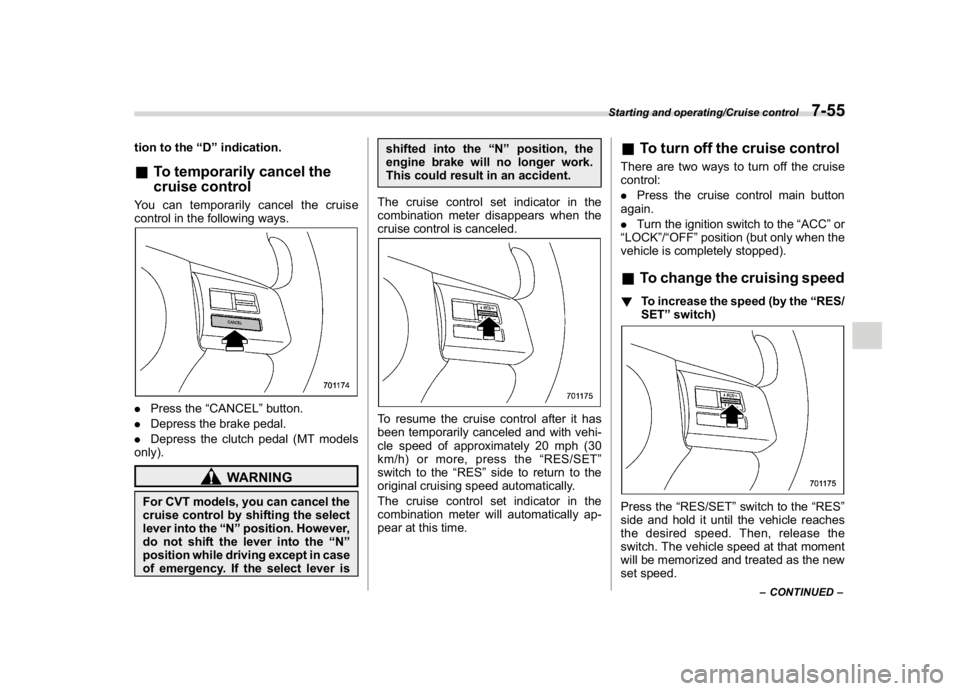
control in the following ways..Press the“CANCEL”button.
.Depress the brake pedal.
.Depress the clutch pedal (MT models
only).
WARNING
For CVT models, you can cancel the
cruise control by shifting the select
lever into the“N”position. However,
do not shift the lever into the“N”
position while driving except in case
of emergency. If the select lever isshifted into the“N”position, the
engine brake will no longer work.
This could result in an accident.
The cruise control set indicator in the
combination meter disappears when the
cruise control is canceled.
To resume the cruise control after it has
been temporarily canceled and with vehi-
cle speed of approximately 20 mph (30
km/h) or more, press the“RES/SET”
switch to the“RES”side to return to the
original cruising speed automatically.
The cruise control set indicator in the
combination meter will automatically ap-
pear at this time.
&To turn off the cruise controlThere are two ways to turn off the cruise
control:
.Press the cruise control main button
again.
.Turn the ignition switch to the“ACC”or
“LOCK”/“OFF”position (but only when the
vehicle is completely stopped).&To change the cruising speed!To increase the speed (by the“RES/
SET”switch)Press the“RES/SET”switch to the“RES”
side and hold it until the vehicle reaches
the desired speed. Then, release the
switch. The vehicle speed at that moment
will be memorized and treated as the new
set speed.
–CONTINUED–
Starting and operating/Cruise control
7-55
7
Page 412 of 578
(425,1)
北米Model "A1700BE-B" EDITED: 2017/ 10/ 11
!System malfunction indicatorSystem malfunction indicator
1) At first, this message will appear
2) Then this message will appearThis indicator appears when a malfunction
occurs in the system. Contact a SUBARU
dealer and have the system inspected.
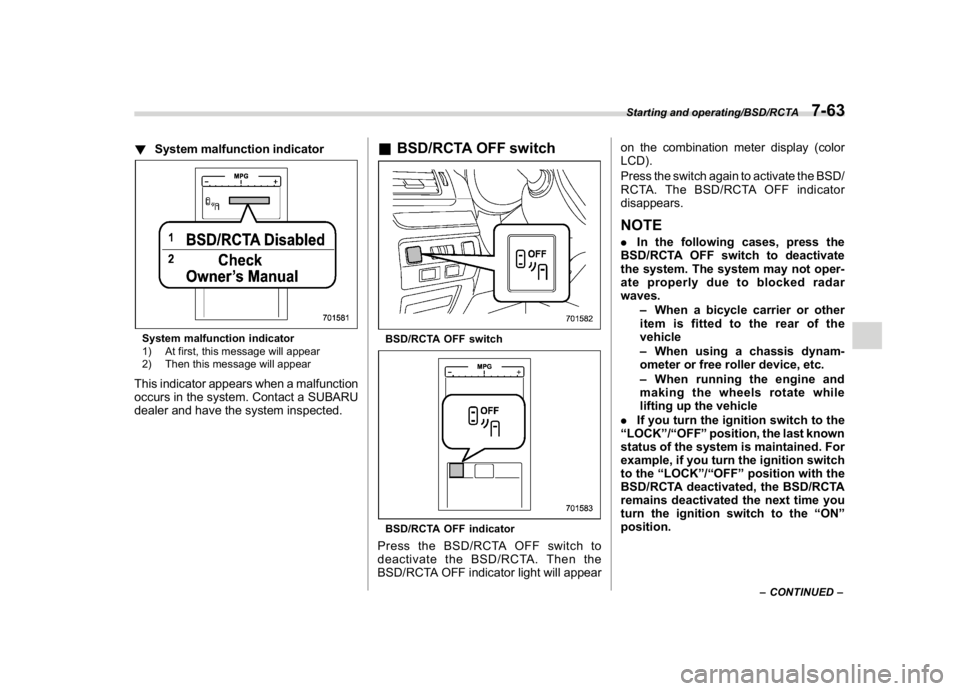
&BSD/RCTA OFF switchBSD/RCTA OFF switchBSD/RCTA OFF indicatorPress the BSD/RCTA OFF switch to
deactivate the BSD/RCTA. Then the
BSD/RCTA OFF indicator light will appearon the combination meter display (color
LCD).
Press the switch again to activate the BSD/
RCTA. The BSD/RCTA OFF indicator
disappears.
NOTE.In the following cases, press the
BSD/RCTA OFF switch to deactivate
the system. The system may not oper-
ate properly due to blocked radar
waves.
–When a bicycle carrier or other
item is fitted to the rear of the
vehicle
–When using a chassis dynam-
ometer or free roller device, etc.
–When running the engine and
making the wheels rotate while
lifting up the vehicle
.If you turn the ignition switch to the
“LOCK”/“OFF”position, the last known
status of the system is maintained. For
example, if you turn the ignition switch
to the“LOCK”/“OFF”position with the
BSD/RCTA deactivated, the BSD/RCTA
remains deactivated the next time you
turn the ignition switch to the“ON”
position.
–CONTINUED–
Starting and operating/BSD/RCTA
7-63
7