Instrument panel SUBARU WRX 2018 User Guide
[x] Cancel search | Manufacturer: SUBARU, Model Year: 2018, Model line: WRX, Model: SUBARU WRX 2018Pages: 578, PDF Size: 33.21 MB
Page 206 of 578
(211,1)
北米Model "A1700BE-B" EDITED: 2017/ 10/ 11
&Daytime running light system
WARNING
When the daytime running lights are
illuminated, the tail lights do not
illuminate. When it becomes dark
outside, turn the light switch to the
“
”position to illuminate the head-
lights and tail lights. This will im-
prove visibility and allow other dri-
vers to see your vehicle more easily.
The daytime running lights will automati-
cally illuminate when the following condi-
tions are fulfilled.
.The engine is running.
.The parking brake is fully released.
.The light control switch is in the“AUTO”
(if equipped),“
”or off position.
.For CVT models, the select lever is in a
position other than the“P”position.
NOTEWhen the light switch is in the“
”
position, the instrument panel illumina-
tion, front side marker lights, tail lights
and license plate lights are also illumi-
nated.
Steering Responsive Head-
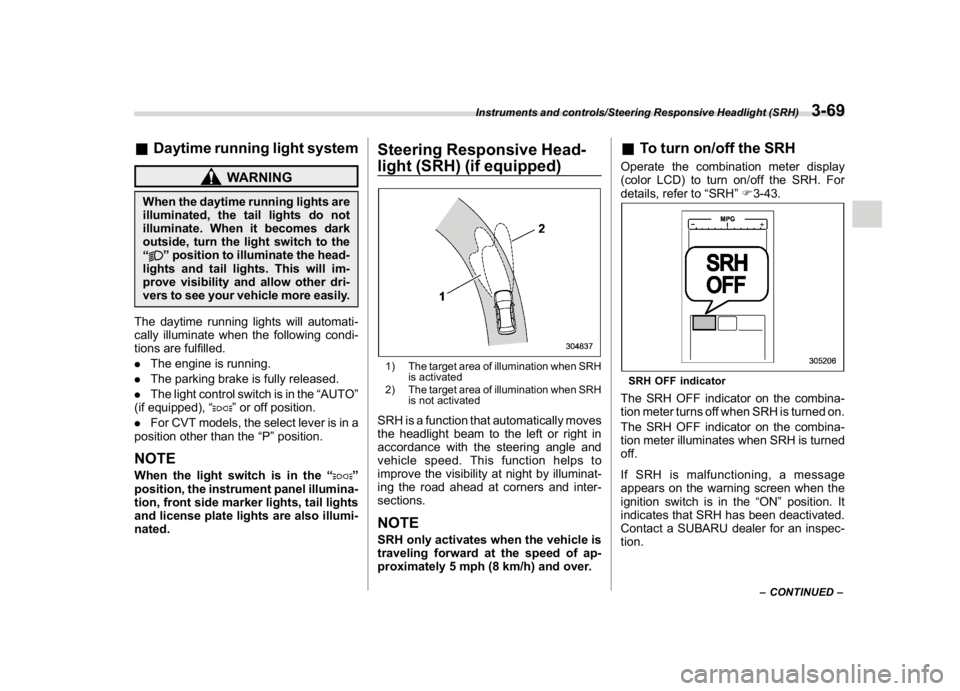
light (SRH) (if equipped)1) The target area of illumination when SRH
is activated
2) The target area of illumination when SRH
is not activatedSRH is a function that automatically moves
the headlight beam to the left or right in
accordance with the steering angle and
vehicle speed. This function helps to
improve the visibility at night by illuminat-
ing the road ahead at corners and inter-
sections.NOTESRH only activates when the vehicle is
traveling forward at the speed of ap-
proximately 5 mph (8 km/h) and over.
&To turn on/off the SRHOperate the combination meter display
(color LCD) to turn on/off the SRH. For
details, refer to“SRH”F3-43.SRH OFF indicatorThe SRH OFF indicator on the combina-
tion meter turns off when SRH is turned on.
The SRH OFF indicator on the combina-
tion meter illuminates when SRH is turned
off.
If SRH is malfunctioning, a message
appears on the warning screen when the
ignition switch is in the“ON”position. It
indicates that SRH has been deactivated.
Contact a SUBARU dealer for an inspec-
tion.
–CONTINUED–
Instruments and controls/Steering Responsive Headlight (SRH)
3-69
3
Page 208 of 578
(213,1)
北米Model "A1700BE-B" EDITED: 2017/ 10/ 11
Illumination brightness con-
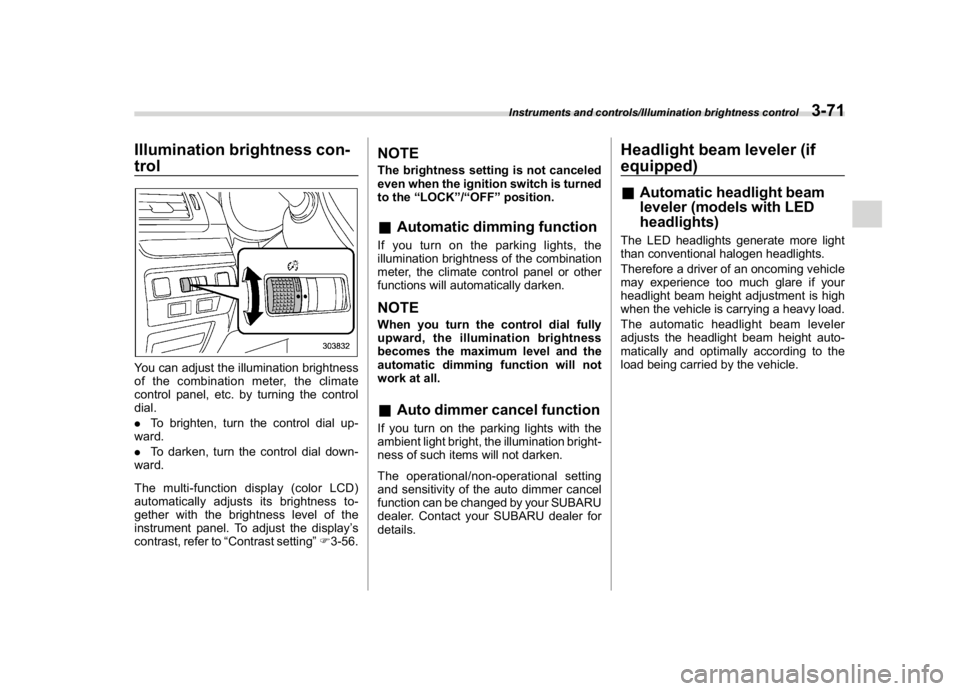
trolYou can adjust the illumination brightness
of the combination meter, the climate
control panel, etc. by turning the control
dial.
.To brighten, turn the control dial up-
ward.
.To darken, turn the control dial down-
ward.
Themulti-functiondisplay(colorLCD)
automatically adjusts its brightness to-
gether with the brightness level of the
instrument panel. To adjust the display’s
contrast, refer to“Contrast setting”F3-56.
NOTEThe brightness setting is not canceled
even when the ignition switch is turned
to the“LOCK”/“OFF”position.&Automatic dimming functionIf you turn on the parking lights, the
illumination brightness of the combination
meter, the climate control panel or other
functions will automatically darken.NOTEWhen you turn the control dial fully
upward, the illumination brightness
becomes the maximum level and the
automatic dimming function will not
work at all.&Auto dimmer cancel functionIf you turn on the parking lights with the
ambient light bright, the illumination bright-
ness of such items will not darken.
The operational/non-operational setting
and sensitivity of the auto dimmer cancel
function can be changed by your SUBARU
dealer. Contact your SUBARU dealer for
details.
Headlight beam leveler (if
equipped)&Automatic headlight beam
leveler (models with LED
headlights)The LED headlights generate more light
than conventional halogen headlights.
Therefore a driver of an oncoming vehicle
may experience too much glare if your
headlight beam height adjustment is high
when the vehicle is carrying a heavy load.
The automatic headlight beam leveler
adjusts the headlight beam height auto-
matically and optimally according to the
load being carried by the vehicle.
Instruments and controls/Illumination brightness control
3-71
3
Page 221 of 578
(226,1)
北米Model "A1700BE-B" EDITED: 2017/ 10/ 11
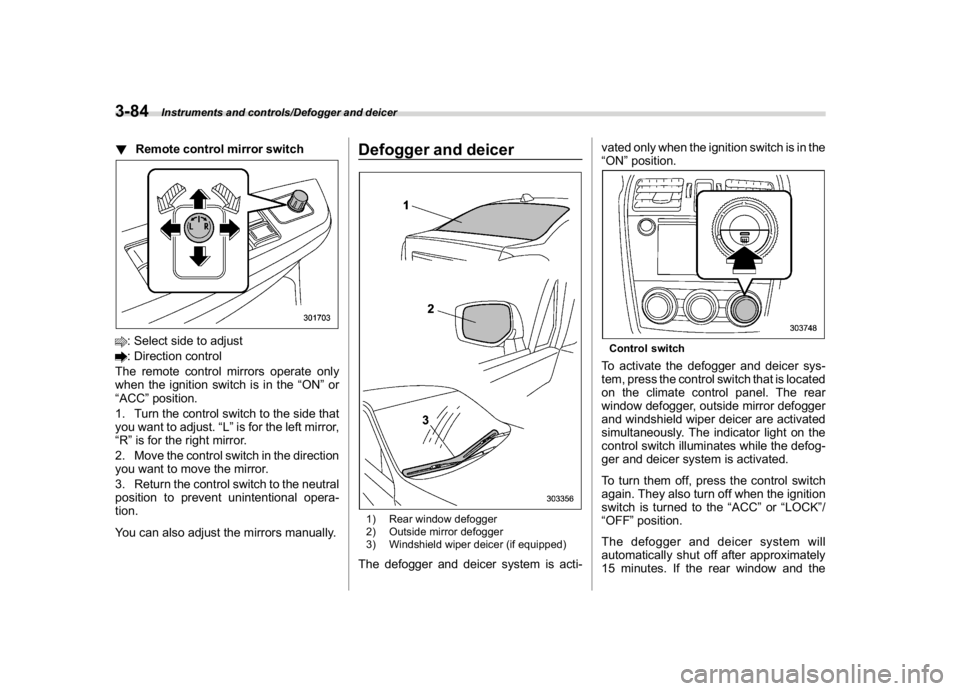
!Remote control mirror switch: Select side to adjust: Direction control
The remote control mirrors operate only
when the ignition switch is in the“ON”or
“ACC”position.
1. Turn the control switch to the side that
you want to adjust.“L”is for the left mirror,
“R”is for the right mirror.
2. Move the control switch in the direction
you want to move the mirror.
3. Return the control switch to the neutral
position to prevent unintentional opera-
tion.
You can also adjust the mirrors manually.
Defogger and deicer1) Rear window defogger
2) Outside mirror defogger
3) Windshield wiper deicer (if equipped)The defogger and deicer system is acti-vated only when the ignition switch is in the
“ON”position.
Control switchTo activate the defogger and deicer sys-
tem, press the control switch that is located
on the climate control panel. The rear
window defogger, outside mirror defogger
and windshield wiper deicer are activated
simultaneously. The indicator light on the
control switch illuminates while the defog-
ger and deicer system is activated.
To turn them off, press the control switch
again. They also turn off when the ignition
switch is turned to the“ACC”or“LOCK”/
“OFF”position.
The defogger and deicer system will
automatically shut off after approximately
15 minutes. If the rear window and the
Instruments and controls/Defogger and deicer
3-84
Page 229 of 578

(236,1)
北米Model "A1700BE-B" EDITED: 2017/ 10/ 11
–Solar sensor: beside the windshield
defroster grille
–Interior air temperature sensor: next to
the steering column
–Outside temperature sensor: near the
front bumper opening
These sensors are delicate. If they are not
treated properly and become damaged,
the system may not be able to control the
interior temperature correctly. To avoid
damaging the sensors, observe the follow-
ing precautions.
–Do not subject the sensors to impact.
–Keep water away from the sensors.
–Do not cover the sensors.
Manual climate control op-
eration&Airflow mode selectionTo select the airflow mode:
Type A:Turn the airflow mode selection
dial.
Type B:Press the airflow mode selection
button.
To select the defrost mode:
Press the defroster button.
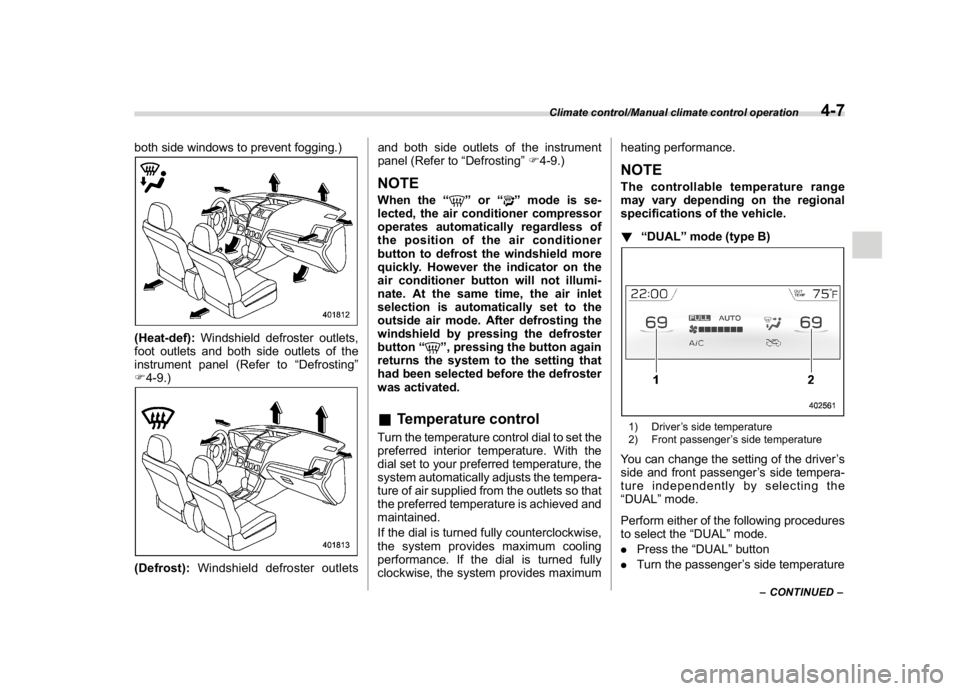
Airflow modes are as follows.(Ventilation):Instrument panel outlets
(Bi-level):Instrument panel outlets and
foot outlets(Heat):Foot outlets, both side outlets of
the instrument panel and some through
windshield defroster outlets (A small
amount of air flows to the windshield and
Climate control/Manual climate control operation
4-6
Page 230 of 578
(237,1)
北米Model "A1700BE-B" EDITED: 2017/ 10/ 11
both side windows to prevent fogging.)(Heat-def):Windshield defroster outlets,
foot outlets and both side outlets of the
instrument panel (Refer to“Defrosting”
F4-9.)(Defrost):Windshield defroster outletsand both side outlets of the instrument
panel (Refer to“Defrosting”F4-9.)
NOTEWhen the“
”or“
”mode is se-
lected, the air conditioner compressor
operates automatically regardless of
the position of the air conditioner
button to defrost the windshield more
quickly. However the indicator on the
air conditioner button will not illumi-
nate. At the same time, the air inlet
selection is automatically set to the
outside air mode. After defrosting the
windshield by pressing the defroster
button“
”, pressing the button again
returns the system to the setting that
had been selected before the defroster
was activated.
&Temperature controlTurn the temperature control dial to set the
preferred interior temperature. With the
dial set to your preferred temperature, the
system automatically adjusts the tempera-
ture of air supplied from the outlets so that
the preferred temperature is achieved and
maintained.
If the dial is turned fully counterclockwise,
the system provides maximum cooling
performance. If the dial is turned fully
clockwise, the system provides maximumheating performance.
NOTEThe controllable temperature range
may vary depending on the regional
specifications of the vehicle.
!“DUAL”mode (type B)1) Driver’s side temperature
2) Front passenger’s side temperatureYou can change the setting of the driver’s
side and front passenger’s side tempera-
ture independently by selecting the
“DUAL”mode.
Perform either of the following procedures
to select the“DUAL”mode.
.Press the“DUAL”button
.Turn the passenger’s side temperature
–CONTINUED–
Climate control/Manual climate control operation
4-7
4
Page 436 of 578
(451,1)
北米Model "A1700BE-B" EDITED: 2017/ 10/ 11
Loading your vehicle
WARNING
.Never allow passengers to ride
on a folded rear seatback or in the
trunk. Doing so may result in
serious injury.
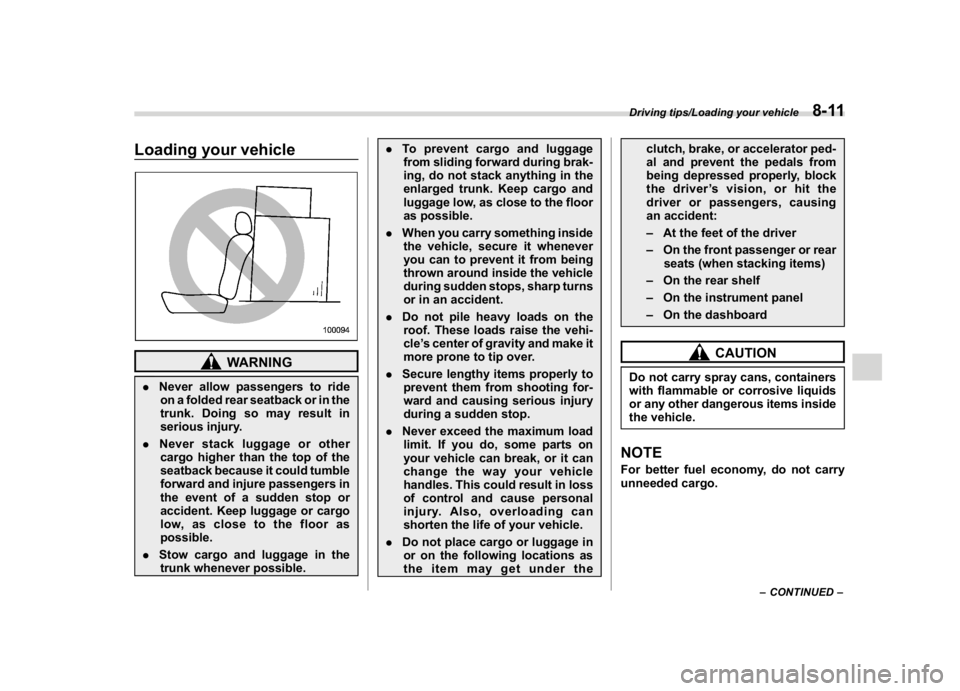
.Never stack luggage or other
cargo higher than the top of the
seatback because it could tumble
forward and injure passengers in
the event of a sudden stop or
accident. Keep luggage or cargo
low, as close to the floor as
possible.
.Stow cargo and luggage in the
trunk whenever possible..To prevent cargo and luggage
from sliding forward during brak-
ing, do not stack anything in the
enlarged trunk. Keep cargo and
luggage low, as close to the floor
as possible.
.When you carry something inside
the vehicle, secure it whenever
you can to prevent it from being
thrown around inside the vehicle
during sudden stops, sharp turns
or in an accident.
.Do not pile heavy loads on the
roof. These loads raise the vehi-
cle’s center of gravity and make it
more prone to tip over.
.Secure lengthy items properly to
prevent them from shooting for-
ward and causing serious injury
during a sudden stop.
.Never exceed the maximum load
limit. If you do, some parts on
your vehicle can break, or it can
change the way your vehicle
handles. This could result in loss
of control and cause personal
injury. Also, overloading can
shorten the life of your vehicle.
.Do not place cargo or luggage in
or on the following locations as
the item may get under theclutch, brake, or accelerator ped-
al and prevent the pedals from
being depressed properly, block
the driver’s vision, or hit the
driver or passengers, causing
an accident:
–At the feet of the driver
–On the front passenger or rear
seats (when stacking items)
–On the rear shelf
–On the instrument panel
–On the dashboard
CAUTION
Do not carry spray cans, containers
with flammable or corrosive liquids
or any other dangerous items inside
the vehicle.NOTEFor better fuel economy, do not carry
unneeded cargo.
–CONTINUED–
Driving tips/Loading your vehicle
8-11
8
Page 470 of 578

(489,1)
北米Model "A1700BE-B" EDITED: 2017/ 10/ 11
Exterior care..........................................................10-2
Washing...............................................................10-2
Waxing and polishing............................................10-4
Cleaning alloy wheels...........................................10-4
Corrosion protection............................................10-5
Most common causes of corrosion.......................10-5
To help prevent corrosion.....................................10-5
Cleaning the interior.............................................10-6
Seat fabric............................................................10-6Leather seat materials..........................................10-6
Synthetic leather upholstery.................................10-6
Climate control panel, audio panel, instrument
panel, console panel, and switches....................10-7
Monitor.................................................................10-7
Steering wheel with ultra-suede covering
(if equipped).......................................................10-7
Regular cleaning...................................................10-7
Liquid dirt.............................................................10-8
Dirt from hands....................................................10-8
Appearance care
10
Page 476 of 578

(495,1)
北米Model "A1700BE-B" EDITED: 2017/ 10/ 11
&Climate control panel, audio
panel, instrument panel, con-
sole panel, and switchesUse a soft, damp cloth to clean the climate
control panel, audio equipment, instru-
ment panel, center console, combination
meter panel, and switches.
CAUTION
.Do not use organic solvents such
as paint thinners or fuel, or
strong cleaning agents that con-
tain those solvents. Doing so
could damage the surface and
cause the color to deteriorate.
.Do not use chemical solvents that
contain silicone on the vehicle
audio system, electrical compo-
nents of the air-conditioner or
any switches. If silicone adheres
to these parts, it may cause
damage to electrical compo-
nents.
&MonitorTo clean the audio/navigation/multi-func-
tion display monitor, wipe it with a silicone
cloth or with a soft cloth. If the monitor is
extremely dirty, clean it with a soft cloth
moistened with neutral detergent then
carefully wipe off any remaining detergent.
CAUTION
.Do not spray neutral detergent
directly onto the monitor. Doing
so could damage the monitor’s
components.
.Do not wipe the monitor with a
hard cloth. Doing so could
scratch the monitor.
.Do not use cleaning fluid that
contains thinner, fuel, or any
other volatile substance. Such
cleaning fluid could erase the
lettering on the switches at the
bottom of the monitor.
Steering wheel with ultra-
suede covering (if equipped)In order to maintain the characteristic
texture and appearance of ultra-suede,
regular cleaning of the steering wheel is
recommended.NOTEIf the steering wheel is used continually
without cleaning, the surface will ap-
pear worn. This is due to dirt from
hands and other sources which causes
the ultra-suede fibers to harden. This is
not a defect.
Follow the procedure below and perform
cleaning.&Regular cleaningIt is recommended that regular cleaning
(approximately once a month) be per-
formed by following the procedure below.
1. Dampen a cloth or similar item with
warm water at approximately 1048F
(408C), then strongly wring it out and wipe
over the entire steering wheel.
2. When the surface of the ultra-suede is
dry, use a lint brush or similar means to
straighten the fibers.
–CONTINUED–
Appearance care/Steering wheel with ultra-suede covering
10-7
10
Page 486 of 578
(507,1)
北米Model "A1700BE-B" EDITED: 2017/ 10/ 11
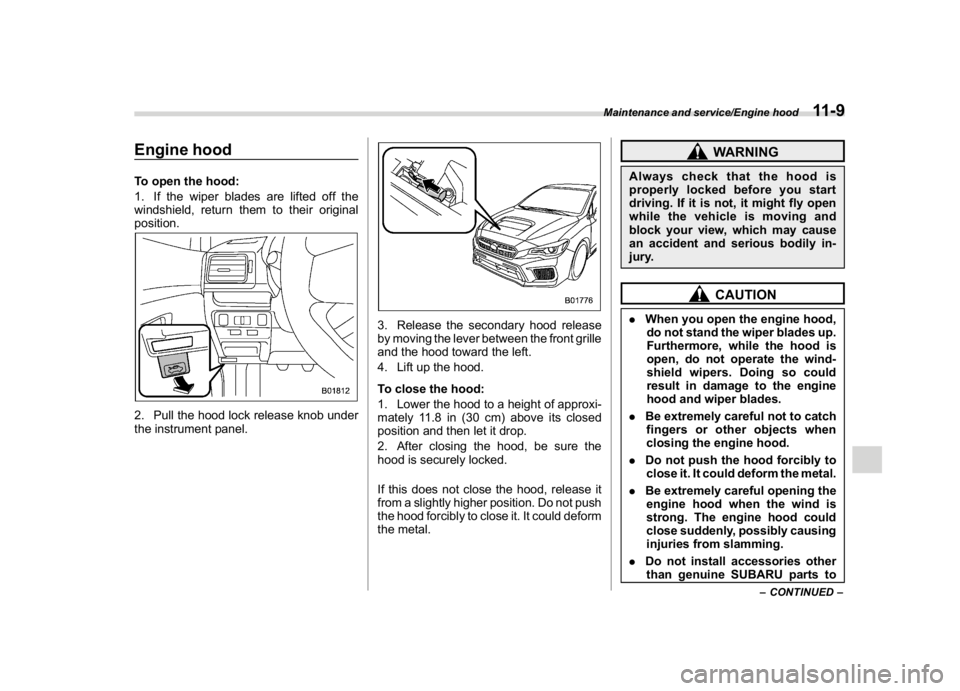
Engine hoodTo open the hood:
1. If the wiper blades are lifted off the
windshield, return them to their original
position.2. Pull the hood lock release knob under
the instrument panel.
3. Release the secondary hood release
by moving the lever between the front grille
and the hood toward the left.
4. Lift up the hood.
To close the hood:
1. Lower the hood to a height of approxi-
mately 11.8 in (30 cm) above its closed
position and then let it drop.
2. After closing the hood, be sure the
hood is securely locked.
If this does not close the hood, release it
from a slightly higher position. Do not push
the hood forcibly to close it. It could deform
the metal.
WARNING
Always check that the hood is
properly locked before you start
driving. If it is not, it might fly open
while the vehicle is moving and
block your view, which may cause
an accident and serious bodily in-
jury.
CAUTION
.When you open the engine hood,
do not stand the wiper blades up.
Furthermore, while the hood is
open, do not operate the wind-
shield wipers. Doing so could
result in damage to the engine
hood and wiper blades.
.Be extremely careful not to catch
fingers or other objects when
closing the engine hood.
.Do not push the hood forcibly to
close it. It could deform the metal.
.Be extremely careful opening the
engine hood when the wind is
strong. The engine hood could
close suddenly, possibly causing
injuries from slamming.
.Do not install accessories other
than genuine SUBARU parts to
–CONTINUED–
Maintenance and service/Engine hood
11-9
11
Page 519 of 578
(540,1)
北米Model "A1700BE-B" EDITED: 2017/ 10/ 11
remove rings, metal watchbands,
and other metal jewelry. Never
allow metal tools to contact the
positive battery terminal and any-
thing connected to it WHILE you
are at the same time in contact
with any other metallic portion of
the vehicle because a short cir-
cuit will result.
.Keep everyone including children
away from the battery.
.Charge the battery in a well-
ventilated area.
.Battery posts, terminals and re-
lated accessories contain lead
and lead compounds, chemicals
known to the State of California
to cause cancer and reproductive
harm. Batteries also contain
other chemicals known to the
State of California to cause can-
cer.
Wash hands after handling
.
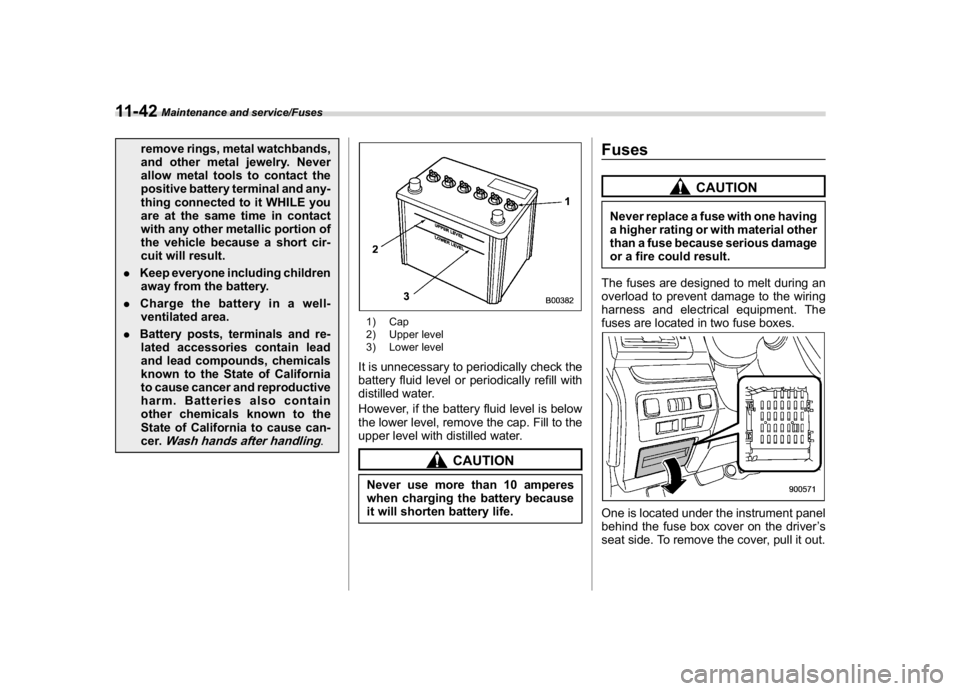
1) Cap
2) Upper level
3) Lower levelIt is unnecessary to periodically check the
battery fluid level or periodically refill with
distilled water.
However, if the battery fluid level is below
the lower level, remove the cap. Fill to the
upper level with distilled water.
CAUTION
Never use more than 10 amperes
when charging the battery because
it will shorten battery life.
Fuses
CAUTION
Never replace a fuse with one having
a higher rating or with material other
than a fuse because serious damage
or a fire could result.
The fuses are designed to melt during an
overload to prevent damage to the wiring
harness and electrical equipment. The
fuses are located in two fuse boxes.One is located under the instrument panel
behind the fuse box cover on the driver’s
seat side. To remove the cover, pull it out.
Maintenance and service/Fuses
11-42