alarm SUBARU WRX 2018 User Guide
[x] Cancel search | Manufacturer: SUBARU, Model Year: 2018, Model line: WRX, Model: SUBARU WRX 2018Pages: 578, PDF Size: 33.21 MB
Page 127 of 578
(130,1)
北米Model "A1700BE-B" EDITED: 2017/ 10/ 11
!Tripped sensor identification
The security indicator light flashes when
the alarm system has been triggered. Also,
the number of flashes indicates the loca-
tion of unauthorized intrusion or the
severity of impact on the vehicle.
After turning the ignition switch to the“ON”
position, the indicator light will light for 1
second and then flash as follows.
.When a door was opened: 5 times
.When the trunk was opened: 4 times
.When the engine hood was opened: 3
times
.When a strong impact or multiple
impacts were sensed: twice (only models
with shock sensors (dealer option))
.When a light impact was sensed: once
(only models with shock sensors (dealer
option))NOTEAny of the above indicator light flash-
ings will recur each time the ignition
switch is turned to the“ON”position.
Rearming the alarm system cancels the
flashing.!Shock sensors (dealer option)
The shock sensors trigger the alarm
system when they sense impacts applied
to the vehicle and when any of their electric
wires are cut. The alarm system causes
the horn to sound and the hazard warning
flashers to flash for a short time when the
sensed impact is weak, but it warns of a
strong impact or multiple impacts by
sounding the horn and flashing the hazard
warning flashers, both lasting approxi-
mately 30 seconds.
If you desire, your SUBARU dealer can
connect them and set them for activation
or deactivation.
NOTE.The shock sensors are not always
able to sense impacts caused by break-
ing in, and cannot sense an impact that
does not cause vibration (such as
breaking the glass using a rescue
hammer).
.The shock sensors may sense vibra-
tion as indicated in the following ex-
amples and trigger the alarm system.
Select the settings of the alarm system
and shock sensors appropriately de-
pending on where you usually park
your vehicle.Examples:
–Vibration from a construction site
–Vibration in a multistory car park
–Vibration from trains
.You can have the sensitivity of the
shock sensors adjusted to your pre-
ference by your SUBARU dealer.
Keys and doors/Anti-theft system
2-30
Page 149 of 578
(154,1)
北米Model "A1700BE-B" EDITED: 2017/ 10/ 11
&ECO gaugeThe unit displayed varies depending on
the models.The ECO gauge shows the difference
between the average rate of fuel con-
sumption since the trip meter was last
reset and the current rate of fuel consump-
tion.
The ECO gauge indicates the current fuel
efficiency as shown in the following chart.Displayed
unitNeedle position
“+”side“-”side
MPG Better Poorer
l/100km Poorer Better
km/l BetterPoorer
NOTE.The ECO gauge shows only an
approximate indication.
.After resetting the trip meter, the
average rate of fuel consumption is not
shown until driving 0.6 mile (1 km). Until
that time, the ECO gauge does not
operate.
REV indicator light and buz-
zer (STI)1) REV indicator lightThe REV alarm system has the following
functions.
.When the engine speed reaches the
level that was previously set, the REV
indicator light illuminates to inform you. At
this time, a buzzer also sounds if the
buzzer setting is activated.
.Whenever the engine speed enters the
red zone of the tachometer, the REV
indicator light flashes.
Instruments and controls/REV indicator light and buzzer (STI)
3-12
Page 150 of 578
(155,1)
北米Model "A1700BE-B" EDITED: 2017/ 10/ 11
NOTEEven if the REV alarm system is not set,
the REV indicator light will flash when-
ever the engine speed enters the red
zone of the tachometer.
To change the REV indicator settings,
perform the procedures described in
“REV settings (STI)”F3-43.
Warning and indicator lightsSeveral of the warning and indicator lights
illuminate when you initially turn the igni-
tion switch to the“ON”position. This
permits checking the operation of the
bulbs.
Apply the parking brake and turn the
ignition switch to the“ON”position. For
the system check, the following lights
illuminate and then turn off after several
seconds or after the engine has started.: Seatbelt warning light
(The seatbelt warning light turns off
only when the driver fastens the seat-
belt.): Front passenger’s seatbelt warning
light
(The seatbelt warning light turns off
only when the front seat passenger
fastens the seatbelt.): SRS airbag system warning light
ON /
: Front passenger’s frontal airbag
ON indicator light
/
: Front passenger’s frontal airbag
OFF indicator light
: CHECK ENGINE warning light/Mal-
function indicator light
: Charge warning light: Oil pressure warning light: REV indicator light (STI): AT OIL TEMP warning light
(CVT models): Rear differential oil temperature warn-
ing light (STI): Low tire pressure warning light
(U.S.-spec. models)/
: ABS warning light
/
: Brake system warning light: Electronic parking brake indicator
light (models with the electronic
parking brake system)
: Low fuel warning light: Hill start assist warning light/Hill start
assist OFF indicator light (models
without electronic parking brake sys-
tem): Door open warning light: AWD warning light (if equipped): Power steering warning light (except
STI)
–CONTINUED–
Instruments and controls/Warning and indicator lights
3-13
3
Page 170 of 578
(175,1)
北米Model "A1700BE-B" EDITED: 2017/ 10/ 11
&Security indicator lightThis indicator light shows the status of the
alarm system. It also indicates operation of
the immobilizer system.
!Alarm system
It blinks to show the driver the operational
status of the alarm system. For detailed
information, refer to“Alarm system”F2-
24.
!Immobilizer system
The security indicator light starts blinking
in the following conditions.
For models with“keyless access with
push-button start system”:
.Immediately after turning the push-
button ignition switch to the“OFF”position.
.Immediately after opening or closing
the driver’s door when all of the following
conditions are met.
–The push-button ignition switch is in
the“ON”or“ACC”position.
–The access key fob is outside the
vehicle.
–The engine is not running.
–In the event that an unauthorized
key is used (for example, the key is
unregistered or the ID code does not
match), the power is not switched to
“ON”and the security indicator lightcontinues blinking.
For models without“keyless access
with push-button start system”:
.Approximately 60 seconds after turning
the ignition switch from the“ON”position to
the“ACC”or“LOCK”position.
.Immediately after pulling out the key.
If the indicator light does not blink in the
above conditions, it may indicate that
immobilizer system may be malfunction-
ing. Contact your nearest SUBARU dealer
immediately.
In the event that an unauthorized key (for
example, an unauthorized duplicate) is
used, the security indicator light illumi-
nates. For details about the immobilizer
system, refer to“Immobilizer”F2-22.
NOTE.The security indicator light remains
off in the following conditions. It means
that the matching of the ID code is
completed and the immobilizer system
is deactivated, and it does not indicate
a malfunction.
Models with“keyless access with
push-button start system”:
–while the engine is running
–the push-button ignition switchhas been turned to the“ON”or
“ACC”position and the driver’s
door has not been opened or closed
Models without“keyless access
with push-button start system”:
–while the engine is running
–for approximately 60 seconds
after the ignition switch is turned
from the“ON”position to the“ACC”
or“LOCK”position
–when the ignition switch is in the
“ON”position.
.Even if a malfunction occurs, such
as the security indicator light flashes
irregularly, it will not affect the func-
tionality of the immobilizer system.
–CONTINUED–
Instruments and controls/Warning and indicator lights
3-33
3
Page 179 of 578
(184,1)
北米Model "A1700BE-B" EDITED: 2017/ 10/ 11
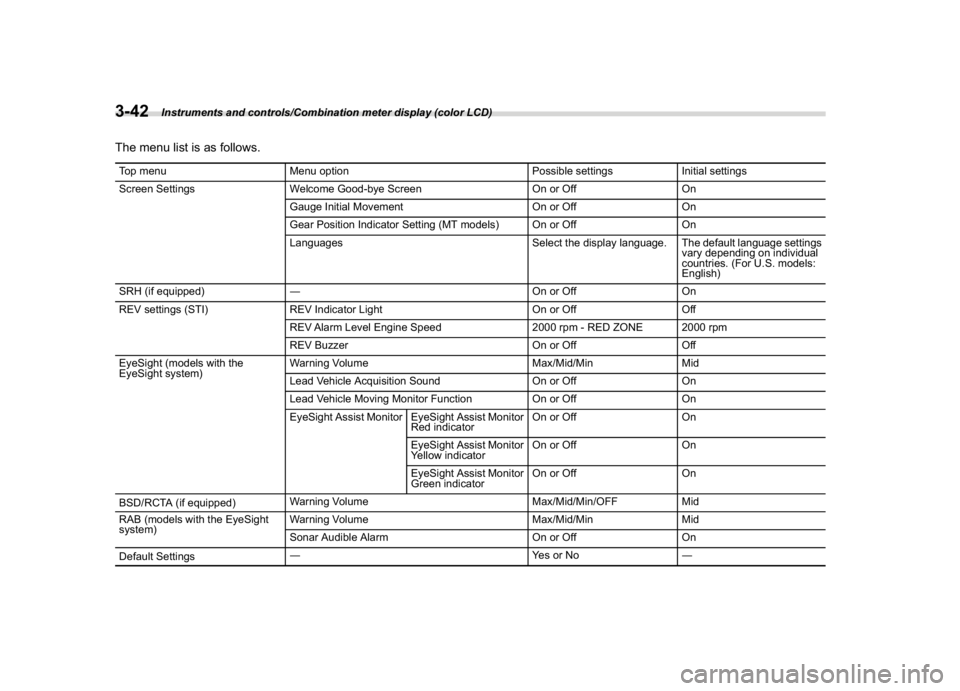
The menu list is as follows.Top menu Menu option Possible settings Initial settings
Screen Settings Welcome Good-bye Screen On or Off On
Gauge Initial Movement On or Off On
Gear Position Indicator Setting (MT models) On or Off On
Languages Select the display language. The default language settings
vary depending on individual
countries. (For U.S. models:
English)
SRH (if equipped)―On or Off On
REV settings (STI) REV Indicator Light On or Off Off
REV Alarm Level Engine Speed 2000 rpm - RED ZONE 2000 rpm
REV Buzzer On or Off Off
EyeSight (models with the
EyeSight system)Warning Volume Max/Mid/Min Mid
Lead Vehicle Acquisition Sound On or Off On
Lead Vehicle Moving Monitor Function On or Off On
EyeSight Assist Monitor EyeSight Assist Monitor
Red indicatorOn or Off On
EyeSight Assist Monitor
Yellow indicatorOn or Off On
EyeSight Assist Monitor
Green indicatorOn or Off On
BSD/RCTA (if equipped)Warning Volume Max/Mid/Min/OFF Mid
RAB (models with the EyeSight
system)Warning Volume Max/Mid/Min Mid
Sonar Audible Alarm On or Off On
Default Settings―Ye s o r N o―
Instruments and controls/Combination meter display (color LCD)
3-42
Page 180 of 578
(185,1)
北米Model "A1700BE-B" EDITED: 2017/ 10/ 11
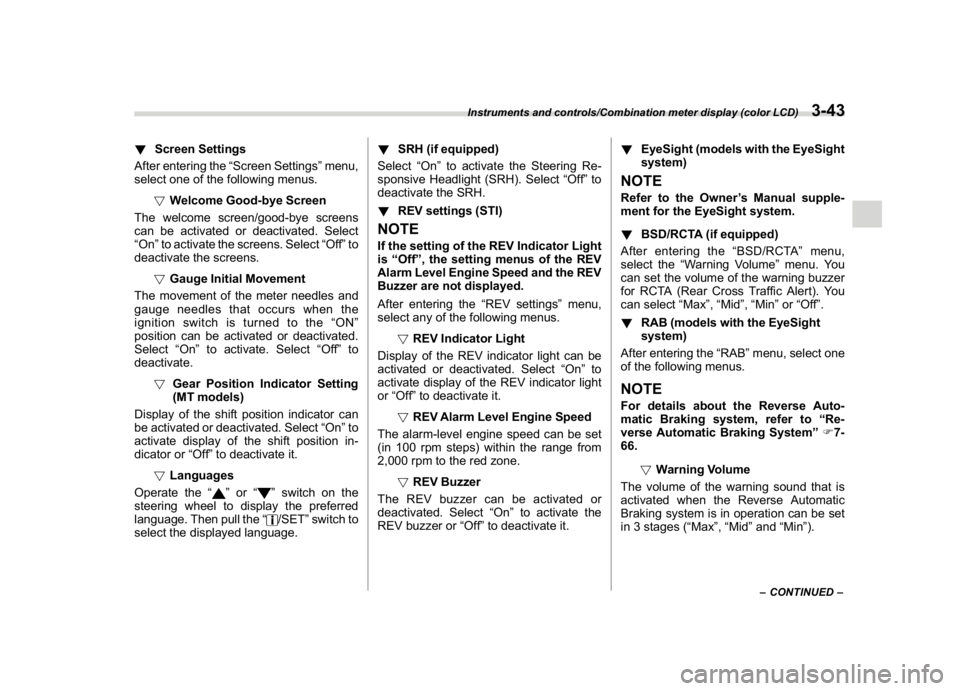
!Screen Settings
After entering the“Screen Settings”menu,
select one of the following menus.
!Welcome Good-bye Screen
The welcome screen/good-bye screens
can be activated or deactivated. Select
“On”to activate the screens. Select“Off”to
deactivate the screens.
!Gauge Initial Movement
The movement of the meter needles and
gauge needles that occurs when the
ignition switch is turned to the“ON”
position can be activated or deactivated.
Select“On”to activate. Select“Off”to
deactivate.
!Gear Position Indicator Setting
(MT models)
Display of the shift position indicator can
be activated or deactivated. Select“On”to
activate display of the shift position in-
dicator or“Off”to deactivate it.
!Languages
Operate the“
”or“
”switch on the
steering wheel to display the preferred
language. Then pull the“/SET”switch to
select the displayed language.!SRH (if equipped)
Select“On”to activate the Steering Re-
sponsive Headlight (SRH). Select“Off”to
deactivate the SRH.
!REV settings (STI)
NOTEIf the setting of the REV Indicator Light
is“Off”, the setting menus of the REV
Alarm Level Engine Speed and the REV
Buzzer are not displayed.
After entering the“REV settings”menu,
select any of the following menus.
!REV Indicator Light
Display of the REV indicator light can be
activated or deactivated. Select“On”to
activate display of the REV indicator light
or“Off”to deactivate it.
!REV Alarm Level Engine Speed
The alarm-level engine speed can be set
(in 100 rpm steps) within the range from
2,000 rpm to the red zone.
!REV Buzzer
The REV buzzer can be activated or
deactivated. Select“On”to activate the
REV buzzer or“Off”to deactivate it.!EyeSight (models with the EyeSight
system)
NOTERefer to the Owner’s Manual supple-
ment for the EyeSight system.
!BSD/RCTA (if equipped)
After entering the“BSD/RCTA”menu,
select the“Warning Volume”menu. You
can set the volume of the warning buzzer
for RCTA (Rear Cross Traffic Alert). You
can select“Max”,“Mid”,“Min”or“Off”.
!RAB (models with the EyeSight
system)
After entering the“RAB”menu, select one
of the following menus.NOTEFor details about the Reverse Auto-
matic Braking system, refer to“Re-
verse Automatic Braking System”F7-
66.
!Warning Volume
The volume of the warning sound that is
activated when the Reverse Automatic
Braking system is in operation can be set
in 3 stages (“Max”,“Mid”and“Min”).
–CONTINUED–
Instruments and controls/Combination meter display (color LCD)
3-43
3
Page 181 of 578
(186,1)
北米Model "A1700BE-B" EDITED: 2017/ 10/ 11
!Sonar Audible Alarm
The Reverse Automatic Braking system is
equipped with a function that emits a
warning sound when the system operates.
The function can be activated or deacti-
vated. Select“On”to set the warning
sound to active. Select“Off”to set the
warning sound to inactive.
!Default Settings
Select“Ye s”to use the menu screen to
restore customized settings to the factory
default settings. Select“No”to return to the
previous screen without restoring to the
factory default settings.
Multi-function display (color
LCD)
WARNING
Always pay adequate attention to
safe driving when operating the
multi-function display while the ve-
hicle is in motion. When operation of
the multi-function display is disturb-
ing your awareness and ability to
concentrate on driving, stop the
vehicle in a safe place before per-
forming operations on the screen.
Also, do not concentrate on the
display while driving. Doing so may
cause you to look away from the
road and could result in an accident.
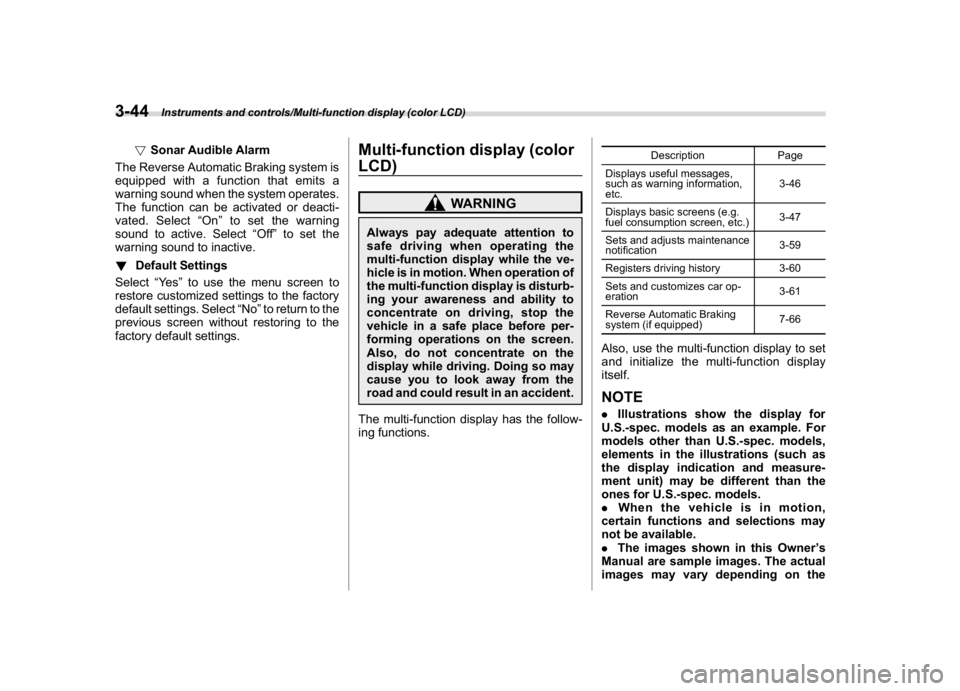
The multi-function display has the follow-
ing functions.
Description Page
Displays useful messages,
such as warning information,
etc.3-46
Displays basic screens (e.g.
fuel consumption screen, etc.)3-47
Sets and adjusts maintenance
notification3-59
Registers driving history 3-60
Sets and customizes car op-
eration3-61
Reverse Automatic Braking
system (if equipped)7-66
Also, use the multi-function display to set
and initialize the multi-function display
itself.NOTE.Illustrations show the display for
U.S.-spec. models as an example. For
models other than U.S.-spec. models,
elements in the illustrations (such as
the display indication and measure-
ment unit) may be different than the
ones for U.S.-spec. models.
.When the vehicle is in motion,
certain functions and selections may
not be available.
.The images shown in this Owner’s
Manual are sample images. The actual
images may vary depending on the
Instruments and controls/Multi-function display (color LCD)
3-44
Page 364 of 578
(377,1)
北米Model "A1700BE-B" EDITED: 2017/ 10/ 11
!Before starting the engine
Before using the remote engine start
system to start the engine, confirm the
following conditions.
.The select lever is in the“P”position.
.All doors are closed.
.The engine hood is closed.
.The push-button ignition switch is in the
“OFF”position.
!Starting the engine
1. Press the lock button briefly. The
hazard warning flashers then flash once.
2. Within 2 seconds, press the lock button
briefly again. The hazard warning flashers
then flash once again.
3. After step 2, immediately press and
hold the lock button. The hazard warning
flashers then flash once.
4. Approximately 3 seconds after step 3,
release the lock button. The engine will
then start successfully.
!Stopping the engine
Press and hold the lock button to stop the
engine with remote engine start system.
!Automatic engine shutdown
The remote engine start system will auto-
matically shut down or will not start theengine under the following conditions.
.The total run-time has exceeded 20
minutes.
.Any door is opened.
.The select lever is moved to any
position other than“P”.
.The engine hood is opened.
.The push-button ignition switch is
pressed.
.The brake pedal is depressed.
.The engine speed is 3,000 rpm or more.
The time setting until the engine automa-
tically stops can be changed. To change it,
please contact your SUBARU dealer. Note
that some settings may violate state,
provincial, or local laws and regulations.
Check the laws in your area to determine
which setting is permitted.
!Entering the vehicle while it is run-
ning via remote start
1. Unlock the vehicle doors using the
keyless access function. If you unlock the
vehicle’s doors manually using the key, the
vehicle’s alarm system will trigger (if the
alarm system is armed prior to activating
the remote engine start system) and the
engine will turn off. Perform either of the
following procedures to disarm the alarm
system. Refer to“Alarm system”F2-24.
.Switch the ignition to the“ACC”or“ON”state by pressing the push-button
ignition switch once or twice, respec-
tively.
.Press any button on the access key
fob/transmitter.
2. Enter the vehicle.
3. The engine will shut down when any
door is opened.
4. Press the push-button ignition switch
while depressing the brake pedal to restart
the engine.
!Entering the vehicle following re-
mote engine start shutdown
An alarm trigger may occur if the vehicle is
opened by the remote keyless entry
transmitter within a few seconds immedi-
ately following remote engine start shut-
down.
!Pre-heating or pre-cooling the in-
terior of the vehicle
Before exiting the vehicle, set the tem-
perature controls to the desired setting and
operation. After the system starts the
engine, the heater or air conditioning will
activate and heat or cool the interior to
your setting.
–CONTINUED–
Starting and operating/Starting and stopping the engine
7-15
7
Page 420 of 578
(433,1)
北米Model "A1700BE-B" EDITED: 2017/ 10/ 11
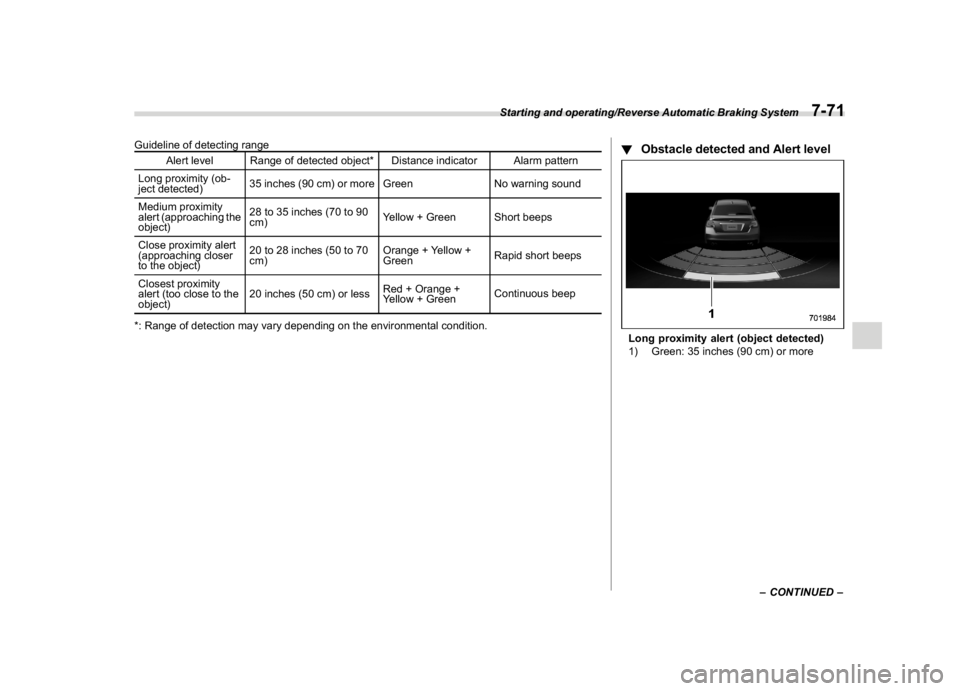
Guideline of detecting range
Alert level Range of detected object* Distance indicator Alarm pattern
Long proximity (ob-
ject detected)35 inches (90 cm) or more Green No warning sound
Medium proximity
alert (approaching the
object)28 to 35 inches (70 to 90
cm)Yellow + Green Short beeps
Close proximity alert
(approaching closer
to the object)20 to 28 inches (50 to 70
cm)Orange + Yellow +
GreenRapid short beeps
Closest proximity
alert (too close to the
object)20 inches (50 cm) or lessRed + Orange +
Yellow + GreenContinuous beep
*: Range of detection may vary depending on the environmental condition.
!Obstacle detected and Alert levelLong proximity alert (object detected)
1) Green: 35 inches (90 cm) or more
–CONTINUED–
Starting and operating/Reverse Automatic Braking System
7-71
7
Page 421 of 578
(434,1)
北米Model "A1700BE-B" EDITED: 2017/ 10/ 11
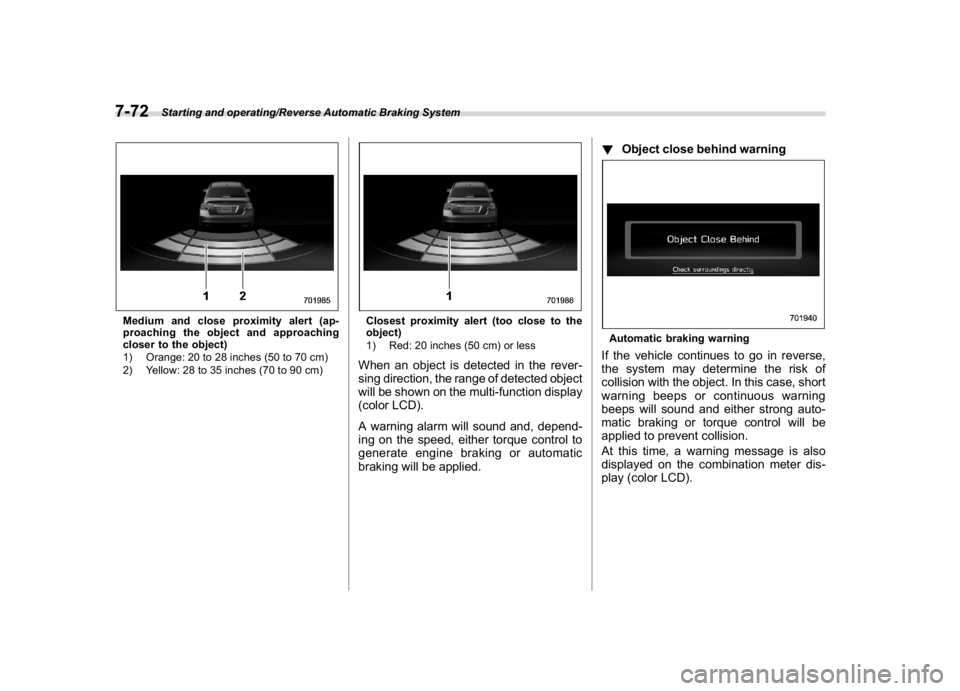
Medium and close proximity alert (ap-
proaching the object and approaching
closer to the object)
1) Orange: 20 to 28 inches (50 to 70 cm)
2) Yellow: 28 to 35 inches (70 to 90 cm)
Closest proximity alert (too close to the
object)
1) Red: 20 inches (50 cm) or lessWhen an object is detected in the rever-
sing direction, the range of detected object
will be shown on the multi-function display
(color LCD).
A warning alarm will sound and, depend-
ing on the speed, either torque control to
generate engine braking or automatic
braking will be applied.!Object close behind warning
Automatic braking warningIf the vehicle continues to go in reverse,
the system may determine the risk of
collision with the object. In this case, short
warning beeps or continuous warning
beeps will sound and either strong auto-
matic braking or torque control will be
applied to prevent collision.
At this time, a warning message is also
displayed on the combination meter dis-
play (color LCD).
Starting and operating/Reverse Automatic Braking System
7-72