high beam SUBARU WRX 2018 User Guide
[x] Cancel search | Manufacturer: SUBARU, Model Year: 2018, Model line: WRX, Model: SUBARU WRX 2018Pages: 578, PDF Size: 33.21 MB
Page 204 of 578

(209,1)
北米Model "A1700BE-B" EDITED: 2017/ 10/ 11
NOTE.You cannot lower the sensitivity of
the high beam assist function in the
following conditions.
–Cruise control or Adaptive Cruise
Control is in operation
–The EyeSight warning indicator
(yellow) is illuminated
.The sensitivity of the high beam
assist function returns to normal level
the next time the ignition switch is
turned to the“LOCK”/“OFF”position
and the engine is restarted.
!How to change the headlight
mode manually
Change to the low beam:
Return the turn signal lever to the center
position to turn off the high beam assist
function. Then the high beam assist
indicator will turn off.
Change to the high beam:
Turn the light control switch to the“
”
position to change the headlight mode to
the high beam.
At this time, the high beam assist function
will turn off, the high beam assist indicator
will turn off and the high beam indicator
light will turn on.
NOTEAfter manually selecting the high beam
mode:
.If you want to turn on the high beam
assist function, return the light control
switch to the“AUTO”position.
.Turn the light control switch to the
“
”position to turn on the instrument
panel illumination, parking lights, front
side marker lights, rear side marker
lights, tail lights and license plate
lights.
!Tips for the high beam assist
function
.The high beam assist function recog-
nizes the condition surrounding the vehicle
based on the brightness of illumination
ahead of your vehicle, etc. Therefore, the
headlight mode may switch in some
situations that do not match to the driver’s
sense.
.A bicycle or cargo cycle may not be
detected.
.Under the following situations, the high
beam assist function may not work prop-
erly. As a result, the glare of the high beam
may disturb the oncoming vehicle or
vehicle ahead. Also, the low beam mode
may continue although there are no
oncoming vehicles and vehicles ahead.In the such cases, change the headlight
mode manually.
–In bad weather (fog, snow, sand
storm, heavy rain, etc.)
–When the windshield glass is dirty,
fogged, cracked or damaged
–Whenthestereocameraisde-
formed or the stereo camera lenses
are dirty
–If there are lights similar to the
headlights or the tail lights in the
surrounding area
–When an oncoming vehicle or ve-
hicle ahead is driven without its head-
lights and tail lights on
–If the headlights of an oncoming
vehicle or the tail lights of a vehicle
ahead are dirty or discolored, or if the
light beams are not aimed correctly
–When a rapid change of brightness
continues while driving
–When driving on a road with many
ups and downs, uneven surfaces or
curves
–When there are some objects that
reflect light strongly, such as a road
sign or a mirror in vehicle ahead
–When the rear part of the vehicle
ahead, such as a container, reflects
light strongly
–When the headlights of your vehicle
are damaged or dirty
–CONTINUED–
Instruments and controls/Light control switch
3-67
3
Page 205 of 578
(210,1)
北米Model "A1700BE-B" EDITED: 2017/ 10/ 11
–When your vehicle is tilted, such as
in case the vehicle has a flat tire or is
being towed
–Immediately after the engine has
started
.In the following conditions, the head-
light mode will not be automatically chan-
ged from the high beam to the low beam.
–When your vehicle passes an on-
coming vehicle suddenly in a blind
curve
–When another vehicle passes in
front of your vehicle
–When an oncoming vehicle or ve-
hicle ahead comes in and out of view
because of continuous curves, median
strips, roadside trees, etc.
.If the stereo camera detects the light of
the front fog lights of an oncoming vehicle,
the headlight mode may change from the
high beam to the low beam automatically.
.The headlight mode may change from
the high beam to the low beam, or the low
beam mode may continue, when affected
by a street light, traffic signal, illumination
of an advertisement board, or a reflective
object such as a road sign and signboard.
.The timing of the change of headlight
mode may differ due to the following
factors.
–the vehicle condition (e.g., the num-
ber of passengers or the weight ofloaded cargo)
–surrounding situation (e.g., the
movement and direction of an oncom-
ing vehicle or vehicle ahead)
–detection limitations of the camera
angle
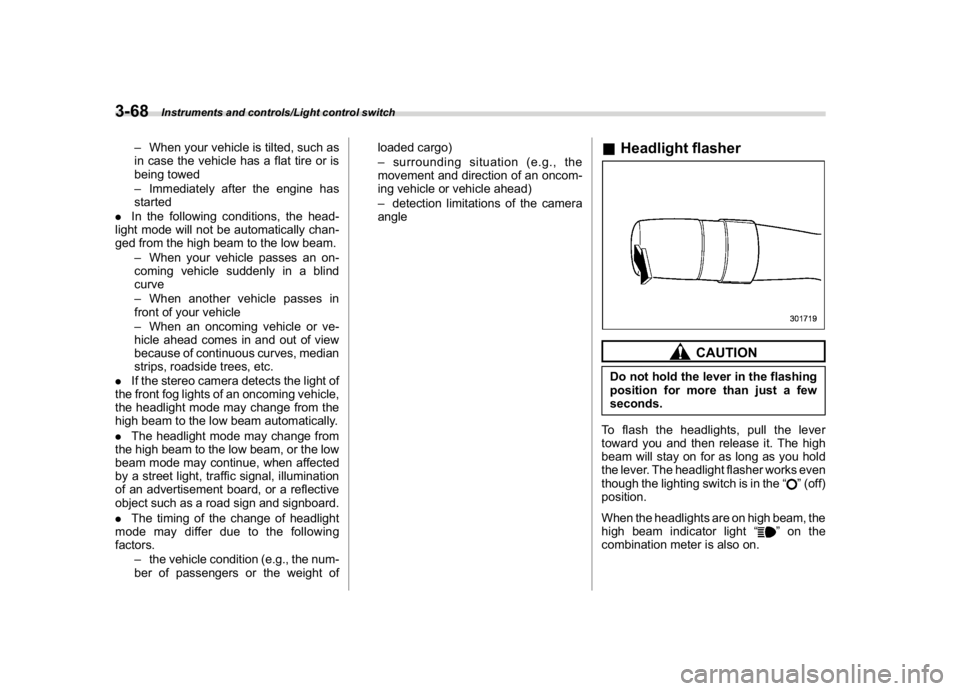
&Headlight flasher
CAUTION
Do not hold the lever in the flashing
position for more than just a few
seconds.
To flash the headlights, pull the lever
toward you and then release it. The high
beam will stay on for as long as you hold
the lever. The headlight flasher works even
though the lighting switch is in the“
”(off)
position.
When the headlights are on high beam, the
high beam indicator light“
”on the
combination meter is also on.
Instruments and controls/Light control switch
3-68
Page 208 of 578
(213,1)
北米Model "A1700BE-B" EDITED: 2017/ 10/ 11
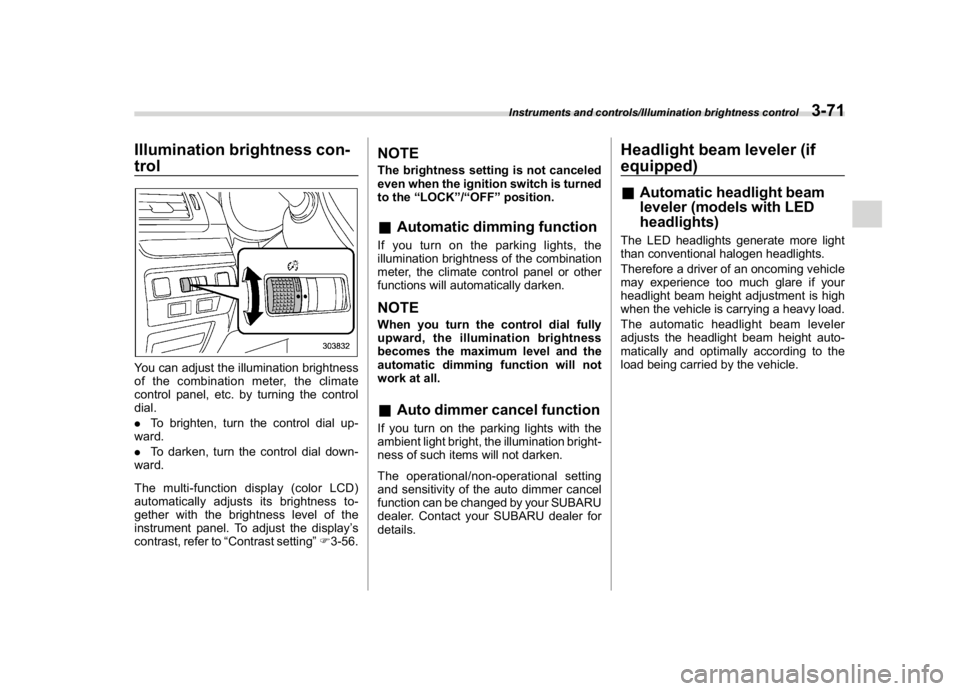
Illumination brightness con-
trolYou can adjust the illumination brightness
of the combination meter, the climate
control panel, etc. by turning the control
dial.
.To brighten, turn the control dial up-
ward.
.To darken, turn the control dial down-
ward.
Themulti-functiondisplay(colorLCD)
automatically adjusts its brightness to-
gether with the brightness level of the
instrument panel. To adjust the display’s
contrast, refer to“Contrast setting”F3-56.
NOTEThe brightness setting is not canceled
even when the ignition switch is turned
to the“LOCK”/“OFF”position.&Automatic dimming functionIf you turn on the parking lights, the
illumination brightness of the combination
meter, the climate control panel or other
functions will automatically darken.NOTEWhen you turn the control dial fully
upward, the illumination brightness
becomes the maximum level and the
automatic dimming function will not
work at all.&Auto dimmer cancel functionIf you turn on the parking lights with the
ambient light bright, the illumination bright-
ness of such items will not darken.
The operational/non-operational setting
and sensitivity of the auto dimmer cancel
function can be changed by your SUBARU
dealer. Contact your SUBARU dealer for
details.
Headlight beam leveler (if
equipped)&Automatic headlight beam
leveler (models with LED
headlights)The LED headlights generate more light
than conventional halogen headlights.
Therefore a driver of an oncoming vehicle
may experience too much glare if your
headlight beam height adjustment is high
when the vehicle is carrying a heavy load.
The automatic headlight beam leveler
adjusts the headlight beam height auto-
matically and optimally according to the
load being carried by the vehicle.
Instruments and controls/Illumination brightness control
3-71
3
Page 242 of 578
(251,1)
北米Model "A1700BE-B" EDITED: 2017/ 10/ 11
!CD player and disc
.This CD player is intended for use with
4.7 in. (12 cm) discs only.
.Extremely high temperatures can keep
the CD player from working. On hot days,
use the air conditioning system to cool the
inside of the vehicle before using the
player.
.Bumpy roads or other vibrations may
make the CD player skip.
.If moisture gets into the CD player, the
discs may not be able to be played.
Remove the discs from the player and
wait until it dries.
WARNING
CD players use an invisible laser
beam which could cause hazardous
radiation exposure if directed out-
side the unit. Be sure to operate the
player correctly.
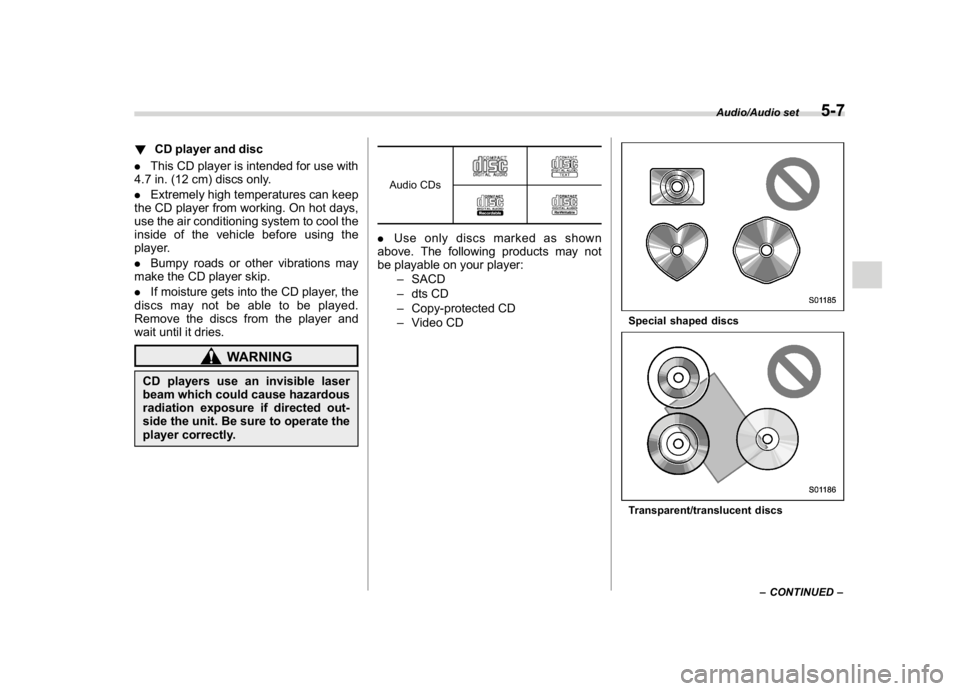
Audio CDs.Use only discs marked as shown
above. The following products may not
be playable on your player:
–SACD
–dts CD
–Copy-protected CD
–Video CD
Special shaped discsTransparent/translucent discs
–CONTINUED–
Audio/Audio set
5-7
5
Page 348 of 578
(359,1)
北米Model "A1700BE-B" EDITED: 2017/ 10/ 11
WARNING
Because the range of the image
captured by the camera is limited,
always check the traffic around the
vehicle directly with your eyes when
driving the vehicle.NOTE.The range of the displayed image
may differ depending on the vehicle
status or the road surface status.
.Because the Front View Monitor
system uses a specially designed lens,
the sense of distance in the displayed
image is different from the actual dis-
tance.
.The camera image may be difficult to
view in the following situations. This is
not a malfunction.
–Dark place (at night)
–High or low temperature around
the lens
–Water contacts lens or in high
humidity (rainy weather)
–There is foreign materials (such
as mud) around the camera
–Sunlight or headlight beam di-
rectly shines towards the camera
lens
.Under an artificial light such as afluorescent lamp, sodium-vapor lamp
or mercury lamp, the lighted portion
may look like it is flickering (flicker
phenomenon).
.While the display has cooled down,
the image may leave traces or become
darker than usual, causing a difficulty
in viewing the screen. Always check the
traffic around the vehicle directly with
your eyes while driving the vehicle.
.The following incidents should not
be deemed a malfunction.
–The camera lens may become
foggy when the humidity is high on
a rainy day.
–The light from a vehicle or build-
ing located ahead may be reflected
towards the camera image while
driving at night.
–In a dark place or while driving at
night, the camera image may be
adjusted to make noises less visi-
ble. Therefore, the image may look
like a monochromatic image or the
image colors may differ from the
actual colors. The camera image
may be deteriorated in regard to
sharpness at the center and four
corners of the screen. This is not a
malfunction.
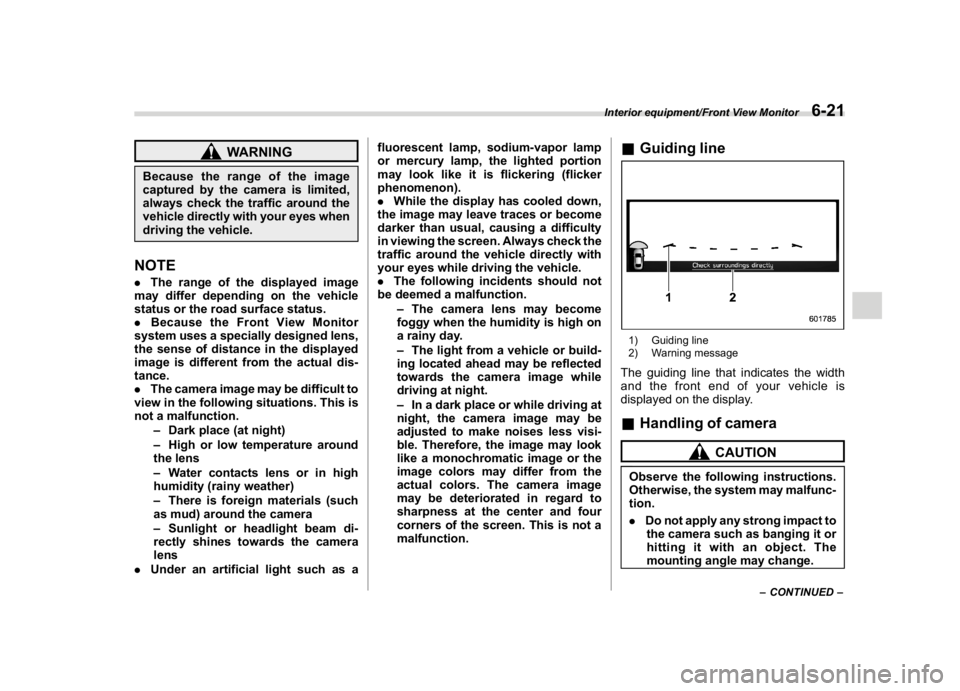
&Guiding line1) Guiding line
2) Warning messageThe guiding line that indicates the width
and the front end of your vehicle is
displayed on the display.&Handling of camera
CAUTION
Observe the following instructions.
Otherwise, the system may malfunc-
tion.
.Do not apply any strong impact to
the camera such as banging it or
hitting it with an object. The
mounting angle may change.
–CONTINUED–
Interior equipment/Front View Monitor
6-21
6
Page 410 of 578

(423,1)
北米Model "A1700BE-B" EDITED: 2017/ 10/ 11
tected.
The indicator light will flash to warn the
driver of dangers under the following
conditions.
.While the indicator light is illuminating, if
the turn signal lever is operated toward the
side in which this light turned on
.When reversing the vehicle while the
system detects a vehicle approaching
from either side
!BSD/RCTA approach indicator
light dimming function
When the headlights are on, the bright-
ness of the BSD/RCTA approach indicator
light will be reduced.NOTE.You may have difficulty seeing the
BSD/RCTA approach indicator light
under the following conditions.
–When sunlight shines directly on
it
–When the headlight beams from a
vehicle traveling behind shines di-
rectly on it
.While the illumination brightness
control dial is in the fully upward
position, even if the headlights are
turned on, the brightness of the BSD/
RCTA approach indicator light will not
be reduced. For details about theillumination brightness control dial,
refer to“Illumination brightness con-
trol”F3-71.
!BSD/RCTA approach warning buz-
zer (only when reversing)
A warning buzzer sounds along with
flashing of the BSD/RCTA approach in-
dicator light to warn the driver of dangers.
You can change the setting of the warning
buzzer volume by operating the combina-
tion meter display (color LCD). For details,
refer to“BSD/RCTA”F3-43.
!Safety tips regarding the BSD/RCTA
approach indicator light/warning
buzzer
.In the following cases, operation of the
BSD/RCTA approach indicator light and
the warning buzzer may be delayed or the
system may fail to issue these warnings.
–When a vehicle moves to the neigh-
boring lane from a lane next to the
neighboring lane
–When you are driving on a steep
incline or on repeated sharp uphill and
downhill grades
–When you are going beyond a pass
–When both your vehicle and a
vehicle driving on a neighboring lane
are driving on the far side of each lane.
–When several narrowly-spaced ve-hicles are approaching in a row
–In low radius bends (tight bends or
when making turns at an intersection)
–When there is a difference in height
between your lane and the neighboring
lane
–Immediately after the BSD/RCTA is
activated by pressing the BSD/RCTA
OFF switch
–Immediately after the shift lever/
select lever is shifted to the“R”position
–When extremely heavy cargo is
loaded in the trunk
.During reversing, operation of the BSD/
RCTA approach indicator light and the
warning buzzer may be delayed or the
system may fail to issue these warnings
under the following conditions.
–When backing out of an angled
parking space
–When a large-sized vehicle is
parked next to your vehicle (That
vehicle prevents the propagation of
radar waves.)
–When reversing on sloped roads
–When reversing at a high speed
–CONTINUED–
Starting and operating/BSD/RCTA
7-61
7
Page 479 of 578

(500,1)
北米Model "A1700BE-B" EDITED: 2017/ 10/ 11
Parking brake stroke (models without
electronic parking brake system)................... 11-30
Tires and wheels................................................. 11-30
Types of tires...................................................... 11-30
Tire pressure monitoring system (TPMS)
(if equipped)..................................................... 11-30
Tire inspection.................................................... 11-32
Tire pressures and wear...................................... 11-32
Wheel balance.................................................... 11-34
Wear indicators................................................... 11-35
Rotational direction of tires................................. 11-35
Tire rotation........................................................ 11-36
Tire replacement................................................. 11-36
Wheel replacement............................................. 11-37
Alloy wheels........................................................ 11-38
Windshield washer fluid..................................... 11-38
Replacement of wiper blades............................ 11-39
Windshield wiper blade assembly........................ 11-40
Windshield wiper blade rubber............................ 11-40
Battery................................................................. 11-41Fuses....................................................................11-42
Installation of accessories..................................11-44
Replacing bulbs...................................................11-44
Headlights (models with LED headlights)............ 11-44
High beam headlight
(models without LED headlights)..................... 11-44
Low beam headlight*, front side marker light,
parking light* and front turn signal light*......... 11-46
Front turn signal light
(models with LED headlights).......................... 11-48
Front fog light
(models with the LED front fog light)............... 11-48
Front fog light (models without the LED front
fog light) (if equipped)..................................... 11-49
Rear combination lights...................................... 11-49
License plate light.............................................. 11-50
Other bulbs........................................................ 11-51
Replacing battery................................................11-51
Safety precautions.............................................. 11-51
Replacing battery of access key fob................... 11-52
Replacing transmitter battery.............................. 11-53
Maintenance and service
Page 521 of 578
(542,1)
北米Model "A1700BE-B" EDITED: 2017/ 10/ 11
Installation of accessoriesAlways consult your SUBARU dealer
before installing fog lights or any other
electrical equipment in your vehicle. Such
accessories may cause the electronic
system to malfunction if they are incor-
rectly installed or if they are not suited for
the vehicle.
Replacing bulbs
WARNING
Bulbs may become very hot while
illuminated. Before replacing bulbs,
turn off the lights and wait until the
bulbs cool down. Otherwise, there is
a risk of sustaining a burn injury.
CAUTION
.Replace any bulb only with a new
bulb of the specified wattage.
Using a bulb of different wattage
could result in a fire. For the
specified wattage of each bulb,
refer to“Bulb chart”F12-14.
.Do not touch the glass portion of
the light bulb with bare hands.
When holding the glass portion is
unavoidable, hold it using with a
clean dry cloth to avoid getting
moisture and grease on the bulb.
Ifthereisanyfingerprintsor
grease on the bulb surface, wipe
them away with a soft cloth
moistened with alcohol. Also, if
the bulb is scratched or dropped,
it may blow out or crack.
&Headlights (models with LED
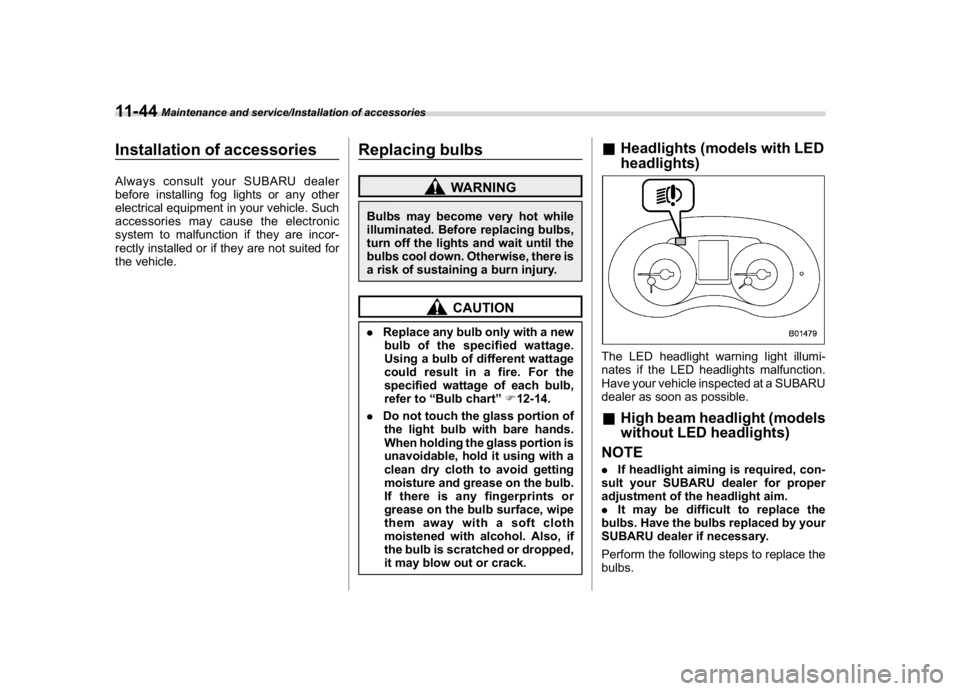
headlights)The LED headlight warning light illumi-
nates if the LED headlights malfunction.
Have your vehicle inspected at a SUBARU
dealer as soon as possible.&High beam headlight (models
without LED headlights)
NOTE.If headlight aiming is required, con-
sult your SUBARU dealer for proper
adjustment of the headlight aim.
.It may be difficult to replace the
bulbs. Have the bulbs replaced by your
SUBARU dealer if necessary.
Perform the following steps to replace the
bulbs.
Maintenance and service/Installation of accessories
11-44
Page 546 of 578
(569,1)
北米Model "A1700BE-B" EDITED: 2017/ 10/ 11
Wattage Bulb No.
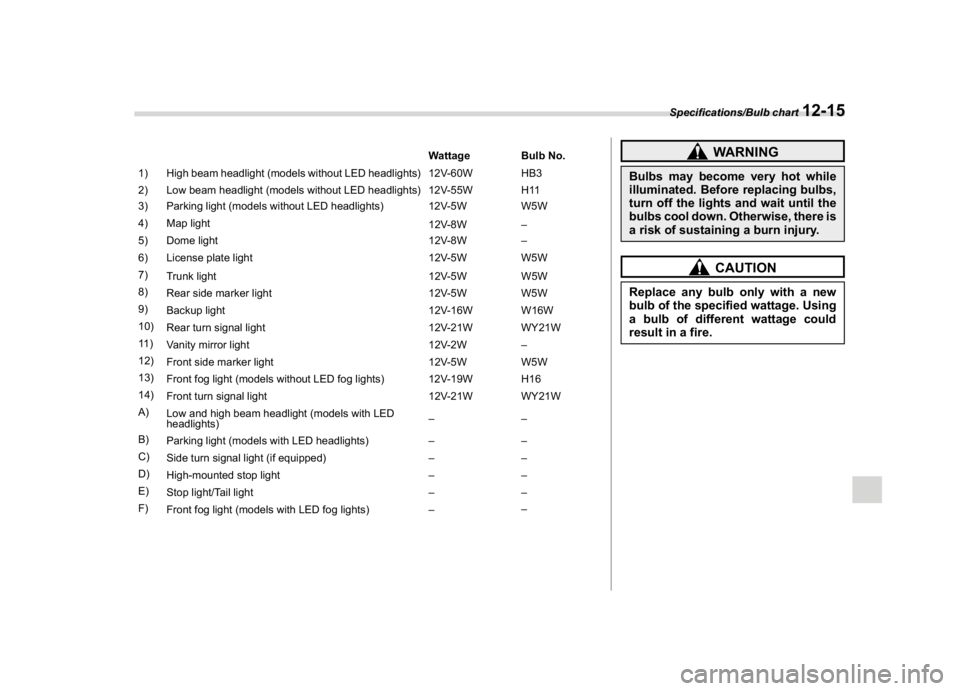
1) High beam headlight (models without LED headlights) 12V-60W HB3
2) Low beam headlight (models without LED headlights) 12V-55W H11
3) Parking light (models without LED headlights) 12V-5W W5W
4) Map light
12V-8W–
5) Dome light 12V-8W–
6) License plate light 12V-5W W5W
7)
Trunk light 12V-5W W5W
8)
Rear side marker light 12V-5W W5W
9)
Backup light 12V-16W W16W
10)
Rear turn signal light 12V-21W WY21W
11 )
Vanity mirror light 12V-2W–
12)
Front side marker light 12V-5W W5W
13)
Front fog light (models without LED fog lights) 12V-19W H16
14)
Front turn signal light 12V-21W WY21W
A)
Low and high beam headlight (models with LED
headlights)––
B)
Parking light (models with LED headlights)––
C)
Side turn signal light (if equipped)––
D)
High-mounted stop light––
E)
Stop light/Tail light––
F)
Front fog light (models with LED fog lights)––
WARNING
Bulbs may become very hot while
illuminated. Before replacing bulbs,
turn off the lights and wait until the
bulbs cool down. Otherwise, there is
a risk of sustaining a burn injury.
CAUTION
Replace any bulb only with a new
bulb of the specified wattage. Using
a bulb of different wattage could
result in a fire.
Specifications/Bulb chart
12-15
12