start stop button SUBARU WRX 2018 User Guide
[x] Cancel search | Manufacturer: SUBARU, Model Year: 2018, Model line: WRX, Model: SUBARU WRX 2018Pages: 578, PDF Size: 33.21 MB
Page 350 of 578

(363,1)
北米Model "A1700BE-B" EDITED: 2017/ 10/ 11
Fuel..........................................................................7-3
Fuel requirements.................................................. 7-3
Fuel filler lid and cap............................................. 7-5
State emission testing (U.S.only).........................7-7
Preparing to drive...................................................7-8
Starting and stopping theengine..........................7-9
General precautions when starting/stopping
engine................................................................. 7-9
Models without push-button start systems............7-10
Models with push-button start systems ................. 7-11
Remote engine start system (dealer option)...........7-14
Manual transmission............................................7-16
Shifting speeds.....................................................7-17
Driving tips...........................................................7-18
Driver’s Control Center Differential
(C.DIFF/DCCD) (STI)...........................................7-18
To change mode of driver’s control center
differential..........................................................7-19
Auto mode............................................................7-20
Manual mode........................................................7-21
Temporary release................................................7-22
Continuously variable transmission....................7-23
Select lever...........................................................7-24
Selection of manual mode.....................................7-25
Shift lock function.................................................7-27
Driving tips...........................................................7-28
SI-DRIVE (if equipped)..........................................7-28
Intelligent (I) mode................................................7-28
Sport (S) mode.....................................................7-29
Sport Sharp (S#) mode..........................................7-29SI-DRIVE switch....................................................7-30
Limited slip differential (LSD)(STI).....................7-31
Power steering......................................................7-31
STI .......................................................................7-31
Except STI............................................................7-32
Braking..................................................................7-33
Braking tips..........................................................7-33
Brake system.......................................................7-33
Disc brake pad wear warning indicators................7-34
High performance brake system (STI)...................7-34
Red caliper with sports brake pad (if equipped) .... 7-34
ABS (Anti-lock BrakeSystem).............................7-35
ABS self-check.....................................................7-35
ABS warning light.................................................7-35
Electronic Brake Force Distribution (EBD)
system................................................................7-36
Steps to take if EBD system malfunctions .............7-36
Vehicle Dynamics Controlsystem......................7-37
Vehicle Dynamics Control system monitor ............7-39
Vehicle Dynamics Control OFF switch...................7-39
Tire pressure monitoring system (TPMS)
(U.S.-spec. models)...........................................7-40
Parking your vehicle............................................7-42
Parking brake (models without electronic parking
brake system)....................................................7-42
Electronic parking brake (models with electronic
parking brake system).......................................7-43
Parking tips..........................................................7-45
Auto Vehicle Holdfunction..................................7-46
To turn on/off the Auto Vehicle Hold function........7-47
To operate the Auto Vehicle Hold function ............7-48
Starting and operating
7
Page 359 of 578

(372,1)
北米Model "A1700BE-B" EDITED: 2017/ 10/ 11
controlled throttle’s self-diagnosis
function. To overcome it, keep the
ignition switch in the“ON”position
for approximately 10 seconds before
starting the engine.&Models without push-button
start systems!Starting engine
CAUTION
Do not operate the starter motor
continuously for more than 10 sec-
onds. If the engine fails to start after
operating the starter for 5 to 10
seconds, wait for 10 seconds or
more before trying again.NOTEDo not shift the shift lever/select lever
while the starter is cranking.
!MT models
1. Apply the parking brake.
2. Turn off unnecessary lights and acces-
sories.
3. Depress the clutch pedal to the floor
and shift the shift lever into neutral. Hold
the clutch pedal to the floor while starting
the engine.The starter motor will only operate when
the clutch pedal is depressed fully to the
floor.
4. Turn the ignition switch to the“ON”
position and check the operation of the
warning and indicator lights. Refer to
“Warning and indicator lights”F3-13.
5. Turn the ignition switch to the“START”
positionwithoutdepressing the accelera-
tor pedal. Release the key immediately
after the engine has started.
If the engine does not start, perform the
procedure described in“If the engine does
not start”F7-11.
6. Confirm that all warning and indicator
lights have turned off after the engine has
started.
!CVT models
1. Apply the parking brake.
2. Turn off unnecessary lights and acces-
sories.
3. Shift the select lever to the“P”or“N”
position (preferably the“P”position).
The starter motor will only operate when
the select lever is at the“P”or“N”position.
4. Turn the ignition switch to the“ON”
position and check the operation of the
warning and indicator lights. Refer to
“Warning and indicator lights”F3-13.
5. Turn the ignition switch to the“START”positionwithoutdepressing the accelera-
tor pedal. Release the key immediately
after the engine has started.
If the engine does not start, perform the
procedure described in“If the engine does
not start”F7-11.
6. Confirm that all warning and indicator
lights have turned off after the engine has
started.
While the engine is warming up, make sure
that the select lever is at the“P”or“
N”
position and that the parking brake is
applied.
CAUTION
If you restart the engine while the
vehicle is moving, shift the select
lever into the“N”position. Do not
attempt to place the select lever of a
moving vehicle into the“P”position.
Starting and operating/Starting and stopping the engine
7-10
Page 360 of 578
(373,1)
北米Model "A1700BE-B" EDITED: 2017/ 10/ 11
!If the engine does not start
CAUTION
For safety, release the accelerator
pedal as soon as the engine starts.
Try the following procedure.
1. Turn the ignition switch to the“LOCK”
position and wait for at least 10 seconds.
2. After checking that the parking brake is
firmly set, turn the ignition switch to the
“START”position while depressing the
accelerator pedal slightly (approximately
a quarter of the full stroke).
3. If this fails to start the engine, turn the
ignition switch back to the“LOCK”position
and wait for at least 10 seconds.
4. Fully depress the accelerator pedal
and turn the ignition switch to the“START”
position.
If this fails to start the engine, try the
following procedure.
1. Turn the ignition switch again to the
“LOCK”position.
2. After waiting for 10 seconds or longer,
turn the ignition switch to the“START”
position without depressing the accelera-
tor pedal.
If the engine still does not start, contactyour nearest SUBARU dealer for assis-
tance.
!Stopping the engine
The ignition switch should be turned off
only when the vehicle is stopped and the
engine is idling.
WARNING
Do not stop the engine when the
vehicle is moving. This will cause
loss of power to the power steering
and the brake booster, making steer-
ing and braking more difficult. It
could also result in accidental acti-
vation of the“LOCK”position on the
ignition switch, causing the steering
wheel to lock.&Models with push-button
start systems!Safety precautions
Refer to“Safety precautions”F2-8.
!Operating range for push-button
start system
Refer to“Operating range”F3-6.!Starting engine
WARNING
If the indicator on the push-button
ignition switch flashes in green after
the engine has started, never drive
the vehicle. The steering is still
locked, and it may result in an
accident. In this case, press the
push-button ignition switch with
the brake pedal depressed and with
the steering wheel turned from the
right to the left.
CAUTION
.When the operation indicator on
the push-button ignition switch is
flashing in orange, there may be a
malfunction with the vehicle.
Contact a SUBARU dealer imme-
diately.
.Do not continue pressing the
push-button ignition switch for
more than 10 seconds. Doing so
could cause a malfunction. If the
engine does not start, stop press-
ing the push-button ignition
switch. Instead, press the push-
buttonignitionswitchwithout
depressing the brake pedal to
–CONTINUED–
Starting and operating/Starting and stopping the engine
7-11
7
Page 361 of 578
(374,1)
北米Model "A1700BE-B" EDITED: 2017/ 10/ 11
switch the power status to“OFF”.
Wait 10 seconds, and then push
the push-button ignition switch
to start the engine.
NOTE.When pressing the push-button igni-
tion switch with the clutch pedal (MT
models) or the brake pedal (CVT mod-
els) depressed:
–The engine starter operates for a
maximum of 10 seconds and after
starting the engine, the starter stops
automatically.
–You can start the engine regard-
less of the power status.
.If the engine does not start, check
the security indicator light. Then press
the push-button ignition switch without
depressing the clutch pedal (MT mod-
els) or the brake pedal (CVT models) to
switch the power to“OFF”.
–If the light had illuminated, try to
start the engine again.
–If the light had been off, press the
push-button ignition switch while
depressing the clutch pedal (MT
models) or the brake pedal (CVT
models) more forcefully.
.The engine may not start depending
on the radio wave conditions aroundthe vehicle. In such a case, refer to
“Starting engine”F9-27.
.If the vehicle battery is discharged,
the steering cannot be unlocked.
Charge the battery.
.Do not shift the shift lever/select
lever while the starter is cranking.
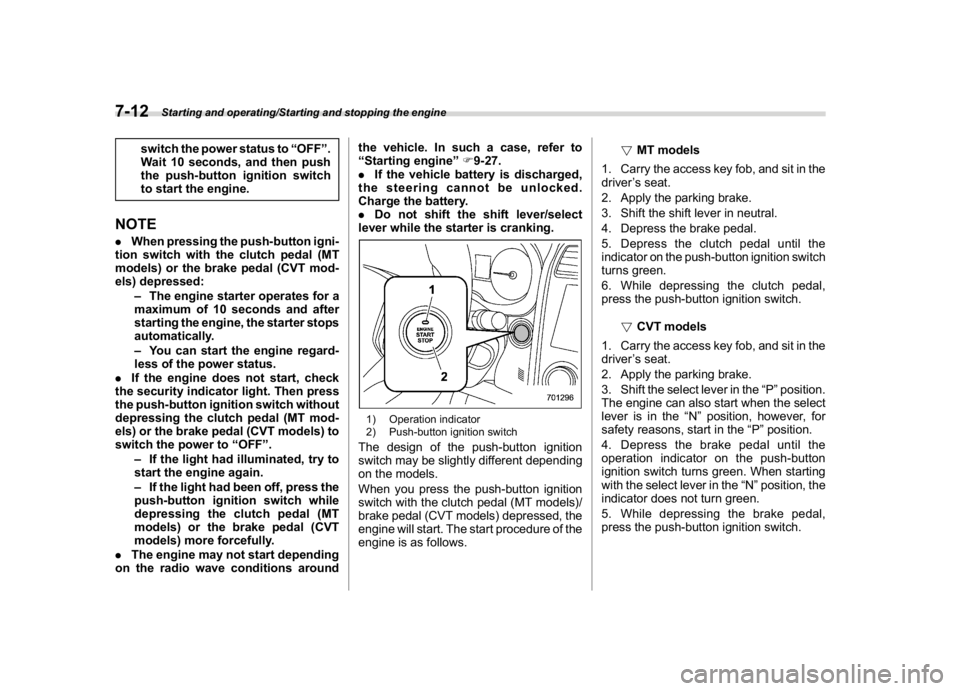
1) Operation indicator
2) Push-button ignition switchThe design of the push-button ignition
switch may be slightly different depending
on the models.
When you press the push-button ignition
switch with the clutch pedal (MT models)/
brake pedal (CVT models) depressed, the
engine will start. The start procedure of the
engine is as follows.!MT models
1. Carry the access key fob, and sit in the
driver’s seat.
2. Apply the parking brake.
3. Shift the shift lever in neutral.
4. Depress the brake pedal.
5. Depress the clutch pedal until the
indicator on the push-button ignition switch
turns green.
6. While depressing the clutch pedal,
press the push-button ignition switch.
!CVT models
1. Carry the access key fob, and sit in the
driver’s seat.
2. Apply the parking brake.
3. Shift the select lever in the“P”position.
The engine can also start when the select
lever is in the“N”position, however, for
safety reasons, start in the“P”position.
4. Depress the brake pedal until the
operation indicator on the push-button
ignition switch turns green. When starting
with the select lever in the“N”position, the
indicator does not turn green.
5. While depressing the brake pedal,
press the push-button ignition switch.
Starting and operating/Starting and stopping the engine
7-12
Page 362 of 578
(375,1)
北米Model "A1700BE-B" EDITED: 2017/ 10/ 11
NOTE.While pressing the select lever but-
ton in, the indicator on the push-button
ignition switch will not turn green even
when the select lever is in the“P”
position.
.When the engine is not started, the
brake pedal may feel stiff. In such a
case, depress the brake pedal more
forcefully than usual. Check that the
operation indicator on the push-button
ignition switch turns green, and press
the push-button ignition switch to start
the engine.
!In case of the engine does not
start by the normal engine start
procedure
1. Move the shift lever to the neutral
position (MT models), or move the select
lever to the“P”position (CVT models).
2. Switch the power status to“ACC”.
3. Press and hold the push-button ignition
switch for at least 15 seconds with the
clutch pedal (MT models)/brake pedal
(CVT models) depressed.
Although the engine may start, only use
this procedure in the case of an emer-
gency. If the engine still does not start,
refer to“Starting engine”F9-27.!Stopping engine
1. Stop the vehicle completely.
2. Move the select lever to the“P”
position (CVT models).
3. Press the push-button ignition switch.
The engine will stop, and the power will be
switched to“OFF”.
WARNING
.Do not touch the push-button
ignition switch while driving.
When you operate the push-but-
ton ignition switch as follows, the
engine will stop.
–Pressing and holding the
switch for 3 seconds or longer.
–Pressing the switch briefly 3
times or more in succession.
When the engine stops, the brake
booster will not function. A great-
er foot pressure will be required
on the brake pedal.
The power steering system will
not operate either. A greater force
will be required to steer, and it
may result in an accident.
.If the engine stops while driving,
do not operate the push-button
ignition switch or open any of thedoors until the vehicle is stopped
in a safe location. It is dangerous
because the steering may be
locked. Stop the vehicle in a safe
location, and contact a SUBARU
dealer immediately.
CAUTION
For CVT models:
.Do not stop the engine while the
select lever is in a position other
than the“P”position.
.If the engine is stopped while the
select lever is in a position other
than the“P”position, the power
will be in“ACC”. If the vehicle is
left in this condition, the battery
may be discharged.NOTEAlthough you can stop the engine by
operating the push-button ignition
switch, do not stop the engine while
driving except in an emergency.
–CONTINUED–
Starting and operating/Starting and stopping the engine
7-13
7
Page 363 of 578
(376,1)
北米Model "A1700BE-B" EDITED: 2017/ 10/ 11
!When access key fob does not
operate properly
Refer to“Access key fob–if access key
fob does not operate properly”F9-26.&Remote engine start system
(dealer option)
WARNING
.Do not remote start a vehicle in an
enclosed environment (e.g.
closed garage). Prolonged opera-
tion of a motor vehicle in an
enclosed environment can cause
a harmful build-up of Carbon
Monoxide. Carbon Monoxide is
harmful to your health. Exposure
to high levels of Carbon Monox-
ide can cause headaches, dizzi-
ness or in extreme cases uncon-
sciousness and/or death.
.Before performing any servicing
of the vehicle, temporarily place
the remote engine start system in
service mode to prevent the sys-
tem from unexpectedly starting
the engine.
The remote engine start system allows you
to start the engine from outside the vehicle.
In addition, the remote engine start systemcan activate the heater or air conditioner,
providing you with a comfortable cabin
upon entry.
NOTEThe length of time for which it is
acceptable to allow the engine to
remain idling may be governed by local
laws and regulations. Check the local
rules when using the remote engine
start system.!Models with“keyless access with
push-button start system”
NOTEFor more details, refer to the Owner’s
Manual supplement for the remote
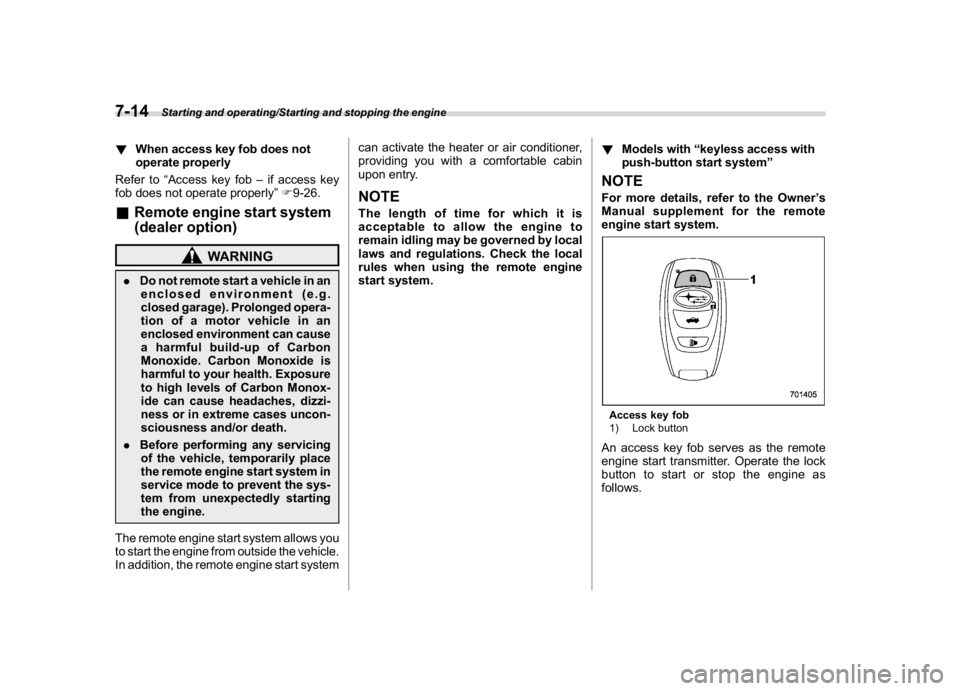
engine start system.Access key fob
1) Lock buttonAn access key fob serves as the remote
engine start transmitter. Operate the lock
button to start or stop the engine as
follows.
Starting and operating/Starting and stopping the engine
7-14
Page 364 of 578

(377,1)
北米Model "A1700BE-B" EDITED: 2017/ 10/ 11
!Before starting the engine
Before using the remote engine start
system to start the engine, confirm the
following conditions.
.The select lever is in the“P”position.
.All doors are closed.
.The engine hood is closed.
.The push-button ignition switch is in the
“OFF”position.
!Starting the engine
1. Press the lock button briefly. The
hazard warning flashers then flash once.
2. Within 2 seconds, press the lock button
briefly again. The hazard warning flashers
then flash once again.
3. After step 2, immediately press and
hold the lock button. The hazard warning
flashers then flash once.
4. Approximately 3 seconds after step 3,
release the lock button. The engine will
then start successfully.
!Stopping the engine
Press and hold the lock button to stop the
engine with remote engine start system.
!Automatic engine shutdown
The remote engine start system will auto-
matically shut down or will not start theengine under the following conditions.
.The total run-time has exceeded 20
minutes.
.Any door is opened.
.The select lever is moved to any
position other than“P”.
.The engine hood is opened.
.The push-button ignition switch is
pressed.
.The brake pedal is depressed.
.The engine speed is 3,000 rpm or more.
The time setting until the engine automa-
tically stops can be changed. To change it,
please contact your SUBARU dealer. Note
that some settings may violate state,
provincial, or local laws and regulations.
Check the laws in your area to determine
which setting is permitted.
!Entering the vehicle while it is run-
ning via remote start
1. Unlock the vehicle doors using the
keyless access function. If you unlock the
vehicle’s doors manually using the key, the
vehicle’s alarm system will trigger (if the
alarm system is armed prior to activating
the remote engine start system) and the
engine will turn off. Perform either of the
following procedures to disarm the alarm
system. Refer to“Alarm system”F2-24.
.Switch the ignition to the“ACC”or“ON”state by pressing the push-button
ignition switch once or twice, respec-
tively.
.Press any button on the access key
fob/transmitter.
2. Enter the vehicle.
3. The engine will shut down when any
door is opened.
4. Press the push-button ignition switch
while depressing the brake pedal to restart
the engine.
!Entering the vehicle following re-
mote engine start shutdown
An alarm trigger may occur if the vehicle is
opened by the remote keyless entry
transmitter within a few seconds immedi-
ately following remote engine start shut-
down.
!Pre-heating or pre-cooling the in-
terior of the vehicle
Before exiting the vehicle, set the tem-
perature controls to the desired setting and
operation. After the system starts the
engine, the heater or air conditioning will
activate and heat or cool the interior to
your setting.
–CONTINUED–
Starting and operating/Starting and stopping the engine
7-15
7
Page 373 of 578
(386,1)
北米Model "A1700BE-B" EDITED: 2017/ 10/ 11
heard that is characteristic of this type
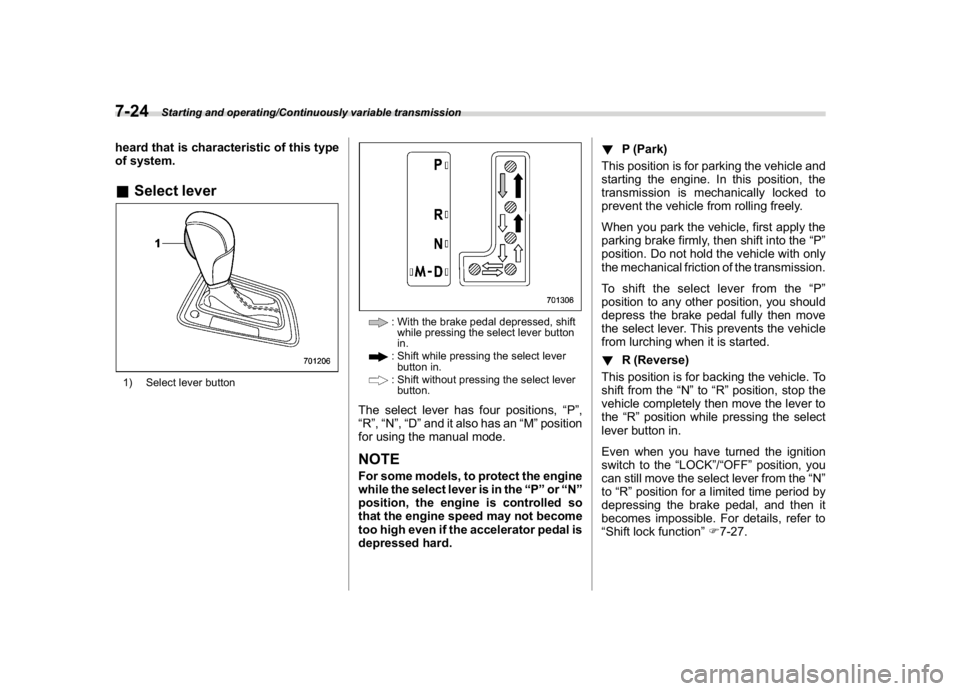
of system.&Select lever1) Select lever button
: With the brake pedal depressed, shift
while pressing the select lever button
in.: Shift while pressing the select lever
button in.: Shift without pressing the select lever
button.
The select lever has four positions,“P”,
“R”,“N”,“D”and it also has an“M”position
for using the manual mode.NOTEFor some models, to protect the engine
while the select lever is in the“P”or“N”
position, the engine is controlled so
that the engine speed may not become
too high even if the accelerator pedal is
depressed hard.!P (Park)
This position is for parking the vehicle and
starting the engine. In this position, the
transmission is mechanically locked to
prevent the vehicle from rolling freely.
When you park the vehicle, first apply the
parking brake firmly, then shift into the“P”
position. Do not hold the vehicle with only
the mechanical friction of the transmission.
To shift the select lever from the“P”
position to any other position, you should
depress the brake pedal fully then move
the select lever. This prevents the vehicle
from lurching when it is started.
!R (Reverse)
This position is for backing the vehicle. To
shift from the“N”to“R”position, stop the
vehicle completely then move the lever to
the“R”position while pressing the select
lever button in.
Even when you have turned the ignition
switch to the“LOCK”/“OFF”position, you
can still move the select lever from the“N”
to“R”position for a limited time period by
depressing the brake pedal, and then it
becomes impossible. For details, refer to
“Shift lock function”F7-27.
Starting and operating/Continuously variable transmission
7-24
Page 376 of 578
(389,1)
北米Model "A1700BE-B" EDITED: 2017/ 10/ 11
red zone. Also, if the engine revolutions
reach the specified number, the fuel
supply will be cut. In this case, perform
shift up operation.
!To deselect the manual mode
To deselect the manual mode, return the
select lever to the“D”position from the“M”
position.&Shift lock functionThe shift lock function helps prevent the
improper operation of the select lever.
.You cannot move the select lever with
the ignition switch in the“ON”position and
the brake pedal depressed.
.You cannot move the select lever from
the“P”position to any other position
unless the brake pedal is depressed.
Depress the brake pedal first, and then
operate the select lever.
.Only the“P”position allows you to turn
the ignition switch from the“ACC”position
to the“LOCK”/“OFF”position and remove
the key from the ignition switch.
.If you turn the ignition switch to the
“LOCK”/“OFF”position while the select
lever is in the“N”position, the select lever
may not be moved to the“P”position after
a period of time. Therefore, move the
select lever to the“P”position with the
brake pedal depressed soon after turningthe ignition switch to the“LOCK”/“OFF”
position.
!Shift lock release
If you cannot move the select lever, turn
theignitionswitchbacktothe“ON”
position then move the select lever to the
“P”position with the select lever button
pressed and brake pedal depressed.
If the select lever does not move after
performing the above procedure, perform
the following steps.
.When you cannot shift the select
lever from“P”to“N”:
Refer to“
Shift lock release using the shift
lock release button”F7-27.
.When you cannot shift the select
lever from“N”to“R”,“P”:
Within 60 seconds after placing the ignition
switch in the“ACC”position, move the
select lever to the“P”position with the
select lever button pressed and brake
pedal depressed.
If you must perform the above procedure,
the shift lock system (or the vehicle control
system) may be malfunctioning. Contact a
SUBARU dealer for an inspection as soon
as possible.
If the select lever does not move after
performing the above procedure, refer to“Shift lock release using the shift lock
release button”F7-27.
!Shift lock release using the shift
lock release button
Perform the following procedure to release
the shift lock.
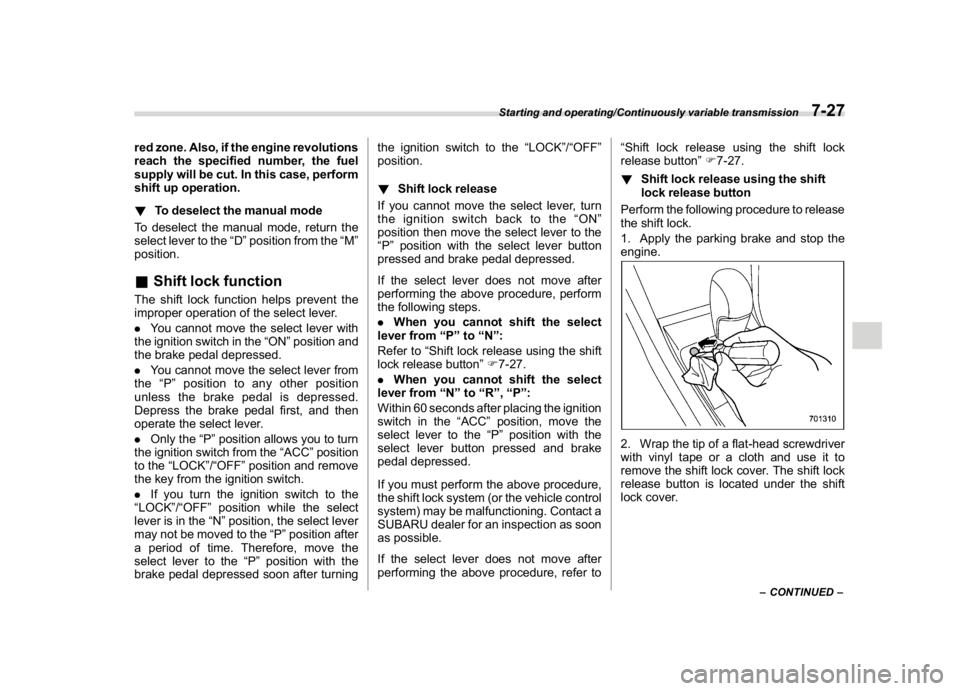
1. Apply the parking brake and stop the
engine.
2. Wrap the tip of a flat-head screwdriver
with vinyl tape or a cloth and use it to
remove the shift lock cover. The shift lock
release button is located under the shift
lock cover.
–CONTINUED–
Starting and operating/Continuously variable transmission
7-27
7
Page 377 of 578
(390,1)
北米Model "A1700BE-B" EDITED: 2017/ 10/ 11
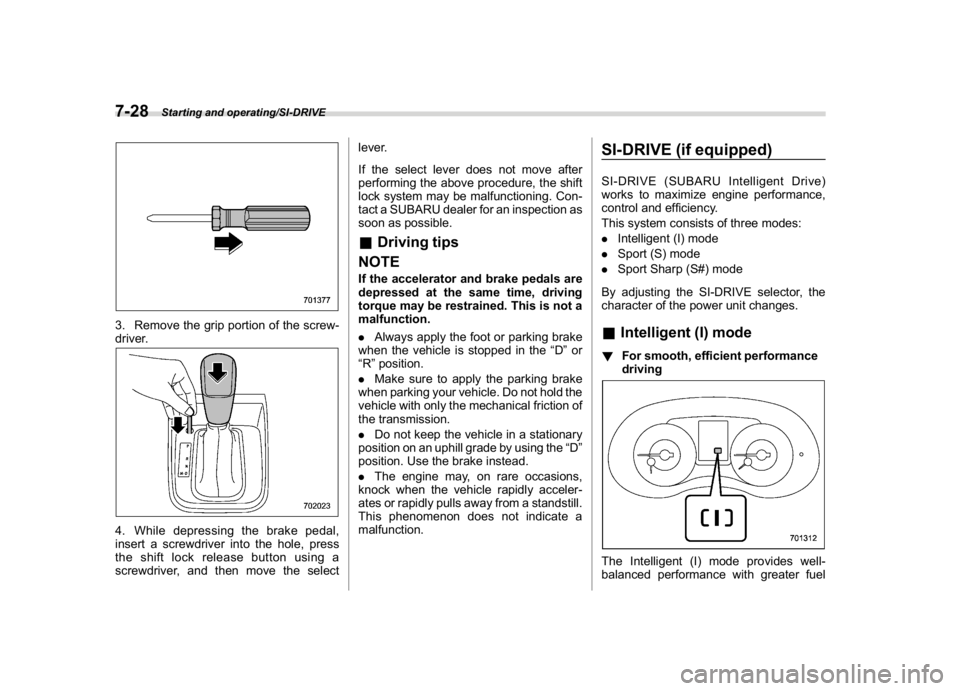
3. Remove the grip portion of the screw-
driver.4. While depressing the brake pedal,
insert a screwdriver into the hole, press
the shift lock release button using a
screwdriver, and then move the selectlever.
If the select lever does not move after
performing the above procedure, the shift
lock system may be malfunctioning. Con-
tact a SUBARU dealer for an inspection as
soon as possible.
&Driving tips
NOTEIf the accelerator and brake pedals are
depressed at the same time, driving
torque may be restrained. This is not a
malfunction.
.Always apply the foot or parking brake
when the vehicle is stopped in the“D”or
“R”position.
.Make sure to apply the parking brake
when parking your vehicle. Do not hold the
vehicle with only the mechanical friction of
the transmission.
.Do not keep the vehicle in a stationary
position on an uphill grade by using the“D”
position. Use the brake instead.
.The engine may, on rare occasions,
knock when the vehicle rapidly acceler-
ates or rapidly pulls away from a standstill.
This phenomenon does not indicate a
malfunction.
SI-DRIVE (if equipped)SI-DRIVE (SUBARU Intelligent Drive)
works to maximize engine performance,
control and efficiency.
This system consists of three modes:
.Intelligent (I) mode
.Sport (S) mode
.Sport Sharp (S#) mode
By adjusting the SI-DRIVE selector, the
character of the power unit changes.&Intelligent (I) mode!For smooth, efficient performance
drivingThe Intelligent (I) mode provides well-
balanced performance with greater fuel
Starting and operating/SI-DRIVE
7-28