battery SUBARU WRX 2018 Owner's Manual
[x] Cancel search | Manufacturer: SUBARU, Model Year: 2018, Model line: WRX, Model: SUBARU WRX 2018Pages: 578, PDF Size: 33.21 MB
Page 147 of 578
(152,1)
北米Model "A1700BE-B" EDITED: 2017/ 10/ 11
trip meter, the odometer/trip meter will turn
off.
Also, if you open and close the driver’s
door within 10 seconds of illumination of
the odometer/trip meter, the odometer/trip
meter will turn off.
You can switch the display as shown in the
following sequence by pressing the trip
knob.To set the trip meter to zero, select the A
trip or B trip meter by pressing the knob
and keep the knob pressed for more than 2
seconds.
CAUTION
To ensure safety, do not attempt to
change the function of the indicator
while driving, as an accident could
result.NOTEIf the connection between the combina-
tion meter and battery is broken for any
reason such as vehicle maintenance or
fuse replacement, the data recorded on
the trip meter will be lost.
&TachometerThe tachometer shows the engine speed
in thousands of revolutions per minute.
CAUTION
Do not operate the engine with the
pointer of the tachometer in the red
zone. In this range, fuel injection will
be cut by the engine control module
to protect the engine from overrev-
ving. The engine will resume run-
ning normally after the engine speed
is reduced below the red zone.
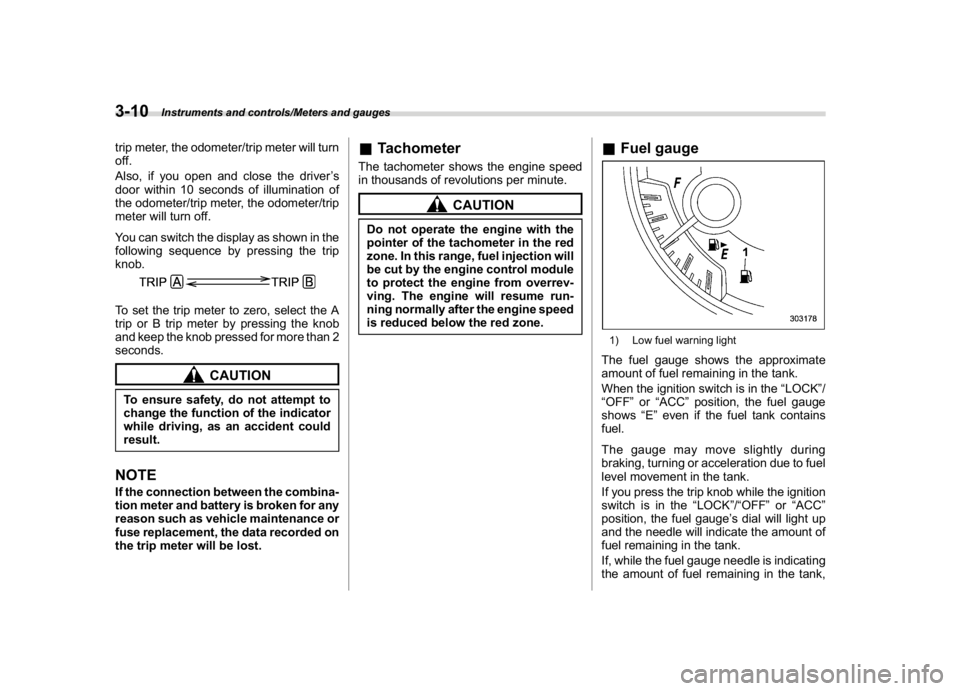
&Fuel gauge1) Low fuel warning lightThe fuel gauge shows the approximate
amount of fuel remaining in the tank.
When the ignition switch is in the“LOCK”/
“OFF”or“ACC”position, the fuel gauge
shows“E”even if the fuel tank contains
fuel.
The gauge may move slightly during
braking, turning or acceleration due to fuel
level movement in the tank.
If you press the trip knob while the ignition
switch is in the“LOCK”/“OFF”or“ACC”
position, the fuel gauge’s dial will light up
and the needle will indicate the amount of
fuel remaining in the tank.
If, while the fuel gauge needle is indicating
the amount of fuel remaining in the tank,
Instruments and controls/Meters and gauges
3-10
Page 158 of 578
(163,1)
北米Model "A1700BE-B" EDITED: 2017/ 10/ 11
.The warning light illuminates while
driving, but it turns off immediately and
remains off.
When driving with an insufficient battery
voltage such as when the engine is jump
started, the ABS warning light may illumi-
nate. This is due to the low battery voltage
and does not indicate a malfunction. When
the battery becomes fully charged, the
light will turn off.&Brake system
warning light
WARNING
.Driving with the brake system
warning light on is dangerous.
This indicates your brake system
may not be working properly. If
the light remains illuminated,
have the brakes inspected by a
SUBARU dealer immediately.
.If at all in doubt about whether the
brakes are operating properly, do
not drive the vehicle. Have your
vehicle towed to the nearest
SUBARU dealer for repair.
.For models with the electronic
parking brake: If the brake sys-
tem warning light illuminates, the
electronic parking brake systemmay be malfunctioning. Immedi-
ately stop your vehicle in a safe
location, use tire stops under the
tires to prevent the vehicle from
moving and contact your
SUBARU dealer. For details, refer
to“Electronic parking brake
(models with electronic parking
brake system)”F7-43.
NOTEFor models with the electronic parking
brake:
.Even if the brake system warning
light illuminates, if the warning light
behavior is as described in the follow-
ing examples, the electronic parking
brake system is not malfunctioning.
–The warning light turns off when
the electronic parking brake is ap-
plied or released.
–The warning light turns off when
the ignition switch is turned to the
“ON”position again.
.The brake system warning light may
illuminate immediately after the engine
is started. However, it is not malfunc-
tioning if the warning light turns off
after the electronic parking brake is
released.
.The brake system warning light mayilluminate after the electronic parking
brake is frequently applied and re-
leased. However, the electronic parking
brake system is not malfunctioning if
the light turns off for a short period of
time.
.When the engine is started while the
electronic parking brake is applied/
released, the system may judge an
abnormal situation and the warning
light may illuminate. If the warning light
illuminates, turn the ignition switch
once to the“LOCK/OFF”position and
then restart the engine. Then, apply/
release the electronic parking brake. If
the warning light turns off, the system
will be restored.
This light has the following functions.
!Parking brake indicator (models
without electronic parking brake
system)
This light illuminates with the parking
brake applied while the ignition switch is
in the“ON”position. It turns off when the
parking brake is fully released.
–CONTINUED–
Instruments and controls/Warning and indicator lights
3-21
3
Page 169 of 578

(174,1)
北米Model "A1700BE-B" EDITED: 2017/ 10/ 11
Inside warning
chimeOutside warning
chimeOperation indicator
on push-button igni-
tion switchStatus Action
Long beep
(continuous)——Select lever position warning:
.Case 1: The driver’s door was
opened while the push-button igni-
tion switch is in a position other than
“OFF”and the select lever is in a
position other than the“P”position.
.Case 2: The engine is turned off by
pressing the push-button ignition
switch and the select lever is in a
position other than the“P”position..Case 1: Shift the select lever to
the“P”position, switch the push-
button ignition switch to“OFF”and
exit the vehicle.
.Case 2: Start the engine, shift
the select lever to the“P”position,
switch the push-button ignition
switch to“OFF”and exit the vehicle.
Ding——The battery of the access key fob is low.Replace the battery of the access key
fob.
Ding—Flashes in green
(15 seconds max.)Steering lock warning:
The engine start procedure was per-
formed, but the steering is still locked.While turning the steering wheel right and
left lightly, depress the brake pedal and
press the push-button ignition switch.
Ding—Flashes in orangeSystem malfunction warning:
A malfunction was detected in the power
system or steering lock.Contact a SUBARU dealer immediately
and have the vehicle inspected.
NOTEAn electronic chirp will sound while the select lever is in the“R”position. In this case, the select lever position warning chime
will not sound.
Instruments and controls/Warning and indicator lights
3-32
Page 200 of 578
(205,1)
北米Model "A1700BE-B" EDITED: 2017/ 10/ 11
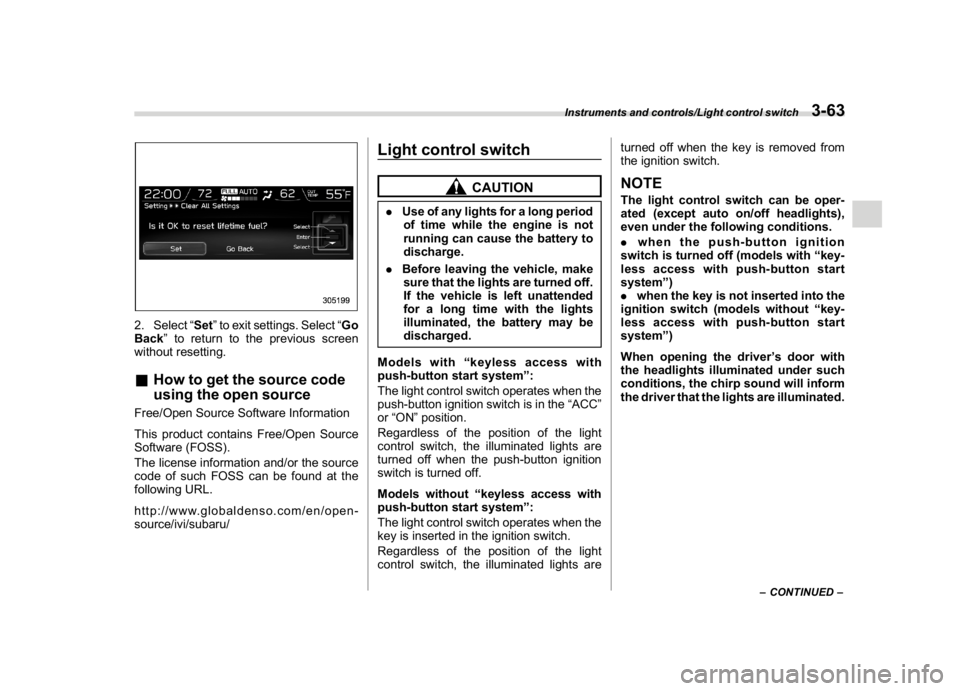
2. Select“Set”to exit settings. Select“Go
Back”to return to the previous screen
without resetting.&How to get the source code
using the open sourceFree/Open Source Software Information
This product contains Free/Open Source
Software (FOSS).
The license information and/or the source
code of such FOSS can be found at the
following URL.
http://www.globaldenso.com/en/open-
source/ivi/subaru/
Light control switch
CAUTION
.Use of any lights for a long period
of time while the engine is not
running can cause the battery to
discharge.
.Before leaving the vehicle, make
sure that the lights are turned off.
If the vehicle is left unattended
for a long time with the lights
illuminated, the battery may be
discharged.
Models with“keyless access with
push-button start system”:
The light control switch operates when the
push-button ignition switch is in the“ACC”
or“ON”position.
Regardless of the position of the light
control switch, the illuminated lights are
turned off when the push-button ignition
switch is turned off.
Models without“keyless access with
push-button start system”:
The light control switch operates when the
key is inserted in the ignition switch.
Regardless of the position of the light
control switch, the illuminated lights areturned off when the key is removed from
the ignition switch.
NOTEThe light control switch can be oper-
ated (except auto on/off headlights),
even under the following conditions.
.when the push-button ignition
switch is turned off (models with“key-
less access with push-button start
system”)
.when the key is not inserted into the
ignition switch (models without“key-
less access with push-button start
system”)
When opening the driver’s door with
the headlights illuminated under such
conditions, the chirp sound will inform
the driver that the lights are illuminated.
–CONTINUED–
Instruments and controls/Light control switch
3-63
3
Page 215 of 578
(220,1)
北米Model "A1700BE-B" EDITED: 2017/ 10/ 11
outside of the garage.
.Do not use HomeLink with any
garage door opener that lacks
safety stop and reverse features
as required by U.S. federal safety
standards (this includes any gar-
age door opener model manufac-
tured before April 1, 1982). A
garage door that cannot detect
an object signaling the door to
stop and reverse does not meet
current U.S. federal safety stan-
dards.
.It is also recommended that a new
battery be placed in the hand-
held remote (garage door opener
remote) of the device for quicker
and more accurate training.
.Some vehicles may require the
ignition switch to be turned to the
“ON”or“ACC”position for pro-
gramming and/or operation of
HomeLink.
.Keep the hand-held remote (gar-
age door opener remote) of the
device you are programming for
use in other vehicles as well as
for future HomeLink program-
ming. It is also suggested that
upon the sale of the vehicle, the
programmed HomeLink buttonsbe erased for security purposes.
Refer to“Erasing HomeLink But-
tons”F3-81.
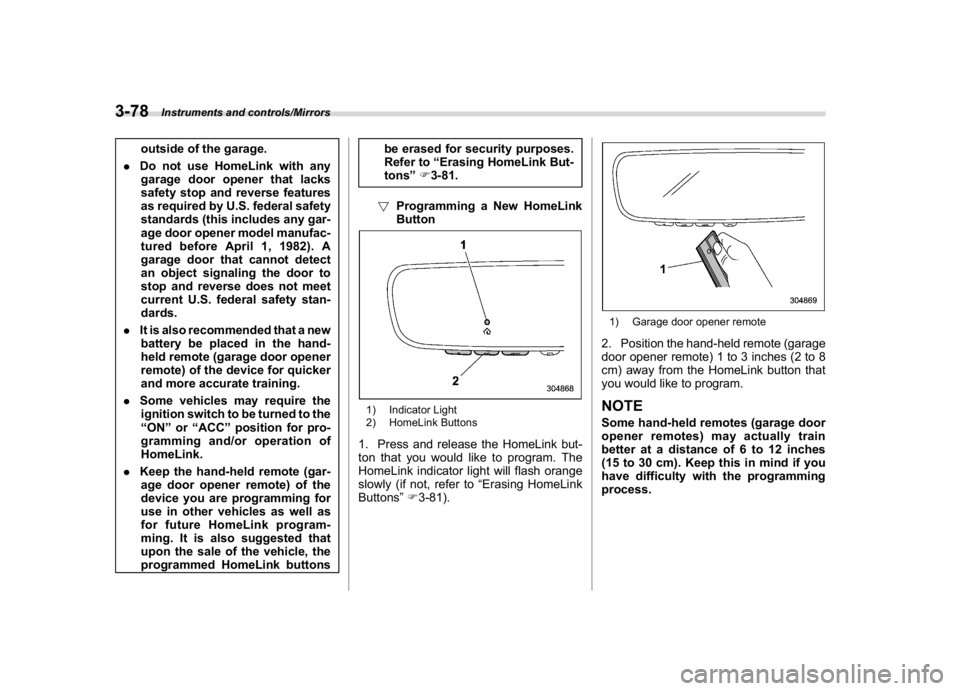
!Programming a New HomeLink
Button
1) Indicator Light
2) HomeLink Buttons1. Press and release the HomeLink but-
ton that you would like to program. The
HomeLink indicator light will flash orange
slowly (if not, refer to“Erasing HomeLink
Buttons”F3-81).
1) Garage door opener remote2. Position the hand-held remote (garage
door opener remote) 1 to 3 inches (2 to 8
cm) away from the HomeLink button that
you would like to program.NOTESome hand-held remotes (garage door
opener remotes) may actually train
better at a distance of 6 to 12 inches
(15 to 30 cm). Keep this in mind if you
have difficulty with the programming
process.
Instruments and controls/Mirrors
3-78
Page 222 of 578
(227,1)
北米Model "A1700BE-B" EDITED: 2017/ 10/ 11
outside mirrors have been cleared and the
windshield wiper blade rubbers have been
deiced completely before that time, press
the control switch to turn them off. If
defrosting, defogging or deicing is not
complete, you have to press the control
switch to turn them on again.
It is possible for the defogger and deicer
system to be set to continuous operation
mode by a SUBARU dealer. Consult your
SUBARU dealer for details. Also, you can
change the setting using the multi-function
display (color LCD). For details, refer to
“Defogger setting”F3-61.
If the battery voltage drops below the
permissible level, continuous operation of
the defogger and deicer system is can-
celed and the system stops operating.
CAUTION
.To prevent the battery from being
discharged, do not operate the
defogger and deicer system con-
tinuously for any longer than
necessary.
.Do not use sharp instruments or
window cleaner containing abra-
sives to clean the inner surface of
the rear window. They may da-
mage the conductors printed onthe window.
NOTE.Turn on the defogger and deicer
system if the wipers are frozen to the
windshield.
.If the windshield is covered with
snow, remove the snow so that the
windshield wiper deicer works effec-
tively.
.While the defogger and deicer sys-
tem is in the continuous operation
mode:
–If the vehicle speed remains at 9
mph (15 km/h) or lower for 15
minutes, the windshield wiper dei-
cer system automatically stops op-
erating. However, the rear window
defogger system and outside mirror
defogger system maintain continu-
ous operation in this condition.
–If the vehicle battery voltage
drops below the permissible level,
continuous operation of the defog-
ger system and deicer system is
canceled and the system stops
operating.
Tilt/telescopic steering wheel
WARNING
.Do not adjust the steering wheel
tilt/telescopic position while driv-
ing. This may cause loss of
vehicle control and result in per-
sonal injury.
.If the lever cannot be raised to the
fixed position, adjust the steering
wheel again. It is dangerous to
drive without locking the steering
wheel. This may cause loss of
vehicle control and result in per-
sonal injury.
–CONTINUED–
Instruments and controls/Tilt/telescopic steering wheel
3-85
3
Page 231 of 578
(238,1)
北米Model "A1700BE-B" EDITED: 2017/ 10/ 11
control dial
Press the“DUAL”button to cancel the
“DUAL”mode.
When the“DUAL”mode is selected:
Turn the driver’s side dial to set the driver’s
side temperature. Turn the front passen-
ger’s side dial to set the front passenger’s
side temperature.
When the“DUAL”mode is canceled:
Turn the driver’s side dial to set the desired
temperature.
When the“DUAL”mode is canceled, only
the driver’s side temperature is displayed.&Fan speed controlThe fan operates only when the ignition
switch is in the“ON”position. Turn the fan
speed control dial to select the preferred
fan speed.
&Air conditioner controlThe air conditioner operates only when the
engine is running.
Press the air conditioner button while the
fan is in operation to turn on the air
conditioner. When the air conditioner is
on, the“A/C”indicator light illuminates.
To turn off the air conditioner, press the
button again.NOTEFor efficient defogging or dehumidify-
ing in cold weather, turn on the air
conditioner. However, if the ambient
temperature decreases to approxi-
mately 328F(08C), the air conditioner
compressor will stop operating.&Air inlet selectionSelect the air inlet by pressing the air inlet
selection button.
ON position (recirculation):Interior air is
recirculated inside the vehicle. Press the
air inlet selection button to the ON position
for fast cooling with the air conditioner or
when driving on a dusty road.
OFF position (outside air):Outside air is
drawn into the passenger compartment.
Press the air inlet selection button to the
OFF position when the interior has cooledto a comfortable temperature and the road
is no longer dusty.
WARNING
Continued operation in the ON posi-
tion may fog up the windows. Switch
to the OFF position as soon as the
outside conditions are no longer
dusty.NOTEWhen the battery is disconnected or the
battery voltage drops, the air inlet
selection operation indicator light may
blink. This does not indicate a malfunc-
tion. However, if the indicator light
blinks every time you start the engine,
a malfunction may occur in the elec-
trical circuit. Have the vehicle in-
spected at the nearest SUBARU dealer.
Climate control/Manual climate control operation
4-8
Page 237 of 578

(246,1)
北米Model "A1700BE-B" EDITED: 2017/ 10/ 11
Antenna&Roof antennaThe shark-fin type roof antenna is installed
in the center at the rear of the roof.
Audio setYour vehicle may be equipped with one of
the following audio sets. Refer to the
pages indicated in this section for operat-
ing details.
CAUTION
.Always consult your SUBARU
dealer before installing a citizen
band radio or other transmitting
device in your vehicle. Such
devices may cause the electronic
control system to malfunction if
they are incorrectly installed or if
they are not suited for the vehi-
cle.
.To prevent the battery from being
discharged, do not leave the
audio/visual system on when the
engine is not running.NOTE.If a cell phone is placed near the
audio set, it may cause the audio set to
emit noise when the phone receives
calls. This noise does not indicate an
audio set malfunction. Note that a cell
phone should not be placed near the
audio set..Some functions may not be available
depending on the market and specifi-
cations of your vehicle.
.The images shown in this Owner’s
Manual are sample images. The actual
images may vary depending on the
market and specifications of your ve-
hicle.
Audio/Antenna
5-2
Page 252 of 578
(261,1)
北米Model "A1700BE-B" EDITED: 2017/ 10/ 11
first two connected devices will be
recognized.&Basic operationThis section describes some of the basic
features of the audio/visual system. Some
information may not pertain to your sys-
tem.
Your audio/visual system works when the
ignition switch is turned to the“ACC”or
“ON”position.
CAUTION
To prevent the battery from being
discharged, do not leave the audio/
visual system on longer than neces-
sary when the engine is not running.NOTESome functions can also be operated
by using the voice command system.
For details, refer to“Voice command
system”F5-79.!Turning the system on and off
Press the power/VOLUME knob to turn the
audio/visual system on and off. When the
system turns on, the mode that was in use
the last time the system was turned off will
be displayed. Press and hold the knob to
turn the display off.
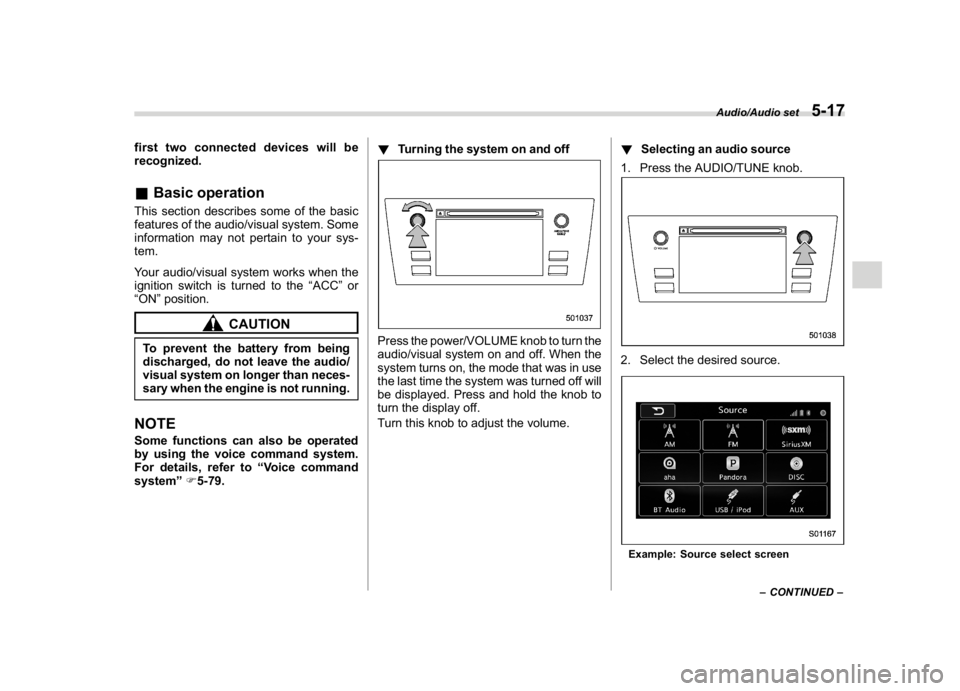
Turn this knob to adjust the volume.!Selecting an audio source
1. Press the AUDIO/TUNE knob.
2. Select the desired source.Example: Source select screen
–CONTINUED–
Audio/Audio set
5-17
5
Page 279 of 578

(288,1)
北米Model "A1700BE-B" EDITED: 2017/ 10/ 11
Audio panel
No. Function&1
Turn to adjust volume.
Press to turn the audio system on/off.
&2
Press to display the sound setting
screen. Refer to“
Unit settings”F5-18.
&3
Press to display the station operation
screen.
Press to select an audio mode.
&4
Turn to display the next/previous con-
tent item.
Press to select an audio source. Refer
to“
Selecting an audio source”F5-17.
&5
Press to display the next/previous con-
tent item.
NOTE.For safety reasons, certain func-
tions are not available while your
vehicle is in motion.
.In order to maximize signal recep-
tion, performance and precision of the
smartphone, please ensure the smart-
phone is placed as close to the system
as possible, while ensuring it is stowed
and secure while driving.
.When the ignition switch is in the
“ACC”or“ON”position, the battery of
the connected iPhone/iPod touch is
charged.
.iPhone/iPod touch may not be re-
cognized when the ignition switch is in
the“ACC”or“ON”position. In this
case, remove the iPhone/iPod touch
and reconnect it.
.The accuracy of the displayed in-
formation or the signal reception per-
formance depends on the smartphone
or the connected device, and it’s wire-
less connection.
.Since the aha application uses sig-
nals from GPS satellites and wireless
communication lines, it may not work
properly in the following locations.
–In a tunnel
–In underground parking lots
Audio/Audio set
5-44