sensor SUBARU WRX 2018 Owner's Manual
[x] Cancel search | Manufacturer: SUBARU, Model Year: 2018, Model line: WRX, Model: SUBARU WRX 2018Pages: 578, PDF Size: 33.21 MB
Page 157 of 578
(162,1)
北米Model "A1700BE-B" EDITED: 2017/ 10/ 11
damage and a fast leak that causes
the tire to lose air rapidly. If you have
a flat tire, refer to“Flat tires”F9-5.
When a spare tire is mounted or a
wheel rim is replaced without the
original pressure sensor/transmitter
being transferred, the Low tire pres-
sure warning light will illuminate
steadily after blinking for approxi-
mately one minute. This indicates
the TPMS is unable to monitor all
four road wheels. Contact your
SUBARU dealer as soon as possible
for tire and sensor replacement and/
or system resetting.
If the light illuminates steadily after
blinking for approximately one min-
ute, promptly contact a SUBARU
dealer to have the system inspected.
CAUTION
The tire pressure monitoring system
is NOT a substitute for manually
checking tire pressure. The tire
pressure should be checked peri-
odically (at least monthly) using a
tire gauge. After any change to tire
pressure(s), the tire pressure mon-
itoring system will not re-check tire
inflation pressures until the vehicleis first driven to a vehicle speed of at
least 20 mph (32 km/h). After adjust-
ing the tire pressures, increase the
vehicle speed to at least 20 mph (32
km/h) to start the TPMS re-checking
of the tire inflation pressures. If the
tire pressures are now above the
severe low pressure threshold, the
low tire pressure warning light
should turn off a few minutes later.
Therefore, be sure to install the
specified size for the front and rear
tires.
&ABS warning light
CAUTION
.If any of the following conditions
occur, we recommend that you
have the ABS system repaired at
the first available opportunity by
your SUBARU dealer.
–The warning light does not
illuminate when the ignition
switch is turned to the“ON”
position.
–The warning light illuminates
when the ignition switch is
turned to the“ON”position,
but it does not turn off evenafter starting the vehicle.
–The warning light illuminates
while driving.
.When the warning light is on (and
the brake system warning light is
off), the ABS function shuts
down. However, the conventional
brake system continues to oper-
ate normally.
The ABS warning light illuminates together
with the brake system warning light if the
EBD system malfunctions. For further
details of the EBD system malfunction
warning, refer to“Brake system warning
light”F3-21.
NOTEIf the warning light behavior is as
described in the following conditions,
the ABS system may be considered
normal.
.The warning light illuminates when
the ignition switch is turned to the“ON”
position and turns off approximately 2
seconds after the engine has started.
.The warning light illuminates right
after the engine is started but turns off
immediately, remaining off.
.The warning light remains illumi-
nated after the engine has been started,
but it turns off while driving.
Instruments and controls/Warning and indicator lights
3-20
Page 167 of 578

(172,1)
北米Model "A1700BE-B" EDITED: 2017/ 10/ 11
Inside warning
chimeOutside warning
chimeOperation indicator
on push-button igni-
tion switchStatus Action
Ding, ding ...
(intermittent)——The driver’s door was opened while the
push-button ignition switch is“ACC”(in
CVT models, when the select lever is in
the“P”position.)Switch the push-button ignition switch to
“OFF”, or close the driver’s door.
*When exiting the vehicle, be sure to
switch the push-button ignition switch to
“OFF”.
The push-button ignition switch was
switched to“OFF”while the driver’s door
is open.Close the driver’s door.
DingShort beep
(2 seconds)—Lockout warning:
All doors were closed after the locking of
all doors was set by using the door lock
lever or power door locking switch while
the access key fob is inside the vehicle.Take out the access key fob from the
vehicle, and lock the doors.
*The doors cannot be locked while the
access key fob is inside the vehicle.
*A chirp sound will be heard, and all
doors will be unlocked.
—Short beep
(2 seconds)—Trunk lockout warning:
The trunk was closed with the access key
fob in it while all doors are locked (or
during the automatic lock time period).Take out the access key fob from the
trunk, and close the trunk.
*By pressing the trunk opener button
after this warning chime sounds, the
trunk can be unlocked.
Access key lock-in warning:
The door lock sensor was touched while
the push-button ignition switch is“OFF”
and the access key fob is inside the
vehicle.Take out the access key fob from the
vehicle, and lock the doors.
*If the access key fob is inside the
vehicle, the doors cannot be locked.
—Beep, beep ...
(5 beeps)—Door ajar warning:
The door lock sensor is touched while the
push-button ignition switch is in the
“OFF”position and another door or the
trunk is opened.Close the doors securely and lock them.
*If one of the doors is opened, the doors
cannot be locked.
Instruments and controls/Warning and indicator lights
3-30
Page 168 of 578

(173,1)
北米Model "A1700BE-B" EDITED: 2017/ 10/ 11
Inside warning
chimeOutside warning
chimeOperation indicator
on push-button igni-
tion switchStatus Action
DingLong beep
(60 seconds max.)—Power warning:
The door lock sensor was touched while
carrying the access key fob and the
push-button ignition switch is in a posi-
tion other than“OFF”and the select lever
is in the“P”position.Open the door and return the access key
fob inside the vehicle, or switch the push-
button ignition switch to“OFF”.
*If the push-button ignition switch is not
switched to“OFF”, the doors cannot be
locked.
Ding, ding ...
(7 seconds)——Access key warning:
The vehicle was driven while the access
key fob is not inside the vehicle.Carry the access key fob, and drive the
vehicle.
Ding——Access key warning for engine start:
The push-button ignition switch was
pressed while the access key fob is not
inside the vehicle.Carry the access key fob, and press the
push-button ignition switch.
DingBeep, beep, beep
(3 beeps)—Access key takeout warning:
The driver exited the vehicle with the
access key fob and closed the driver’s
door while the push-button ignition
switch is in a position other than“OFF”
and the select lever is in the“P”position.Switch the push-button ignition switch to
“OFF”, and get out of the vehicle.
DingBeep, beep, beep
(3 beeps)—Passenger access key takeout warn-
ing:
A fellow passenger exited the vehicle
with the access key fob and closed a
door other than the driver’s door while
the push-button ignition switch is in a
position other than“OFF”.Return the access key fob to inside the
vehicle, or switch the push-button ignition
switch to“
OFF”.
Long beep
(continuous)Long beep
(continuous)—Access key takeout without“P”posi-
tion warning:
The driver exited the vehicle with the
access key fob and closed the driver’s
door while the push-button ignition
switch is in a position other than“OFF”
and the select lever is in a position other
than the“P”position.Shift the select lever to the“P”position,
switch the push-button ignition switch to
“OFF”and exit the vehicle.
–CONTINUED–
Instruments and controls/Warning and indicator lights
3-31
3
Page 182 of 578
(187,1)
北米Model "A1700BE-B" EDITED: 2017/ 10/ 11
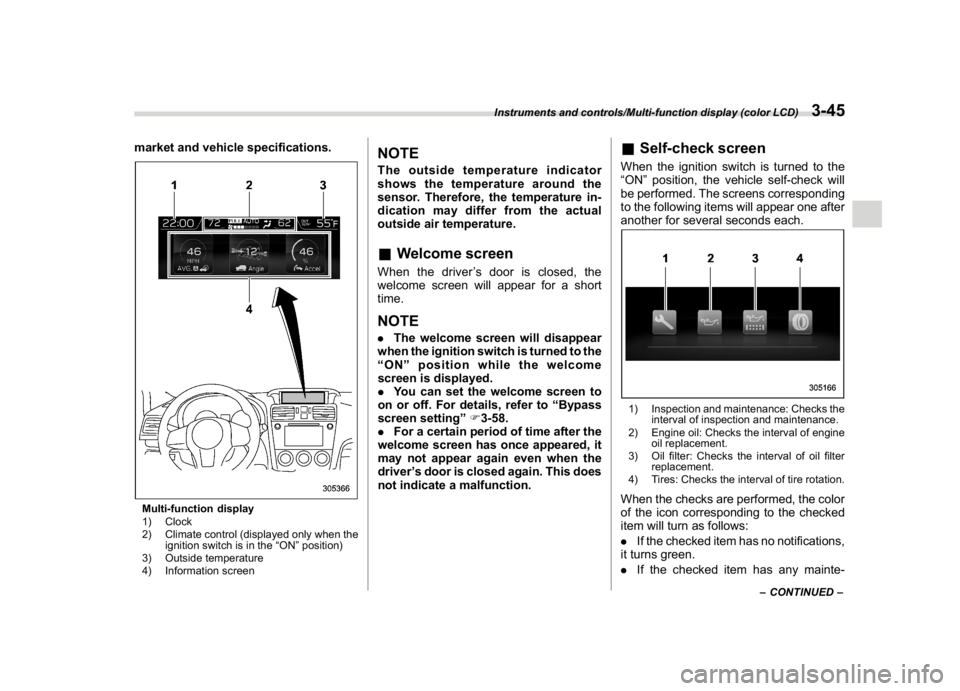
market and vehicle specifications.Multi-function display
1) Clock
2) Climate control (displayed only when the
ignition switch is in the“ON”position)
3) Outside temperature
4) Information screen
NOTEThe outside temperature indicator
shows the temperature around the
sensor. Therefore, the temperature in-
dication may differ from the actual
outside air temperature.&Welcome screenWhen the driver’s door is closed, the
welcome screen will appear for a short
time.NOTE.The welcome screen will disappear
when the ignition switch is turned to the
“ON”position while the welcome
screen is displayed.
.You can set the welcome screen to
on or off. For details, refer to“Bypass
screen setting”F3-58.
.For a certain period of time after the
welcome screen has once appeared, it
may not appear again even when the
driver’s door is closed again. This does
not indicate a malfunction.
&Self-check screenWhen the ignition switch is turned to the
“ON”position, the vehicle self-check will
be performed. The screens corresponding
to the following items will appear one after
another for several seconds each.1) Inspection and maintenance: Checks the
interval of inspection and maintenance.
2) Engine oil: Checks the interval of engine
oil replacement.
3) Oil filter: Checks the interval of oil filter
replacement.
4) Tires: Checks the interval of tire rotation.When the checks are performed, the color
of the icon corresponding to the checked
item will turn as follows:
.If the checked item has no notifications,
it turns green.
.If the checked item has any mainte-
–CONTINUED–
Instruments and controls/Multi-function display (color LCD)
3-45
3
Page 191 of 578

(196,1)
北米Model "A1700BE-B" EDITED: 2017/ 10/ 11
Top menu Menu option Description Page
Car Setting
Keyless Buzzer Volume Set the audible signal volume. 0 (OFF) to 7 3-61
Hazard Warning Flasher Set the hazard warning flasher. On or Off 3-61
Defogger Set and customize the operation of the defogger. 15 minutes or Continuous 3-61
Interior Light Set and customize the interior light off delay timer. 10, 20, 30 seconds or Off 3-61
Auto Light Sensor
*1
Set and customize the sensitivity of the auto light
sensor.Low, Mid, High or Max 3-61
Keyless Access Setting
Driver’s Door Unlock
*1
Set and customize the keyless access function. Driver’s Door Only, All 3-62
Welcome Lighting Set the leaving time and approaching time. 30, 60, 90 seconds or Off 3-62
Go Back Return to top menu.—
Initialize
Reset to Defaults Reset all settings to the default settings. Yes or No 3-62
Lifetime Fuel Cons Reset Clear logged lifetime fuel consumption data. Yes or No 3-62
Go Back Return to the top menu.—
Go Back
—Return to the top menu.—
*1: If equipped
Instruments and controls/Multi-function display (color LCD)
3-54
Page 198 of 578
(203,1)
北米Model "A1700BE-B" EDITED: 2017/ 10/ 11
!Car setting
You can set the vehicle setting.
!Keyless buzzer volume setting
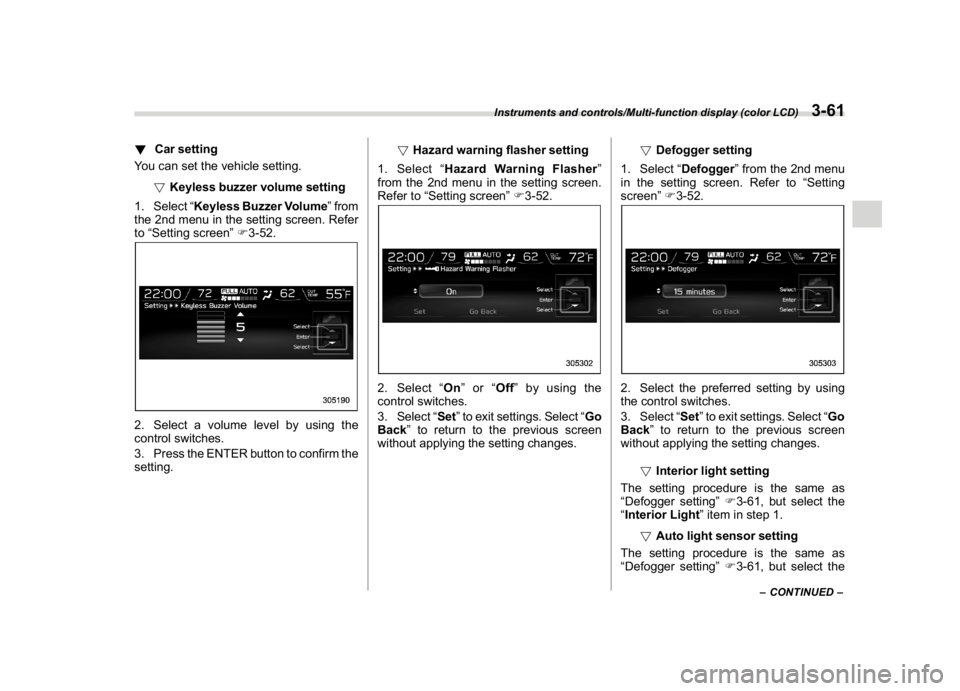
1. Select“Keyless Buzzer Volume”from
the 2nd menu in the setting screen. Refer
to“Setting screen”F3-52.2. Select a volume level by using the
control switches.
3. Press the ENTER button to confirm the
setting.!Hazard warning flasher setting
1. Select“Hazard Warning Flasher”
from the 2nd menu in the setting screen.
Refer to“Setting screen”F3-52.
2. Select“On”or“Off”by using the
control switches.
3. Select“Set”to exit settings. Select“Go
Back”to return to the previous screen
without applying the setting changes.!Defogger setting
1. Select“Defogger”from the 2nd menu
in the setting screen. Refer to“Setting
screen”F3-52.
2. Select the preferred setting by using
the control switches.
3. Select“Set”to exit settings. Select“Go
Back”to return to the previous screen
without applying the setting changes.
!Interior light setting
The setting procedure is the same as
“Defogger setting”F3-61, but select the
“Interior Light”item in step 1.
!Auto light sensor setting
The setting procedure is the same as
“Defogger setting”F3-61, but select the
–CONTINUED–
Instruments and controls/Multi-function display (color LCD)
3-61
3
Page 199 of 578
(204,1)
北米Model "A1700BE-B" EDITED: 2017/ 10/ 11
“Auto Light Sensor”item in step 1.
!Keyless Access setting
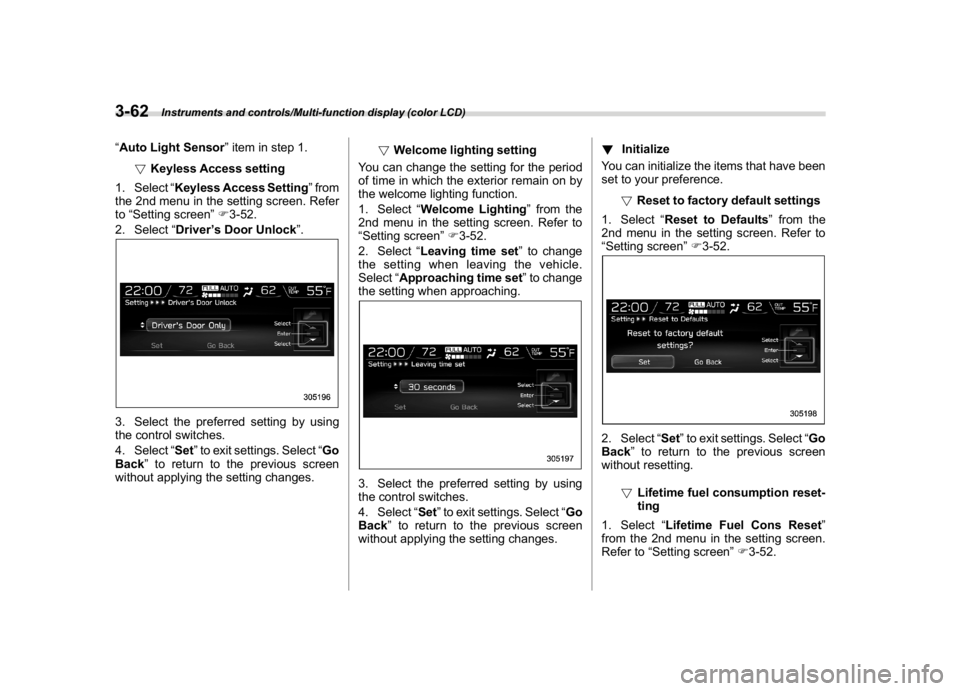
1. Select“Keyless Access Setting”from
the 2nd menu in the setting screen. Refer
to“Setting screen”F3-52.
2. Select“Driver’s Door Unlock”.3. Select the preferred setting by using
the control switches.
4. Select“Set”to exit settings. Select“Go
Back”to return to the previous screen
without applying the setting changes.!Welcome lighting setting
You can change the setting for the period
of time in which the exterior remain on by
the welcome lighting function.
1. Select“Welcome Lighting”from the
2nd menu in the setting screen. Refer to
“Setting screen”F3-52.
2. Select“Leaving time set”to change
the setting when leaving the vehicle.
Select“Approaching time set”to change
the setting when approaching.
3. Select the preferred setting by using
the control switches.
4. Select“Set”to exit settings. Select“Go
Back”to return to the previous screen
without applying the setting changes.!Initialize
You can initialize the items that have been
set to your preference.
!Reset to factory default settings
1. Select“Reset to Defaults”from the
2nd menu in the setting screen. Refer to
“Setting screen”F3-52.
2. Select“Set”to exit settings. Select“Go
Back”to return to the previous screen
without resetting.
!Lifetime fuel consumption reset-
ting
1. Select“Lifetime Fuel Cons Reset”
from the 2nd menu in the setting screen.
Refer to“Setting screen”F3-52.
Instruments and controls/Multi-function display (color LCD)
3-62
Page 201 of 578
(206,1)
北米Model "A1700BE-B" EDITED: 2017/ 10/ 11
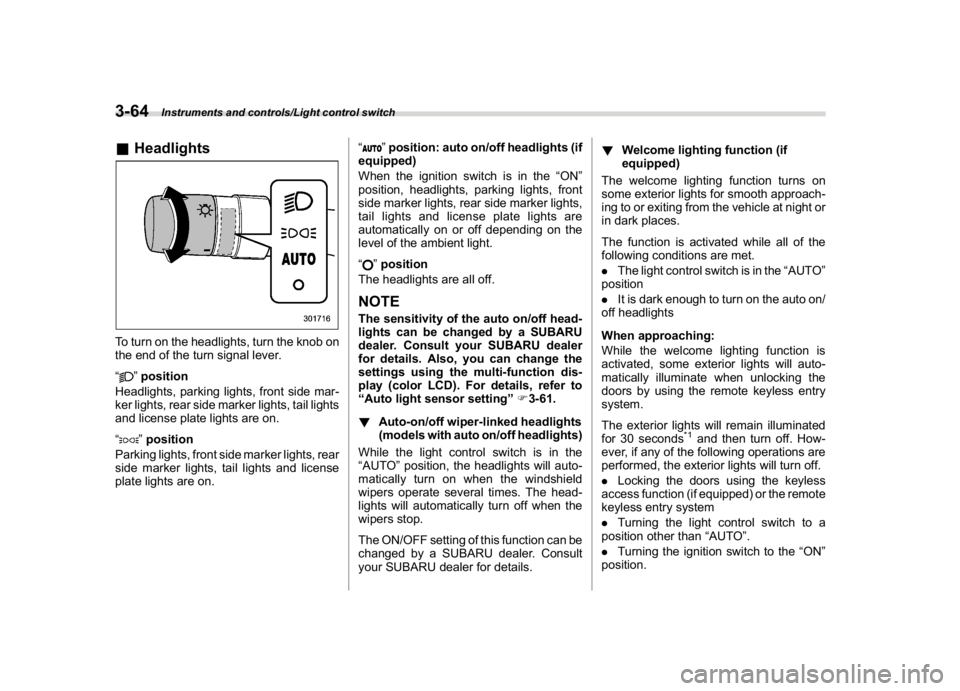
&HeadlightsTo turn on the headlights, turn the knob on
the end of the turn signal lever.
“
”position
Headlights, parking lights, front side mar-
ker lights, rear side marker lights, tail lights
and license plate lights are on.
“”position
Parking lights, front side marker lights, rear
side marker lights, tail lights and license
plate lights are on.“
”position: auto on/off headlights (if
equipped)
When the ignition switch is in the“ON”
position, headlights, parking lights, front
side marker lights, rear side marker lights,
tail lights and license plate lights are
automatically on or off depending on the
level of the ambient light.
“”position
The headlights are all off.
NOTEThe sensitivity of the auto on/off head-
lights can be changed by a SUBARU
dealer. Consult your SUBARU dealer
for details. Also, you can change the
settings using the multi-function dis-
play (color LCD). For details, refer to
“Auto light sensor setting”F3-61.
!Auto-on/off wiper-linked headlights
(models with auto on/off headlights)
While the light control switch is in the
“AUTO”position, the headlights will auto-
matically turn on when the windshield
wipers operate several times. The head-
lights will automatically turn off when the
wipers stop.
The ON/OFF setting of this function can be
changed by a SUBARU dealer. Consult
your SUBARU dealer for details.!Welcome lighting function (if
equipped)
The welcome lighting function turns on
some exterior lights for smooth approach-
ing to or exiting from the vehicle at night or
in dark places.
The function is activated while all of the
following conditions are met.
.The light control switch is in the“AUTO”
position
.It is dark enough to turn on the auto on/
off headlights
When approaching:
While the welcome lighting function is
activated, some exterior lights will auto-
matically illuminate when unlocking the
doors by using the remote keyless entry
system.
The exterior lights will remain illuminated
for 30 seconds
*1and then turn off. How-
ever, if any of the following operations are
performed, the exterior lights will turn off.
.Locking the doors using the keyless
access function (if equipped) or the remote
keyless entry system
.Turning the light control switch to a
position other than“AUTO”.
.Turning the ignition switch to the“ON”
position.
Instruments and controls/Light control switch
3-64
Page 202 of 578
(207,1)
北米Model "A1700BE-B" EDITED: 2017/ 10/ 11
When exiting:
While the welcome lighting function is
activated, some exterior lights will remain
illuminated even when either of the follow-
ing operations is performed.
.Turning the push-button ignition switch
to the“OFF”status (models with“keyless
access with push-button start system”)
.Pulling out the key from the ignition
switch (models without“keyless access
with push-button start system”)
The exterior lights will turn off under any of
the following conditions.
.3 minutes have passed since the
exterior lights were illuminated by the
welcome lighting function.
.30 seconds have passed since the door
was opened and closed.
*1
.The light control switch is turned to a
position other than“AUTO”.
.The locking procedures using the key-
less access function (if equipped) or the
remote keyless entry system is performed
twice. When performing the unlocking
procedure after performing the locking
procedure, perform the locking procedure
twice again.*1: The setting for the period of time in which the
exterior lights remain on by the welcome lighting
function can be changed by a SUBARU dealer.Contact your SUBARU dealer for details.
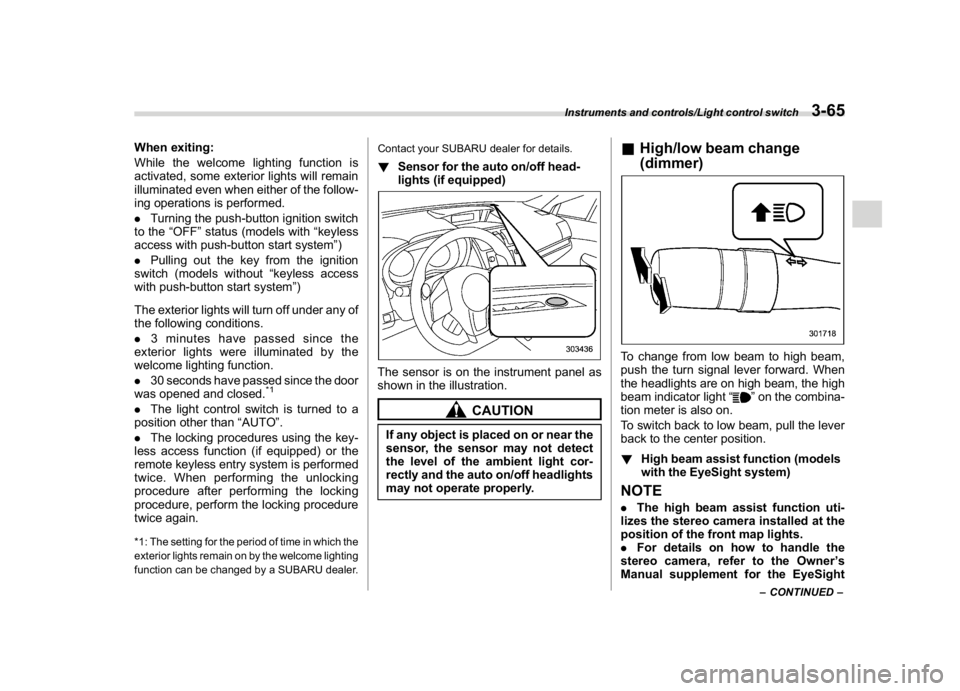
!Sensor for the auto on/off head-
lights (if equipped)The sensor is on the instrument panel as
shown in the illustration.
CAUTION
If any object is placed on or near the
sensor, the sensor may not detect
the level of the ambient light cor-
rectly and the auto on/off headlights
may not operate properly.
&High/low beam change
(dimmer)To change from low beam to high beam,
push the turn signal lever forward. When
the headlights are on high beam, the high
beam indicator light“
”on the combina-
tion meter is also on.
To switch back to low beam, pull the lever
back to the center position.
!High beam assist function (models
with the EyeSight system)
NOTE.The high beam assist function uti-
lizes the stereo camera installed at the
position of the front map lights.
.For details on how to handle the
stereo camera, refer to the Owner’s
Manual supplement for the EyeSight
–CONTINUED–
Instruments and controls/Light control switch
3-65
3
Page 224 of 578

(231,1)
北米Model "A1700BE-B" EDITED: 2017/ 10/ 11
Ventilator control....................................................4-2
Center and side ventilators.................................... 4-2
Climate control panel.............................................4-3
Type A ................................................................... 4-3
Type B ................................................................... 4-4
Automatic climate controloperation..................... 4-5
Sensors................................................................. 4-5
Manual climate controloperation..........................4-6
Airflow mode selection........................................... 4-6
Temperature control............................................... 4-7
Fan speed control.................................................. 4-8
Air conditioner control........................................... 4-8
Air inlet selection................................................... 4-8
Defrosting................................................................4-9Operating tips for heater andair conditioner...... 4-9
Cleaning ventilation grille.......................................4-9
Efficient cooling after parking in direct sunlight ......4-9
Lubrication oil circulation in the refrigerant
circuit..................................................................4-9
Checking air conditioning system before summer
season................................................................4-9
Cooling and dehumidifying in high humidity and
low temperature weather conditions...................4-10
Air conditioner compressor shut-off when engine
is heavily loaded................................................4-10
Refrigerant for your climate control system..........4-10
Air filtration system..............................................4-10
Replacing a cabin air filter.................................... 4-11
Climate control
4