bluetooth SUBARU WRX 2018 Owner's Guide
[x] Cancel search | Manufacturer: SUBARU, Model Year: 2018, Model line: WRX, Model: SUBARU WRX 2018Pages: 578, PDF Size: 33.21 MB
Page 314 of 578
(323,1)
北米Model "A1700BE-B" EDITED: 2017/ 10/ 11
!For PBAP incompatible but OPP
compatible Bluetooth phones
1. Select the“Download 1 Entry”key.
2. Transfer the contact data to the system
using a Bluetooth phone.
.This operation may be unnecessary
depending on the type of cell phone.
.To cancel this function, select the
“Cancel”key.
3. Check that a confirmation screen is
displayed when the operation is complete.
NOTETo download all items, you may need to
change the settings in your cell phone
beforehand.
!Deleting the contact data
You can delete the phonebook data stored
in the audio set.
1. Display the“PHONE”screen. Refer to
“How to change the hands-free phone
system”F5-72.
2. Touch the“Contacts”key, and then
select the“Delete All”key.
3. Select the“OK”key when the con-
firmation screen appears.
NOTE.Manual transfer operation cannot be
performed while driving.
.If your cell phone is neither PBAP
nor OPP compatible, the contacts can-
not be transferred.
.Depending on the type of Bluetooth
phone:
–It may be necessary to perform
additional steps on the phone when
transferring contact data.
Voice command systemThe voice command system enables the
audio, hands-free phone system, etc. to be
operated using voice commands.
Refer to the“Command list”F5-83 for
samples of voice commands.
Voice commands can be used even when
you set the system to another language.
For details about setting language, refer to
“General settings”F5-19.&Using the voice command
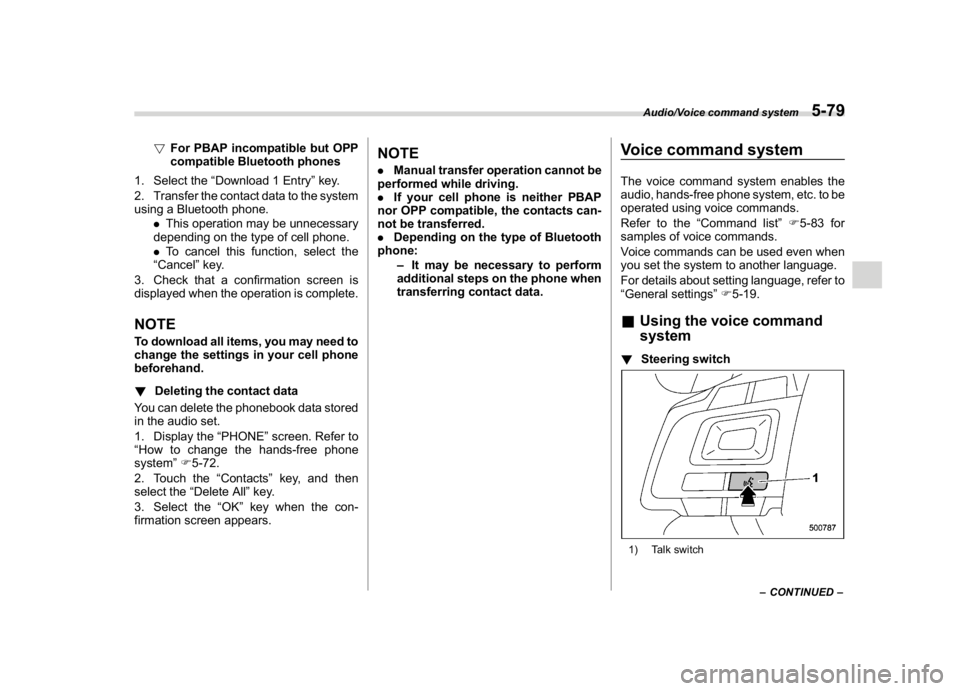
system!Steering switch1) Talk switch
–CONTINUED–
Audio/Voice command system
5-79
5
Page 318 of 578

(327,1)
北米Model "A1700BE-B" EDITED: 2017/ 10/ 11
&Command listRecognizable voice commands and their
actions are shown below.NOTE.Some voice commands may not be
available depending on the market,
vehicle specifications or the device
connection status.
.Frequently used commands are
listed in the following tables.
.For devices that are not installed in
the vehicle, the related commands will
not be displayed on the screen. Also,
according to conditions, other com-
mands may not be displayed on the
screen.
.The functions available may vary
according to the system installed.
.Voice recognition language can be
changed. Refer to“Unit settings”F5-
18.
.The notations used in the com-
mands are as follows.
–<
>: Numbers, titles or
names to be spoken
–():Thereisnoneedto
speak the command, the voice
command system will recognize
the content.!Basic command
Voice command Function
BackGo back one hierar-
chy or cancel the
voice recognition
(voice command top
screen)
HelpAsk for help with the
current task
Cancel, CloseCancel the current
task
Ye s
No
Display OFF Turns the display off
Audio ONTurns the audio sys-
tem on
Audio OFFTurns the audio sys-
tem off
STARLINKSwitch to APPS mode
!Commands for changing the audio
mode
Voice command Function
Change to AM Switch to AM mode
Change to AM1Switch to AM mode
band 1
Change to AM2Switch to AM mode
band 2
Change to FM Switch to FM mode
Change to FM1Switch to FM mode
band 1
Change to FM2Switch to FM mode
band 2
Change to FM3Switch to FM mode
band 3
Change to SiriusXM Switch to XM mode
Change to BT AudioSwitch to Bluetooth
Audio mode
Change to CD Switch to CD mode
Change to USB Switch to USB mode
Change to iPod Switch to iPod mode
Change to ahaSwitch to aha radio
mode
Change to PandoraSwitch to Pandora
mode
Change to AUXSwitch to AUX mode
–CONTINUED–Audio/Voice command system
5-83
5
Page 321 of 578

(330,1)
北米Model "A1700BE-B" EDITED: 2017/ 10/ 11
!Commands for Bluetooth audio
control
Voice command Function
Pause Pause play
Track Up Select the next track
Track DownSelect the current
track
Repeat?1 track
Repeat, Repeat All,
Group RepeatSelect a repeat mode
1 Track Repeat Repeat single track
Repeat All Repeat all tracks
Group RepeatRepeat tracks on
group
Shuffle?Shuffle All,
Group Shuffle, Shuffle
OFFSelect a random play
mode
Shuffle All Shuffle all tracks
Group ShuffleShuffle tracks on
group
Shuffle OFFTurn off shuffle
Audio/Voice command system
5-86
Page 322 of 578

(331,1)
北米Model "A1700BE-B" EDITED: 2017/ 10/ 11
What to do if...&TroubleshootingIf there is a problem with the hands-free system or a Bluetooth device, first check the table below.
When using the hands-free system with a Bluetooth device
Symptom Likely cause SolutionPage
Cell
phoneThis
system
The hands-free system or Bluetooth
device does not work.The connected device may not be a
compatible Bluetooth cell phone.For USA customers, please visit
www.subaru.com for details. Outside of the
USA customers, contact your local dealer to
arrange a demonstration in order to confirm
whether or not the device can be paired with
the vehicle.*—
The Bluetooth version of the connected
cell phone may be older than the
specified version.Use a cell phone with Bluetooth version 1.1 or
higher (recommended: Ver. 2.1 + EDR or
higher).*5-66
*: For details, refer to the owner’s manual that came with the cell phone.
–CONTINUED–
Audio/What to do if...
5-87
5
Page 323 of 578

(332,1)
北米Model "A1700BE-B" EDITED: 2017/ 10/ 11
When registering/connecting a cell phone
Symptom Likely cause SolutionPage
Cell
phoneThis
system
A cell phone cannot be registered.An incorrect passcode was entered on
the cell phone.Enter the correct passcode on the cell phone. *—
The registration operation has not
been completed on the cell phone
side.Complete the registration operation on the cell
phone (approve registration on the phone).*—
Old registration information remains
on either this system or the cell phone.Delete the existing registration information from
both this system and the cell phone, then register
the cell phone you wish to connect to this system.*5-67
A Bluetooth connection cannot be
made.Another Bluetooth device is already
connected.Manually connect the cell phone you wish to use to
this system.—5-67
Bluetooth function is not enabled on
the cell phone.Enable the Bluetooth function on the cell phone. *—
Automatic Bluetooth connection on
this system is set to off.Set automatic Bluetooth connection on this system
to on when the ignition switch is turned to the“ACC”
or“ON”position.—5-67
*: For details, refer to the owner’s manual that came with the cell phone.
Audio/What to do if...
5-88
Page 325 of 578

(334,1)
北米Model "A1700BE-B" EDITED: 2017/ 10/ 11
In other situations
Symptom Likely cause SolutionPage
Cell
phoneThis
system
Even though all conceivable mea-
sures have been taken, the symptom
status does not change.The cell phone is not close enough to
this system.Bring the cell phone closer to this system.——
The cell phone is the most likely cause of
the symptom.Turn the cell phone off, remove and reinstall
the battery pack, and then restart the cell
phone.*—
Enable the cell phone’s Bluetooth connection. *—
Stop the cell phone’s security software and
close all applications.*—
Before using an application installed on the cell
phone, carefully check its source and how its
operation might affect this system.*—
*: For details, refer to the owner’s manual that came with the cell phone.
Audio/What to do if...
5-90
Page 326 of 578
(335,1)
北米Model "A1700BE-B" EDITED: 2017/ 10/ 11
Appendix&Certification.Bluetooth
The Bluetooth word mark and logo are
registered trademarks of Bluetooth SIG,
Inc. and any use of such marks by Clarion
Co., Ltd. is under license..SiriusXM Satellite Radio (if
equipped)
SiriusXM
TM
and all related marks and
logos are trademarks of SiriusXM Radio
Inc. All rights reserved.
.Pandora (if equipped)
Pandora, the Pandora logo, and other
Pandora marks are trademarks or regis-
tered trademarks of Pandora Media, Inc.,
or its subsidiaries worldwide.
If you have any issues with the Pandora
application on your mobile phone, please
direct them to
[email protected].
.iPod
“Made for iPod”and“Made for iPhone”
mean that an electronic accessory has
been designed to connect specifically to
iPod or iPhone respectively, and has been
certified by the developer to meet Apple
performance standards. Apple is not re-
sponsible for the operation of this device or
its compliance with safety and regulatory
standards. Please note that the use of this
accessory with iPod or iPhone may affect
wireless performance.
iPhone, iPod, iPod classic, iPod nano,
iPod touch, and iTunes are trademarks of
Apple Inc., registered in the U.S. and other
countries..How to get the source code using the
open source
This system implements software using
theopensource.Forcustomerswho
would like to get the source code of the
software, it is available by downloading it
from the web site of Clarion Co., Ltd.
For details, refer to the following web site.http://www.clarion.com/us/en/support/in-
dex.html
&Certification for the Hands-
free system.U.S.-spec. models
CAUTION
FCC WARNING
Changes or modifications not ex-
pressly approved by the party re-
sponsible for compliance could void
the user’s authority to operate the
equipment.
This device complies with part 15 of the
FCC Rules. Operation is subject to the
following two conditions: (1) This device
may not cause harmful interference, and
(2) this device must accept any interfer-
ence received, including interference that
may cause undesired operation.
–CONTINUED–
Audio/Appendix
5-91
5