wheel SUBARU WRX 2018 Owner's Guide
[x] Cancel search | Manufacturer: SUBARU, Model Year: 2018, Model line: WRX, Model: SUBARU WRX 2018Pages: 578, PDF Size: 33.21 MB
Page 177 of 578
(182,1)
北米Model "A1700BE-B" EDITED: 2017/ 10/ 11
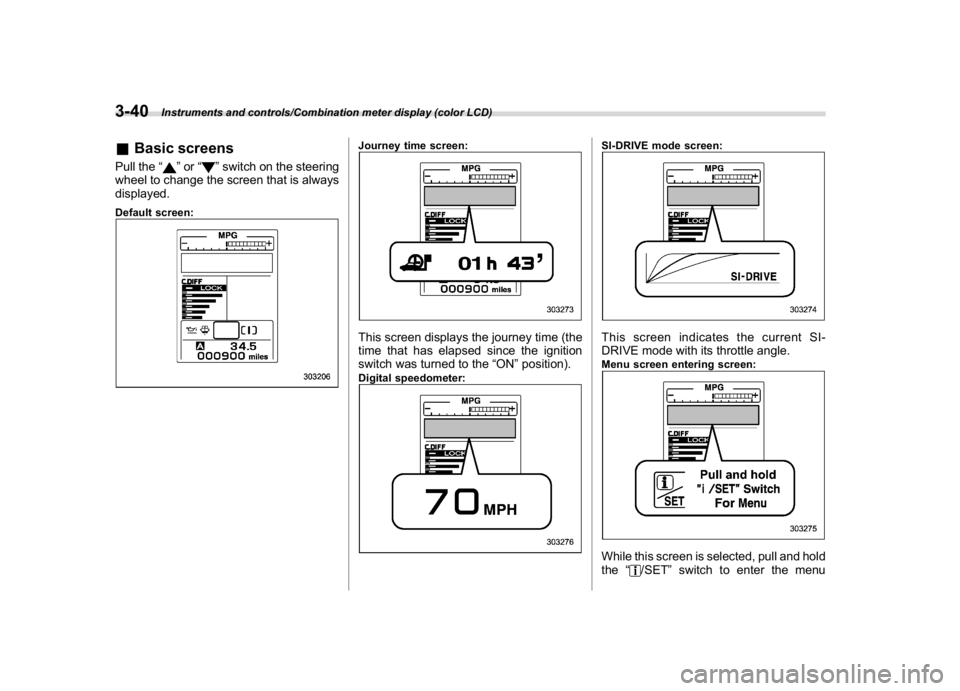
&Basic screensPull the“
”or“
”switch on the steering
wheel to change the screen that is always
displayed.
Default screen:
Journey time screen:This screen displays the journey time (the
time that has elapsed since the ignition
switch was turned to the“ON”position).Digital speedometer:
SI-DRIVE mode screen:This screen indicates the current SI-
DRIVE mode with its throttle angle.Menu screen entering screen:While this screen is selected, pull and hold
the“
/SET”switch to enter the menu
Instruments and controls/Combination meter display (color LCD)
3-40
Page 180 of 578

(185,1)
北米Model "A1700BE-B" EDITED: 2017/ 10/ 11
!Screen Settings
After entering the“Screen Settings”menu,
select one of the following menus.
!Welcome Good-bye Screen
The welcome screen/good-bye screens
can be activated or deactivated. Select
“On”to activate the screens. Select“Off”to
deactivate the screens.
!Gauge Initial Movement
The movement of the meter needles and
gauge needles that occurs when the
ignition switch is turned to the“ON”
position can be activated or deactivated.
Select“On”to activate. Select“Off”to
deactivate.
!Gear Position Indicator Setting
(MT models)
Display of the shift position indicator can
be activated or deactivated. Select“On”to
activate display of the shift position in-
dicator or“Off”to deactivate it.
!Languages
Operate the“
”or“
”switch on the
steering wheel to display the preferred
language. Then pull the“/SET”switch to
select the displayed language.!SRH (if equipped)
Select“On”to activate the Steering Re-
sponsive Headlight (SRH). Select“Off”to
deactivate the SRH.
!REV settings (STI)
NOTEIf the setting of the REV Indicator Light
is“Off”, the setting menus of the REV
Alarm Level Engine Speed and the REV
Buzzer are not displayed.
After entering the“REV settings”menu,
select any of the following menus.
!REV Indicator Light
Display of the REV indicator light can be
activated or deactivated. Select“On”to
activate display of the REV indicator light
or“Off”to deactivate it.
!REV Alarm Level Engine Speed
The alarm-level engine speed can be set
(in 100 rpm steps) within the range from
2,000 rpm to the red zone.
!REV Buzzer
The REV buzzer can be activated or
deactivated. Select“On”to activate the
REV buzzer or“Off”to deactivate it.!EyeSight (models with the EyeSight
system)
NOTERefer to the Owner’s Manual supple-
ment for the EyeSight system.
!BSD/RCTA (if equipped)
After entering the“BSD/RCTA”menu,
select the“Warning Volume”menu. You
can set the volume of the warning buzzer
for RCTA (Rear Cross Traffic Alert). You
can select“Max”,“Mid”,“Min”or“Off”.
!RAB (models with the EyeSight
system)
After entering the“RAB”menu, select one
of the following menus.NOTEFor details about the Reverse Auto-
matic Braking system, refer to“Re-
verse Automatic Braking System”F7-
66.
!Warning Volume
The volume of the warning sound that is
activated when the Reverse Automatic
Braking system is in operation can be set
in 3 stages (“Max”,“Mid”and“Min”).
–CONTINUED–
Instruments and controls/Combination meter display (color LCD)
3-43
3
Page 222 of 578
(227,1)
北米Model "A1700BE-B" EDITED: 2017/ 10/ 11
outside mirrors have been cleared and the
windshield wiper blade rubbers have been
deiced completely before that time, press
the control switch to turn them off. If
defrosting, defogging or deicing is not
complete, you have to press the control
switch to turn them on again.
It is possible for the defogger and deicer
system to be set to continuous operation
mode by a SUBARU dealer. Consult your
SUBARU dealer for details. Also, you can
change the setting using the multi-function
display (color LCD). For details, refer to
“Defogger setting”F3-61.
If the battery voltage drops below the
permissible level, continuous operation of
the defogger and deicer system is can-
celed and the system stops operating.
CAUTION
.To prevent the battery from being
discharged, do not operate the
defogger and deicer system con-
tinuously for any longer than
necessary.
.Do not use sharp instruments or
window cleaner containing abra-
sives to clean the inner surface of
the rear window. They may da-
mage the conductors printed onthe window.
NOTE.Turn on the defogger and deicer
system if the wipers are frozen to the
windshield.
.If the windshield is covered with
snow, remove the snow so that the
windshield wiper deicer works effec-
tively.
.While the defogger and deicer sys-
tem is in the continuous operation
mode:
–If the vehicle speed remains at 9
mph (15 km/h) or lower for 15
minutes, the windshield wiper dei-
cer system automatically stops op-
erating. However, the rear window
defogger system and outside mirror
defogger system maintain continu-
ous operation in this condition.
–If the vehicle battery voltage
drops below the permissible level,
continuous operation of the defog-
ger system and deicer system is
canceled and the system stops
operating.
Tilt/telescopic steering wheel
WARNING
.Do not adjust the steering wheel
tilt/telescopic position while driv-
ing. This may cause loss of
vehicle control and result in per-
sonal injury.
.If the lever cannot be raised to the
fixed position, adjust the steering
wheel again. It is dangerous to
drive without locking the steering
wheel. This may cause loss of
vehicle control and result in per-
sonal injury.
–CONTINUED–
Instruments and controls/Tilt/telescopic steering wheel
3-85
3
Page 223 of 578
(228,1)
北米Model "A1700BE-B" EDITED: 2017/ 10/ 11
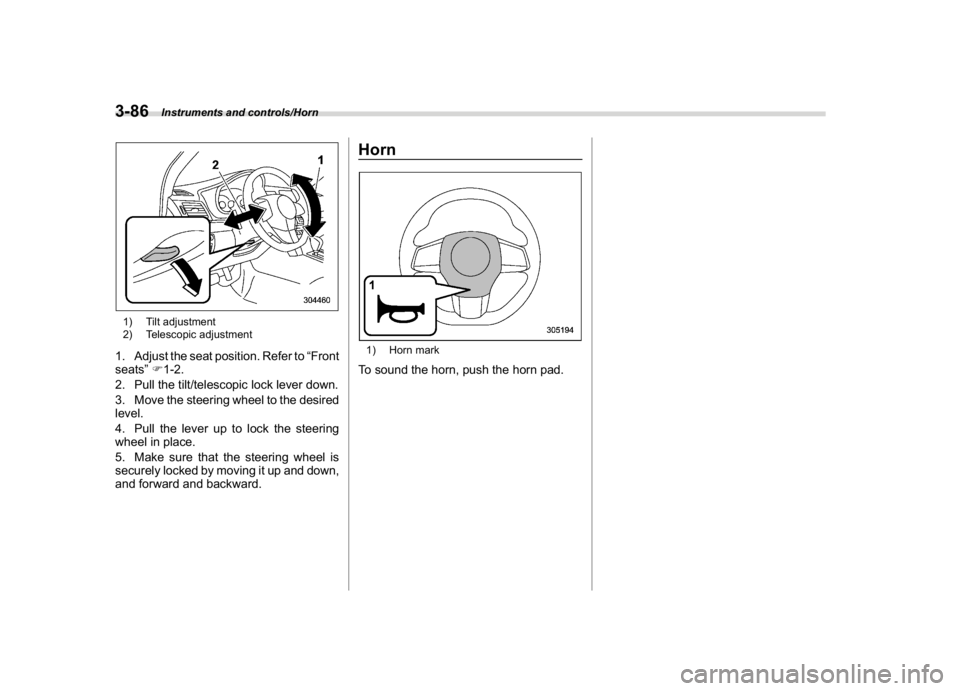
1) Tilt adjustment
2) Telescopic adjustment1. Adjust the seat position. Refer to“Front
seats”F1-2.
2. Pull the tilt/telescopic lock lever down.
3. Move the steering wheel to the desired
level.
4. Pull the lever up to lock the steering
wheel in place.
5. Make sure that the steering wheel is
securely locked by moving it up and down,
and forward and backward.
Horn1) Horn markTo sound the horn, push the horn pad.
Instruments and controls/Horn
3-86
Page 225 of 578
(232,1)
北米Model "A1700BE-B" EDITED: 2017/ 10/ 11
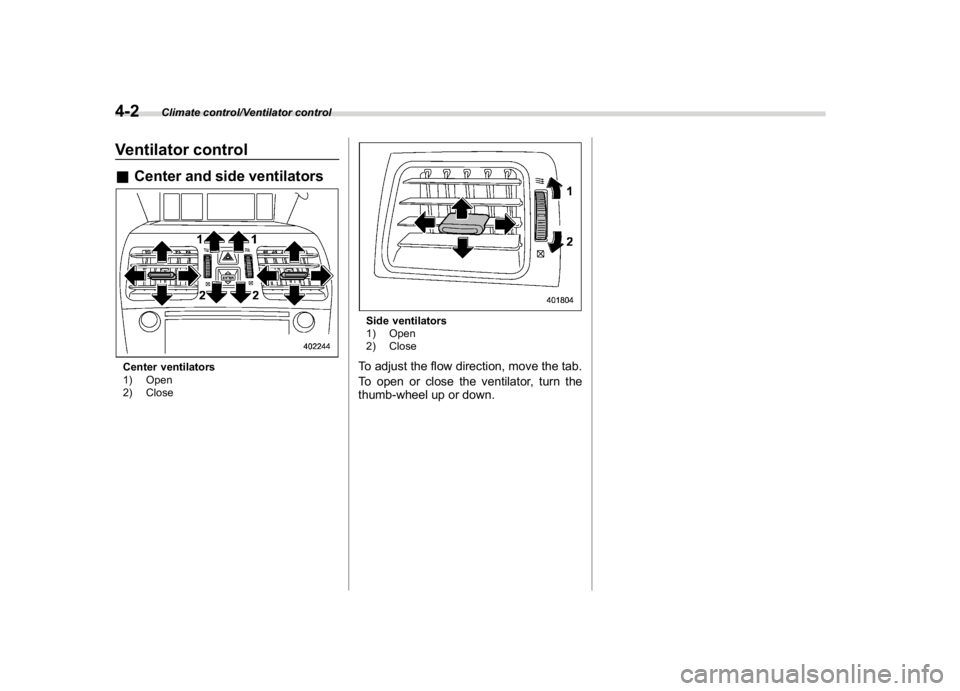
Ventilator control&Center and side ventilatorsCenter ventilators
1) Open
2) Close
Side ventilators
1) Open
2) CloseTo adjust the flow direction, move the tab.
To open or close the ventilator, turn the
thumb-wheel up or down.
Climate control/Ventilator control
4-2
Page 296 of 578
(305,1)
北米Model "A1700BE-B" EDITED: 2017/ 10/ 11
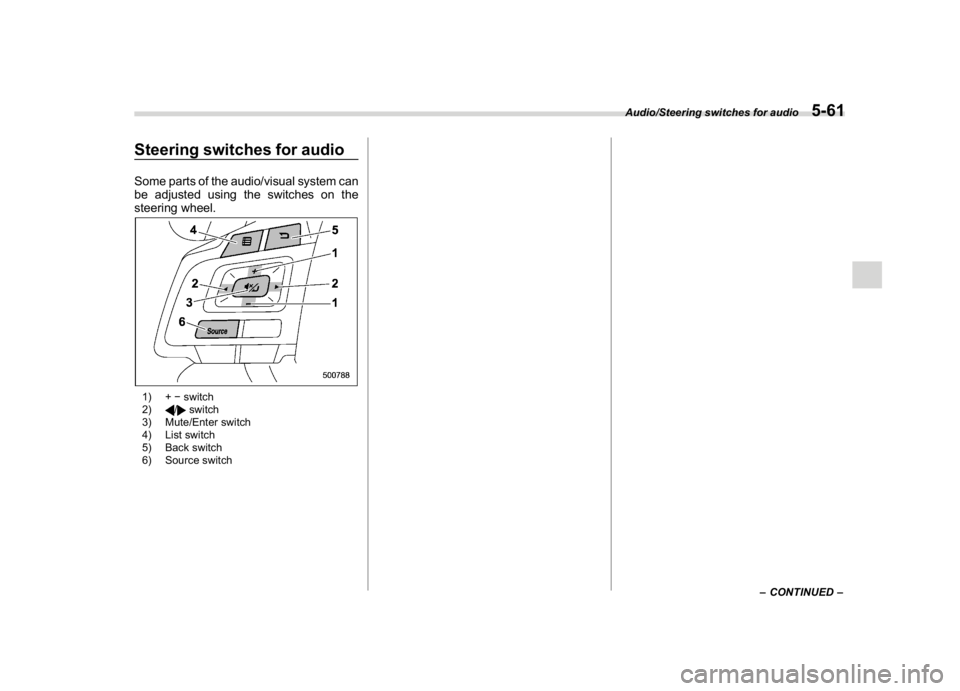
Steering switches for audioSome parts of the audio/visual system can
be adjusted using the switches on the
steering wheel.1) +switch
2)
/
switch
3) Mute/Enter switch
4) List switch
5) Back switch
6) Source switch
–CONTINUED–
Audio/Steering switches for audio
5-61
5
Page 299 of 578
(308,1)
北米Model "A1700BE-B" EDITED: 2017/ 10/ 11
Bluetooth
®settingsWARNING
Be sure to park the vehicle in a safe
location before connecting or oper-
ating a Bluetooth phone or audio
device. Failure to do so may result in
loss of control of your vehicle and
cause an accident or serious injury.&Regulatory informationThe Bluetooth
®word mark and logos are
registered trademarks owned by Bluetooth
SIG, Inc.
&Registering/connecting
Bluetooth
®device
You can register up to five devices,
regardless of whether they are Bluetooth
phones or audio devices.NOTE.Once the phone has been registered,
it is possible to use the hands-free
system or Bluetooth audio.
.Devices cannot be registered whiledriving.
!Registering a Bluetooth phone for
the first time
To use the hands-free system, it is
necessary to register a Bluetooth phone
with the system.
For details about registering a Bluetooth
device: Refer to“Registering a Bluetooth
Audio device for the first time”F5-65.
1. Turn the Bluetooth connection setting
of your cell phone on.
.This function is not available when
Bluetooth connection setting of your
cell phone is set to off.
2. Press the HOME button and select the
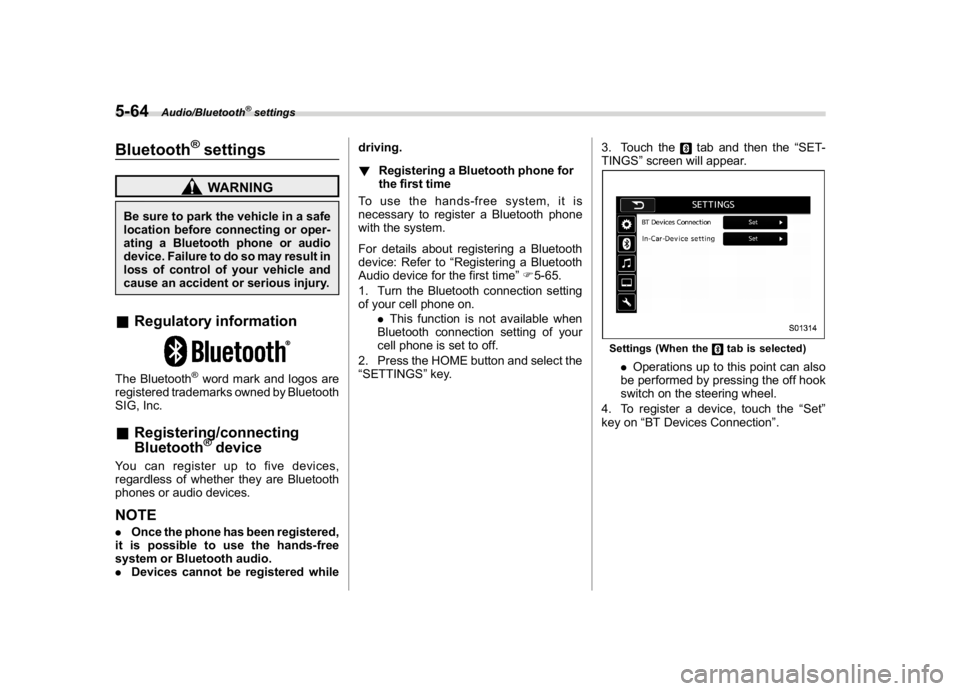
“SETTINGS”key.3. Touch the
tab and then the“SET-
TINGS”screen will appear.
Settings (When the
tab is selected)
.Operations up to this point can also
be performed by pressing the off hook
switch on the steering wheel.
4. To register a device, touch the“Set”
key on“BT Devices Connection”.
Audio/Bluetooth
®settings
5-64
Page 304 of 578
(313,1)
北米Model "A1700BE-B" EDITED: 2017/ 10/ 11
Hands-free phone systemThe hands-free system enables calls to be
made and received without having to take
your hands off the steering wheel.
This system supports Bluetooth. Bluetooth
is a wireless data system that enables cell
phones to be used without being con-
nected by a cable or placed in a cradle.
The operating procedure of the phone is
explained here.
WARNING
.While driving, do not use a cell
phone or connect the Bluetooth
phone. Doing so may result in
loss of control of your vehicle
and cause an accident or serious
injury.
.Your audio unit is fitted with
Bluetooth antennas. People with
implantable cardiac pacemakers,
cardiac resynchronization ther-
apy-pacemakers or implantable
cardioverter defibrillators should
maintain a reasonable distance
between themselves and the
Bluetooth antennas. The radio
waves may affect the operation
of such devices..Before using Bluetooth devices,
users of any electrical medical
device other than implantable
cardiac pacemakers, cardiac re-
synchronization therapy-pace-
makers or implantable cardiover-
ter defibrillators should consult
the manufacturer of the device
for information about its opera-
tion under the influence of radio
waves. Radio waves could have
unexpected effects on the opera-
tion of such medical devices.
CAUTION
Do not leave your cell phone in the
vehicle. The temperature inside may
rise to a level that could damage the
phone.NOTE.If your cell phone does not support
Bluetooth, this system cannot function.
.In the following conditions, the sys-
tem may not function:
–The cell phone is turned off.
–The current position is outside
the communication area.
–The cell phone is not connected.
–The cell phone has a low battery..When using the hands free function
and other Bluetooth functions at the
same time, the following problems may
occur:
–The Bluetooth connection may
be cut.
–Noise may be heard when playing
back voice with the Bluetooth func-
tion.
.The other party’s voice will be heard
from the front speakers. The audio/
visual system will be muted during
phone calls or when hands-free voice
commands are used.
.Talk alternately with the other party
on the phone. If both parties speak at
the same time, the other party may not
hear what has been said. (This is not a
malfunction.)
.Keep call volume down. Otherwise,
the other party’s voice may be audible
outside the vehicle and voice echo may
increase. When talking on the phone,
speak clearly towards the microphone.
.The other party may not hear you
clearly when:
–Driving on an unpaved road.
(Making excessive traffic noise.)
–Driving at high speeds.
–The moonroof or windows are
open.
–The air conditioning vents are
–CONTINUED–
Audio/Hands-free phone system
5-69
5
Page 306 of 578
(315,1)
北米Model "A1700BE-B" EDITED: 2017/ 10/ 11
&Registering/connecting a
Bluetooth phoneTo use the hands-free system for cell
phones, it is necessary to register a cell
phone with the system. Refer to“Register-
ing/connecting Bluetooth
®device”F5-64.
!Bluetooth phone condition display
The condition of the Bluetooth phone
appears on the upper right side of the
screen.
&Using the phone switch/mi-
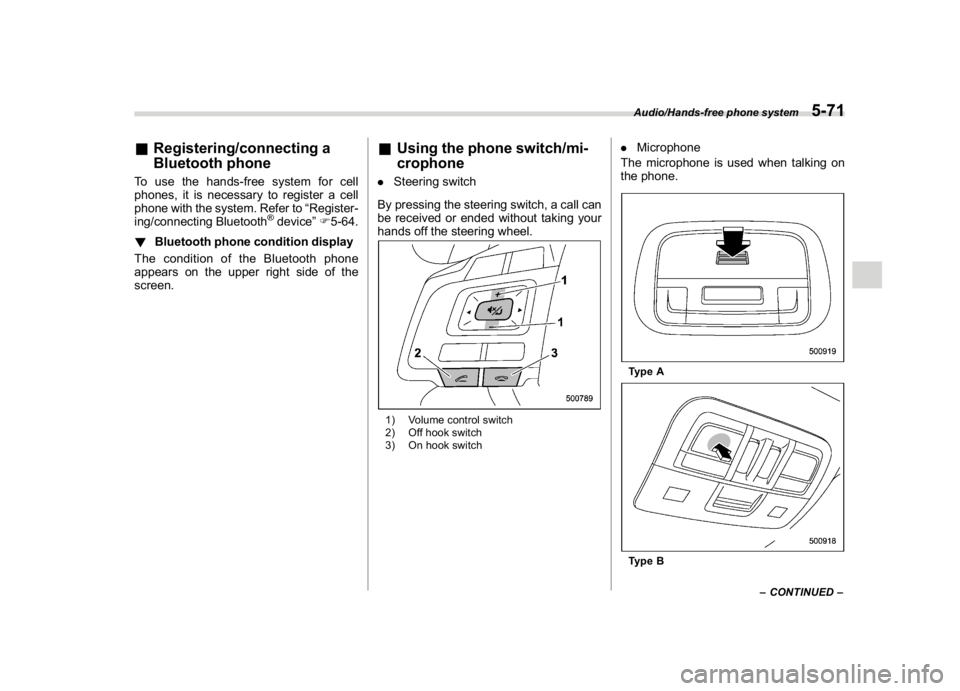
crophone.Steering switch
By pressing the steering switch, a call can
be received or ended without taking your
hands off the steering wheel.1) Volume control switch
2) Off hook switch
3) On hook switch
.Microphone
The microphone is used when talking on
the phone.Type AType B
–CONTINUED–Audio/Hands-free phone system
5-71
5
Page 307 of 578
(316,1)
北米Model "A1700BE-B" EDITED: 2017/ 10/ 11
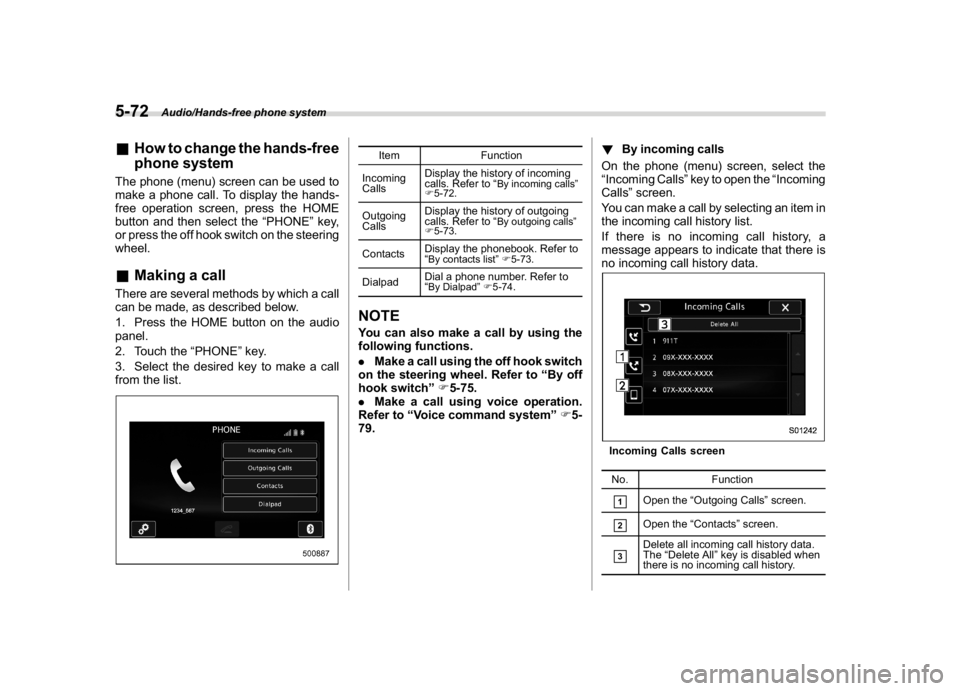
&How to change the hands-free
phone systemThe phone (menu) screen can be used to
make a phone call. To display the hands-
free operation screen, press the HOME
button and then select the“PHONE”key,
or press the off hook switch on the steering
wheel.&Making a callThere are several methods by which a call
can be made, as described below.
1. Press the HOME button on the audio
panel.
2. Touch the“PHONE”key.
3. Select the desired key to make a call
from the list.
Item Function
Incoming
CallsDisplay the history of incoming
calls. Refer to“
By incoming calls”
F5-72.
Outgoing
CallsDisplay the history of outgoing
calls. Refer to“
By outgoing calls”
F5-73.
ContactsDisplay the phonebook. Refer to
“
By contacts list”F5-73.
DialpadDial a phone number. Refer to
“
By Dialpad”F5-74.
NOTEYou can also make a call by using the
following functions.
.Make a call using the off hook switch
on the steering wheel. Refer to“By off
hook switch”F5-75.
.Make a call using voice operation.
Refer to“Voice command system”F5-
79.!By incoming calls
On the phone (menu) screen, select the
“Incoming Calls”key to open the“Incoming
Calls”screen.
You can make a call by selecting an item in
the incoming call history list.
If there is no incoming call history, a
message appears to indicate that there is
no incoming call history data.
Incoming Calls screen
No. Function&1
Open the“Outgoing Calls”screen.
&2
Open the“Contacts”screen.
&3
Delete all incoming call history data.
The“Delete All”key is disabled when
there is no incoming call history.
Audio/Hands-free phone system
5-72