key SUBARU WRX 2018 Repair Manual
[x] Cancel search | Manufacturer: SUBARU, Model Year: 2018, Model line: WRX, Model: SUBARU WRX 2018Pages: 578, PDF Size: 33.21 MB
Page 191 of 578
(196,1)
北米Model "A1700BE-B" EDITED: 2017/ 10/ 11
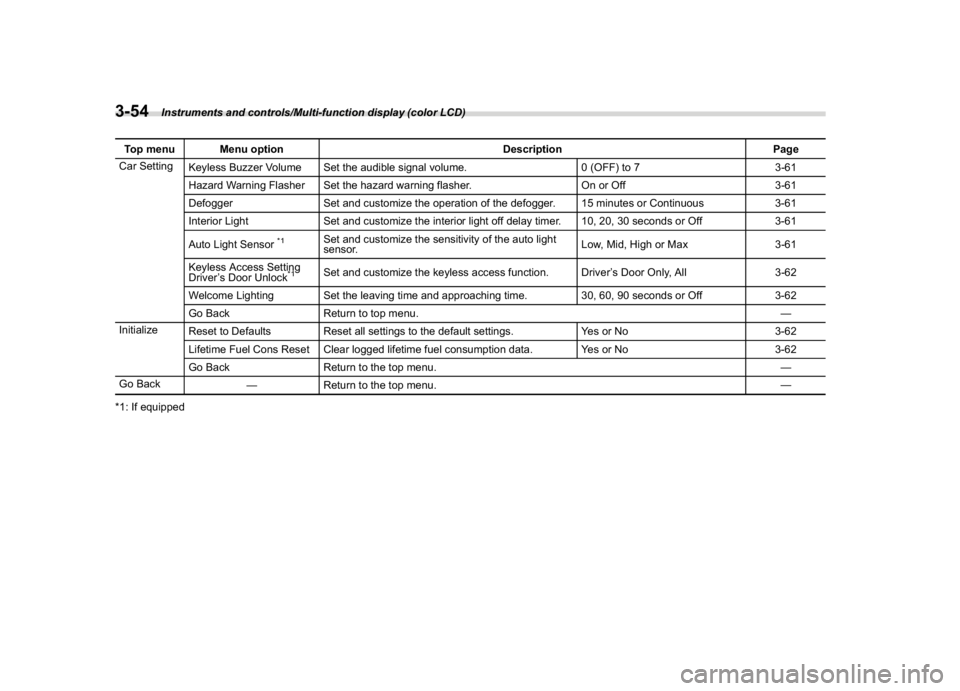
Top menu Menu option Description Page
Car Setting
Keyless Buzzer Volume Set the audible signal volume. 0 (OFF) to 7 3-61
Hazard Warning Flasher Set the hazard warning flasher. On or Off 3-61
Defogger Set and customize the operation of the defogger. 15 minutes or Continuous 3-61
Interior Light Set and customize the interior light off delay timer. 10, 20, 30 seconds or Off 3-61
Auto Light Sensor
*1
Set and customize the sensitivity of the auto light
sensor.Low, Mid, High or Max 3-61
Keyless Access Setting
Driver’s Door Unlock
*1
Set and customize the keyless access function. Driver’s Door Only, All 3-62
Welcome Lighting Set the leaving time and approaching time. 30, 60, 90 seconds or Off 3-62
Go Back Return to top menu.—
Initialize
Reset to Defaults Reset all settings to the default settings. Yes or No 3-62
Lifetime Fuel Cons Reset Clear logged lifetime fuel consumption data. Yes or No 3-62
Go Back Return to the top menu.—
Go Back
—Return to the top menu.—
*1: If equipped
Instruments and controls/Multi-function display (color LCD)
3-54
Page 198 of 578
(203,1)
北米Model "A1700BE-B" EDITED: 2017/ 10/ 11
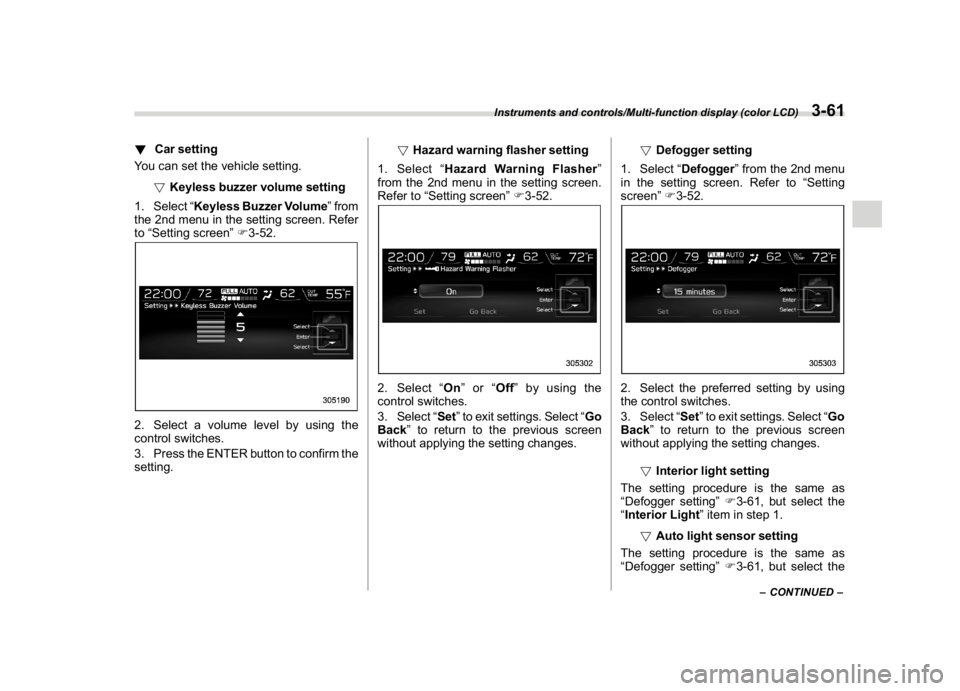
!Car setting
You can set the vehicle setting.
!Keyless buzzer volume setting
1. Select“Keyless Buzzer Volume”from
the 2nd menu in the setting screen. Refer
to“Setting screen”F3-52.2. Select a volume level by using the
control switches.
3. Press the ENTER button to confirm the
setting.!Hazard warning flasher setting
1. Select“Hazard Warning Flasher”
from the 2nd menu in the setting screen.
Refer to“Setting screen”F3-52.
2. Select“On”or“Off”by using the
control switches.
3. Select“Set”to exit settings. Select“Go
Back”to return to the previous screen
without applying the setting changes.!Defogger setting
1. Select“Defogger”from the 2nd menu
in the setting screen. Refer to“Setting
screen”F3-52.
2. Select the preferred setting by using
the control switches.
3. Select“Set”to exit settings. Select“Go
Back”to return to the previous screen
without applying the setting changes.
!Interior light setting
The setting procedure is the same as
“Defogger setting”F3-61, but select the
“Interior Light”item in step 1.
!Auto light sensor setting
The setting procedure is the same as
“Defogger setting”F3-61, but select the
–CONTINUED–
Instruments and controls/Multi-function display (color LCD)
3-61
3
Page 199 of 578
(204,1)
北米Model "A1700BE-B" EDITED: 2017/ 10/ 11
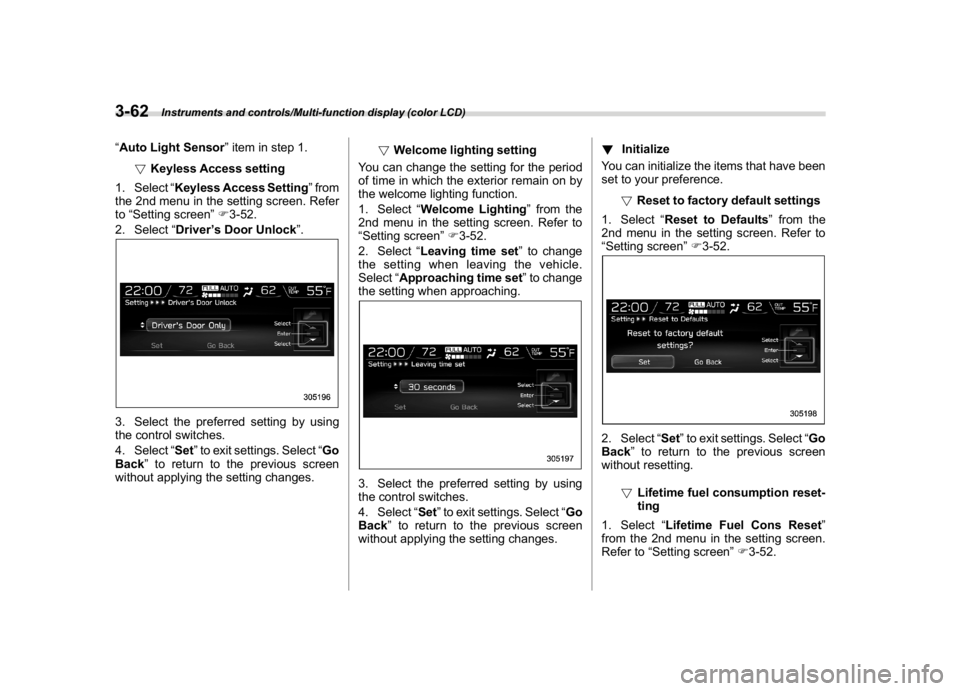
“Auto Light Sensor”item in step 1.
!Keyless Access setting
1. Select“Keyless Access Setting”from
the 2nd menu in the setting screen. Refer
to“Setting screen”F3-52.
2. Select“Driver’s Door Unlock”.3. Select the preferred setting by using
the control switches.
4. Select“Set”to exit settings. Select“Go
Back”to return to the previous screen
without applying the setting changes.!Welcome lighting setting
You can change the setting for the period
of time in which the exterior remain on by
the welcome lighting function.
1. Select“Welcome Lighting”from the
2nd menu in the setting screen. Refer to
“Setting screen”F3-52.
2. Select“Leaving time set”to change
the setting when leaving the vehicle.
Select“Approaching time set”to change
the setting when approaching.
3. Select the preferred setting by using
the control switches.
4. Select“Set”to exit settings. Select“Go
Back”to return to the previous screen
without applying the setting changes.!Initialize
You can initialize the items that have been
set to your preference.
!Reset to factory default settings
1. Select“Reset to Defaults”from the
2nd menu in the setting screen. Refer to
“Setting screen”F3-52.
2. Select“Set”to exit settings. Select“Go
Back”to return to the previous screen
without resetting.
!Lifetime fuel consumption reset-
ting
1. Select“Lifetime Fuel Cons Reset”
from the 2nd menu in the setting screen.
Refer to“Setting screen”F3-52.
Instruments and controls/Multi-function display (color LCD)
3-62
Page 200 of 578
(205,1)
北米Model "A1700BE-B" EDITED: 2017/ 10/ 11
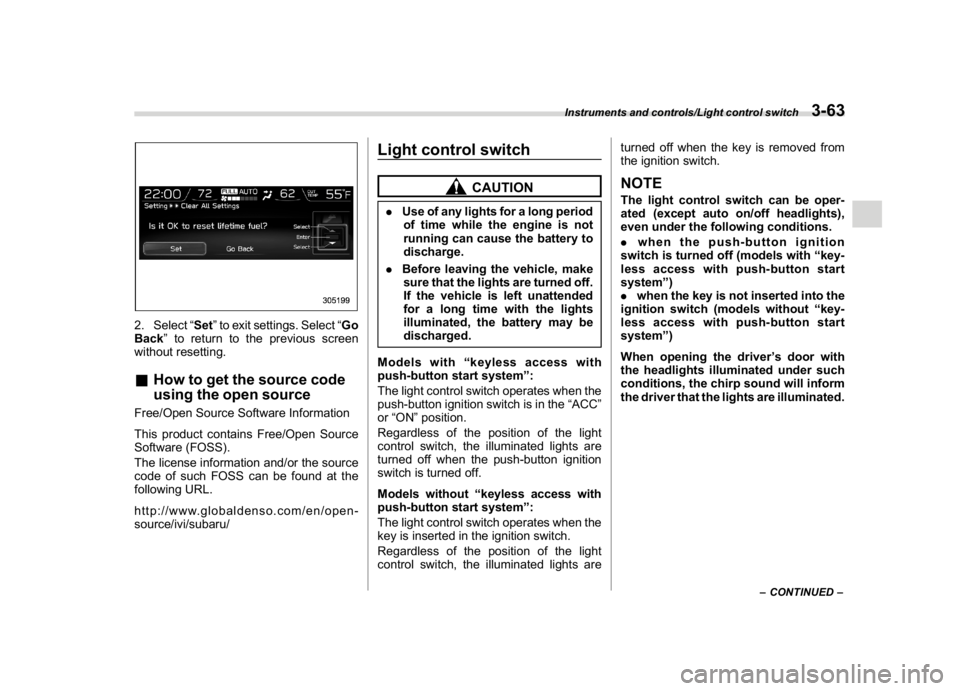
2. Select“Set”to exit settings. Select“Go
Back”to return to the previous screen
without resetting.&How to get the source code
using the open sourceFree/Open Source Software Information
This product contains Free/Open Source
Software (FOSS).
The license information and/or the source
code of such FOSS can be found at the
following URL.
http://www.globaldenso.com/en/open-
source/ivi/subaru/
Light control switch
CAUTION
.Use of any lights for a long period
of time while the engine is not
running can cause the battery to
discharge.
.Before leaving the vehicle, make
sure that the lights are turned off.
If the vehicle is left unattended
for a long time with the lights
illuminated, the battery may be
discharged.
Models with“keyless access with
push-button start system”:
The light control switch operates when the
push-button ignition switch is in the“ACC”
or“ON”position.
Regardless of the position of the light
control switch, the illuminated lights are
turned off when the push-button ignition
switch is turned off.
Models without“keyless access with
push-button start system”:
The light control switch operates when the
key is inserted in the ignition switch.
Regardless of the position of the light
control switch, the illuminated lights areturned off when the key is removed from
the ignition switch.
NOTEThe light control switch can be oper-
ated (except auto on/off headlights),
even under the following conditions.
.when the push-button ignition
switch is turned off (models with“key-
less access with push-button start
system”)
.when the key is not inserted into the
ignition switch (models without“key-
less access with push-button start
system”)
When opening the driver’s door with
the headlights illuminated under such
conditions, the chirp sound will inform
the driver that the lights are illuminated.
–CONTINUED–
Instruments and controls/Light control switch
3-63
3
Page 201 of 578
(206,1)
北米Model "A1700BE-B" EDITED: 2017/ 10/ 11
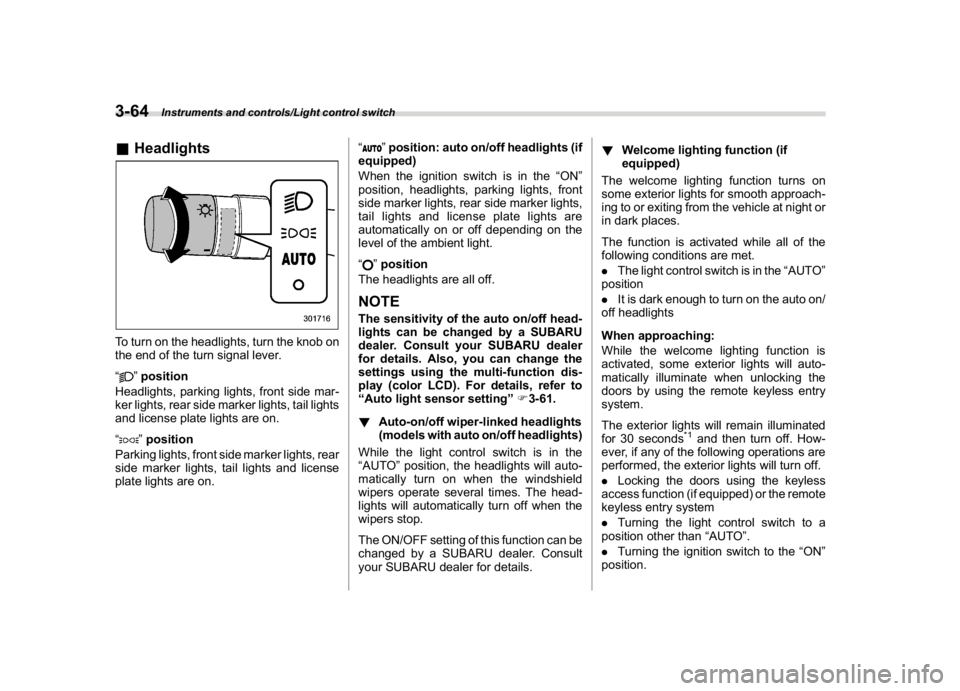
&HeadlightsTo turn on the headlights, turn the knob on
the end of the turn signal lever.
“
”position
Headlights, parking lights, front side mar-
ker lights, rear side marker lights, tail lights
and license plate lights are on.
“”position
Parking lights, front side marker lights, rear
side marker lights, tail lights and license
plate lights are on.“
”position: auto on/off headlights (if
equipped)
When the ignition switch is in the“ON”
position, headlights, parking lights, front
side marker lights, rear side marker lights,
tail lights and license plate lights are
automatically on or off depending on the
level of the ambient light.
“”position
The headlights are all off.
NOTEThe sensitivity of the auto on/off head-
lights can be changed by a SUBARU
dealer. Consult your SUBARU dealer
for details. Also, you can change the
settings using the multi-function dis-
play (color LCD). For details, refer to
“Auto light sensor setting”F3-61.
!Auto-on/off wiper-linked headlights
(models with auto on/off headlights)
While the light control switch is in the
“AUTO”position, the headlights will auto-
matically turn on when the windshield
wipers operate several times. The head-
lights will automatically turn off when the
wipers stop.
The ON/OFF setting of this function can be
changed by a SUBARU dealer. Consult
your SUBARU dealer for details.!Welcome lighting function (if
equipped)
The welcome lighting function turns on
some exterior lights for smooth approach-
ing to or exiting from the vehicle at night or
in dark places.
The function is activated while all of the
following conditions are met.
.The light control switch is in the“AUTO”
position
.It is dark enough to turn on the auto on/
off headlights
When approaching:
While the welcome lighting function is
activated, some exterior lights will auto-
matically illuminate when unlocking the
doors by using the remote keyless entry
system.
The exterior lights will remain illuminated
for 30 seconds
*1and then turn off. How-
ever, if any of the following operations are
performed, the exterior lights will turn off.
.Locking the doors using the keyless
access function (if equipped) or the remote
keyless entry system
.Turning the light control switch to a
position other than“AUTO”.
.Turning the ignition switch to the“ON”
position.
Instruments and controls/Light control switch
3-64
Page 202 of 578
(207,1)
北米Model "A1700BE-B" EDITED: 2017/ 10/ 11
When exiting:
While the welcome lighting function is
activated, some exterior lights will remain
illuminated even when either of the follow-
ing operations is performed.
.Turning the push-button ignition switch
to the“OFF”status (models with“keyless
access with push-button start system”)
.Pulling out the key from the ignition
switch (models without“keyless access
with push-button start system”)
The exterior lights will turn off under any of
the following conditions.
.3 minutes have passed since the
exterior lights were illuminated by the
welcome lighting function.
.30 seconds have passed since the door
was opened and closed.
*1
.The light control switch is turned to a
position other than“AUTO”.
.The locking procedures using the key-
less access function (if equipped) or the
remote keyless entry system is performed
twice. When performing the unlocking
procedure after performing the locking
procedure, perform the locking procedure
twice again.*1: The setting for the period of time in which the
exterior lights remain on by the welcome lighting
function can be changed by a SUBARU dealer.Contact your SUBARU dealer for details.
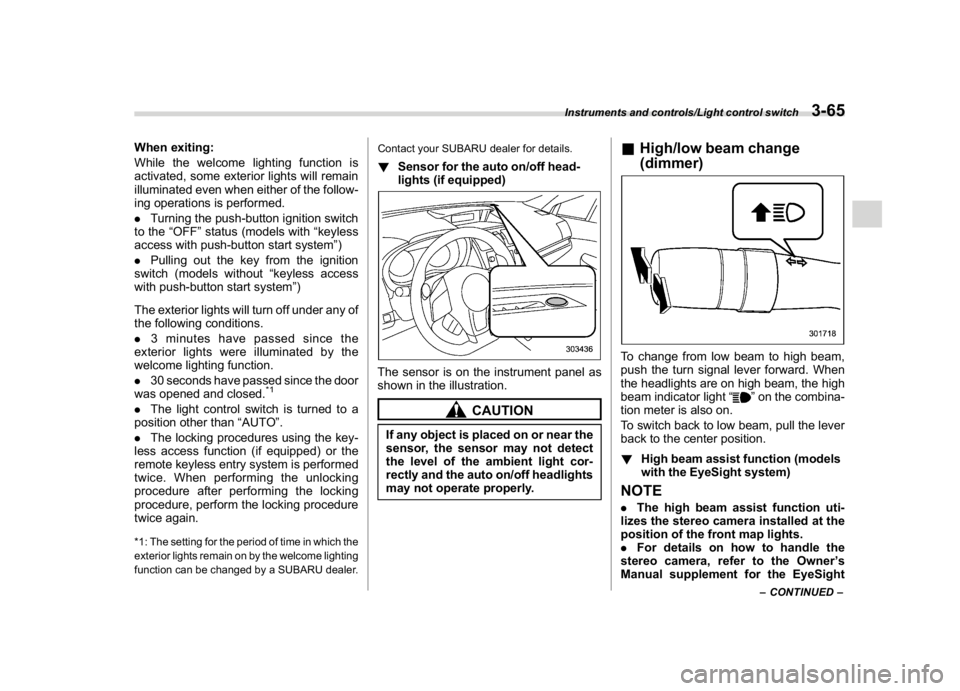
!Sensor for the auto on/off head-
lights (if equipped)The sensor is on the instrument panel as
shown in the illustration.
CAUTION
If any object is placed on or near the
sensor, the sensor may not detect
the level of the ambient light cor-
rectly and the auto on/off headlights
may not operate properly.
&High/low beam change
(dimmer)To change from low beam to high beam,
push the turn signal lever forward. When
the headlights are on high beam, the high
beam indicator light“
”on the combina-
tion meter is also on.
To switch back to low beam, pull the lever
back to the center position.
!High beam assist function (models
with the EyeSight system)
NOTE.The high beam assist function uti-
lizes the stereo camera installed at the
position of the front map lights.
.For details on how to handle the
stereo camera, refer to the Owner’s
Manual supplement for the EyeSight
–CONTINUED–
Instruments and controls/Light control switch
3-65
3
Page 249 of 578
(258,1)
北米Model "A1700BE-B" EDITED: 2017/ 10/ 11
&Basic information before use
WARNING
When the vehicle is stopped with the
engine running, always apply the
parking brake for safety. Failure to
do so may result in loss of control of
your vehicle and cause an accident
or serious injury.
CAUTION
.To prevent damaging the screen,
touch the screen keys with your
finger lightly.
.Wipe off fingerprints using a
glass cleaning cloth. Do not use
chemical cleaners to clean the
screen, as they may damage the
touch screen.!Touch screen gestures
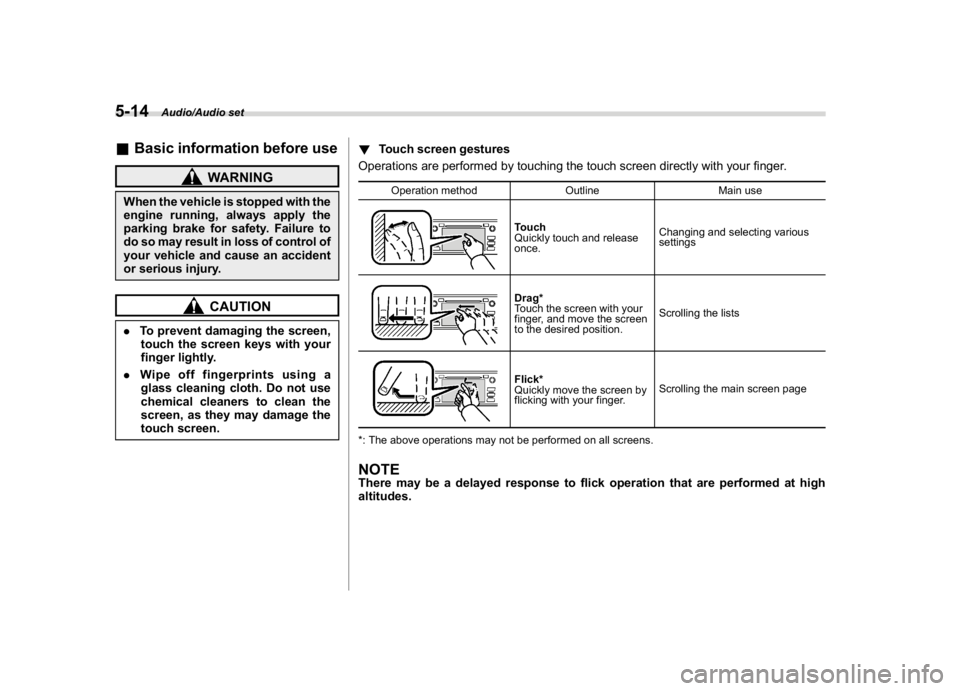
Operations are performed by touching the touch screen directly with your finger.
Operation method Outline Main use
Touch
Quickly touch and release
once.Changing and selecting various
settingsDrag*
Touch the screen with your
finger, and move the screen
to the desired position.Scrolling the listsFlick*
Quickly move the screen by
flicking with your finger.Scrolling the main screen page
*: The above operations may not be performed on all screens.
NOTEThere may be a delayed response to flick operation that are performed at high
altitudes.
Audio/Audio set
5-14
Page 250 of 578
(259,1)
北米Model "A1700BE-B" EDITED: 2017/ 10/ 11
!Touch screen operation
This system is operated mainly by the keys
on the screen.
When a screen key is touched, a beep
sounds. You can set the beep sound.
Refer to“Unit settings”F5-18.NOTE.If the system does not respond to
touching a screen key, move your
finger away from the screen and touch
it again.
.Grayed-out screen keys cannot be
operated.
.The displayed image may become
darker and moving images may be
slightly distorted when the screen is
cold.
.In extremely cold conditions, the
screen may not be displayed correctly.
Also, the screen keys may be less
responsive than usual when pressed.
.When you look at the screen through
polarized material such as polarized
sunglasses, the screen may be dark
and difficult to see. If so, look at the
screen from different angles, adjust the
screen settings or take off your sun-
glasses. Refer to“Unit settings”F5-18.!Entering letters and numbers/list
screen operation
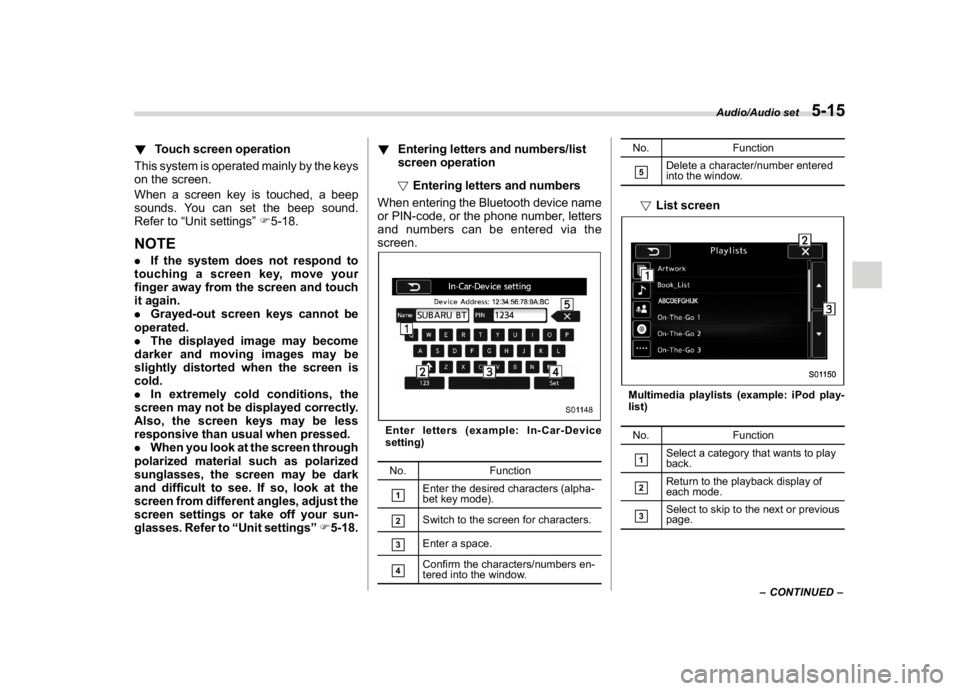
!Entering letters and numbers
When entering the Bluetooth device name
or PIN-code, or the phone number, letters
and numbers can be entered via the
screen.
Enter letters (example: In-Car-Device
setting)
No. Function&1
Enter the desired characters (alpha-
bet key mode).
&2
Switch to the screen for characters.
&3
Enter a space.
&4
Confirm the characters/numbers en-
tered into the window.No. Function
&5
Delete a character/number entered
into the window.
!List screenMultimedia playlists (example: iPod play-
list)
No. Function&1
Select a category that wants to play
back.
&2
Return to the playback display of
each mode.
&3
Select to skip to the next or previous
page.
–CONTINUED–
Audio/Audio set
5-15
5
Page 253 of 578
(262,1)
北米Model "A1700BE-B" EDITED: 2017/ 10/ 11
NOTE.If the audio control screen appears,
select the“Source”key on the audio
screen or press the AUDIO/TUNE knob
again.
.When you push the AUDIO/TUNE
knob while any screen other than the
audio control screen is displayed, the
display will return to the audio control
screen.
.When the AUDIO/TUNE knob is
pushed and held, the graphic equalizer
screen will be displayed. Refer to
““Graphic Equalizer””F5-22.
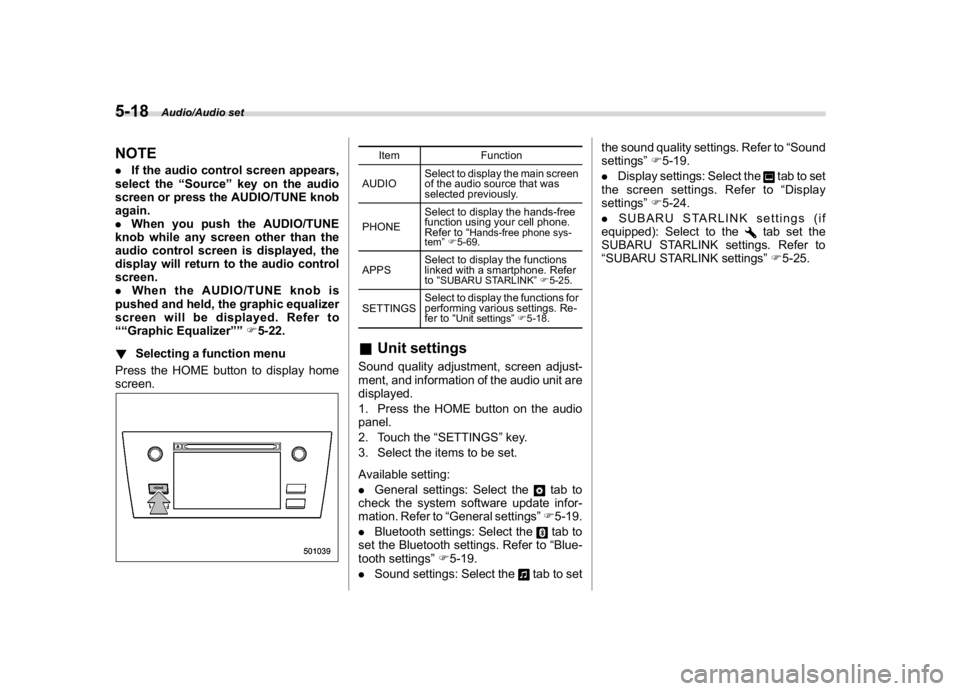
!Selecting a function menu
Press the HOME button to display home
screen.
Item Function
AUDIOSelect to display the main screen
of the audio source that was
selected previously.
PHONESelect to display the hands-free
function using your cell phone.
Refer to“
Hands-free phone sys-
tem”F5-69.
APPSSelect to display the functions
linked with a smartphone. Refer
to“
SUBARU STARLINK”F5-25.
SETTINGSSelect to display the functions for
performing various settings. Re-
fer to“
Unit settings”F5-18.
&Unit settingsSound quality adjustment, screen adjust-
ment, and information of the audio unit are
displayed.
1. Press the HOME button on the audio
panel.
2. Touch the“SETTINGS”key.
3. Select the items to be set.
Available setting:
.General settings: Select the
tab to
check the system software update infor-
mation. Refer to“General settings”F5-19.
.Bluetooth settings: Select thetab to
set the Bluetooth settings. Refer to“Blue-
tooth settings”F5-19.
.Sound settings: Select the
tab to setthe sound quality settings. Refer to“Sound
settings”F5-19.
.Display settings: Select the
tab to set
the screen settings. Refer to“Display
settings”F5-24.
.SUBARU STARLINK settings (if
equipped): Select to the
tab set the
SUBARU STARLINK settings. Refer to
“SUBARU STARLINK settings”F5-25.
Audio/Audio set
5-18
Page 256 of 578
(265,1)
北米Model "A1700BE-B" EDITED: 2017/ 10/ 11
!“Balance/Fader”
A good balance of the left and right stereo
channels and of the front and rear sound
levels is important for good quality audio
program listening.
Keep in mind that when listening to a
stereo recording or broadcast, changing
the right/left balance will increase the
volume of 1 group of sounds while
decreasing the volume of another.
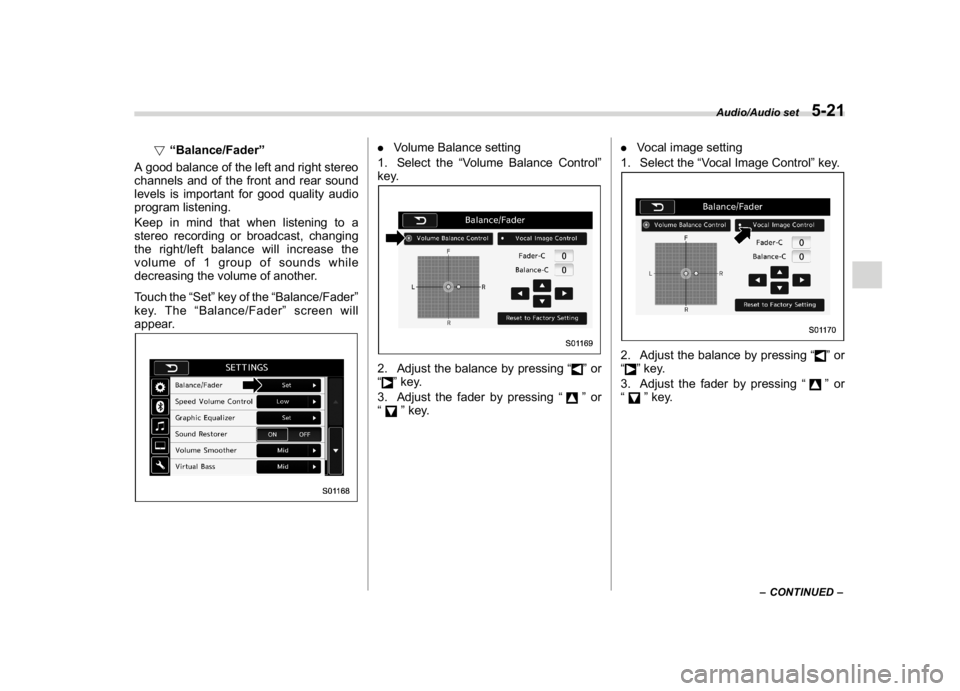
Touch the“Set”key of the“Balance/Fader”
key. The“Balance/Fader”screen will
appear.
.Volume Balance setting
1. Select the“Volume Balance Control”
key.2. Adjust the balance by pressing“
”or
“
”key.
3. Adjust the fader by pressing“
”or
“
”key..Vocal image setting
1. Select the“Vocal Image Control”key.
2. Adjust the balance by pressing“
”or
“
”key.
3. Adjust the fader by pressing“
”or
“
”key.
–CONTINUED–
Audio/Audio set
5-21
5