warning light SUBARU WRX 2018 Manual PDF
[x] Cancel search | Manufacturer: SUBARU, Model Year: 2018, Model line: WRX, Model: SUBARU WRX 2018Pages: 578, PDF Size: 33.21 MB
Page 204 of 578

(209,1)
北米Model "A1700BE-B" EDITED: 2017/ 10/ 11
NOTE.You cannot lower the sensitivity of
the high beam assist function in the
following conditions.
–Cruise control or Adaptive Cruise
Control is in operation
–The EyeSight warning indicator
(yellow) is illuminated
.The sensitivity of the high beam
assist function returns to normal level
the next time the ignition switch is
turned to the“LOCK”/“OFF”position
and the engine is restarted.
!How to change the headlight
mode manually
Change to the low beam:
Return the turn signal lever to the center
position to turn off the high beam assist
function. Then the high beam assist
indicator will turn off.
Change to the high beam:
Turn the light control switch to the“
”
position to change the headlight mode to
the high beam.
At this time, the high beam assist function
will turn off, the high beam assist indicator
will turn off and the high beam indicator
light will turn on.
NOTEAfter manually selecting the high beam
mode:
.If you want to turn on the high beam
assist function, return the light control
switch to the“AUTO”position.
.Turn the light control switch to the
“
”position to turn on the instrument
panel illumination, parking lights, front
side marker lights, rear side marker
lights, tail lights and license plate
lights.
!Tips for the high beam assist
function
.The high beam assist function recog-
nizes the condition surrounding the vehicle
based on the brightness of illumination
ahead of your vehicle, etc. Therefore, the
headlight mode may switch in some
situations that do not match to the driver’s
sense.
.A bicycle or cargo cycle may not be
detected.
.Under the following situations, the high
beam assist function may not work prop-
erly. As a result, the glare of the high beam
may disturb the oncoming vehicle or
vehicle ahead. Also, the low beam mode
may continue although there are no
oncoming vehicles and vehicles ahead.In the such cases, change the headlight
mode manually.
–In bad weather (fog, snow, sand
storm, heavy rain, etc.)
–When the windshield glass is dirty,
fogged, cracked or damaged
–Whenthestereocameraisde-
formed or the stereo camera lenses
are dirty
–If there are lights similar to the
headlights or the tail lights in the
surrounding area
–When an oncoming vehicle or ve-
hicle ahead is driven without its head-
lights and tail lights on
–If the headlights of an oncoming
vehicle or the tail lights of a vehicle
ahead are dirty or discolored, or if the
light beams are not aimed correctly
–When a rapid change of brightness
continues while driving
–When driving on a road with many
ups and downs, uneven surfaces or
curves
–When there are some objects that
reflect light strongly, such as a road
sign or a mirror in vehicle ahead
–When the rear part of the vehicle
ahead, such as a container, reflects
light strongly
–When the headlights of your vehicle
are damaged or dirty
–CONTINUED–
Instruments and controls/Light control switch
3-67
3
Page 206 of 578
(211,1)
北米Model "A1700BE-B" EDITED: 2017/ 10/ 11
&Daytime running light system
WARNING
When the daytime running lights are
illuminated, the tail lights do not
illuminate. When it becomes dark
outside, turn the light switch to the
“
”position to illuminate the head-
lights and tail lights. This will im-
prove visibility and allow other dri-
vers to see your vehicle more easily.
The daytime running lights will automati-
cally illuminate when the following condi-
tions are fulfilled.
.The engine is running.
.The parking brake is fully released.
.The light control switch is in the“AUTO”
(if equipped),“
”or off position.
.For CVT models, the select lever is in a
position other than the“P”position.
NOTEWhen the light switch is in the“
”
position, the instrument panel illumina-
tion, front side marker lights, tail lights
and license plate lights are also illumi-
nated.
Steering Responsive Head-
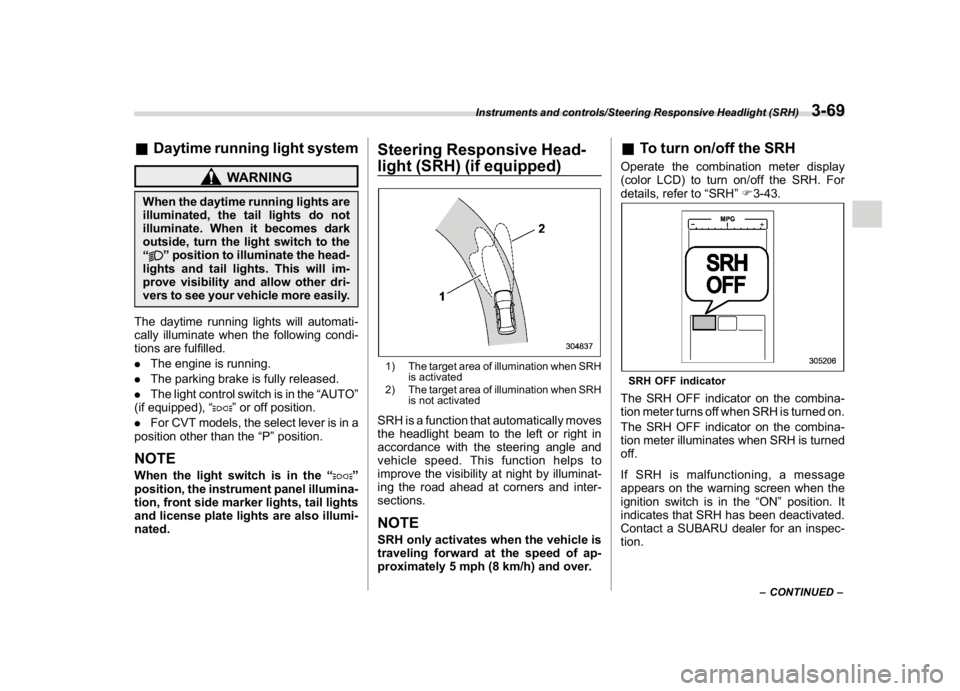
light (SRH) (if equipped)1) The target area of illumination when SRH
is activated
2) The target area of illumination when SRH
is not activatedSRH is a function that automatically moves
the headlight beam to the left or right in
accordance with the steering angle and
vehicle speed. This function helps to
improve the visibility at night by illuminat-
ing the road ahead at corners and inter-
sections.NOTESRH only activates when the vehicle is
traveling forward at the speed of ap-
proximately 5 mph (8 km/h) and over.
&To turn on/off the SRHOperate the combination meter display
(color LCD) to turn on/off the SRH. For
details, refer to“SRH”F3-43.SRH OFF indicatorThe SRH OFF indicator on the combina-
tion meter turns off when SRH is turned on.
The SRH OFF indicator on the combina-
tion meter illuminates when SRH is turned
off.
If SRH is malfunctioning, a message
appears on the warning screen when the
ignition switch is in the“ON”position. It
indicates that SRH has been deactivated.
Contact a SUBARU dealer for an inspec-
tion.
–CONTINUED–
Instruments and controls/Steering Responsive Headlight (SRH)
3-69
3
Page 209 of 578
(214,1)
北米Model "A1700BE-B" EDITED: 2017/ 10/ 11
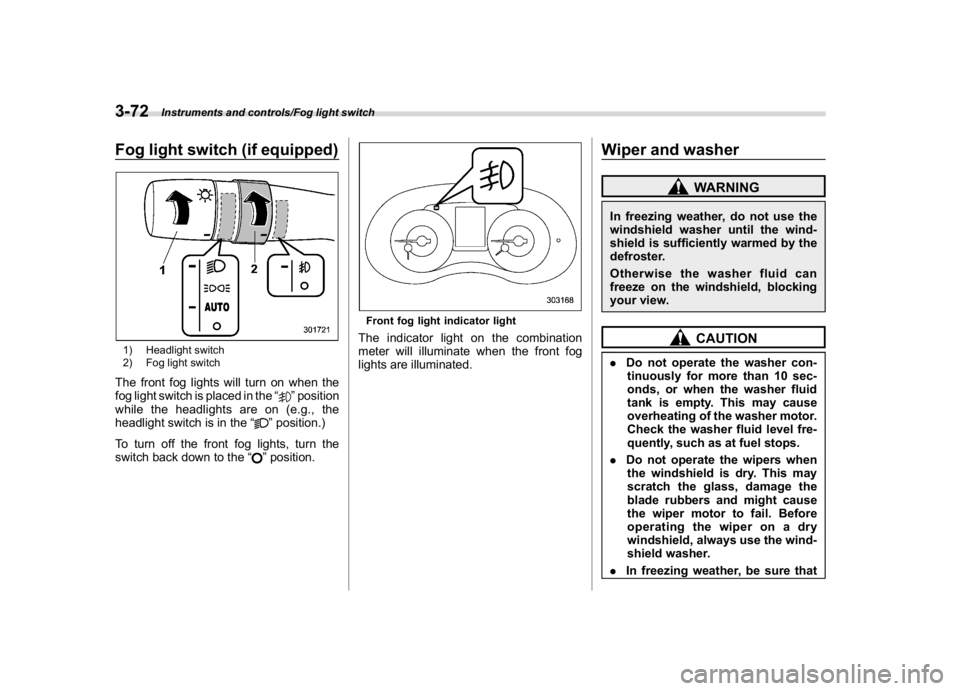
Fog light switch (if equipped)1) Headlight switch
2) Fog light switchThe front fog lights will turn on when the
fog light switch is placed in the“
”position
while the headlights are on (e.g., the
headlight switch is in the“
”position.)
To turn off the front fog lights, turn the
switch back down to the“”position.
Front fog light indicator lightThe indicator light on the combination
meter will illuminate when the front fog
lights are illuminated.
Wiper and washer
WARNING
In freezing weather, do not use the
windshield washer until the wind-
shield is sufficiently warmed by the
defroster.
Otherwise the washer fluid can
freeze on the windshield, blocking
your view.
CAUTION
.Do not operate the washer con-
tinuously for more than 10 sec-
onds, or when the washer fluid
tank is empty. This may cause
overheating of the washer motor.
Check the washer fluid level fre-
quently, such as at fuel stops.
.Do not operate the wipers when
the windshield is dry. This may
scratch the glass, damage the
blade rubbers and might cause
the wiper motor to fail. Before
operating the wiper on a dry
windshield, always use the wind-
shield washer.
.In freezing weather, be sure that
Instruments and controls/Fog light switch
3-72
Page 212 of 578
(217,1)
北米Model "A1700BE-B" EDITED: 2017/ 10/ 11
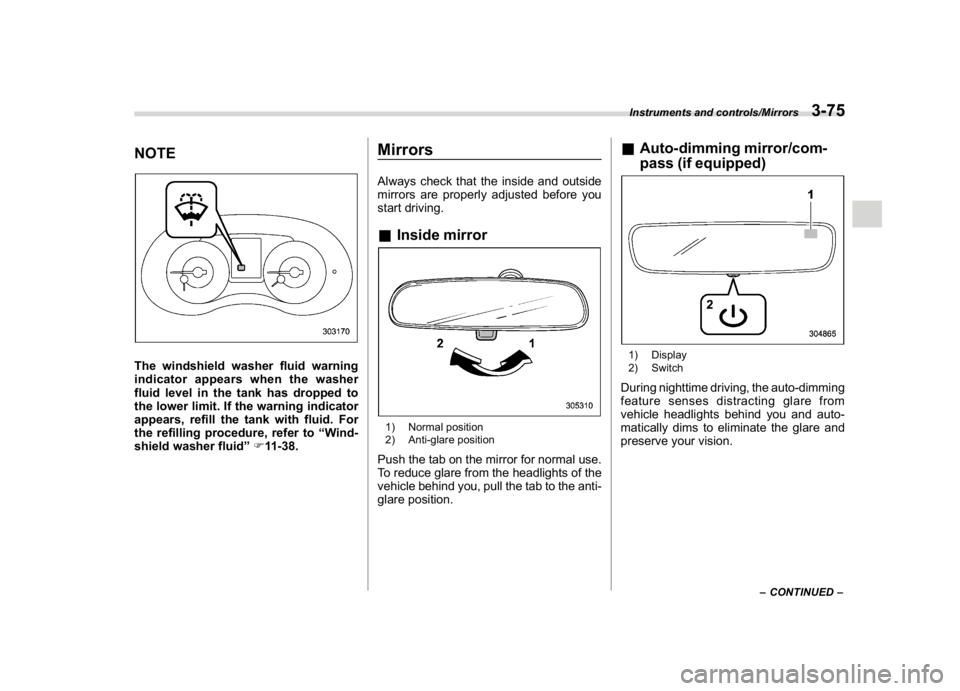
NOTEThe windshield washer fluid warning
indicator appears when the washer
fluid level in the tank has dropped to
the lower limit. If the warning indicator
appears, refill the tank with fluid. For
the refilling procedure, refer to“Wind-
shield washer fluid”F11-38.
MirrorsAlways check that the inside and outside
mirrors are properly adjusted before you
start driving.&Inside mirror1) Normal position
2) Anti-glare positionPush the tab on the mirror for normal use.
To reduce glare from the headlights of the
vehicle behind you, pull the tab to the anti-
glare position.
&Auto-dimming mirror/com-
pass (if equipped)1) Display
2) SwitchDuring nighttime driving, the auto-dimming
feature senses distracting glare from
vehicle headlights behind you and auto-
matically dims to eliminate the glare and
preserve your vision.
–CONTINUED–
Instruments and controls/Mirrors
3-75
3
Page 231 of 578
(238,1)
北米Model "A1700BE-B" EDITED: 2017/ 10/ 11
control dial
Press the“DUAL”button to cancel the
“DUAL”mode.
When the“DUAL”mode is selected:
Turn the driver’s side dial to set the driver’s
side temperature. Turn the front passen-
ger’s side dial to set the front passenger’s
side temperature.
When the“DUAL”mode is canceled:
Turn the driver’s side dial to set the desired
temperature.
When the“DUAL”mode is canceled, only
the driver’s side temperature is displayed.&Fan speed controlThe fan operates only when the ignition
switch is in the“ON”position. Turn the fan
speed control dial to select the preferred
fan speed.
&Air conditioner controlThe air conditioner operates only when the
engine is running.
Press the air conditioner button while the
fan is in operation to turn on the air
conditioner. When the air conditioner is
on, the“A/C”indicator light illuminates.
To turn off the air conditioner, press the
button again.NOTEFor efficient defogging or dehumidify-
ing in cold weather, turn on the air
conditioner. However, if the ambient
temperature decreases to approxi-
mately 328F(08C), the air conditioner
compressor will stop operating.&Air inlet selectionSelect the air inlet by pressing the air inlet
selection button.
ON position (recirculation):Interior air is
recirculated inside the vehicle. Press the
air inlet selection button to the ON position
for fast cooling with the air conditioner or
when driving on a dusty road.
OFF position (outside air):Outside air is
drawn into the passenger compartment.
Press the air inlet selection button to the
OFF position when the interior has cooledto a comfortable temperature and the road
is no longer dusty.
WARNING
Continued operation in the ON posi-
tion may fog up the windows. Switch
to the OFF position as soon as the
outside conditions are no longer
dusty.NOTEWhen the battery is disconnected or the
battery voltage drops, the air inlet
selection operation indicator light may
blink. This does not indicate a malfunc-
tion. However, if the indicator light
blinks every time you start the engine,
a malfunction may occur in the elec-
trical circuit. Have the vehicle in-
spected at the nearest SUBARU dealer.
Climate control/Manual climate control operation
4-8
Page 249 of 578
(258,1)
北米Model "A1700BE-B" EDITED: 2017/ 10/ 11
&Basic information before use
WARNING
When the vehicle is stopped with the
engine running, always apply the
parking brake for safety. Failure to
do so may result in loss of control of
your vehicle and cause an accident
or serious injury.
CAUTION
.To prevent damaging the screen,
touch the screen keys with your
finger lightly.
.Wipe off fingerprints using a
glass cleaning cloth. Do not use
chemical cleaners to clean the
screen, as they may damage the
touch screen.!Touch screen gestures
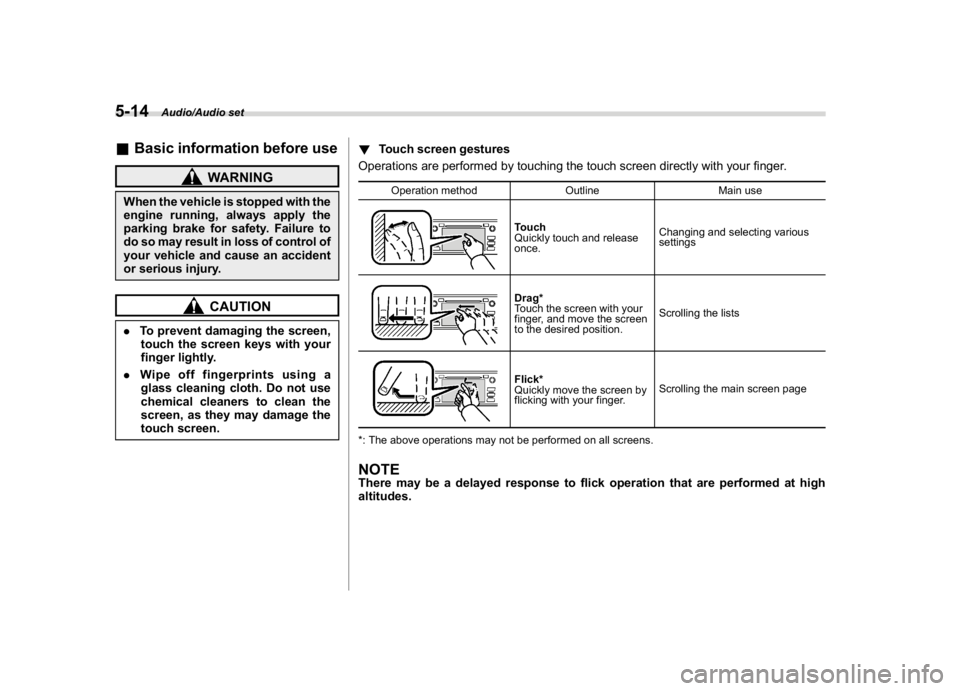
Operations are performed by touching the touch screen directly with your finger.
Operation method Outline Main use
Touch
Quickly touch and release
once.Changing and selecting various
settingsDrag*
Touch the screen with your
finger, and move the screen
to the desired position.Scrolling the listsFlick*
Quickly move the screen by
flicking with your finger.Scrolling the main screen page
*: The above operations may not be performed on all screens.
NOTEThere may be a delayed response to flick operation that are performed at high
altitudes.
Audio/Audio set
5-14
Page 259 of 578
(268,1)
北米Model "A1700BE-B" EDITED: 2017/ 10/ 11
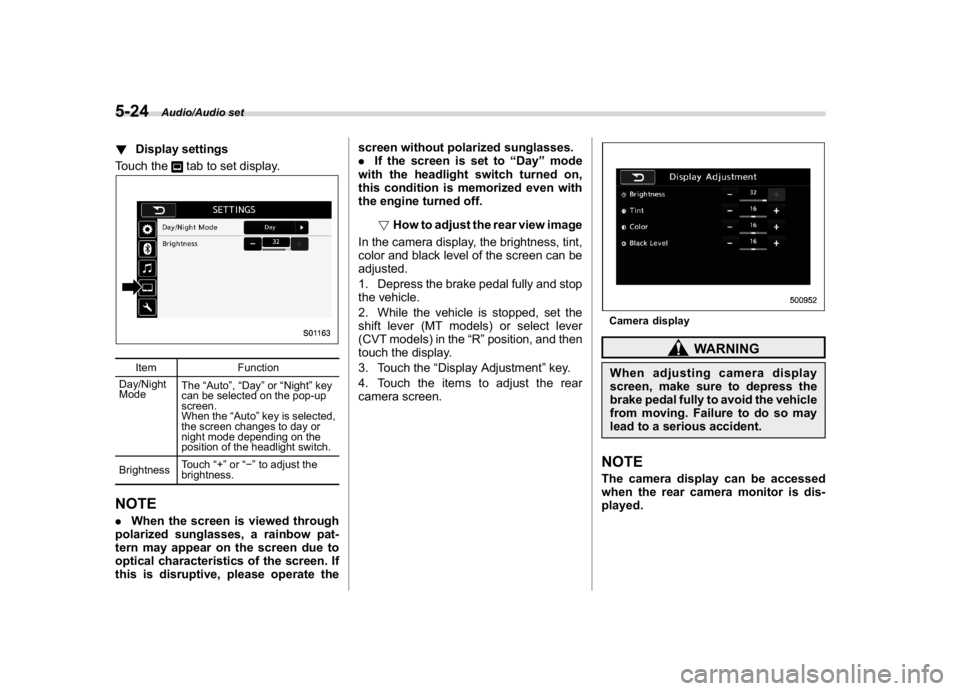
!Display settings
Touch the
tab to set display.
Item Function
Day/Night
ModeThe“Auto”,“Day”or“Night”key
can be selected on the pop-up
screen.
When the“Auto”key is selected,
the screen changes to day or
night mode depending on the
position of the headlight switch.
BrightnessTouch“+”or“”to adjust the
brightness.
NOTE.When the screen is viewed through
polarized sunglasses, a rainbow pat-
tern may appear on the screen due to
optical characteristics of the screen. If
this is disruptive, please operate thescreen without polarized sunglasses.
.If the screen is set to“Day”mode
with the headlight switch turned on,
this condition is memorized even with
the engine turned off.
!How to adjust the rear view image
In the camera display, the brightness, tint,
color and black level of the screen can be
adjusted.
1. Depress the brake pedal fully and stop
the vehicle.
2. While the vehicle is stopped, set the
shift lever (MT models) or select lever
(CVT models) in the“R”position, and then
touch the display.
3. Touch the“Display Adjustment”key.
4. Touch the items to adjust the rear
camera screen.
Camera display
WARNING
When adjusting camera display
screen, make sure to depress the
brake pedal fully to avoid the vehicle
from moving. Failure to do so may
lead to a serious accident.NOTEThe camera display can be accessed
when the rear camera monitor is dis-
played.
Audio/Audio set
5-24
Page 336 of 578
(347,1)
北米Model "A1700BE-B" EDITED: 2017/ 10/ 11
below the climate control dials and in the
center console. Electrical power (12V DC)
from the battery is available at any of the
outlets when the ignition switch is in either
the“ACC”or“ON”position.
You can use an in-vehicle electrical appli-
ance by connecting it to an outlet.
The maximum power rating of an appli-
ance that can be connected is120W.Do
not use an appliance which exceeds the
indicated wattage for each outlet.
When using appliances connected to two
or more outlets simultaneously, the total
power consumed by them must not ex-
ceed 120W.
CAUTION
.Do not attempt to use a cigarette
lighter in the accessory power
outlets.
.Do not place any foreign objects,
especially metal ones such as
coins or aluminum foil, into the
accessory power outlet. That
could cause a short circuit. Al-
ways put the cap on the acces-
sory power outlet when it is not in
use.
.Use only electrical appliances
which are designed for 12V DC.
The maximum power rating of anappliance that can be connected
is 120W. Do not use an appliance
which exceeds the indicated wat-
tage for each outlet.
When using appliances con-
nected to two or more outlets
simultaneously, the total power
consumed by them must not
exceed 120W. Overloading the
accessory power outlet can
cause a short circuit. Do not use
double adapters or more than
one electrical appliance.
.If the plug on your electric appli-
ance is either too loose or too
tight for the accessory power
outlet, this can result in a poor
contact or cause the plug to get
stuck. Only use plugs that fit
properly.
.Use of an electric appliance in the
accessory power outlet for a long
period of time while the engine is
not running can cause battery
discharge.
.Before driving your vehicle, make
sure that the plug and the cord on
your electrical appliance will not
interfere with your shifting gears
and operating the accelerator
and brake pedals. If they do, donot use the electrical appliance
while driving.
&Use with a cigarette lighter (if
equipped)To use the accessory power outlet as a
cigarette lighter socket, purchase the
cigarette lighter plug, which is an optional
accessory. A cigarette lighter plug is
available from your SUBARU dealer.
The cigarette lighter operates only when
the ignition switch is in the“ON”or“ACC”
position.
To use the cigarette lighter, push in the
knob and wait a few moments. It will
automatically spring up when ready for
use.
WARNING
To avoid being burned, never grasp
the lighter by the end with the
heating element. Doing so could
result in injury and could also da-
mage the heating element.
–CONTINUED–
Interior equipment/Accessory power outlets
6-9
6
Page 348 of 578
(359,1)
北米Model "A1700BE-B" EDITED: 2017/ 10/ 11
WARNING
Because the range of the image
captured by the camera is limited,
always check the traffic around the
vehicle directly with your eyes when
driving the vehicle.NOTE.The range of the displayed image
may differ depending on the vehicle
status or the road surface status.
.Because the Front View Monitor
system uses a specially designed lens,
the sense of distance in the displayed
image is different from the actual dis-
tance.
.The camera image may be difficult to
view in the following situations. This is
not a malfunction.
–Dark place (at night)
–High or low temperature around
the lens
–Water contacts lens or in high
humidity (rainy weather)
–There is foreign materials (such
as mud) around the camera
–Sunlight or headlight beam di-
rectly shines towards the camera
lens
.Under an artificial light such as afluorescent lamp, sodium-vapor lamp
or mercury lamp, the lighted portion
may look like it is flickering (flicker
phenomenon).
.While the display has cooled down,
the image may leave traces or become
darker than usual, causing a difficulty
in viewing the screen. Always check the
traffic around the vehicle directly with
your eyes while driving the vehicle.
.The following incidents should not
be deemed a malfunction.
–The camera lens may become
foggy when the humidity is high on
a rainy day.
–The light from a vehicle or build-
ing located ahead may be reflected
towards the camera image while
driving at night.
–In a dark place or while driving at
night, the camera image may be
adjusted to make noises less visi-
ble. Therefore, the image may look
like a monochromatic image or the
image colors may differ from the
actual colors. The camera image
may be deteriorated in regard to
sharpness at the center and four
corners of the screen. This is not a
malfunction.
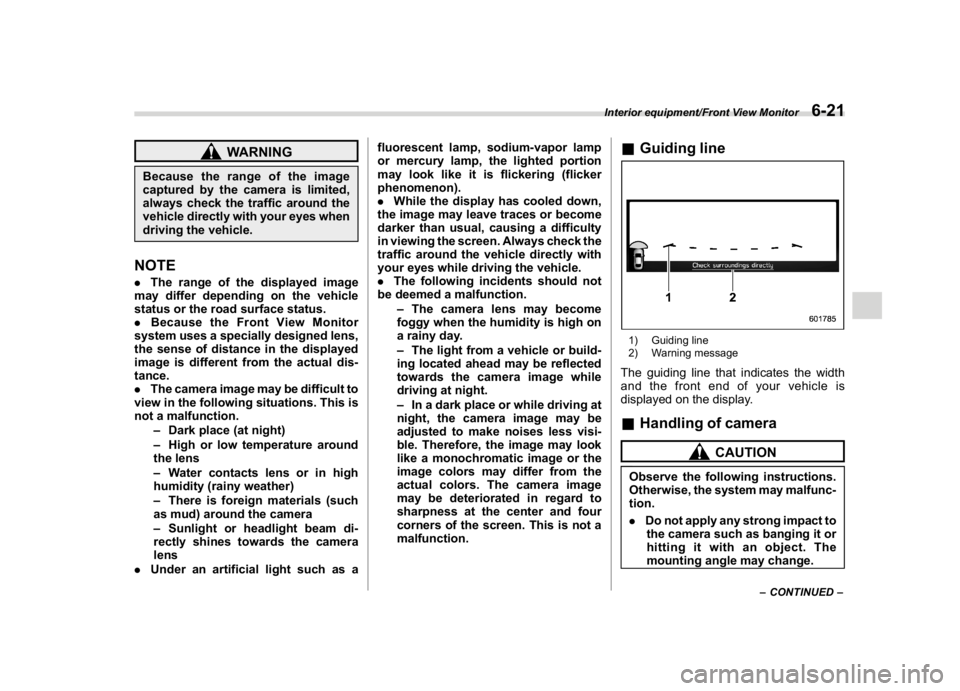
&Guiding line1) Guiding line
2) Warning messageThe guiding line that indicates the width
and the front end of your vehicle is
displayed on the display.&Handling of camera
CAUTION
Observe the following instructions.
Otherwise, the system may malfunc-
tion.
.Do not apply any strong impact to
the camera such as banging it or
hitting it with an object. The
mounting angle may change.
–CONTINUED–
Interior equipment/Front View Monitor
6-21
6
Page 350 of 578

(363,1)
北米Model "A1700BE-B" EDITED: 2017/ 10/ 11
Fuel..........................................................................7-3
Fuel requirements.................................................. 7-3
Fuel filler lid and cap............................................. 7-5
State emission testing (U.S.only).........................7-7
Preparing to drive...................................................7-8
Starting and stopping theengine..........................7-9
General precautions when starting/stopping
engine................................................................. 7-9
Models without push-button start systems............7-10
Models with push-button start systems ................. 7-11
Remote engine start system (dealer option)...........7-14
Manual transmission............................................7-16
Shifting speeds.....................................................7-17
Driving tips...........................................................7-18
Driver’s Control Center Differential
(C.DIFF/DCCD) (STI)...........................................7-18
To change mode of driver’s control center
differential..........................................................7-19
Auto mode............................................................7-20
Manual mode........................................................7-21
Temporary release................................................7-22
Continuously variable transmission....................7-23
Select lever...........................................................7-24
Selection of manual mode.....................................7-25
Shift lock function.................................................7-27
Driving tips...........................................................7-28
SI-DRIVE (if equipped)..........................................7-28
Intelligent (I) mode................................................7-28
Sport (S) mode.....................................................7-29
Sport Sharp (S#) mode..........................................7-29SI-DRIVE switch....................................................7-30
Limited slip differential (LSD)(STI).....................7-31
Power steering......................................................7-31
STI .......................................................................7-31
Except STI............................................................7-32
Braking..................................................................7-33
Braking tips..........................................................7-33
Brake system.......................................................7-33
Disc brake pad wear warning indicators................7-34
High performance brake system (STI)...................7-34
Red caliper with sports brake pad (if equipped) .... 7-34
ABS (Anti-lock BrakeSystem).............................7-35
ABS self-check.....................................................7-35
ABS warning light.................................................7-35
Electronic Brake Force Distribution (EBD)
system................................................................7-36
Steps to take if EBD system malfunctions .............7-36
Vehicle Dynamics Controlsystem......................7-37
Vehicle Dynamics Control system monitor ............7-39
Vehicle Dynamics Control OFF switch...................7-39
Tire pressure monitoring system (TPMS)
(U.S.-spec. models)...........................................7-40
Parking your vehicle............................................7-42
Parking brake (models without electronic parking
brake system)....................................................7-42
Electronic parking brake (models with electronic
parking brake system).......................................7-43
Parking tips..........................................................7-45
Auto Vehicle Holdfunction..................................7-46
To turn on/off the Auto Vehicle Hold function........7-47
To operate the Auto Vehicle Hold function ............7-48
Starting and operating
7