reset SUBARU WRX 2018 Owners Manual
[x] Cancel search | Manufacturer: SUBARU, Model Year: 2018, Model line: WRX, Model: SUBARU WRX 2018Pages: 578, PDF Size: 33.21 MB
Page 149 of 578

(154,1)
北米Model "A1700BE-B" EDITED: 2017/ 10/ 11
&ECO gaugeThe unit displayed varies depending on
the models.The ECO gauge shows the difference
between the average rate of fuel con-
sumption since the trip meter was last
reset and the current rate of fuel consump-
tion.
The ECO gauge indicates the current fuel
efficiency as shown in the following chart.Displayed
unitNeedle position
“+”side“-”side
MPG Better Poorer
l/100km Poorer Better
km/l BetterPoorer
NOTE.The ECO gauge shows only an
approximate indication.
.After resetting the trip meter, the
average rate of fuel consumption is not
shown until driving 0.6 mile (1 km). Until
that time, the ECO gauge does not
operate.
REV indicator light and buz-
zer (STI)1) REV indicator lightThe REV alarm system has the following
functions.
.When the engine speed reaches the
level that was previously set, the REV
indicator light illuminates to inform you. At
this time, a buzzer also sounds if the
buzzer setting is activated.
.Whenever the engine speed enters the
red zone of the tachometer, the REV
indicator light flashes.
Instruments and controls/REV indicator light and buzzer (STI)
3-12
Page 157 of 578
(162,1)
北米Model "A1700BE-B" EDITED: 2017/ 10/ 11
damage and a fast leak that causes
the tire to lose air rapidly. If you have
a flat tire, refer to“Flat tires”F9-5.
When a spare tire is mounted or a
wheel rim is replaced without the
original pressure sensor/transmitter
being transferred, the Low tire pres-
sure warning light will illuminate
steadily after blinking for approxi-
mately one minute. This indicates
the TPMS is unable to monitor all
four road wheels. Contact your
SUBARU dealer as soon as possible
for tire and sensor replacement and/
or system resetting.
If the light illuminates steadily after
blinking for approximately one min-
ute, promptly contact a SUBARU
dealer to have the system inspected.
CAUTION
The tire pressure monitoring system
is NOT a substitute for manually
checking tire pressure. The tire
pressure should be checked peri-
odically (at least monthly) using a
tire gauge. After any change to tire
pressure(s), the tire pressure mon-
itoring system will not re-check tire
inflation pressures until the vehicleis first driven to a vehicle speed of at
least 20 mph (32 km/h). After adjust-
ing the tire pressures, increase the
vehicle speed to at least 20 mph (32
km/h) to start the TPMS re-checking
of the tire inflation pressures. If the
tire pressures are now above the
severe low pressure threshold, the
low tire pressure warning light
should turn off a few minutes later.
Therefore, be sure to install the
specified size for the front and rear
tires.
&ABS warning light
CAUTION
.If any of the following conditions
occur, we recommend that you
have the ABS system repaired at
the first available opportunity by
your SUBARU dealer.
–The warning light does not
illuminate when the ignition
switch is turned to the“ON”
position.
–The warning light illuminates
when the ignition switch is
turned to the“ON”position,
but it does not turn off evenafter starting the vehicle.
–The warning light illuminates
while driving.
.When the warning light is on (and
the brake system warning light is
off), the ABS function shuts
down. However, the conventional
brake system continues to oper-
ate normally.
The ABS warning light illuminates together
with the brake system warning light if the
EBD system malfunctions. For further
details of the EBD system malfunction
warning, refer to“Brake system warning
light”F3-21.
NOTEIf the warning light behavior is as
described in the following conditions,
the ABS system may be considered
normal.
.The warning light illuminates when
the ignition switch is turned to the“ON”
position and turns off approximately 2
seconds after the engine has started.
.The warning light illuminates right
after the engine is started but turns off
immediately, remaining off.
.The warning light remains illumi-
nated after the engine has been started,
but it turns off while driving.
Instruments and controls/Warning and indicator lights
3-20
Page 187 of 578
(192,1)
北米Model "A1700BE-B" EDITED: 2017/ 10/ 11
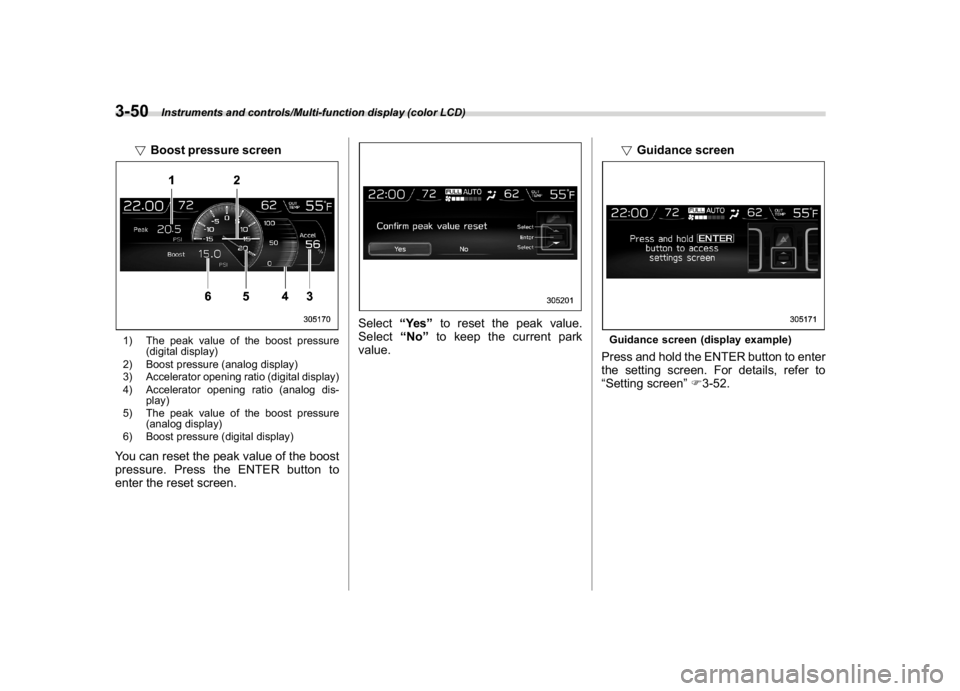
!Boost pressure screen1) The peak value of the boost pressure
(digital display)
2) Boost pressure (analog display)
3) Accelerator opening ratio (digital display)
4) Accelerator opening ratio (analog dis-
play)
5) The peak value of the boost pressure
(analog display)
6) Boost pressure (digital display)You can reset the peak value of the boost
pressure. Press the ENTER button to
enter the reset screen.
Select“Ye s”to reset the peak value.
Select“No”to keep the current park
value.!Guidance screen
Guidance screen (display example)Press and hold the ENTER button to enter
the setting screen. For details, refer to
“Setting screen”F3-52.
Instruments and controls/Multi-function display (color LCD)
3-50
Page 191 of 578

(196,1)
北米Model "A1700BE-B" EDITED: 2017/ 10/ 11
Top menu Menu option Description Page
Car Setting
Keyless Buzzer Volume Set the audible signal volume. 0 (OFF) to 7 3-61
Hazard Warning Flasher Set the hazard warning flasher. On or Off 3-61
Defogger Set and customize the operation of the defogger. 15 minutes or Continuous 3-61
Interior Light Set and customize the interior light off delay timer. 10, 20, 30 seconds or Off 3-61
Auto Light Sensor
*1
Set and customize the sensitivity of the auto light
sensor.Low, Mid, High or Max 3-61
Keyless Access Setting
Driver’s Door Unlock
*1
Set and customize the keyless access function. Driver’s Door Only, All 3-62
Welcome Lighting Set the leaving time and approaching time. 30, 60, 90 seconds or Off 3-62
Go Back Return to top menu.—
Initialize
Reset to Defaults Reset all settings to the default settings. Yes or No 3-62
Lifetime Fuel Cons Reset Clear logged lifetime fuel consumption data. Yes or No 3-62
Go Back Return to the top menu.—
Go Back
—Return to the top menu.—
*1: If equipped
Instruments and controls/Multi-function display (color LCD)
3-54
Page 199 of 578
(204,1)
北米Model "A1700BE-B" EDITED: 2017/ 10/ 11
“Auto Light Sensor”item in step 1.
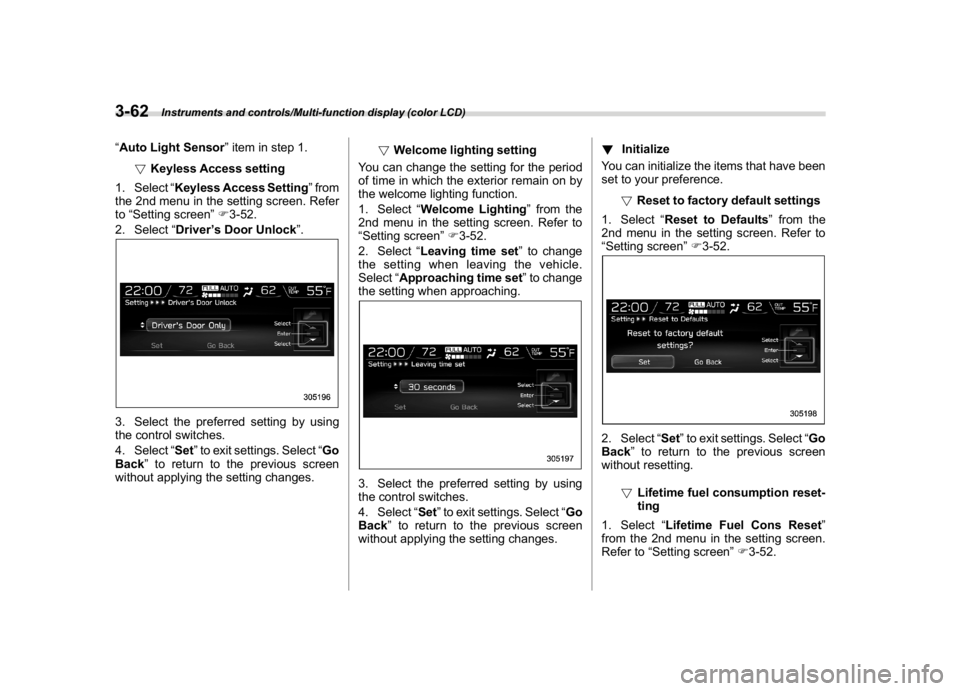
!Keyless Access setting
1. Select“Keyless Access Setting”from
the 2nd menu in the setting screen. Refer
to“Setting screen”F3-52.
2. Select“Driver’s Door Unlock”.3. Select the preferred setting by using
the control switches.
4. Select“Set”to exit settings. Select“Go
Back”to return to the previous screen
without applying the setting changes.!Welcome lighting setting
You can change the setting for the period
of time in which the exterior remain on by
the welcome lighting function.
1. Select“Welcome Lighting”from the
2nd menu in the setting screen. Refer to
“Setting screen”F3-52.
2. Select“Leaving time set”to change
the setting when leaving the vehicle.
Select“Approaching time set”to change
the setting when approaching.
3. Select the preferred setting by using
the control switches.
4. Select“Set”to exit settings. Select“Go
Back”to return to the previous screen
without applying the setting changes.!Initialize
You can initialize the items that have been
set to your preference.
!Reset to factory default settings
1. Select“Reset to Defaults”from the
2nd menu in the setting screen. Refer to
“Setting screen”F3-52.
2. Select“Set”to exit settings. Select“Go
Back”to return to the previous screen
without resetting.
!Lifetime fuel consumption reset-
ting
1. Select“Lifetime Fuel Cons Reset”
from the 2nd menu in the setting screen.
Refer to“Setting screen”F3-52.
Instruments and controls/Multi-function display (color LCD)
3-62
Page 200 of 578
(205,1)
北米Model "A1700BE-B" EDITED: 2017/ 10/ 11
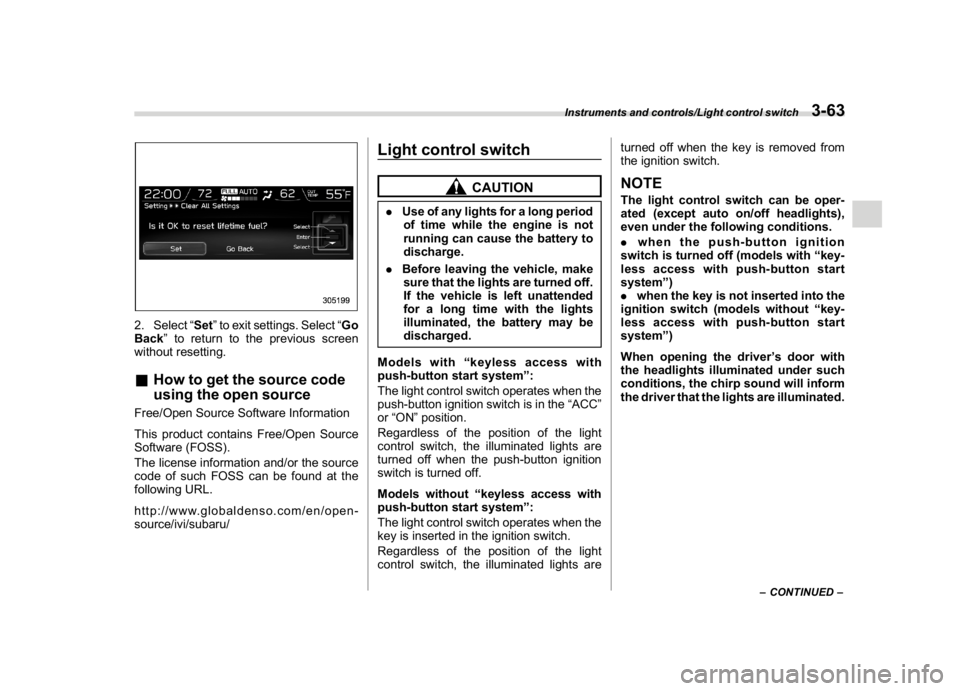
2. Select“Set”to exit settings. Select“Go
Back”to return to the previous screen
without resetting.&How to get the source code
using the open sourceFree/Open Source Software Information
This product contains Free/Open Source
Software (FOSS).
The license information and/or the source
code of such FOSS can be found at the
following URL.
http://www.globaldenso.com/en/open-
source/ivi/subaru/
Light control switch
CAUTION
.Use of any lights for a long period
of time while the engine is not
running can cause the battery to
discharge.
.Before leaving the vehicle, make
sure that the lights are turned off.
If the vehicle is left unattended
for a long time with the lights
illuminated, the battery may be
discharged.
Models with“keyless access with
push-button start system”:
The light control switch operates when the
push-button ignition switch is in the“ACC”
or“ON”position.
Regardless of the position of the light
control switch, the illuminated lights are
turned off when the push-button ignition
switch is turned off.
Models without“keyless access with
push-button start system”:
The light control switch operates when the
key is inserted in the ignition switch.
Regardless of the position of the light
control switch, the illuminated lights areturned off when the key is removed from
the ignition switch.
NOTEThe light control switch can be oper-
ated (except auto on/off headlights),
even under the following conditions.
.when the push-button ignition
switch is turned off (models with“key-
less access with push-button start
system”)
.when the key is not inserted into the
ignition switch (models without“key-
less access with push-button start
system”)
When opening the driver’s door with
the headlights illuminated under such
conditions, the chirp sound will inform
the driver that the lights are illuminated.
–CONTINUED–
Instruments and controls/Light control switch
3-63
3
Page 210 of 578

(215,1)
北米Model "A1700BE-B" EDITED: 2017/ 10/ 11
the blade rubbers are not frozen
to the windshield before switch-
ing on the wipers. Attempting to
operate the wiper with the blade
rubbers frozen to the window
glass could cause not only the
blade rubbers to be damaged but
also might cause the wiper motor
to fail. If the blade rubbers are
frozen to the window glass, be
sure to operate the defroster or
the windshield wiper deicer (if
equipped) before turning on the
wiper.
.If the wipers stop during opera-
tion because of ice or some other
obstruction on the window, this
might cause the wiper motor to
fail even if the wiper switch is
turned off. If this occurs,
promptly stop the vehicle in a
safe place, turn the ignition
switch to the“LOCK”/“OFF”po-
sition and clean the window glass
to allow proper wiper operation.
.Use clean water if windshield
washer fluid is unavailable. In
areas where water freezes in
winter, use SUBARU Windshield
Washer Fluid or the equivalent.
Refer to“Windshield washer
fluid”F11-38.Also, when driving the vehicle
when there are freezing tempera-
tures, use non-freezing type wi-
per blades.
.Do not clean the wiper blades
with gasoline or a solvent, such
as paint thinner or benzine. This
will cause deterioration of the
wiper blades.
NOTE.The windshield wiper motor is pro-
tected against overloads by a circuit
breaker. If the motor operates continu-
ously under an unusually heavy load,
the circuit breaker may trip to stop the
motor temporarily. If this happens, park
your vehicle in a safe place, turn off the
wiper switch, and wait for approxi-
mately 10 minutes. The circuit breaker
will reset itself, and the wipers will
again operate normally.
.Clean your blade rubbers and win-
dow glass periodically with a washer
solution to prevent streaking, and to
remove accumulations of road salt or
road film. Operate the windshield
washer for at least 1 second so that
washer solution will be sprinkled all
over the windshield.
.Grease, wax, insects or other mate-rial on the windshield or the blade
rubbers results in jerky wiper operation
and streaking on the glass. If you
cannot remove those streaks after
operating the washer or if the wiper
operation is jerky, clean the outer sur-
face of the windshield and the blade
rubbers using a sponge or soft cloth
with a neutral detergent or mild-abra-
sive cleaner. After cleaning, rinse the
window glass and blade rubbers with
clean water. The glass is clean if no
beads form on the glass when you rinse
with water.
.If you cannot eliminate the streaking
even after following this procedure,
replace the wiper blades (or blade
rubbers) with new ones. For replace-
ment instructions, refer to“Replace-
ment of wiper blades”F11-39.
–CONTINUED–
Instruments and controls/Wiper and washer
3-73
3
Page 254 of 578
(263,1)
北米Model "A1700BE-B" EDITED: 2017/ 10/ 11
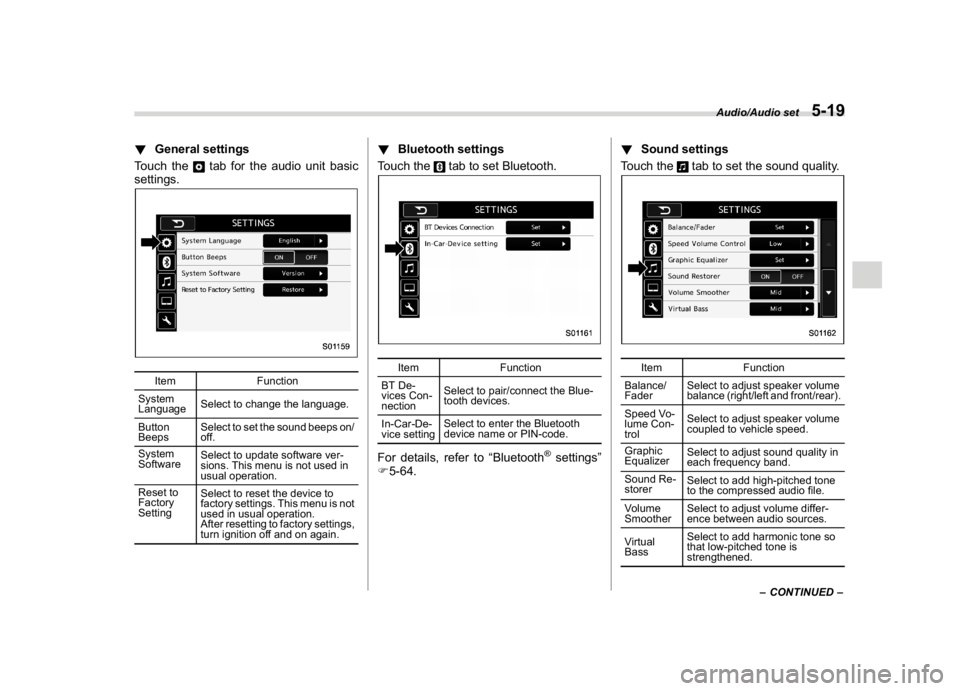
!General settings
Touch the
tab for the audio unit basic
settings.
Item Function
System
LanguageSelect to change the language.
Button
BeepsSelect to set the sound beeps on/
off.
System
SoftwareSelect to update software ver-
sions. This menu is not used in
usual operation.
Reset to
Factory
SettingSelect to reset the device to
factory settings. This menu is not
used in usual operation.
After resetting to factory settings,
turn ignition off and on again.
!Bluetooth settings
Touch the
tab to set Bluetooth.
Item Function
BT De-
vices Con-
nectionSelect to pair/connect the Blue-
tooth devices.
In-Car-De-
vice settingSelect to enter the Bluetooth
device name or PIN-code.
For details, refer to“Bluetooth
®settings”
F5-64.!Sound settings
Touch the
tab to set the sound quality.
Item Function
Balance/
FaderSelect to adjust speaker volume
balance (right/left and front/rear).
Speed Vo-
lume Con-
trolSelect to adjust speaker volume
coupled to vehicle speed.
Graphic
EqualizerSelect to adjust sound quality in
each frequency band.
Sound Re-
storerSelect to add high-pitched tone
to the compressed audio file.
Volume
SmootherSelect to adjust volume differ-
ence between audio sources.
Virtual
BassSelect to add harmonic tone so
that low-pitched tone is
strengthened.
–CONTINUED–
Audio/Audio set
5-19
5
Page 257 of 578
(266,1)
北米Model "A1700BE-B" EDITED: 2017/ 10/ 11
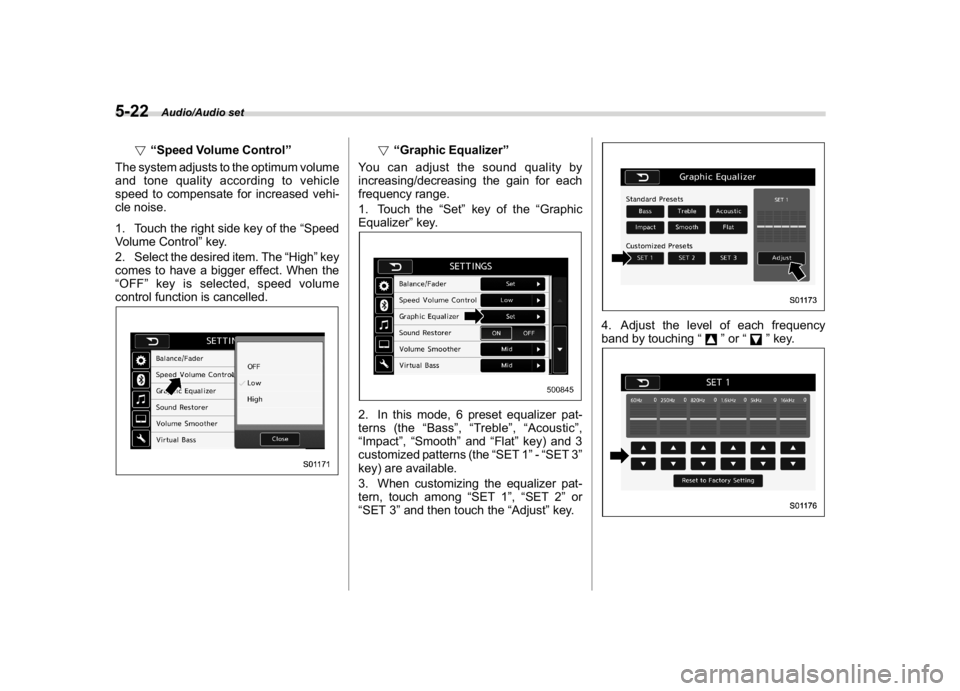
!“Speed Volume Control”
The system adjusts to the optimum volume
and tone quality according to vehicle
speed to compensate for increased vehi-
cle noise.
1. Touch the right side key of the“Speed
Volume Control”key.
2. Select the desired item. The“High”key
comes to have a bigger effect. When the
“OFF”key is selected, speed volume
control function is cancelled.
!“Graphic Equalizer”
You can adjust the sound quality by
increasing/decreasing the gain for each
frequency range.
1. Touch the“Set”key of the“Graphic
Equalizer”key.
2. In this mode, 6 preset equalizer pat-
terns (the“Bass”,“Treble”,“Acoustic”,
“Impact”,“Smooth”and“Flat”key) and 3
customized patterns (the“SET 1”-“SET 3”
key) are available.
3. When customizing the equalizer pat-
tern, touch among“SET 1”,“SET 2”or
“SET 3”and then touch the“Adjust”key.
4. Adjust the level of each frequency
band by touching“
”or“
”key.
Audio/Audio set
5-22
Page 262 of 578
(271,1)
北米Model "A1700BE-B" EDITED: 2017/ 10/ 11
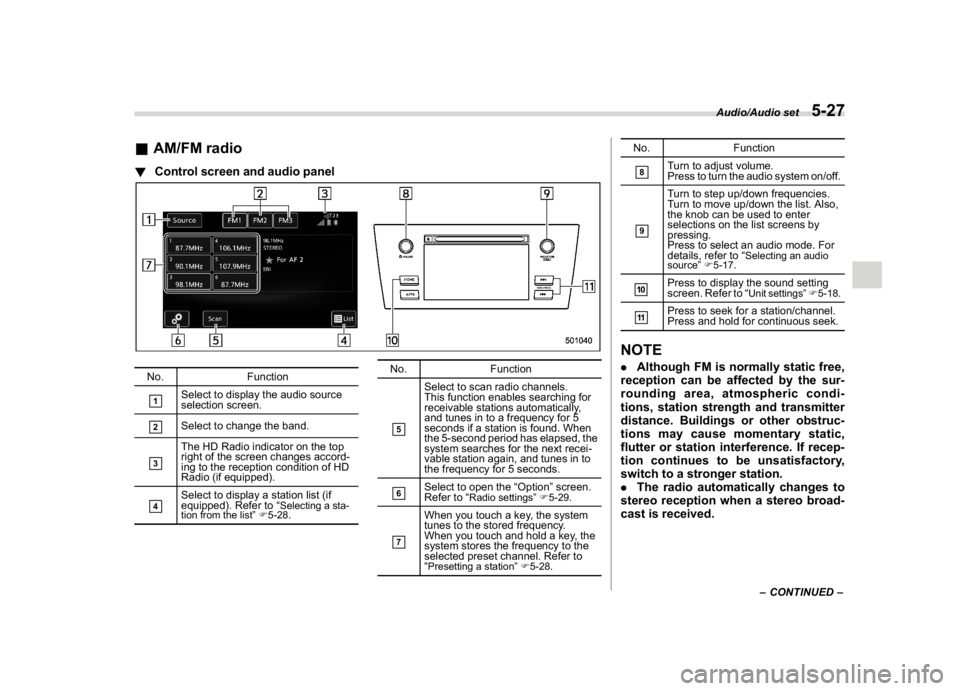
&AM/FM radio!Control screen and audio panelNo. Function&1
Select to display the audio source
selection screen.
&2
Select to change the band.
&3
The HD Radio indicator on the top
right of the screen changes accord-
ing to the reception condition of HD
Radio (if equipped).
&4
Select to display a station list (if
equipped). Refer to“
Selecting a sta-
tion from the list”F5-28.
No. Function&5
Select to scan radio channels.
This function enables searching for
receivable stations automatically,
and tunes in to a frequency for 5
seconds if a station is found. When
the 5-second period has elapsed, the
system searches for the next recei-
vable station again, and tunes in to
the frequency for 5 seconds.
&6
Select to open the“Option”screen.
Refer to“
Radio settings”F5-29.
&7
When you touch a key, the system
tunes to the stored frequency.
When you touch and hold a key, the
system stores the frequency to the
selected preset channel. Refer to
“Presetting a station”F5-28.
No. Function&8
Turn to adjust volume.
Press to turn the audio system on/off.
&9
Turn to step up/down frequencies.
Turn to move up/down the list. Also,
the knob can be used to enter
selections on the list screens by
pressing.
Press to select an audio mode. For
details, refer to“
Selecting an audio
source”F5-17.
&10
Press to display the sound setting
screen. Refer to“
Unit settings”F5-18.
&11
Press to seek for a station/channel.
Press and hold for continuous seek.
NOTE.Although FM is normally static free,
reception can be affected by the sur-
rounding area, atmospheric condi-
tions, station strength and transmitter
distance. Buildings or other obstruc-
tions may cause momentary static,
flutter or station interference. If recep-
tion continues to be unsatisfactory,
switch to a stronger station.
.The radio automatically changes to
stereo reception when a stereo broad-
cast is received.
–CONTINUED–
Audio/Audio set
5-27
5