lane assist SUBARU WRX 2020 Quick Guide
[x] Cancel search | Manufacturer: SUBARU, Model Year: 2020, Model line: WRX, Model: SUBARU WRX 2020Pages: 44, PDF Size: 15.19 MB
Page 21 of 44
4High Beams:Push the lever forward to change from low beam to high beam. Pull the
lever back to center to return to low beam. If equipped, this also activates the High
Beam Assist (HBA) system.
5Fog Lights:If equipped, rotate the dial to turn on the fog lights.
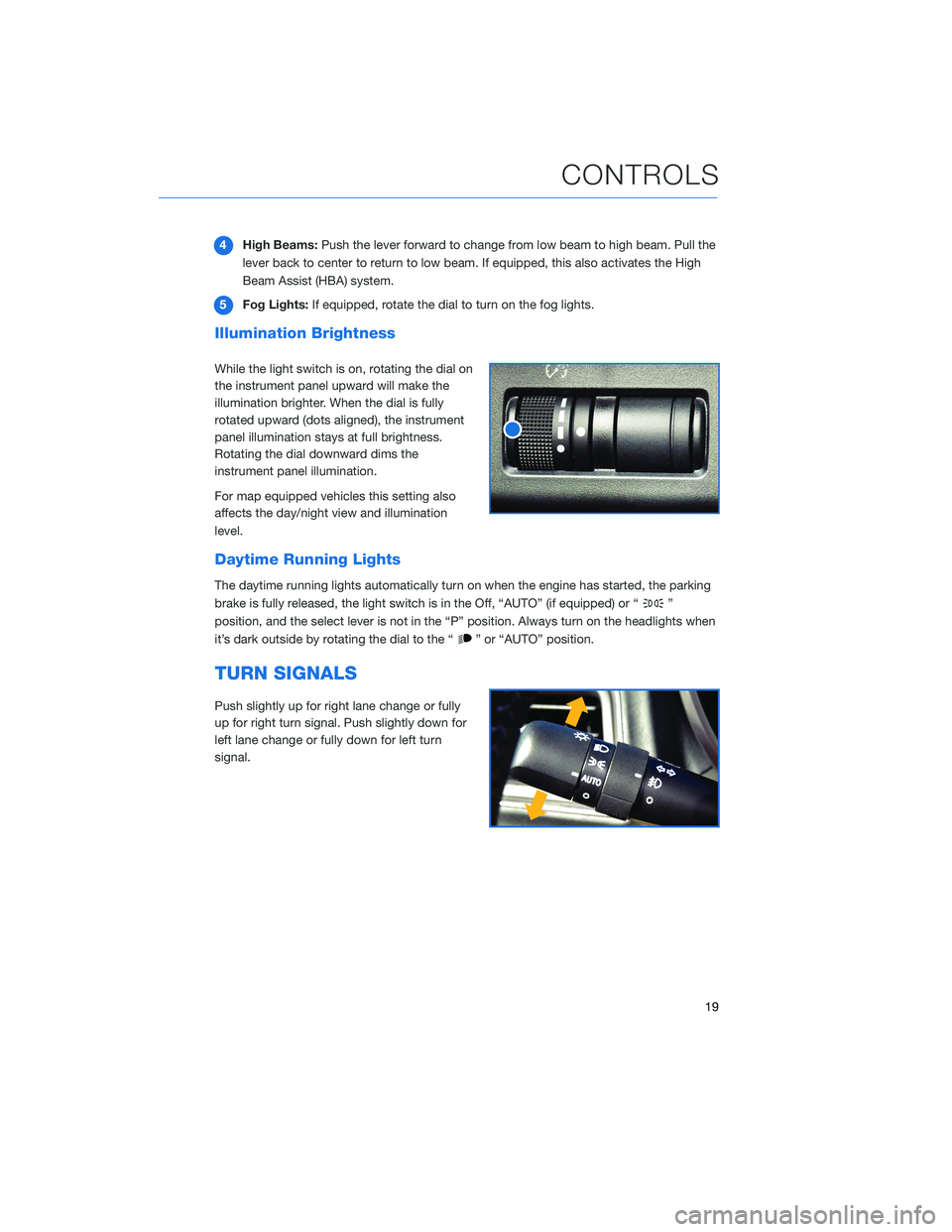
Illumination Brightness
While the light switch is on, rotating the dial on
the instrument panel upward will make the
illumination brighter. When the dial is fully
rotated upward (dots aligned), the instrument
panel illumination stays at full brightness.
Rotating the dial downward dims the
instrument panel illumination.
For map equipped vehicles this setting also
affects the day/night view and illumination
level.
Daytime Running Lights
The daytime running lights automatically turn on when the engine has started, the parking
brake is fully released, the light switch is in the Off, “AUTO” (if equipped) or “
”
position, and the select lever is not in the “P” position. Always turn on the headlights when
it’s dark outside by rotating the dial to the “
” or “AUTO” position.
TURN SIGNALS
Push slightly up for right lane change or fully
up for right turn signal. Push slightly down for
left lane change or fully down for left turn
signal.
CONTROLS
19
Page 23 of 44
OVERHEAD PANEL
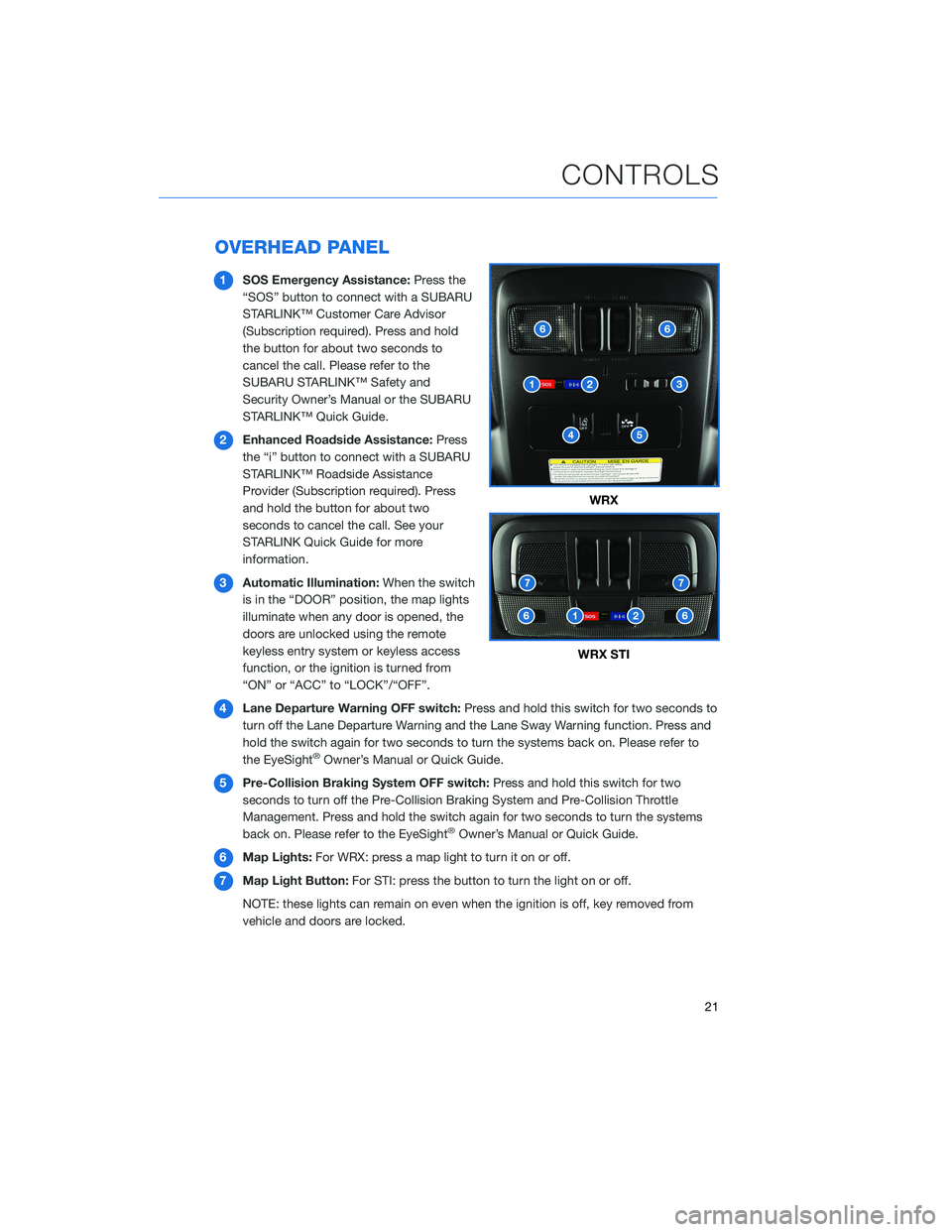
1SOS Emergency Assistance:Press the
“SOS” button to connect with a SUBARU
STARLINK™ Customer Care Advisor
(Subscription required). Press and hold
the button for about two seconds to
cancel the call. Please refer to the
SUBARU STARLINK™ Safety and
Security Owner’s Manual or the SUBARU
STARLINK™ Quick Guide.
2Enhanced Roadside Assistance:Press
the “i” button to connect with a SUBARU
STARLINK™ Roadside Assistance
Provider (Subscription required). Press
and hold the button for about two
seconds to cancel the call. See your
STARLINK Quick Guide for more
information.
3Automatic Illumination:When the switch
is in the “DOOR” position, the map lights
illuminate when any door is opened, the
doors are unlocked using the remote
keyless entry system or keyless access
function, or the ignition is turned from
“ON” or “ACC” to “LOCK”/“OFF”.
4Lane Departure Warning OFF switch:Press and hold this switch for two seconds to
turn off the Lane Departure Warning and the Lane Sway Warning function. Press and
hold the switch again for two seconds to turn the systems back on. Please refer to
the EyeSight
®Owner’s Manual or Quick Guide.
5Pre-Collision Braking System OFF switch:Press and hold this switch for two
seconds to turn off the Pre-Collision Braking System and Pre-Collision Throttle
Management. Press and hold the switch again for two seconds to turn the systems
back on. Please refer to the EyeSight
®Owner’s Manual or Quick Guide.
6Map Lights:For WRX: press a map light to turn it on or off.
7Map Light Button:For STI: press the button to turn the light on or off.
NOTE: these lights can remain on even when the ignition is off, key removed from
vehicle and doors are locked.
WRX
WRX STI
CONTROLS
21