light SUBARU WRX 2020 Quick Guide
[x] Cancel search | Manufacturer: SUBARU, Model Year: 2020, Model line: WRX, Model: SUBARU WRX 2020Pages: 44, PDF Size: 15.19 MB
Page 3 of 44
2PURPOSE OF THIS GUIDE
4ENTRY AND EXIT
6INSTRUMENT PANEL
8GETTING COMFORTABLE
17CONTROLS
22GAUGES AND WARNING LIGHTS
23OPERATING THE VEHICLE
30REFUELING
32PASSENGER/CARGO AREAS
35ENGINE COMPARTMENT
37ADDITIONAL SPECIFICATIONS
38INDEX
TABLE OF CONTENTS
Page 6 of 44
KEYLESS ENTRY
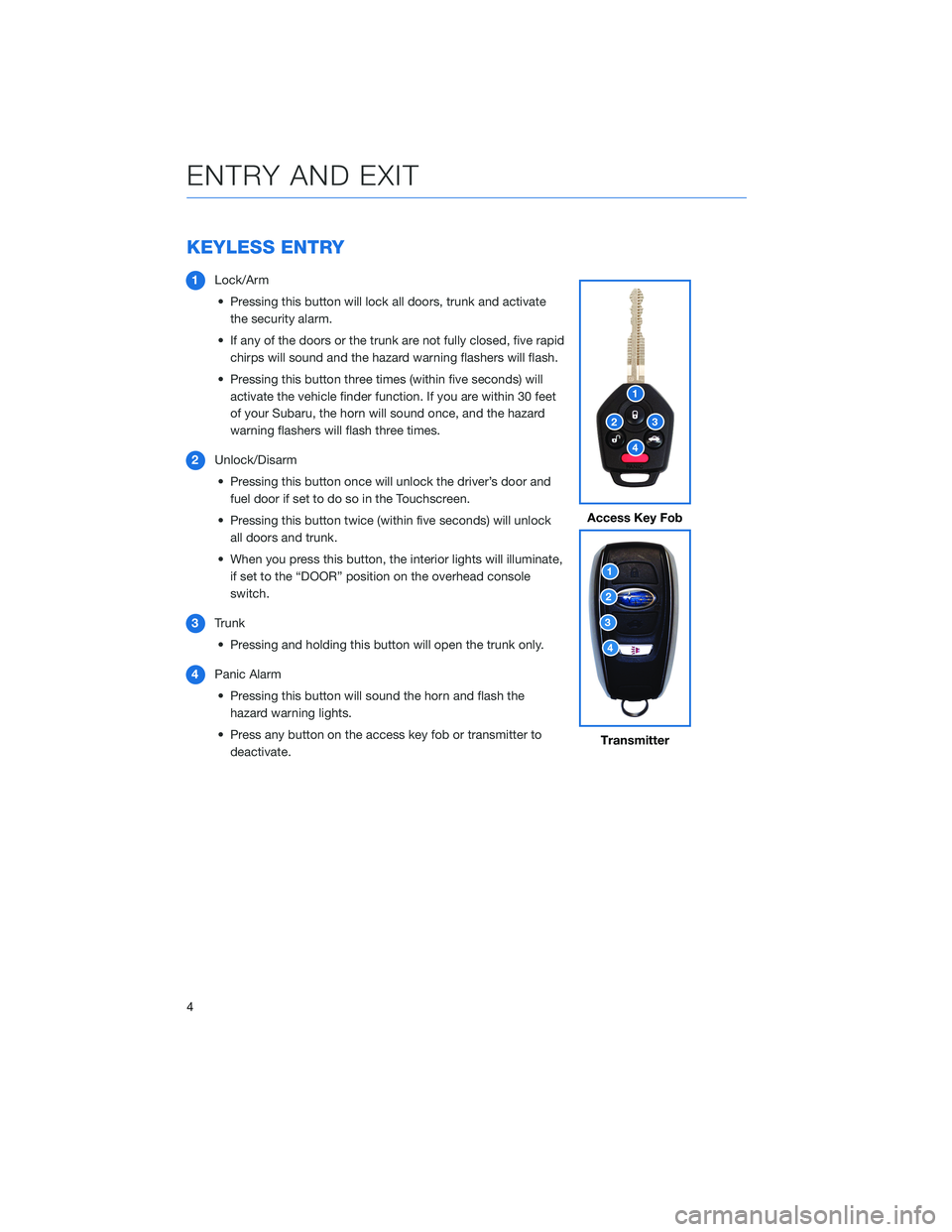
1Lock/Arm
• Pressing this button will lock all doors, trunk and activate
the security alarm.
• If any of the doors or the trunk are not fully closed, five rapid
chirps will sound and the hazard warning flashers will flash.
• Pressing this button three times (within five seconds) will
activate the vehicle finder function. If you are within 30 feet
of your Subaru, the horn will sound once, and the hazard
warning flashers will flash three times.
2Unlock/Disarm
• Pressing this button once will unlock the driver’s door and
fuel door if set to do so in the Touchscreen.
• Pressing this button twice (within five seconds) will unlock
all doors and trunk.
• When you press this button, the interior lights will illuminate,
if set to the “DOOR” position on the overhead console
switch.
3Trunk
• Pressing and holding this button will open the trunk only.
4Panic Alarm
• Pressing this button will sound the horn and flash the
hazard warning lights.
• Press any button on the access key fob or transmitter to
deactivate.
Access Key Fob
Transmitter
ENTRY AND EXIT
4
Page 8 of 44
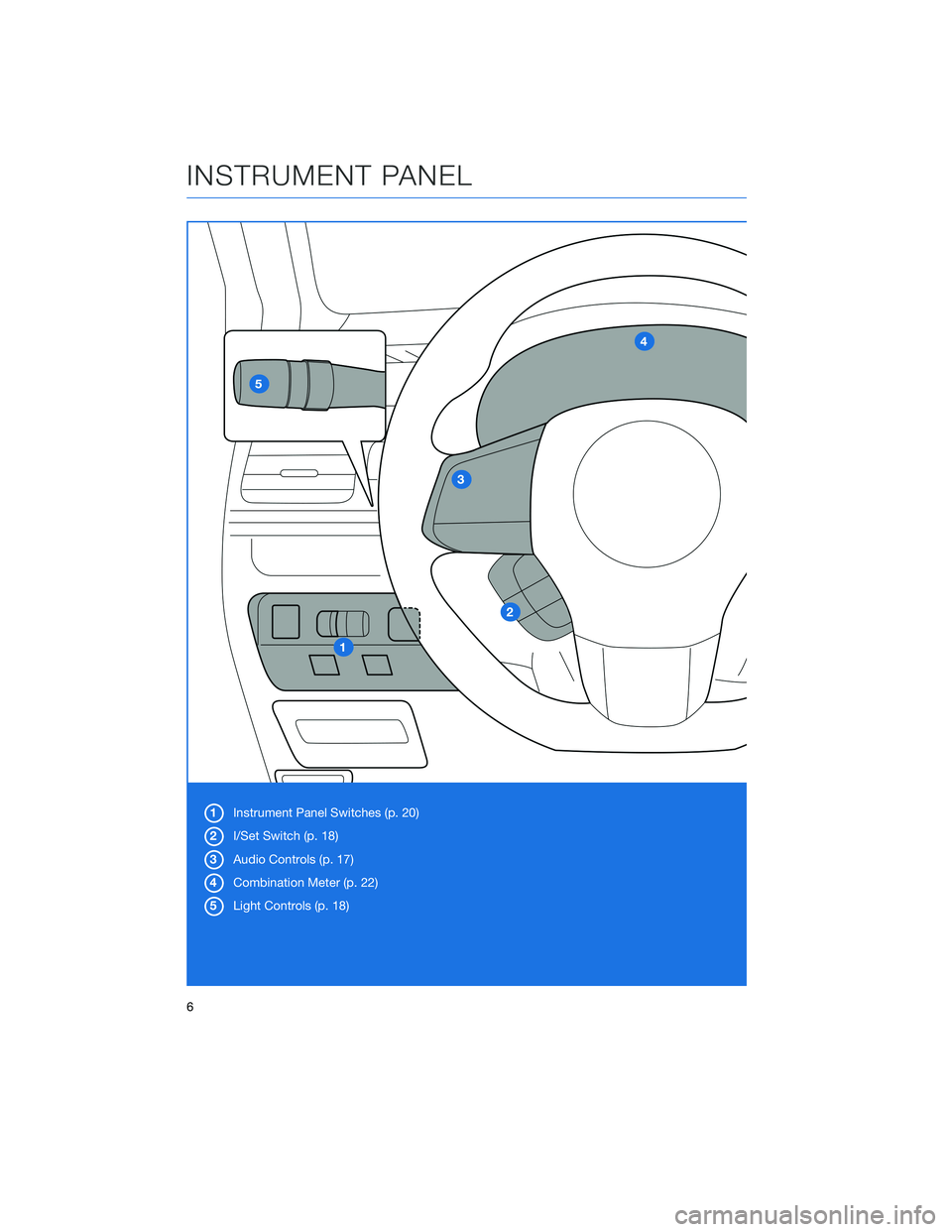
1Instrument Panel Switches (p. 20)
2I/Set Switch (p. 18)
3Audio Controls (p. 17)
4Combination Meter (p. 22)
5Light Controls (p. 18)
INSTRUMENT PANEL
6
Page 12 of 44
POWER EXTERIOR MIRRORS
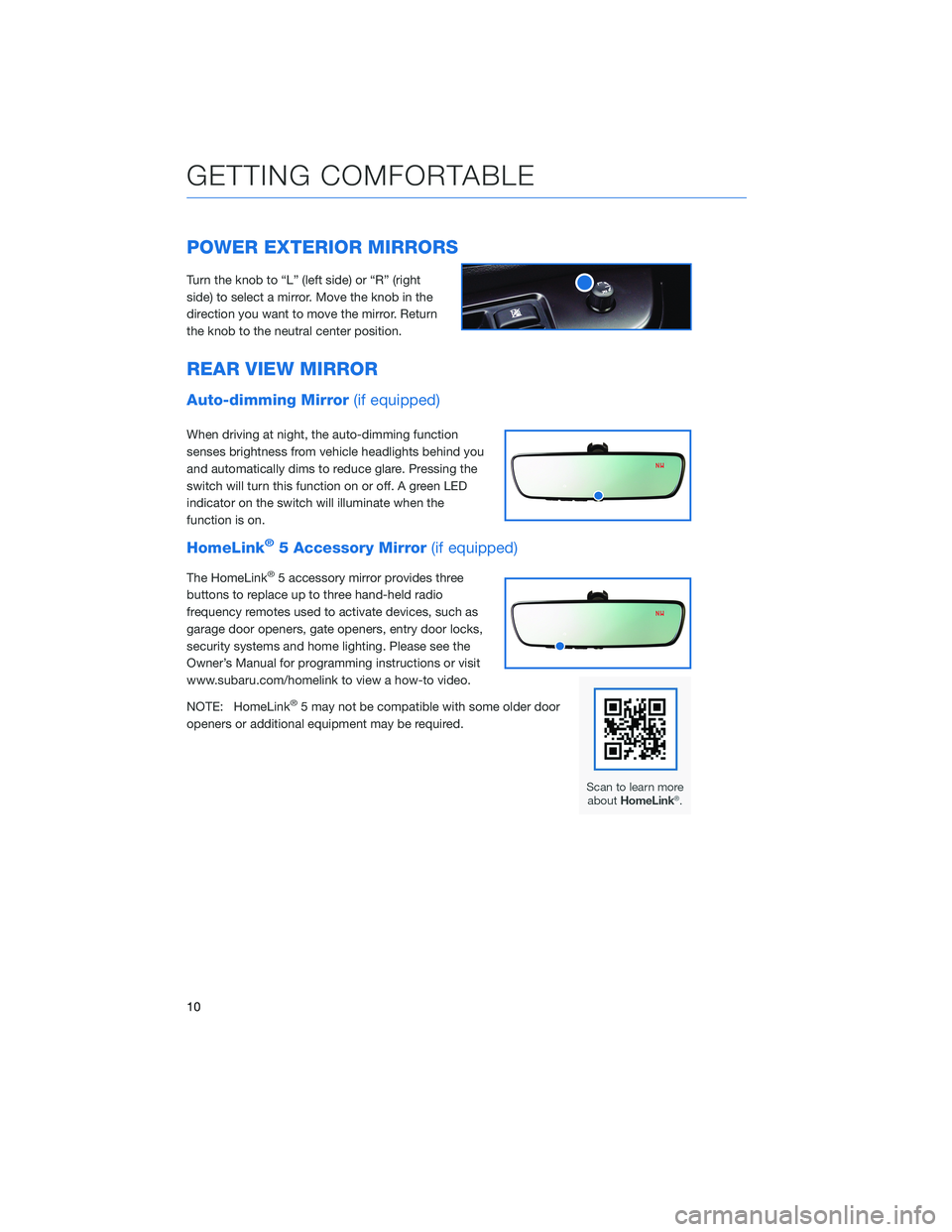
Turn the knob to “L” (left side) or “R” (right
side) to select a mirror. Move the knob in the
direction you want to move the mirror. Return
the knob to the neutral center position.
REAR VIEW MIRROR
Auto-dimming Mirror(if equipped)
When driving at night, the auto-dimming function
senses brightness from vehicle headlights behind you
and automatically dims to reduce glare. Pressing the
switch will turn this function on or off. A green LED
indicator on the switch will illuminate when the
function is on.
HomeLink®5 Accessory Mirror(if equipped)
The HomeLink®5 accessory mirror provides three
buttons to replace up to three hand-held radio
frequency remotes used to activate devices, such as
garage door openers, gate openers, entry door locks,
security systems and home lighting. Please see the
Owner’s Manual for programming instructions or visit
www.subaru.com/homelink to view a how-to video.
NOTE: HomeLink
®5 may not be compatible with some older door
openers or additional equipment may be required.
GETTING COMFORTABLE
10
Page 13 of 44
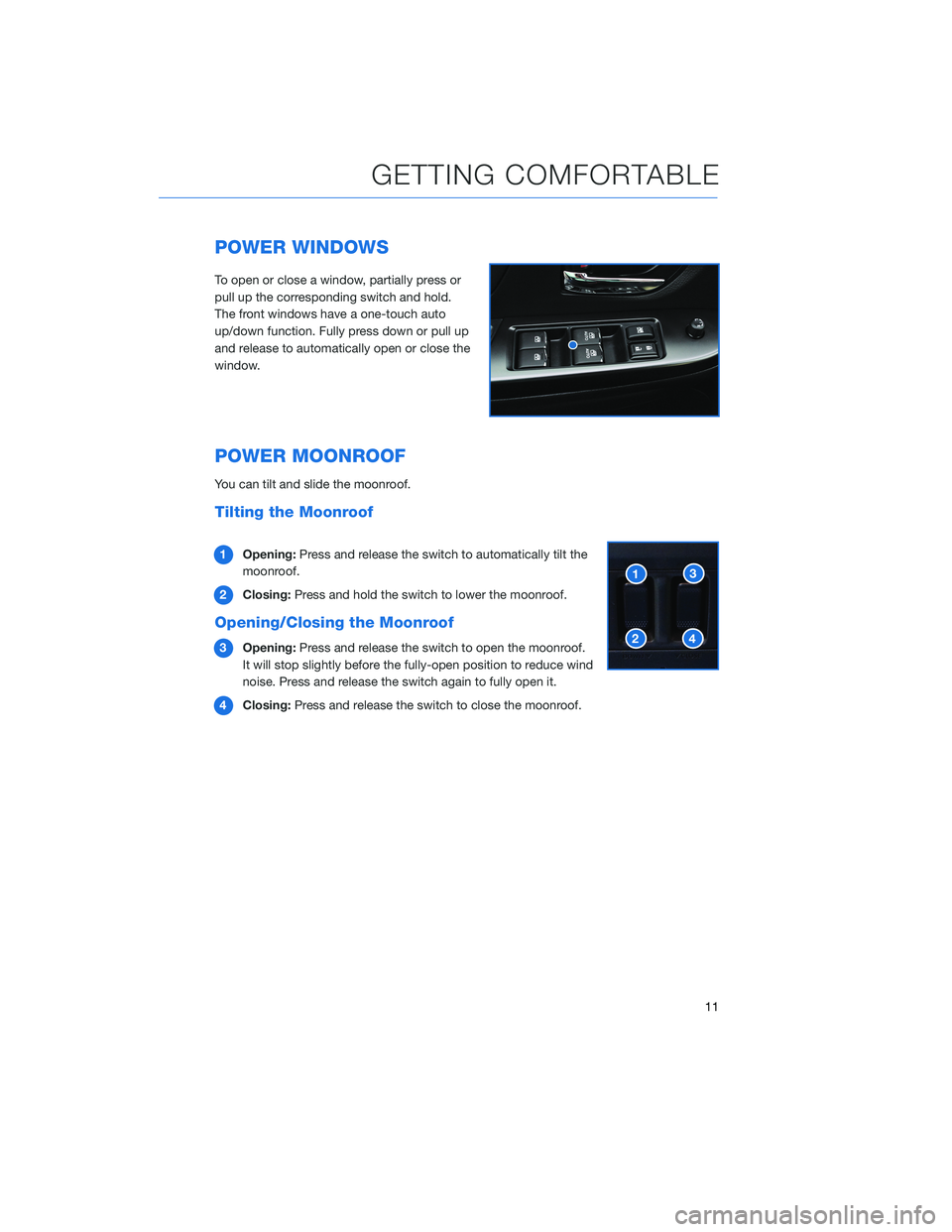
POWER WINDOWS
To open or close a window, partially press or
pull up the corresponding switch and hold.
The front windows have a one-touch auto
up/down function. Fully press down or pull up
and release to automatically open or close the
window.
POWER MOONROOF
You can tilt and slide the moonroof.
Tilting the Moonroof
1Opening:Press and release the switch to automatically tilt the
moonroof.
2Closing:Press and hold the switch to lower the moonroof.
Opening/Closing the Moonroof
3Opening:Press and release the switch to open the moonroof.
It will stop slightly before the fully-open position to reduce wind
noise. Press and release the switch again to fully open it.
4Closing:Press and release the switch to close the moonroof.
GETTING COMFORTABLE
11
Page 16 of 44
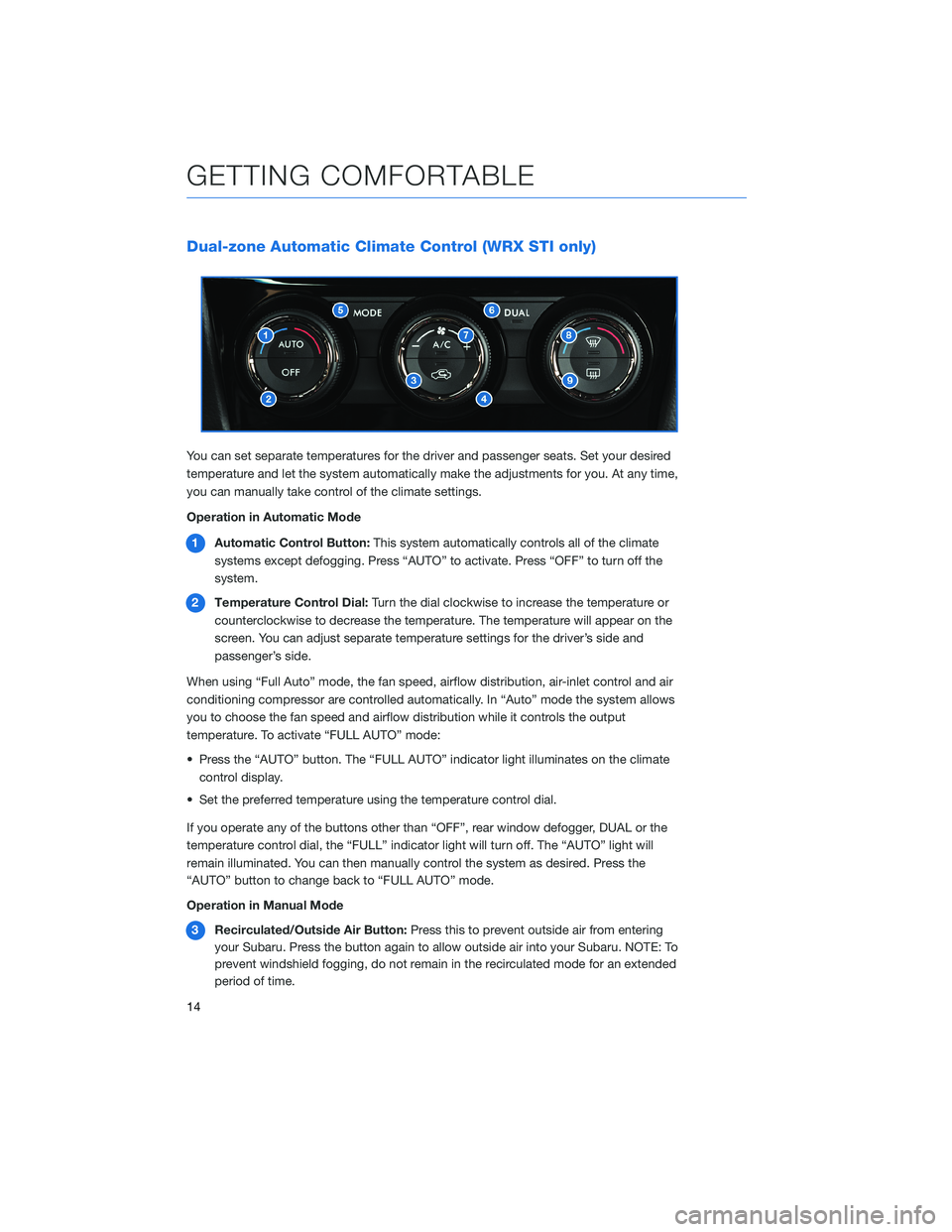
Dual-zone Automatic Climate Control (WRX STI only)
You can set separate temperatures for the driver and passenger seats. Set your desired
temperature and let the system automatically make the adjustments for you. At any time,
you can manually take control of the climate settings.
Operation in Automatic Mode
1Automatic Control Button:This system automatically controls all of the climate
systems except defogging. Press “AUTO” to activate. Press “OFF” to turn off the
system.
2Temperature Control Dial:Turn the dial clockwise to increase the temperature or
counterclockwise to decrease the temperature. The temperature will appear on the
screen. You can adjust separate temperature settings for the driver’s side and
passenger’s side.
When using “Full Auto” mode, the fan speed, airflow distribution, air-inlet control and air
conditioning compressor are controlled automatically. In “Auto” mode the system allows
you to choose the fan speed and airflow distribution while it controls the output
temperature. To activate “FULL AUTO” mode:
• Press the “AUTO” button. The “FULL AUTO” indicator light illuminates on the climate
control display.
• Set the preferred temperature using the temperature control dial.
If you operate any of the buttons other than “OFF”, rear window defogger, DUAL or the
temperature control dial, the “FULL” indicator light will turn off. The “AUTO” light will
remain illuminated. You can then manually control the system as desired. Press the
“AUTO” button to change back to “FULL AUTO” mode.
Operation in Manual Mode
3Recirculated/Outside Air Button:Press this to prevent outside air from entering
your Subaru. Press the button again to allow outside air into your Subaru. NOTE: To
prevent windshield fogging, do not remain in the recirculated mode for an extended
period of time.
GETTING COMFORTABLE
14
Page 17 of 44
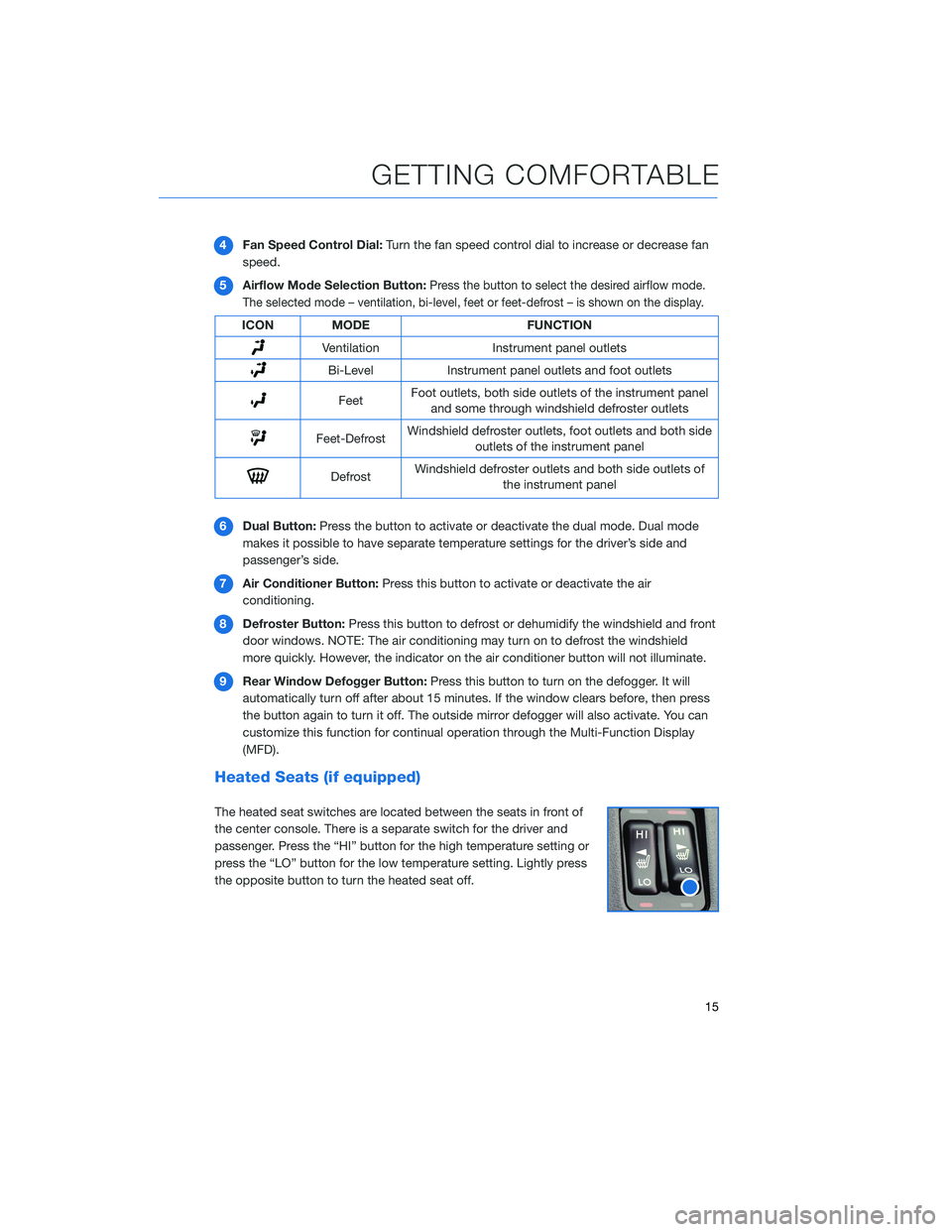
4Fan Speed Control Dial:Turn the fan speed control dial to increase or decrease fan
speed.
5Airflow Mode Selection Button:
Press the button to select the desired airflow mode.
The selected mode – ventilation, bi-level, feet or feet-defrost – is shown on the display.
ICON MODE FUNCTION
Ventilation Instrument panel outlets
Bi-Level Instrument panel outlets and foot outlets
FeetFoot outlets, both side outlets of the instrument panel
and some through windshield defroster outlets
Feet-DefrostWindshield defroster outlets, foot outlets and both side
outlets of the instrument panel
DefrostWindshield defroster outlets and both side outlets of
the instrument panel
6Dual Button:Press the button to activate or deactivate the dual mode. Dual mode
makes it possible to have separate temperature settings for the driver’s side and
passenger’s side.
7Air Conditioner Button:Press this button to activate or deactivate the air
conditioning.
8Defroster Button:Press this button to defrost or dehumidify the windshield and front
door windows. NOTE: The air conditioning may turn on to defrost the windshield
more quickly. However, the indicator on the air conditioner button will not illuminate.
9Rear Window Defogger Button:Press this button to turn on the defogger. It will
automatically turn off after about 15 minutes. If the window clears before, then press
the button again to turn it off. The outside mirror defogger will also activate. You can
customize this function for continual operation through the Multi-Function Display
(MFD).
Heated Seats (if equipped)
The heated seat switches are located between the seats in front of
the center console. There is a separate switch for the driver and
passenger. Press the “HI” button for the high temperature setting or
press the “LO” button for the low temperature setting. Lightly press
the opposite button to turn the heated seat off.
GETTING COMFORTABLE
15
Page 20 of 44
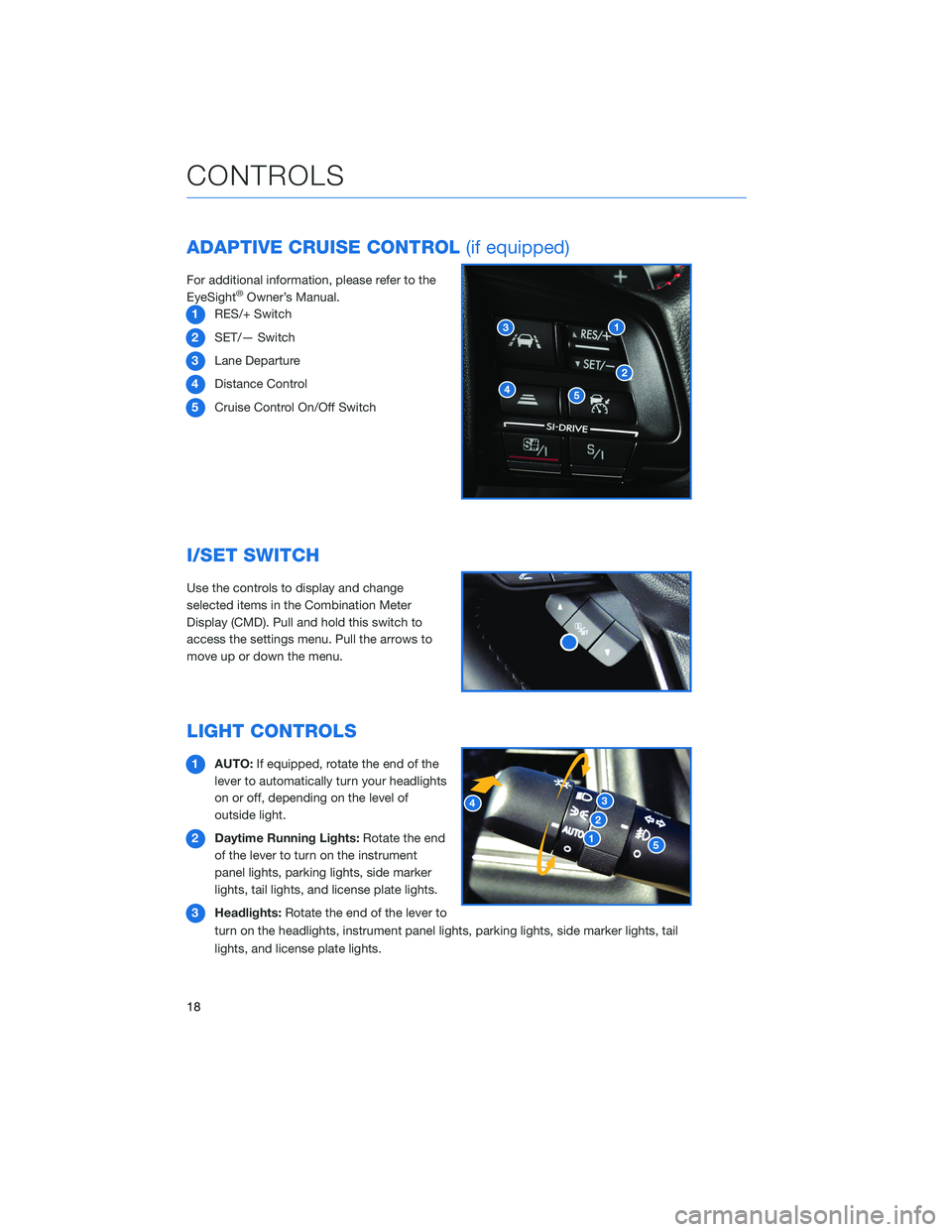
ADAPTIVE CRUISE CONTROL(if equipped)
For additional information, please refer to the
EyeSight®Owner’s Manual.
1RES/+ Switch
2SET/— Switch
3Lane Departure
4Distance Control
5Cruise Control On/Off Switch
I/SET SWITCH
Use the controls to display and change
selected items in the Combination Meter
Display (CMD). Pull and hold this switch to
access the settings menu. Pull the arrows to
move up or down the menu.
LIGHT CONTROLS
1AUTO:If equipped, rotate the end of the
lever to automatically turn your headlights
on or off, depending on the level of
outside light.
2Daytime Running Lights:Rotate the end
of the lever to turn on the instrument
panel lights, parking lights, side marker
lights, tail lights, and license plate lights.
3Headlights:Rotate the end of the lever to
turn on the headlights, instrument panel lights, parking lights, side marker lights, tail
lights, and license plate lights.
CONTROLS
18
Page 21 of 44
4High Beams:Push the lever forward to change from low beam to high beam. Pull the
lever back to center to return to low beam. If equipped, this also activates the High
Beam Assist (HBA) system.
5Fog Lights:If equipped, rotate the dial to turn on the fog lights.
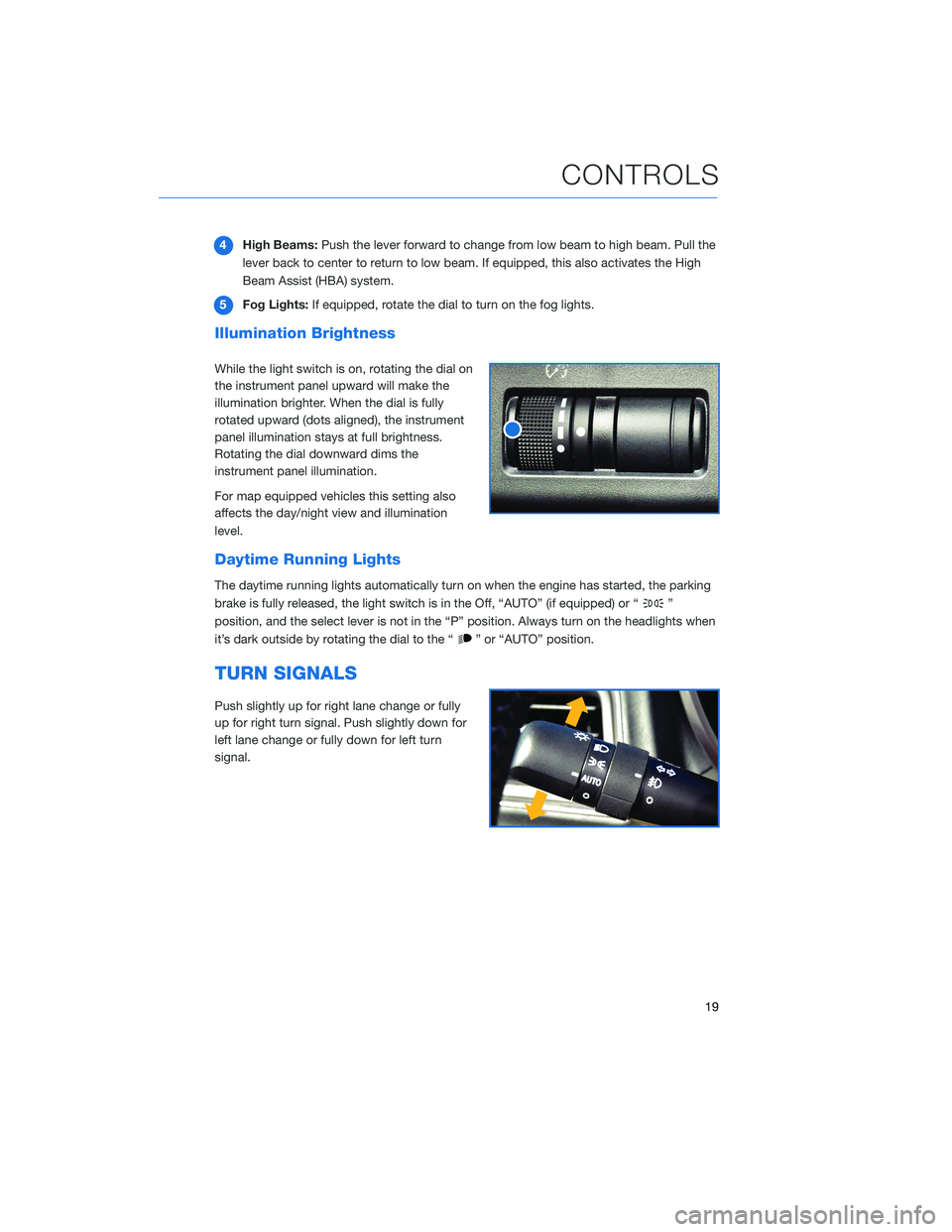
Illumination Brightness
While the light switch is on, rotating the dial on
the instrument panel upward will make the
illumination brighter. When the dial is fully
rotated upward (dots aligned), the instrument
panel illumination stays at full brightness.
Rotating the dial downward dims the
instrument panel illumination.
For map equipped vehicles this setting also
affects the day/night view and illumination
level.
Daytime Running Lights
The daytime running lights automatically turn on when the engine has started, the parking
brake is fully released, the light switch is in the Off, “AUTO” (if equipped) or “
”
position, and the select lever is not in the “P” position. Always turn on the headlights when
it’s dark outside by rotating the dial to the “
” or “AUTO” position.
TURN SIGNALS
Push slightly up for right lane change or fully
up for right turn signal. Push slightly down for
left lane change or fully down for left turn
signal.
CONTROLS
19
Page 23 of 44
OVERHEAD PANEL
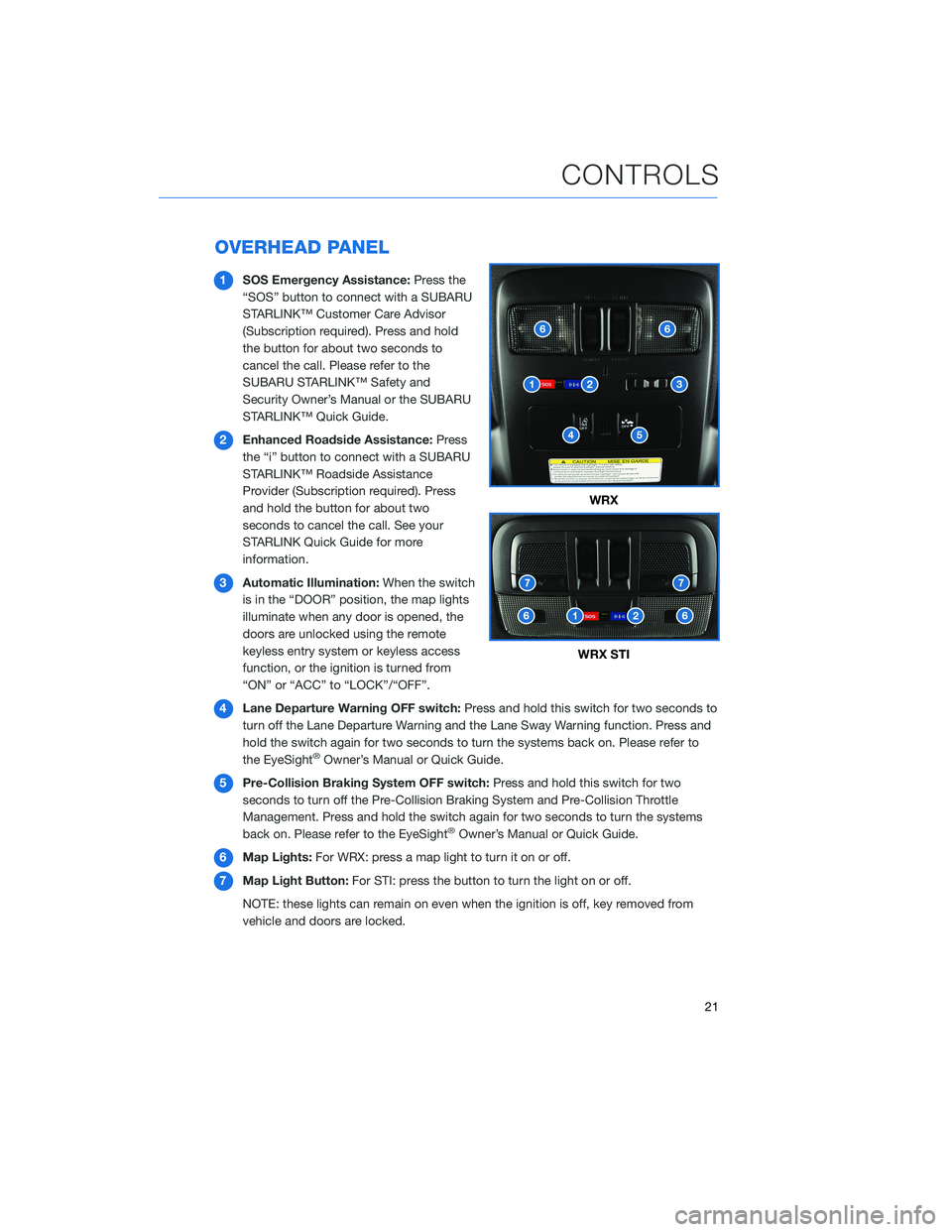
1SOS Emergency Assistance:Press the
“SOS” button to connect with a SUBARU
STARLINK™ Customer Care Advisor
(Subscription required). Press and hold
the button for about two seconds to
cancel the call. Please refer to the
SUBARU STARLINK™ Safety and
Security Owner’s Manual or the SUBARU
STARLINK™ Quick Guide.
2Enhanced Roadside Assistance:Press
the “i” button to connect with a SUBARU
STARLINK™ Roadside Assistance
Provider (Subscription required). Press
and hold the button for about two
seconds to cancel the call. See your
STARLINK Quick Guide for more
information.
3Automatic Illumination:When the switch
is in the “DOOR” position, the map lights
illuminate when any door is opened, the
doors are unlocked using the remote
keyless entry system or keyless access
function, or the ignition is turned from
“ON” or “ACC” to “LOCK”/“OFF”.
4Lane Departure Warning OFF switch:Press and hold this switch for two seconds to
turn off the Lane Departure Warning and the Lane Sway Warning function. Press and
hold the switch again for two seconds to turn the systems back on. Please refer to
the EyeSight
®Owner’s Manual or Quick Guide.
5Pre-Collision Braking System OFF switch:Press and hold this switch for two
seconds to turn off the Pre-Collision Braking System and Pre-Collision Throttle
Management. Press and hold the switch again for two seconds to turn the systems
back on. Please refer to the EyeSight
®Owner’s Manual or Quick Guide.
6Map Lights:For WRX: press a map light to turn it on or off.
7Map Light Button:For STI: press the button to turn the light on or off.
NOTE: these lights can remain on even when the ignition is off, key removed from
vehicle and doors are locked.
WRX
WRX STI
CONTROLS
21