battery SUZUKI CELERIO 2015 User Guide
[x] Cancel search | Manufacturer: SUZUKI, Model Year: 2015, Model line: CELERIO, Model: SUZUKI CELERIO 2015Pages: 201, PDF Size: 5.82 MB
Page 62 of 201
2-40
BEFORE DRIVING
76MH1-74E
76MH1-74E
NOTE: If the power steering system does not work properly, you will feel heavier to steer butyou still will be able to steer.
NOTE: If the steering is operated, you may hear a noise. This is normal and indicates that the power steering system works properly.
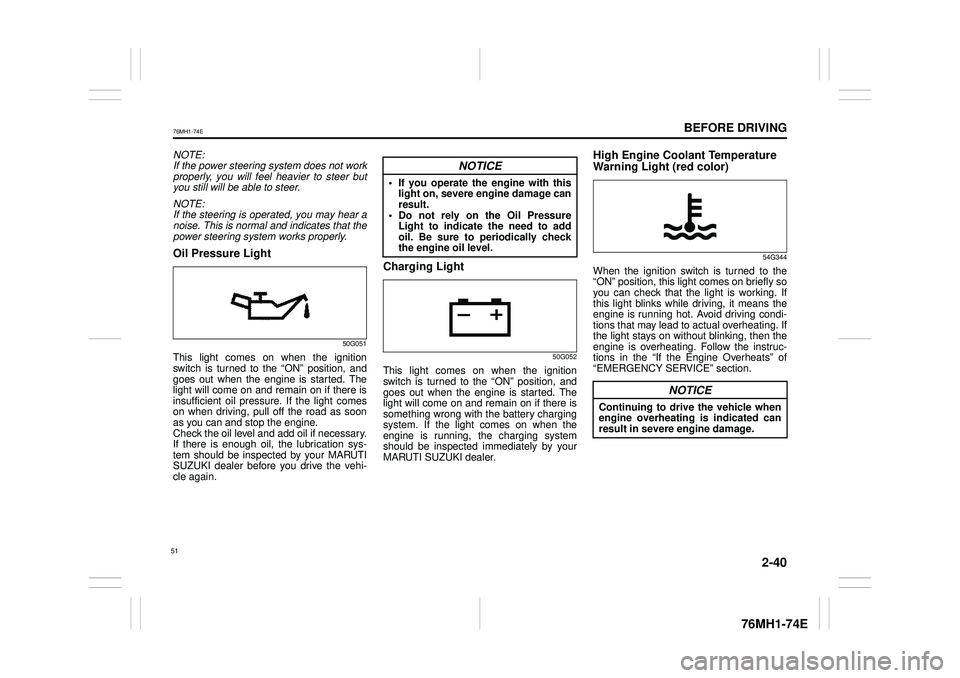
Oil Pressure Light
50G051
This light comes on when the ignition switch is turned to the “ON” position, and goes out when the engine is started. Thelight will come on and remain on if there is insufficient oil pressure. If the light comes on when driving, pull off the road as soonas you can and stop the engine. Check the oil level and add oil if necessary. If there is enough oil, the lubrication sys-tem should be inspected by your MARUTI SUZUKI dealer before you drive the vehi- cle again.
Charging Light
50G052
This light comes on when the ignitionswitch is turned to the “ON” position, and goes out when the engine is started. The light will come on and remain on if there issomething wrong with the battery charging system. If the light comes on when theengine is running, the charging system should be inspected immediately by your MARUTI SUZUKI dealer.
High Engine Coolant Temperature
Warning Light (red color)
54G344
When the ignition switch is turned to the “ON” position, this light comes on briefly soyou can check that the light is working. If this light blinks while driving, it means the engine is running hot. Avoid driving condi-tions that may lead to actual overheating. If the light stays on without blinking, then the engine is overheating. Follow the instruc-tions in the “If the Engine Overheats” of “EMERGENCY SERVICE” section.
NOTICE
• If you operate the engine with thislight on, severe engine damage can result.• Do not rely on the Oil PressureLight to indicate the need to addoil. Be sure to periodically check the engine oil level.
NOTICE
Continuing to drive the vehicle whenengine overheating is indicated can result in severe engine damage.
51
Page 72 of 201
3-2
OPERATING YOUR VEHICLE
76MH1-74E
76MH1-74E
NOTE: It is normal for water to drip from the air conditioning system after use.
4) Make sure the hood is fully closed and latched.5) Check the headlights, turn signal lights, brake lights and horn for proper opera- tion.6) Adjust the seat and head restraint (if equipped). 7) Check the brake pedal and the parkingbrake lever. 8) Adjust the mirrors. 9) Make sure that you and all passengershave properly fastened your seat belts. 10)Make sure that all warning lights come on as the key is turned to the “ON” posi-tion. 11)Check all gauges. 12)Make sure that the BRAKE SYSTEMWARNING light turns off when the parking brake is released.
Once a week, or each time you fill your fuel tank, perform the following under-hood checks:
1) Engine oil level 2) Coolant level3) Brake fluid level 4) Windshield washer fluid level 5) Battery solution level6) Hood latch operation Pull the hood release handle inside the vehicle. Make sure that you cannotopen the hood all the way without
releasing the secondary latch. Be sure to close the hood securely after check- ing for proper latch operation. See “Alllatches, hinges & locks” of “CHASSIS AND BODY” in the “Periodic Mainte- nance Schedule” in the “INSPECTIONAND MAINTENANCE” section for lubri- cation schedule.
Once a month, or each time you fill your fuel tank, check the tire pressure using a tire pressure gauge. Also check the tirepressure of the spare tire.
Engine Oil Consumption
It is normal for the engine to consume some engine oil during normal vehicle operation.
The amount of engine oil consumed depends on the viscosity of the oil, thequality of the oil and the conditions the vehicle is driven under. More oil is consumed during high-speeddriving and when there is frequent acceler- ation and deceleration. Under high loads, your engine also will consume more oil.A new engine also consumes more oil, since its pistons, piston rings and cylinder
walls have not yet become conditioned. New engines reach the normal level of oil consumption only after approximately 5000km (3000 miles) driving.
Oil consumption: Max. 1.0 L per 1000 km (1 Qt. per 600 miles)
When judging the amount of oil consump- tion, note that the oil may become diluted and make it difficult to accurately judge thetrue oil level. As an example, if a vehicle is used for repeated short trips, and consumes a nor-mal amount of oil, the dipstick may not show any drop in the oil level at all, even after 1000 km (600 miles) or more of driv-ing. This is because the oil is gradually becoming diluted with fuel or moisture, making it appear that the oil level has notchanged. You should also be aware that the diluting ingredients evaporate out when the vehicleis subsequently driven at high speeds, such as on an expressway, making it appear that oil is excessively consumedafter high-speed driving.
WA R N I N G
Make sure the hood is fully closed and latched before driv ing. If it is not, it can fly up unexpectedly duringdriving, obstructing your view and resulting in an accident.
61
Page 74 of 201
3-4
OPERATING YOUR VEHICLE
76MH1-74E
76MH1-74E
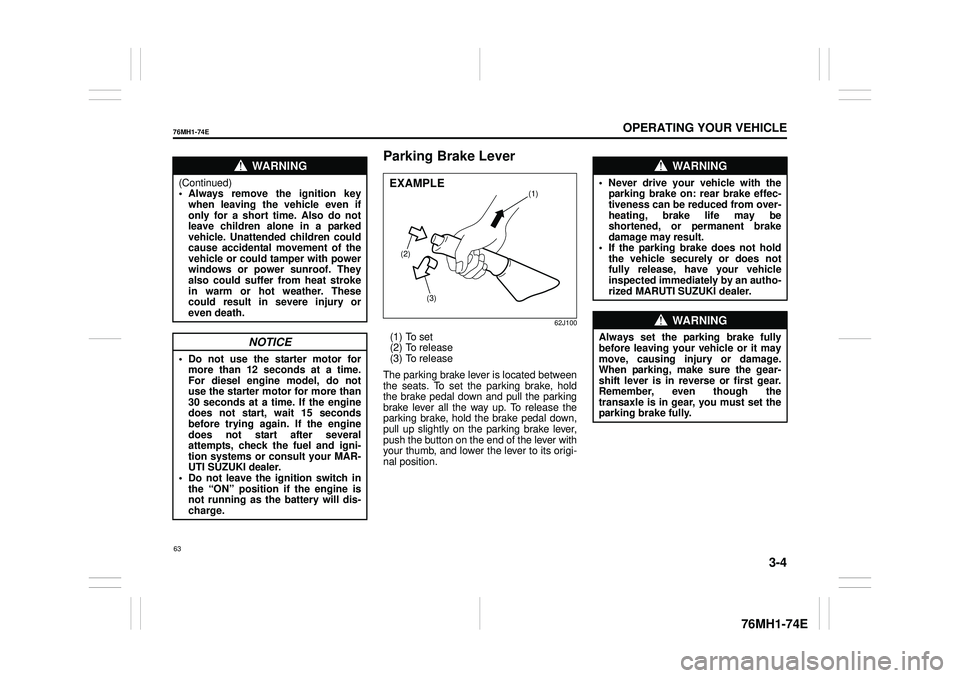
Parking Brake Lever
62J100
(1) To set (2) To release(3) To release
The parking brake lever is located between the seats. To set the parking brake, hold the brake pedal down and pull the parking brake lever all the way up. To release theparking brake, hold the brake pedal down, pull up slightly on the parking brake lever, push the button on the end of the lever withyour thumb, and lower the lever to its origi- nal position.
WA R N I N G
(Continued) • Always remove the ignition keywhen leaving the vehicle even if only for a short time. Also do not leave children alone in a parkedvehicle. Unattended children could cause accidental movement of the vehicle or could tamper with powerwindows or power sunroof. They also could suffer from heat stroke in warm or hot weather. Thesecould result in severe injury or even death.
NOTICE
• Do not use the starter motor for more than 12 seconds at a time.For diesel engine model, do not use the starter motor for more than 30 seconds at a time. If the enginedoes not start, wait 15 seconds before trying again. If the engine does not start after severalattempts, check the fuel and igni- tion systems or consult your MAR- UTI SUZUKI dealer.• Do not leave the ignition switch in the “ON” position if the engine is not running as the battery will dis-charge.
(2)
(3)
(1)EXAMPLE
WA R N I N G
• Never drive your vehicle with theparking brake on: rear brake effec-tiveness can be reduced from over- heating, brake life may be shortened, or permanent brakedamage may result. • If the parking brake does not hold the vehicle securely or does notfully release, have your vehicle inspected immediately by an autho- rized MARUTI SUZUKI dealer.
WA R N I N G
Always set the pa rking brake fully before leaving your vehicle or it may move, causing injury or damage. When parking, make sure the gear-shift lever is in reverse or first gear. Remember, even though the transaxle is in gear, you must set theparking brake fully.
63
Page 100 of 201
5-4
OTHER CONTROLS AND EQUIPMENT
76MH1-74E
76MH1-74E
Vanity mirror (if equipped)
74LHT0532
(2) Vanity mirror
There is a vanity mirror (2) on the back of the sun visor.
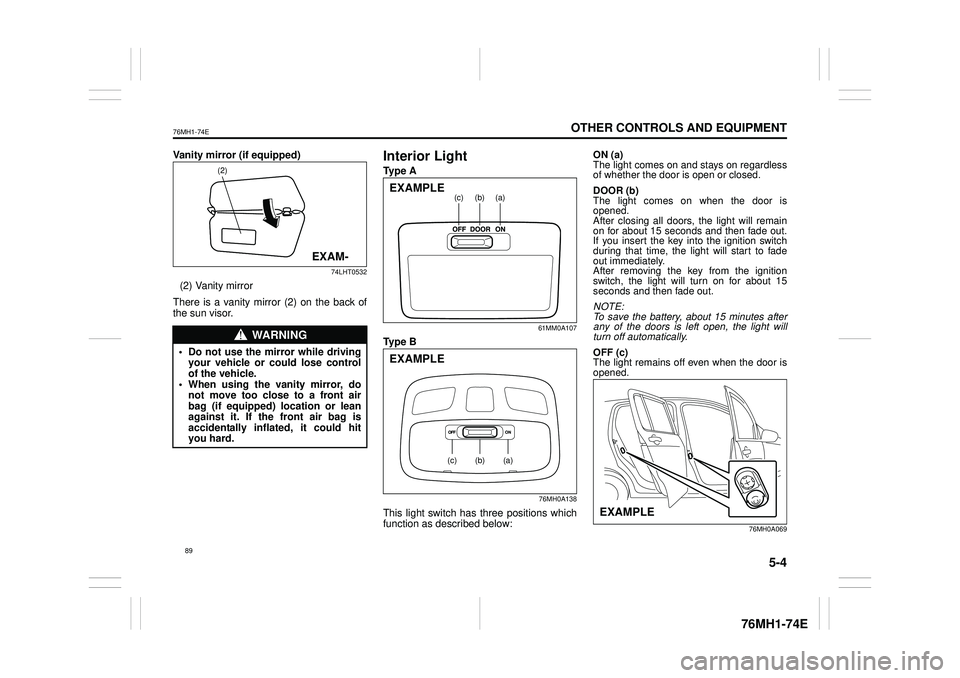
Interior Light
Ty p e A
61MM0A107
Ty p e B
76MH0A138
This light switch has three positions which function as described below:
ON (a) The light comes on and stays on regardless of whether the door is open or closed.
DOOR (b) The light comes on when the door isopened. After closing all doors, the light will remain on for about 15 seconds and then fade out.If you insert the key into the ignition switch during that time, the light will start to fade out immediately. After removing the key from the ignition switch, the light will turn on for about 15 seconds and then fade out.
NOTE: To save the battery, about 15 minutes after any of the doors is left open, the light will turn off automatically.
OFF (c) The light remains off even when the door is opened.
76MH0A069
WA R N I N G
• Do not use the mirror while driving your vehicle or could lose controlof the vehicle. • When using the vanity mirror, do not move too close to a front airbag (if equipped) location or lean against it. If the front air bag is accidentally inflated, it could hityou hard.
(2)
EXAM-
(a)(b)(c)EXAMPLE
(a)(b)(c)
EXAMPLE
EXAMPLE
89
Page 134 of 201
5-38
OTHER CONTROLS AND EQUIPMENT
76MH1-74E
76MH1-74E
Selecting the radio station (FM1, FM2, AM mode) To select the next pr eset station, press “ ” of the switch (4) only for a moment. To select the previous preset station, press “ ” of the switch (4) only for amoment. To scan a higher frequency radio station, press “ ” of the switch (4) for 1 secondor longer. To scan a lower frequency radio station, press “ ” of the switch (4) for 1 secondor longer.
Selecting the track (CD, USB (iPod®), Bluetooth® audio mode) To skip to the next track, press “ ” of the switch (4) only for a moment. To skip to the previous track, press “ ” of the switch (4) twice only for a moment. When the switch (4) is pushed downonce only for a moment, the track cur- rently being played will start from the beginning again.
Fast forwarding/Rewinding a track To fast forward, press “ ” of the switch(4) for 1 second or longer. To fast rewind, press “ ” of the switch (4) for 1 second or longer.
Anti-Theft Feature
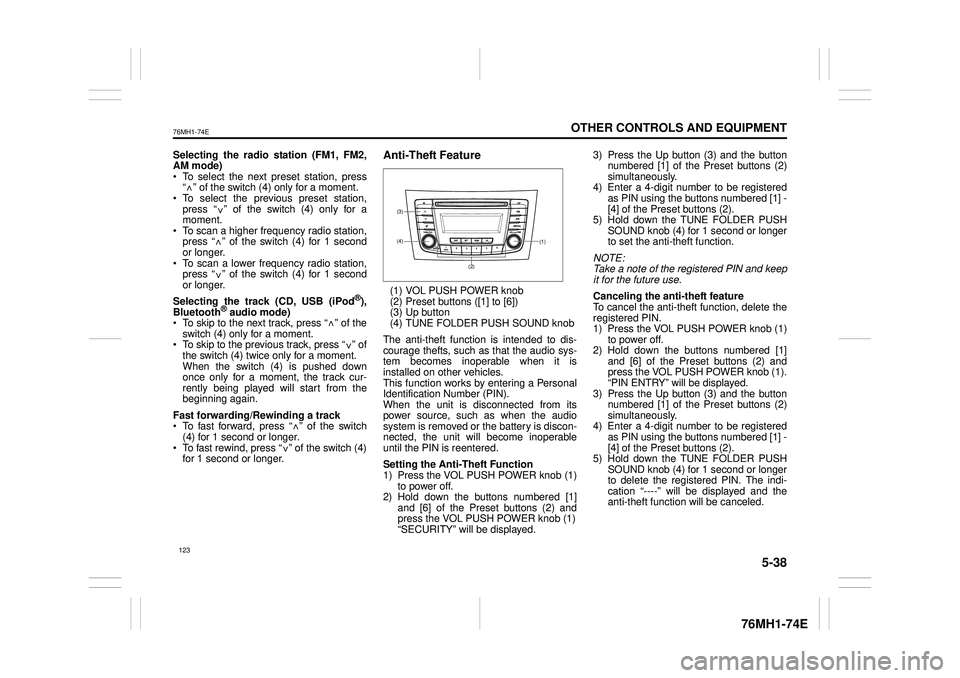
(1) VOL PUSH POWER knob(2) Preset buttons ([1] to [6])(3) Up button (4) TUNE FOLDER PUSH SOUND knob
The anti-theft function is intended to dis- courage thefts, such as that the audio sys- tem becomes inoperable when it isinstalled on other vehicles. This function works by entering a Personal Identification Number (PIN).When the unit is disconnected from its power source, such as when the audio system is removed or the battery is discon-nected, the unit will become inoperable until the PIN is reentered.
Setting the Anti-Theft Function 1) Press the VOL PUSH POWER knob (1) to power off.2) Hold down the buttons numbered [1] and [6] of the Preset buttons (2) and press the VOL PUSH POWER knob (1)“SECURITY” will be displayed.
3) Press the Up button (3) and the button numbered [1] of the Preset buttons (2) simultaneously.4) Enter a 4-digit number to be registered as PIN using the buttons numbered [1] - [4] of the Preset buttons (2).5) Hold down the TUNE FOLDER PUSH SOUND knob (4) for 1 second or longer to set the anti-theft function.
NOTE: Take a note of the registered PIN and keepit for the future use.
Canceling the anti -theft feature To cancel the anti-theft function, delete the registered PIN. 1) Press the VOL PUSH POWER knob (1)to power off. 2) Hold down the buttons numbered [1] and [6] of the Preset buttons (2) andpress the VOL PUSH POWER knob (1). “PIN ENTRY” will be displayed. 3) Press the Up button (3) and the buttonnumbered [1] of the Preset buttons (2) simultaneously. 4) Enter a 4-digit number to be registeredas PIN using the buttons numbered [1] - [4] of the Preset buttons (2). 5) Hold down the TUNE FOLDER PUSHSOUND knob (4) for 1 second or longer to delete the registered PIN. The indi- cation “----” will be displayed and theanti-theft function will be canceled.
<
<
<
<
<
<
<
<
(1)(4)
(3)
(2)
123
Page 135 of 201
5-39
OTHER CONTROLS AND EQUIPMENT
76MH1-74E
76MH1-74E
NOTE: To change your PIN, first delete your cur- rent PIN, then set a new one.
Confirming the Personal Identification Number (PIN)When the main power source is discon- nected such as when the battery is replaced, etc, it is required to enter the PINto make the unit operable again. 1) Set the ignition switch to the “ACC” position. “SECURITY” will be displayed. 2) Press the Up button (3) and the button numbered [1] of the Preset buttons (2)simultaneously. 3) Enter a 4-digit number to be registered as PIN using the buttons numbered [1] -[4] of the Preset buttons (2). 4) Hold down TUNE FOLDER PUSH SOUND knob (4) for 1 second or lon-ger. When the PIN same as registered is entered, the power of the audio systemwill be turned off automatically and it will become operable again.
NOTE: If an incorrect PIN is entered, “ERROR” and the total number of incorrect entryattempts will be displayed. If an incorrect PIN is entered 10 times, “HELP” will be displayed and the audiosystem will become inoperable.
Battery Installation
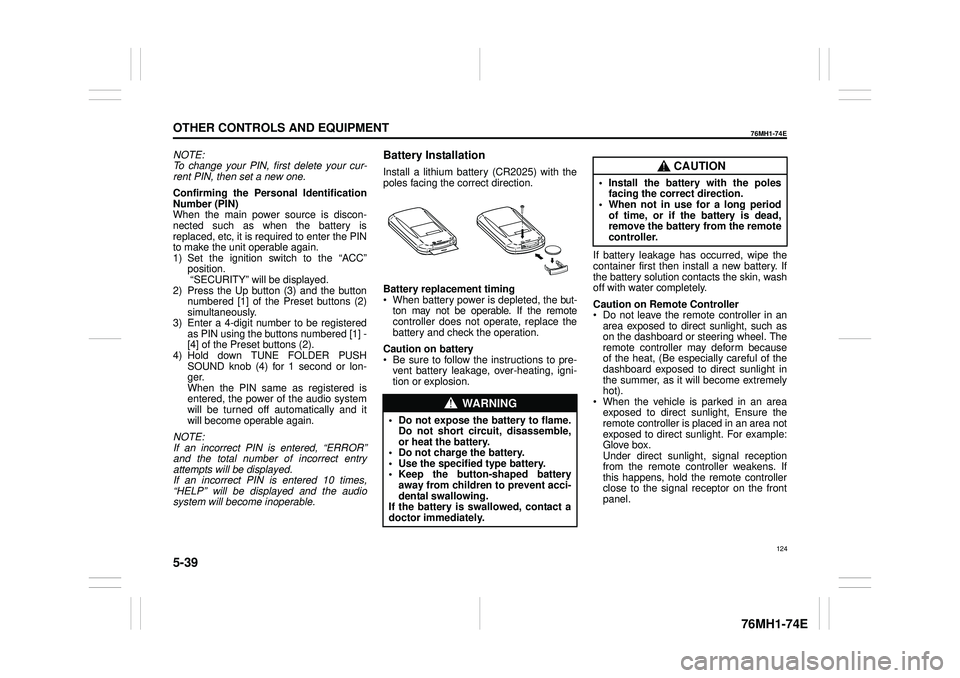
Install a lithium battery (CR2025) with the poles facing the correct direction.
Battery replacement timing When battery power is depleted, the but-ton may not be operable. If the remote controller does not operate, replace the battery and check the operation.
Caution on battery Be sure to follow the instructions to pre- vent battery leakage, over-heating, igni- tion or explosion.
If battery leakage has occurred, wipe the container first then install a new battery. If the battery solution contacts the skin, wash off with water completely.
Caution on Remote Controller Do not leave the remote controller in anarea exposed to direct sunlight, such as on the dashboard or steering wheel. The remote controller may deform becauseof the heat, (Be especially careful of the dashboard exposed to direct sunlight in the summer, as it will become extremelyhot). When the vehicle is parked in an area exposed to direct sunlight, Ensure theremote controller is placed in an area not exposed to direct sunlight. For example: Glove box.Under direct sunlight , signal reception from the remote controller weakens. If this happens, hold the remote controllerclose to the signal receptor on the front panel.
WA R N I N G
• Do not expose the battery to flame. Do not short circuit, disassemble,or heat the battery. • Do not charge the battery. • Use the specified type battery.• Keep the button-shaped battery away from children to prevent acci- dental swallowing.If the battery is swallowed, contact a doctor immediately.
CAUTION
• Install the battery with the poles facing the correct direction.• When not in use for a long period of time, or if the battery is dead, remove the battery from the remotecontroller.
124
Page 149 of 201
INSPECTION AND MAINTENANCE
76MH1-74E
76MH1-74E
138
INSPECTION AND MAINTENANCEMaintenance Schedule ....................................................... 7-2
Periodic Maintenance Schedule . ....................................... 7-2
Drive Belt ............................................................................. 7-6
Engine Oil and Filter ........................................................... 7-6
Engine Coolant .................................................................... 7-10
Air Cleaner ........................................................................... 7-12
Spark Plugs ......................................................................... 7-12
Gear Oil ................................................................................ 7-14
Clutch Pedal ........................................................................ 7-14
Fuel Filter (Diesel engine) .................................................. 7-15
Brakes .......... ........................................................................ 7-15
Steering ................................................................................ 7-17
Tires ...................................................................................... 7-18
Battery .................................................................................. 7-19
Fuses .................................................................................... 7-20
Bulb Replacement ............................................................... 7-23
Wiper Blades ....................................................................... 7-28
Windshield Washer Fluid ................................................... 7-31
Air Conditioning System .................................................... 7-31
Page 150 of 201
7-1
INSPECTION AND MAINTENANCE
76MH1-74E
76MH1-74E
60A187S
WA R N I N G
You should take extreme care when working on your vehicle to preventaccidental injury. Here are a few pre- cautions that you should be espe- cially careful to observe:(Continued)
WA R N I N G
(Continued)• To prevent damage or unintendedactivation of the air bag system be sure the battery is disconnected and the ignition switch has been inthe “LOCK” position for at least 90 seconds before performing any electrical service work on yourMARUTI SUZUKI. Do not touch air bag system components, or wires. The wires are wrapped with yellowtape or yellow tubing, and the cou- plers are yellow for easy identifica- tion.• Do not leave the engine running in garages or other confined areas. • When the engine is running, keephands, clothing, tools, and other objects away from the fan and drive belt. Even though the fan may notbe moving, it can automatically turn on without warning. • When it is necessary to do servicework with the engine running, make sure that the parking brake is set fully and the transaxle is in Neutral.• Do not touch ignition wires or other ignition system parts when start- ing the engine or when the engineis running, or you could receive an electric shock. (Continued)
WA R N I N G
(Continued)• Be careful not to touch a hotengine, exhaust manifold and pipes, muffler, radiator and water hoses.• Do not allow smoking, sparks, or flames around fuel or the battery. Flammable fumes are present.• Do not get under your vehicle if it is supported only with the portable jack provided in your vehicle.• Be careful not to cause accidental short circuits be tween the positive and negative battery terminals.• Keep used oil, coolant, and other fluids away from children and pets. Dispose of used fluids properly;never pour them on the ground, into sewers, etc.
139
Page 154 of 201
7-5
INSPECTION AND MAINTENANCE
76MH1-74E
76MH1-74E
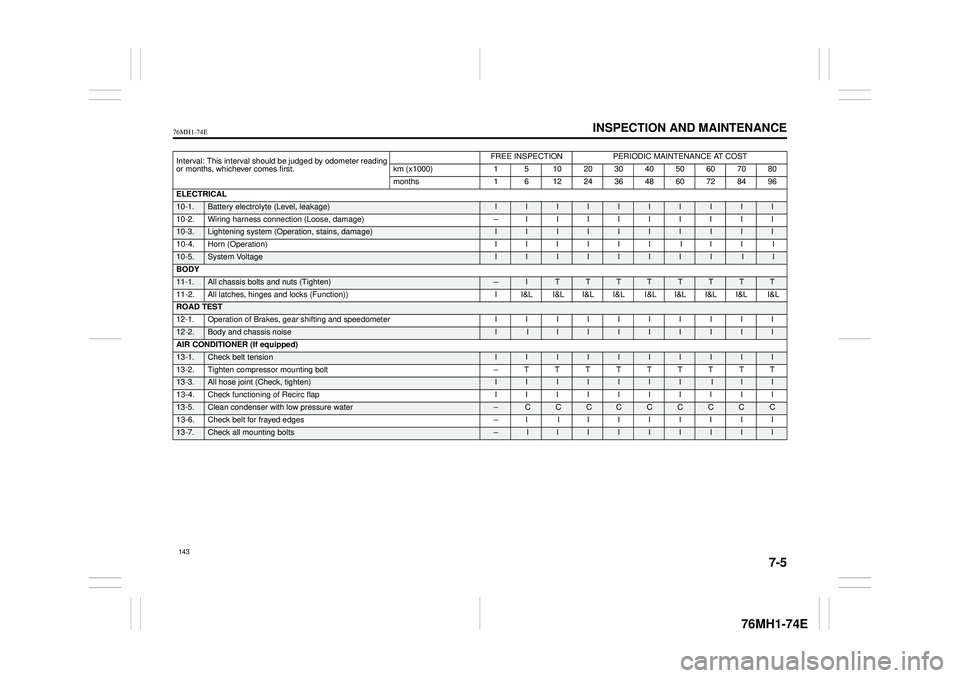
Interval: This interval should be judged by odometer reading or months, whichever comes first.
FREE INSPECTIONPERIODIC MAINTENANCE AT COST
km (x1000) 1 5 10 20 30 40 50 60 70 80
months 1 6 12 24 36 48 60 72 84 96
ELECTRICAL
10-1. Battery electrolyte (Level, leakage) I I I I I I I I I I
10-2. Wiring harness connection (Loose, damage) – I I I I I I I I I
10-3. Lightening system (Operat ion, stains, damage) I I I I I I I I I I
10-4. Horn (Operation) I I I I I I I I I I
10-5.System Voltage II I I I I I I I I
BODY
11-1. All chassis bolts and nuts (Tighten) – I T T T T T T T T
11-2. All latches, hinges and locks (Function)) I I&L I&L I&L I&L I&L I&L I&L I&L I&L
ROAD TEST
12-1. Operation of Brakes, gear shifting and speedometer I I I I I I I I I I
12-2.Body and chassis noise I I I I I I I I I I
AIR CONDITIONER (If equipped)
13-1. Check belt tension I I I I I I I I I I
13-2. Tighten compressor mounting bolt – T T T T T T T T T
13-3. All hose joint (Check, tighten) I I I I II I I I I
13-4. Check functioning of Recirc flap I I I I I I I I I I
13-5. Clean condenser with low pressure water – C C CCC C C C C
13-6. Check belt for frayed edges – I I I I I I I I I
13-7.Check all mounting bolts – I I I I I I I I I
143
Page 155 of 201
7-6
INSPECTION AND MAINTENANCE
76MH1-74E
76MH1-74E
Drive Belt
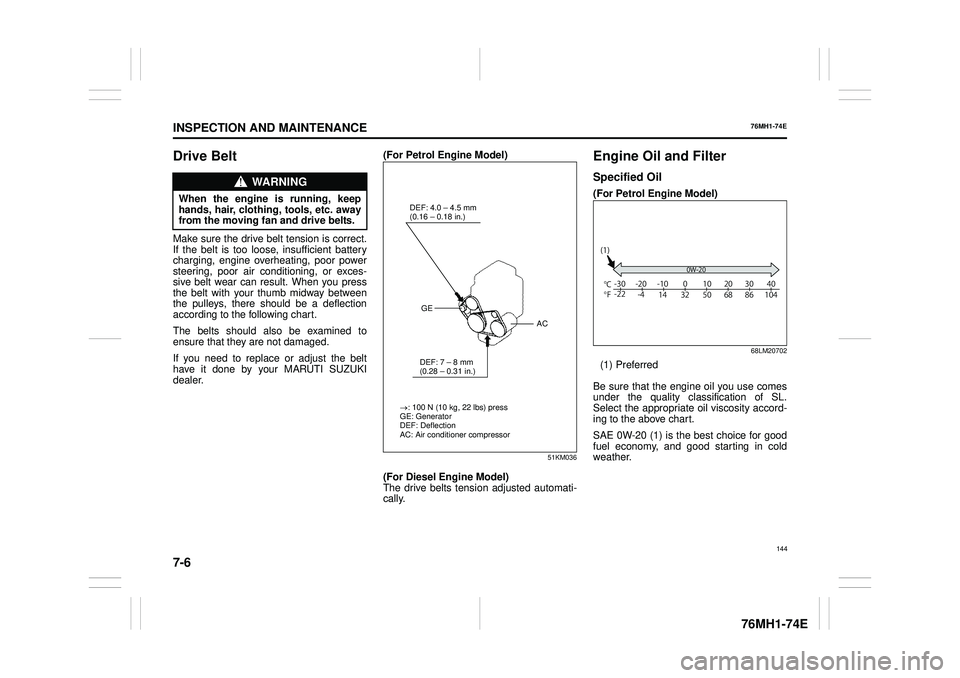
Make sure the drive belt tension is correct. If the belt is too loos e, insufficient battery charging, engine overheating, poor powersteering, poor air conditioning, or exces- sive belt wear can result. When you press the belt with your thumb midway betweenthe pulleys, there should be a deflection according to the following chart.
The belts should also be examined to ensure that they are not damaged.
If you need to replace or adjust the belt have it done by your MARUTI SUZUKI dealer.
(For Petrol Engine Model)
51KM036
(For Diesel Engine Model) The drive belts tens ion adjusted automati- cally.
Engine Oil and Filter
Specified Oil
(For Petrol Engine Model)
68LM20702
(1) Preferred
Be sure that the engine oil you use comes under the quality classification of SL.Select the appropriate oil viscosity accord- ing to the above chart.
SAE 0W-20 (1) is the best choice for good fuel economy, and good starting in cold weather.
WA R N I N G
When the engine is running, keephands, hair, clothing, tools, etc. away from the moving fan and drive belts.
: 100 N (10 kg, 22 lbs) press GE: Generator DEF: DeflectionAC: Air conditioner compressor
DEF: 4.0 – 4.5 mm (0.16