info button SUZUKI CELERIO 2018 Owners Manual
[x] Cancel search | Manufacturer: SUZUKI, Model Year: 2018, Model line: CELERIO, Model: SUZUKI CELERIO 2018Pages: 201, PDF Size: 5.82 MB
Page 27 of 201
2-5
BEFORE DRIVING
76MH1-74E
76MH1-74E
Keyless Entry System
Transmitter (if equipped)
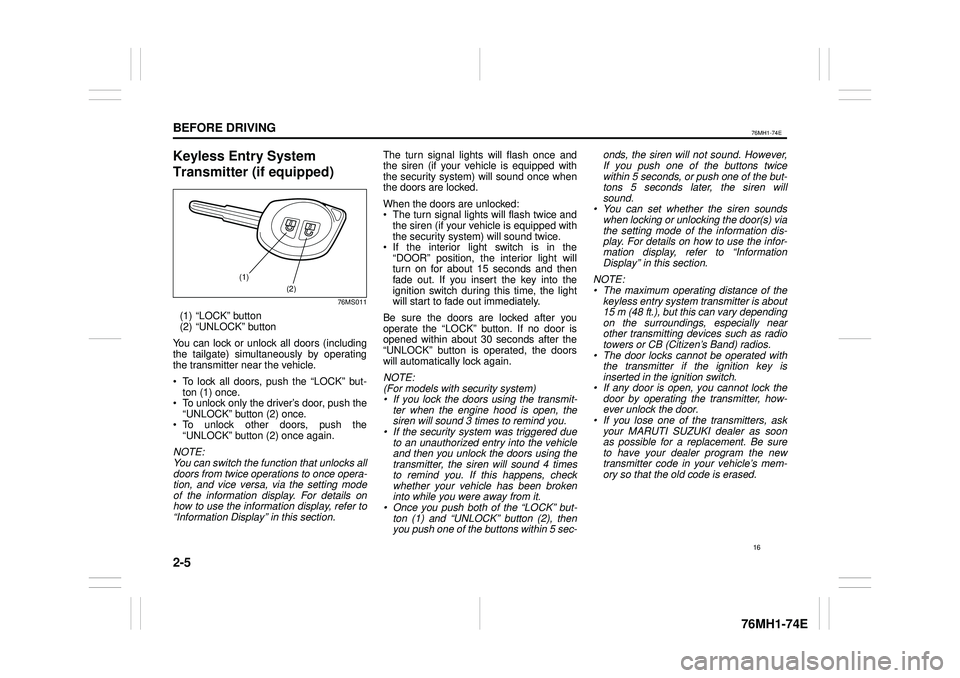
76MS011
(1) “LOCK” button (2) “UNLOCK” button
You can lock or unlock all doors (includingthe tailgate) simultaneously by operating the transmitter near the vehicle.
To lock all doors, push the “LOCK” but-ton (1) once. To unlock only the driver’s door, push the“UNLOCK” button (2) once. To unlock other doors, push the“UNLOCK” button (2) once again.
NOTE: You can switch the function that unlocks alldoors from twice operations to once opera- tion, and vice versa, via the setting modeof the information display. For details onhow to use the information display, refer to“Information Display” in this section.
The turn signal lights will flash once and the siren (if your vehicle is equipped with the security system) will sound once whenthe doors are locked.
When the doors are unlocked: The turn signal lights will flash twice andthe siren (if your vehicle is equipped withthe security system) will sound twice. If the interior light switch is in the“DOOR” position, the interior light willturn on for about 15 seconds and thenfade out. If you insert the key into the ignition switch during this time, the light will start to fade out immediately.
Be sure the doors are locked after youoperate the “LOCK” button. If no door isopened within about 30 seconds after the “UNLOCK” button is operated, the doors will automatically lock again.
NOTE: (For models with security system)• If you lock the doors using the transmit-ter when the engine hood is open, thesiren will sound 3 times to remind you.• If the security system was triggered dueto an unauthorized entry into the vehicleand then you unlock the doors using thetransmitter, the siren will sound 4 times to remind you. If this happens, check whether your vehicle has been brokeninto while you were away from it.• Once you push both of the “LOCK” but-ton (1) and “UNLOCK” button (2), thenyou push one of the buttons within 5 sec-
onds, the siren will not sound. However, If you push one of the buttons twice within 5 seconds, or push one of the but-tons 5 seconds later, the siren willsound.• You can set whether the siren soundswhen locking or unlocking the door(s) via the setting mode of the information dis- play. For details on how to use the infor-mation display, refer to “InformationDisplay” in this section.
NOTE: • The maximum operating distance of thekeyless entry system transmitter is about 15 m (48 ft.), but this can vary depending on the surroundings, especially near other transmitting devices such as radiotowers or CB (Citizen’s Band) radios.• The door locks cannot be operated withthe transmitter if the ignition key isinserted in the ignition switch.• If any door is open, you cannot lock thedoor by operating the transmitter, how-ever unlock the door.• If you lose one of the transmitters, askyour MARUTI SUZUKI dealer as soonas possible for a replacement. Be sure to have your dealer program the new transmitter code in your vehicle’s mem-ory so that the old code is erased.
(1)
(2)
16
Page 116 of 201
5-20
OTHER CONTROLS AND EQUIPMENT
76MH1-74E
76MH1-74E
Display change Press the DISP button (8). Each time the button is pressed, displaywill change as follows:
NOTE: • “NO TITLE” will be displayed when there is no text information in the disc currently being played. • If text data contains more than 12 char- acters, the “>” mark will appear at theright end. Holding down the DISP button (8) for 1 second or longer can display the next page.
Listening to an MP3/WMA/AAC Disc
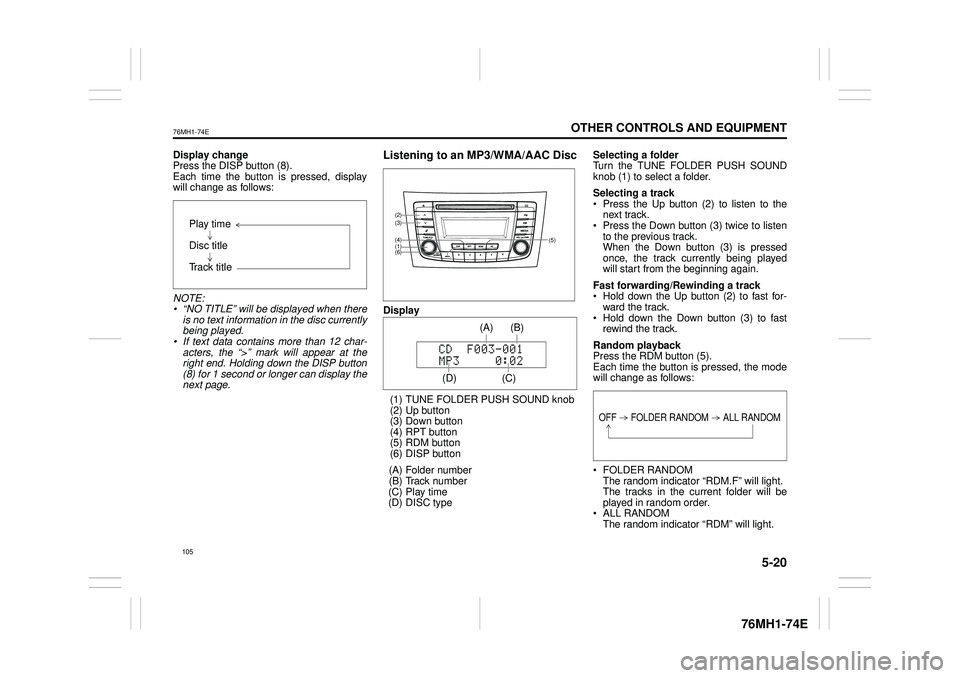
Display
(1) TUNE FOLDER PUSH SOUND knob (2) Up button (3) Down button (4) RPT button(5) RDM button (6) DISP button
(A) Folder number (B) Track number (C) Play time(D) DISC type
Selecting a folder Turn the TUNE FOLDER PUSH SOUND knob (1) to select a folder.
Selecting a track Press the Up button (2) to listen to thenext track. Press the Down button (3) twice to listen to the previous track.When the Down button (3) is pressed once, the track currently being played will start from the beginning again.
Fast forwarding/Rewinding a track Hold down the Up button (2) to fast for-ward the track. Hold down the Down button (3) to fast rewind the track.
Random playback Press the RDM button (5).Each time the button is pressed, the mode will change as follows:
FOLDER RANDOM The random indicator “RDM.F” will light. The tracks in the current folder will beplayed in random order. ALL RANDOM The random indicator “RDM” will light.
Play time
Disc title
Track title
(5)
(6)
(4)
(3)
(1)
(2)
(C)
(B) (A)
(D)
105
Page 117 of 201
5-21
OTHER CONTROLS AND EQUIPMENT
76MH1-74E
76MH1-74E
The tracks in the loaded disc will be played in random order.
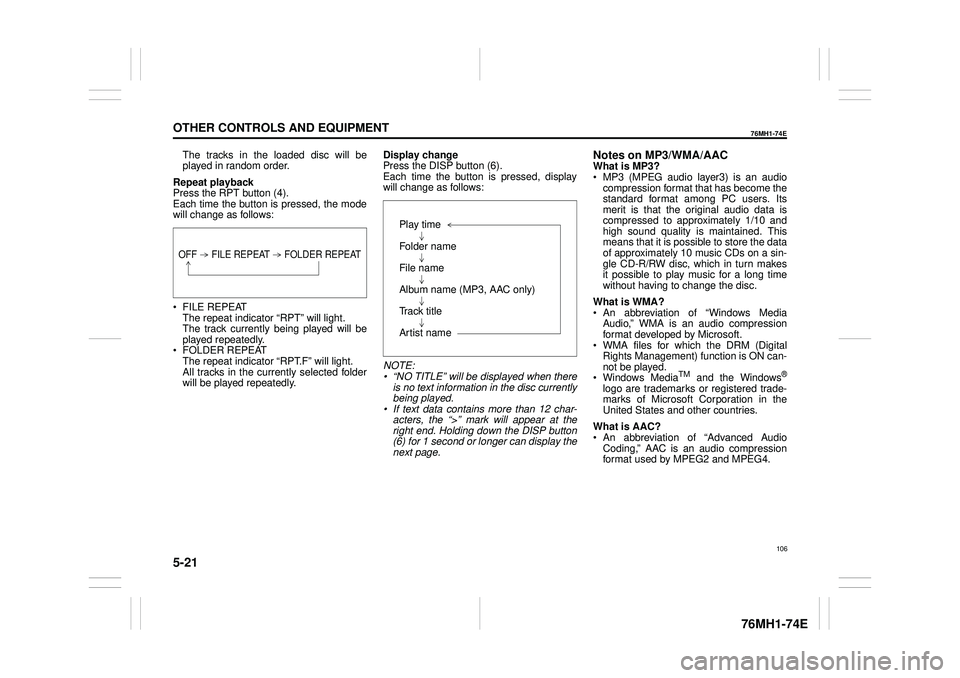
Repeat playback Press the RPT button (4). Each time the button is pressed, the modewill change as follows:
FILE REPEAT The repeat indicator “RPT” will light.The track currently being played will be played repeatedly. FOLDER REPEAT The repeat indicator “RPT.F” will light. All tracks in the currently selected folderwill be played repeatedly.
Display change Press the DISP button (6). Each time the button is pressed, displaywill change as follows:
NOTE: • “NO TITLE” will be displayed when there is no text information in the disc currently being played.• If text data contains more than 12 char- acters, the “>” mark will appear at the right end. Holding down the DISP button(6) for 1 second or longer can display the next page.
Notes on MP3/WMA/AACWhat is MP3? MP3 (MPEG audio layer3) is an audio compression format that has become the standard format among PC users. Itsmerit is that the original audio data is compressed to approximately 1/10 and high sound quality is maintained. Thismeans that it is possible to store the data of approximately 10 music CDs on a sin- gle CD-R/RW disc, which in turn makesit possible to play music for a long time without having to change the disc.
What is WMA? An abbreviation of “Windows Media Audio,” WMA is an audio compressionformat developed by Microsoft. WMA files for which the DRM (Digital Rights Management) function is ON can-not be played. Windows MediaTM and the Windows®
logo are trademarks or registered trade- marks of Microsoft Corporation in the United States and other countries.
What is AAC? An abbreviation of “Advanced Audio Coding,” AAC is an audio compressionformat used by MPEG2 and MPEG4.
OFF FILE REPEAT FOLDER REPEAT
Play time
Folder name
File name
Album name (MP3, AAC only)
Track title
Artist name
106
Page 120 of 201
5-24
OTHER CONTROLS AND EQUIPMENT
76MH1-74E
76MH1-74E
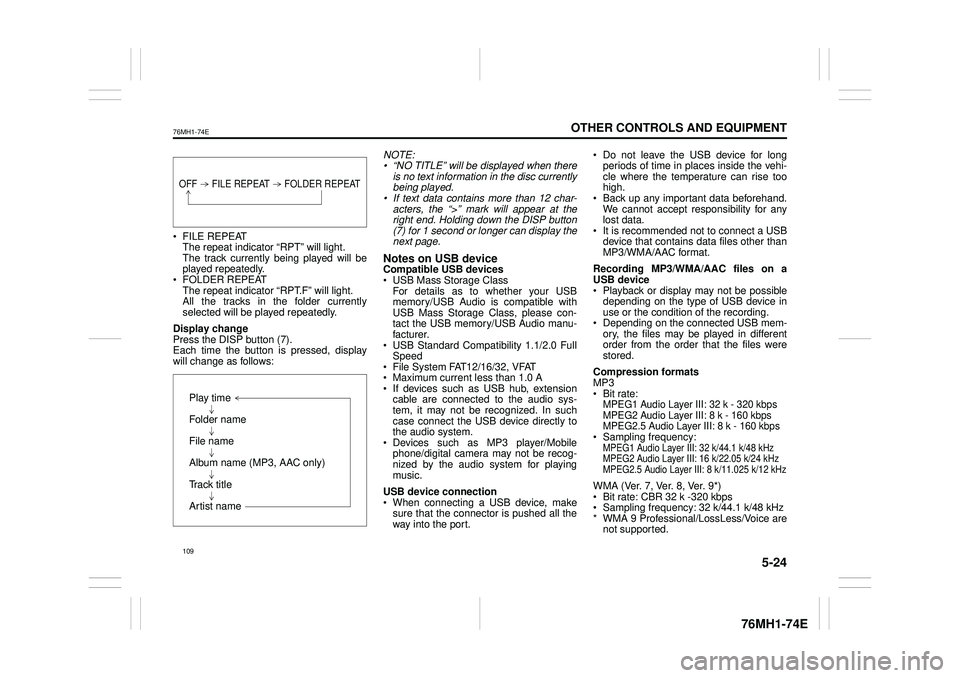
FILE REPEAT The repeat indicator “RPT” will light. The track currently being played will beplayed repeatedly. FOLDER REPEAT The repeat indicator “RPT.F” will light.All the tracks in the folder currently selected will be played repeatedly.
Display change Press the DISP button (7). Each time the button is pressed, display will change as follows:
NOTE: • “NO TITLE” will be displayed when there is no text information in the disc currentlybeing played. • If text data contains more than 12 char- acters, the “>” mark will appear at theright end. Holding down the DISP button (7) for 1 second or longer can display the next page.
Notes on USB deviceCompatible USB devices USB Mass Storage Class For details as to whether your USBmemory/USB Audio is compatible with USB Mass Storage Class, please con- tact the USB memory/USB Audio manu-facturer. USB Standard Compatibility 1.1/2.0 Full Speed File System FAT12/16/32, VFAT Maximum current less than 1.0 A If devices such as USB hub, extensioncable are connected to the audio sys- tem, it may not be recognized. In such case connect the USB device directly tothe audio system. Devices such as MP3 player/Mobile phone/digital camera may not be recog-nized by the audio system for playing music.
USB device connection When connecting a USB device, make sure that the connector is pushed all theway into the port.
Do not leave the USB device for long periods of time in places inside the vehi- cle where the temperature can rise toohigh. Back up any important data beforehand. We cannot accept responsibility for anylost data. It is recommended not to connect a USB device that contains data files other thanMP3/WMA/AAC format.
Recording MP3/WMA/AAC files on a USB device Playback or display may not be possible depending on the type of USB device inuse or the condition of the recording. Depending on the connected USB mem- ory, the files may be played in differentorder from the order that the files were stored.
Compression formats MP3 Bit rate:MPEG1 Audio Layer III: 32 k - 320 kbps MPEG2 Audio Layer III: 8 k - 160 kbps MPEG2.5 Audio Layer III: 8 k - 160 kbps Sampling frequency:MPEG1 Audio Layer III: 32 k/44.1 k/48 kHzMPEG2 Audio Layer III: 16 k/22.05 k/24 kHzMPEG2.5 Audio Layer III: 8 k/11.025 k/12 kHz
WMA (Ver. 7, Ver. 8, Ver. 9*) Bit rate: CBR 32 k -320 kbps Sampling frequency: 32 k/44.1 k/48 kHz * WMA 9 Professional/LossLess/Voice arenot supported.
OFF FILE REPEAT FOLDER REPEAT
Play time
Folder name
File name
Album name (MP3, AAC only)
Track title
Artist name
109
Page 128 of 201
5-32
OTHER CONTROLS AND EQUIPMENT
76MH1-74E
76MH1-74E
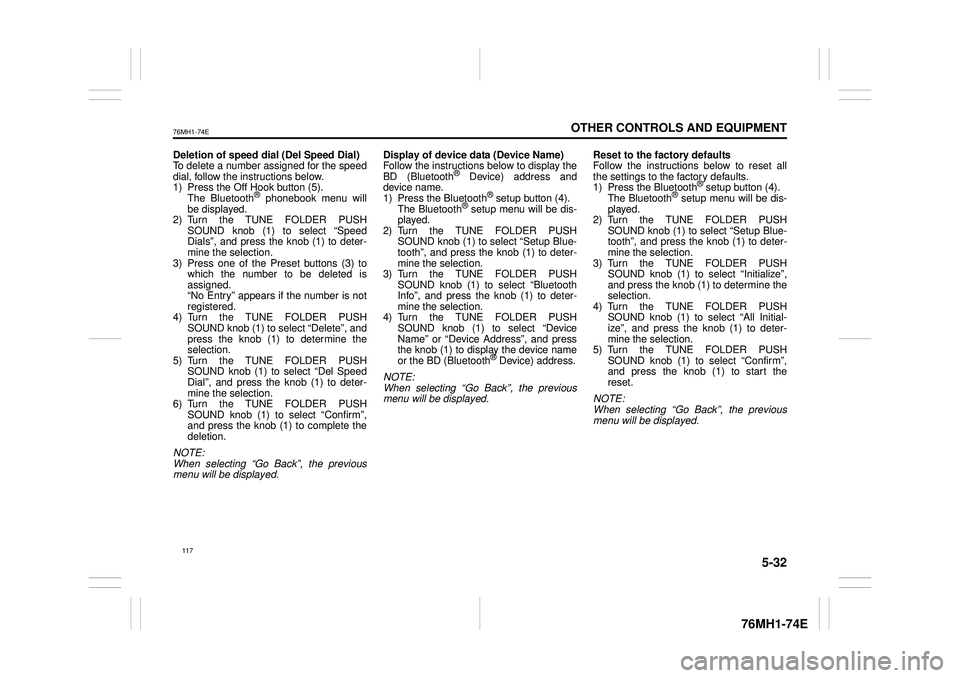
Deletion of speed dial (Del Speed Dial) To delete a number assigned for the speed dial, follow the instructions below.1) Press the Off Hook button (5). The Bluetooth® phonebook menu will be displayed.2) Turn the TUNE FOLDER PUSH SOUND knob (1) to select “Speed Dials”, and press the knob (1) to deter-mine the selection. 3) Press one of the Preset buttons (3) to which the number to be deleted isassigned. “No Entry” appears if the number is not registered.4) Turn the TUNE FOLDER PUSH SOUND knob (1) to select “Delete”, and press the knob (1) to determine theselection. 5) Turn the TUNE FOLDER PUSH SOUND knob (1) to select “Del Speed Dial”, and press the knob (1) to deter- mine the selection. 6) Turn the TUNE FOLDER PUSHSOUND knob (1) to select “Confirm”, and press the knob (1) to complete the deletion.
NOTE: When selecting “Go Back”, the previousmenu will be displayed.
Display of device data (Device Name) Follow the instructions below to display the BD (Bluetooth® Device) address anddevice name. 1) Press the Bluetooth® setup button (4). The Bluetooth® setup menu will be dis-played. 2) Turn the TUNE FOLDER PUSH SOUND knob (1) to select “Setup Blue-tooth”, and press the knob (1) to deter- mine the selection. 3) Turn the TUNE FOLDER PUSHSOUND knob (1) to select “Bluetooth Info”, and press the knob (1) to deter- mine the selection.4) Turn the TUNE FOLDER PUSH SOUND knob (1) to select “Device Name” or “Device Address”, and pressthe knob (1) to display the device name or the BD (Bluetooth® Device) address.
NOTE: When selecting “Go Back”, the previous menu will be displayed.
Reset to the factory defaults Follow the instructions below to reset all the settings to the factory defaults.1) Press the Bluetooth® setup button (4). The Bluetooth® setup menu will be dis- played.2) Turn the TUNE FOLDER PUSH SOUND knob (1) to select “Setup Blue- tooth”, and press the knob (1) to deter-mine the selection. 3) Turn the TUNE FOLDER PUSH SOUND knob (1) to se lect “Initialize”, and press the knob (1) to determine the selection. 4) Turn the TUNE FOLDER PUSHSOUND knob (1) to select “All Initial- ize”, and press the knob (1) to deter- mine the selection.5) Turn the TUNE FOLDER PUSH SOUND knob (1) to select “Confirm”, and press the knob (1) to start thereset.
NOTE: When selecting “Go Back”, the previous menu will be displayed.
117
Page 130 of 201
5-34
OTHER CONTROLS AND EQUIPMENT
76MH1-74E
76MH1-74E
Deletion of phone information (Delete Phone) Follow the instructions below to delete theregistered information of the phone. 1) Press the Bluetooth® setup button (4). The Bluetooth® setup menu will be dis-played. 2) Turn the TUNE FOLDER PUSH SOUND knob (1) to select “Setup Blue-tooth”, and press the knob (1) to deter- mine the selection. 3) Turn the TUNE FOLDER PUSHSOUND knob (1) to select “List Phone”, and press the knob (1) to determine the selection.4) Turn the TUNE FOLDER PUSH SOUND knob (1) to select a phone to be deleted, and press the knob (1) todetermine the selection. 5) Turn the TUNE FOLDER PUSH SOUND knob (1) to select “DeletePhone”, and press the knob (1) to determine the selection. 6) Turn the TUNE FOLDER PUSHSOUND knob (1) to select “Delete?”, and press the knob (1) to determine the selection.7) Turn the TUNE FOLDER PUSH SOUND knob (1) to select “Confirm”, and press the knob (1) to determine theselection.
NOTE: When selecting “Go Back”, the previous menu will be displayed.
BT function on /off (BT Power) Follow the instructions below to turn on/off the Bluetooth® function.1) Press the Bluetooth® setup button (4). The Bluetooth® setup menu will be dis- played.2) Turn the TUNE FOLDER PUSH SOUND knob (1) to select “Setup Blue- tooth”, and press the knob (1) to deter-mine the selection. 3) Turn the TUNE FOLDER PUSH SOUND knob (1) to select “BT Power”,and press the knob (1) to determine the selection. 4) Press the TUNE FOLDER PUSHSOUND knob (1) to select “BT Power On” or “BT Power Off ”.
NOTE: • When the BT function is turned off, the connection between this unit and theregistered phone in use will be discon- nected. • When selecting “Go Back”, the previousmenu will be displayed.
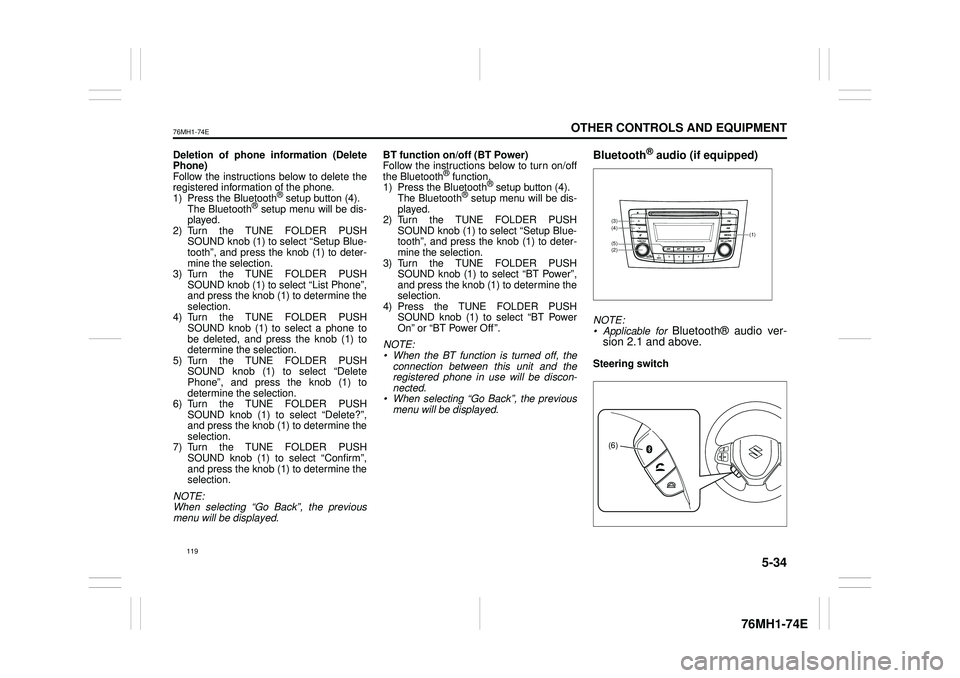
Bluetooth® audio (if equipped)
NOTE:• Applicable for Bluetooth® audio ver- sion 2.1 and above.
Steering switch
(1)
(2)
(4)(3)
(5)
(6)
119
Page 133 of 201
5-37
OTHER CONTROLS AND EQUIPMENT
76MH1-74E
76MH1-74E
NOTE: When selecting “Go Back”, the previous menu will be displayed.
Deletion of audio device information (Delete Audio)Follow the instructions below to delete the registered information of audio device. 1) Press the Bluetooth® setup button (6). The Bluetooth® setup menu will be dis- played. 2) Turn the TUNE FOLDER PUSHSOUND knob (2) to select “Setup Blue- tooth”, and press the knob (2) to deter- mine the selection.3) Turn the TUNE FOLDER PUSH SOUND knob (2) to select “List Audio”, and press the knob (2) to determine theselection. 4) Turn the TUNE FOLDER PUSH SOUND knob (2) to select an audiodevice to be deleted, and press the knob (2) to determine the selection. 5) Turn the TUNE FOLDER PUSHSOUND knob (2) to select “Delete”, and press the knob (2) to determine the selection.6) Turn the TUNE FOLDER PUSH SOUND knob (2) to select “Delete?”, and press the knob (2) to determine theselection. 7) Turn the TUNE FOLDER PUSH SOUND knob (2) to select “Confirm”,and press the knob (2) to complete the deletion.
NOTE: When selecting “Go Back”, the previous menu will be displayed.
Disclaimer for Bluetooth® function Depending on the mobile phone models, some phones may not be compatible fully or partially (some function may berestricted). Connectivity or voice quality may get affected depending on circumstances. After the ignition switch is turned to the “ON” position, the audio system takes few seconds to detect and connect to theBluetooth® device (if already paired). Make sure that you are aware of all applicable local laws and accordinglyuse Bluetooth device.
Remote Audio Controls
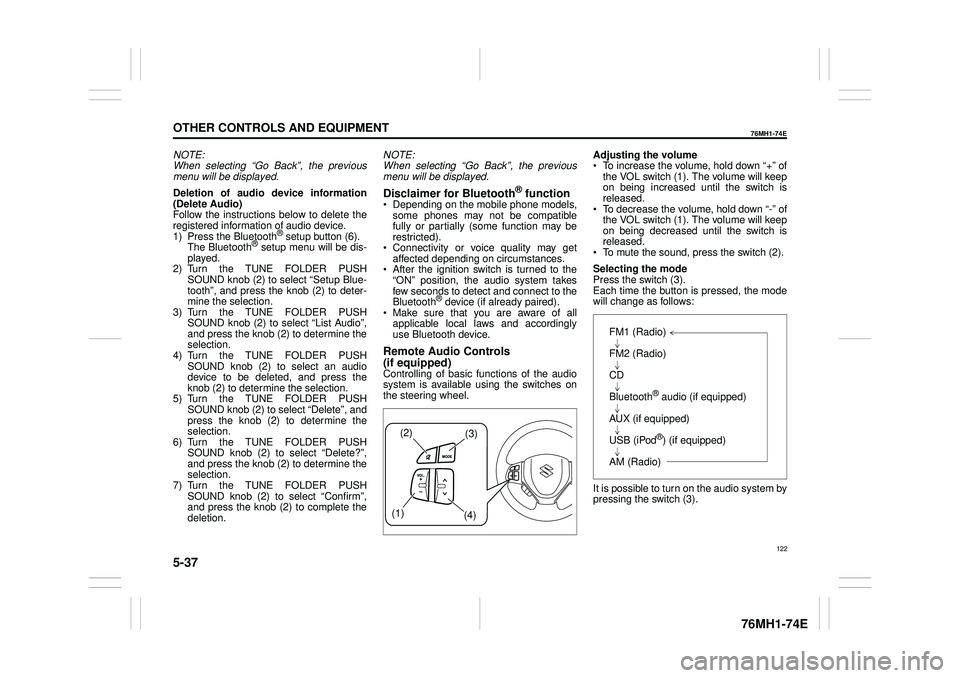
(if equipped)Controlling of basic functions of the audio system is available us ing the switches on the steering wheel.
Adjusting the volume To increase the volume, hold down “+” of the VOL switch (1). The volume will keepon being increased until the switch is released. To decrease the volume, hold down “-” ofthe VOL switch (1). The volume will keep on being decreased until the switch is released. To mute the sound, press the switch (2).
Selecting the mode Press the switch (3). Each time the button is pressed, the mode will change as follows:
It is possible to turn on the audio system by pressing the switch (3).
(2)(3)
(1) (4)
FM1 (Radio)
FM2 (Radio)
CD
Bluetooth® audio (if equipped)
AUX (if equipped)
USB (iPod®) (if equipped)
AM (Radio)
122