temperature SUZUKI CELERIO 2019 User Guide
[x] Cancel search | Manufacturer: SUZUKI, Model Year: 2019, Model line: CELERIO, Model: SUZUKI CELERIO 2019Pages: 201, PDF Size: 5.82 MB
Page 108 of 201

5-12
OTHER CONTROLS AND EQUIPMENT
76MH1-74E
76MH1-74E
Air conditioning switch (5) To turn on the air conditioning system, set the blower speed selector to a positionother than “OFF” and push in the “A/C” switch. With this “A/C” switch operation, a indicator light will come on when the airconditioning system is on. To turn off the air conditioning system, push the “A/C” switch again.
During operation of the air conditioner, you may notice slight changes in enginespeed. These changes are normal, the system is designed so that the compressor turns on or off to maintain the desired tem-perature.
Less operation of the compressor results in better fuel economy.
System Operating Instructions
Natural ventilationSelect “VENTILATION” and “FRESH AIR”, the temperature selector to the desired temperature position, and the blowerspeed selector to “OFF”. Fresh air will flow through the vehicle during driving.
Forced ventilation The control settings are the same as for natural ventilation except you set theblower speed selector to a position other than “OFF”.
Normal heating (using outside air) Select “HEAT” and “FRESH AIR”, the tem- perature selector to the desired tempera-ture position and the blower speed selector
to the desired blower speed position. Set- ting the blower speed selector to a higher blower speed position increases heatingefficiency.
Quick heating (using recirculated air) The control settings are the same as for normal heating except you select “RECIR- CULATED AIR”. If you use this heatingmethod for an extended period of time, the air in the vehicle can become contami- nated and the windows can become misty.Therefore, use this method only for quick heating and change to the normal heating method as soon as possible.
Head cooled/Feet warmed heating Select “BI-LEVEL” and “FRESH AIR”, thetemperature selector to the desired tem- perature position, and the blower speed selector to the desired blower speed posi-tion. Unless the temperature selector is in the fully COLD position or fully HOT posi- tion, the air that comes out of the centerand side outlets will be cooler than the air that comes out of the floor outlets.
Normal cooling Set the air flow selector to “VENTILA- TION”, the temperatur e selector to the desired temperature position and the blower speed selector to the desired blower speed position, and turn on the “A/C” switch. Setting the blower speed selec- tor to a higher blower speed position increases cooling efficiency.
You can switch the air intake selector to either “FRESH AIR” or “RECIRCULATED AIR” as you desire. Choosing “RECIRCU-LATED AIR” increases cooling efficiency.
Quick cooling (using recirculated air) The control settings are the same as for normal cooling except you select “RECIR- CULATED AIR” and the highest blowerspeed.
NOTE: • To turn on the air conditioning system, push in the “A/C” switch and set the blower speed selector to a position otherthan “OFF”. With this “A/C” switch opera- tion, an indicator light will come on when the air conditioning system is on. To turnoff the air conditioning system, push the “A/C” switch again. • During operation of the air conditioner,you may notice slight changes in engine speed. These changes are normal, the system is designed so that the compres-sor turns on or of f to maintain the desired temperature. Less operation of the compressor result s in better fuel economy.
NOTE: • If you select “RECIRCULATED AIR” for an extended period of time, the air in the vehicle can become contaminated.Therefore, you should occasionally select “FRESH AIR”. • If your vehicle has been left in the sunwith the windows closed, it will cool
97
Page 109 of 201
5-13
OTHER CONTROLS AND EQUIPMENT
76MH1-74E
76MH1-74E
faster if you open the windows briefly while you operate the air conditioner with the air intake selector at “FRESH AIR”and the blower at high speed.
DehumidifyingSet the air flow selector to a desired air flow selector position, the temperature selector to the desired temperature position and theblower speed selector to the desired blower speed position. Also select “FRESH AIR” and turn on the “A/C” switch.
NOTE:Because the air conditioner dehumidifiesthe air, turning it on will help keep the win- dows clear, even when blowing heated air using the “DEFROST” or “HEAT &DEFROST” functions.
76MH0A090
NOTE:If you need maximum defrosting:• set the air flow selector to “DEFROST”,
• set the blower speed selector to HIGH, • adjust the temperature selector to the HOT end, • turn on the “A/C” switch, and• adjust the side outlets so the air blows on the side windows.
MaintenanceIf you do not use the air conditioner for a long period, such as during winter, it may not give the best performance when youstart using it again. To help maintain opti- mum performance and durability of your air conditioner, it needs to be run periodically.Operate the air conditioner at least once a month for one minute with the engine idling. This circulates the refrigerant and oiland helps protect the internal components.
NOTE: Your vehicle uses the air conditioning refrigerant HFC-134a, commonly called “R-134a”. R-134a replaced R-12 around1993 for automotive applications. Other refrigerants are available, including recy- cled R-12, but only R-134a should be usedin your vehicle.
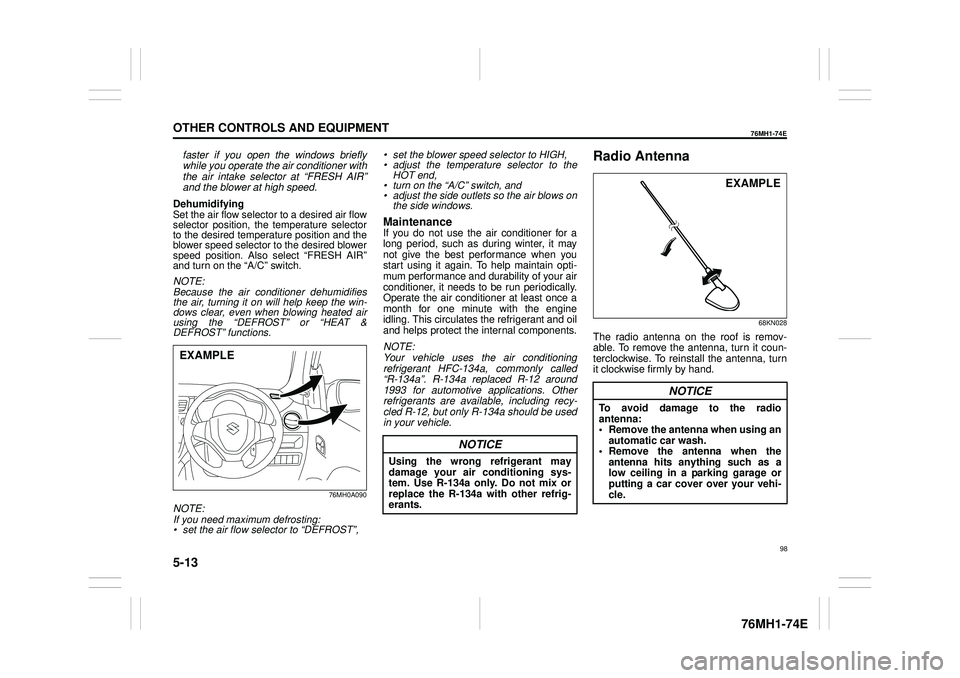
Radio Antenna
68KN028
The radio antenna on the roof is remov-able. To remove the antenna, turn it coun-terclockwise. To reinstall the antenna, turn it clockwise firmly by hand.
EXAMPLE
NOTICE
Using the wrong refrigerant may damage your air conditioning sys- tem. Use R-134a only. Do not mix or replace the R-134a with other refrig-erants.
NOTICE
To avoid damage to the radio antenna: • Remove the antenna when using anautomatic car wash. • Remove the antenna when the antenna hits anything such as alow ceiling in a parking garage or putting a car cover over your vehi- cle.
EXAMPLE
98
Page 120 of 201
5-24
OTHER CONTROLS AND EQUIPMENT
76MH1-74E
76MH1-74E
FILE REPEAT The repeat indicator “RPT” will light. The track currently being played will beplayed repeatedly. FOLDER REPEAT The repeat indicator “RPT.F” will light.All the tracks in the folder currently selected will be played repeatedly.
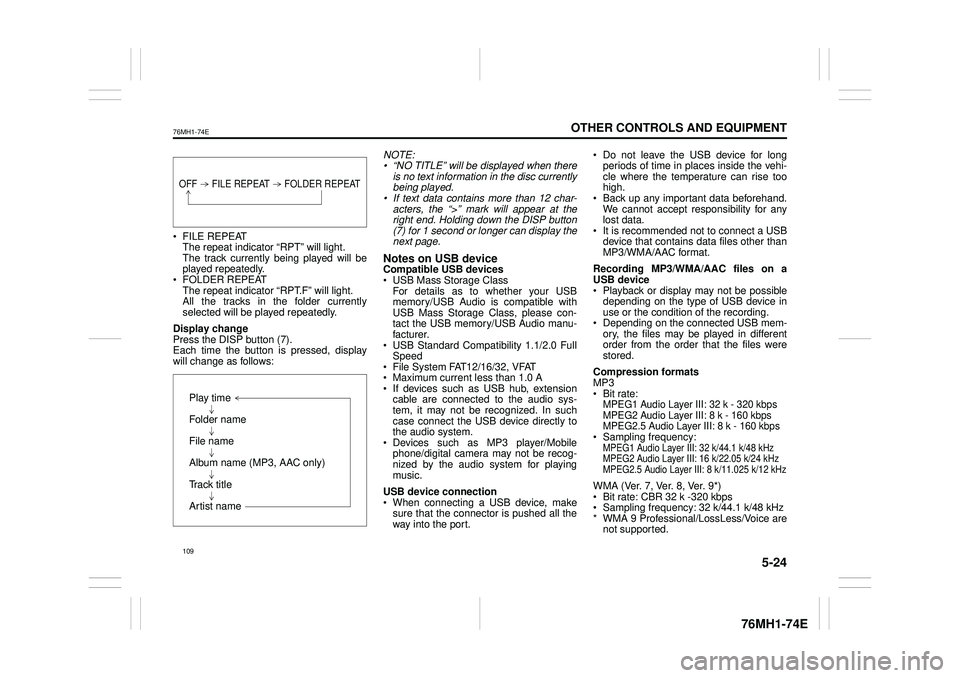
Display change Press the DISP button (7). Each time the button is pressed, display will change as follows:
NOTE: • “NO TITLE” will be displayed when there is no text information in the disc currentlybeing played. • If text data contains more than 12 char- acters, the “>” mark will appear at theright end. Holding down the DISP button (7) for 1 second or longer can display the next page.
Notes on USB deviceCompatible USB devices USB Mass Storage Class For details as to whether your USBmemory/USB Audio is compatible with USB Mass Storage Class, please con- tact the USB memory/USB Audio manu-facturer. USB Standard Compatibility 1.1/2.0 Full Speed File System FAT12/16/32, VFAT Maximum current less than 1.0 A If devices such as USB hub, extensioncable are connected to the audio sys- tem, it may not be recognized. In such case connect the USB device directly tothe audio system. Devices such as MP3 player/Mobile phone/digital camera may not be recog-nized by the audio system for playing music.
USB device connection When connecting a USB device, make sure that the connector is pushed all theway into the port.
Do not leave the USB device for long periods of time in places inside the vehi- cle where the temperature can rise toohigh. Back up any important data beforehand. We cannot accept responsibility for anylost data. It is recommended not to connect a USB device that contains data files other thanMP3/WMA/AAC format.
Recording MP3/WMA/AAC files on a USB device Playback or display may not be possible depending on the type of USB device inuse or the condition of the recording. Depending on the connected USB mem- ory, the files may be played in differentorder from the order that the files were stored.
Compression formats MP3 Bit rate:MPEG1 Audio Layer III: 32 k - 320 kbps MPEG2 Audio Layer III: 8 k - 160 kbps MPEG2.5 Audio Layer III: 8 k - 160 kbps Sampling frequency:MPEG1 Audio Layer III: 32 k/44.1 k/48 kHzMPEG2 Audio Layer III: 16 k/22.05 k/24 kHzMPEG2.5 Audio Layer III: 8 k/11.025 k/12 kHz
WMA (Ver. 7, Ver. 8, Ver. 9*) Bit rate: CBR 32 k -320 kbps Sampling frequency: 32 k/44.1 k/48 kHz * WMA 9 Professional/LossLess/Voice arenot supported.
OFF FILE REPEAT FOLDER REPEAT
Play time
Folder name
File name
Album name (MP3, AAC only)
Track title
Artist name
109
Page 157 of 201
7-8
INSPECTION AND MAINTENANCE
76MH1-74E
76MH1-74E
Refilling
81A147
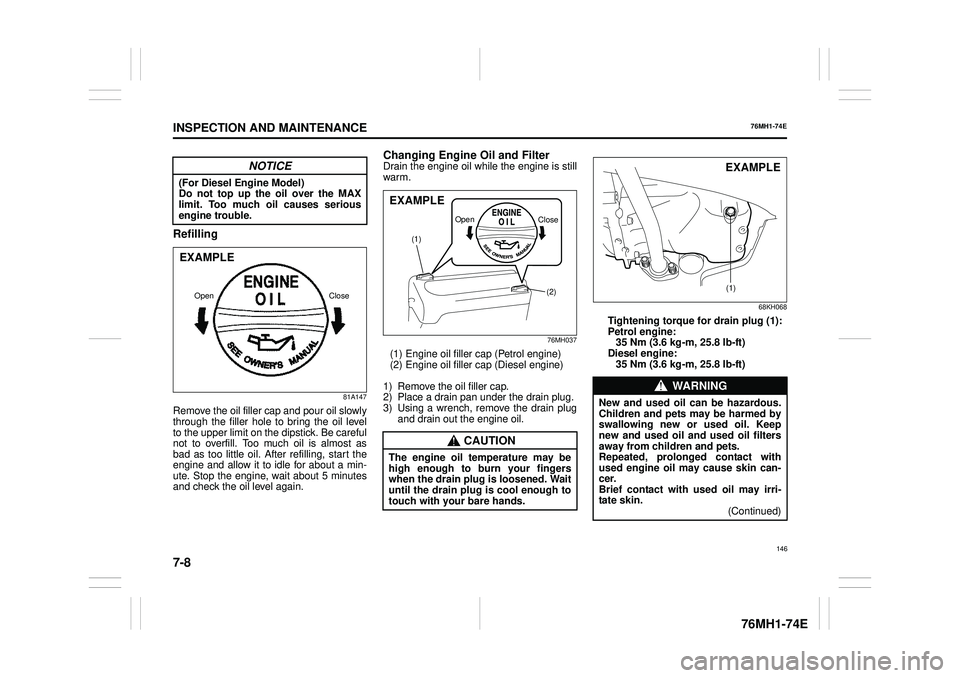
Remove the oil filler cap and pour oil slowly through the filler hole to bring the oil level to the upper limit on the dipstick. Be careful not to overfill. Too much oil is almost asbad as too little oil. After refilling, start the engine and allow it to idle for about a min- ute. Stop the engine, wait about 5 minutesand check the oil level again.
Changing Engine Oil and FilterDrain the engine oil while the engine is stillwarm.
76MH037
(1) Engine oil filler cap (Petrol engine)(2) Engine oil filler cap (Diesel engine)
1) Remove the oil filler cap. 2) Place a drain pan under the drain plug.3) Using a wrench, remove the drain plug and drain out the engine oil.
68KH068
Tightening torque for drain plug (1):Petrol engine: 35 Nm (3.6 kg -m, 25.8 lb-ft) Diesel engine: 35 Nm (3.6 kg -m, 25.8 lb-ft)
NOTICE
(For Diesel Engine Model) Do not top up the oil over the MAX limit. Too much oil causes serious engine trouble.
Close Open
EXAMPLE
CAUTION
The engine oil temperature may behigh enough to burn your fingers when the drain plug is loosened. Waituntil the drain plug is cool enough to touch with your bare hands.
(2)
(1)
Open Close
EXAMPLE
WA R N I N G
New and used oil can be hazardous.Children and pets may be harmed by swallowing new or used oil. Keepnew and used oil and used oil filters away from children and pets. Repeated, prolonged contact withused engine oil may cause skin can- cer. Brief contact with used oil may irri-tate skin. (Continued)
(1)
EXAMPLE
146
Page 160 of 201
7-11
INSPECTION AND MAINTENANCE
76MH1-74E
76MH1-74E
Adding Coolant(For Petrol Engine Model)
76MH0A107
76MH0A108
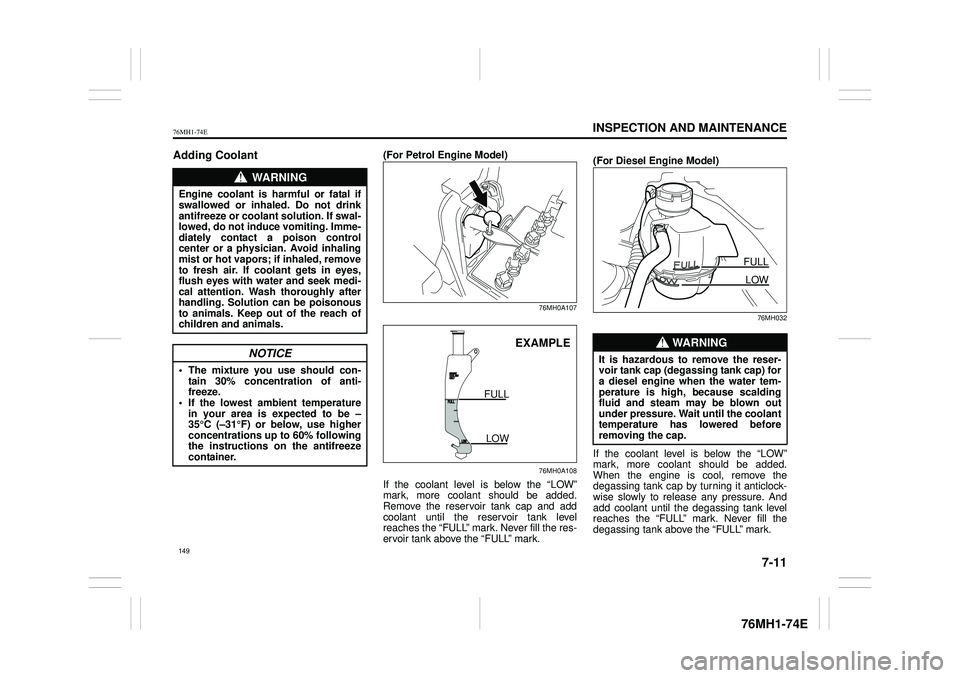
If the coolant level is below the “LOW” mark, more coolant should be added. Remove the reservoir tank cap and add coolant until the reservoir tank level reaches the “FULL” mark. Never fill the res- ervoir tank above the “FULL” mark.
(For Diesel Engine Model)
76MH032
If the coolant level is below the “LOW” mark, more coolant should be added. When the engine is cool, remove the degassing tank cap by turning it anticlock-wise slowly to release any pressure. And add coolant until the degassing tank level reaches the “FULL” mark. Never fill thedegassing tank above the “FULL” mark.
WA R N I N G
Engine coolant is harmful or fatal if swallowed or inhaled. Do not drink antifreeze or coolant solution. If swal-lowed, do not induce vomiting. Imme- diately contact a poison control center or a physician. Avoid inhalingmist or hot vapors; if inhaled, remove to fresh air. If coolant gets in eyes, flush eyes with water and seek medi-cal attention. Wash thoroughly after handling. Solution can be poisonous to animals. Keep out of the reach ofchildren and animals.
NOTICE
• The mixture you use should con- tain 30% concentration of anti- freeze.• If the lowest am bient temperature in your area is expected to be – 35°C (–31°F) or below, use higherconcentrations up to 60% following the instructions on the antifreeze container.
EXAMPLE
FULL
LOW
WA R N I N G
It is hazardous to remove the reser- voir tank cap (degassing tank cap) for a diesel engine when the water tem- perature is high, because scaldingfluid and steam may be blown out under pressure. Wait until the coolant temperature has lowered beforeremoving the cap.
FULL
LOW
149
Page 163 of 201
7-14
INSPECTION AND MAINTENANCE
76MH1-74E
76MH1-74E
Gear Oil
Manual Transaxle Oil/
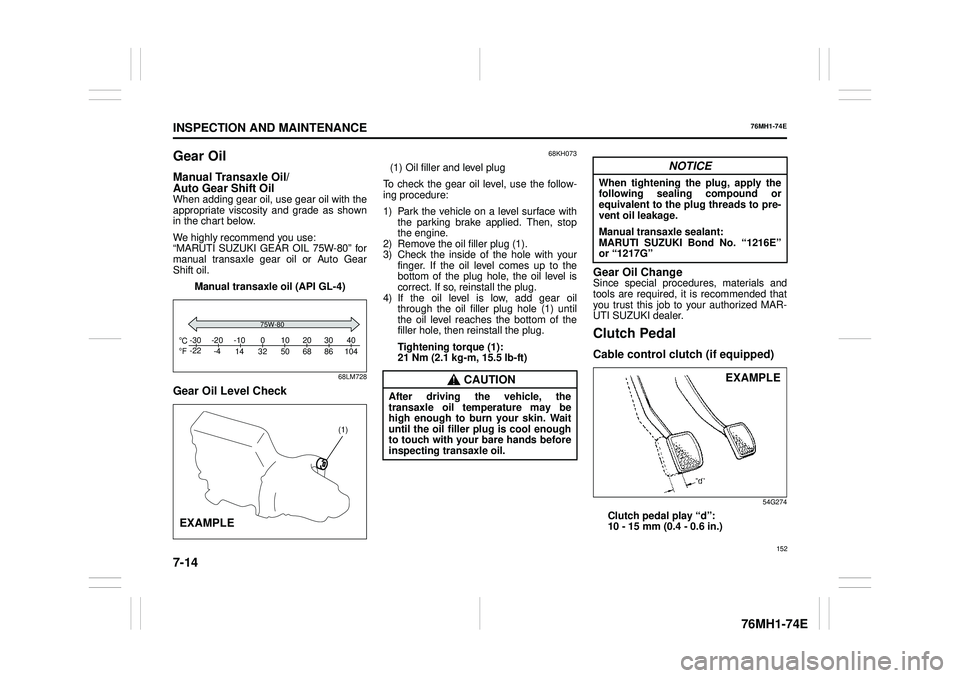
Auto Gear Shift OilWhen adding gear oil, use gear oil with the appropriate viscosity and grade as shown in the chart below.
We highly recommend you use: “MARUTI SUZUKI GEAR OIL 75W-80” formanual transaxle gear oil or Auto Gear Shift oil.
Manual transaxle oil (API GL-4)
68LM728
Gear Oil Level Check
68KH073
(1) Oil filler and level plug
To check the gear oil level, use the follow- ing procedure:
1) Park the vehicle on a level surface with the parking brake applied. Then, stop the engine.2) Remove the oil filler plug (1). 3) Check the inside of the hole with your finger. If the oil level comes up to thebottom of the plug hole, the oil level is correct. If so, reinstall the plug. 4) If the oil level is low, add gear oilthrough the oil filler plug hole (1) until the oil level reaches the bottom of the filler hole, then reinstall the plug.
Tightening torque (1): 21 Nm (2.1 kg -m, 15.5 lb-ft)
Gear Oil ChangeSince special procedures, materials and tools are required, it is recommended that you trust this job to your authorized MAR-UTI SUZUKI dealer.
Clutch Pedal
Cable control clutch (if equipped)
54G274
Clutch pedal play “d”: 10 - 15 mm (0.4 - 0.6 in.)
C Fo o-30 -22 -20 -4 -10 14 32 50 68 86 104 010203040
75W-80
(1)
EXAMPLE
CAUTION
After driving the vehicle, the transaxle oil temperature may behigh enough to burn your skin. Wait until the oil filler plug is cool enough to touch with your bare hands beforeinspecting transaxle oil.
NOTICE
When tightening the plug, apply thefollowing sealing compound orequivalent to the plug threads to pre- vent oil leakage.
Manual transaxle sealant: MARUTI SUZUKI Bond No. “1216E” or “1217G”
EXAMPLE
152
Page 187 of 201
8-6
EMERGENCY SERVICE
76MH1-74E
76MH1-74E
If the Starter Does Not
Operate
1) Try turning the ignition switch to the “START” position with the headlights turned on to determine the battery con- dition. If the headlights go excessivelydim or go off, it usually means that either the battery is flat or the battery terminal contact is poor. Recharge thebattery or correct battery terminal con- tact as necessary. 2) If the headlights remain bright, checkthe fuses. If the reason for failure of the starter is not obvious, there may be a major electrical problem. Have the vehi-cle inspected by your authorized MAR- UTI SUZUKI dealer.
If the Engine is Flooded
If the engine is flooded with petrol, it may be hard to start. If this happens, press theaccelerator pedal all the way to the floor and hold it there while cranking the engine. For petrol engine model, do not operatethe starter motor for more than 12 sec- onds. For diesel engine model, do not operatethe starter motor for more than 30 sec- onds.
If the Engine Overheats
The engine could overheat temporarily under severe driving conditions. If the highengine coolant temperature warning light comes on as overheating during driving: 1) Turn off the air conditioner, if equipped.2) Take the vehicle to a safe place and park. 3) Let the engine run at the normal idlespeed for a few minutes until the high engine coolant temperature warning light goes off.
If the high engine coolant temperature warning light does not go off: 1) Turn off the engine and check that the water pump belt and pulleys are notdamaged or slipping. If any abnormality is found, correct it.
2) Check the coolant level in the reservoir. If it is found to be lower than the “LOW” line, look for leaks at the radiator, waterpump, and radiator and heater hoses. If you locate any leaks that may have caused the overheating, do not run theengine until these problems have been corrected. 3) If you do not find a leak, carefully addcoolant to the reservoir and then the radiator, if necessary. (Refer to “Engine Coolant” in the “INSPECTION ANDMAINTENANCE” section.)
NOTE: If your engine overheats and you are unsure what to do, contact your MARUTI SUZUKI dealer.
WA R N I N G
If you see or hear escaping steam,stop the vehicle in a safe place andimmediately turn off the engine to let it cool. Do not open the hood when steam is present. When the steamcan no longer be seen or heard, open the hood to see if the coolant is still boiling. If it is, you must wait until itstops boiling before you proceed.
176
Page 188 of 201
8-7
EMERGENCY SERVICE
76MH1-74E
76MH1-74E
65D614
Warning Triangle
MHO-07-001
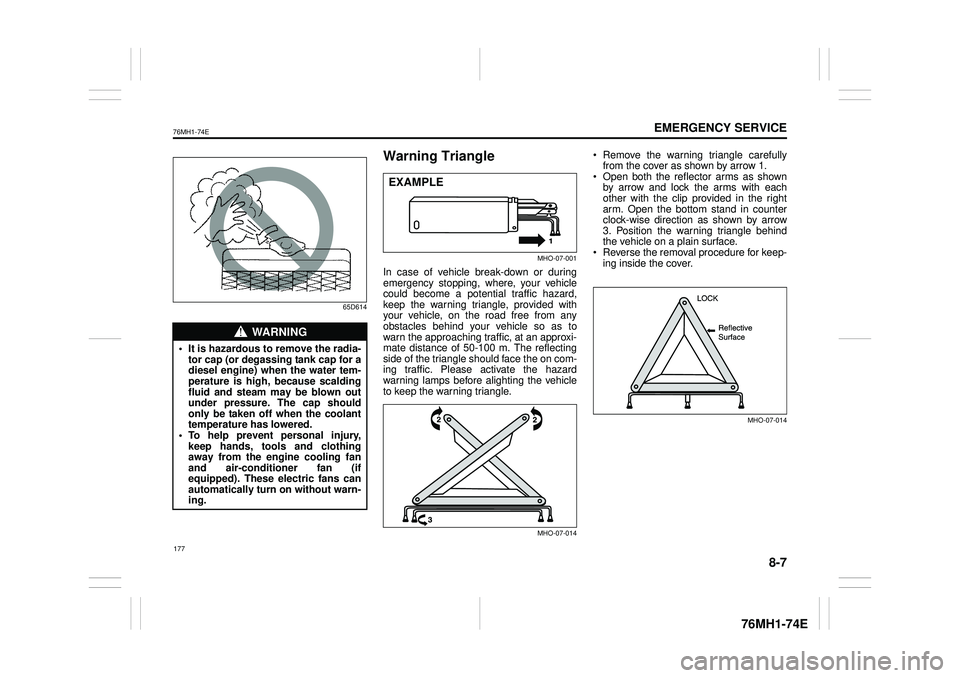
In case of vehicle break-down or during emergency stopping, where, your vehiclecould become a potential traffic hazard, keep the warning triangle, provided with your vehicle, on the road free from anyobstacles behind your vehicle so as to warn the approaching traffic, at an approxi- mate distance of 50-100 m. The reflecting side of the triangle should face the on com- ing traffic. Please activate the hazardwarning lamps before alighting the vehicle to keep the warning triangle.
MHO-07-014
Remove the warning triangle carefullyfrom the cover as shown by arrow 1. Open both the reflector arms as shownby arrow and lock the arms with each other with the clip provided in the right arm. Open the bottom stand in counterclock-wise direction as shown by arrow 3. Position the warning triangle behind the vehicle on a plain surface. Reverse the removal procedure for keep- ing inside the cover.
MHO-07-014
WA R N I N G
• It is hazardous to remove the radia- tor cap (or degassing tank cap for adiesel engine) when the water tem- perature is high, because scalding fluid and steam may be blown outunder pressure. The cap should only be taken off when the coolant temperature has lowered.• To help prevent personal injury, keep hands, tools and clothing away from the engine cooling fanand air-conditioner fan (if equipped). These electric fans can automatically turn on without warn- ing.
EXAMPLE
177
Page 190 of 201
9-1
APPEARANCE CARE
76MH1-74E
76MH1-74E
APPEARANCE CARE
Corrosion Prevention
It is important to take good care of your vehicle to protect it from corrosion. Listedbelow are instructions for how to maintain your vehicle to prevent corrosion. Please read and follow these instructions carefully.
Important Information About Corrosion
Common causes of corrosion 1) Accumulation of road salt, dirt, mois- ture, or chemicals in hard-to-reachareas of the vehicle underbody or frame. 2) Chipping, scratches and any damage totreated or painted metal surfaces resulting from minor accidents or abra- sion by stones and gravel.
Environmental conditions which accel- erate corrosion1) Road salt, dust control chemicals, sea air or industrial pollution will all acceler- ate the corrosion of metal.2) High humidity will increase the rate of corrosion particularly when the tem- perature range is just above the freez-ing point. 3) Moisture in certain areas of a vehicle for an extended period of time may pro-mote corrosion even though other body sections may be completely dry.
4) High temperatures will cause an accel- erated rate of corrosion to parts of the vehicle which are not well ventilated topermit quick drying.
This information illustrates the necessity of keeping your vehicle (particularly the underbody) as clean and dry as possible. It is equally important to repair any damageto the paint or protective coatings as soon as possible.
How to Help Prevent Corrosion
Wash your vehicle frequentlyThe best way to preserve the finish on your vehicle and to help avoid corrosion is tokeep it clean with frequent washing. Wash your vehicle at least once during the winter and once immediately after the win-ter. Keep your vehicle, particularly the underside, as clean and dry as possible. If you frequently drive on salted roads, yourvehicle should be washed at least once a month during the winter. If you live near the ocean, your vehicle should be washed atleast once a month throughout the year.
For washing instructions, refer to the “Vehi- cle Cleaning” section.
Remove foreign ma terial depositsForeign material such as salts, chemicals, road oil or tar, tree sap, bird droppings andindustrial fall-out may damage the finish of your vehicle if it is left on painted surfaces. Remove these types of deposits as quicklyas possible. If these deposits are difficult to wash off, an additional cleaner may be required. Be sure that any cleaner you use
is not harmful to painted surfaces and is specifically intended for your purposes. Fol- low the manufacturer’s directions when using these special cleaners.
Repair finish damage Carefully examine your vehicle for damage to the painted surfaces. Should you findany chips or scratches in the paint, touch them up immediately to prevent corrosion from starting. If the chips or scratches havegone through to the bare metal, have a qualified body shop make the repair.
Keep passenger and luggage compart- ments cleanMoisture, dirt or mud can accumulate under the floor mats and may cause corrosion. Occasionally, check under these mats toensure that this area is clean and dry. More frequent checks are necessary if the vehicle is used off road or in wet weather.Certain cargos such as chemicals, fertiliz- ers, cleaners, salts, etc. are extremely cor- rosive by nature. These products should betransported in sealed containers. If a spill or leak does occur, clean and dry the area immediately.
Store your vehicle in a dry, well-venti- lated area Do not park your vehicle in a damp, poorlyventilated area. If you often wash your vehicle in the garage or if you frequently drive it in when wet, your garage may bedamp. The high humidity in the garage may cause or accelerate corrosion. A wet vehicle may corrode even in a heatedgarage if the ventilation is poor.
179