radio SUZUKI FORENZA 2007 Owner's Manual
[x] Cancel search | Manufacturer: SUZUKI, Model Year: 2007, Model line: FORENZA, Model: SUZUKI FORENZA 2007Pages: 225, PDF Size: 4.39 MB
Page 120 of 225
3-44 INSTRUMENT PANEL
85Z03-03E
STEERING WHEEL REMOTE OPER-
ATION (if equipped in the vehicle)Power Button
Press this button to turn the system on and
off. Press this button for a short time to
MUTE the sound. To cancel MUTE, press
this button again.
Volume Up Button
Press this button to increase the volume
level.
Volume Down Button
Press this button to decrease the volume
level.
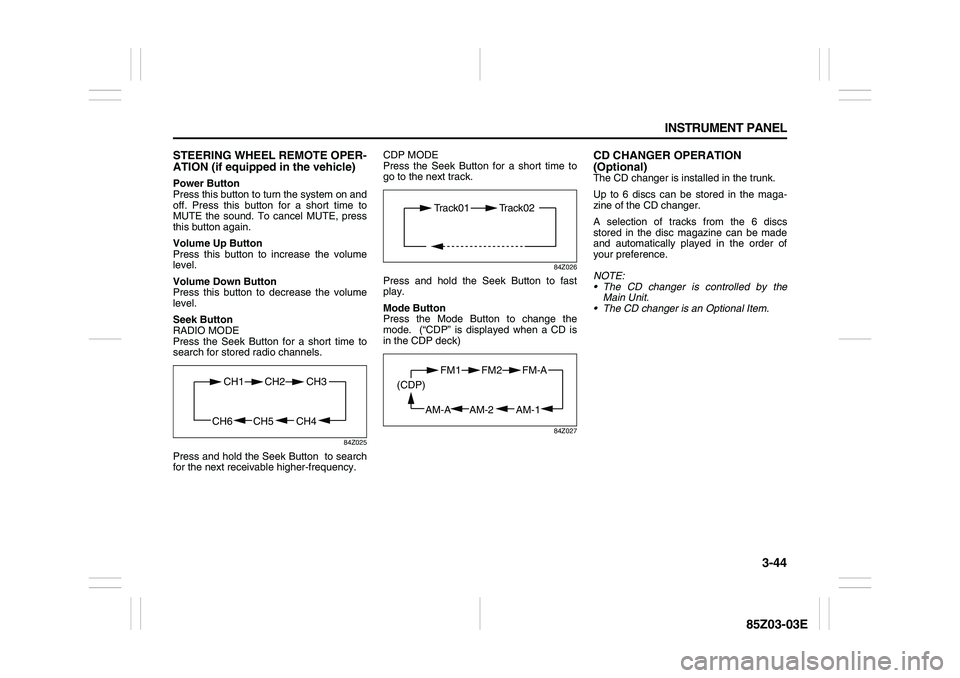
Seek Button
RADIO MODE
Press the Seek Button for a short time to
search for stored radio channels.
84Z025
Press and hold the Seek Button to search
for the next receivable higher-frequency.CDP MODE
Press the Seek Button for a short time to
go to the next track.
84Z026
Press and hold the Seek Button to fast
play.
Mode Button
Press the Mode Button to change the
mode. (“CDP” is displayed when a CD is
in the CDP deck)
84Z027
CD CHANGER OPERATION
(Optional)The CD changer is installed in the trunk.
Up to 6 discs can be stored in the maga-
zine of the CD changer.
A selection of tracks from the 6 discs
stored in the disc magazine can be made
and automatically played in the order of
your preference.
NOTE:
The CD changer is controlled by the
Main Unit.
The CD changer is an Optional Item.
CH4 CH5
CH1 CH2
CH6
CH3
Track01 Track02
AM-1 AM-2
FM1 FM2
AM-A (CDP)
FM-A
Page 123 of 225
3-47 INSTRUMENT PANEL
85Z03-03E
The CD changer is operated by the main
unit.
1) Press the power button on the main unit
to turn the audio system on.
2) If a disc is already inserted inside the
CD changer, press the “CD” button.
Playback starts at the beginning of the
track that you were previously listening
to.
3) If a disc is not inserted yet, load a disc
in the magazine. (Refer to “How to
change discs”.)
Then, press the “CD” button to play.
Playback starts from the No. 1 disc.
CD Changer Play:
To play the CD Changer while operating
the radio, press the “CD” button if a disc is
already inserted in the CD changer.
The mode is transferred to the CD changer
and the CD is played back from the track
that you were previously listening to.
If a disc is not in the CD changer, the mode
is not changed to the CD changer when
you press this button.
Track Up & Down:
The track up & down knob/button allows
you to make quick selections from your
playing disc.
1) To play the next track, rotate this knob
clockwise for less than 1 second or
press the track up button once. Each
time you rotate the knob or press thebutton, the disc will skip to the next
track.
2) To play the previous track, rotate this
knob counterclockwise for less than 1
second or press the track down button
once. Each time you rotate the knob or
press the button, the disc will skip to the
previous track.
Cue & Review:
This function allows desired point-search
within a track at a faster than normal play-
back speed.
1) To search for the desired point of a
track, rotate this knob and hold it or
press and hold the track up/down but-
ton. The audio level is reduced and the
disc will play at a faster than normal
playback speed. When the disc reaches
the desired point, release the knob/but-
ton and normal play will resume.
2) To cue (forward) the track, rotate this
knob clockwise or press the track up
button. To review (backward) the track,
rotate this knob counterclockwise or
press the track down button.
Repeat Play:
To repeatedly listen to the current track,
press the “2/RPT” button.
“RPT” is displayed in VFD and the current
track will be played back repeatedly until
this function is canceled.
To cancel this function, press this button
again.Track Introduction:
To quickly and conveniently scan the track,
use the “3 or 4/INT” button.
“INTRO” will be displayed in VFD and the
audio system will play the first 10 seconds
of each track.
When the player reaches the desired track,
press this button again and normal play will
resume.
Random Play:
To play a CD disc in random order, press
the “4 or 5/RDM” button.
“RDM” will be displayed in VFD and the
audio system will play the CD in random
order.
To cancel this function, press this button
again.
Disc Up / Down Button
To select another disc in ascending order,
press the “3 or 6/UP” button. The number
of the selected disc will appear on the
VFD.
To select another disc in descending order,
press the “5 or 6/DN” button. The number
of the selected disc will appear on the
VFD.
Page 165 of 225
5-21 SERVICE AND APPEARANCE CARE
85Z03-03E
2) Get the vehicles close enough so the
jumper cables can reach, but be sure
the vehicles aren’t touching each other.
If they are, it could cause a ground con-
nection you don’t want. You wouldn’t be
able to start your vehicle, and the bad
grounding could damage the electrical
systems.
To avoid the possibility of the vehicles
rolling, set the parking brake firmly on
both vehicles involved in the jump start
procedure. Put an automatic transmis-
sion in PARK (P) or a manual transmis-
sion in NEUTRAL before setting the
parking brake.3) Turn off the ignition on both vehicles.
Unplug unnecessary accessories
plugged into the cigarette lighter or in
the accessory power outlet. Turn off the
radio and all lamps that aren’t needed.
This will avoid sparks and help save
both batteries. And it could save your
radio!
4) Open the hoods and locate the batter-
ies. Find the positive (+) and negative
(–) terminal locations on each vehicle.
Your vehicle’s positive (+) terminal is
located under a red tethered cap on the
battery. The negative (–) terminal is
located under a black tethered cap on
the battery. See “Engine Compartment
Overview” in this section for more infor-
mation on location. Flip the caps up to
access the positive (+) and negative (–)
terminals.
5) Check that the jumper cables don’t
have loose or missing insulation. If they
do, you could get a shock. The vehicles
could be damaged, too.
Before you connect the cables, here are
some basic things you should know.
Positive (+) will go to positive (+) or to a
remote positive (+) terminal if the vehi-
cle has one. Negative (–) will go to a
heavy, unpainted metal engine part or
to a remote negative (–) terminal if the
vehicle with the dead battery has one.
Don’t connect positive (+) to negative
(–) or you’ll get a short that would dam-
CAUTION
If the other system isn’t a 12-volt sys-
tem with a negative ground, both
vehicles can be damaged. Only use
vehicles with 12-volt systems with
negative grounds to jump start your
vehicle.
CAUTION
If you leave your radio or other acces-
sories on during the jump starting
procedure, they could be damaged.
The repairs wouldn’t be covered by
your warranty. Always turn off your
radio and other accessories when
jump starting your vehicle.
WARNING
An electric fan under the hood can
start up and injure you even when the
engine is not running. Keep hands,
clothing and tools away from any
underhood electric fan.
WARNING
Using a match near a battery can
cause battery gas to explode. People
have been hurt doing this, and some
have been blinded. Use a flashlight if
you need more light.
Be sure the battery has enough
water. You don’t need to add water to
the battery installed in your new vehi-
cle. But if a battery has filler caps, be
sure the right amount of fluid is
there. If it is low, add water to take
care of that first. If you don’t, explo-
sive gas could be present.
Battery fluid contains acid that can
burn you. Don’t get it on you. If you
accidentally get it in your eyes or on
your skin, flush the place with water
and get medical help immediately.
Checking Things Under the Hood:
Page 178 of 225
5-34 SERVICE AND APPEARANCE CARE
85Z03-03E
itoring system. Have tire and wheel
replacement performed by an authorized
service facility to avoid the risk of damag-
ing the tire pressure monitor sensors.
The tire pressure monitoring system may
not work normally in the following circum-
stances:
Wheels other than genuine wheels are
being used.
Wheels whose ID codes are not memo-
rized by the vehicle are used. The moni-
toring system should be set up by an
authorized service facility.
Wheels that are not fitted with tire pres-
sure sensors are being used.
The tire inflation pressure sensors’ bat-
tery is exhausted.
A wireless facility or device using the
same frequency is near the vehicle.
Snow or ice is stuck inside the fenders
and/or on the wheels.
The tire pressure monitoring system oper-
ates on a radio frequency subject to Fed-eral Communications Commission (FCC)
Rules and with Industry and Science Can-
ada.
This device complies with Part 15 of the
FCC Rules and with RSS-210 of Industry
and Science Canada. Operation is subject
to the following two conditions: (1) This
device may not cause harmful interference,
and (2) this device must accept any inter-
ference received including interference that
may cause undesired operation of the
device.
Correcting the Tire PressureTo permanently eliminate the low tire pres-
sure warning light, you must fill the tires
with the correct amount of air. However, at
the next vehicle start-up, the warning light
will reappear if the tire pressure is not cor-
rected. The best time to check your tire
pressure is when the tires are cold. A Tire
and Loading Information label, located on
the driver’s door near the door latch, shows
the correct inflation pressure for the tires
when they are cold. Cold means your vehi-
cle has been sitting for at least three hours
or driven no more than one mile. You may
notice during cooler conditions that low tire
pressure warning light will appear when
the vehicle is first started and then turn off
as you start to drive the vehicle. This could
be an early indicator that your tire pres-
sures are getting low and need to be
inflated to the proper pressure.
WARNING
Only use tires and wheels recom-
mended by us as standard or
optional equipment for your vehicle.
Use of tires or wheels not recom-
mended by us can result in TPMS fail-
ure. Refer to “Tires” in the “SERVICE
AND APPEARANCE CARE” section
for additional information.
WARNING
Changes or modifications expressly
approved by the party responsible for
compliance could void the user’s
authority to operate the equipment.
Tires:
Page 194 of 225
5-50 SERVICE AND APPEARANCE CARE
85Z03-03E
Power Windows and Other Power
OptionsCircuit breakers in the fuse block protect
the power windows and other power
accessories. When the current load is too
heavy, the circuit breaker opens, protecting
the circuit until the problem is fixed or goes
away.Fuses and Circuit BreakersThe wiring circuits in your vehicle are pro-
tected from short circuits by a combination
of fuses, circuit breakers and fusible ther-
mal links in the wiring itself.
Look at the silver-colored band inside the
fuse. If the band is broken or melted,
replace the fuse. Be sure you replace a
bad fuse with a new one of the identical
size and rating.
There are spare fuses provided in the
engine compartment fuse block. If you ever
have a problem on the road and don’t have
a spare fuse, you can borrow one that has
the same amperage. Just pick a feature of
your vehicle that you can get along without
– like the radio or cigarette lighter – and
use its fuse, if it is the correct amperage.
Replace it as soon as you can.
There are two fuse blocks in your vehicle:
the instrument panel fuse block and the
engine compartment fuse block.
There is a fuse puller located on the
engine compartment fuse block. It can beused to easily remove fuses from the fuse
block.
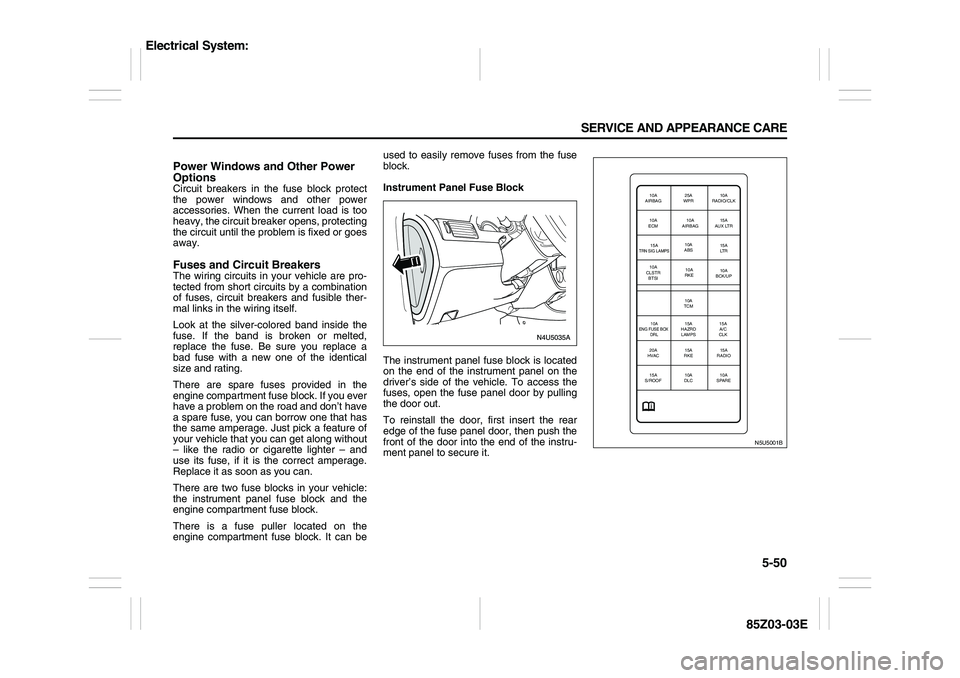
Instrument Panel Fuse Block
The instrument panel fuse block is located
on the end of the instrument panel on the
driver’s side of the vehicle. To access the
fuses, open the fuse panel door by pulling
the door out.
To reinstall the door, first insert the rear
edge of the fuse panel door, then push the
front of the door into the end of the instru-
ment panel to secure it.
N5U5001B
10A
AIRBAG25A
WPR10A
RADIO/CLK
10A
ECM10A
AIRBAG15A
AUX LTR
15ATRN SIG LAMPS
10A
ABS15A
LT R
10A
CLSTR
BTSI10A
BCK/UP
15A
A/C
CLK 10A
TCM10A
RKE
10A
ENG FUSE BOX
DRL
15A
HAZRD
LAMPS
20A
HVAC15A
RKE15A
RADIO
15A
S/ROOF10A
DLC10A
SPARE
Electrical System:
Page 195 of 225
5-51 SERVICE AND APPEARANCE CARE
85Z03-03E
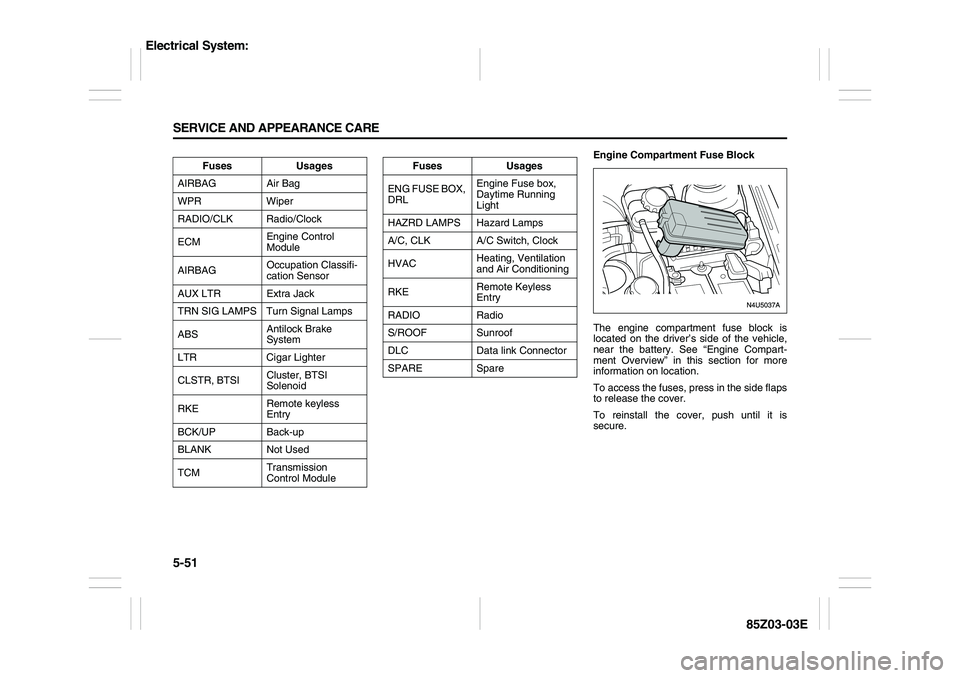
Engine Compartment Fuse Block
The engine compartment fuse block is
located on the driver’s side of the vehicle,
near the battery. See “Engine Compart-
ment Overview” in this section for more
information on location.
To access the fuses, press in the side flaps
to release the cover.
To reinstall the cover, push until it is
secure. Fuses Usages
AIRBAG Air Bag
WPR Wiper
RADIO/CLK Radio/Clock
ECMEngine Control
Module
AIRBAGOccupation Classifi-
cation Sensor
AUX LTR Extra Jack
TRN SIG LAMPS Turn Signal Lamps
ABSAntilock Brake
System
LTR Cigar Lighter
CLSTR, BTSICluster, BTSI
Solenoid
RKERemote keyless
Entry
BCK/UP Back-up
BLANK Not Used
TCMTransmission
Control Module
Fuses Usages
ENG FUSE BOX,
DRLEngine Fuse box,
Daytime Running
Light
HAZRD LAMPS Hazard Lamps
A/C, CLK A/C Switch, Clock
HVACHeating, Ventilation
and Air Conditioning
RKERemote Keyless
Entry
RADIO Radio
S/ROOF Sunroof
DLC Data link Connector
SPARE Spare
Electrical System:
Page 223 of 225
8-4 INDEX
85Z03-03E
Passenger Air Bag Off Indicator
........................................3-26
Passenger Compartment Air Filter ....................................3-17
Passenger Sensing System
................................................1-31
Power Door Locks
...............................................................2-5
Power Steering Fluid ...........................................................5-17
Power Windows
...................................................................2-9
Power Windows and Other Power Options
.......................5-50
QQuestions and Answers About Safety Belts
.....................1-7
RRadio with Six-Disc CD (Double Display, MP3/WMA)
(AGH-5400)
...........................................................................3-37
Rear Center Safety Belt (Sedan only)
................................1-13
Rear Door Security Locks
...................................................2-5
Rear Seat Armrest
...............................................................2-23
Rear Seat Passengers
.........................................................1-11
Rear Seats
............................................................................1-4
Rear Sidemarker Lamps
.....................................................5-27
Rear Window and Outside Rearview Mirror Defogger
.....3-16
Rear Window Washer/Wiper
...............................................3-7
Reclining Seatbacks
............................................................1-2
Recommended Fluids and Lubricants
..............................6-10
Recreational Vehicle Towing
..............................................4-16
Remote Keyless Entry System ...........................................2-1
Remote Keyless Entry System Operation
.........................2-2
Replacement Bulbs
.............................................................5-27
Replacing Restraint System Parts After a Crash
.............1-35
Reporting Safety Defects
....................................................7-4
Restraint System Check .....................................................1-34
Right Front Passenger Position
.........................................1-11
Roof Rack (Wagon only)
.....................................................2-25Running Your Engine While You Are Parked
................... 2-20
SSafety Belt: They are for Everyone .................................... 1-5
Safety Belt Extender
........................................................... 1-15
Safety Belt Pretensioner System
....................................... 1-14
Safety Belt Reminder Light
................................................ 3-19
Safety Belt Reminder Tone ................................................ 3-19
Safety Belt Use During Pregnancy
.................................... 1-10
Safety Belts
......................................................................... 1-5
Safety Certification Label
................................................... 7-2
Scheduled Maintenance Services
..................................... 6-2
Securing a Child Restraint Designed for the LATCH
System
................................................................................. 1-24
Securing a Child Restraint in a Rear Seat Position
......... 1-25
Securing a Child Restraint in the Right Front Seat
Position
................................................................................ 1-26
Securing a Child Restraint with Top Strap
....................... 1-22
Selecting the Right Condition
............................................ 6-1
Service
................................................................................. 5-1
Servicing Your Air Bag-Equipped Vehicle
........................ 1-34
Sheet Metal Damage
........................................................... 5-48
Shifting Into Park (P) .......................................................... 2-18
Shifting Out of Park (P) ...................................................... 2-18
Side Storage Box (Wagon only)
........................................ 2-24
Spare Tire
............................................................................ 5-44
Specifications
...................................................................... 5-54
Speed Sensitive Power Steering (SSPS) Warning
Light
..................................................................................... 3-22
Speedometer and Odometer
.............................................. 3-18
Starting and Operating Your Vehicle
................................ 2-12
Starting Your Engine
.......................................................... 2-13