turn signal SUZUKI FORENZA 2008 1.G Owners Manual
[x] Cancel search | Manufacturer: SUZUKI, Model Year: 2008, Model line: FORENZA, Model: SUZUKI FORENZA 2008 1.GPages: 226, PDF Size: 5.25 MB
Page 10 of 226
0-3
85Z04-03E
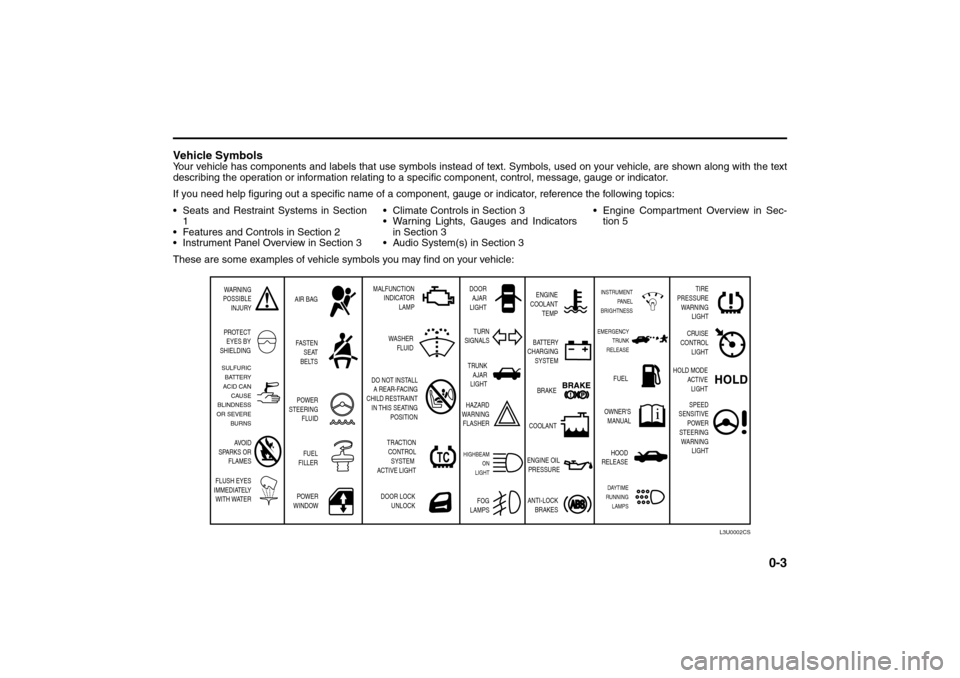
Vehicle SymbolsYour vehicle has components and labels that use symbols instead of text. Symbols, used on your vehicle, are shown along with the text
describing the operation or information relating to a specific component, control, message, gauge or indicator.
If you need help figuring out a specific name of a component, gauge or indicator, reference the following topics:
Seats and Restraint Systems in Section
1
Features and Controls in Section 2
Instrument Panel Overview in Section 3 Climate Controls in Section 3
Warning Lights, Gauges and Indicators
in Section 3
Audio System(s) in Section 3 Engine Compartment Overview in Sec-
tion 5
These are some examples of vehicle symbols you may find on your vehicle:
WARNING
POSSIBLE
INJURY
PROTECT
EYES BY
SHIELDINGFASTEN
SEAT
BELTS
POWER
WINDOWDOOR LOCK
UNLOCK DO NOT INSTALL
A REAR-FACING
CHILD RESTRAINT
IN THIS SEATING
POSITION AIR BAGMALFUNCTION
INDICATOR
LAMPENGINE
COOLANT
TEMP
FUEL
OWNER'S
MANUAL BATTERY
CHARGING
SYSTEM
BRAKE
COOLANT
ENGINE OIL
PRESSURE
ANTI-LOCK
BRAKES TURN
SIGNALS
HAZARD
WARNING
FLASHER
HIGHBEAM
ON
LIGHT
FOG
LAMPS
SULFURIC
BATTERY
ACID CAN
CAUSE
BLINDNESS
OR SEVERE
BURNS
AVOID
SPARKS OR
FLAMES
FLUSH EYES
IMMEDIATELY
WITH WATER
L3U0002CS
DOOR
AJAR
LIGHT
POWER
STEERING
FLUID
FUEL
FILLER
EMERGENCY
TRUNK
RELEASEINSTRUMENT
PANEL
BRIGHTNESS
TRUNK
AJAR
LIGHT
HOOD
RELEASEDAYTIME
RUNNING
LAMPS
TRACTION
CONTROL
SYSTEM
ACTIVE LIGHTWASHER
FLUID
TIRE
PRESSURE
WARNING
LIGHT
CRUISE
CONTROL
LIGHT
HOLD MODE
ACTIVE
LIGHT
SPEED
SENSITIVE
POWER
STEERING
WARNING
LIGHT
Page 50 of 226
2-2
FEATURES AND CONTROLS
85Z04-03E
Check the distance. You may be too far
from your vehicle. You may need to
stand closer during rainy or snowy
weather.
Check the location. Other vehicles or
objects may be blocking the signal. Take
a few steps to the left or right, hold the
transmitter higher, and try again.
Check to determine if battery replace-
ment is necessary. See “Battery
Replacement” under Remote Keyless
Entry System Operation in this section.
If you are still having trouble, see your
SUZUKI dealer or a qualified technician
for ser vice.
Remote Keyless Entry System
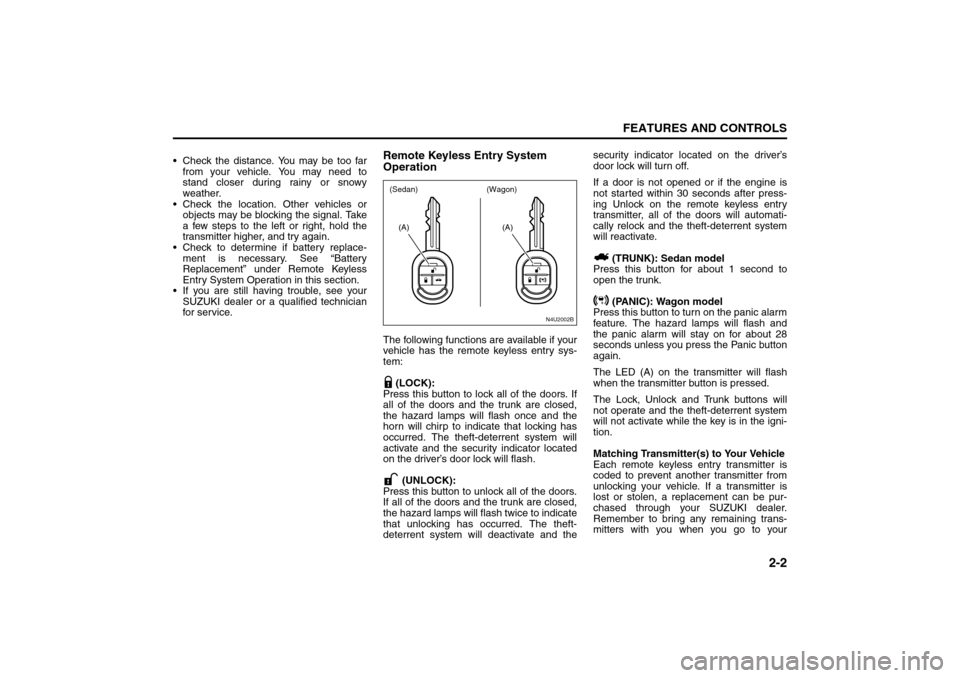
OperationThe following functions are available if your
vehicle has the remote keyless entry sys-
tem:
(LOCK):
Press this button to lock all of the doors. If
all of the doors and the trunk are closed,
the hazard lamps will flash once and the
horn will chirp to indicate that locking has
occurred. The theft-deterrent system will
activate and the security indicator located
on the driver’s door lock will flash.
(UNLOCK):
Press this button to unlock all of the doors.
If all of the doors and the trunk are closed,
the hazard lamps will flash twice to indicate
that unlocking has occurred. The theft-
deterrent system will deactivate and thesecurity indicator located on the driver’s
door lock will turn off.
If a door is not opened or if the engine is
not started within 30 seconds after press-
ing Unlock on the remote keyless entry
transmitter, all of the doors will automati-
cally relock and the theft-deterrent system
will reactivate.
(TRUNK): Sedan model
Press this button for about 1 second to
open the trunk.
(PANIC): Wagon model
Press this button to turn on the panic alarm
feature. The hazard lamps will flash and
the panic alarm will stay on for about 28
seconds unless you press the Panic button
again.
The LED (A) on the transmitter will flash
when the transmitter button is pressed.
The Lock, Unlock and Trunk buttons will
not operate and the theft-deterrent system
will not activate while the key is in the igni-
tion.
Matching Transmitter(s) to Your Vehicle
Each remote keyless entry transmitter is
coded to prevent another transmitter from
unlocking your vehicle. If a transmitter is
lost or stolen, a replacement can be pur-
chased through your SUZUKI dealer.
Remember to bring any remaining trans-
mitters with you when you go to your
N4U2002B
(A)
(A)
(Sedan) (Wagon)
Keys:
Page 59 of 226
2-11FEATURES AND CONTROLS
85Z04-03E
How to Turn Off the System Alarm
If the system alarm is active, it can be
deactivated using the following methods:
Press the Lock or Unlock button on the
remote keyless entry transmitter.
Unlock the driver’s or passenger’s front
door using the key.
Otherwise, the alarm will automatically
stop after 30 seconds. The system will
then lock the doors and reactivate the
theft-deterrent system.
How to Detect a Tamper Condition
If the hazard lamps flash once when the
Lock or Unlock button on your transmitter
is pressed, that means the theft-security
system alarm was triggered while you
were away.
Daily Inspection ChecklistBefore Driving1) Make sure that windows, mirrors, lights
and reflectors are clean and unob-
structed.
2) Visually check the tires for the following
points:
– the depth of the tread groove
– abnormal wear, cracks and damage
– loose wheel nuts
– existence of foreign material such as
nails, stones, etc.
Refer to “Tires” in the “SERVICE AND
APPEARANCE CARE” section for details.
3) Look for oil or other fluid leaks.
NOTE:
It is normal for water to drip from the air
conditioning system after use.
4) Make sure the hood is fully closed and
latched.
5) Check the headlights, turn signal lights,
brake lights and horn for proper opera-
tion.
6) Lock all doors.
7) Adjust the seat and adjustable head
restraints (if equipped).
8) Check the brake pedal.
9) Adjust the mirrors.
10)Make sure that you and all passengers
have properly fastened your safety
belts.11)Make sure that all warning lights come
on as the key is turned to the “ON” or
“START” position.
12)Check all gauges.
13)Make sure that the BRAKE light turns
off when the parking brake is released.
Once a week, or each time you fill your fuel
tank, perform the following under-hood
checks:
1) Engine oil level
2) Coolant level
3) Brake fluid level
4) Power steering (if equipped) fluid level
5) Windshield washer fluid level
6) Hood latch operation
Pull the hood release handle inside the
vehicle. Make sure that you cannot
open the hood all the way without
releasing the secondary latch. Be sure
to close the hood securely after check-
ing for proper latch operation. See the
item “Lubricate Locks, Hinges & Hood
Latch” under “Chassis and Body” in the
“MAINTENANCE SCHEDULE” section
for the lubrication schedule.
WARNING
Make sure the hood is fully closed
and latched before driving. If it is not,
it can fly up unexpectedly during
driving, obstructing your view and
resulting in an accident.
Theft-Deterrent Systems:
Daily Inspection Checklist:
Page 79 of 226
3-3INSTRUMENT PANEL
85Z04-03E
Hazard Warning FlashersYour hazard warning flashers let you warn
others. They also let police know you have
a problem. Your front and rear turn signal
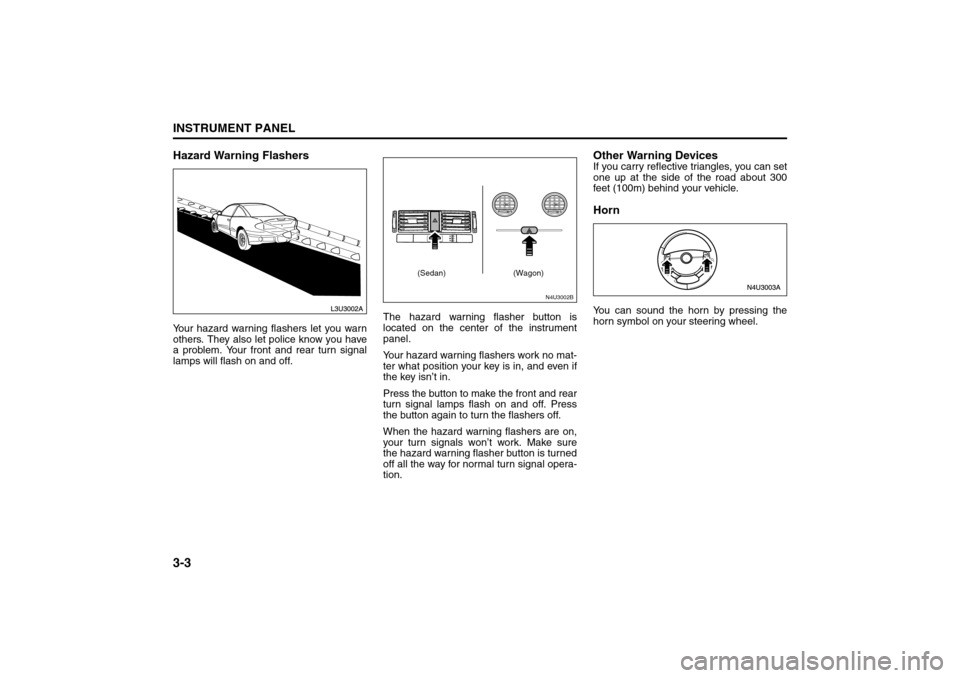
lamps will flash on and off.The hazard warning flasher button is
located on the center of the instrument
panel.
Your hazard warning flashers work no mat-
ter what position your key is in, and even if
the key isn’t in.
Press the button to make the front and rear
turn signal lamps flash on and off. Press
the button again to turn the flashers off.
When the hazard warning flashers are on,
your turn signals won’t work. Make sure
the hazard warning flasher button is turned
off all the way for normal turn signal opera-
tion.
Other Warning DevicesIf you carry reflective triangles, you can set
one up at the side of the road about 300
feet (100m) behind your vehicle.HornYou can sound the horn by pressing the
horn symbol on your steering wheel.
N4U3002B
(Sedan) (Wagon)
Instrument Panel Overview:
Page 80 of 226
3-4
INSTRUMENT PANEL
85Z04-03E
Tilt WheelYour vehicle has a tilt wheel which allows
you to adjust the steering wheel before you
drive. You can raise it to the highest level to
give your legs more room when you exit
and enter the vehicle.
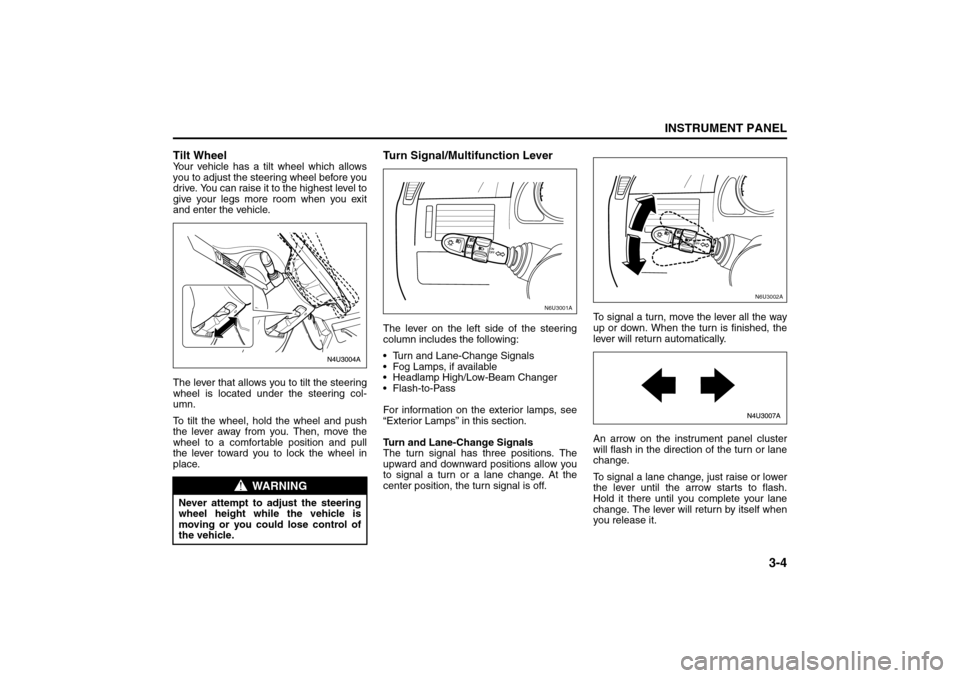
The lever that allows you to tilt the steering
wheel is located under the steering col-
umn.
To tilt the wheel, hold the wheel and push
the lever away from you. Then, move the
wheel to a comfortable position and pull
the lever toward you to lock the wheel in
place.
Turn Signal/Multifunction LeverThe lever on the left side of the steering
column includes the following:
Turn and Lane-Change Signals
Fog Lamps, if available
Headlamp High/Low-Beam Changer
Flash-to-Pass
For information on the exterior lamps, see
“Exterior Lamps” in this section.
Turn and Lane-Change Signals
The turn signal has three positions. The
upward and downward positions allow you
to signal a turn or a lane change. At the
center position, the turn signal is off.To signal a turn, move the lever all the way
up or down. When the turn is finished, the
lever will return automatically.
An arrow on the instrument panel cluster
will flash in the direction of the turn or lane
change.
To signal a lane change, just raise or lower
the lever until the arrow starts to flash.
Hold it there until you complete your lane
change. The lever will return by itself when
you release it.
WARNING
Never attempt to adjust the steering
wheel height while the vehicle is
moving or you could lose control of
the vehicle.
N6U3001A
N6U3002A
Instrument Panel Overview:
Page 81 of 226
3-5INSTRUMENT PANEL
85Z04-03E
As you signal a turn or a lane change, if
the arrows flash rapidly, a signal bulb may
be burned out and other drivers won’t see
your turn signal.
If a bulb is burned out, replace it to help
avoid an accident. If the arrows don’t go on
at all when you signal a turn, check for
burned-out bulbs and then check the fuse.
See “Fuses and Circuit Breakers” in sec-
tion 5.
Headlamp High/Low-Beam Changer
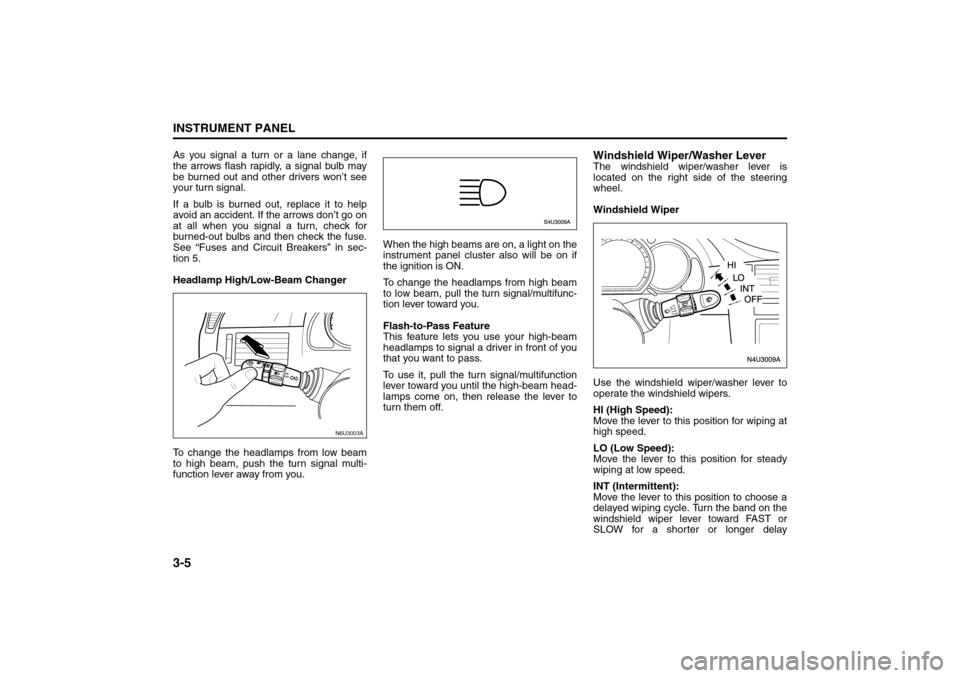
To change the headlamps from low beam
to high beam, push the turn signal multi-
function lever away from you.When the high beams are on, a light on the
instrument panel cluster also will be on if
the ignition is ON.
To change the headlamps from high beam
to low beam, pull the turn signal/multifunc-
tion lever toward you.
Flash-to-Pass Feature
This feature lets you use your high-beam
headlamps to signal a driver in front of you
that you want to pass.
To use it, pull the turn signal/multifunction
lever toward you until the high-beam head-
lamps come on, then release the lever to
turn them off.
Windshield Wiper/Washer LeverThe windshield wiper/washer lever is
located on the right side of the steering
wheel.
Windshield Wiper
Use the windshield wiper/washer lever to
operate the windshield wipers.
HI (High Speed):
Move the lever to this position for wiping at
high speed.
LO (Low Speed):
Move the lever to this position for steady
wiping at low speed.
INT (Intermittent):
Move the lever to this position to choose a
delayed wiping cycle. Turn the band on the
windshield wiper lever toward FAST or
SLOW for a shorter or longer delay
N6U3003A
Instrument Panel Overview:
Page 85 of 226
3-9INSTRUMENT PANEL
85Z04-03E
Erasing Speed Memory
When you turn off the cruise control or the
ignition, your cruise control set speed
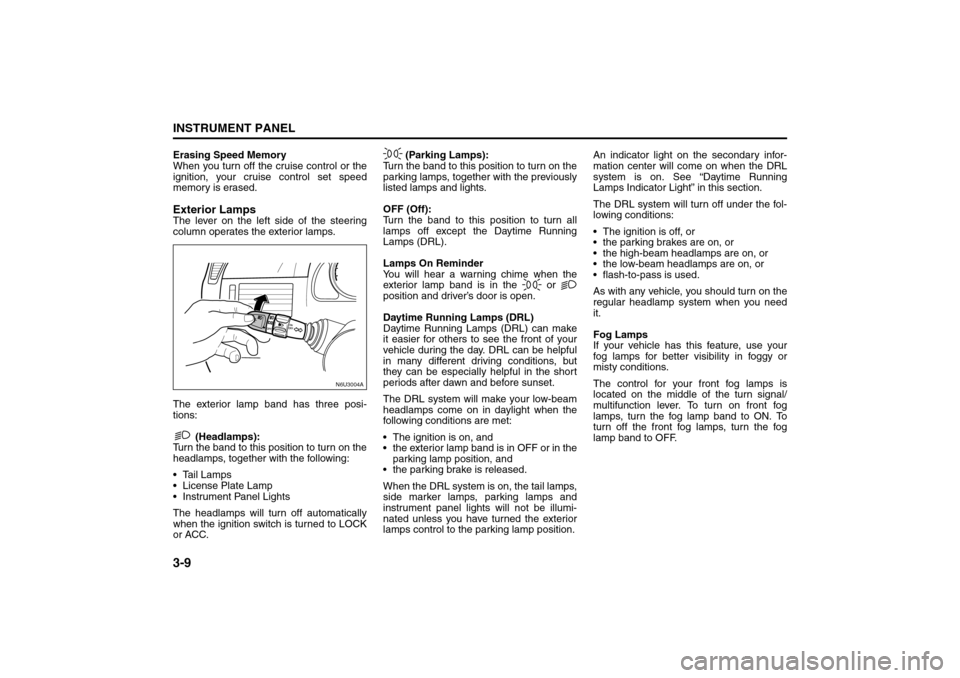
memory is erased.Exterior LampsThe lever on the left side of the steering
column operates the exterior lamps.
The exterior lamp band has three posi-
tions:
(Headlamps):
Turn the band to this position to turn on the
headlamps, together with the following:
Tail Lamps
License Plate Lamp
Instrument Panel Lights
The headlamps will turn off automatically
when the ignition switch is turned to LOCK
or ACC. (Parking Lamps):
Turn the band to this position to turn on the
parking lamps, together with the previously
listed lamps and lights.
OFF (Off):
Turn the band to this position to turn all
lamps off except the Daytime Running
Lamps (DRL).
Lamps On Reminder
You will hear a warning chime when the
exterior lamp band is in the or
position and driver’s door is open.
Daytime Running Lamps (DRL)
Daytime Running Lamps (DRL) can make
it easier for others to see the front of your
vehicle during the day. DRL can be helpful
in many different driving conditions, but
they can be especially helpful in the short
periods after dawn and before sunset.
The DRL system will make your low-beam
headlamps come on in daylight when the
following conditions are met:
The ignition is on, and
the exterior lamp band is in OFF or in the
parking lamp position, and
the parking brake is released.
When the DRL system is on, the tail lamps,
side marker lamps, parking lamps and
instrument panel lights will not be illumi-
nated unless you have turned the exterior
lamps control to the parking lamp position.An indicator light on the secondary infor-
mation center will come on when the DRL
system is on. See “Daytime Running
Lamps Indicator Light” in this section.
The DRL system will turn off under the fol-
lowing conditions:
The ignition is off, or
the parking brakes are on, or
the high-beam headlamps are on, or
the low-beam headlamps are on, or
flash-to-pass is used.
As with any vehicle, you should turn on the
regular headlamp system when you need
it.
Fog Lamps
If your vehicle has this feature, use your
fog lamps for better visibility in foggy or
misty conditions.
The control for your front fog lamps is
located on the middle of the turn signal/
multifunction lever. To turn on front fog
lamps, turn the fog lamp band to ON. To
turn off the front fog lamps, turn the fog
lamp band to OFF.
N6U3004A
Instrument Panel Overview:
Page 101 of 226
3-25INSTRUMENT PANEL
85Z04-03E
See “Fog Lamps” under Exterior Lamps in
this section for more information.Cruise Control LightIf your vehicle has this feature, this light will
come on briefly when the ignition is turned
on.
The CRUISE light comes on whenever the
cruise control is set. See “Cruise Control”
in this section. The light will turn off when
the cruise control is turned off.High beam On LightThis light comes on whenever the high-
beam headlamps are on.
See “Headlamp High/Low-Beam Changer”
under “Turn Signal/Multifunction Lever” in
this section for additional information.
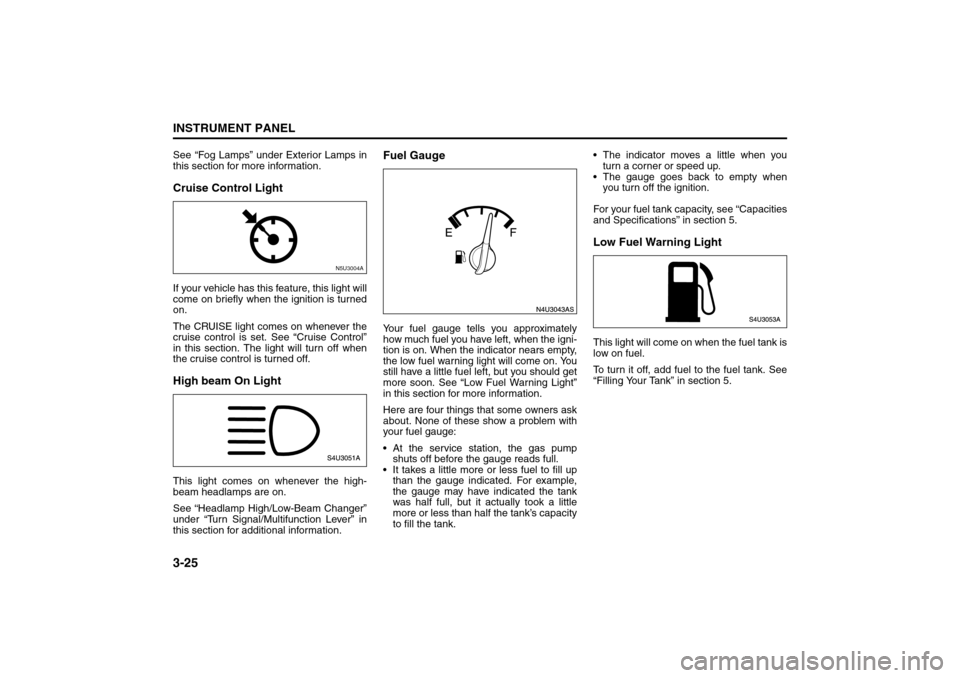
Fuel GaugeYour fuel gauge tells you approximately
how much fuel you have left, when the igni-
tion is on. When the indicator nears empty,
the low fuel warning light will come on. You
still have a little fuel left, but you should get
more soon. See “Low Fuel Warning Light”
in this section for more information.
Here are four things that some owners ask
about. None of these show a problem with
your fuel gauge:
At the service station, the gas pump
shuts off before the gauge reads full.
It takes a little more or less fuel to fill up
than the gauge indicated. For example,
the gauge may have indicated the tank
was half full, but it actually took a little
more or less than half the tank’s capacity
to fill the tank. The indicator moves a little when you
turn a corner or speed up.
The gauge goes back to empty when
you turn off the ignition.
For your fuel tank capacity, see “Capacities
and Specifications” in section 5.
Low Fuel Warning LightThis light will come on when the fuel tank is
low on fuel.
To turn it off, add fuel to the fuel tank. See
“Filling Your Tank” in section 5.
N5U3004A
Warning Lights, Gauges and Indicators:
Page 103 of 226
3-27INSTRUMENT PANEL
85Z04-03E
tire pressure monitoring system is func-
tioning properly.
Your vehicle has also been equipped with
a TPMS malfunction indictor to indicate
when the system is not operating properly.
The TPMS malfunction indicator is com-
bined with the low tire pressure telltale.
When the system detects a malfunction,
the telltale will flash for approximately one
minute and then remain continuously illu-
minated. This sequence will continue upon
subsequent vehicle start-ups as long as
the malfunction exists.In this situation, please have the system
inspected by an authorized service facility.
If you replace one or more tires and the
TPMS warning light goes off during driv-
ing, there is no problem. However, if the
warning light does not go off, or if it flashes
again when the vehicle is driven, have the
vehicle inspected by an authorized service
facility.
WARNING
Each tire, including the spare (if pro-
vided), should be checked monthly
when cold and inflated to the inflation
pressure recommended by the vehi-
cle manufacturer on the vehicle plac-
ard or tire inflation pressure label and
this manual. (If your vehicle has tires
of a different size than the size indi-
cated on the vehicle label or tire infla-
tion pressure label, you should
determine the proper tire inflation
pressure for those tires.)
As an added safety feature, your
vehicle has been equipped with a tire
pressure monitoring system (TPMS)
that illuminates a low tire pressure
telltale when one or more of your
tires is significantly under-inflated.
Accordingly, when the low tire pres-
sure telltale illuminates, you should
stop and check your tires as soon as
possible and inflate them to the
proper pressure. Driving on a signifi-
cantly under-inflated tire causes the
tire to overheat and can lead to tire
failure.
Under-inflation also reduces fuel effi-
ciency and tire tread life and may
affect the vehicle’s handling and
stopping ability.
(Continued)
WARNING
(Continued)
Please note that the TPMS is not a
substitute for proper tire mainte-
nance, and it is the driver’s responsi-
bility to maintain correct tire
pressure, even if under-inflation has
not reached the level to trigger illumi-
nation of the TPMS low tire pressure
telltale.
WARNING
If the tire pressure monitoring system
warning light does not illuminate
when the ignition key is turned to the
“ON” position, have the system
inspected by an authorized service
facility. If the warning light flashes
while driving, check to see whether
the warning light goes off after a few
minutes of driving.
WARNING
When the malfunction indicator is
illuminated, the system may not be
able to detect or signal low tire pres-
sure as intended. TPMS malfunctions
may occur for a variety of reasons,
including the installation of replace-
ment or alternate tires or wheels on
the vehicle that prevent the TPMS
from functioning properly. Always
check the TPMS malfunction telltale
after replacing one or more tires or
wheels on your vehicle to ensure that
the replacement or alternate tires and
wheels allow the TPMS to continue to
function properly.
Audio System:
Page 107 of 226
3-31INSTRUMENT PANEL
85Z04-03E
PLAYING THE RADIO
Power/Volume knob (1):
Press this knob to turn the system on and
off.
Turn the Power/Volume knob clockwise or
counterclockwise to increase or decrease
the volume.
Press this button for a short time to MUTE
the radio. Press the button again to cancel
MUTE.
Finding a Station
AM button (2):
Press this button to switch to an AM sta-
tion. The display will show the selection.
FM button (3):
Press this button to switch to an FM sta-
tion. The display will show the selection.
TUNE button (4):
Press this button to select radio stations.
(Manual tuning)
Press the up arrows to increase the fre-
quency.
Press the down arrows to decrease the fre-
quency.
The frequency of the AM band changes
10 kHz each time and the frequency of the
FM band changes 200 kHz each time.
SEEK button (5):
Press this button to search for and select
receivable radio stations. (Seek tuning)
To search for the next receivable higher
station, press the up arrows. To search for the previous receivable lower
station, press the down arrows.
SCAN/AST button (6):
Press this button to scan radio stations.
(Scan tuning)
Scan
The radio will go to a station, play for a few
seconds, and then go on to the next sta-
tion. Press this button again to stop scan-
ning.
The radio will only scan stations with a
strong signal that are in the selected band.
Automatic Store
Press and hold this button to use Auto
Store.
FM1’s 6 preset stations with the strongest
signal in the region can be automatically
stored. The display will show “AUTO
SCANNING”, and “SCANNING” will flash
on display.
Stored stations will flash for a short time on
display in sequence. Once the stations are
stored, the radio will switch to FM-A and
the first preset station will begin to play.
FM-A will appear on the display when lis-
tening to the automatically stored stations.
Press the AM or FM button to stop auto-
matic store.Preset station buttons (7):
Setting Preset Stations
Up to 36 stations (six FM1, six FM2, six
FM-A and six AM1, six AM2, six AM-A),
can be programmed on the six numbered
preset buttons, by performing the following
steps:
1) Turn the radio on.
2) Press the AM or FM button to select
FM1, FM2, FM-A, AM1, AM2 or AM-A.
3) Tune in the desired station.
4) Press and hold one of the six numbered
preset buttons.
The preset button number (Display:
CH#1 ~ CH#6) will flash on the display
when the station has been set. When-
ever that numbered preset button is
pressed, the memorized station will
return.
5) Repeat the previous four steps for each
preset button.