Controls SUZUKI GRAND VITARA 2006 Owners Manual
[x] Cancel search | Manufacturer: SUZUKI, Model Year: 2006, Model line: GRAND VITARA, Model: SUZUKI GRAND VITARA 2006Pages: 337, PDF Size: 6.21 MB
Page 233 of 337
5-80
OTHER CONTROLS AND EQUIPMENT
79K21-03E
HomeLink
® (if equipped)
66J092
HomeLink
® and the HomeLink
® house are
registered trademarks of Johnson
Controls, Inc.
The HomeLink
® Wireless Control System
provides a convenient way to replace up to
three hand-held radio-frequency (RF)
transmitters used to activate devices such
as gate operators, garage door openers,
entry door locks, security systems, even
home lighting. Additional HomeLink
® infor-
mation can be found on the Internet at
www.homelink.com
or by calling 1-800-
355-3515.
Before programming HomeLink
® to a
garage door opener or gate operator, make
sure that people and objects are out of the
way of the device to prevent potential harm
or damage. When programming a garage
door opener, it is advised to park outside of
the garage. Do not use HomeLink® with
any garage door opener that lacks safety
stop and reverse features as required by
U.S. federal safety standards (this includesany garage door opener model manufac-
tured before April 1, 1982). A garage door
that cannot detect an object – signaling the
door to stop and reverse – does not meet
current U.S. federal safety standards. For
more information, contact HomeLink
® at
www.homelink.com
or by calling 1-800-
355-3515.
Retain the original transmitter of the RF
device you are programming for use in
other vehicles as well as for future
HomeLink
® programming. It is also sug-
gested that upon the sale of the vehicle,
the programmed HomeLink
® buttons be
erased for security purposes. Refer to
“Programming HomeLink
®” (step 1) only)
or, for assistance, contact HomeLink
® at
www.homelink.com
or by calling 1-800-
355-3515.
Programming HomeLink
®
NOTE:
Some vehicles may require the ignition
switch to be turned to the second (or
“accessories”) position or the “on” position
for programming and/or operation of
HomeLink
®. It is also recommended that a
new battery be placed in the hand-held
transmitter of the device being pro-
grammed to HomeLink
® for quicker train-
ing and accurate transmission of the radio-
frequency signal. Do not repeat “Program-
ming HomeLink
®” – step 1) to train addi-
tional devices to a second or thirdHomeLink
® button. Begin with “Program-
ming HomeLink
®” – step 2).
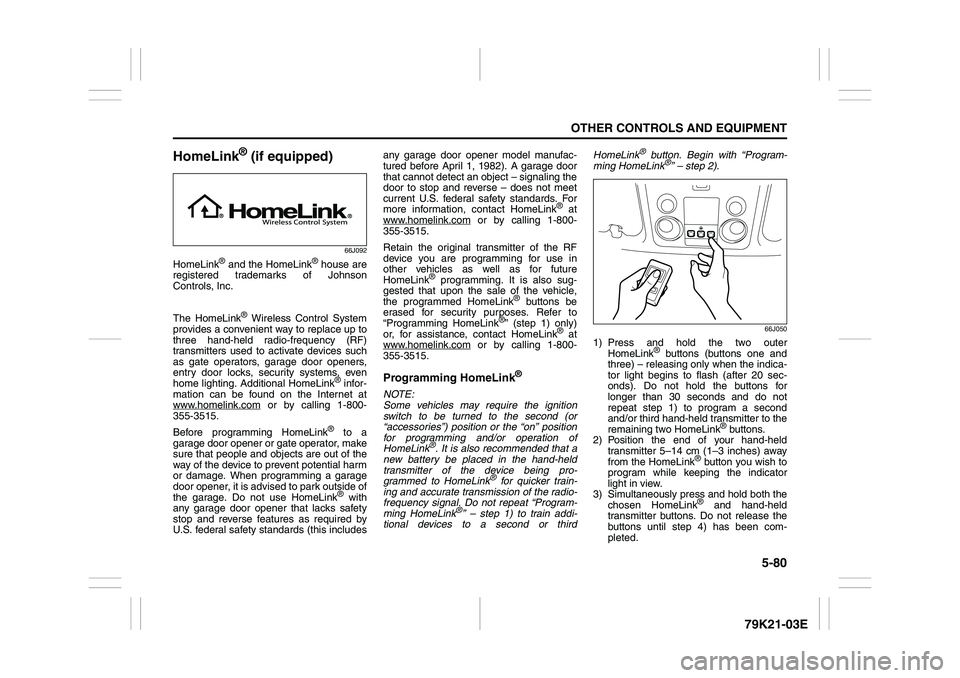
66J050
1) Press and hold the two outer
HomeLink
® buttons (buttons one and
three) – releasing only when the indica-
tor light begins to flash (after 20 sec-
onds). Do not hold the buttons for
longer than 30 seconds and do not
repeat step 1) to program a second
and/or third hand-held transmitter to the
remaining two HomeLink
® buttons.
2) Position the end of your hand-held
transmitter 5–14 cm (1–3 inches) away
from the HomeLink
® button you wish to
program while keeping the indicator
light in view.
3) Simultaneously press and hold both the
chosen HomeLink® and hand-held
transmitter buttons. Do not release the
buttons until step 4) has been com-
pleted.
Page 234 of 337
5-81OTHER CONTROLS AND EQUIPMENT
79K21-03E
NOTE:
Some gate operators and garage door
openers may require you to replace this
Programming step 3) with procedures
noted in the “Gate Operator / Canadian
Programming” section.
4) After the HomeLink
® indicator light
changes from a slow to a rapidly blink-
ing light, release both the HomeLink
®
and hand-held transmitter buttons.
NOTE:
If the HomeLink
® indicator light does not
change to a rapidly blinking light, contact
HomeLink
® at www.homelink.com
or call
1-800-355-3515 for assistance.
5) Press and hold the just-trained
HomeLink
® button and observe the
indicator light.
– If the indicator light stays on con-
stantly, programming is complete and
your device should activate when the
HomeLink® button is pressed and
released.
NOTE:
To program the remaining two HomeLink
®
buttons, begin with “Programming
HomeLink
®” – step 2). Do not repeat step
1).
– If the indicator light blinks rapidly for
two seconds and then turns to a con-
stant light continue with “ProgrammingHomeLink
®” steps 6–8 to complete the
programming of a rolling code
equipped device (most commonly a
garage door opener).
66J051
66J052
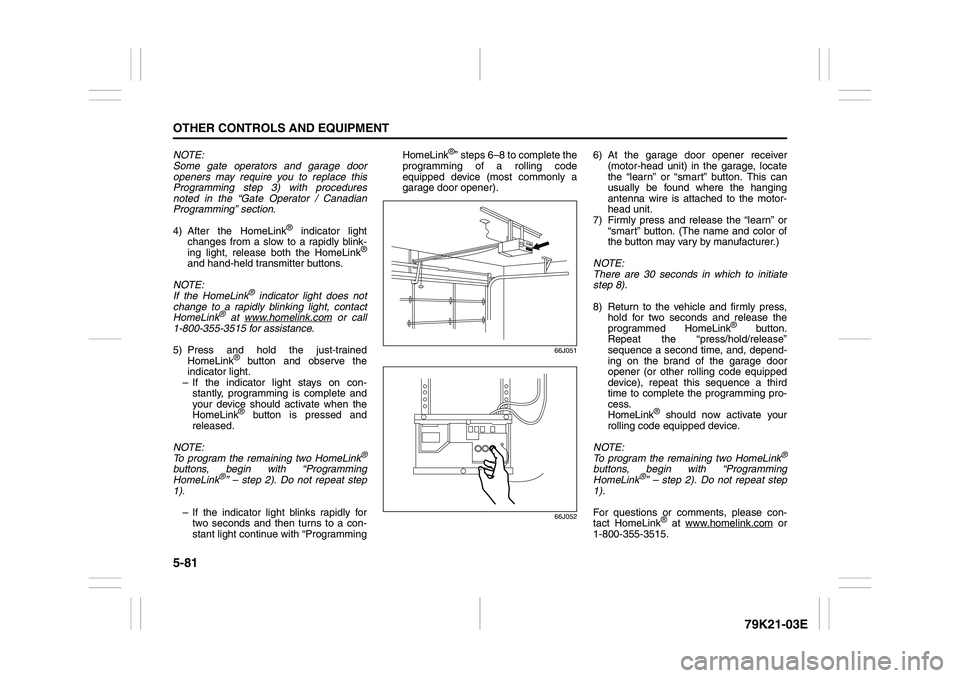
6) At the garage door opener receiver
(motor-head unit) in the garage, locate
the “learn” or “smart” button. This can
usually be found where the hanging
antenna wire is attached to the motor-
head unit.
7) Firmly press and release the “learn” or
“smart” button. (The name and color of
the button may vary by manufacturer.)
NOTE:
There are 30 seconds in which to initiate
step 8).
8) Return to the vehicle and firmly press,
hold for two seconds and release the
programmed HomeLink
® button.
Repeat the “press/hold/release”
sequence a second time, and, depend-
ing on the brand of the garage door
opener (or other rolling code equipped
device), repeat this sequence a third
time to complete the programming pro-
cess.
HomeLink
® should now activate your
rolling code equipped device.
NOTE:
To program the remaining two HomeLink
®
buttons, begin with “Programming
HomeLink
®” – step 2). Do not repeat step
1).
For questions or comments, please con-
tact HomeLink
® at www.homelink.com
or
1-800-355-3515.
Page 235 of 337
5-82
OTHER CONTROLS AND EQUIPMENT
79K21-03E
Gate Operator / Canadian Program-
mingCanadian radio-frequency laws require
transmitter signals to “time-out” (or quit)
after several seconds of transmission –
which may not be long enough for
HomeLink
® to pick up the signal during
programming. Similar to this Canadian law,
some U.S. gate operators are designed to
“time-out” in the same manner.
If you live in Canada or you are having diffi-
culties programming a gate operator by
using the Programming procedures
(regardless of where you live), replace
“Programming HomeLink
®” step 3) with
the following:
NOTE:
If programming a garage door opener or
gate operator, it is advised to unplug the
device during the “cycling” process to pre-
vent possible overheating.
3) Continue to press and hold the
HomeLink
® button while you press and
release – every two seconds (“cycle”)
your hand-held transmitter until the fre-
quency signal has successfully been
accepted by HomeLink
®. (The indicator
light will flash slowly and then rapidly.)
Proceed with “Programming HomeLink
®”
step 4) to complete.
Using HomeLink
®
To operate, simply press and release the
programmed HomeLink
® button. Activation
will now occur for the trained device (i.e.
garage door opener, gate operator, secu-
rity system, entry door lock, home/office
lighting, etc.). For convenience, the hand-
held transmitter of the device may also be
used at any time. In the event that there
are still programming difficulties or ques-
tions, contact HomeLink
® at
www.homelink.com
or 1-800-355-3515.
Erasing HomeLink
® Buttons
To erase programming from the three but-
tons (individual buttons cannot be erased
but can be “reprogrammed” as outlined
below), follow the step noted:
Press and hold the two outer HomeLink
®
buttons until the indicator light begins to
flash-after 20 seconds. Release both but-
tons. Do not hold for longer that 30 sec-
onds. HomeLink
® is now in the train (or
learning) mode and can be programmed at
any time beginning with “Programming
HomeLink
®” – step 2).
Reprogramming a Single
HomeLink
® Button
To program a device to HomeLink
® using a
HomeLink
® button previously trained, fol-
low these steps:
1) Press and hold the desired HomeLink
®
button. DO NOT release the button.
2) The indicator light will begin to flash
after 20 seconds. Without releasing the
HomeLink
® button, proceed with “Pro-
gramming HomeLink
®” – step 2).
For questions or comments, contact
HomeLink
® at www.homelink.com
or 1-
800-355-3515.
Page 236 of 337
5-83OTHER CONTROLS AND EQUIPMENT
79K21-03E
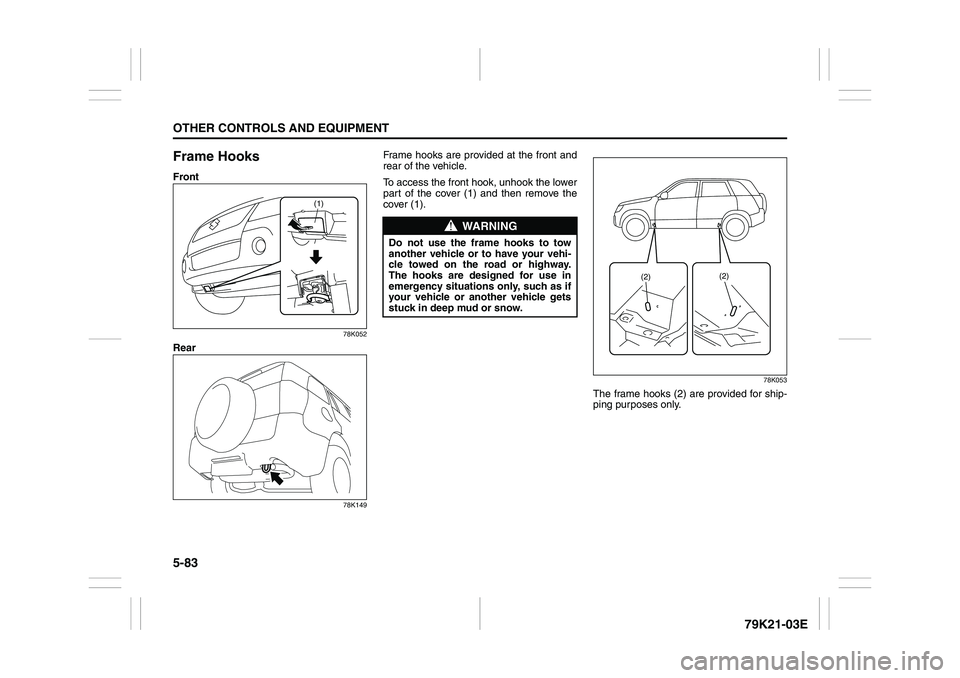
Frame HooksFront
78K052
Rear
78K149
Frame hooks are provided at the front and
rear of the vehicle.
To access the front hook, unhook the lower
part of the cover (1) and then remove the
cover (1).
78K053
The frame hooks (2) are provided for ship-
ping purposes only.
(1)
WARNING
Do not use the frame hooks to tow
another vehicle or to have your vehi-
cle towed on the road or highway.
The hooks are designed for use in
emergency situations only, such as if
your vehicle or another vehicle gets
stuck in deep mud or snow.
(2)(2)
Page 334 of 337
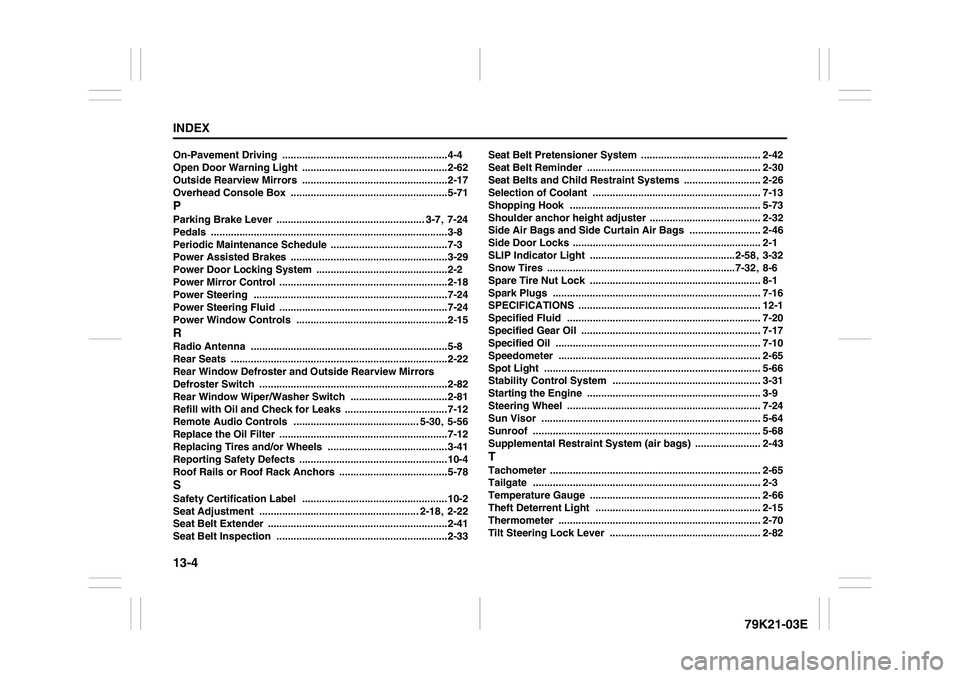
13-4INDEX
79K21-03E
On-Pavement Driving
..........................................................4-4
Open Door Warning Light
...................................................2-62
Outside Rearview Mirrors ...................................................2-17
Overhead Console Box
.......................................................5-71
PParking Brake Lever
.................................................... 3-7
, 7-24
Pedals
...................................................................................3-8
Periodic Maintenance Schedule
.........................................7-3
Power Assisted Brakes
.......................................................3-29
Power Door Locking System
..............................................2-2
Power Mirror Control
...........................................................2-18
Power Steering
....................................................................7-24
Power Steering Fluid
...........................................................7-24
Power Window Controls
.....................................................2-15
RRadio Antenna
.....................................................................5-8
Rear Seats
............................................................................2-22
Rear Window Defroster and Outside Rearview Mirrors
Defroster Switch
..................................................................2-82
Rear Window Wiper/Washer Switch
..................................2-81
Refill with Oil and Check for Leaks ....................................7-12
Remote Audio Controls
............................................ 5-30
, 5-56
Replace the Oil Filter
...........................................................7-12
Replacing Tires and/or Wheels
..........................................3-41
Reporting Safety Defects
....................................................10-4
Roof Rails or Roof Rack Anchors
......................................5-78
SSafety Certification Label
...................................................10-2
Seat Adjustment
........................................................ 2-18
, 2-22
Seat Belt Extender
...............................................................2-41
Seat Belt Inspection ............................................................2-33Seat Belt Pretensioner System
.......................................... 2-42
Seat Belt Reminder
............................................................. 2-30
Seat Belts and Child Restraint Systems
........................... 2-26
Selection of Coolant
........................................................... 7-13
Shopping Hook
................................................................... 5-73
Shoulder anchor height adjuster
....................................... 2-32
Side Air Bags and Side Curtain Air Bags
......................... 2-46
Side Door Locks
.................................................................. 2-1
SLIP Indicator Light
...................................................2-58
, 3-32
Snow Tires
..................................................................7-32
, 8-6
Spare Tire Nut Lock
............................................................ 8-1
Spark Plugs
......................................................................... 7-16
SPECIFICATIONS
................................................................ 12-1
Specified Fluid
.................................................................... 7-20
Specified Gear Oil ............................................................... 7-17
Specified Oil
........................................................................ 7-10
Speedometer ....................................................................... 2-65
Spot Light
............................................................................ 5-66
Stability Control System
.................................................... 3-31
Starting the Engine
............................................................. 3-9
Steering Wheel
.................................................................... 7-24
Sun Visor
............................................................................. 5-64
Sunroof
................................................................................ 5-68
Supplemental Restraint System (air bags)
....................... 2-43
TTachometer
.......................................................................... 2-65
Tailgate
................................................................................ 2-3
Temperature Gauge
............................................................ 2-66
Theft Deterrent Light .......................................................... 2-15
Thermometer
....................................................................... 2-70
Tilt Steering Lock Lever
..................................................... 2-82