Automatic SUZUKI GRAND VITARA 2006 User Guide
[x] Cancel search | Manufacturer: SUZUKI, Model Year: 2006, Model line: GRAND VITARA, Model: SUZUKI GRAND VITARA 2006Pages: 337, PDF Size: 6.21 MB
Page 52 of 337
2-35BEFORE DRIVING
79K21-03E
65D607 65D608
65D609
Installation with Lap-Shoulder Seat
Belts (Child Restraint with No Top
Strap)NOTE:
There are two types of lap-shoulder belts
depending on the vehicle’s specification,
A-ELR (Automatic-Emergency Locking
Retractor) type and ELR (Emergency
Locking Retractor) type.
The A-ELR type belts have emergency
locking retractors (ELRs) that can be tem-
porarily converted to function as automatic
locking retractors (ALRs).
The ELR type belts have ELRs that cannot
be converted to function as ALRs.
To identify the belt is the A-ELR type or the
ELR type, slowly pull all of the shoulder
webbing out of the retractor. Then let the
webbing retract a little and pull it out, and
repeat this a few times. If the belt is locked
each time you pull the belt, the belt is the
A-ELR type. If the belt is not locked, the
belt is the ELR type.
Please note that the methods to secure the
child restraint system with the ELR lap-
shoulder belt and with the A-ELR lap-
shoulder belt are different.
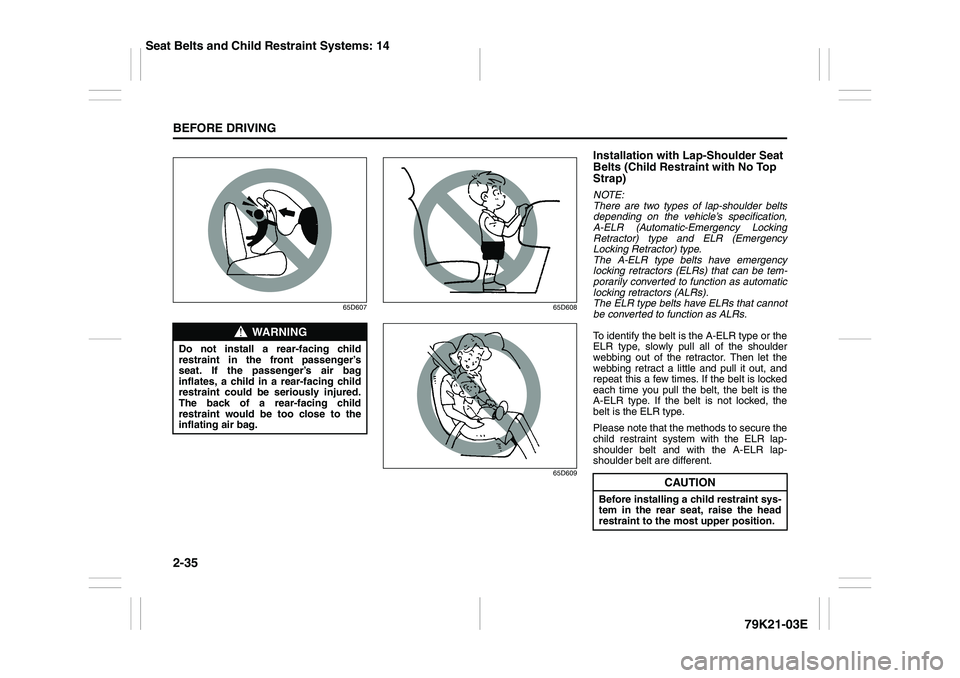
WARNING
Do not install a rear-facing child
restraint in the front passenger’s
seat. If the passenger’s air bag
inflates, a child in a rear-facing child
restraint could be seriously injured.
The back of a rear-facing child
restraint would be too close to the
inflating air bag.
CAUTION
Before installing a child restraint sys-
tem in the rear seat, raise the head
restraint to the most upper position.
Seat Belts and Child Restraint Systems: 14
Page 53 of 337
2-36
BEFORE DRIVING
79K21-03E
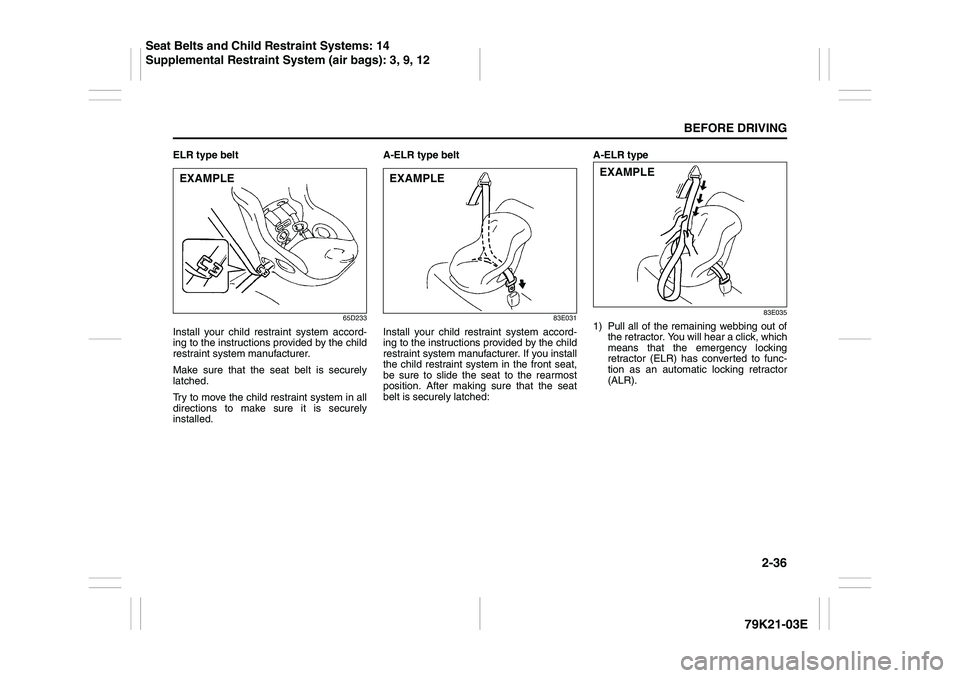
ELR type belt
65D233
Install your child restraint system accord-
ing to the instructions provided by the child
restraint system manufacturer.
Make sure that the seat belt is securely
latched.
Try to move the child restraint system in all
directions to make sure it is securely
installed.A-ELR type belt
83E031
Install your child restraint system accord-
ing to the instructions provided by the child
restraint system manufacturer. If you install
the child restraint system in the front seat,
be sure to slide the seat to the rearmost
position. After making sure that the seat
belt is securely latched:A-ELR type
83E035
1) Pull all of the remaining webbing out of
the retractor. You will hear a click, which
means that the emergency locking
retractor (ELR) has converted to func-
tion as an automatic locking retractor
(ALR).
EXAMPLE
EXAMPLE
EXAMPLE
Seat Belts and Child Restraint Systems: 14
Supplemental Restraint System (air bags): 3, 9, 12
Page 55 of 337
2-38
BEFORE DRIVING
79K21-03E
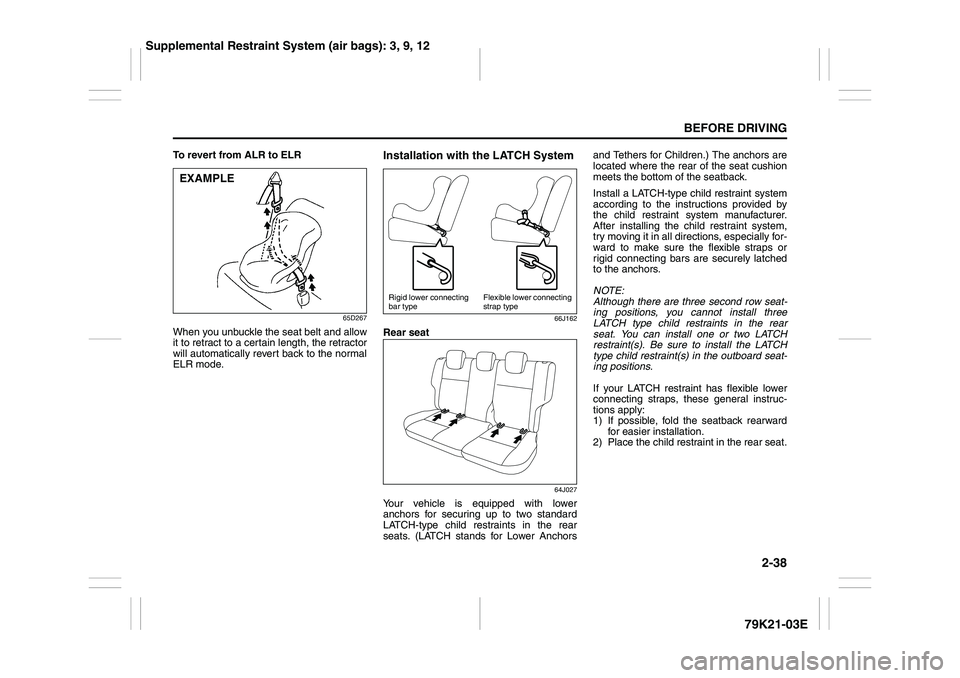
To revert from ALR to ELR
65D267
When you unbuckle the seat belt and allow
it to retract to a certain length, the retractor
will automatically revert back to the normal
ELR mode.
Installation with the LATCH System
66J162
Rear seat
64J027
Your vehicle is equipped with lower
anchors for securing up to two standard
LATCH-type child restraints in the rear
seats. (LATCH stands for Lower Anchorsand Tethers for Children.) The anchors are
located where the rear of the seat cushion
meets the bottom of the seatback.
Install a LATCH-type child restraint system
according to the instructions provided by
the child restraint system manufacturer.
After installing the child restraint system,
try moving it in all directions, especially for-
ward to make sure the flexible straps or
rigid connecting bars are securely latched
to the anchors.
NOTE:
Although there are three second row seat-
ing positions, you cannot install three
LATCH type child restraints in the rear
seat. You can install one or two LATCH
restraint(s). Be sure to install the LATCH
type child restraint(s) in the outboard seat-
ing positions.
If your LATCH restraint has flexible lower
connecting straps, these general instruc-
tions apply:
1) If possible, fold the seatback rearward
for easier installation.
2) Place the child restraint in the rear seat.
EXAMPLE
Rigid lower connecting
bar typeFlexible lower connecting
strap type
Supplemental Restraint System (air bags): 3, 9, 12
Page 76 of 337
2-59BEFORE DRIVING
79K21-03E
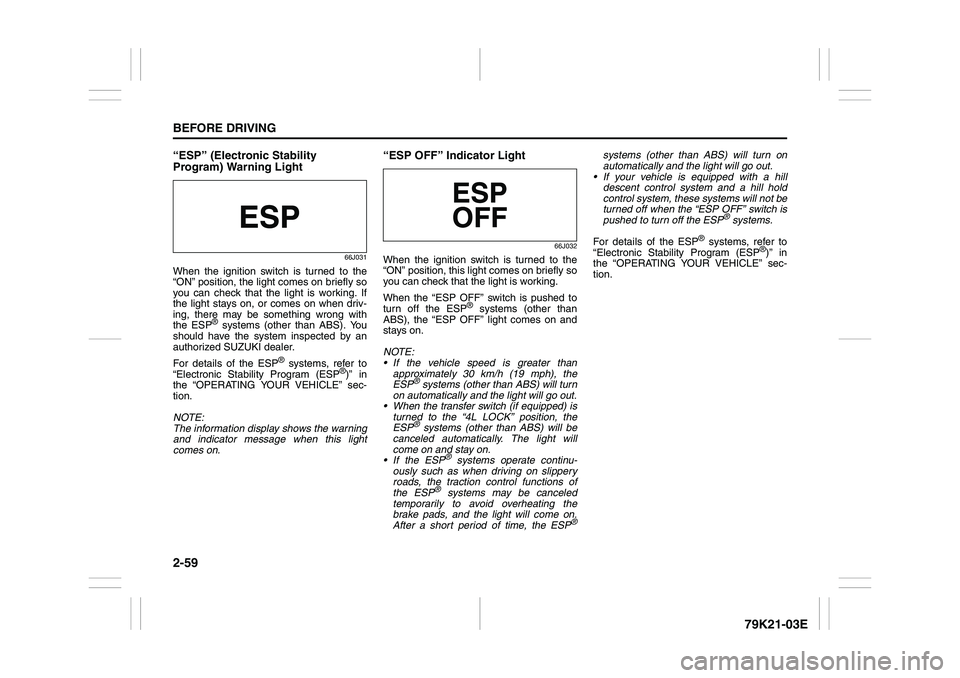
“ESP” (Electronic Stability
Program) Warning Light
66J031
When the ignition switch is turned to the
“ON” position, the light comes on briefly so
you can check that the light is working. If
the light stays on, or comes on when driv-
ing, there may be something wrong with
the ESP
® systems (other than ABS). You
should have the system inspected by an
authorized SUZUKI dealer.
For details of the ESP
® systems, refer to
“Electronic Stability Program (ESP
®)” in
the “OPERATING YOUR VEHICLE” sec-
tion.
NOTE:
The information display shows the warning
and indicator message when this light
comes on.
“ESP OFF” Indicator Light
66J032
When the ignition switch is turned to the
“ON” position, this light comes on briefly so
you can check that the light is working.
When the “ESP OFF” switch is pushed to
turn off the ESP
® systems (other than
ABS), the “ESP OFF” light comes on and
stays on.
NOTE:
If the vehicle speed is greater than
approximately 30 km/h (19 mph), the
ESP
® systems (other than ABS) will turn
on automatically and the light will go out.
When the transfer switch (if equipped) is
turned to the “4L LOCK” position, the
ESP® systems (other than ABS) will be
canceled automatically. The light will
come on and stay on.
If the ESP
® systems operate continu-
ously such as when driving on slippery
roads, the traction control functions of
the ESP
® systems may be canceled
temporarily to avoid overheating the
brake pads, and the light will come on.
After a short period of time, the ESP
®
systems (other than ABS) will turn on
automatically and the light will go out.
If your vehicle is equipped with a hill
descent control system and a hill hold
control system, these systems will not be
turned off when the “ESP OFF” switch is
pushed to turn off the ESP
® systems.
For details of the ESP
® systems, refer to
“Electronic Stability Program (ESP
®)” in
the “OPERATING YOUR VEHICLE” sec-
tion.
Page 83 of 337
2-66
BEFORE DRIVING
79K21-03E
NOTE:
The information display shows the warning
and indicator message when this light
comes on.
NOTE:
The activation point of the low fuel warning
light (1) varies depending on road condi-
tions (for example, slope or curve) and
driving conditions because of fuel moving
in the tank.
The mark (2) indicates that the fuel filler
door is located on the right side of the vehi-
cle.
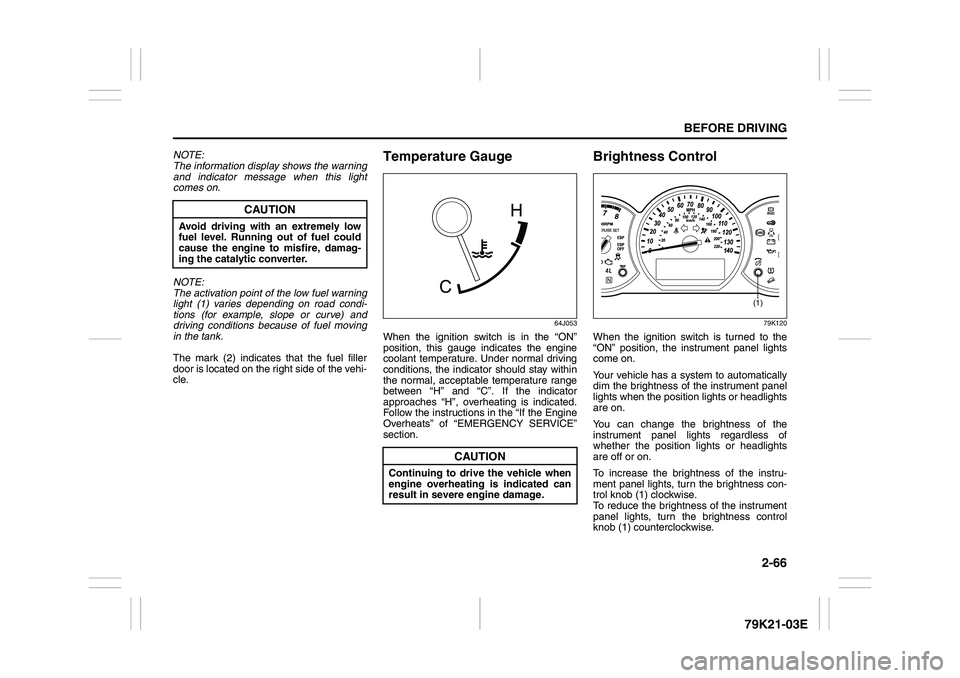
Temperature Gauge
64J053
When the ignition switch is in the “ON”
position, this gauge indicates the engine
coolant temperature. Under normal driving
conditions, the indicator should stay within
the normal, acceptable temperature range
between “H” and “C”. If the indicator
approaches “H”, overheating is indicated.
Follow the instructions in the “If the Engine
Overheats” of “EMERGENCY SERVICE”
section.
Brightness Control
79K120
When the ignition switch is turned to the
“ON” position, the instrument panel lights
come on.
Your vehicle has a system to automatically
dim the brightness of the instrument panel
lights when the position lights or headlights
are on.
You can change the brightness of the
instrument panel lights regardless of
whether the position lights or headlights
are off or on.
To increase the brightness of the instru-
ment panel lights, turn the brightness con-
trol knob (1) clockwise.
To reduce the brightness of the instrument
panel lights, turn the brightness control
knob (1) counterclockwise.
CAUTION
Avoid driving with an extremely low
fuel level. Running out of fuel could
cause the engine to misfire, damag-
ing the catalytic converter.
CAUTION
Continuing to drive the vehicle when
engine overheating is indicated can
result in severe engine damage.
(1)
Page 84 of 337
2-67BEFORE DRIVING
79K21-03E
79K062
NOTE:
If you do not turn the brightness control
knob within about 5 seconds of activat-
ing the brightness control display, the
brightness control display will be can-
celed automatically.
When you reconnect the battery, the
brightness of the instrument panel lights
will be reinitialized. Readjust the bright-
ness according to your preference.
NOTE:
If you select the lowest brightness level
when the parking lights or headlights are
on, the instrument panel lights other than
meter lights are turned off.
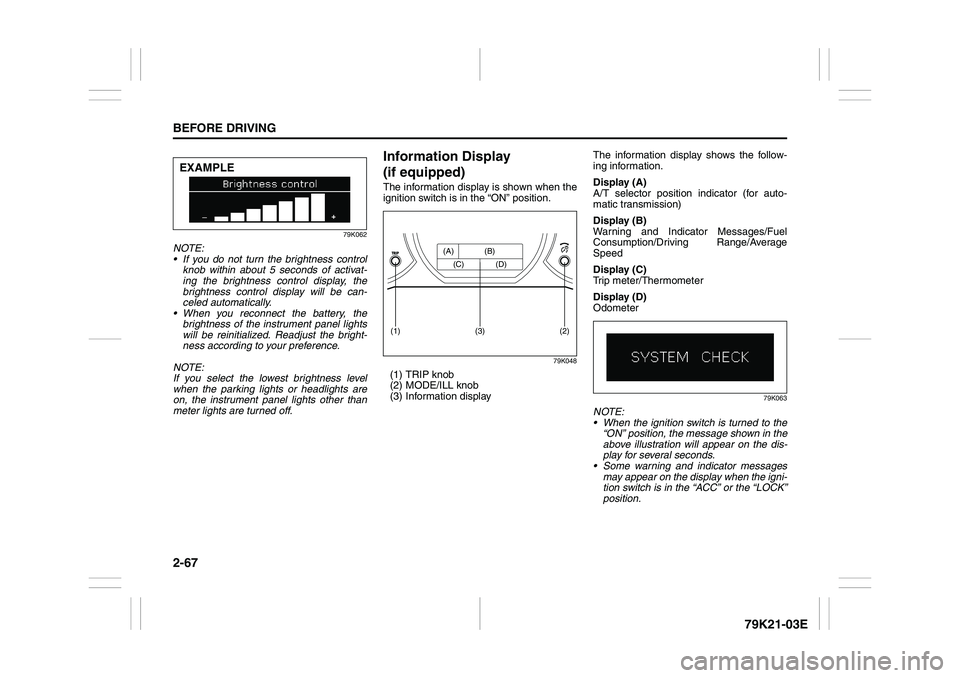
Information Display
(if equipped)The information display is shown when the
ignition switch is in the “ON” position.
79K048
(1) TRIP knob
(2) MODE/ILL knob
(3) Information displayThe information display shows the follow-
ing information.
Display (A)
A/T selector position indicator (for auto-
matic transmission)
Display (B)
Warning and Indicator Messages/Fuel
Consumption/Driving Range/Average
Speed
Display (C)
Trip meter/Thermometer
Display (D)
Odometer
79K063
NOTE:
When the ignition switch is turned to the
“ON” position, the message shown in the
above illustration will appear on the dis-
play for several seconds.
Some warning and indicator messages
may appear on the display when the igni-
tion switch is in the “ACC” or the “LOCK”
position.
EXAMPLE
(2)
(1)
(3)
(A) (B)
(C) (D)
Page 85 of 337
2-68
BEFORE DRIVING
79K21-03E
A/T Selector Position
(for automatic transmission)
79K121
The display (A) shows the automatic trans-
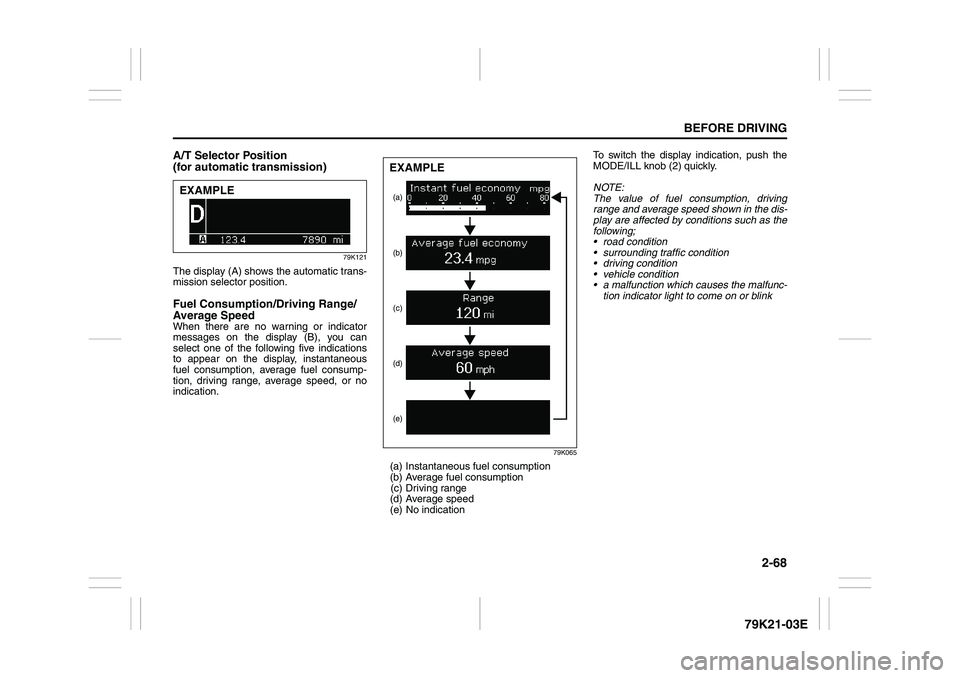
mission selector position. Fuel Consumption/Driving Range/
Average SpeedWhen there are no warning or indicator
messages on the display (B), you can
select one of the following five indications
to appear on the display, instantaneous
fuel consumption, average fuel consump-
tion, driving range, average speed, or no
indication.
79K065
(a) Instantaneous fuel consumption
(b) Average fuel consumption
(c) Driving range
(d) Average speed
(e) No indicationTo switch the display indication, push the
MODE/ILL knob (2) quickly.
NOTE:
The value of fuel consumption, driving
range and average speed shown in the dis-
play are affected by conditions such as the
following;
road condition
surrounding traffic condition
driving condition
vehicle condition
a malfunction which causes the malfunc-
tion indicator light to come on or blink
EXAMPLE
(a)
(e) (d)(c) (b)EXAMPLE
Page 88 of 337
2-71BEFORE DRIVING
79K21-03E
Thermometer
The thermometer indicates the outside
temperature.
79K067
If the outside temperature nears freezing,
the message shown in the above illustra-
tion will appear on the display.
NOTE:
The outside temperature indication is not
the actual outside temperature when driv-
ing at low speed, or when stopped.
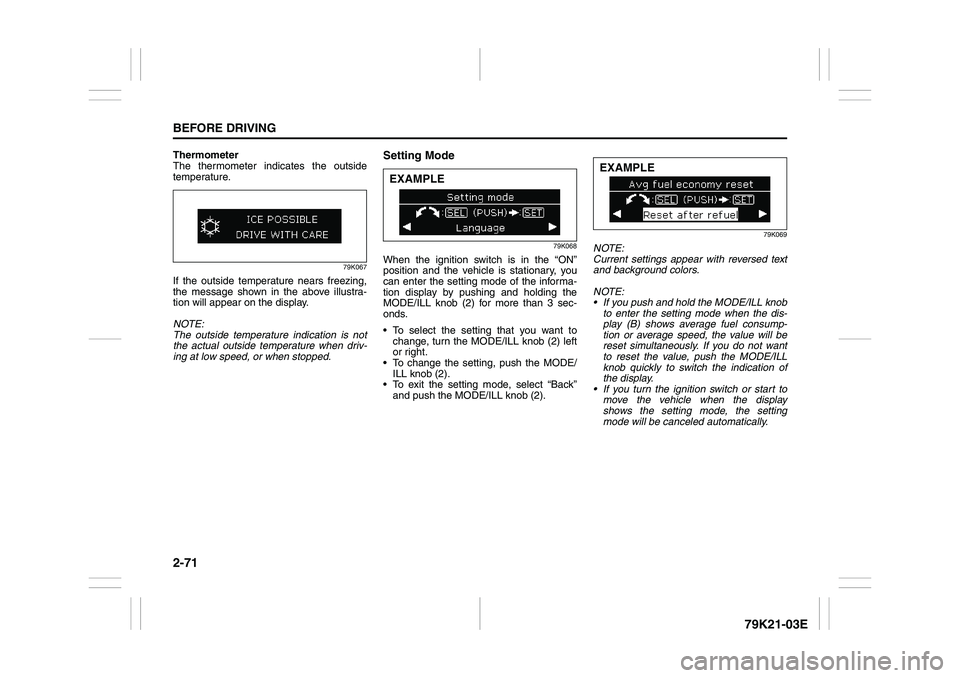
Setting Mode
79K068
When the ignition switch is in the “ON”
position and the vehicle is stationary, you
can enter the setting mode of the informa-
tion display by pushing and holding the
MODE/ILL knob (2) for more than 3 sec-
onds.
To select the setting that you want to
change, turn the MODE/ILL knob (2) left
or right.
To change the setting, push the MODE/
ILL knob (2).
To exit the setting mode, select “Back”
and push the MODE/ILL knob (2).
79K069
NOTE:
Current settings appear with reversed text
and background colors.
NOTE:
If you push and hold the MODE/ILL knob
to enter the setting mode when the dis-
play (B) shows average fuel consump-
tion or average speed, the value will be
reset simultaneously. If you do not want
to reset the value, push the MODE/ILL
knob quickly to switch the indication of
the display.
If you turn the ignition switch or start to
move the vehicle when the display
shows the setting mode, the setting
mode will be canceled automatically.
EXAMPLE
EXAMPLE
Page 89 of 337
2-72
BEFORE DRIVING
79K21-03E
Distance units
You can change the units odo/trip meter
distance is displayed in.
NOTE:
When you change the units odo/trip meter
distance is displayed in, the trip meter will
be reset automatically.
Fuel economy units
You can change the units that fuel con-
sumption is displayed in.
Language
You can change the language of the infor-
mation display.
Avg. fuel economy reset
You can change when the value of average
fuel consumption is reset.
Temperature units
You can change the units that temperature
is displayed in.
NOTE:
When you change the units that tempera-
ture is displayed in, the air conditioning
system temperature display units will be
changed automatically.
Default setting
If you select “YES” and push the MODE/
ILL knob (2), all settings will be reinitial-
ized.
Warning and Indicator MessagesThe display shows the warning and indica-
tor messages to let you know about certain
vehicle problems.
A tone may also sound to alert you.
If warning and indicator messages appear
on the display, follow the messages.
Master warning indicator
78K049
When the display shows warning and indi-
cator messages, the master warning indi-
cator may also come on or blink.
NOTE:
When the problem that causes a mes-
sage to appear is corrected, the mes-
sage will disappear.
If a message is displayed, and other
problems requiring a message occur, the
message for each of the problems will be
alternately displayed about every 5 sec-
onds.
When you push and hold the MODE/ILL
knob for about 2 seconds while a mes-
sage is displayed, the message will dis-
appear temporarily. If the problem that
caused the message is not corrected,the message will appear again after 5
seconds.
Page 97 of 337
2-80
BEFORE DRIVING
79K21-03E
Windshield Wipers
63J301
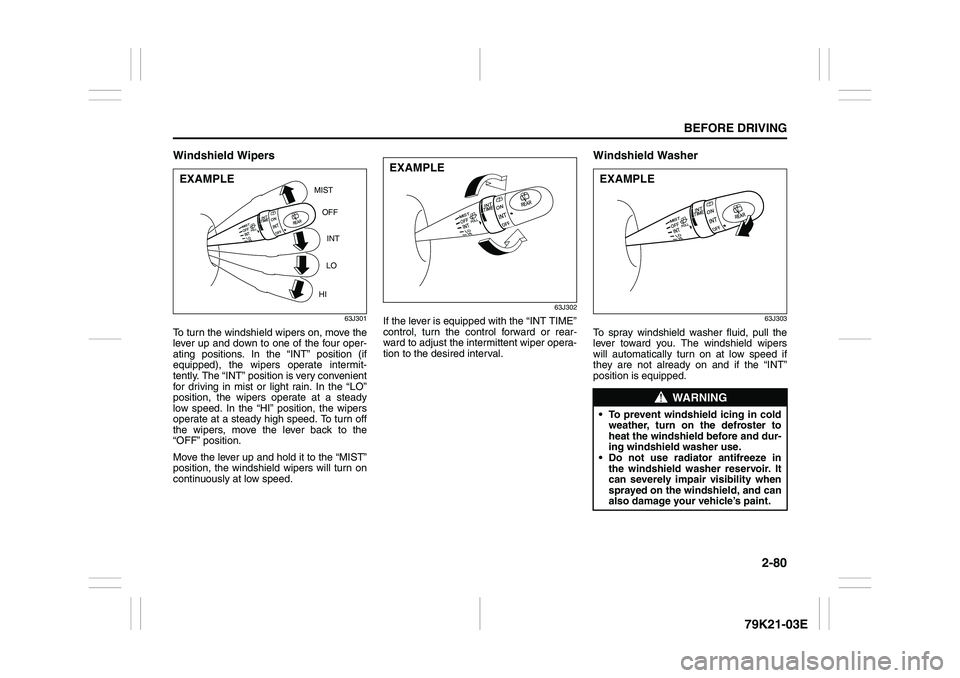
To turn the windshield wipers on, move the
lever up and down to one of the four oper-
ating positions. In the “INT” position (if
equipped), the wipers operate intermit-
tently. The “INT” position is very convenient
for driving in mist or light rain. In the “LO”
position, the wipers operate at a steady
low speed. In the “HI” position, the wipers
operate at a steady high speed. To turn off
the wipers, move the lever back to the
“OFF” position.
Move the lever up and hold it to the “MIST”
position, the windshield wipers will turn on
continuously at low speed.
63J302
If the lever is equipped with the “INT TIME”
control, turn the control forward or rear-
ward to adjust the intermittent wiper opera-
tion to the desired interval.
Windshield Washer
63J303
To spray windshield washer fluid, pull the
lever toward you. The windshield wipers
will automatically turn on at low speed if
they are not already on and if the “INT”
position is equipped.
MIST
OFF
INT
LO
HI
EXAMPLE
EXAMPLE
WARNING
To prevent windshield icing in cold
weather, turn on the defroster to
heat the windshield before and dur-
ing windshield washer use.
Do not use radiator antifreeze in
the windshield washer reservoir. It
can severely impair visibility when
sprayed on the windshield, and can
also damage your vehicle’s paint.EXAMPLE