tow SUZUKI GRAND VITARA 2008 3.G Owners Manual
[x] Cancel search | Manufacturer: SUZUKI, Model Year: 2008, Model line: GRAND VITARA, Model: SUZUKI GRAND VITARA 2008 3.GPages: 290, PDF Size: 4.99 MB
Page 5 of 290
66J22-03E
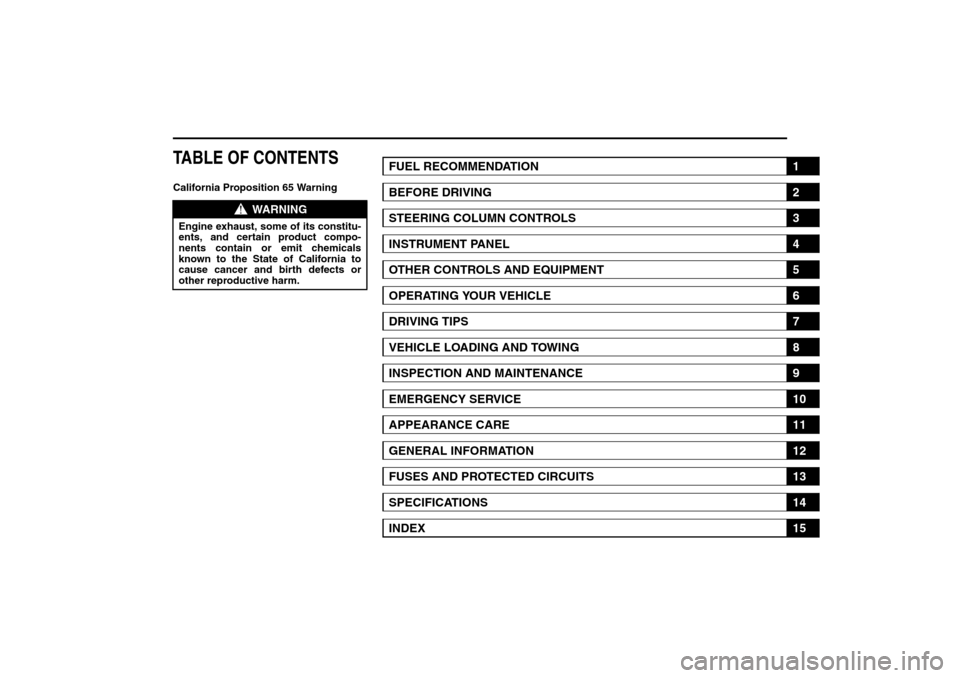
TABLE OF CONTENTSCalifornia Proposition 65 Warning
WARNING
Engine exhaust, some of its constitu-
ents, and certain product compo-
nents contain or emit chemicals
known to the State of California to
cause cancer and birth defects or
other reproductive harm.
FUEL RECOMMENDATION
1
BEFORE DRIVING
2
STEERING COLUMN CONTROLS
3
INSTRUMENT PANEL
4
OTHER CONTROLS AND EQUIPMENT
5
OPERATING YOUR VEHICLE
6
DRIVING TIPS
7
VEHICLE LOADING AND TOWING
8
INSPECTION AND MAINTENANCE
9
EMERGENCY SERVICE
10
APPEARANCE CARE
11
GENERAL INFORMATION
12
FUSES AND PROTECTED CIRCUITS
13
SPECIFICATIONS
14
INDEX
15
Page 15 of 290
2-2
BEFORE DRIVING
66J22-03E
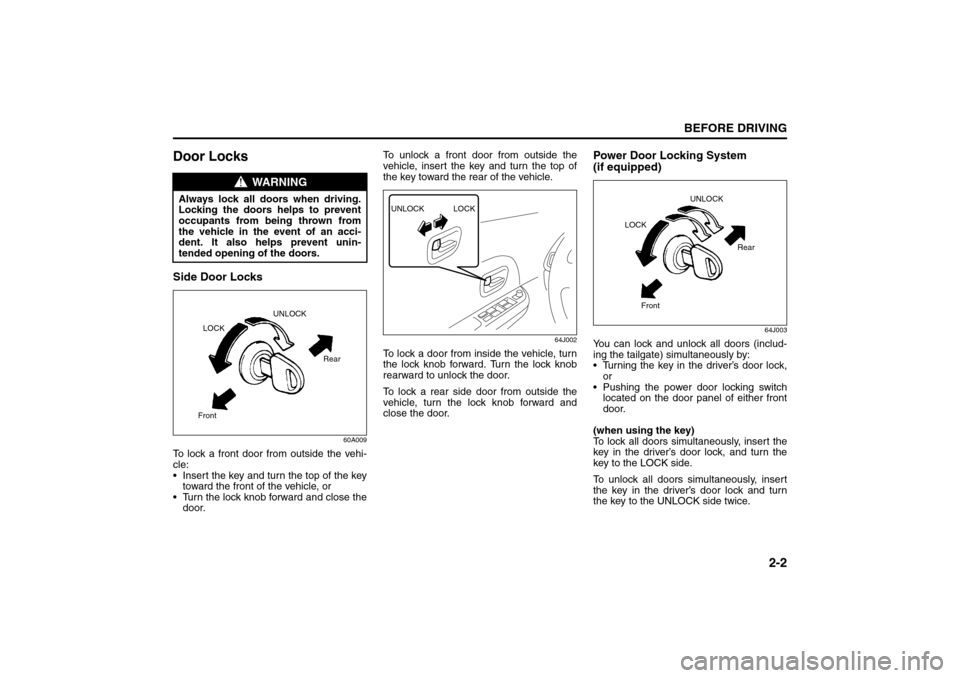
Door LocksSide Door Locks
60A009
To lock a front door from outside the vehi-
cle:
Insert the key and turn the top of the key
toward the front of the vehicle, or
Turn the lock knob forward and close the
door.To unlock a front door from outside the
vehicle, insert the key and turn the top of
the key toward the rear of the vehicle.
64J002
To lock a door from inside the vehicle, turn
the lock knob forward. Turn the lock knob
rearward to unlock the door.
To lock a rear side door from outside the
vehicle, turn the lock knob forward and
close the door.
Power Door Locking System
(if equipped)
64J003
You can lock and unlock all doors (includ-
ing the tailgate) simultaneously by:
Turning the key in the driver’s door lock,
or
Pushing the power door locking switch
located on the door panel of either front
door.
(when using the key)
To lock all doors simultaneously, insert the
key in the driver’s door lock, and turn the
key to the LOCK side.
To unlock all doors simultaneously, insert
the key in the driver’s door lock and turn
the key to the UNLOCK side twice.
WARNING
Always lock all doors when driving.
Locking the doors helps to prevent
occupants from being thrown from
the vehicle in the event of an acci-
dent. It also helps prevent unin-
tended opening of the doors.
Rear
FrontLOCKUNLOCK
UNLOCK LOCK
UNLOCK
Rear
Front LOCK
Door Locks: 3, 5, 8
Page 17 of 290
2-4
BEFORE DRIVING
66J22-03E
You can lock or unlock the doors by
pushing the request switch on the door
handle. For details, refer to the explana-
tion in this section.
You can start the engine without using
an ignition key. For details, refer to “Igni-
tion Switch” in the “STEERING COL-
UMN CONTROLS” section and “Starting
the Engine” in the “OPERATING YOUR
VEHICLE” section.
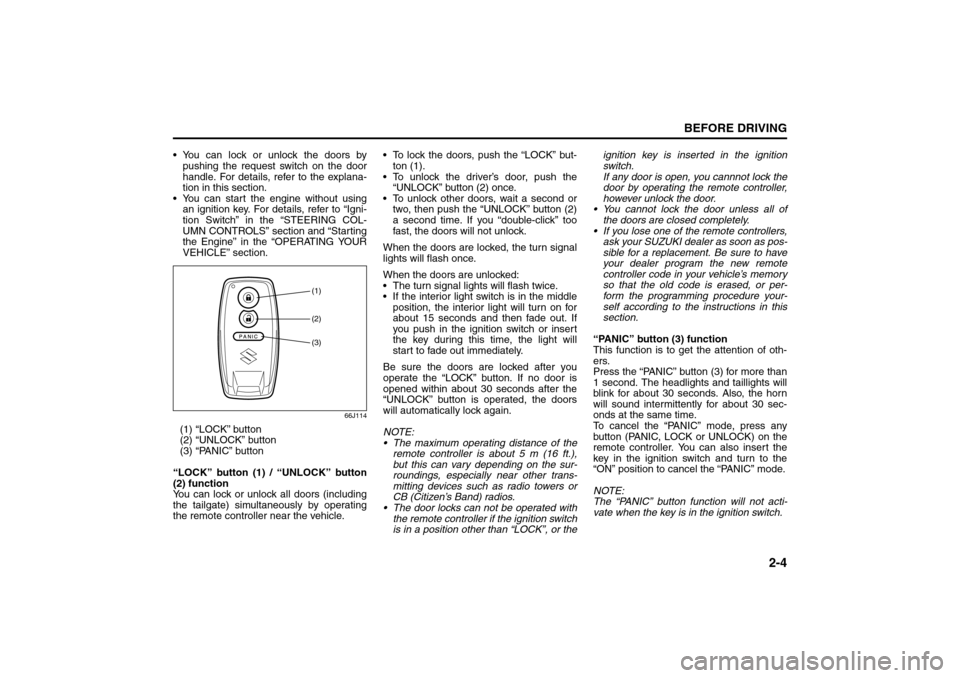
66J114
(1) “LOCK” button
(2) “UNLOCK” button
(3) “PANIC” button
“LOCK” button (1) / “UNLOCK” button
(2) function
You can lock or unlock all doors (including
the tailgate) simultaneously by operating
the remote controller near the vehicle. To lock the doors, push the “LOCK” but-
ton (1).
To unlock the driver’s door, push the
“UNLOCK” button (2) once.
To unlock other doors, wait a second or
two, then push the “UNLOCK” button (2)
a second time. If you “double-click” too
fast, the doors will not unlock.
When the doors are locked, the turn signal
lights will flash once.
When the doors are unlocked:
The turn signal lights will flash twice.
If the interior light switch is in the middle
position, the interior light will turn on for
about 15 seconds and then fade out. If
you push in the ignition switch or insert
the key during this time, the light will
start to fade out immediately.
Be sure the doors are locked after you
operate the “LOCK” button. If no door is
opened within about 30 seconds after the
“UNLOCK” button is operated, the doors
will automatically lock again.
NOTE:
The maximum operating distance of the
remote controller is about 5 m (16 ft.),
but this can vary depending on the sur-
roundings, especially near other trans-
mitting devices such as radio towers or
CB (Citizen’s Band) radios.
The door locks can not be operated with
the remote controller if the ignition switch
is in a position other than “LOCK”, or theignition key is inserted in the ignition
switch.
If any door is open, you cannnot lock the
door by operating the remote controller,
however unlock the door.
You cannot lock the door unless all of
the doors are closed completely.
If you lose one of the remote controllers,
ask your SUZUKI dealer as soon as pos-
sible for a replacement. Be sure to have
your dealer program the new remote
controller code in your vehicle’s memory
so that the old code is erased, or per-
form the programming procedure your-
self according to the instructions in this
section.
“PANIC” button (3) function
This function is to get the attention of oth-
ers.
Press the “PANIC” button (3) for more than
1 second. The headlights and taillights will
blink for about 30 seconds. Also, the horn
will sound intermittently for about 30 sec-
onds at the same time.
To cancel the “PANIC” mode, press any
button (PANIC, LOCK or UNLOCK) on the
remote controller. You can also insert the
key in the ignition switch and turn to the
“ON” position to cancel the “PANIC” mode.
NOTE:
The “PANIC” button function will not acti-
vate when the key is in the ignition switch.
(1)(2)(3)
Door Locks: 3, 5, 8
Page 19 of 290
2-6
BEFORE DRIVING
66J22-03E
If a spare remote controller is in the vehi-
cle, the request switches may not oper-
ate normally.
The remote controller will only operate a
request switch if it is within the switch’s
operating range. For example, if the
remote controller is within the operating
range of the driver’s door request switch
but not the front passenger’s door
request switch or the tailgate request
switch, the driver’s door switch can be
operated but the front passenger’s door
switch or tailgate switch can not be oper-
ated.
NOTE:
The keyless start system may not function
correctly in certain environments or under
certain operating conditions such as the
following:
When there are strong signals coming
from a television, power station or a cel-
lular phone. When the remote controller is in contact
with or covered by a metal object.
When a radio wave type remote keyless
entry is used nearby.
When the remote controller is placed
near an electronic device such as per-
sonal computer.
Some additional precautions you should
take and information you should be aware
of are:
Make sure the ignition key is stowed in
the remote controller. If the remote con-
troller becomes unreliable, you will not
be able to lock or unlock the doors or
start the engine.
Be sure that the driver always carries the
remote controller.
If you lose one of the remote controllers,
ask your SUZUKI dealer as soon as pos-
sible for a replacement. Be sure to have
your dealer program the new remote
controller code in your vehicle’s memory
so that the old code is erased, or per-
form the programming procedure your-
self according to the instructions in this
section.
You can use up to four remote controllers
and ignition keys for your vehicle. Ask
your SUZUKI dealer for details.
The battery life of the remote controller
is about two years, but it can vary
depending on usage conditions.
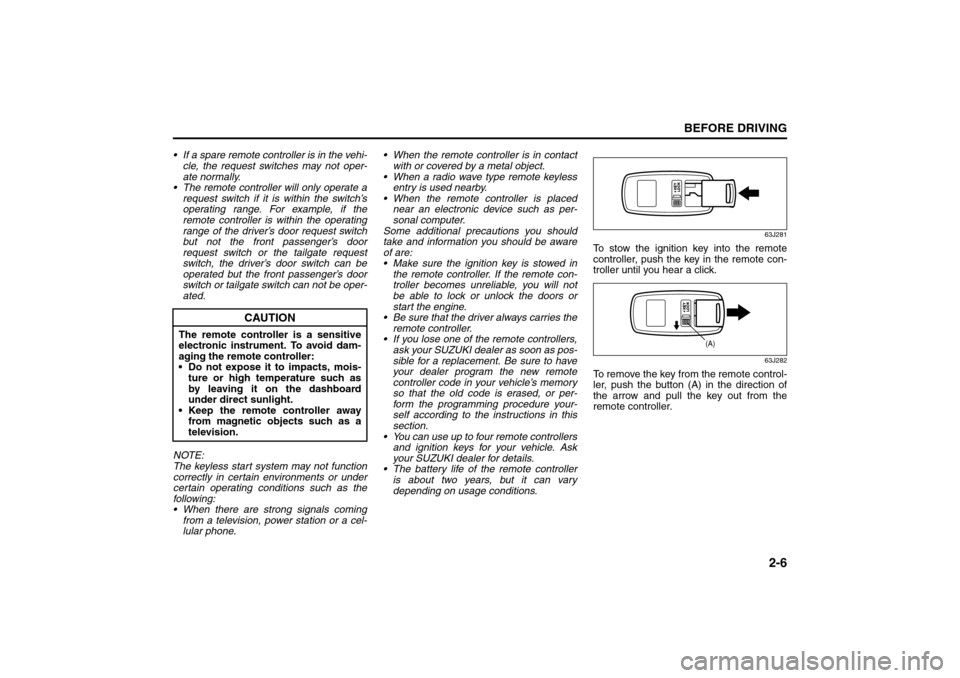
63J281
To stow the ignition key into the remote
controller, push the key in the remote con-
troller until you hear a click.
63J282
To remove the key from the remote control-
ler, push the button (A) in the direction of
the arrow and pull the key out from the
remote controller.
CAUTION
The remote controller is a sensitive
electronic instrument. To avoid dam-
aging the remote controller:
Do not expose it to impacts, mois-
ture or high temperature such as
by leaving it on the dashboard
under direct sunlight.
Keep the remote controller away
from magnetic objects such as a
television.
(A)
Door Locks: 3, 5, 8
Page 23 of 290
2-10
BEFORE DRIVING
66J22-03E
less entry system operate properly by
operating each remote controller.
1. For USA
This device complies with Part 15 of the
FCC Rules. Operation is subject to the fol-
lowing two conditions:
1) This device may not cause harmful
interference, and
2) This device must accept any interfer-
ence received, including interference
that may cause undesired operation.
NOTE:
Changes or modifications not expressly
approved by the party responsible for com-
pliance could void the user’s authority to
operate the equipment.
2. For Canada
This device complies with Industry Canada
Standard RSS-210. Operation is subject to
the following two conditions:
1) This device may not cause interference,
and
2) This device must accept any interfer-
ence, including interference that may
cause undesired operation of the
device.
The term “IC:” before the certification/reg-
istration number only signifies that the
Industry Canada technical specifications
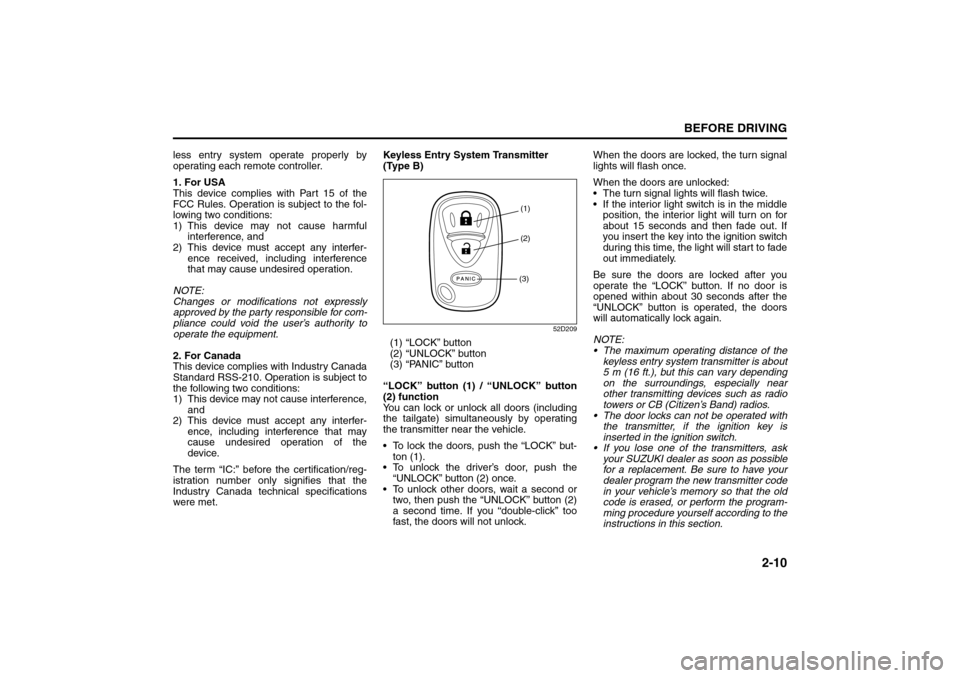
were met.Keyless Entry System Transmitter
(Type B)
52D209
(1) “LOCK” button
(2) “UNLOCK” button
(3) “PANIC” button
“LOCK” button (1) / “UNLOCK” button
(2) function
You can lock or unlock all doors (including
the tailgate) simultaneously by operating
the transmitter near the vehicle.
To lock the doors, push the “LOCK” but-
ton (1).
To unlock the driver’s door, push the
“UNLOCK” button (2) once.
To unlock other doors, wait a second or
two, then push the “UNLOCK” button (2)
a second time. If you “double-click” too
fast, the doors will not unlock.When the doors are locked, the turn signal
lights will flash once.
When the doors are unlocked:
The turn signal lights will flash twice.
If the interior light switch is in the middle
position, the interior light will turn on for
about 15 seconds and then fade out. If
you insert the key into the ignition switch
during this time, the light will start to fade
out immediately.
Be sure the doors are locked after you
operate the “LOCK” button. If no door is
opened within about 30 seconds after the
“UNLOCK” button is operated, the doors
will automatically lock again.
NOTE:
The maximum operating distance of the
keyless entry system transmitter is about
5 m (16 ft.), but this can vary depending
on the surroundings, especially near
other transmitting devices such as radio
towers or CB (Citizen’s Band) radios.
The door locks can not be operated with
the transmitter, if the ignition key is
inserted in the ignition switch.
If you lose one of the transmitters, ask
your SUZUKI dealer as soon as possible
for a replacement. Be sure to have your
dealer program the new transmitter code
in your vehicle’s memory so that the old
code is erased, or perform the program-
ming procedure yourself according to the
instructions in this section.
(1)
(2)
(3)
Door Locks: 3, 5, 8
Page 44 of 290
2-31BEFORE DRIVING
66J22-03E
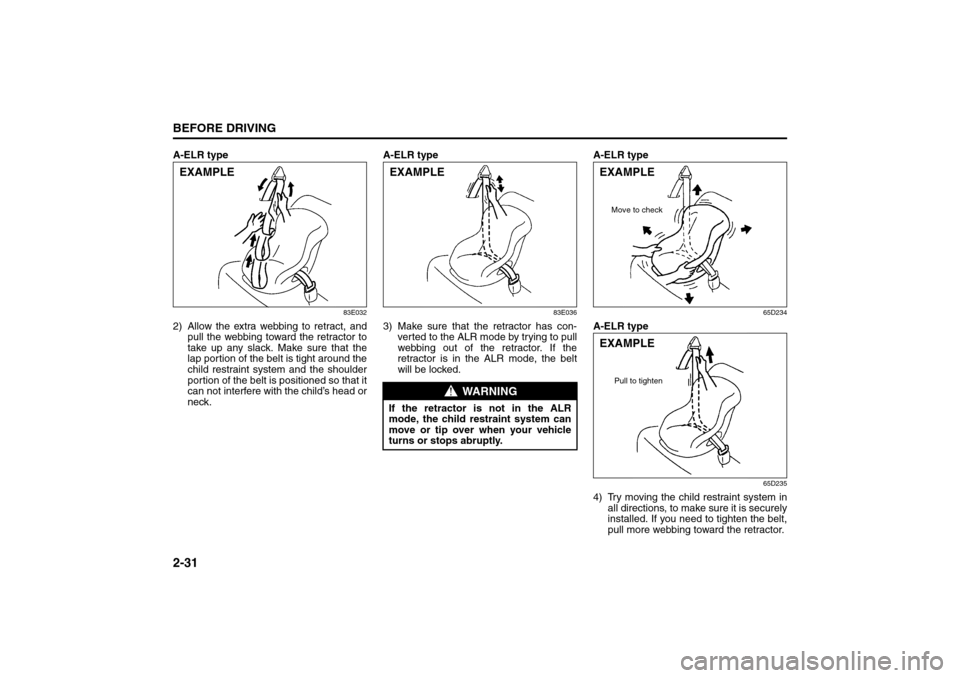
A-ELR type
83E032
2) Allow the extra webbing to retract, and
pull the webbing toward the retractor to
take up any slack. Make sure that the
lap portion of the belt is tight around the
child restraint system and the shoulder
portion of the belt is positioned so that it
can not interfere with the child’s head or
neck.A-ELR type
83E036
3) Make sure that the retractor has con-
ver ted to the ALR mode by trying to pull
webbing out of the retractor. If the
retractor is in the ALR mode, the belt
will be locked.A-ELR type
65D234
A-ELR type
65D235
4) Try moving the child restraint system in
all directions, to make sure it is securely
installed. If you need to tighten the belt,
pull more webbing toward the retractor.
EXAMPLE
WARNING
If the retractor is not in the ALR
mode, the child restraint system can
move or tip over when your vehicle
turns or stops abruptly.EXAMPLE
EXAMPLE
Move to check
EXAMPLE
Pull to tighten
Seat Belts and Child Restraint Systems: 14
Page 46 of 290

2-33BEFORE DRIVING
66J22-03E
65D340
3) Snap the strap hooks to the anchors.
Take care not to pinch your fingers.
65D341
4) Return the seatback to the normal,
upright position. Tighten the lower
straps as described in the child restraintowner’s manual. Attach the top tether
strap, if applicable.
65D342
5) Make sure the child restraint is securely
fastened by trying to move the child
restraint system in all directions, espe-
cially forward.If your LATCH restraint has rigid lower con-
necting bars, these general instructions
apply:
1) If possible, fold the seatback rearward
for easier installation.
2) Place the child restraint in the rear seat,
inserting the connecting bars through
the slots in the seat cushion or the slots
in the seatback bottom.
54G183
3) Use your hands to carefully align the
connecting bar tips with the anchors.
Take care not to pinch your fingers.
EXAMPLEEXAMPLE
WARNING
The seatback should always be
securely latched in a fairly upright
position when any type of child seat
is installed. An unlatched or reclined
seatback will reduce the intended
effectiveness of the child restraint
system.EXAMPLE
EXAMPLE
Seat Belts and Child Restraint Systems: 14
Page 47 of 290
2-34
BEFORE DRIVING
66J22-03E
54G184
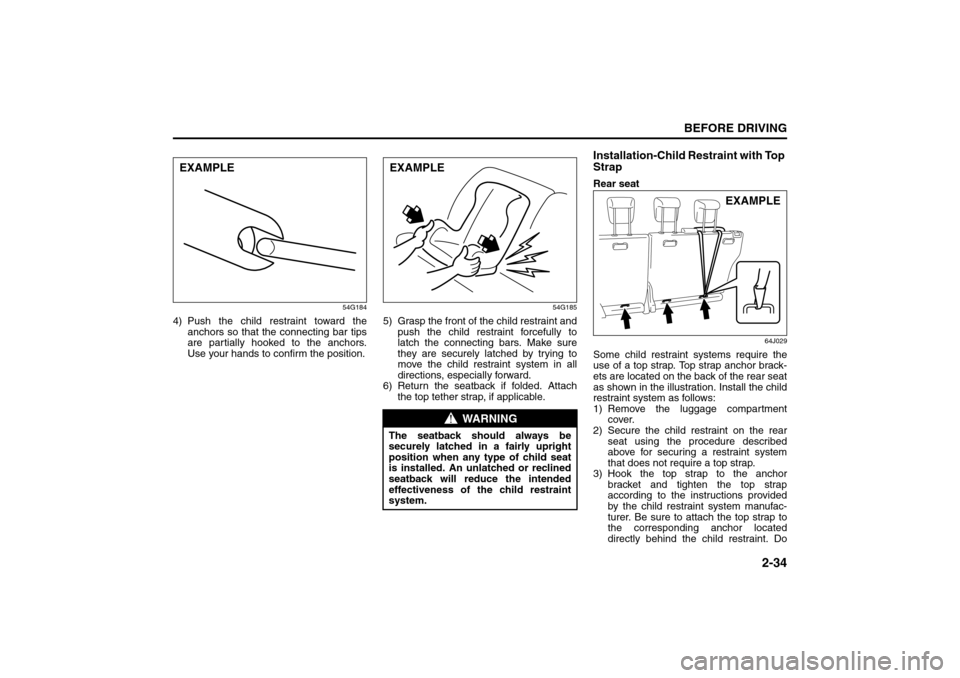
4) Push the child restraint toward the
anchors so that the connecting bar tips
are partially hooked to the anchors.
Use your hands to confirm the position.
54G185
5) Grasp the front of the child restraint and
push the child restraint forcefully to
latch the connecting bars. Make sure
they are securely latched by trying to
move the child restraint system in all
directions, especially forward.
6) Return the seatback if folded. Attach
the top tether strap, if applicable.
Installation-Child Restraint with Top
StrapRear seat
64J029
Some child restraint systems require the
use of a top strap. Top strap anchor brack-
ets are located on the back of the rear seat
as shown in the illustration. Install the child
restraint system as follows:
1) Remove the luggage compartment
cover.
2) Secure the child restraint on the rear
seat using the procedure described
above for securing a restraint system
that does not require a top strap.
3) Hook the top strap to the anchor
bracket and tighten the top strap
according to the instructions provided
by the child restraint system manufac-
turer. Be sure to attach the top strap to
the corresponding anchor located
directly behind the child restraint. Do
EXAMPLE
WARNING
The seatback should always be
securely latched in a fairly upright
position when any type of child seat
is installed. An unlatched or reclined
seatback will reduce the intended
effectiveness of the child restraint
system.EXAMPLE
EXAMPLE
Seat Belts and Child Restraint Systems: 14
Page 48 of 290
2-35BEFORE DRIVING
66J22-03E
not attach the top strap to the luggage
restraint loops (if equipped).
86G032
4) When routing the top strap, be sure to
pass it between the head restraint and
the rear seatback as shown. (Refer to
“Head Restraints” section for details onhow to raise or lower the head
restraint.)
5) Make sure that cargo does not interfere
with routing of the top strap.
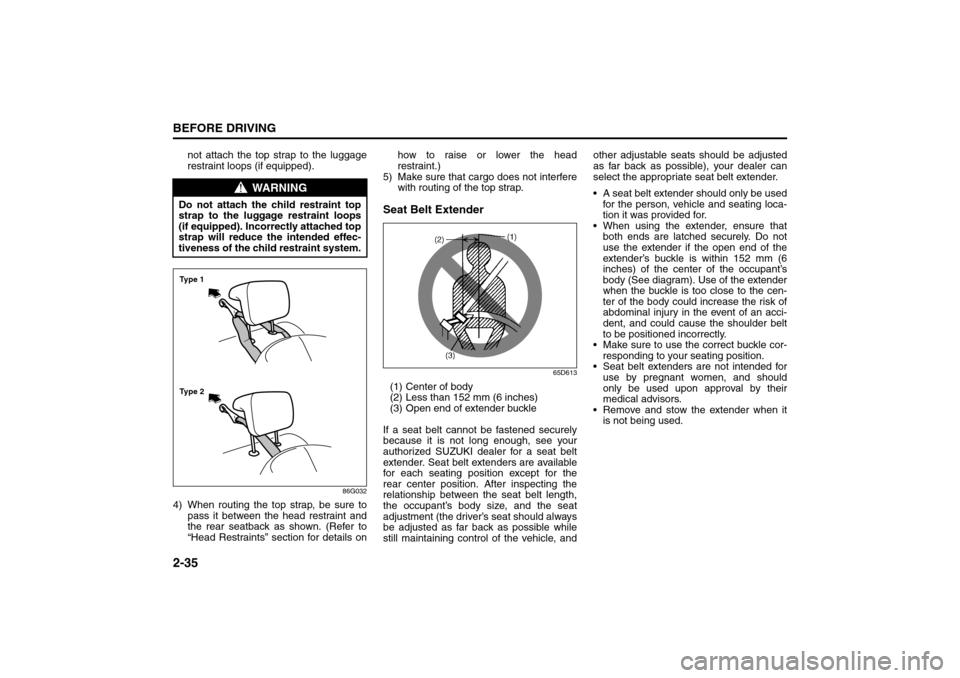
Seat Belt Extender
65D613
(1) Center of body
(2) Less than 152 mm (6 inches)
(3) Open end of extender buckle
If a seat belt cannot be fastened securely
because it is not long enough, see your
authorized SUZUKI dealer for a seat belt
extender. Seat belt extenders are available
for each seating position except for the
rear center position. After inspecting the
relationship between the seat belt length,
the occupant’s body size, and the seat
adjustment (the driver’s seat should always
be adjusted as far back as possible while
still maintaining control of the vehicle, andother adjustable seats should be adjusted
as far back as possible), your dealer can
select the appropriate seat belt extender.
A seat belt extender should only be used
for the person, vehicle and seating loca-
tion it was provided for.
When using the extender, ensure that
both ends are latched securely. Do not
use the extender if the open end of the
extender’s buckle is within 152 mm (6
inches) of the center of the occupant’s
body (See diagram). Use of the extender
when the buckle is too close to the cen-
ter of the body could increase the risk of
abdominal injury in the event of an acci-
dent, and could cause the shoulder belt
to be positioned incorrectly.
Make sure to use the correct buckle cor-
responding to your seating position.
Seat belt extenders are not intended for
use by pregnant women, and should
only be used upon approval by their
medical advisors.
Remove and stow the extender when it
is not being used.
WARNING
Do not attach the child restraint top
strap to the luggage restraint loops
(if equipped). Incorrectly attached top
strap will reduce the intended effec-
tiveness of the child restraint system.Ty p e 2 Ty p e 1
Seat Belts and Child Restraint Systems: 14
Page 49 of 290
2-36
BEFORE DRIVING
66J22-03E
Seat Belt Pretensioner System
(for front seat belt only)
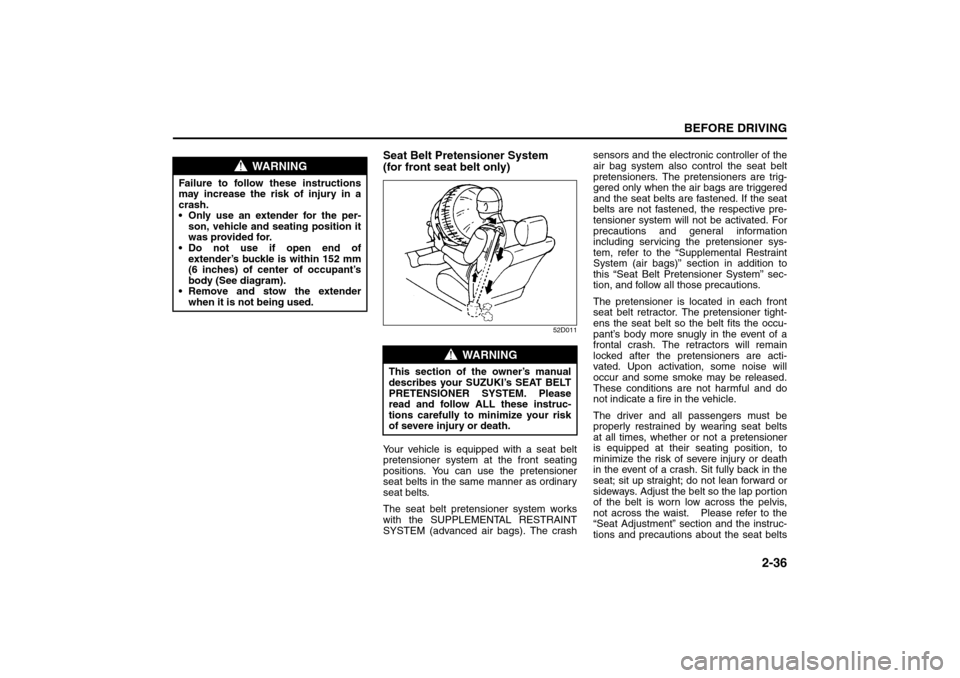
52D011
Your vehicle is equipped with a seat belt
pretensioner system at the front seating
positions. You can use the pretensioner
seat belts in the same manner as ordinary
seat belts.
The seat belt pretensioner system works
with the SUPPLEMENTAL RESTRAINT
SYSTEM (advanced air bags). The crashsensors and the electronic controller of the
air bag system also control the seat belt
pretensioners. The pretensioners are trig-
gered only when the air bags are triggered
and the seat belts are fastened. If the seat
belts are not fastened, the respective pre-
tensioner system will not be activated. For
precautions and general information
including servicing the pretensioner sys-
tem, refer to the “Supplemental Restraint
System (air bags)” section in addition to
this “Seat Belt Pretensioner System” sec-
tion, and follow all those precautions.
The pretensioner is located in each front
seat belt retractor. The pretensioner tight-
ens the seat belt so the belt fits the occu-
pant’s body more snugly in the event of a
frontal crash. The retractors will remain
locked after the pretensioners are acti-
vated. Upon activation, some noise will
occur and some smoke may be released.
These conditions are not harmful and do
not indicate a fire in the vehicle.
The driver and all passengers must be
properly restrained by wearing seat belts
at all times, whether or not a pretensioner
is equipped at their seating position, to
minimize the risk of severe injury or death
in the event of a crash. Sit fully back in the
seat; sit up straight; do not lean forward or
sideways. Adjust the belt so the lap portion
of the belt is worn low across the pelvis,
not across the waist. Please refer to the
“Seat Adjustment” section and the instruc-
tions and precautions about the seat belts
WARNING
Failure to follow these instructions
may increase the risk of injury in a
crash.
Only use an extender for the per-
son, vehicle and seating position it
was provided for.
Do not use if open end of
extender’s buckle is within 152 mm
(6 inches) of center of occupant’s
body (See diagram).
Remove and stow the extender
when it is not being used.
WARNING
This section of the owner’s manual
describes your SUZUKI’s SEAT BELT
PRETENSIONER SYSTEM. Please
read and follow ALL these instruc-
tions carefully to minimize your risk
of severe injury or death.
Seat Belts and Child Restraint Systems: 14
Supplemental Restraint System (air bags): 3, 9, 12