light SUZUKI GRAND VITARA 2010 3.G Owners Manual
[x] Cancel search | Manufacturer: SUZUKI, Model Year: 2010, Model line: GRAND VITARA, Model: SUZUKI GRAND VITARA 2010 3.GPages: 337, PDF Size: 6.21 MB
Page 226 of 337
5-73OTHER CONTROLS AND EQUIPMENT
79K21-03E
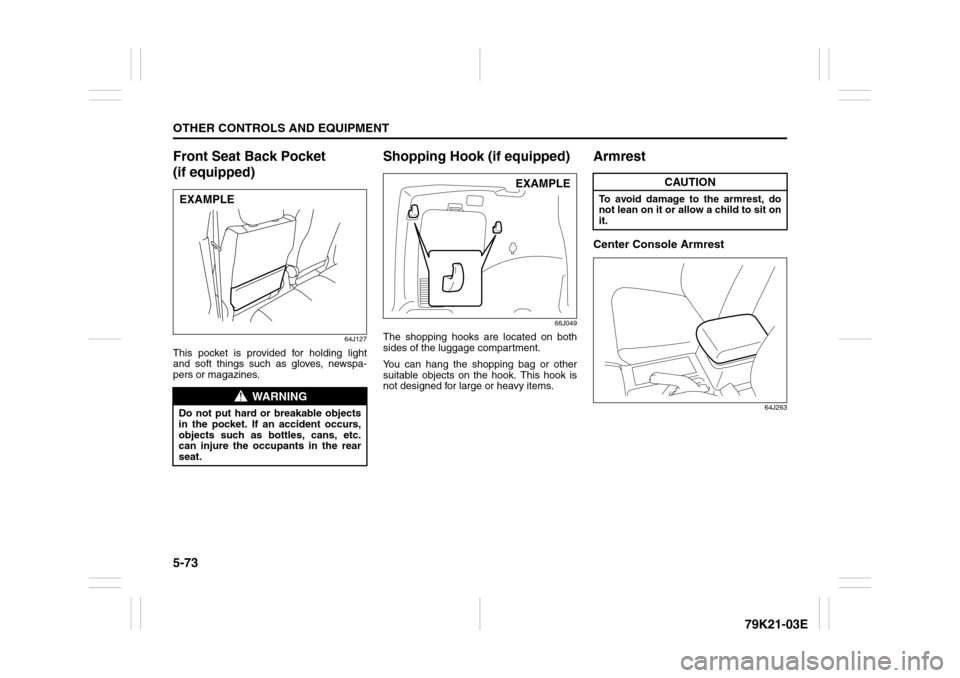
Front Seat Back Pocket
(if equipped)
64J127
This pocket is provided for holding light
and soft things such as gloves, newspa-
pers or magazines.
Shopping Hook (if equipped)
66J049
The shopping hooks are located on both
sides of the luggage compartment.
You can hang the shopping bag or other
suitable objects on the hook. This hook is
not designed for large or heavy items.
ArmrestCenter Console Armrest
64J263
WARNING
Do not put hard or breakable objects
in the pocket. If an accident occurs,
objects such as bottles, cans, etc.
can injure the occupants in the rear
seat.EXAMPLE
EXAMPLE
CAUTION
To avoid damage to the armrest, do
not lean on it or allow a child to sit on
it.
Page 227 of 337
5-74
OTHER CONTROLS AND EQUIPMENT
79K21-03E
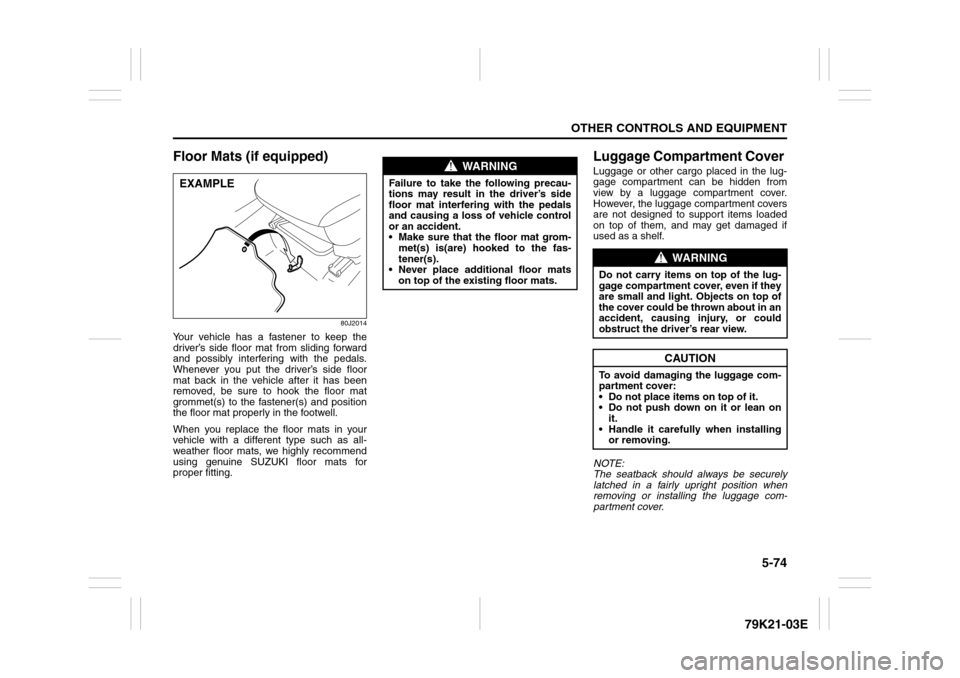
Floor Mats (if equipped)
80J2014
Your vehicle has a fastener to keep the
driver’s side floor mat from sliding forward
and possibly interfering with the pedals.
Whenever you put the driver’s side floor
mat back in the vehicle after it has been
removed, be sure to hook the floor mat
grommet(s) to the fastener(s) and position
the floor mat properly in the footwell.
When you replace the floor mats in your
vehicle with a different type such as all-
weather floor mats, we highly recommend
using genuine SUZUKI floor mats for
proper fitting.
Luggage Compartment Cover Luggage or other cargo placed in the lug-
gage compartment can be hidden from
view by a luggage compartment cover.
However, the luggage compartment covers
are not designed to support items loaded
on top of them, and may get damaged if
used as a shelf.
NOTE:
The seatback should always be securely
latched in a fairly upright position when
removing or installing the luggage com-
partment cover.
EXAMPLE
WARNING
Failure to take the following precau-
tions may result in the driver’s side
floor mat interfering with the pedals
and causing a loss of vehicle control
or an accident.
Make sure that the floor mat grom-
met(s) is(are) hooked to the fas-
tener(s).
Never place additional floor mats
on top of the existing floor mats.
WARNING
Do not carry items on top of the lug-
gage compartment cover, even if they
are small and light. Objects on top of
the cover could be thrown about in an
accident, causing injury, or could
obstruct the driver’s rear view.
CAUTION
To avoid damaging the luggage com-
partment cover:
Do not place items on top of it.
Do not push down on it or lean on
it.
Handle it carefully when installing
or removing.
Page 231 of 337
5-78
OTHER CONTROLS AND EQUIPMENT
79K21-03E
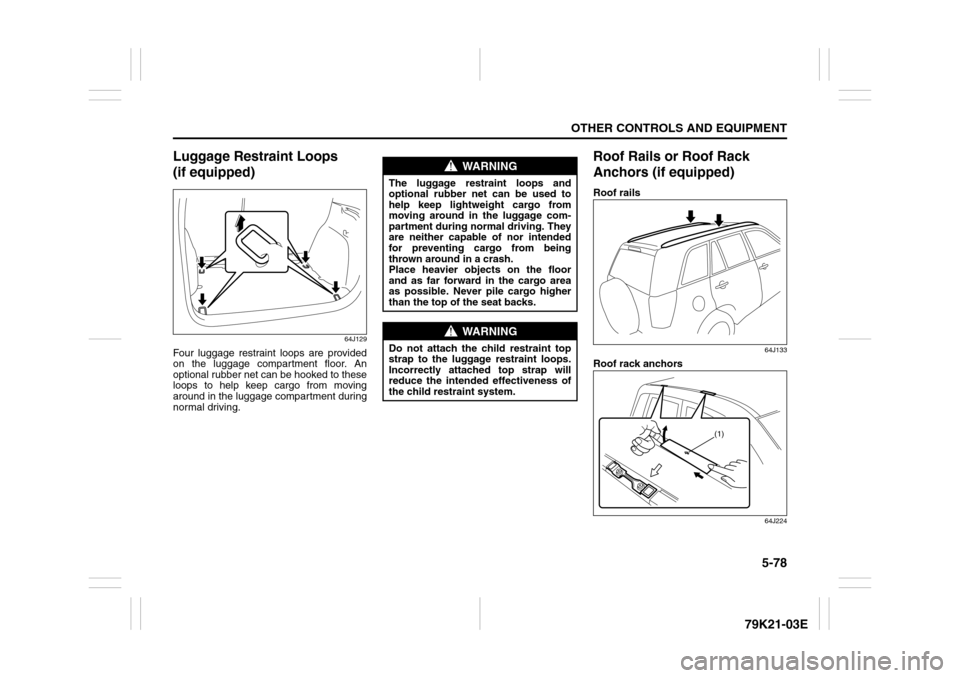
Luggage Restraint Loops
(if equipped)
64J129
Four luggage restraint loops are provided
on the luggage compartment floor. An
optional rubber net can be hooked to these
loops to help keep cargo from moving
around in the luggage compartment during
normal driving.
Roof Rails or Roof Rack
Anchors (if equipped)Roof rails
64J133
Roof rack anchors
64J224
WARNING
The luggage restraint loops and
optional rubber net can be used to
help keep lightweight cargo from
moving around in the luggage com-
partment during normal driving. They
are neither capable of nor intended
for preventing cargo from being
thrown around in a crash.
Place heavier objects on the floor
and as far forward in the cargo area
as possible. Never pile cargo higher
than the top of the seat backs.
WARNING
Do not attach the child restraint top
strap to the luggage restraint loops.
Incorrectly attached top strap will
reduce the intended effectiveness of
the child restraint system.
(1)
Page 233 of 337
5-80
OTHER CONTROLS AND EQUIPMENT
79K21-03E
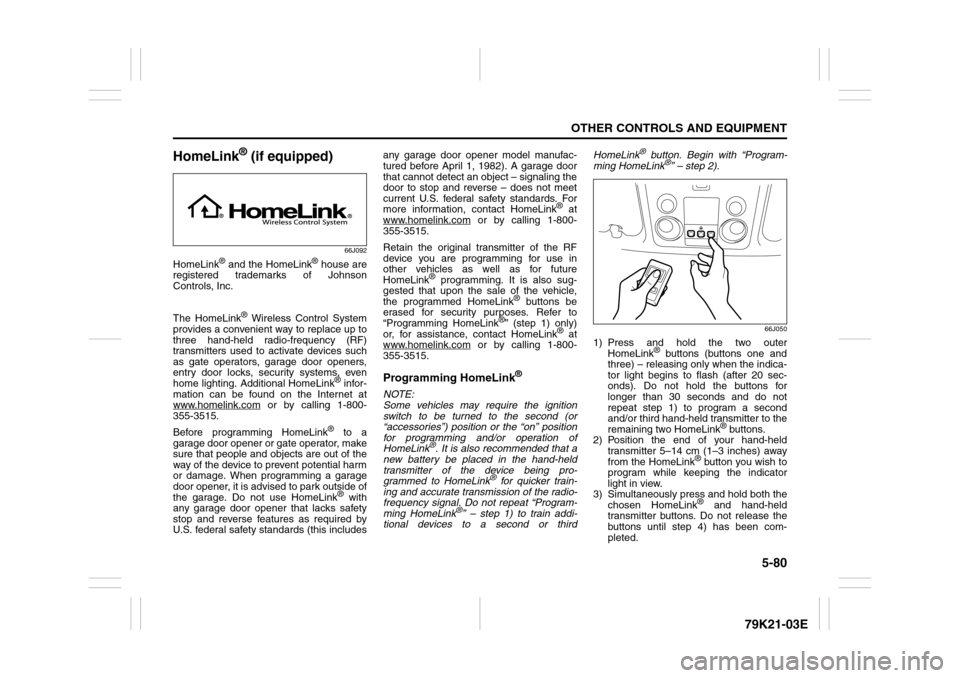
HomeLink
® (if equipped)
66J092
HomeLink
® and the HomeLink
® house are
registered trademarks of Johnson
Controls, Inc.
The HomeLink
® Wireless Control System
provides a convenient way to replace up to
three hand-held radio-frequency (RF)
transmitters used to activate devices such
as gate operators, garage door openers,
entry door locks, security systems, even
home lighting. Additional HomeLink
® infor-
mation can be found on the Internet at
www.homelink.com
or by calling 1-800-
355-3515.
Before programming HomeLink
® to a
garage door opener or gate operator, make
sure that people and objects are out of the
way of the device to prevent potential harm
or damage. When programming a garage
door opener, it is advised to park outside of
the garage. Do not use HomeLink® with
any garage door opener that lacks safety
stop and reverse features as required by
U.S. federal safety standards (this includesany garage door opener model manufac-
tured before April 1, 1982). A garage door
that cannot detect an object – signaling the
door to stop and reverse – does not meet
current U.S. federal safety standards. For
more information, contact HomeLink
® at
www.homelink.com
or by calling 1-800-
355-3515.
Retain the original transmitter of the RF
device you are programming for use in
other vehicles as well as for future
HomeLink
® programming. It is also sug-
gested that upon the sale of the vehicle,
the programmed HomeLink
® buttons be
erased for security purposes. Refer to
“Programming HomeLink
®” (step 1) only)
or, for assistance, contact HomeLink
® at
www.homelink.com
or by calling 1-800-
355-3515.
Programming HomeLink
®
NOTE:
Some vehicles may require the ignition
switch to be turned to the second (or
“accessories”) position or the “on” position
for programming and/or operation of
HomeLink
®. It is also recommended that a
new battery be placed in the hand-held
transmitter of the device being pro-
grammed to HomeLink
® for quicker train-
ing and accurate transmission of the radio-
frequency signal. Do not repeat “Program-
ming HomeLink
®” – step 1) to train addi-
tional devices to a second or thirdHomeLink
® button. Begin with “Program-
ming HomeLink
®” – step 2).
66J050
1) Press and hold the two outer
HomeLink
® buttons (buttons one and
three) – releasing only when the indica-
tor light begins to flash (after 20 sec-
onds). Do not hold the buttons for
longer than 30 seconds and do not
repeat step 1) to program a second
and/or third hand-held transmitter to the
remaining two HomeLink
® buttons.
2) Position the end of your hand-held
transmitter 5–14 cm (1–3 inches) away
from the HomeLink
® button you wish to
program while keeping the indicator
light in view.
3) Simultaneously press and hold both the
chosen HomeLink® and hand-held
transmitter buttons. Do not release the
buttons until step 4) has been com-
pleted.
Page 234 of 337

5-81OTHER CONTROLS AND EQUIPMENT
79K21-03E
NOTE:
Some gate operators and garage door
openers may require you to replace this
Programming step 3) with procedures
noted in the “Gate Operator / Canadian
Programming” section.
4) After the HomeLink
® indicator light
changes from a slow to a rapidly blink-
ing light, release both the HomeLink
®
and hand-held transmitter buttons.
NOTE:
If the HomeLink
® indicator light does not
change to a rapidly blinking light, contact
HomeLink
® at www.homelink.com
or call
1-800-355-3515 for assistance.
5) Press and hold the just-trained
HomeLink
® button and observe the
indicator light.
– If the indicator light stays on con-
stantly, programming is complete and
your device should activate when the
HomeLink® button is pressed and
released.
NOTE:
To program the remaining two HomeLink
®
buttons, begin with “Programming
HomeLink
®” – step 2). Do not repeat step
1).
– If the indicator light blinks rapidly for
two seconds and then turns to a con-
stant light continue with “ProgrammingHomeLink
®” steps 6–8 to complete the
programming of a rolling code
equipped device (most commonly a
garage door opener).
66J051
66J052
6) At the garage door opener receiver
(motor-head unit) in the garage, locate
the “learn” or “smart” button. This can
usually be found where the hanging
antenna wire is attached to the motor-
head unit.
7) Firmly press and release the “learn” or
“smart” button. (The name and color of
the button may vary by manufacturer.)
NOTE:
There are 30 seconds in which to initiate
step 8).
8) Return to the vehicle and firmly press,
hold for two seconds and release the
programmed HomeLink
® button.
Repeat the “press/hold/release”
sequence a second time, and, depend-
ing on the brand of the garage door
opener (or other rolling code equipped
device), repeat this sequence a third
time to complete the programming pro-
cess.
HomeLink
® should now activate your
rolling code equipped device.
NOTE:
To program the remaining two HomeLink
®
buttons, begin with “Programming
HomeLink
®” – step 2). Do not repeat step
1).
For questions or comments, please con-
tact HomeLink
® at www.homelink.com
or
1-800-355-3515.
Page 235 of 337
5-82
OTHER CONTROLS AND EQUIPMENT
79K21-03E
Gate Operator / Canadian Program-
mingCanadian radio-frequency laws require
transmitter signals to “time-out” (or quit)
after several seconds of transmission –
which may not be long enough for
HomeLink
® to pick up the signal during
programming. Similar to this Canadian law,
some U.S. gate operators are designed to
“time-out” in the same manner.
If you live in Canada or you are having diffi-
culties programming a gate operator by
using the Programming procedures
(regardless of where you live), replace
“Programming HomeLink
®” step 3) with
the following:
NOTE:
If programming a garage door opener or
gate operator, it is advised to unplug the
device during the “cycling” process to pre-
vent possible overheating.
3) Continue to press and hold the
HomeLink
® button while you press and
release – every two seconds (“cycle”)
your hand-held transmitter until the fre-
quency signal has successfully been
accepted by HomeLink
®. (The indicator
light will flash slowly and then rapidly.)
Proceed with “Programming HomeLink
®”
step 4) to complete.
Using HomeLink
®
To operate, simply press and release the
programmed HomeLink
® button. Activation
will now occur for the trained device (i.e.
garage door opener, gate operator, secu-
rity system, entry door lock, home/office
lighting, etc.). For convenience, the hand-
held transmitter of the device may also be
used at any time. In the event that there
are still programming difficulties or ques-
tions, contact HomeLink
® at
www.homelink.com
or 1-800-355-3515.
Erasing HomeLink
® Buttons
To erase programming from the three but-
tons (individual buttons cannot be erased
but can be “reprogrammed” as outlined
below), follow the step noted:
Press and hold the two outer HomeLink
®
buttons until the indicator light begins to
flash-after 20 seconds. Release both but-
tons. Do not hold for longer that 30 sec-
onds. HomeLink
® is now in the train (or
learning) mode and can be programmed at
any time beginning with “Programming
HomeLink
®” – step 2).
Reprogramming a Single
HomeLink
® Button
To program a device to HomeLink
® using a
HomeLink
® button previously trained, fol-
low these steps:
1) Press and hold the desired HomeLink
®
button. DO NOT release the button.
2) The indicator light will begin to flash
after 20 seconds. Without releasing the
HomeLink
® button, proceed with “Pro-
gramming HomeLink
®” – step 2).
For questions or comments, contact
HomeLink
® at www.homelink.com
or 1-
800-355-3515.
Page 239 of 337
6-2
VEHICLE LOADING AND TOWING
79K21-03E
Trailer TowingYou can use your SUZUKI to tow a trailer,
but you should always observe the require-
ments and recommendations in this sec-
tion. If you intend to tow a trailer, it is
essential to select a trailer and trailer tow-
ing equipment which are compatible. A
reputable trailer dealer can help you.
For Automatic transmission vehicles, shift
into “3” (Low 2) or “L” (Low 1) (if necessary)
and frequently monitor the coolant temper-
ature gauge when towing up a steep hill. If
the gauge indicates overheating, park the
vehicle in a safe place and let the enginecool down. Refer to “If the Engine Over-
heats” section for details on how to deal
with overheating.
HitchesUse only a trailer hitch bracket that is
designed to bolt to the frame of your vehi-
cle, and a hitch that is designed to bolt to
this bracket. We recommend that you use
a genuine SUZUKI trailer hitch bracket and
trailer hitch (available as options), or equiv-
alent.Safety ChainsAlways attach safety chains between your
vehicle and trailer. Cross safety chains
under the tongue of the trailer so that the
tongue will not drop to the road if the trailer
becomes separated from the hitch. Follow
the manufacturer’s recommendation for
attaching safety chains. Always leave just
enough slack to permit full turning. Never
allow safety chains to drag on the road.
Trailer LightsMake sure your trailer is equipped with
lights which meet federal, state and local
requirements. Always check for the proper
operation of all trailer lights before you
start to tow.Brakes CAUTION
Trailer towing puts additional stress
on the engine, drive train and brakes
of your vehicle. Never tow a trailer
during the first 960 km (600 miles) of
vehicle operation.
CAUTION
Because towing a trailer puts addi-
tional stress on your vehicle, more
frequent maintenance will be
required than under normal driving
conditions. Follow the schedule for
Maintenance Recommended Under
Severe Driving Conditions or perform
more frequent maintenance as nec-
essary.
CAUTION
Towing in “D” range up a steep hill
can cause coolant overheating which
may result in engine/automatic trans-
mission damage.
WARNING
Never use a bumper hitch or a hitch
which attaches to the axle of your
vehicle.
WARNING
Never attach safety chains to the
bumper of your vehicle. Secure con-
nections so that they can’t come
loose.
WARNING
Never splice trailer lights directly into
your vehicle’s electrical system, or
electrical system damage may occur.
WARNING
If trailer brakes are used, you should
follow all instructions provided by the
manufacturer. Never tap into the
brake system of your vehicle.
Trailer Towing: 5, 11, 13
Page 242 of 337
6-5VEHICLE LOADING AND TOWING
79K21-03E
Additional Trailer Towing Warnings
WARNING
Never overload your trailer or your
vehicle. Gross Trailer Weight must
never exceed 1350 kg (3000 pounds).
Gross Combined Weight must never
exceed 3400 kg (7500 pounds) for
2WD or 3450 kg (7600 pounds) for
4WD.
Gross vehicle weight must never
exceed the Gross Vehicle Weight Rat-
ing (GVWR) listed on the Safety Certi-
fication Label. Gross axle weight for
the front and rear axles must not
exceed the Gross Axle Weight Rating
(GAWR) listed on the Safety Certifica-
tion Label.
WARNING
Do not tow a trailer having a gross
trailer weight greater than 450 kg
(1000 pounds) unless the trailer is
equipped with trailer brakes.
WARNING
Connect trailer lights and hook up
safety chains every time you tow.
WARNING
Your vehicle will handle differently
when towing a trailer. For your safety
and the safety of others, you should
observe the following precautions:
Practice turning, stopping and
backing up before you begin tow-
ing in traffic. Do not tow in traffic
until you are confident that you can
handle the vehicle and trailer
safely.
Never exceed posted towing speed
limits or 72 km/h (45 mph), which-
ever is lower.
Never drive at a speed that causes
shaking or swaying of the trailer. If
you notice even the slightest sign
of shaking or swaying, slow down.
Always have someone guide you
when backing.
(Continued)
WARNING
(Continued)
Allow adequate stopping distance.
Stopping distance is increased
when you tow a trailer. For each 16
km/h (10 mph) of speed, allow at
least one vehicle and trailer length
between you and the vehicle ahead.
Follow at a greater distance if roads
are wet or slippery.
Slow down when making turns.
Remember that a larger than nor-
mal turning radius is needed
because the trailer wheels will be
closer than the vehicle wheels to
the inside of the turn.
Avoid sudden acceleration and
stopping of the vehicle. Do not
make quick maneuvers unless they
are necessary.
Slow down in cross winds and be
prepared for wind blasts from large
passing vehicles.
Be careful when passing other
vehicles. Be sure to allow enough
room for your trailer before you
change lanes, and signal well in
advance.
Slow down and shift into a lower
gear before you reach long or steep
downhill grades. It is hazardous to
attempt downshifting while you are
descending a hill.
(Continued)
Trailer Towing: 5, 11, 13
Page 245 of 337
6-8
VEHICLE LOADING AND TOWING
79K21-03E
Before towing
64J147
Vehicles equipped with a transfer switch
may be towed from the front with all four
wheels on the ground. Be sure to use
proper towing equipment designed for rec-
reational towing and make sure that towing
speed does not exceed 90 km/h (55 mph).To tow a vehicle equipped with a trans-
fer switch with all four wheels on the
ground:
1) Turn the ignition key to the “ON” posi-
tion.
2) Place the transmission in “N” (Neutral)
and depress the brake pedal and the
clutch pedal fully (if equipped).
3) Use the transfer switch to shift into neu-
tral.
64J218
NOTE:
First, push in and turn the switch to the
mark (1) at the left of the “N” position, and
hold the switch in this position for 5 sec-
onds until the “N” indicator blinks, then turn
the switch to the “N” position.
When you turn the transfer switch to the
“N” position, “N” indicator will come on with
the buzzer sound.
4) Make sure the “N” light on the instru-
ment cluster comes on.
5) Shift the manual transmission lever into
2nd gear or the automatic transmission
lever into “P” (Park).
6) Turn the ignition key to the “ACC” posi-
tion to unlock the steering wheel.
WARNING
When you tow your vehicle, follow
the instructions below to avoid acci-
dents and damage to your vehicle. In
addition, be sure to observe govern-
ment and local requirements regard-
ing vehicle lighting and trailer hitches
or tow bars.
WARNING
A safety chain should always be used
when you tow your vehicle.
CAUTION
Do not tow your vehicle with either
front wheels or rear wheels directly
on the ground (and the transmission
in neutral). If you do, the transmis-
sion will be damaged fatally.
(1)
Towing Your Vehicle (recreational towing): 13
Page 249 of 337
INSPECTION AND MAINTENANCE
7
79K21-03E
60G410
INSPECTION AND MAINTENANCEMaintenance Schedule ....................................................... 7-2
Periodic Maintenance Schedule ........................................ 7-3
Maintenance Recommended under Severe Driving
Conditions ........................................................................... 7-7
Drive Belt ............................................................................. 7-9
Engine Oil and Filter ........................................................... 7-10
Engine Coolant .................................................................... 7-13
Air Cleaner ........................................................................... 7-16
Spark Plugs ......................................................................... 7-16
Gear Oil ................................................................................ 7-17
Clutch Pedal ........................................................................ 7-20
Automatic Transmission Fluid ........................................... 7-20
Brakes .................................................................................. 7-22
Steering Wheel .................................................................... 7-24
Tires ...................................................................................... 7-25
Battery .................................................................................. 7-36
Fuses .................................................................................... 7-36
Headlight Aiming ................................................................. 7-39
Bulb Replacement ............................................................... 7-40
Wiper Blades ....................................................................... 7-46
Windshield Washer Fluid ................................................... 7-49
Air Conditioning System .................................................... 7-49