CD changer SUZUKI GRAND VITARA 2011 User Guide
[x] Cancel search | Manufacturer: SUZUKI, Model Year: 2011, Model line: GRAND VITARA, Model: SUZUKI GRAND VITARA 2011Pages: 337, PDF Size: 6.21 MB
Page 183 of 337
5-30
OTHER CONTROLS AND EQUIPMENT
79K21-03E
TRACK REPEAT
The indication “TRACK RPT” appears in
the display for 2 seconds and then the
repeat indicator (E) lights.
The track being currently played is
played repeatedly.
DISC REPEAT
The indication “DISC RPT” appears in
the display for 2 seconds and then the
repeat indicator (E) lights.
When all the tracks on a disc being cur-
rently played finish playing, play starts
again at the beginning of the disc.
Remote Audio Controls
(if equipped)
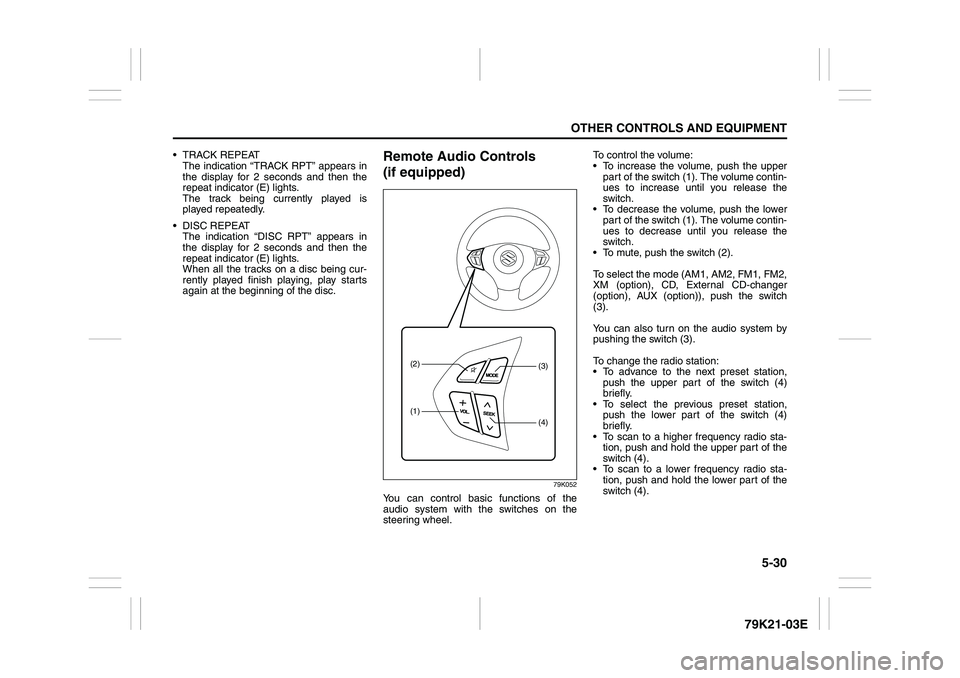
79K052
You can control basic functions of the
audio system with the switches on the
steering wheel.To control the volume:
To increase the volume, push the upper
part of the switch (1). The volume contin-
ues to increase until you release the
switch.
To decrease the volume, push the lower
part of the switch (1). The volume contin-
ues to decrease until you release the
switch.
To mute, push the switch (2).
To select the mode (AM1, AM2, FM1, FM2,
XM (option), CD, External CD-changer
(option), AUX (option)), push the switch
(3).
You can also turn on the audio system by
pushing the switch (3).
To change the radio station:
To advance to the next preset station,
push the upper part of the switch (4)
briefly.
To select the previous preset station,
push the lower part of the switch (4)
briefly.
To scan to a higher frequency radio sta-
tion, push and hold the upper part of the
switch (4).
To scan to a lower frequency radio sta-
tion, push and hold the lower part of the
switch (4).
(1)(2)
(4)(3)
Page 184 of 337
5-31OTHER CONTROLS AND EQUIPMENT
79K21-03E
To change the selection on a CD:
To advance to the next track on a CD,
push the upper part of the switch (4)
briefly.
To select the previous track on a CD,
push the lower part of the switch (4).
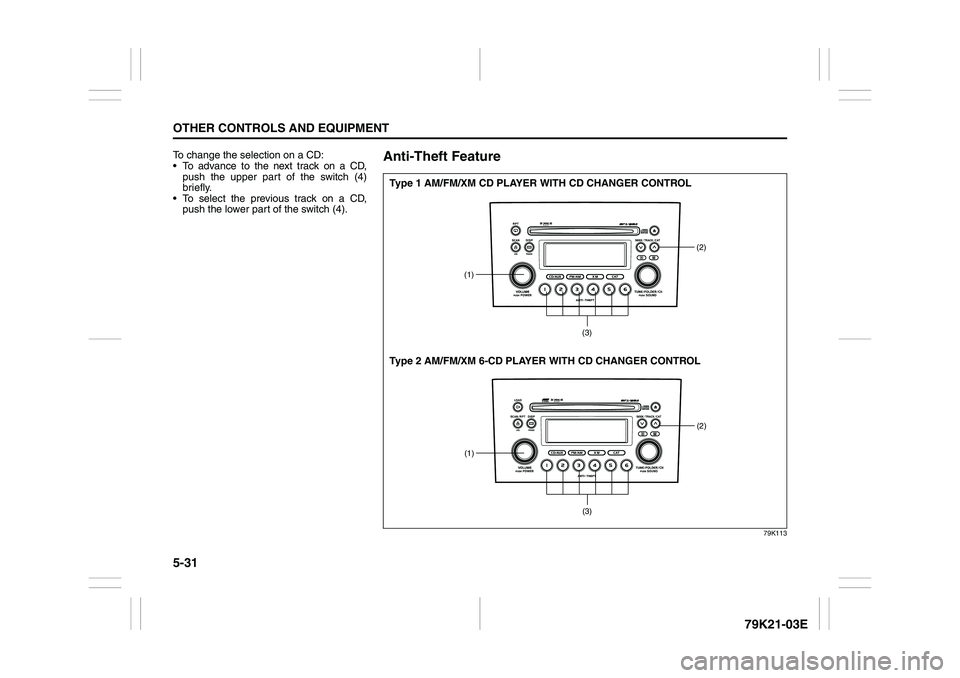
Anti-Theft Feature
79K113
(1)
(2)
(3)
(1)
(2)
(3)
Type 1 AM/FM/XM CD PLAYER WITH CD CHANGER CONTROL
Type 2 AM/FM/XM 6-CD PLAYER WITH CD CHANGER CONTROL
Page 188 of 337

5-35OTHER CONTROLS AND EQUIPMENT
79K21-03E
Error display
This unit has a number of self-diagnostic functions to protect the system.
If a problem should occur, the display shows the type of error. Refer to the table below and take proper measures to correct the problem.
If the problem is corrected, the unit will operate normally.
If an error display not listed above appears, turn off the unit and contact your SUZUKI dealer. Error display Measures to be taken
CD/CD changer “Mechanical error”.
This error display indicates a mechanical failure in the CD changer
(failure to change or eject a disc).
The mechanism is probably damaged. Contact your authorized
SUZUKI dealer.
CD/CD changer “Focus error”.
The pick-up-focus is not properly functioning during playback due to
damage on the disc or for other reasons.
Check disc for damage.
CD/CD changer “Disc error”.
The CD is inserted upside down or only an eight-centimeter CD
adapter is equipped.
Check disc for correct loading.
Page 189 of 337
5-36
OTHER CONTROLS AND EQUIPMENT
79K21-03E
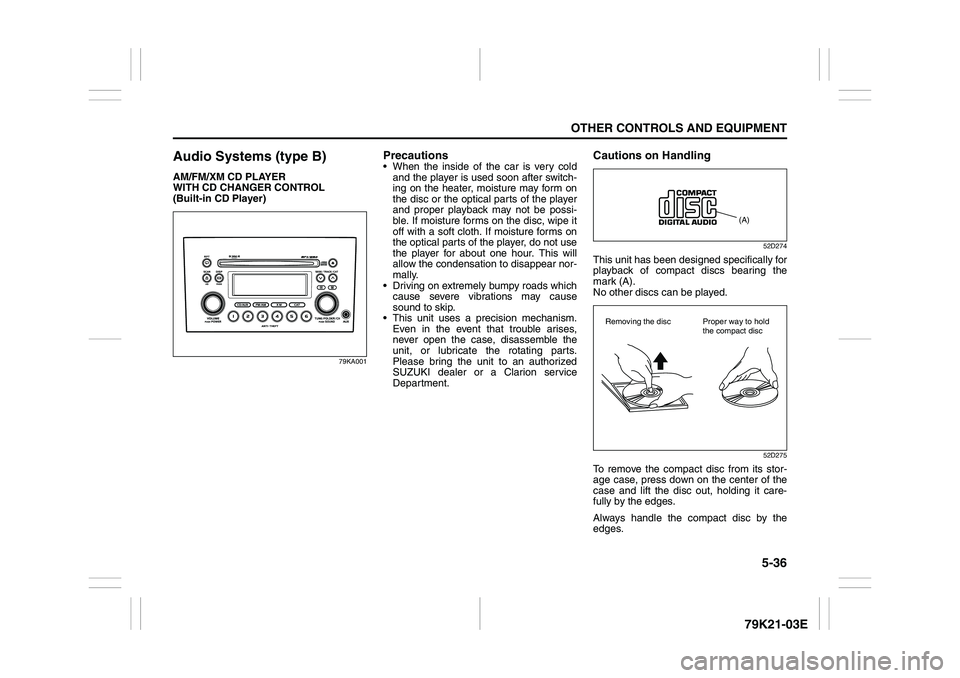
Audio Systems (type B)AM/FM/XM CD PLAYER
WITH CD CHANGER CONTROL
(Built-in CD Player)
79KA001
Precautions When the inside of the car is very cold
and the player is used soon after switch-
ing on the heater, moisture may form on
the disc or the optical parts of the player
and proper playback may not be possi-
ble. If moisture forms on the disc, wipe it
off with a soft cloth. If moisture forms on
the optical parts of the player, do not use
the player for about one hour. This will
allow the condensation to disappear nor-
mally.
Driving on extremely bumpy roads which
cause severe vibrations may cause
sound to skip.
This unit uses a precision mechanism.
Even in the event that trouble arises,
never open the case, disassemble the
unit, or lubricate the rotating parts.
Please bring the unit to an authorized
SUZUKI dealer or a Clarion service
Department.
Cautions on Handling
52D274
This unit has been designed specifically for
playback of compact discs bearing the
mark (A).
No other discs can be played.
52D275
To remove the compact disc from its stor-
age case, press down on the center of the
case and lift the disc out, holding it care-
fully by the edges.
Always handle the compact disc by the
edges.
(A)
Removing the disc Proper way to hold
the compact disc
Page 191 of 337
5-38
OTHER CONTROLS AND EQUIPMENT
79K21-03E
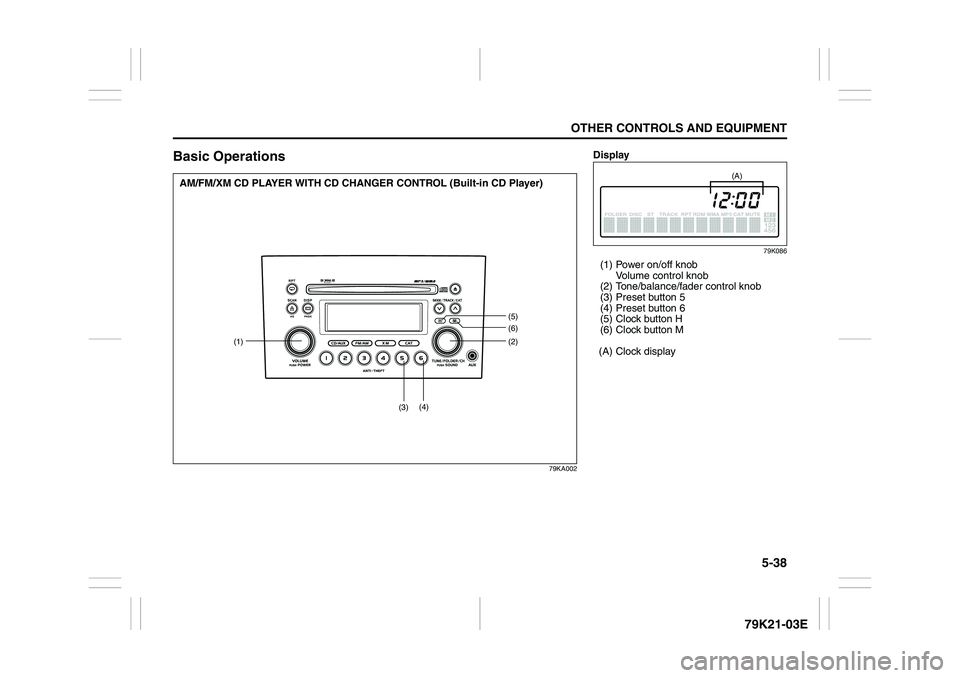
Basic Operations
79KA002
(1)(2)
(5)(6)
(3)(4)
AM/FM/XM CD PLAYER WITH CD CHANGER CONTROL (Built-in CD Player)
Display
79K086
(1) Power on/off knob
Volume control knob
(2) Tone/balance/fader control knob
(3) Preset button 5
(4) Preset button 6
(5) Clock button H
(6) Clock button M
(A) Clock display
(A)
Page 193 of 337
5-40
OTHER CONTROLS AND EQUIPMENT
79K21-03E
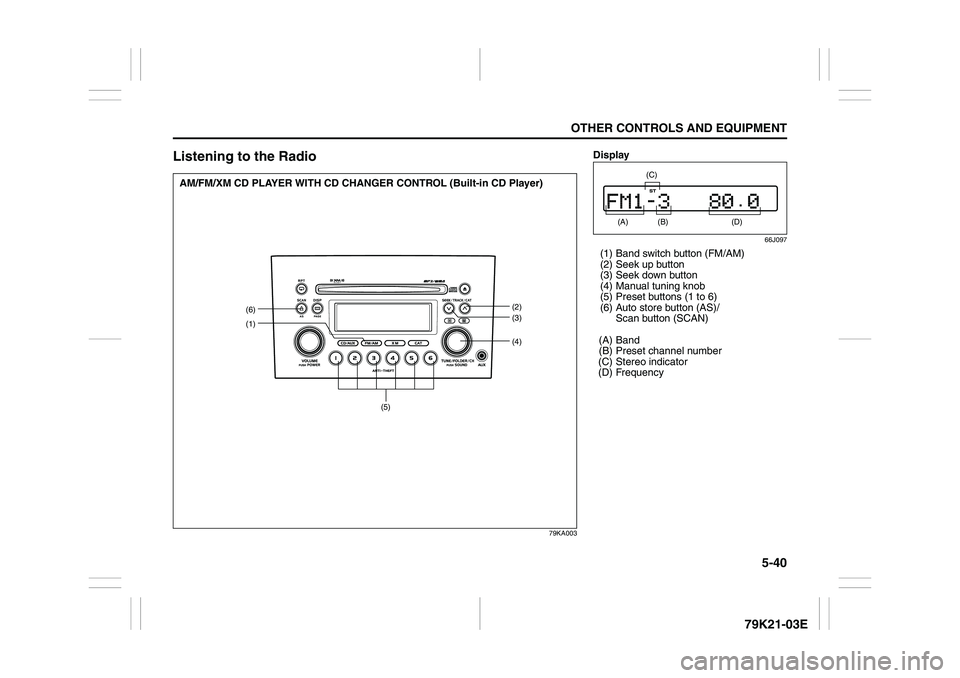
Listening to the Radio
79KA003
(1)
(4)(6)
(2)
(3)
(5)
AM/FM/XM CD PLAYER WITH CD CHANGER CONTROL (Built-in CD Player)
Display
66J097
(1) Band switch button (FM/AM)
(2) Seek up button
(3) Seek down button
(4) Manual tuning knob
(5) Preset buttons (1 to 6)
(6) Auto store button (AS)/
Scan button (SCAN)
(A) Band
(B) Preset channel number
(C) Stereo indicator
(D) Frequency
(A)
(B)
(C)
(D)
Page 196 of 337
5-43OTHER CONTROLS AND EQUIPMENT
79K21-03E
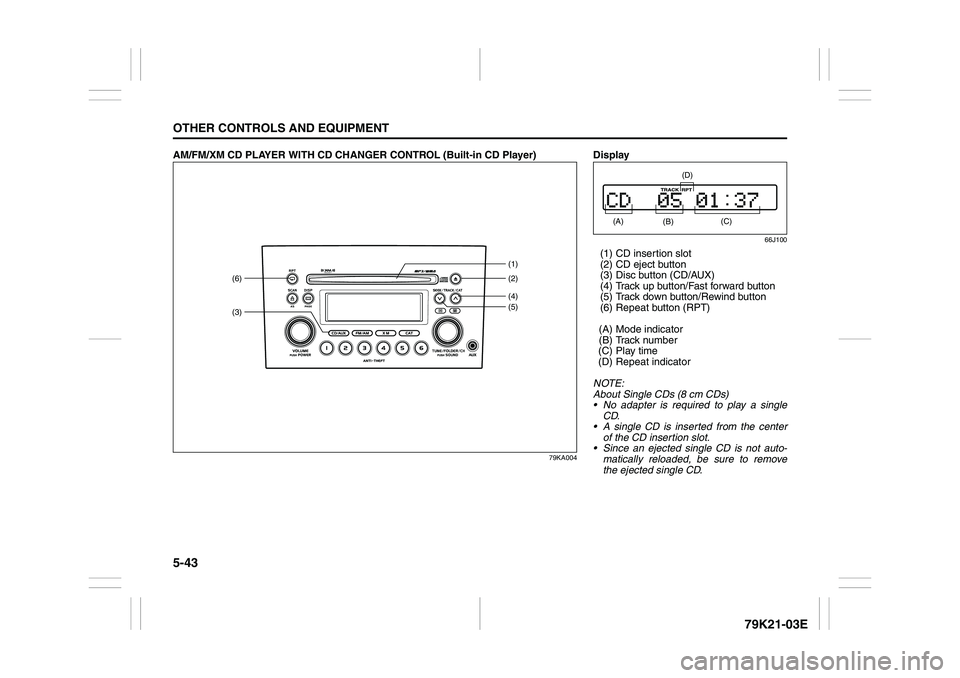
AM/FM/XM CD PLAYER WITH CD CHANGER CONTROL (Built-in CD Player)
79KA004
(3)(6)
(4)(2) (1)
(5)
Display
66J100
(1) CD insertion slot
(2) CD eject button
(3) Disc button (CD/AUX)
(4) Track up button/Fast forward button
(5) Track down button/Rewind button
(6) Repeat button (RPT)
(A) Mode indicator
(B) Track number
(C) Play time
(D) Repeat indicator
NOTE:
About Single CDs (8 cm CDs)
No adapter is required to play a single
CD.
A single CD is inserted from the center
of the CD insertion slot.
Since an ejected single CD is not auto-
matically reloaded, be sure to remove
the ejected single CD. (A)
(B)
(C)
(D)
Page 198 of 337
5-45OTHER CONTROLS AND EQUIPMENT
79K21-03E
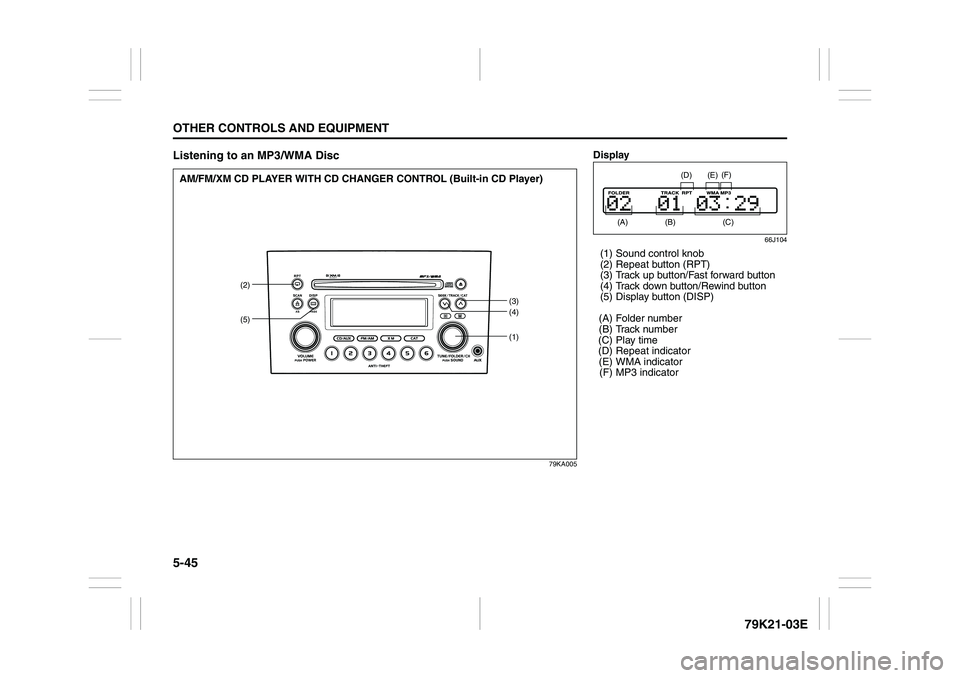
Listening to an MP3/WMA Disc
79KA005
(1)
(2)
(3)
(4)
(5)
AM/FM/XM CD PLAYER WITH CD CHANGER CONTROL (Built-in CD Player)
Display
66J104
(1) Sound control knob
(2) Repeat button (RPT)
(3) Track up button/Fast forward button
(4) Track down button/Rewind button
(5) Display button (DISP)
(A) Folder number
(B) Track number
(C) Play time
(D) Repeat indicator
(E) WMA indicator
(F) MP3 indicator
(A)
(B)
(E)
(D)
(C) (F)
Page 202 of 337
5-49OTHER CONTROLS AND EQUIPMENT
79K21-03E
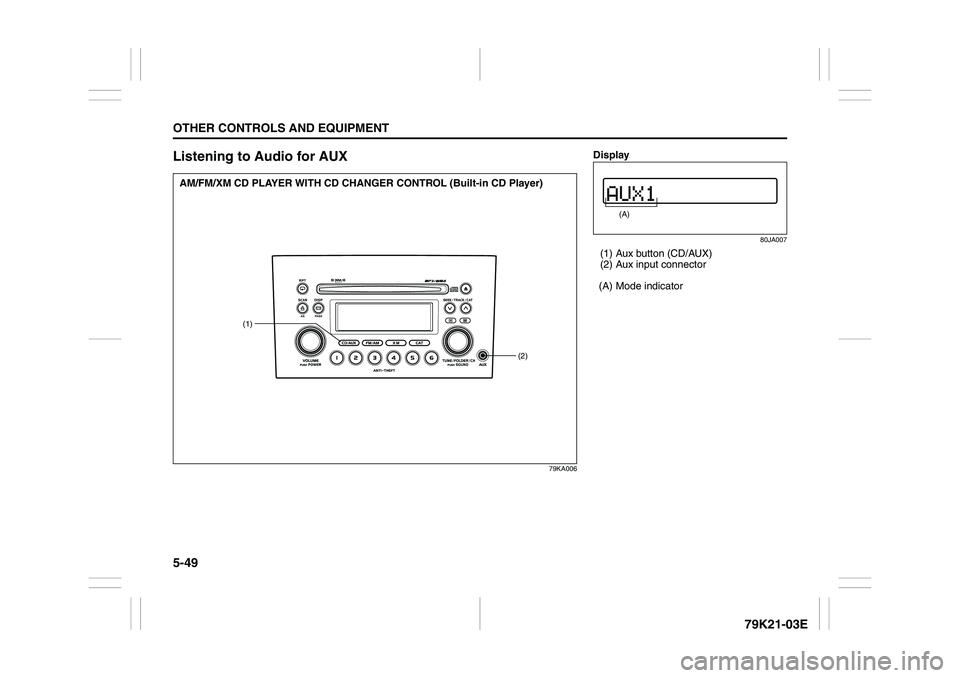
Listening to Audio for AUX
79KA006
(1)
(2)
AM/FM/XM CD PLAYER WITH CD CHANGER CONTROL (Built-in CD Player)
Display
80JA007
(1) Aux button (CD/AUX)
(2) Aux input connector
(A) Mode indicator
(A)
Page 204 of 337
5-51OTHER CONTROLS AND EQUIPMENT
79K21-03E
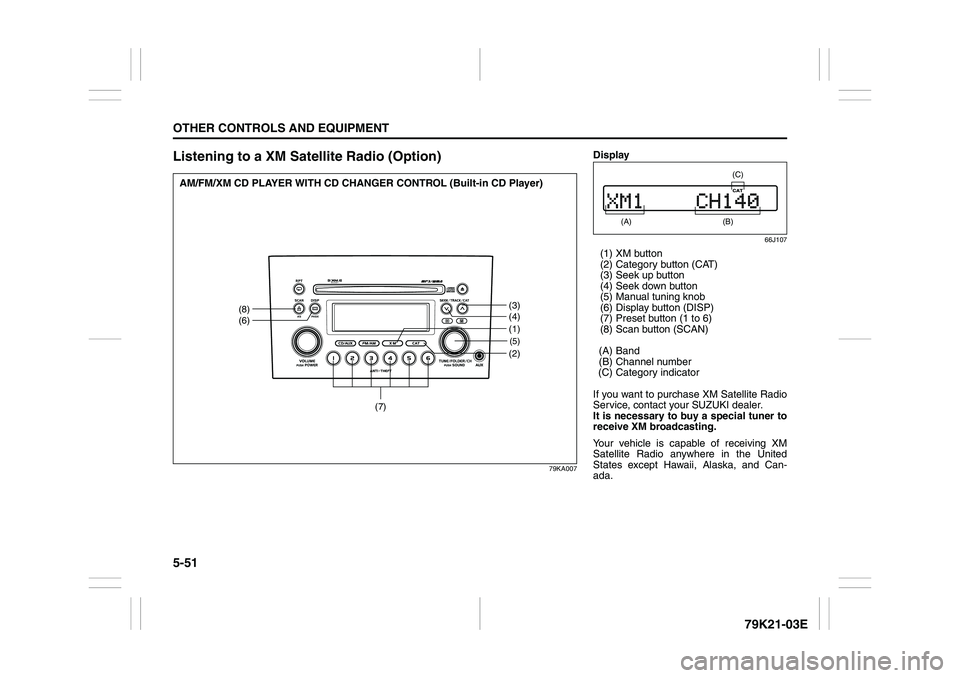
Listening to a XM Satellite Radio (Option)
79KA007
(5)(2)
(8)
(6)
(3)
(4)
(7)
(1)
AM/FM/XM CD PLAYER WITH CD CHANGER CONTROL (Built-in CD Player)
Display
66J107
(1) XM button
(2) Category button (CAT)
(3) Seek up button
(4) Seek down button
(5) Manual tuning knob
(6) Display button (DISP)
(7) Preset button (1 to 6)
(8) Scan button (SCAN)
(A) Band
(B) Channel number
(C) Category indicator
If you want to purchase XM Satellite Radio
Service, contact your SUZUKI dealer.
It is necessary to buy a special tuner to
receive XM broadcasting.
Your vehicle is capable of receiving XM
Satellite Radio anywhere in the United
States except Hawaii, Alaska, and Can-
ada.
(A)
(B) (C)