trip SUZUKI GRAND VITARA 2011 Owners Manual
[x] Cancel search | Manufacturer: SUZUKI, Model Year: 2011, Model line: GRAND VITARA, Model: SUZUKI GRAND VITARA 2011Pages: 337, PDF Size: 6.21 MB
Page 71 of 337
2-54
BEFORE DRIVING
79K21-03E
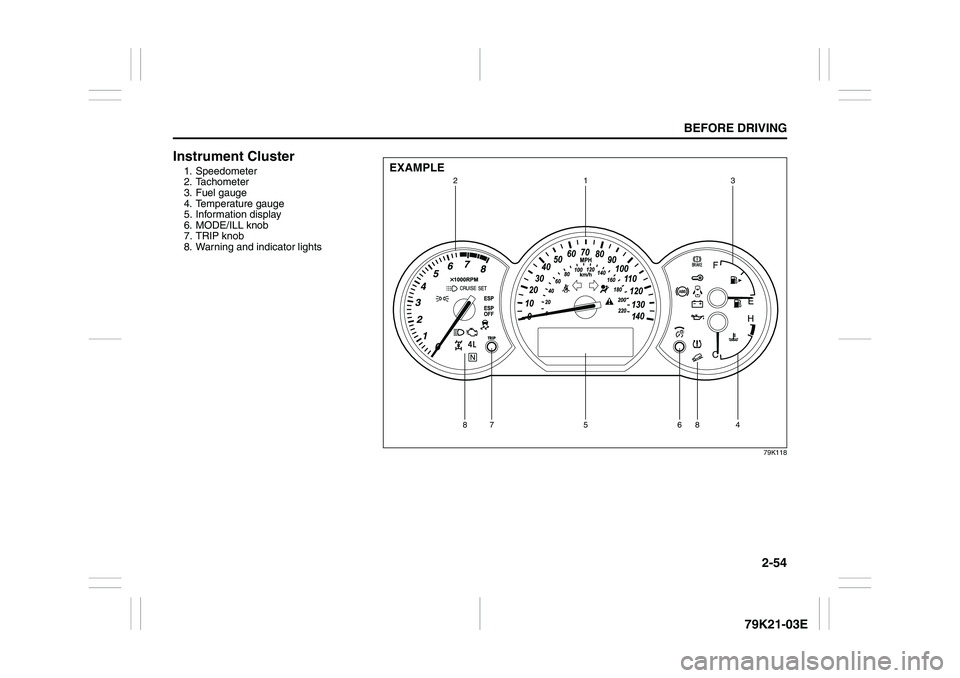
Instrument Cluster1. Speedometer
2. Tachometer
3. Fuel gauge
4. Temperature gauge
5. Information display
6. MODE/ILL knob
7. TRIP knob
8. Warning and indicator lights
79K118
EXAMPLE
1
3
2
5
88
6
7
4
Page 84 of 337
2-67BEFORE DRIVING
79K21-03E
79K062
NOTE:
If you do not turn the brightness control
knob within about 5 seconds of activat-
ing the brightness control display, the
brightness control display will be can-
celed automatically.
When you reconnect the battery, the
brightness of the instrument panel lights
will be reinitialized. Readjust the bright-
ness according to your preference.
NOTE:
If you select the lowest brightness level
when the parking lights or headlights are
on, the instrument panel lights other than
meter lights are turned off.
Information Display
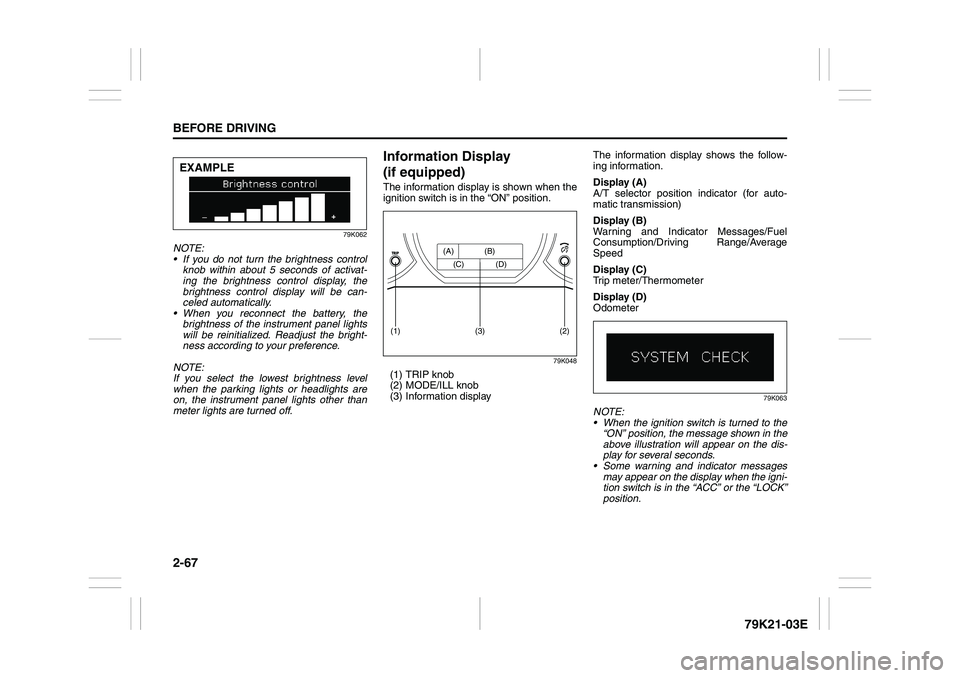
(if equipped)The information display is shown when the
ignition switch is in the “ON” position.
79K048
(1) TRIP knob
(2) MODE/ILL knob
(3) Information displayThe information display shows the follow-
ing information.
Display (A)
A/T selector position indicator (for auto-
matic transmission)
Display (B)
Warning and Indicator Messages/Fuel
Consumption/Driving Range/Average
Speed
Display (C)
Trip meter/Thermometer
Display (D)
Odometer
79K063
NOTE:
When the ignition switch is turned to the
“ON” position, the message shown in the
above illustration will appear on the dis-
play for several seconds.
Some warning and indicator messages
may appear on the display when the igni-
tion switch is in the “ACC” or the “LOCK”
position.
EXAMPLE
(2)
(1)
(3)
(A) (B)
(C) (D)
Page 86 of 337
2-69BEFORE DRIVING
79K21-03E
Instantaneous fuel consumption
If you selected instantaneous fuel con-
sumption the last time you drove the vehi-
cle, the display does not show the bar
graph when the ignition switch is turned to
the “ON” position. The display shows the
bar graph only when the vehicle is moving.
Average fuel consumption
If you selected average fuel consumption
the last time you drove the vehicle, the dis-
play shows the last value of average fuel
consumption from previous driving when
the ignition switch is turned to the “ON”
position. Unless you reset the value of
average fuel consumption, the display indi-
cates the value of average fuel consump-
tion which includes average fuel
consumption during previous driving.
NOTE:
When you reconnect the negative (–) ter-
minal to the battery, the value of average
fuel consumption will be shown after driv-
ing for a while.You can select when the value of average
fuel consumption is reset from among the
following three methods;
Reset after refuel: the value of average
fuel consumption will be reset automati-
cally by refueling.
Reset with trip A: the value of average
fuel consumption will be reset automati-
cally by resetting trip meter A.
Reset manually: the value of average
fuel consumption will be reset by push-
ing and holding the MODE/ILL knob (2)
when the display indicates the average
fuel consumption.
To change when the value of average fuel
consumption is reset, refer to “Setting
Mode” later in this section.
NOTE:
If you add only a small amount of fuel
when you select “Reset after refuel”, the
average fuel consumption value may not
be reset.Driving range
If you selected driving range the last time
you drove the vehicle, the display indicates
“---” for a few seconds and then indicates
the current driving range when the ignition
switch is turned to the “ON” position.
The driving range shown in the display is
the approximate distance you can drive
until the fuel gauge indicates “E”, based on
current driving conditions.
When the remaining fuel in fuel tank
reaches a low level, the display “---” will
appear.
If the low fuel warning light comes on, fill
the fuel tank immediately regardless of the
value of driving range shown in the display.
As the driving range after refueling is cal-
culated based on the most recent driving
condition, the value is different each time
you refuel.
NOTE:
If you refuel when the ignition switch is in
the “ON” position, the driving range may
not indicate the correct value.
When you reconnect the negative (–) ter-
minal to the battery, the value of driving
range will be shown after driving for a
while.
Page 87 of 337
2-70
BEFORE DRIVING
79K21-03E
Average speed
If you selected average speed the last time
you drove the vehicle, the display indicates
the last value of average speed from previ-
ous driving when the ignition switch is
turned to the “ON” position. Unless you
reset the value of average speed, the dis-
play indicates the value of average speed
which includes average speed during pre-
vious driving.
To reset the value of average speed, push
and hold the MODE/ILL knob (2) for about
2 seconds when the display indicates an
average speed. The display shows “---”
and then indicates a new average speed
after driving for a short time.
NOTE:
When you reconnect the negative (–) ter-
minal to the battery, the value of average
speed will be shown after driving for a
while.
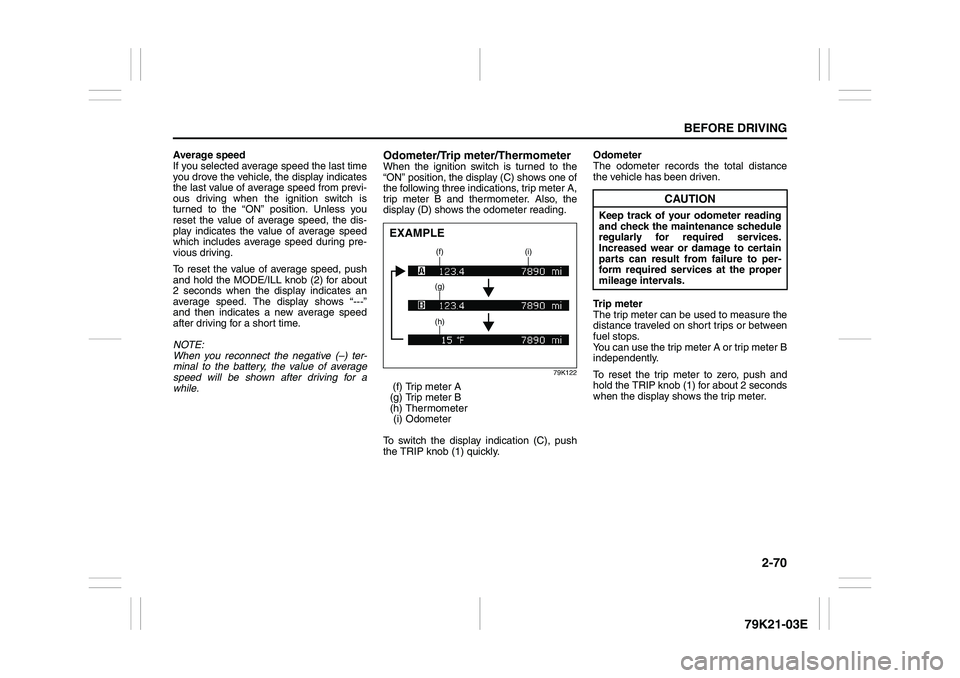
Odometer/Trip meter/ThermometerWhen the ignition switch is turned to the
“ON” position, the display (C) shows one of
the following three indications, trip meter A,
trip meter B and thermometer. Also, the
display (D) shows the odometer reading.
79K122
(f) Trip meter A
(g) Trip meter B
(h) Thermometer
(i) Odometer
To switch the display indication (C), push
the TRIP knob (1) quickly.Odometer
The odometer records the total distance
the vehicle has been driven.
Trip meter
The trip meter can be used to measure the
distance traveled on short trips or between
fuel stops.
You can use the trip meter A or trip meter B
independently.
To reset the trip meter to zero, push and
hold the TRIP knob (1) for about 2 seconds
when the display shows the trip meter.EXAMPLE
(f) (i)
(g)
(h)
CAUTION
Keep track of your odometer reading
and check the maintenance schedule
regularly for required services.
Increased wear or damage to certain
parts can result from failure to per-
form required services at the proper
mileage intervals.
Page 89 of 337
2-72
BEFORE DRIVING
79K21-03E
Distance units
You can change the units odo/trip meter
distance is displayed in.
NOTE:
When you change the units odo/trip meter
distance is displayed in, the trip meter will
be reset automatically.
Fuel economy units
You can change the units that fuel con-
sumption is displayed in.
Language
You can change the language of the infor-
mation display.
Avg. fuel economy reset
You can change when the value of average
fuel consumption is reset.
Temperature units
You can change the units that temperature
is displayed in.
NOTE:
When you change the units that tempera-
ture is displayed in, the air conditioning
system temperature display units will be
changed automatically.
Default setting
If you select “YES” and push the MODE/
ILL knob (2), all settings will be reinitial-
ized.
Warning and Indicator MessagesThe display shows the warning and indica-
tor messages to let you know about certain
vehicle problems.
A tone may also sound to alert you.
If warning and indicator messages appear
on the display, follow the messages.
Master warning indicator
78K049
When the display shows warning and indi-
cator messages, the master warning indi-
cator may also come on or blink.
NOTE:
When the problem that causes a mes-
sage to appear is corrected, the mes-
sage will disappear.
If a message is displayed, and other
problems requiring a message occur, the
message for each of the problems will be
alternately displayed about every 5 sec-
onds.
When you push and hold the MODE/ILL
knob for about 2 seconds while a mes-
sage is displayed, the message will dis-
appear temporarily. If the problem that
caused the message is not corrected,the message will appear again after 5
seconds.
Page 256 of 337
7-7INSPECTION AND MAINTENANCE
79K21-03E
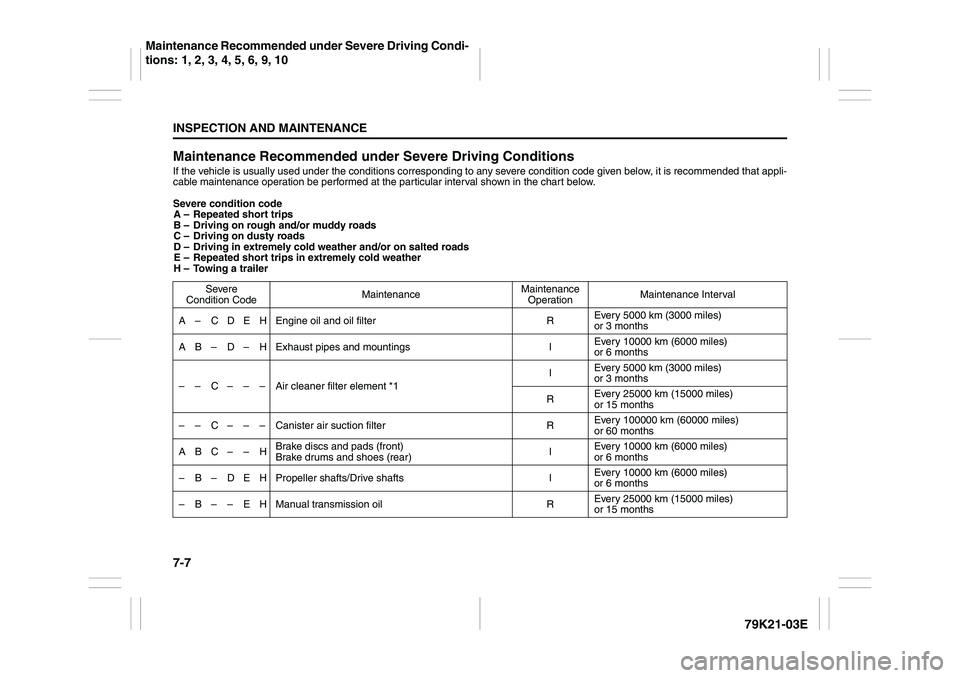
Maintenance Recommended under Severe Driving ConditionsIf the vehicle is usually used under the conditions corresponding to any severe condition code given below, it is recommended that appli-
cable maintenance operation be performed at the particular interval shown in the chart below.
Severe condition code
A – Repeated short trips
B – Driving on rough and/or muddy roads
C – Driving on dusty roads
D – Driving in extremely cold weather and/or on salted roads
E – Repeated short trips in extremely cold weather
H – Towing a trailer
Severe
Condition CodeMaintenanceMaintenance
OperationMaintenance Interval
A – C D E H Engine oil and oil filter REvery 5000 km (3000 miles)
or 3 months
A B – D – H Exhaust pipes and mountings IEvery 10000 km (6000 miles)
or 6 months
– – C – – – Air cleaner filter element *1IEvery 5000 km (3000 miles)
or 3 months
REvery 25000 km (15000 miles)
or 15 months
– – C – – – Canister air suction filter REvery 100000 km (60000 miles)
or 60 months
ABC– – HBrake discs and pads (front)
Brake drums and shoes (rear)IEvery 10000 km (6000 miles)
or 6 months
– B – D E H Propeller shafts/Drive shafts IEvery 10000 km (6000 miles)
or 6 months
– B – – E H Manual transmission oil REvery 25000 km (15000 miles)
or 15 months
Maintenance Recommended under Severe Driving Condi-
tions: 1, 2, 3, 4, 5, 6, 9, 10
Page 284 of 337
7-35INSPECTION AND MAINTENANCE
79K21-03E
gers in your vehicle, the amount of
available cargo and luggage load
capacity is 650 lbs (1400 – 750 (5 x
150) = 650 lbs).
5) Determine the combined weight of
luggage and cargo being loaded on
the vehicle. That weight may not
safely exceed the available cargo
and luggage load capacity calcu-
lated in Step 4.
6) If your vehicle will be towing a
trailer, load from your trailer will be
transferred to your vehicle. Consult
this manual to determine how this
reduces the available cargo and
luggage load capacity of your vehi-
cle.
Vehicle Loading Example
As an example, suppose that the Tire
and Loading Information label on your
vehicle indicates that your vehicle’s
total load capacity is 950 lbs. If you
were to drive your vehicle with one
passenger, and the total combined
weight of you and your passenger was
350 lbs, then the cargo and luggage
capacity of your vehicle would be 600
lbs (950 – 350 = 600 lbs).
If you later added 2 more passengers,
having a combined weight of 325 lbs,
the cargo and luggage capacity of
your vehicle would be reduced from600 lbs to 275 lbs (600 – 325 = 275
lbs). As you can see, as the number
and combined weight of vehicle occu-
pants increase, the vehicle’s cargo
and luggage capacity decreases.
Suppose again, that you were to take
a trip in your vehicle with the same
three passengers described above,
and you decided to tow a trailer having
a trailer tongue weight of 75 lbs. The
cargo and luggage capacity would be
reduced again, to 200 lbs (275 – 75 =
200 lbs).
Determining Compatibility of Tire
and Vehicle Load Limits
The tires on your vehicle, when they
are inflated to the recommended tire
inflation pressure, have a load-carry-
ing capacity that is greater than the
load that will be on the tires when the
vehicle is at its GVWR or GAWR limit.
Never use replacement tires that have
a load-carrying capacity less than the
original tires on your vehicle. Tire load-
carrying capacity information is
molded into the tire sidewall typically
shown as “Max. Load”. Use of replace-
ment tires with a lower load-carrying
capacity than the original tires, or fail-
ure to keep the tires inflated to recom-
mended tire pressure, may reduce the
GVWR or GAWR limit of your vehicle.NOTE:
Use of replacement tires with a higher
load-carrying capacity than the origi-
nal tires, or using a tire inflation pres-
sure higher than the recommended
tire inflation pressure, will not increase
the GVWR or GAWR limit of your vehi-
cle.
Fuses: 7
Headlight Aiming:
Bulb Replacement: 7
Page 335 of 337
13-5
INDEX79K21-03E
Tire Chains
...........................................................................4-7
Tire Changing Tool
..............................................................8-1
Tire Inflation Pressure .........................................................7-27
Tire Inspection
.....................................................................7-28
Tire Pressure Monitoring System (TPMS)
.........................3-38
Tire Rotation
........................................................................7-31
Tire Sidewall Labeling
.........................................................7-25
Tire Size
................................................................................7-26
Tires
......................................................................................7-25
Towing a Disabled Vehicle
.................................................8-8
Towing Your Vehicle (recreational towing)
.......................6-7
Traction Control System
.....................................................3-31
Trailer Towing
......................................................................6-2
Transfer Position Indicator Light
.......................................2-64
Trip meter
.............................................................................2-70
Troubleshooting
..................................................................5-34
,
................................................................................................5-60
Turn Signal Control Lever
..................................................2-78
Turn Signal Indicators
.........................................................2-63
Turn Signal Operation .........................................................2-79
UUnderfloor Bins
...................................................................5-77
Uniform Tire Quality Grading
.............................................7-30
Using the Transfer Switch
..................................................3-15
Using the Transmission
......................................................3-11
VVehicle Cleaning
..................................................................9-3
Vehicle Identification Number
............................................10-1
Vehicle Loading
........................................................... 6-1
, 7-33
Vehicle With Keyless Start System
....................................3-4
Vehicle Without Keyless Start System
..............................3-3
WWarning and Indicator Lights
............................................ 2-55
Warning and Indicator Messages
...................................... 2-72
Warranties
........................................................................... 10-2
Washing
............................................................................... 9-4
Waxing ................................................................................. 9-5
Windows .............................................................................. 2-15
Windshield Washer
............................................................. 2-80
Windshield Washer Fluid
................................................... 7-49
Windshield Wiper and Washer Lever
................................ 2-79
Windshield Wipers
.............................................................. 2-80
Wiper Blades
....................................................................... 7-46