hold SUZUKI GRAND VITARA 2012 User Guide
[x] Cancel search | Manufacturer: SUZUKI, Model Year: 2012, Model line: GRAND VITARA, Model: SUZUKI GRAND VITARA 2012Pages: 337, PDF Size: 6.21 MB
Page 89 of 337
2-72
BEFORE DRIVING
79K21-03E
Distance units
You can change the units odo/trip meter
distance is displayed in.
NOTE:
When you change the units odo/trip meter
distance is displayed in, the trip meter will
be reset automatically.
Fuel economy units
You can change the units that fuel con-
sumption is displayed in.
Language
You can change the language of the infor-
mation display.
Avg. fuel economy reset
You can change when the value of average
fuel consumption is reset.
Temperature units
You can change the units that temperature
is displayed in.
NOTE:
When you change the units that tempera-
ture is displayed in, the air conditioning
system temperature display units will be
changed automatically.
Default setting
If you select “YES” and push the MODE/
ILL knob (2), all settings will be reinitial-
ized.
Warning and Indicator MessagesThe display shows the warning and indica-
tor messages to let you know about certain
vehicle problems.
A tone may also sound to alert you.
If warning and indicator messages appear
on the display, follow the messages.
Master warning indicator
78K049
When the display shows warning and indi-
cator messages, the master warning indi-
cator may also come on or blink.
NOTE:
When the problem that causes a mes-
sage to appear is corrected, the mes-
sage will disappear.
If a message is displayed, and other
problems requiring a message occur, the
message for each of the problems will be
alternately displayed about every 5 sec-
onds.
When you push and hold the MODE/ILL
knob for about 2 seconds while a mes-
sage is displayed, the message will dis-
appear temporarily. If the problem that
caused the message is not corrected,the message will appear again after 5
seconds.
Page 90 of 337
2-73BEFORE DRIVING
79K21-03E
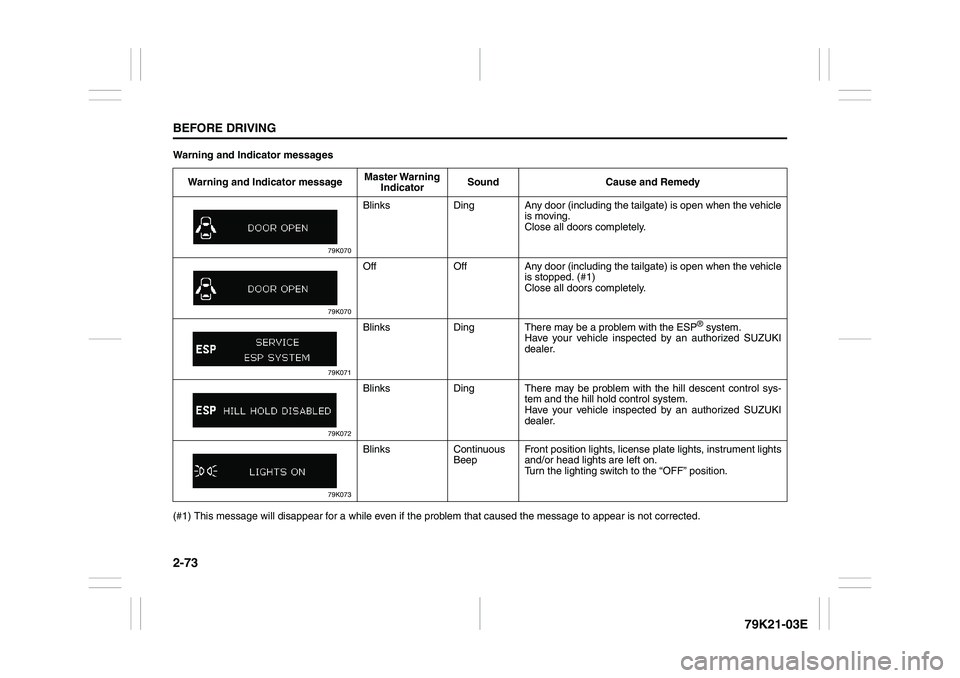
Warning and Indicator messages
(#1) This message will disappear for a while even if the problem that caused the message to appear is not corrected.Warning and Indicator messageMaster Warning
IndicatorSound Cause and Remedy
79K070
Blinks Ding Any door (including the tailgate) is open when the vehicle
is moving.
Close all doors completely.
79K070
Off Off Any door (including the tailgate) is open when the vehicle
is stopped. (#1)
Close all doors completely.
79K071
Blinks Ding There may be a problem with the ESP
® system.
Have your vehicle inspected by an authorized SUZUKI
dealer.
79K072
Blinks Ding There may be problem with the hill descent control sys-
tem and the hill hold control system.
Have your vehicle inspected by an authorized SUZUKI
dealer.
79K073
Blinks Continuous
BeepFront position lights, license plate lights, instrument lights
and/or head lights are left on.
Turn the lighting switch to the “OFF” position.
Page 96 of 337
2-79BEFORE DRIVING
79K21-03E
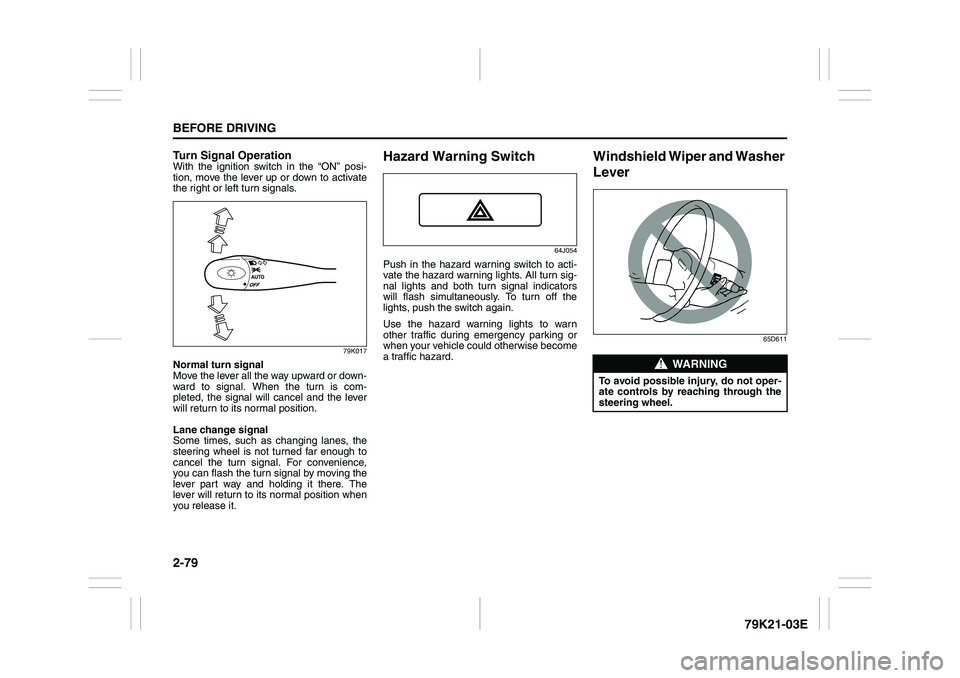
Turn Signal OperationWith the ignition switch in the “ON” posi-
tion, move the lever up or down to activate
the right or left turn signals.
79K017
Normal turn signal
Move the lever all the way upward or down-
ward to signal. When the turn is com-
pleted, the signal will cancel and the lever
will return to its normal position.
Lane change signal
Some times, such as changing lanes, the
steering wheel is not turned far enough to
cancel the turn signal. For convenience,
you can flash the turn signal by moving the
lever part way and holding it there. The
lever will return to its normal position when
you release it.
Hazard Warning Switch
64J054
Push in the hazard warning switch to acti-
vate the hazard warning lights. All turn sig-
nal lights and both turn signal indicators
will flash simultaneously. To turn off the
lights, push the switch again.
Use the hazard warning lights to warn
other traffic during emergency parking or
when your vehicle could otherwise become
a traffic hazard.
Windshield Wiper and Washer
Lever
65D611
WARNING
To avoid possible injury, do not oper-
ate controls by reaching through the
steering wheel.
Page 97 of 337
2-80
BEFORE DRIVING
79K21-03E
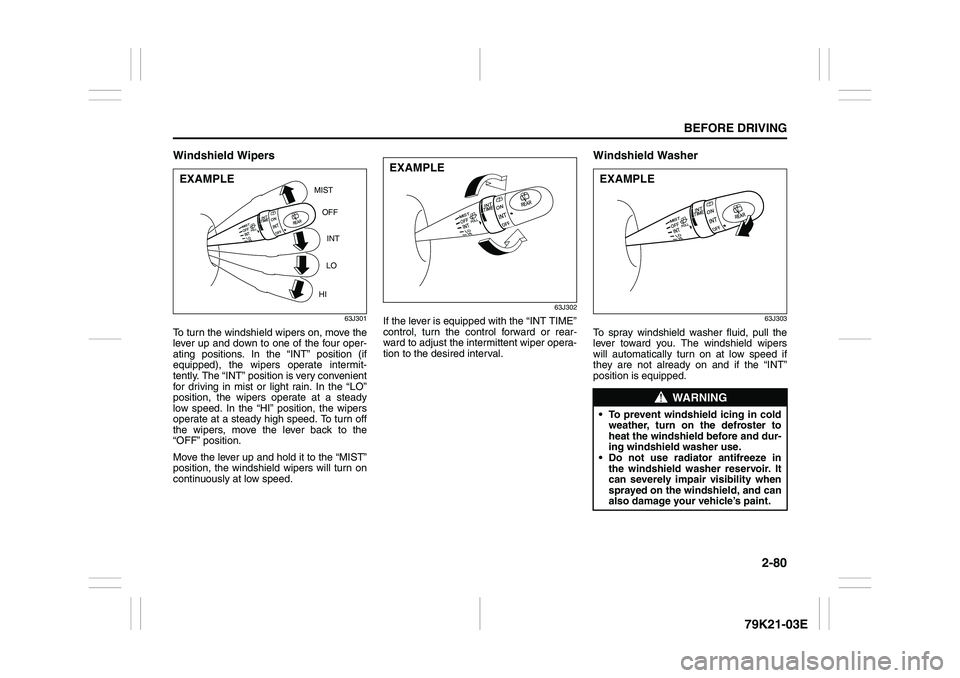
Windshield Wipers
63J301
To turn the windshield wipers on, move the
lever up and down to one of the four oper-
ating positions. In the “INT” position (if
equipped), the wipers operate intermit-
tently. The “INT” position is very convenient
for driving in mist or light rain. In the “LO”
position, the wipers operate at a steady
low speed. In the “HI” position, the wipers
operate at a steady high speed. To turn off
the wipers, move the lever back to the
“OFF” position.
Move the lever up and hold it to the “MIST”
position, the windshield wipers will turn on
continuously at low speed.
63J302
If the lever is equipped with the “INT TIME”
control, turn the control forward or rear-
ward to adjust the intermittent wiper opera-
tion to the desired interval.
Windshield Washer
63J303
To spray windshield washer fluid, pull the
lever toward you. The windshield wipers
will automatically turn on at low speed if
they are not already on and if the “INT”
position is equipped.
MIST
OFF
INT
LO
HI
EXAMPLE
EXAMPLE
WARNING
To prevent windshield icing in cold
weather, turn on the defroster to
heat the windshield before and dur-
ing windshield washer use.
Do not use radiator antifreeze in
the windshield washer reservoir. It
can severely impair visibility when
sprayed on the windshield, and can
also damage your vehicle’s paint.EXAMPLE
Page 98 of 337
2-81BEFORE DRIVING
79K21-03E
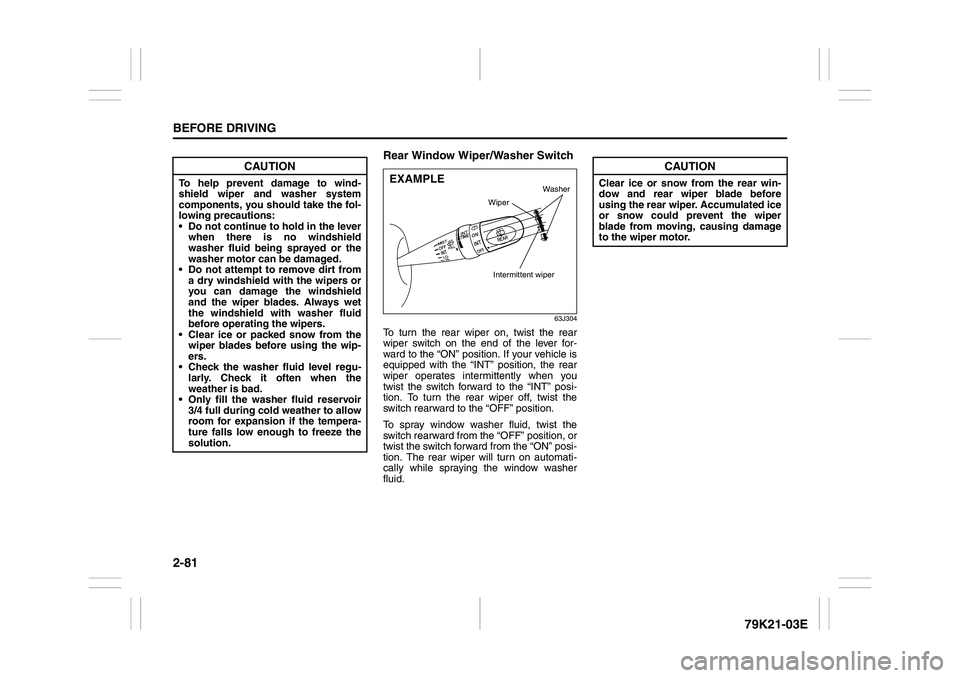
Rear Window Wiper/Washer Switch
63J304
To turn the rear wiper on, twist the rear
wiper switch on the end of the lever for-
ward to the “ON” position. If your vehicle is
equipped with the “INT” position, the rear
wiper operates intermittently when you
twist the switch forward to the “INT” posi-
tion. To turn the rear wiper off, twist the
switch rearward to the “OFF” position.
To spray window washer fluid, twist the
switch rearward from the “OFF” position, or
twist the switch forward from the “ON” posi-
tion. The rear wiper will turn on automati-
cally while spraying the window washer
fluid.
CAUTION
To help prevent damage to wind-
shield wiper and washer system
components, you should take the fol-
lowing precautions:
Do not continue to hold in the lever
when there is no windshield
washer fluid being sprayed or the
washer motor can be damaged.
Do not attempt to remove dirt from
a dry windshield with the wipers or
you can damage the windshield
and the wiper blades. Always wet
the windshield with washer fluid
before operating the wipers.
Clear ice or packed snow from the
wiper blades before using the wip-
ers.
Check the washer fluid level regu-
larly. Check it often when the
weather is bad.
Only fill the washer fluid reservoir
3/4 full during cold weather to allow
room for expansion if the tempera-
ture falls low enough to freeze the
solution.
EXAMPLE
Wiper
Intermittent wiper
Washer
CAUTION
Clear ice or snow from the rear win-
dow and rear wiper blade before
using the rear wiper. Accumulated ice
or snow could prevent the wiper
blade from moving, causing damage
to the wiper motor.
Page 108 of 337
3-7OPERATING YOUR VEHICLE
79K21-03E
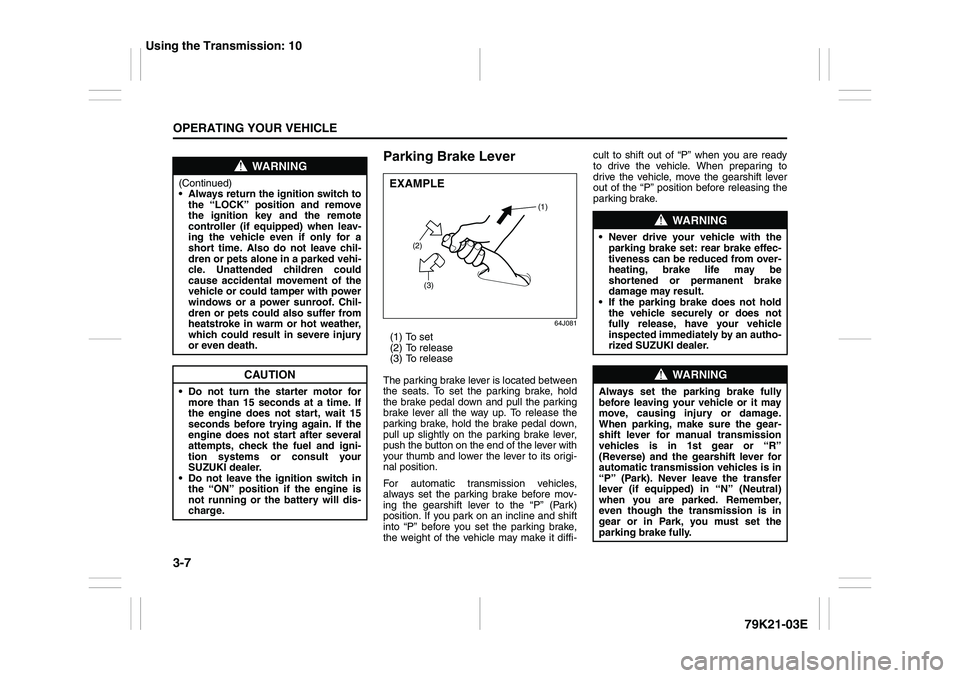
Parking Brake Lever
64J081
(1) To set
(2) To release
(3) To release
The parking brake lever is located between
the seats. To set the parking brake, hold
the brake pedal down and pull the parking
brake lever all the way up. To release the
parking brake, hold the brake pedal down,
pull up slightly on the parking brake lever,
push the button on the end of the lever with
your thumb and lower the lever to its origi-
nal position.
For automatic transmission vehicles,
always set the parking brake before mov-
ing the gearshift lever to the “P” (Park)
position. If you park on an incline and shift
into “P” before you set the parking brake,
the weight of the vehicle may make it diffi-cult to shift out of “P” when you are ready
to drive the vehicle. When preparing to
drive the vehicle, move the gearshift lever
out of the “P” position before releasing the
parking brake.
WARNING
(Continued)
Always return the ignition switch to
the “LOCK” position and remove
the ignition key and the remote
controller (if equipped) when leav-
ing the vehicle even if only for a
short time. Also do not leave chil-
dren or pets alone in a parked vehi-
cle. Unattended children could
cause accidental movement of the
vehicle or could tamper with power
windows or a power sunroof. Chil-
dren or pets could also suffer from
heatstroke in warm or hot weather,
which could result in severe injury
or even death.
CAUTION
Do not turn the starter motor for
more than 15 seconds at a time. If
the engine does not start, wait 15
seconds before trying again. If the
engine does not start after several
attempts, check the fuel and igni-
tion systems or consult your
SUZUKI dealer.
Do not leave the ignition switch in
the “ON” position if the engine is
not running or the battery will dis-
charge.
EXAMPLE
(2)
(3)(1)
WARNING
Never drive your vehicle with the
parking brake set: rear brake effec-
tiveness can be reduced from over-
heating, brake life may be
shortened or permanent brake
damage may result.
If the parking brake does not hold
the vehicle securely or does not
fully release, have your vehicle
inspected immediately by an autho-
rized SUZUKI dealer.
WARNING
Always set the parking brake fully
before leaving your vehicle or it may
move, causing injury or damage.
When parking, make sure the gear-
shift lever for manual transmission
vehicles is in 1st gear or “R”
(Reverse) and the gearshift lever for
automatic transmission vehicles is in
“P” (Park). Never leave the transfer
lever (if equipped) in “N” (Neutral)
when you are parked. Remember,
even though the transmission is in
gear or in Park, you must set the
parking brake fully.
Using the Transmission: 10
Page 110 of 337
3-9OPERATING YOUR VEHICLE
79K21-03E
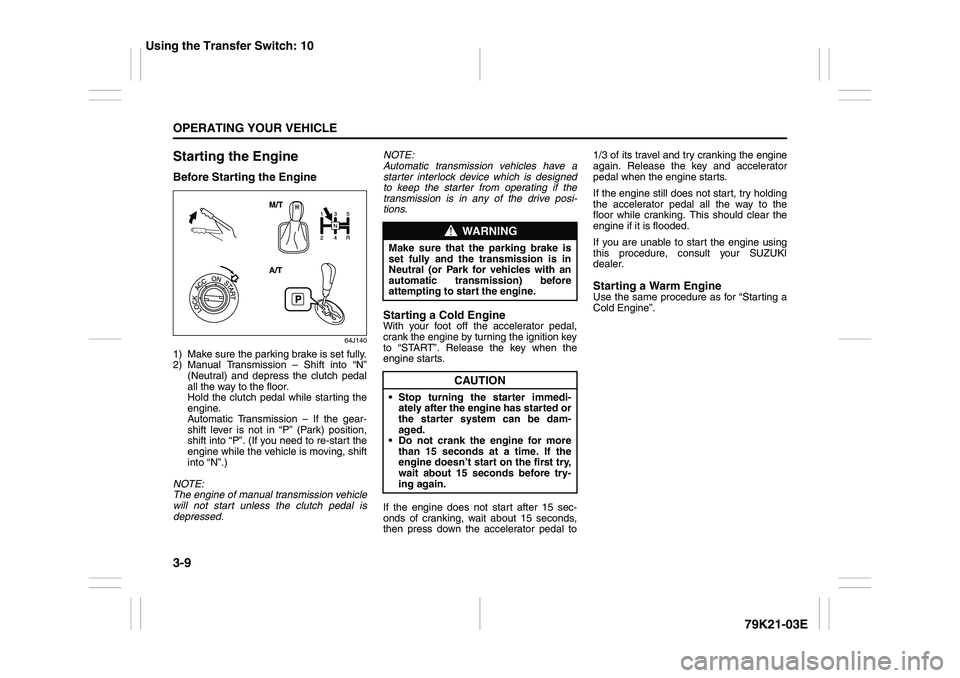
Starting the EngineBefore Starting the Engine
64J140
1) Make sure the parking brake is set fully.
2) Manual Transmission – Shift into “N”
(Neutral) and depress the clutch pedal
all the way to the floor.
Hold the clutch pedal while starting the
engine.
Automatic Transmission – If the gear-
shift lever is not in “P” (Park) position,
shift into “P”. (If you need to re-start the
engine while the vehicle is moving, shift
into “N”.)
NOTE:
The engine of manual transmission vehicle
will not start unless the clutch pedal is
depressed.NOTE:
Automatic transmission vehicles have a
starter interlock device which is designed
to keep the starter from operating if the
transmission is in any of the drive posi-
tions.
Starting a Cold EngineWith your foot off the accelerator pedal,
crank the engine by turning the ignition key
to “START”. Release the key when the
engine starts.
If the engine does not start after 15 sec-
onds of cranking, wait about 15 seconds,
then press down the accelerator pedal to1/3 of its travel and try cranking the engine
again. Release the key and accelerator
pedal when the engine starts.
If the engine still does not start, try holding
the accelerator pedal all the way to the
floor while cranking. This should clear the
engine if it is flooded.
If you are unable to start the engine using
this procedure, consult your SUZUKI
dealer.
Starting a Warm EngineUse the same procedure as for “Starting a
Cold Engine”.
WARNING
Make sure that the parking brake is
set fully and the transmission is in
Neutral (or Park for vehicles with an
automatic transmission) before
attempting to start the engine.
CAUTION
Stop turning the starter immedi-
ately after the engine has started or
the starter system can be dam-
aged.
Do not crank the engine for more
than 15 seconds at a time. If the
engine doesn’t start on the first try,
wait about 15 seconds before try-
ing again.
Using the Transfer Switch: 10
Page 113 of 337
3-12
OPERATING YOUR VEHICLE
79K21-03E
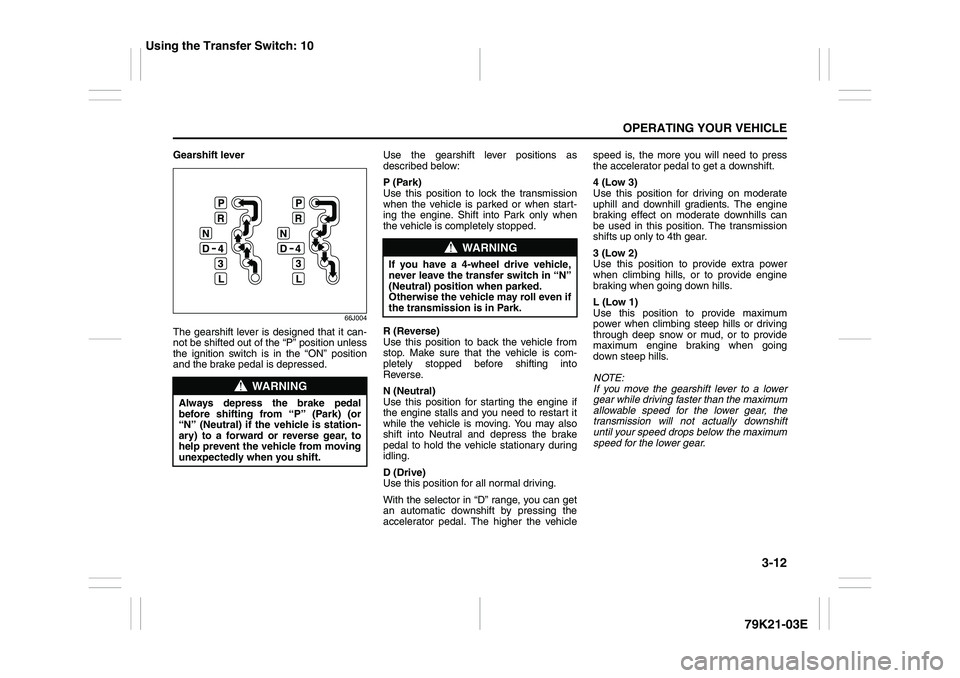
Gearshift lever
66J004
The gearshift lever is designed that it can-
not be shifted out of the “P” position unless
the ignition switch is in the “ON” position
and the brake pedal is depressed.Use the gearshift lever positions as
described below:
P (Park)
Use this position to lock the transmission
when the vehicle is parked or when start-
ing the engine. Shift into Park only when
the vehicle is completely stopped.
R (Reverse)
Use this position to back the vehicle from
stop. Make sure that the vehicle is com-
pletely stopped before shifting into
Reverse.
N (Neutral)
Use this position for starting the engine if
the engine stalls and you need to restart it
while the vehicle is moving. You may also
shift into Neutral and depress the brake
pedal to hold the vehicle stationary during
idling.
D (Drive)
Use this position for all normal driving.
With the selector in “D” range, you can get
an automatic downshift by pressing the
accelerator pedal. The higher the vehiclespeed is, the more you will need to press
the accelerator pedal to get a downshift.
4 (Low 3)
Use this position for driving on moderate
uphill and downhill gradients. The engine
braking effect on moderate downhills can
be used in this position. The transmission
shifts up only to 4th gear.
3 (Low 2)
Use this position to provide extra power
when climbing hills, or to provide engine
braking when going down hills.
L (Low 1)
Use this position to provide maximum
power when climbing steep hills or driving
through deep snow or mud, or to provide
maximum engine braking when going
down steep hills.
NOTE:
If you move the gearshift lever to a lower
gear while driving faster than the maximum
allowable speed for the lower gear, the
transmission will not actually downshift
until your speed drops below the maximum
speed for the lower gear.
WARNING
Always depress the brake pedal
before shifting from “P” (Park) (or
“N” (Neutral) if the vehicle is station-
ary) to a forward or reverse gear, to
help prevent the vehicle from moving
unexpectedly when you shift.
WARNING
If you have a 4-wheel drive vehicle,
never leave the transfer switch in “N”
(Neutral) position when parked.
Otherwise the vehicle may roll even if
the transmission is in Park.
Using the Transfer Switch: 10
Page 114 of 337
3-13OPERATING YOUR VEHICLE
79K21-03E
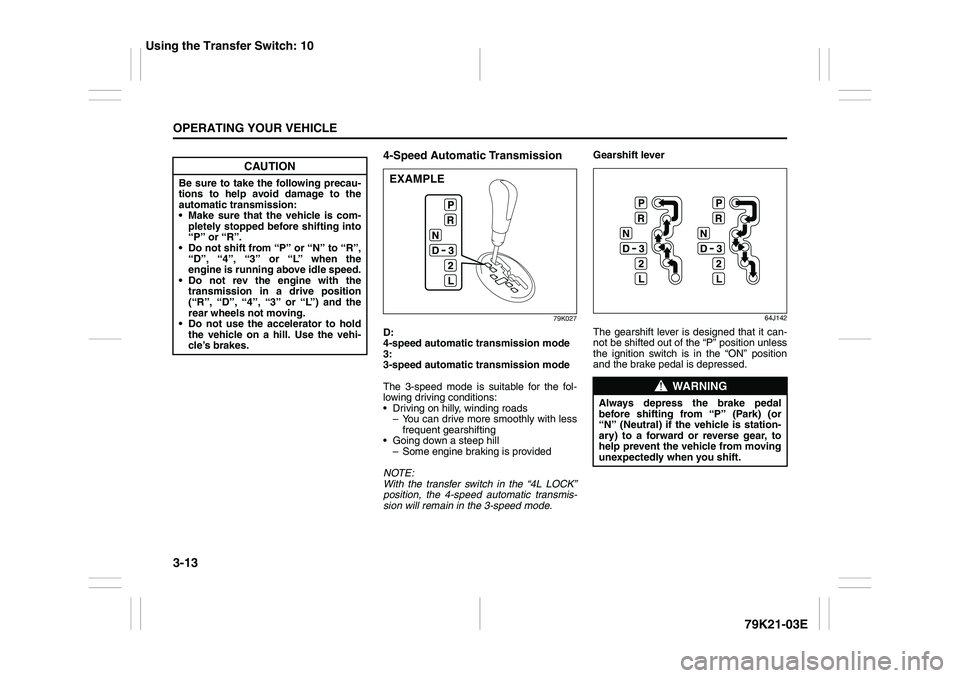
4-Speed Automatic Transmission
79K027
D:
4-speed automatic transmission mode
3:
3-speed automatic transmission mode
The 3-speed mode is suitable for the fol-
lowing driving conditions:
Driving on hilly, winding roads
– You can drive more smoothly with less
frequent gearshifting
Going down a steep hill
– Some engine braking is provided
NOTE:
With the transfer switch in the “4L LOCK”
position, the 4-speed automatic transmis-
sion will remain in the 3-speed mode.Gearshift lever
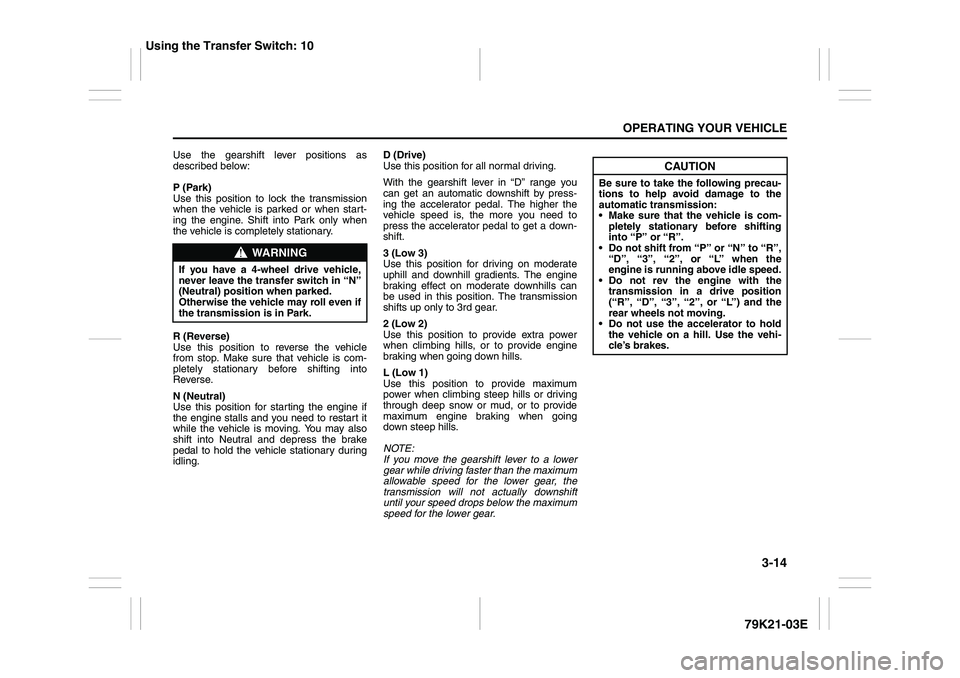
64J142
The gearshift lever is designed that it can-
not be shifted out of the “P” position unless
the ignition switch is in the “ON” position
and the brake pedal is depressed.
CAUTION
Be sure to take the following precau-
tions to help avoid damage to the
automatic transmission:
Make sure that the vehicle is com-
pletely stopped before shifting into
“P” or “R”.
Do not shift from “P” or “N” to “R”,
“D”, “4”, “3” or “L” when the
engine is running above idle speed.
Do not rev the engine with the
transmission in a drive position
(“R”, “D”, “4”, “3” or “L”) and the
rear wheels not moving.
Do not use the accelerator to hold
the vehicle on a hill. Use the vehi-
cle’s brakes.
EXAMPLE
WARNING
Always depress the brake pedal
before shifting from “P” (Park) (or
“N” (Neutral) if the vehicle is station-
ary) to a forward or reverse gear, to
help prevent the vehicle from moving
unexpectedly when you shift.
Using the Transfer Switch: 10
Page 115 of 337
3-14
OPERATING YOUR VEHICLE
79K21-03E
Use the gearshift lever positions as
described below:
P (Park)
Use this position to lock the transmission
when the vehicle is parked or when start-
ing the engine. Shift into Park only when
the vehicle is completely stationary.
R (Reverse)
Use this position to reverse the vehicle
from stop. Make sure that vehicle is com-
pletely stationary before shifting into
Reverse.
N (Neutral)
Use this position for starting the engine if
the engine stalls and you need to restart it
while the vehicle is moving. You may also
shift into Neutral and depress the brake
pedal to hold the vehicle stationary during
idling.D (Drive)
Use this position for all normal driving.
With the gearshift lever in “D” range you
can get an automatic downshift by press-
ing the accelerator pedal. The higher the
vehicle speed is, the more you need to
press the accelerator pedal to get a down-
shift.
3 (Low 3)
Use this position for driving on moderate
uphill and downhill gradients. The engine
braking effect on moderate downhills can
be used in this position. The transmission
shifts up only to 3rd gear.
2 (Low 2)
Use this position to provide extra power
when climbing hills, or to provide engine
braking when going down hills.
L (Low 1)
Use this position to provide maximum
power when climbing steep hills or driving
through deep snow or mud, or to provide
maximum engine braking when going
down steep hills.
NOTE:
If you move the gearshift lever to a lower
gear while driving faster than the maximum
allowable speed for the lower gear, the
transmission will not actually downshift
until your speed drops below the maximum
speed for the lower gear.
WARNING
If you have a 4-wheel drive vehicle,
never leave the transfer switch in “N”
(Neutral) position when parked.
Otherwise the vehicle may roll even if
the transmission is in Park.
CAUTION
Be sure to take the following precau-
tions to help avoid damage to the
automatic transmission:
Make sure that the vehicle is com-
pletely stationary before shifting
into “P” or “R”.
Do not shift from “P” or “N” to “R”,
“D”, “3”, “2”, or “L” when the
engine is running above idle speed.
Do not rev the engine with the
transmission in a drive position
(“R”, “D”, “3”, “2”, or “L”) and the
rear wheels not moving.
Do not use the accelerator to hold
the vehicle on a hill. Use the vehi-
cle’s brakes.
Using the Transfer Switch: 10