lighting SUZUKI GRAND VITARA 2012 User Guide
[x] Cancel search | Manufacturer: SUZUKI, Model Year: 2012, Model line: GRAND VITARA, Model: SUZUKI GRAND VITARA 2012Pages: 337, PDF Size: 6.21 MB
Page 233 of 337
5-80
OTHER CONTROLS AND EQUIPMENT
79K21-03E
HomeLink
® (if equipped)
66J092
HomeLink
® and the HomeLink
® house are
registered trademarks of Johnson
Controls, Inc.
The HomeLink
® Wireless Control System
provides a convenient way to replace up to
three hand-held radio-frequency (RF)
transmitters used to activate devices such
as gate operators, garage door openers,
entry door locks, security systems, even
home lighting. Additional HomeLink
® infor-
mation can be found on the Internet at
www.homelink.com
or by calling 1-800-
355-3515.
Before programming HomeLink
® to a
garage door opener or gate operator, make
sure that people and objects are out of the
way of the device to prevent potential harm
or damage. When programming a garage
door opener, it is advised to park outside of
the garage. Do not use HomeLink® with
any garage door opener that lacks safety
stop and reverse features as required by
U.S. federal safety standards (this includesany garage door opener model manufac-
tured before April 1, 1982). A garage door
that cannot detect an object – signaling the
door to stop and reverse – does not meet
current U.S. federal safety standards. For
more information, contact HomeLink
® at
www.homelink.com
or by calling 1-800-
355-3515.
Retain the original transmitter of the RF
device you are programming for use in
other vehicles as well as for future
HomeLink
® programming. It is also sug-
gested that upon the sale of the vehicle,
the programmed HomeLink
® buttons be
erased for security purposes. Refer to
“Programming HomeLink
®” (step 1) only)
or, for assistance, contact HomeLink
® at
www.homelink.com
or by calling 1-800-
355-3515.
Programming HomeLink
®
NOTE:
Some vehicles may require the ignition
switch to be turned to the second (or
“accessories”) position or the “on” position
for programming and/or operation of
HomeLink
®. It is also recommended that a
new battery be placed in the hand-held
transmitter of the device being pro-
grammed to HomeLink
® for quicker train-
ing and accurate transmission of the radio-
frequency signal. Do not repeat “Program-
ming HomeLink
®” – step 1) to train addi-
tional devices to a second or thirdHomeLink
® button. Begin with “Program-
ming HomeLink
®” – step 2).
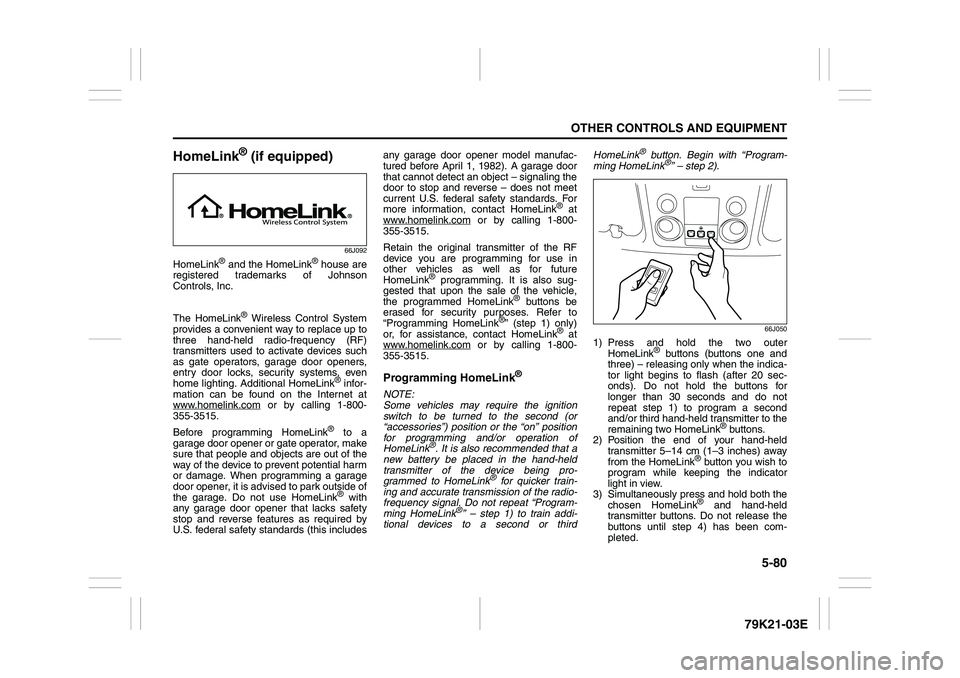
66J050
1) Press and hold the two outer
HomeLink
® buttons (buttons one and
three) – releasing only when the indica-
tor light begins to flash (after 20 sec-
onds). Do not hold the buttons for
longer than 30 seconds and do not
repeat step 1) to program a second
and/or third hand-held transmitter to the
remaining two HomeLink
® buttons.
2) Position the end of your hand-held
transmitter 5–14 cm (1–3 inches) away
from the HomeLink
® button you wish to
program while keeping the indicator
light in view.
3) Simultaneously press and hold both the
chosen HomeLink® and hand-held
transmitter buttons. Do not release the
buttons until step 4) has been com-
pleted.
Page 235 of 337
5-82
OTHER CONTROLS AND EQUIPMENT
79K21-03E
Gate Operator / Canadian Program-
mingCanadian radio-frequency laws require
transmitter signals to “time-out” (or quit)
after several seconds of transmission –
which may not be long enough for
HomeLink
® to pick up the signal during
programming. Similar to this Canadian law,
some U.S. gate operators are designed to
“time-out” in the same manner.
If you live in Canada or you are having diffi-
culties programming a gate operator by
using the Programming procedures
(regardless of where you live), replace
“Programming HomeLink
®” step 3) with
the following:
NOTE:
If programming a garage door opener or
gate operator, it is advised to unplug the
device during the “cycling” process to pre-
vent possible overheating.
3) Continue to press and hold the
HomeLink
® button while you press and
release – every two seconds (“cycle”)
your hand-held transmitter until the fre-
quency signal has successfully been
accepted by HomeLink
®. (The indicator
light will flash slowly and then rapidly.)
Proceed with “Programming HomeLink
®”
step 4) to complete.
Using HomeLink
®
To operate, simply press and release the
programmed HomeLink
® button. Activation
will now occur for the trained device (i.e.
garage door opener, gate operator, secu-
rity system, entry door lock, home/office
lighting, etc.). For convenience, the hand-
held transmitter of the device may also be
used at any time. In the event that there
are still programming difficulties or ques-
tions, contact HomeLink
® at
www.homelink.com
or 1-800-355-3515.
Erasing HomeLink
® Buttons
To erase programming from the three but-
tons (individual buttons cannot be erased
but can be “reprogrammed” as outlined
below), follow the step noted:
Press and hold the two outer HomeLink
®
buttons until the indicator light begins to
flash-after 20 seconds. Release both but-
tons. Do not hold for longer that 30 sec-
onds. HomeLink
® is now in the train (or
learning) mode and can be programmed at
any time beginning with “Programming
HomeLink
®” – step 2).
Reprogramming a Single
HomeLink
® Button
To program a device to HomeLink
® using a
HomeLink
® button previously trained, fol-
low these steps:
1) Press and hold the desired HomeLink
®
button. DO NOT release the button.
2) The indicator light will begin to flash
after 20 seconds. Without releasing the
HomeLink
® button, proceed with “Pro-
gramming HomeLink
®” – step 2).
For questions or comments, contact
HomeLink
® at www.homelink.com
or 1-
800-355-3515.
Page 245 of 337
6-8
VEHICLE LOADING AND TOWING
79K21-03E
Before towing
64J147
Vehicles equipped with a transfer switch
may be towed from the front with all four
wheels on the ground. Be sure to use
proper towing equipment designed for rec-
reational towing and make sure that towing
speed does not exceed 90 km/h (55 mph).To tow a vehicle equipped with a trans-
fer switch with all four wheels on the
ground:
1) Turn the ignition key to the “ON” posi-
tion.
2) Place the transmission in “N” (Neutral)
and depress the brake pedal and the
clutch pedal fully (if equipped).
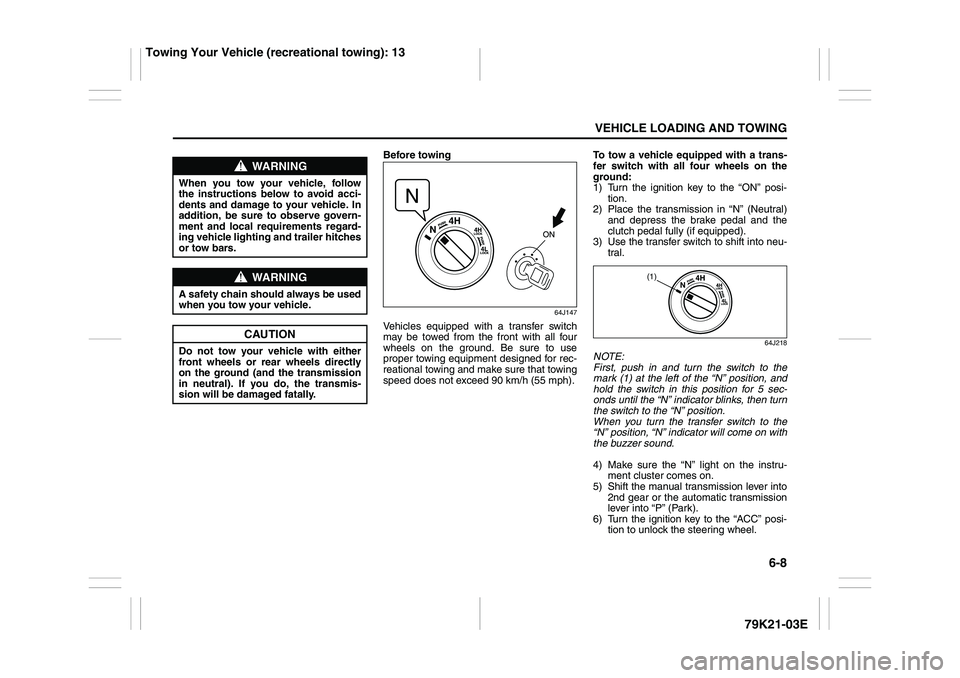
3) Use the transfer switch to shift into neu-
tral.
64J218
NOTE:
First, push in and turn the switch to the
mark (1) at the left of the “N” position, and
hold the switch in this position for 5 sec-
onds until the “N” indicator blinks, then turn
the switch to the “N” position.
When you turn the transfer switch to the
“N” position, “N” indicator will come on with
the buzzer sound.
4) Make sure the “N” light on the instru-
ment cluster comes on.
5) Shift the manual transmission lever into
2nd gear or the automatic transmission
lever into “P” (Park).
6) Turn the ignition key to the “ACC” posi-
tion to unlock the steering wheel.
WARNING
When you tow your vehicle, follow
the instructions below to avoid acci-
dents and damage to your vehicle. In
addition, be sure to observe govern-
ment and local requirements regard-
ing vehicle lighting and trailer hitches
or tow bars.
WARNING
A safety chain should always be used
when you tow your vehicle.
CAUTION
Do not tow your vehicle with either
front wheels or rear wheels directly
on the ground (and the transmission
in neutral). If you do, the transmis-
sion will be damaged fatally.
(1)
Towing Your Vehicle (recreational towing): 13
Page 333 of 337
13-3
INDEX79K21-03E
If the Engine Overheats
......................................................8-9
If the Starter Does Not Operate
..........................................8-8
If You Cannot Shift Automatic Transmission Gearshift
Lever Out of “P” (PARK)
.....................................................3-15
If Your Vehicle Gets Stuck ..................................................4-6
Ignition Key Reminder
........................................................2-1
Ignition Switch
.....................................................................3-3
Illumination Indicator Light
................................................2-64
Important Vehicle Design Features To Know
...................4-1
Improving Fuel Economy
....................................................4-3
Information Display
.............................................................2-67
Inside Rearview Mirror ........................................................2-17
Installation with Lap-Shoulder Seat Belts
(Child Restraint with No Top Strap)
...................................2-35
Installation with the LATCH System ..................................2-38
Installation-Child Restraint with Top Strap
.......................2-40
Instrument Cluster
...............................................................2-54
Interior Light Switch ............................................................5-64
JJacking Instructions
............................................................8-2
Jump Starting Instructions
.................................................8-7
KKeyless Entry System Transmitter (Type B)
.....................2-11
Keyless Start System Indicator Light
................................2-63
Keyless Start System Remote Controller (Type A)
..........2-5
Keyless Start System Remote Controller/
Keyless Entry System Transmitter
....................................2-4
Keys
......................................................................................2-1
LLap-Shoulder Belt
................................................................2-28
Lighting Control Lever
........................................................2-75Lighting Operation
.............................................................. 2-76
Lights “On” reminder ......................................................... 2-78
Listening to a CD
.......................................................5-15
, 5-42
Listening to a CD from an External CD Changer
(Option)
.......................................................................5-28
, 5-54
Listening to a XM Satellite Radio (Option)
..............5-25
, 5-51
Listening to Audio for AUX (Option)
.............. 5-27
, 5-49
, 5-53
Listening to the Radio
...............................................5-13
, 5-40
Low Fuel Warning Light
..................................................... 2-62
Low Tire Pressure Warning Light
.............................2-55
, 3-38
Luggage Compartment Cover
........................................... 5-74
Luggage Compartment Light ............................................. 5-65
Luggage Restraint Loops
................................................... 5-78
MMaintenance Recommended under Severe Driving
Conditions
........................................................................... 7-7
Maintenance Schedule
....................................................... 7-2
Malfunction Indicator Light
................................................ 2-61
Manual Transmission
......................................................... 3-11
Master Warning Indicator Light
......................................... 2-64
Mirrors
.................................................................................. 2-17
NNational Highway Traffic Safety Administration
(NHTSA)
............................................................................... 10-4
OOdometer
............................................................................. 2-70
Off-Road Driving
................................................................. 4-6
Oil Level Check ................................................................... 7-10
Oil Pressure Light ............................................................... 2-60
On-Board Vehicle Computers and Event Data
Recorders
............................................................................ 10-3