cd changer SUZUKI GRAND VITARA 2012 Owner's Manual
[x] Cancel search | Manufacturer: SUZUKI, Model Year: 2012, Model line: GRAND VITARA, Model: SUZUKI GRAND VITARA 2012Pages: 337, PDF Size: 6.21 MB
Page 206 of 337
5-53OTHER CONTROLS AND EQUIPMENT
79K21-03E
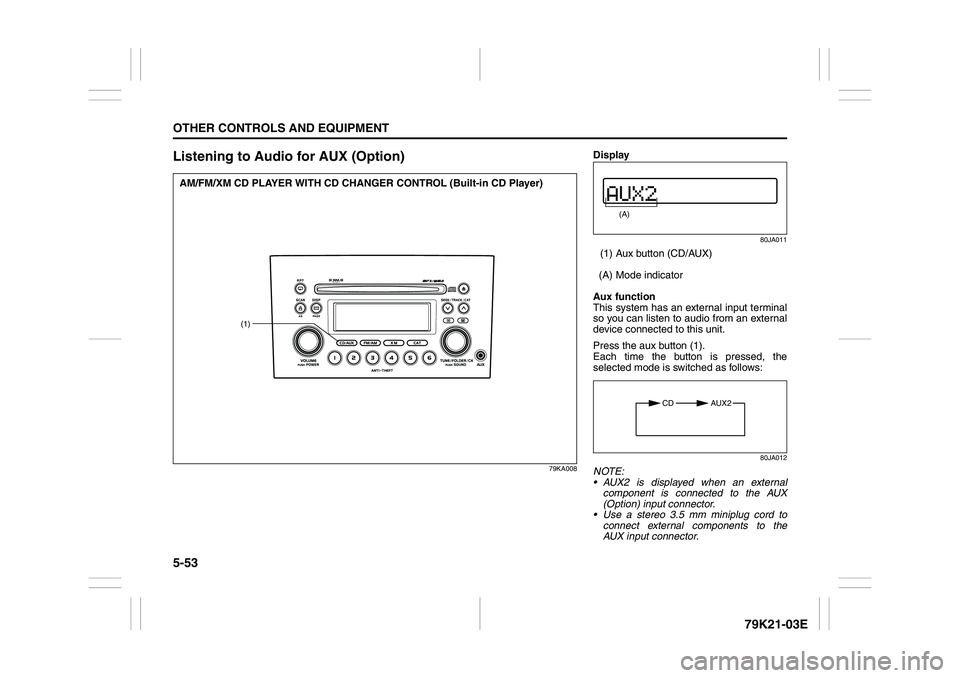
Listening to Audio for AUX (Option)
79KA008
(1)
AM/FM/XM CD PLAYER WITH CD CHANGER CONTROL (Built-in CD Player)
Display
80JA011
(1) Aux button (CD/AUX)
(A) Mode indicator
Aux function
This system has an external input terminal
so you can listen to audio from an external
device connected to this unit.
Press the aux button (1).
Each time the button is pressed, the
selected mode is switched as follows:
80JA012
NOTE:
AUX2 is displayed when an external
component is connected to the AUX
(Option) input connector.
Use a stereo 3.5 mm miniplug cord to
connect external components to the
AUX input connector.
(A)
CD AUX2
Page 207 of 337
5-54
OTHER CONTROLS AND EQUIPMENT
79K21-03E
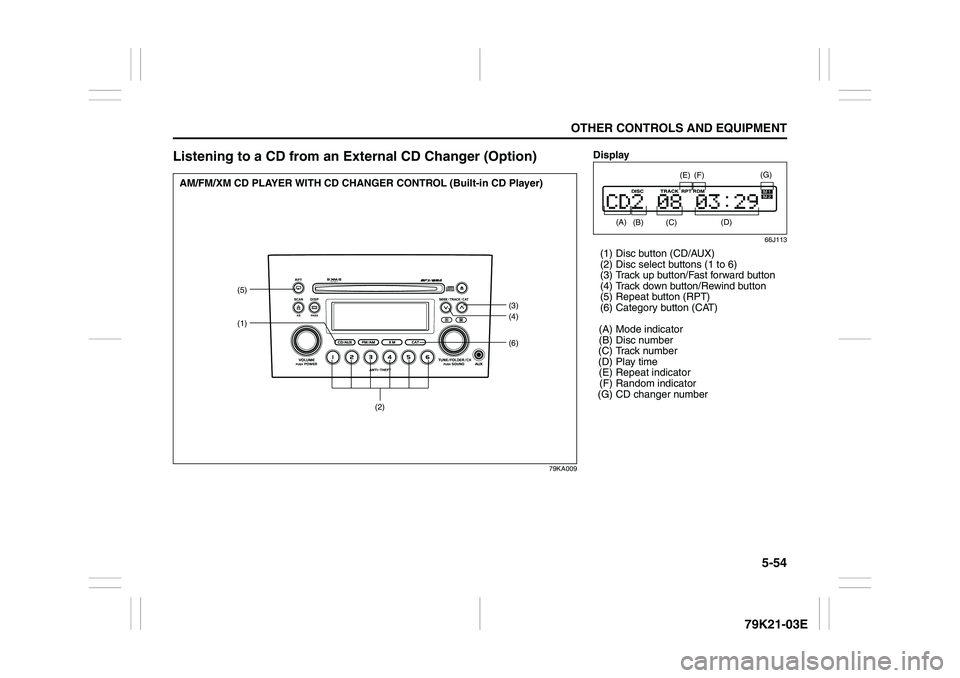
Listening to a CD from an External CD Changer (Option)
79KA009
(6)
(5)
(1)
(3)
(4)
(2)
AM/FM/XM CD PLAYER WITH CD CHANGER CONTROL (Built-in CD Player)
Display
66J113
(1) Disc button (CD/AUX)
(2) Disc select buttons (1 to 6)
(3) Track up button/Fast forward button
(4) Track down button/Rewind button
(5) Repeat button (RPT)
(6) Category button (CAT)
(A) Mode indicator
(B) Disc number
(C) Track number
(D) Play time
(E) Repeat indicator
(F) Random indicator
(G) CD changer number
(A)
(B)
(E)
(D)
(F)
(C)
(G)
Page 208 of 337
5-55OTHER CONTROLS AND EQUIPMENT
79K21-03E
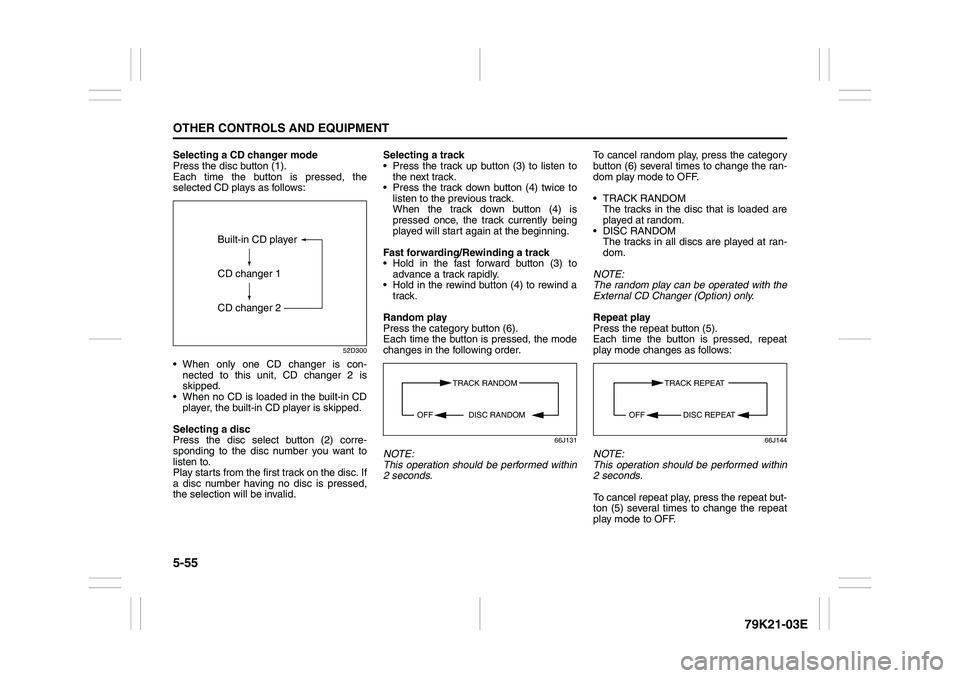
Selecting a CD changer mode
Press the disc button (1).
Each time the button is pressed, the
selected CD plays as follows:
52D300
When only one CD changer is con-
nected to this unit, CD changer 2 is
skipped.
When no CD is loaded in the built-in CD
player, the built-in CD player is skipped.
Selecting a disc
Press the disc select button (2) corre-
sponding to the disc number you want to
listen to.
Play starts from the first track on the disc. If
a disc number having no disc is pressed,
the selection will be invalid.Selecting a track
Press the track up button (3) to listen to
the next track.
Press the track down button (4) twice to
listen to the previous track.
When the track down button (4) is
pressed once, the track currently being
played will start again at the beginning.
Fast forwarding/Rewinding a track
Hold in the fast forward button (3) to
advance a track rapidly.
Hold in the rewind button (4) to rewind a
track.
Random play
Press the category button (6).
Each time the button is pressed, the mode
changes in the following order.
66J131
NOTE:
This operation should be performed within
2 seconds.To cancel random play, press the category
button (6) several times to change the ran-
dom play mode to OFF.
TRACK RANDOM
The tracks in the disc that is loaded are
played at random.
DISC RANDOM
The tracks in all discs are played at ran-
dom.
NOTE:
The random play can be operated with the
External CD Changer (Option) only.
Repeat play
Press the repeat button (5).
Each time the button is pressed, repeat
play mode changes as follows:
66J144
NOTE:
This operation should be performed within
2 seconds.
To cancel repeat play, press the repeat but-
ton (5) several times to change the repeat
play mode to OFF.
Built-in CD player
CD changer 1
CD changer 2
TRACK RANDOM
DISC RANDOM OFF
TRACK REPEAT
DISC REPEAT OFF
Page 209 of 337
5-56
OTHER CONTROLS AND EQUIPMENT
79K21-03E
TRACK REPEAT
The indication “TRACK RPT” appears in
the display for 2 seconds and then the
repeat indicator (E) lights.
The track being currently played is
played repeatedly.
DISC REPEAT
The indication “DISC RPT” appears in
the display for 2 seconds and then the
repeat indicator (E) lights.
When all the tracks on a disc being cur-
rently played finish playing, play starts
again at the beginning of the disc.
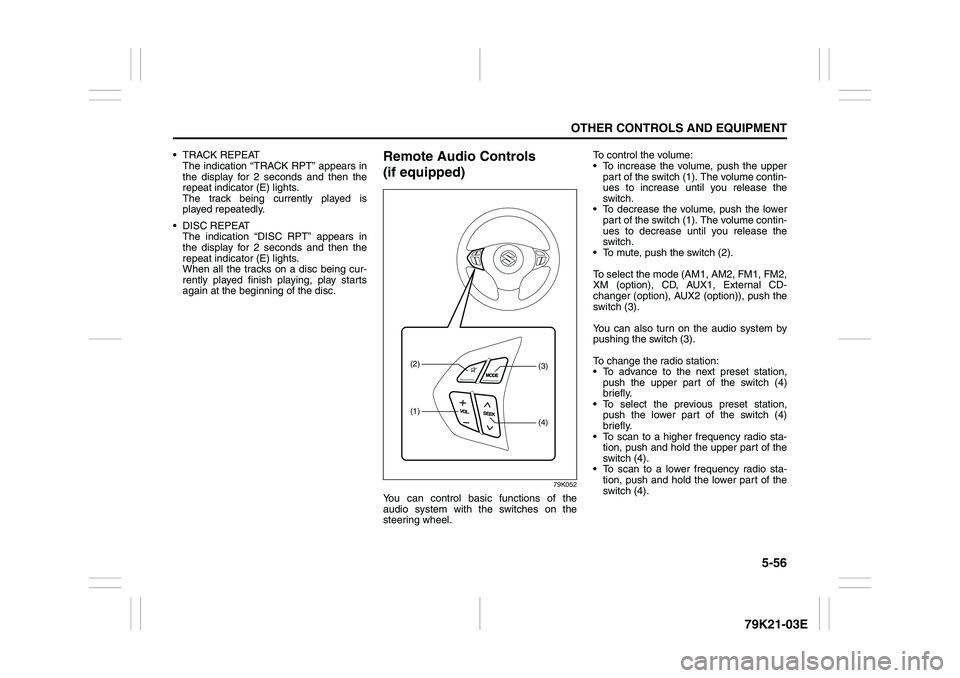
Remote Audio Controls
(if equipped)
79K052
You can control basic functions of the
audio system with the switches on the
steering wheel.To control the volume:
To increase the volume, push the upper
part of the switch (1). The volume contin-
ues to increase until you release the
switch.
To decrease the volume, push the lower
part of the switch (1). The volume contin-
ues to decrease until you release the
switch.
To mute, push the switch (2).
To select the mode (AM1, AM2, FM1, FM2,
XM (option), CD, AUX1, External CD-
changer (option), AUX2 (option)), push the
switch (3).
You can also turn on the audio system by
pushing the switch (3).
To change the radio station:
To advance to the next preset station,
push the upper part of the switch (4)
briefly.
To select the previous preset station,
push the lower part of the switch (4)
briefly.
To scan to a higher frequency radio sta-
tion, push and hold the upper part of the
switch (4).
To scan to a lower frequency radio sta-
tion, push and hold the lower part of the
switch (4).
(1)(2)
(4)(3)
Page 210 of 337
5-57OTHER CONTROLS AND EQUIPMENT
79K21-03E
To change the selection on a CD:
To advance to the next track on a CD,
push the upper part of the switch (4)
briefly.
To select the previous track on a CD,
push the lower part of the switch (4).
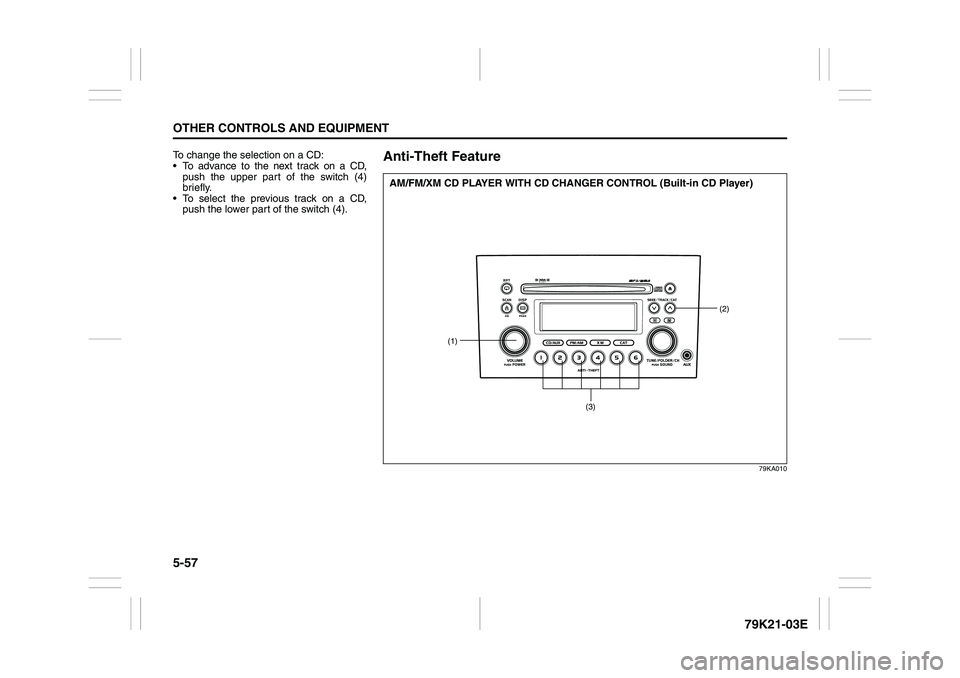
Anti-Theft Feature
79KA010
(1)
(2)
(3)
AM/FM/XM CD PLAYER WITH CD CHANGER CONTROL (Built-in CD Player)
Page 214 of 337
5-61OTHER CONTROLS AND EQUIPMENT
79K21-03E
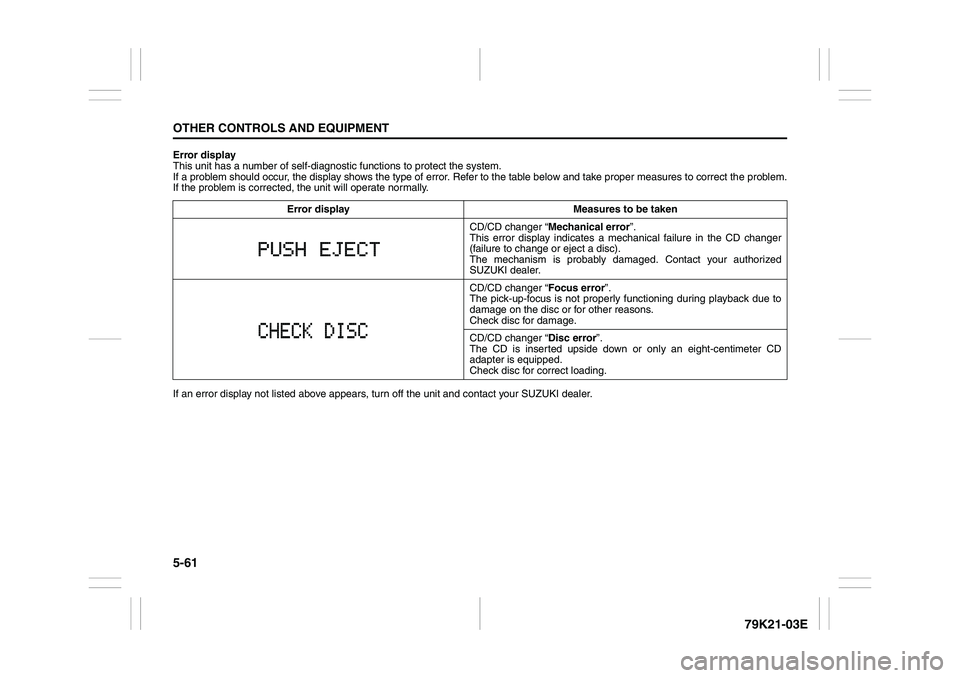
Error display
This unit has a number of self-diagnostic functions to protect the system.
If a problem should occur, the display shows the type of error. Refer to the table below and take proper measures to correct the problem.
If the problem is corrected, the unit will operate normally.
If an error display not listed above appears, turn off the unit and contact your SUZUKI dealer. Error display Measures to be taken
CD/CD changer “Mechanical error”.
This error display indicates a mechanical failure in the CD changer
(failure to change or eject a disc).
The mechanism is probably damaged. Contact your authorized
SUZUKI dealer.
CD/CD changer “Focus error”.
The pick-up-focus is not properly functioning during playback due to
damage on the disc or for other reasons.
Check disc for damage.
CD/CD changer “Disc error”.
The CD is inserted upside down or only an eight-centimeter CD
adapter is equipped.
Check disc for correct loading.
Page 333 of 337
13-3
INDEX79K21-03E
If the Engine Overheats
......................................................8-9
If the Starter Does Not Operate
..........................................8-8
If You Cannot Shift Automatic Transmission Gearshift
Lever Out of “P” (PARK)
.....................................................3-15
If Your Vehicle Gets Stuck ..................................................4-6
Ignition Key Reminder
........................................................2-1
Ignition Switch
.....................................................................3-3
Illumination Indicator Light
................................................2-64
Important Vehicle Design Features To Know
...................4-1
Improving Fuel Economy
....................................................4-3
Information Display
.............................................................2-67
Inside Rearview Mirror ........................................................2-17
Installation with Lap-Shoulder Seat Belts
(Child Restraint with No Top Strap)
...................................2-35
Installation with the LATCH System ..................................2-38
Installation-Child Restraint with Top Strap
.......................2-40
Instrument Cluster
...............................................................2-54
Interior Light Switch ............................................................5-64
JJacking Instructions
............................................................8-2
Jump Starting Instructions
.................................................8-7
KKeyless Entry System Transmitter (Type B)
.....................2-11
Keyless Start System Indicator Light
................................2-63
Keyless Start System Remote Controller (Type A)
..........2-5
Keyless Start System Remote Controller/
Keyless Entry System Transmitter
....................................2-4
Keys
......................................................................................2-1
LLap-Shoulder Belt
................................................................2-28
Lighting Control Lever
........................................................2-75Lighting Operation
.............................................................. 2-76
Lights “On” reminder ......................................................... 2-78
Listening to a CD
.......................................................5-15
, 5-42
Listening to a CD from an External CD Changer
(Option)
.......................................................................5-28
, 5-54
Listening to a XM Satellite Radio (Option)
..............5-25
, 5-51
Listening to Audio for AUX (Option)
.............. 5-27
, 5-49
, 5-53
Listening to the Radio
...............................................5-13
, 5-40
Low Fuel Warning Light
..................................................... 2-62
Low Tire Pressure Warning Light
.............................2-55
, 3-38
Luggage Compartment Cover
........................................... 5-74
Luggage Compartment Light ............................................. 5-65
Luggage Restraint Loops
................................................... 5-78
MMaintenance Recommended under Severe Driving
Conditions
........................................................................... 7-7
Maintenance Schedule
....................................................... 7-2
Malfunction Indicator Light
................................................ 2-61
Manual Transmission
......................................................... 3-11
Master Warning Indicator Light
......................................... 2-64
Mirrors
.................................................................................. 2-17
NNational Highway Traffic Safety Administration
(NHTSA)
............................................................................... 10-4
OOdometer
............................................................................. 2-70
Off-Road Driving
................................................................. 4-6
Oil Level Check ................................................................... 7-10
Oil Pressure Light ............................................................... 2-60
On-Board Vehicle Computers and Event Data
Recorders
............................................................................ 10-3