luggage SUZUKI GRAND VITARA 2012 Owners Manual
[x] Cancel search | Manufacturer: SUZUKI, Model Year: 2012, Model line: GRAND VITARA, Model: SUZUKI GRAND VITARA 2012Pages: 337, PDF Size: 6.21 MB
Page 11 of 337
ILLUSTRATED TABLE OF CONTENTS
79K21-03E
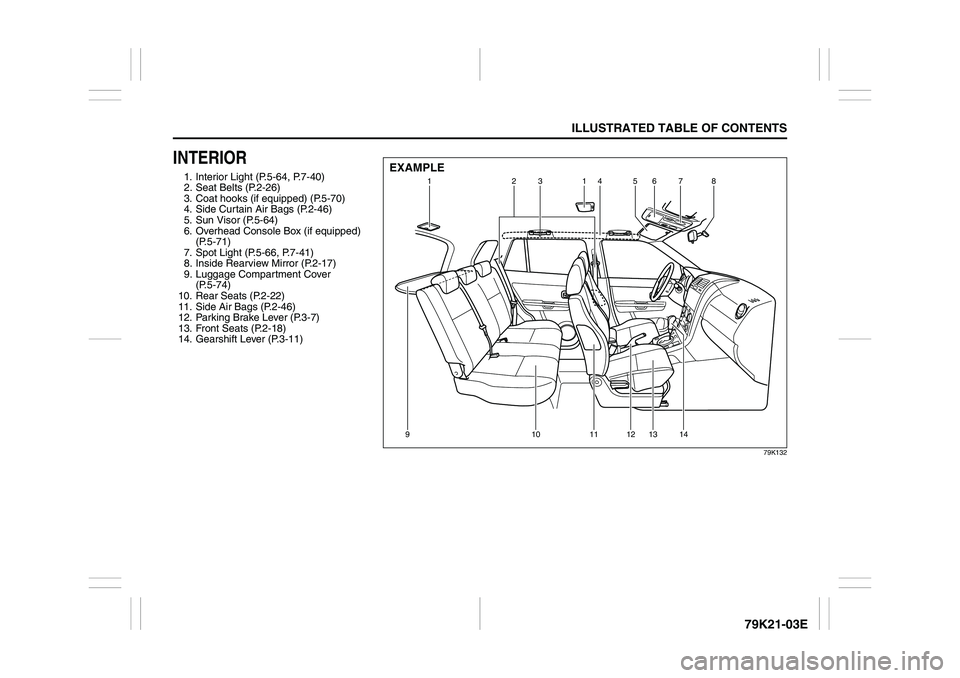
INTERIOR1. Interior Light (P.5-64, P.7-40)
2. Seat Belts (P.2-26)
3. Coat hooks (if equipped) (P.5-70)
4. Side Curtain Air Bags (P.2-46)
5. Sun Visor (P.5-64)
6. Overhead Console Box (if equipped)
(P.5-71)
7. Spot Light (P.5-66, P.7-41)
8. Inside Rearview Mirror (P.2-17)
9. Luggage Compartment Cover
(P.5-74)
10. Rear Seats (P.2-22)
11. Side Air Bags (P.2-46)
12. Parking Brake Lever (P.3-7)
13. Front Seats (P.2-18)
14. Gearshift Lever (P.3-11)
79K132
1231
45678
91011121314
EXAMPLE
Page 14 of 337
79K21-03E
LOCATION OF WARNING
MESSAGESRead and follow all of the warnings (labels
etc.) on your vehicle. Make sure you
understand all of them. Keep them on the
vehicle. Do not remove the messages for
any reason. If a label comes off or the
messages become difficult to be read,
have it corrected by your SUZUKI dealer.
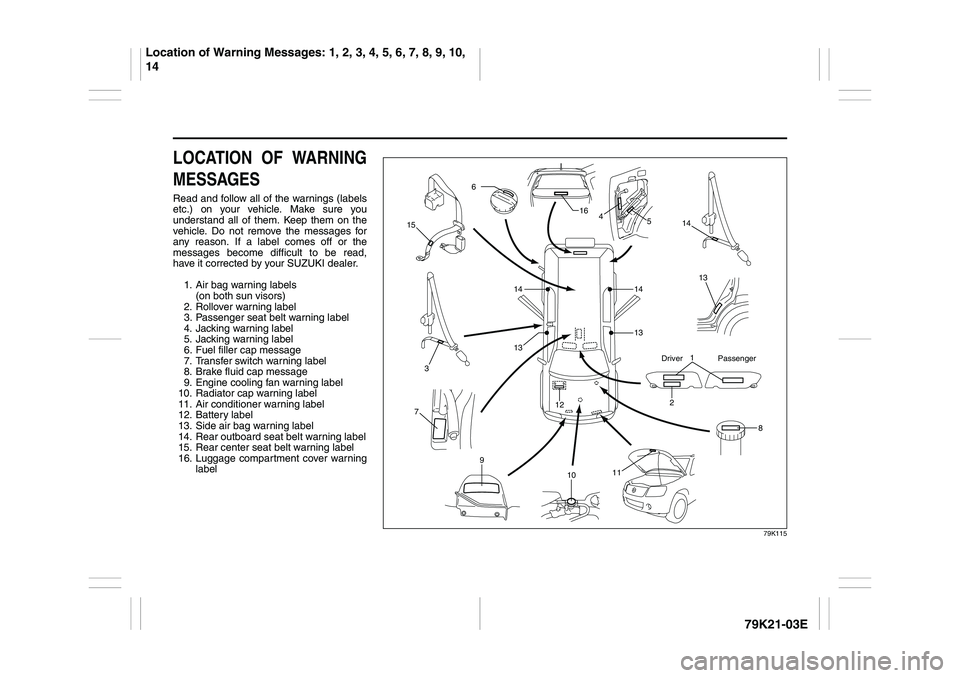
1. Air bag warning labels
(on both sun visors)
2. Rollover warning label
3. Passenger seat belt warning label
4. Jacking warning label
5. Jacking warning label
6. Fuel filler cap message
7. Transfer switch warning label
8. Brake fluid cap message
9. Engine cooling fan warning label
10. Radiator cap warning label
11. Air conditioner warning label
12. Battery label
13. Side air bag warning label
14. Rear outboard seat belt warning label
15. Rear center seat belt warning label
16. Luggage compartment cover warning
label
79K115
1
2
3
6
8 12
13 4 16
14
15
14
7
9
11
10
1413
13
5
Driver Passenger
Location of Warning Messages: 1, 2, 3, 4, 5, 6, 7, 8, 9, 10,
14
Page 20 of 337
2-3BEFORE DRIVING
79K21-03E
(when using the power door locking
switch)
To lock or unlock all the doors simulta-
neously, depress the front or rear of the
switch respectively.
NOTE:
If your vehicle is equipped with the key-
less entry system, you can also lock or
unlock all doors by operating the remote
controller/transmitter. Refer to “Keyless
Start System Remote Controller/Key-
less Entry System Transmitter” in this
section.
If your vehicle is equipped with the key-
less start system, you can also lock or
unlock all doors by pushing the request
switch on the door handle. Refer to “Key-
less Start System Remote Controller/
Keyless Entry System Transmitter” in
this section.
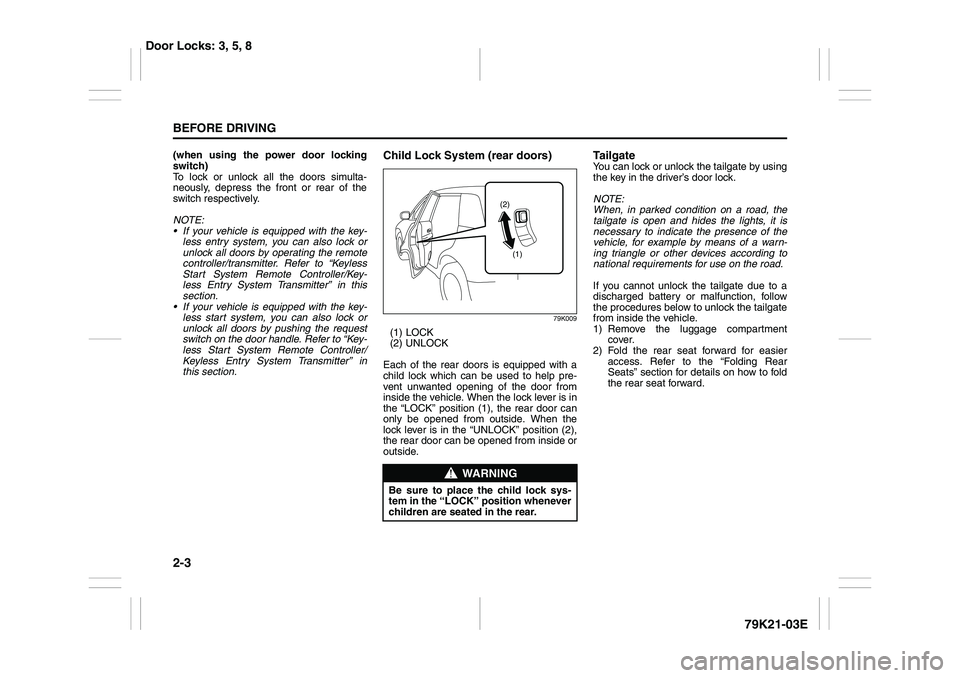
Child Lock System (rear doors)
79K009
(1) LOCK
(2) UNLOCK
Each of the rear doors is equipped with a
child lock which can be used to help pre-
vent unwanted opening of the door from
inside the vehicle. When the lock lever is in
the “LOCK” position (1), the rear door can
only be opened from outside. When the
lock lever is in the “UNLOCK” position (2),
the rear door can be opened from inside or
outside.
Ta i l g a t eYou can lock or unlock the tailgate by using
the key in the driver’s door lock.
NOTE:
When, in parked condition on a road, the
tailgate is open and hides the lights, it is
necessary to indicate the presence of the
vehicle, for example by means of a warn-
ing triangle or other devices according to
national requirements for use on the road.
If you cannot unlock the tailgate due to a
discharged battery or malfunction, follow
the procedures below to unlock the tailgate
from inside the vehicle.
1) Remove the luggage compartment
cover.
2) Fold the rear seat forward for easier
access. Refer to the “Folding Rear
Seats” section for details on how to fold
the rear seat forward.
WARNING
Be sure to place the child lock sys-
tem in the “LOCK” position whenever
children are seated in the rear.
(1) (2)
Door Locks: 3, 5, 8
Page 25 of 337
2-8
BEFORE DRIVING
79K21-03E
You can use up to four remote controllers
and ignition keys for your vehicle. Ask
your SUZUKI dealer for details.
The battery life of the remote controller
is about two years, but it can vary
depending on usage conditions.
63J281
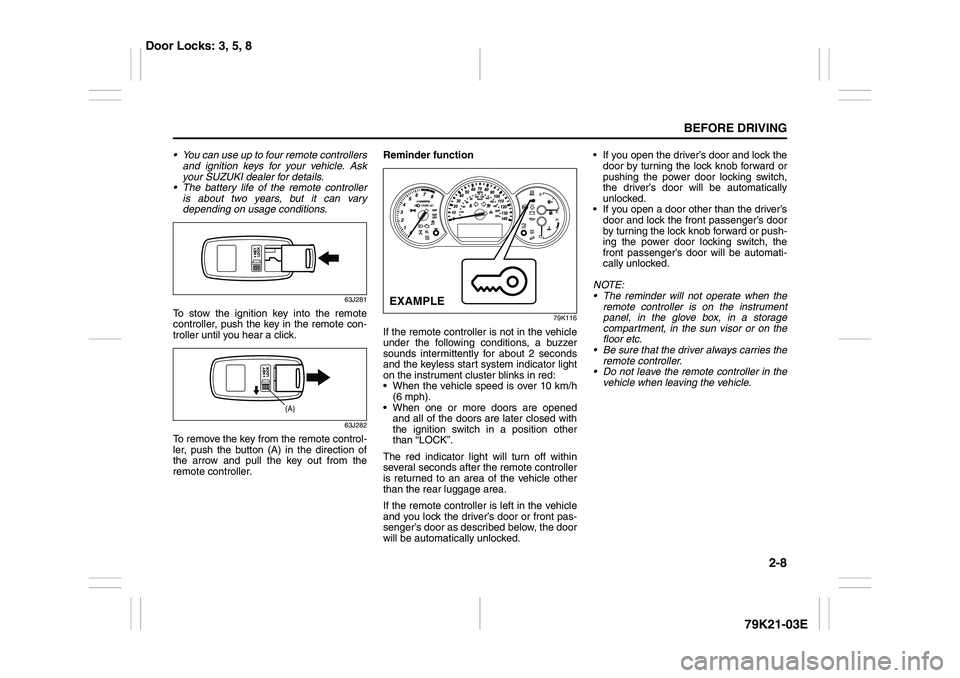
To stow the ignition key into the remote
controller, push the key in the remote con-
troller until you hear a click.
63J282
To remove the key from the remote control-
ler, push the button (A) in the direction of
the arrow and pull the key out from the
remote controller.Reminder function
79K116
If the remote controller is not in the vehicle
under the following conditions, a buzzer
sounds intermittently for about 2 seconds
and the keyless start system indicator light
on the instrument cluster blinks in red:
When the vehicle speed is over 10 km/h
(6 mph).
When one or more doors are opened
and all of the doors are later closed with
the ignition switch in a position other
than “LOCK”.
The red indicator light will turn off within
several seconds after the remote controller
is returned to an area of the vehicle other
than the rear luggage area.
If the remote controller is left in the vehicle
and you lock the driver’s door or front pas-
senger’s door as described below, the door
will be automatically unlocked. If you open the driver’s door and lock the
door by turning the lock knob forward or
pushing the power door locking switch,
the driver’s door will be automatically
unlocked.
If you open a door other than the driver’s
door and lock the front passenger’s door
by turning the lock knob forward or push-
ing the power door locking switch, the
front passenger’s door will be automati-
cally unlocked.
NOTE:
The reminder will not operate when the
remote controller is on the instrument
panel, in the glove box, in a storage
compartment, in the sun visor or on the
floor etc.
Be sure that the driver always carries the
remote controller.
Do not leave the remote controller in the
vehicle when leaving the vehicle.
(A)
EXAMPLE
Door Locks: 3, 5, 8
Page 41 of 337
2-24
BEFORE DRIVING
79K21-03E
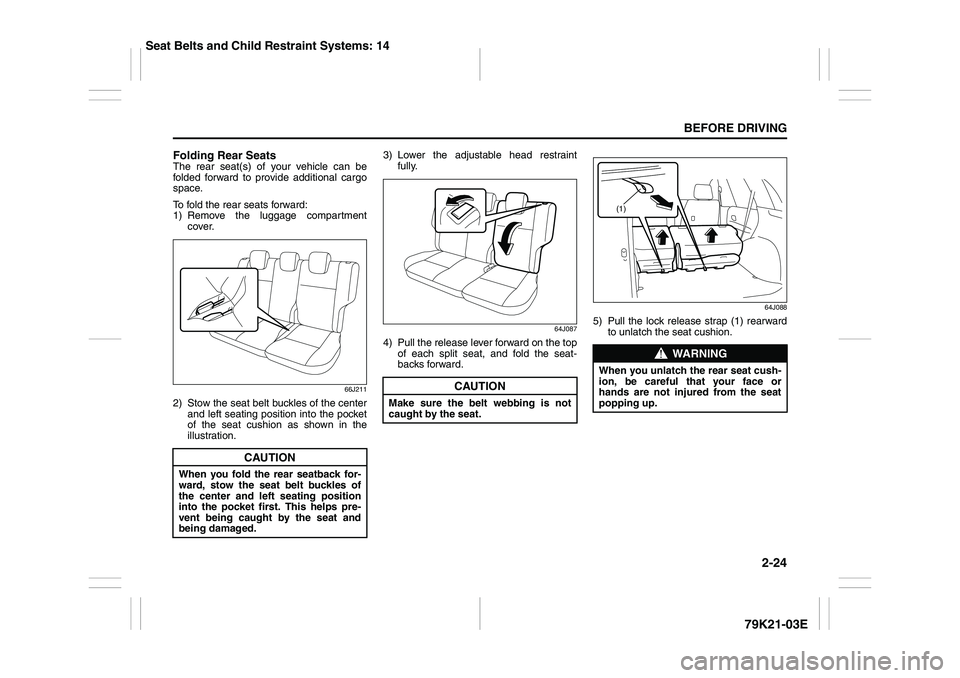
Folding Rear SeatsThe rear seat(s) of your vehicle can be
folded forward to provide additional cargo
space.
To fold the rear seats forward:
1) Remove the luggage compartment
cover.
66J211
2) Stow the seat belt buckles of the center
and left seating position into the pocket
of the seat cushion as shown in the
illustration.3) Lower the adjustable head restraint
fully.
64J087
4) Pull the release lever forward on the top
of each split seat, and fold the seat-
backs forward.
64J088
5) Pull the lock release strap (1) rearward
to unlatch the seat cushion.
CAUTION
When you fold the rear seatback for-
ward, stow the seat belt buckles of
the center and left seating position
into the pocket first. This helps pre-
vent being caught by the seat and
being damaged.
CAUTION
Make sure the belt webbing is not
caught by the seat.
WARNING
When you unlatch the rear seat cush-
ion, be careful that your face or
hands are not injured from the seat
popping up.
(1)
Seat Belts and Child Restraint Systems: 14
Page 42 of 337
2-25BEFORE DRIVING
79K21-03E
64J089
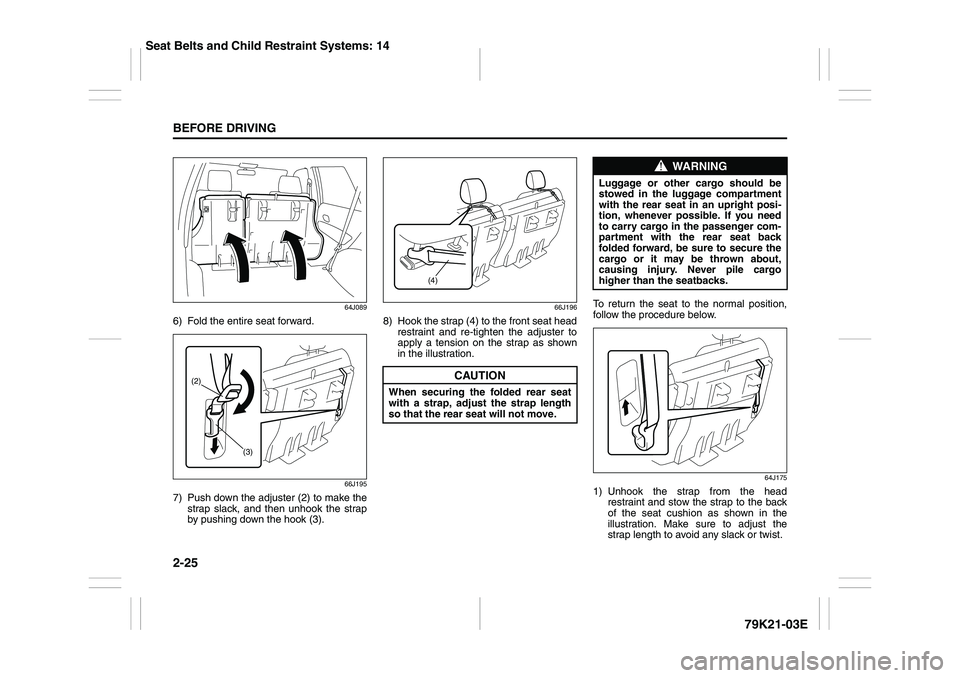
6) Fold the entire seat forward.
66J195
7) Push down the adjuster (2) to make the
strap slack, and then unhook the strap
by pushing down the hook (3).
66J196
8) Hook the strap (4) to the front seat head
restraint and re-tighten the adjuster to
apply a tension on the strap as shown
in the illustration.To return the seat to the normal position,
follow the procedure below.
64J175
1) Unhook the strap from the head
restraint and stow the strap to the back
of the seat cushion as shown in the
illustration. Make sure to adjust the
strap length to avoid any slack or twist.
(2)
(3)
CAUTION
When securing the folded rear seat
with a strap, adjust the strap length
so that the rear seat will not move.
(4)
WARNING
Luggage or other cargo should be
stowed in the luggage compartment
with the rear seat in an upright posi-
tion, whenever possible. If you need
to carry cargo in the passenger com-
partment with the rear seat back
folded forward, be sure to secure the
cargo or it may be thrown about,
causing injury. Never pile cargo
higher than the seatbacks.
Seat Belts and Child Restraint Systems: 14
Page 57 of 337
2-40
BEFORE DRIVING
79K21-03E
54G184
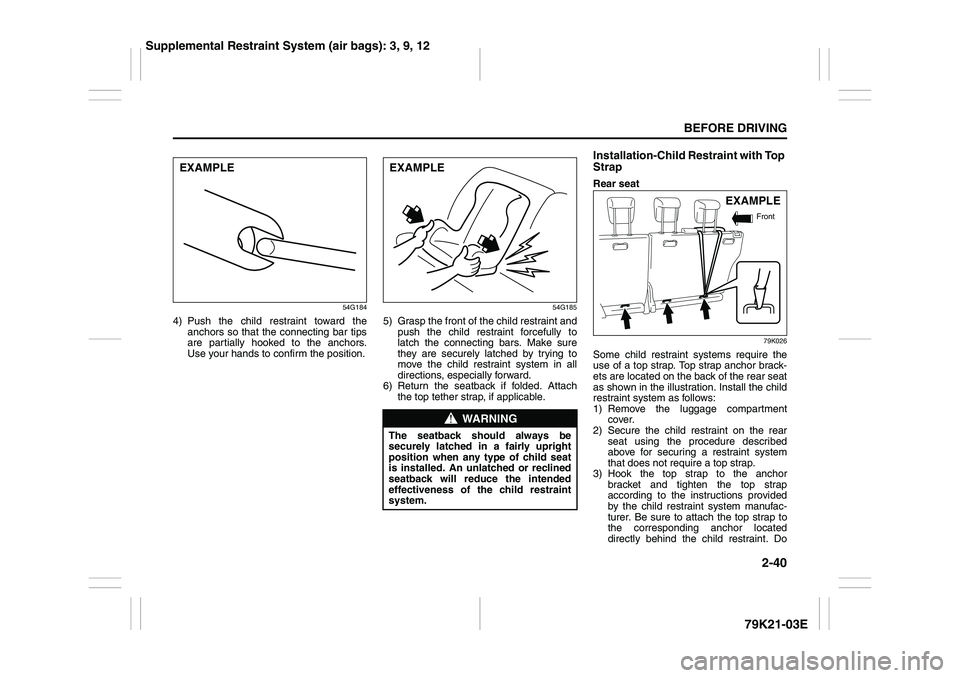
4) Push the child restraint toward the
anchors so that the connecting bar tips
are partially hooked to the anchors.
Use your hands to confirm the position.
54G185
5) Grasp the front of the child restraint and
push the child restraint forcefully to
latch the connecting bars. Make sure
they are securely latched by trying to
move the child restraint system in all
directions, especially forward.
6) Return the seatback if folded. Attach
the top tether strap, if applicable.
Installation-Child Restraint with Top
StrapRear seat
79K026
Some child restraint systems require the
use of a top strap. Top strap anchor brack-
ets are located on the back of the rear seat
as shown in the illustration. Install the child
restraint system as follows:
1) Remove the luggage compartment
cover.
2) Secure the child restraint on the rear
seat using the procedure described
above for securing a restraint system
that does not require a top strap.
3) Hook the top strap to the anchor
bracket and tighten the top strap
according to the instructions provided
by the child restraint system manufac-
turer. Be sure to attach the top strap to
the corresponding anchor located
directly behind the child restraint. Do
EXAMPLE
WARNING
The seatback should always be
securely latched in a fairly upright
position when any type of child seat
is installed. An unlatched or reclined
seatback will reduce the intended
effectiveness of the child restraint
system.EXAMPLE
EXAMPLE
Front
Supplemental Restraint System (air bags): 3, 9, 12
Page 58 of 337
2-41BEFORE DRIVING
79K21-03E
not attach the top strap to the luggage
restraint loops (if equipped).
86G032
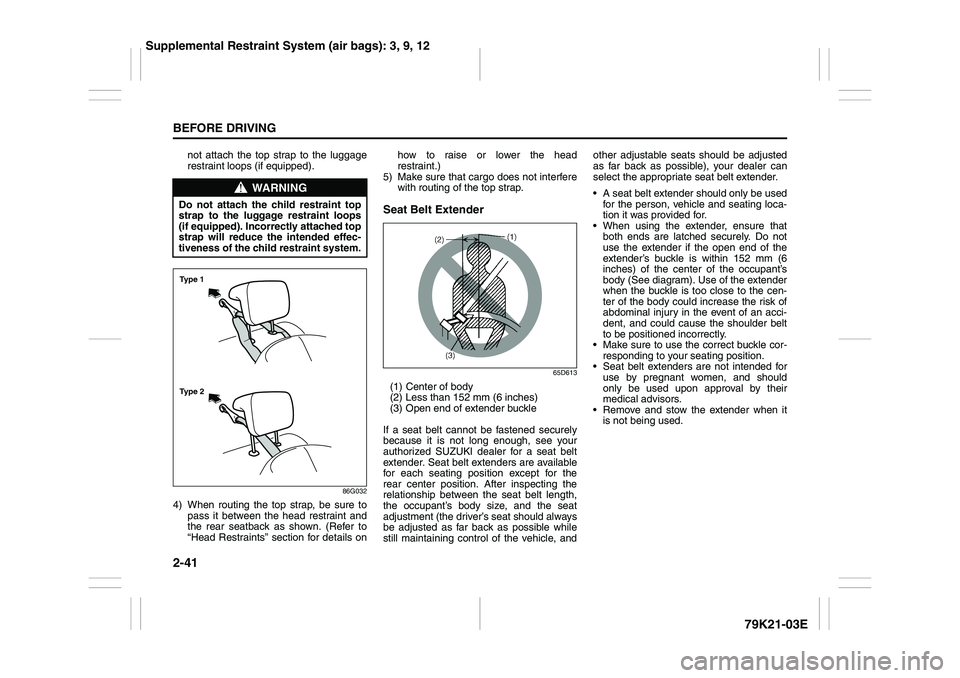
4) When routing the top strap, be sure to
pass it between the head restraint and
the rear seatback as shown. (Refer to
“Head Restraints” section for details onhow to raise or lower the head
restraint.)
5) Make sure that cargo does not interfere
with routing of the top strap.
Seat Belt Extender
65D613
(1) Center of body
(2) Less than 152 mm (6 inches)
(3) Open end of extender buckle
If a seat belt cannot be fastened securely
because it is not long enough, see your
authorized SUZUKI dealer for a seat belt
extender. Seat belt extenders are available
for each seating position except for the
rear center position. After inspecting the
relationship between the seat belt length,
the occupant’s body size, and the seat
adjustment (the driver’s seat should always
be adjusted as far back as possible while
still maintaining control of the vehicle, andother adjustable seats should be adjusted
as far back as possible), your dealer can
select the appropriate seat belt extender.
A seat belt extender should only be used
for the person, vehicle and seating loca-
tion it was provided for.
When using the extender, ensure that
both ends are latched securely. Do not
use the extender if the open end of the
extender’s buckle is within 152 mm (6
inches) of the center of the occupant’s
body (See diagram). Use of the extender
when the buckle is too close to the cen-
ter of the body could increase the risk of
abdominal injury in the event of an acci-
dent, and could cause the shoulder belt
to be positioned incorrectly.
Make sure to use the correct buckle cor-
responding to your seating position.
Seat belt extenders are not intended for
use by pregnant women, and should
only be used upon approval by their
medical advisors.
Remove and stow the extender when it
is not being used.
WARNING
Do not attach the child restraint top
strap to the luggage restraint loops
(if equipped). Incorrectly attached top
strap will reduce the intended effec-
tiveness of the child restraint system.Ty p e 2 Ty p e 1
Supplemental Restraint System (air bags): 3, 9, 12
Page 105 of 337
3-4
OPERATING YOUR VEHICLE
79K21-03E
ACC
Accessories such as the radio can oper-
ate, but the engine is off.
ON
This is the normal operating position. All
electrical systems are on.
START
This is the position for starting the engine
using the starter motor. The key should be
released from this position as soon as the
engine starts.
Ignition key reminder
A buzzer sounds intermittently to remind
you to remove the ignition key if it is in the
ignition switch when the driver’s door is
opened.
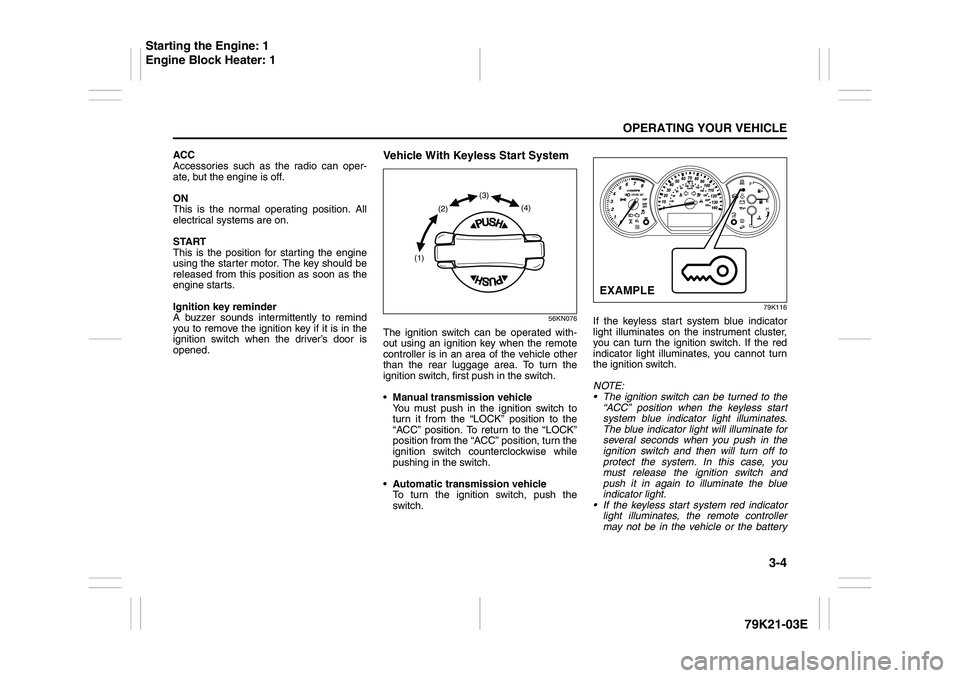
Vehicle With Keyless Start System
56KN076
The ignition switch can be operated with-
out using an ignition key when the remote
controller is in an area of the vehicle other
than the rear luggage area. To turn the
ignition switch, first push in the switch.
Manual transmission vehicle
You must push in the ignition switch to
turn it from the “LOCK” position to the
“ACC” position. To return to the “LOCK”
position from the “ACC” position, turn the
ignition switch counterclockwise while
pushing in the switch.
Automatic transmission vehicle
To turn the ignition switch, push the
switch.
79K116
If the keyless start system blue indicator
light illuminates on the instrument cluster,
you can turn the ignition switch. If the red
indicator light illuminates, you cannot turn
the ignition switch.
NOTE:
The ignition switch can be turned to the
“ACC” position when the keyless start
system blue indicator light illuminates.
The blue indicator light will illuminate for
several seconds when you push in the
ignition switch and then will turn off to
protect the system. In this case, you
must release the ignition switch and
push it in again to illuminate the blue
indicator light.
If the keyless start system red indicator
light illuminates, the remote controller
may not be in the vehicle or the battery
(1)(2)(3)
(4)
EXAMPLE
Starting the Engine: 1
Engine Block Heater: 1
Page 147 of 337
4-4
DRIVING TIPS
79K21-03E
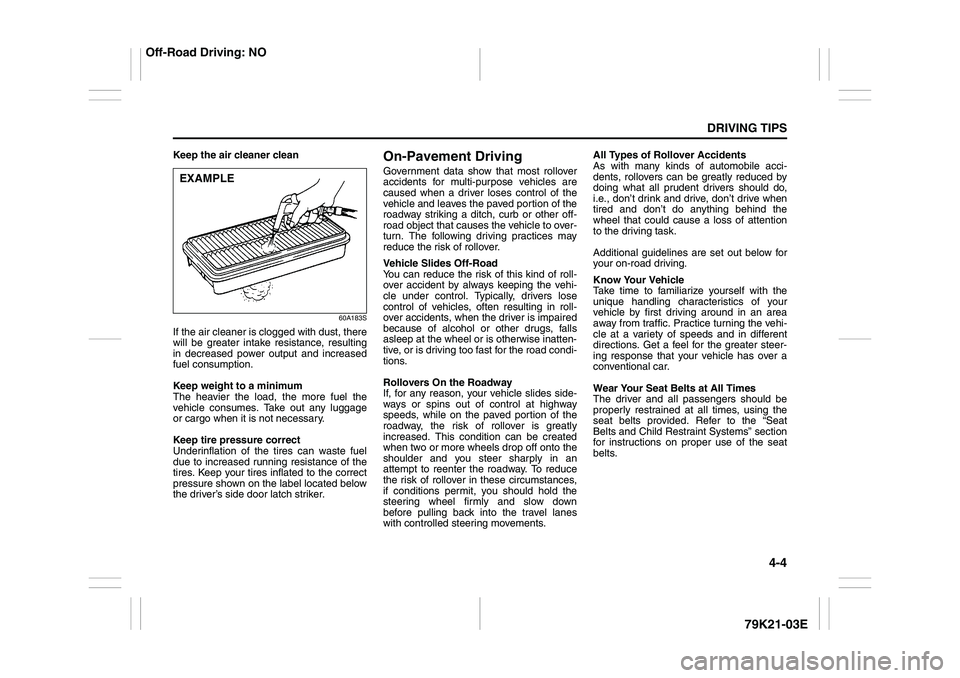
Keep the air cleaner clean
60A183S
If the air cleaner is clogged with dust, there
will be greater intake resistance, resulting
in decreased power output and increased
fuel consumption.
Keep weight to a minimum
The heavier the load, the more fuel the
vehicle consumes. Take out any luggage
or cargo when it is not necessary.
Keep tire pressure correct
Underinflation of the tires can waste fuel
due to increased running resistance of the
tires. Keep your tires inflated to the correct
pressure shown on the label located below
the driver’s side door latch striker.
On-Pavement DrivingGovernment data show that most rollover
accidents for multi-purpose vehicles are
caused when a driver loses control of the
vehicle and leaves the paved portion of the
roadway striking a ditch, curb or other off-
road object that causes the vehicle to over-
turn. The following driving practices may
reduce the risk of rollover.
Vehicle Slides Off-Road
You can reduce the risk of this kind of roll-
over accident by always keeping the vehi-
cle under control. Typically, drivers lose
control of vehicles, often resulting in roll-
over accidents, when the driver is impaired
because of alcohol or other drugs, falls
asleep at the wheel or is otherwise inatten-
tive, or is driving too fast for the road condi-
tions.
Rollovers On the Roadway
If, for any reason, your vehicle slides side-
ways or spins out of control at highway
speeds, while on the paved portion of the
roadway, the risk of rollover is greatly
increased. This condition can be created
when two or more wheels drop off onto the
shoulder and you steer sharply in an
attempt to reenter the roadway. To reduce
the risk of rollover in these circumstances,
if conditions permit, you should hold the
steering wheel firmly and slow down
before pulling back into the travel lanes
with controlled steering movements.All Types of Rollover Accidents
As with many kinds of automobile acci-
dents, rollovers can be greatly reduced by
doing what all prudent drivers should do,
i.e., don’t drink and drive, don’t drive when
tired and don’t do anything behind the
wheel that could cause a loss of attention
to the driving task.
Additional guidelines are set out below for
your on-road driving.
Know Your Vehicle
Take time to familiarize yourself with the
unique handling characteristics of your
vehicle by first driving around in an area
away from traffic. Practice turning the vehi-
cle at a variety of speeds and in different
directions. Get a feel for the greater steer-
ing response that your vehicle has over a
conventional car.
Wear Your Seat Belts at All Times
The driver and all passengers should be
properly restrained at all times, using the
seat belts provided. Refer to the “Seat
Belts and Child Restraint Systems” section
for instructions on proper use of the seat
belts.
EXAMPLE
Off-Road Driving: NO