Driving range SUZUKI GRAND VITARA 2013 User Guide
[x] Cancel search | Manufacturer: SUZUKI, Model Year: 2013, Model line: GRAND VITARA, Model: SUZUKI GRAND VITARA 2013Pages: 337, PDF Size: 6.21 MB
Page 113 of 337
3-12
OPERATING YOUR VEHICLE
79K21-03E
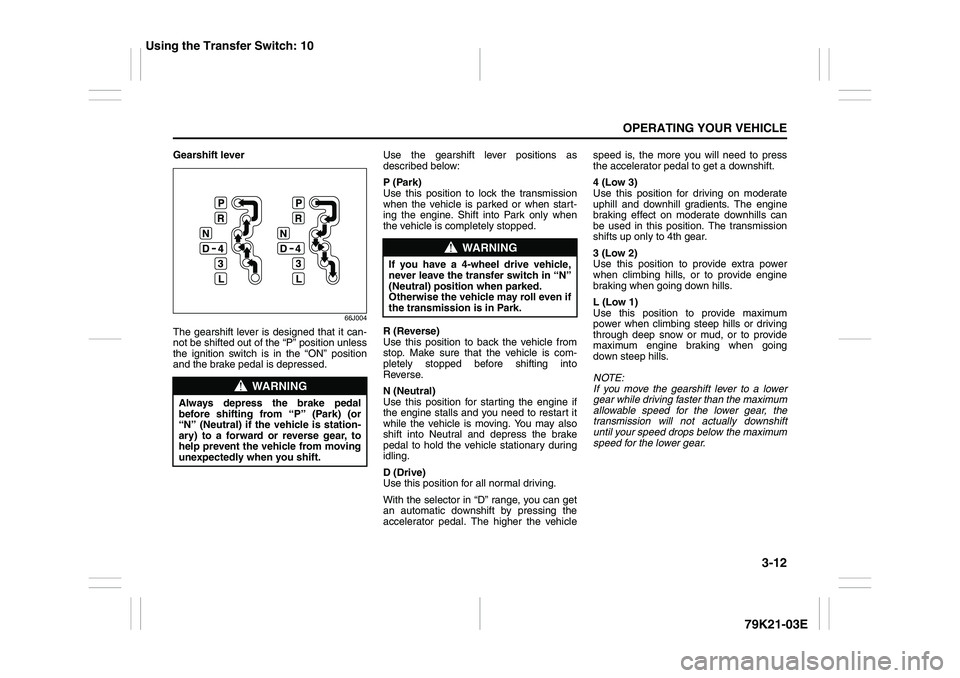
Gearshift lever
66J004
The gearshift lever is designed that it can-
not be shifted out of the “P” position unless
the ignition switch is in the “ON” position
and the brake pedal is depressed.Use the gearshift lever positions as
described below:
P (Park)
Use this position to lock the transmission
when the vehicle is parked or when start-
ing the engine. Shift into Park only when
the vehicle is completely stopped.
R (Reverse)
Use this position to back the vehicle from
stop. Make sure that the vehicle is com-
pletely stopped before shifting into
Reverse.
N (Neutral)
Use this position for starting the engine if
the engine stalls and you need to restart it
while the vehicle is moving. You may also
shift into Neutral and depress the brake
pedal to hold the vehicle stationary during
idling.
D (Drive)
Use this position for all normal driving.
With the selector in “D” range, you can get
an automatic downshift by pressing the
accelerator pedal. The higher the vehiclespeed is, the more you will need to press
the accelerator pedal to get a downshift.
4 (Low 3)
Use this position for driving on moderate
uphill and downhill gradients. The engine
braking effect on moderate downhills can
be used in this position. The transmission
shifts up only to 4th gear.
3 (Low 2)
Use this position to provide extra power
when climbing hills, or to provide engine
braking when going down hills.
L (Low 1)
Use this position to provide maximum
power when climbing steep hills or driving
through deep snow or mud, or to provide
maximum engine braking when going
down steep hills.
NOTE:
If you move the gearshift lever to a lower
gear while driving faster than the maximum
allowable speed for the lower gear, the
transmission will not actually downshift
until your speed drops below the maximum
speed for the lower gear.
WARNING
Always depress the brake pedal
before shifting from “P” (Park) (or
“N” (Neutral) if the vehicle is station-
ary) to a forward or reverse gear, to
help prevent the vehicle from moving
unexpectedly when you shift.
WARNING
If you have a 4-wheel drive vehicle,
never leave the transfer switch in “N”
(Neutral) position when parked.
Otherwise the vehicle may roll even if
the transmission is in Park.
Using the Transfer Switch: 10
Page 115 of 337
3-14
OPERATING YOUR VEHICLE
79K21-03E
Use the gearshift lever positions as
described below:
P (Park)
Use this position to lock the transmission
when the vehicle is parked or when start-
ing the engine. Shift into Park only when
the vehicle is completely stationary.
R (Reverse)
Use this position to reverse the vehicle
from stop. Make sure that vehicle is com-
pletely stationary before shifting into
Reverse.
N (Neutral)
Use this position for starting the engine if
the engine stalls and you need to restart it
while the vehicle is moving. You may also
shift into Neutral and depress the brake
pedal to hold the vehicle stationary during
idling.D (Drive)
Use this position for all normal driving.
With the gearshift lever in “D” range you
can get an automatic downshift by press-
ing the accelerator pedal. The higher the
vehicle speed is, the more you need to
press the accelerator pedal to get a down-
shift.
3 (Low 3)
Use this position for driving on moderate
uphill and downhill gradients. The engine
braking effect on moderate downhills can
be used in this position. The transmission
shifts up only to 3rd gear.
2 (Low 2)
Use this position to provide extra power
when climbing hills, or to provide engine
braking when going down hills.
L (Low 1)
Use this position to provide maximum
power when climbing steep hills or driving
through deep snow or mud, or to provide
maximum engine braking when going
down steep hills.
NOTE:
If you move the gearshift lever to a lower
gear while driving faster than the maximum
allowable speed for the lower gear, the
transmission will not actually downshift
until your speed drops below the maximum
speed for the lower gear.
WARNING
If you have a 4-wheel drive vehicle,
never leave the transfer switch in “N”
(Neutral) position when parked.
Otherwise the vehicle may roll even if
the transmission is in Park.
CAUTION
Be sure to take the following precau-
tions to help avoid damage to the
automatic transmission:
Make sure that the vehicle is com-
pletely stationary before shifting
into “P” or “R”.
Do not shift from “P” or “N” to “R”,
“D”, “3”, “2”, or “L” when the
engine is running above idle speed.
Do not rev the engine with the
transmission in a drive position
(“R”, “D”, “3”, “2”, or “L”) and the
rear wheels not moving.
Do not use the accelerator to hold
the vehicle on a hill. Use the vehi-
cle’s brakes.
Using the Transfer Switch: 10
Page 119 of 337
3-18
OPERATING YOUR VEHICLE
79K21-03E
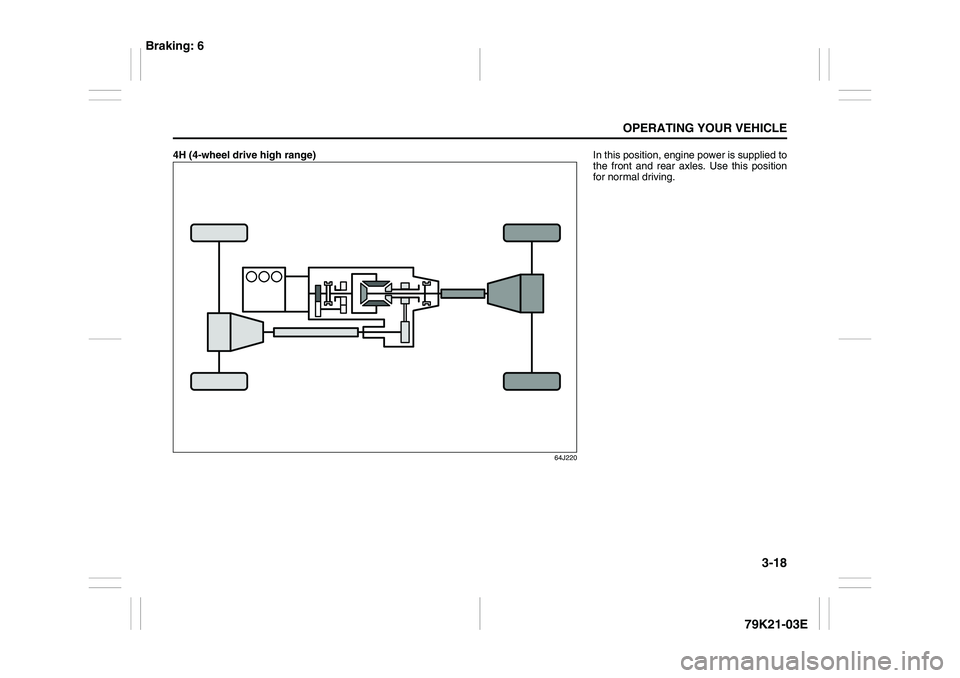
4H (4-wheel drive high range)
64J220
In this position, engine power is supplied to
the front and rear axles. Use this position
for normal driving.
Braking: 6
Page 120 of 337
3-19OPERATING YOUR VEHICLE
79K21-03E
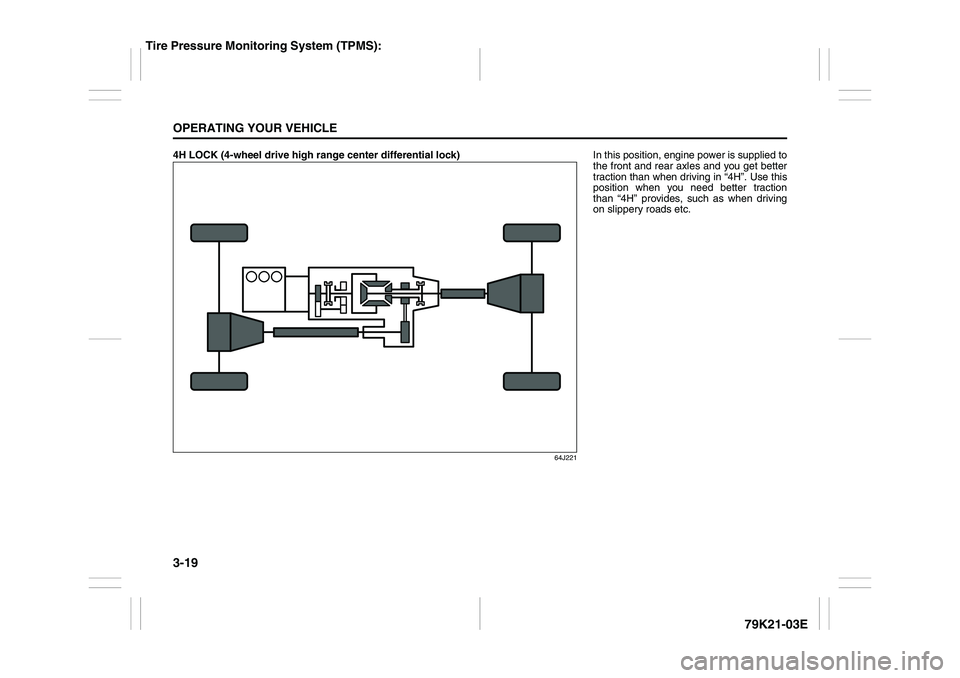
4H LOCK (4-wheel drive high range center differential lock)
64J221
In this position, engine power is supplied to
the front and rear axles and you get better
traction than when driving in “4H”. Use this
position when you need better traction
than “4H” provides, such as when driving
on slippery roads etc.
Tire Pressure Monitoring System (TPMS):
Page 121 of 337
3-20
OPERATING YOUR VEHICLE
79K21-03E
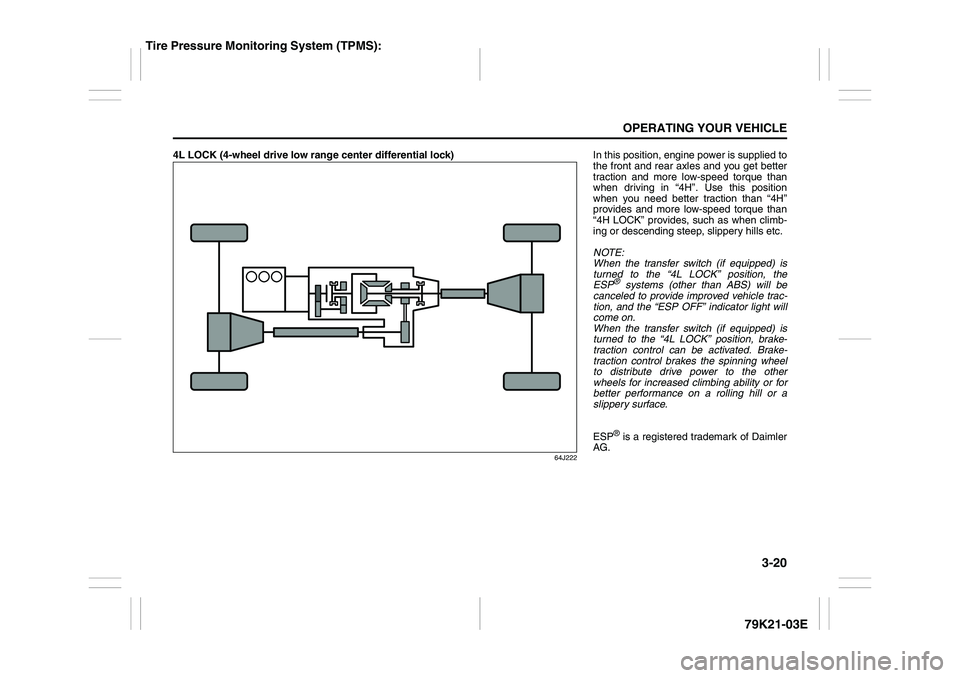
4L LOCK (4-wheel drive low range center differential lock)
64J222
In this position, engine power is supplied to
the front and rear axles and you get better
traction and more low-speed torque than
when driving in “4H”. Use this position
when you need better traction than “4H”
provides and more low-speed torque than
“4H LOCK” provides, such as when climb-
ing or descending steep, slippery hills etc.
NOTE:
When the transfer switch (if equipped) is
turned to the “4L LOCK” position, the
ESP
® systems (other than ABS) will be
canceled to provide improved vehicle trac-
tion, and the “ESP OFF” indicator light will
come on.
When the transfer switch (if equipped) is
turned to the “4L LOCK” position, brake-
traction control can be activated. Brake-
traction control brakes the spinning wheel
to distribute drive power to the other
wheels for increased climbing ability or for
better performance on a rolling hill or a
slippery surface.
ESP® is a registered trademark of Daimler
AG.
Tire Pressure Monitoring System (TPMS):
Page 148 of 337
4-5DRIVING TIPS
79K21-03E
Don’t Make Sharp Turns
As mentioned before, small multipurpose
vehicles have specific design characteris-
tics that allow them to perform in a wide
variety of applications. These characteris-
tics also change the cornering behavior
relative to conventional passenger cars.
Remember, small multipurpose vehicles
have more responsive steering and a
higher center of gravity than conventional
passenger cars. If at all possible, avoid
making sharp turns in your vehicle.
Slow Down on Curves
Learn to approach curves cautiously and
at a conservative speed. Do not attempt to
take curves at the same speeds that you
would in a vehicle with a lower center of
gravity. Just as you would not drive a
sports car on a trail, you should not
attempt to drive your vehicle around curves
like a sports car.
Slow Down and Use Caution on Slip-
pery Roads
Under wet road conditions you should
drive at a lower speed than on dry roads
due to possible slippage of tires during
braking. When driving on icy, snowcovered
or muddy roads, reduce your speed and
avoid sudden acceleration, abrupt braking
or sharp steering movements. Use 4-wheel
drive high range (4H) (if equipped) for bet-
ter traction.NOTE:
Avoid operating your vehicle in “4H LOCK”
or “4L LOCK” on wet pavement as much
as possible. Operating your vehicle in “4H
LOCK” or “4L LOCK” on wet pavement
may cause severe damage to the drive
train.
NOTE:
Operating your vehicle in “4H” on dry and
tight corner may cause some vibration on
your vehicle. This is not caused by the
vehicle malfunction, but caused by working
of the limited slip differential gear in the
center differential.
CAUTION
Do not operate your vehicle in “4H
LOCK” or “4L LOCK” on dry, hard
surfaces. Operating your vehicle in
“4H LOCK” or “4L LOCK” on dry,
hard surfaces puts severe stress to
the drive train, especially during tight
cornering, and can damage it. Also,
you may have some difficulty steer-
ing.
CAUTION
Unevenly worn tires can cause prob-
lems in the operation of the transfer
switch. Be sure to rotate the tires
according to the maintenance sched-
ule. Refer to “Tires” and “Mainte-
nance Schedule” in the
“INSPECTION AND MAINTENANCE”
section for proper tire rotation proce-
dures.
Off-Road Driving: NO
Page 149 of 337
4-6
DRIVING TIPS
79K21-03E
Off-Road DrivingYour vehicle has specific design character-
istics for off-road driving. When you leave
the pavement, you will encounter driving
surfaces of all kinds which may change
continually as you drive. In most cases, off-
road driving requires the use of 4-wheel
drive. If your vehicle is a 2-wheel drive
vehicle, you should limit your off-road driv-
ing only to hard, flat, nonslippery surfaces.
2-wheel drive vehicles have far less trac-
tion on off-road surfaces than 4-wheel
drive vehicles. It is important when driving
off-road to follow the guidelines below.
Use Caution on Steep Inclines
Always inspect hills before you attempt to
drive up them. Know what is on the other
side and how you will get back down. If you
have any doubt that it is safe, do not
attempt to drive over a hill. Never drive
your vehicle up an extremely steep incline.
Coming down a steep hill can be trickier
than getting up one. Keep the vehicle
heading straight down the hill and use low
gear. Do not lock the brakes. If the vehicle
begins to slide, accelerate slightly to regain
steering control.Do Not Turn on or Drive Across the Side
of Hills
Turning on or driving across the side of a
hill can be extremely hazardous. Most of
the vehicle’s weight will be transferred to
the downhill tires, which could result in the
vehicle rolling sideways. Whenever possi-
ble, avoid this potential hazard. Also, if you
have to exit your vehicle on a side-hill,
always get out on the uphill side.
Wear Your Seat Belts at All Times
You and your passengers should use the
seat belts at all times when driving off-
road. For proper seat belt use, refer to the
“Seat Belts and Child Restraint Systems”
section in this manual.
Avoid Sudden Reactions in Mud, Ice or
Snow
Be careful when off-road conditions are
slick. Reduce your speed and avoid sud-
den movements of the vehicle. If your vehi-
cle is a 2-wheel drive vehicle, do not drive
in deep snow or mud. If your vehicle is a 4-
wheel drive vehicle, be aware that driving
in deep snow or mud can cause a loss of
traction and an increase in the resistance
to the vehicle’s forward motion. Use 4WD
low gear (4L) and maintain a steady but
moderate speed with a light touch on the
steering wheel and brakes.Do not drive in the field covered with
grown grass
If you drive in the field covered with grass,
it may cause unexpected accident or vehi-
cle damage by getting caught in grown
grass.
If Your Vehicle Gets Stuck
If your vehicle gets stuck in snow, mud or
sand, follow the directions below:
1) (For vehicles equipped with transfer
switch) Turn the transfer switch to “4H
LOCK” or “4L LOCK”.
2) Shift the transmission back and forth
between a forward range (or first gear
for manual transmission) and reverse.
This will create a rocking motion which
may give you enough momentum to
free the vehicle. Press gently on the
accelerator to keep wheel spin to a min-
imum. Remove your foot from the
accelerator while shifting.
Do not race the engine. Excessive
wheel spin will cause the tires to dig
deeper, making it more difficult to free
the vehicle.
3) If your vehicle remains stuck after a few
minutes of rocking, get another vehicle
to pull you out.
Page 165 of 337
5-12
OTHER CONTROLS AND EQUIPMENT
79K21-03E
Turning power on/off
Press the power on/off knob (1).
The unit starts in the function mode it was
in when the power was turned off last.
Adjusting the volume
Turn the volume control knob (1).
Turning it clockwise increases the volume;
turning it counterclockwise decreases the
volume.
NOTE:
While driving, adjust the volume to an
extent that sound and/or noise coming
from outside the car can be heard.
Adjusting the clock
1) Press the clock button H (5) to adjust
the hours.
Press the clock button M (6) to adjust
the minutes.
2) Hold the button depressed to automati-
cally increment the number.
3) To reset the clock to an hour signal,
press the clock button H (5) while hold-
ing the clock button M (6) depressed.
NOTE:
When the clock has not been set, the time
“12:00” will flash in the display.
Clock reset is effected as follows:
When minutes are between 00 and 29,
the clock will reset to the current hour.
(example: 12:23 ➔ 12:00) When minutes are between 30 and 59,
the clock will reset to the next hour.
(example: 12:38 ➔ 1:00)
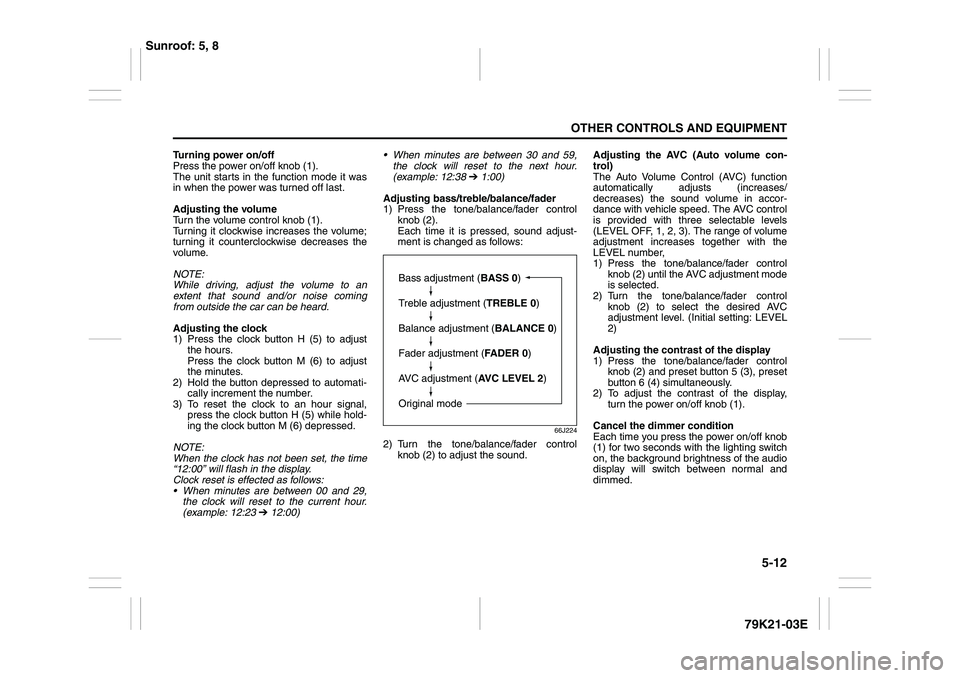
Adjusting bass/treble/balance/fader
1) Press the tone/balance/fader control
knob (2).
Each time it is pressed, sound adjust-
ment is changed as follows:
66J224
2) Turn the tone/balance/fader control
knob (2) to adjust the sound.Adjusting the AVC (Auto volume con-
trol)
The Auto Volume Control (AVC) function
automatically adjusts (increases/
decreases) the sound volume in accor-
dance with vehicle speed. The AVC control
is provided with three selectable levels
(LEVEL OFF, 1, 2, 3). The range of volume
adjustment increases together with the
LEVEL number,
1) Press the tone/balance/fader control
knob (2) until the AVC adjustment mode
is selected.
2) Turn the tone/balance/fader control
knob (2) to select the desired AVC
adjustment level. (Initial setting: LEVEL
2)
Adjusting the contrast of the display
1) Press the tone/balance/fader control
knob (2) and preset button 5 (3), preset
button 6 (4) simultaneously.
2) To adjust the contrast of the display,
turn the power on/off knob (1).
Cancel the dimmer condition
Each time you press the power on/off knob
(1) for two seconds with the lighting switch
on, the background brightness of the audio
display will switch between normal and
dimmed.
Bass adjustment (BASS 0)
Treble adjustment (TREBLE 0)
Balance adjustment (BALANCE 0)
Fader adjustment (FADER 0)
AVC adjustment (AVC LEVEL 2)
Original mode
Sunroof: 5, 8
Page 192 of 337
5-39OTHER CONTROLS AND EQUIPMENT
79K21-03E
Turning power on/off
Press the power on/off knob (1).
The unit starts in the function mode it was
in when the power was turned off last.
Adjusting the volume
Turn the volume control knob (1).
Turning it clockwise increases the volume;
turning it counterclockwise decreases the
volume.
NOTE:
While driving, adjust the volume to an
extent that sound and/or noise coming
from outside the car can be heard.
Adjusting the clock
1) Press the clock button H (5) to adjust
the hours.
Press the clock button M (6) to adjust
the minutes.
2) Hold the button depressed to automati-
cally increment the number.
3) To reset the clock to an hour signal,
press the clock button H (5) while hold-
ing the clock button M (6) depressed.
NOTE:
When the clock has not been set, the time
“12:00” will flash in the display.
Clock reset is effected as follows:
When minutes are between 00 and 29,
the clock will reset to the current hour.
(example: 12:23 ➔ 12:00) When minutes are between 30 and 59,
the clock will reset to the next hour.
(example: 12:38 ➔ 1:00)
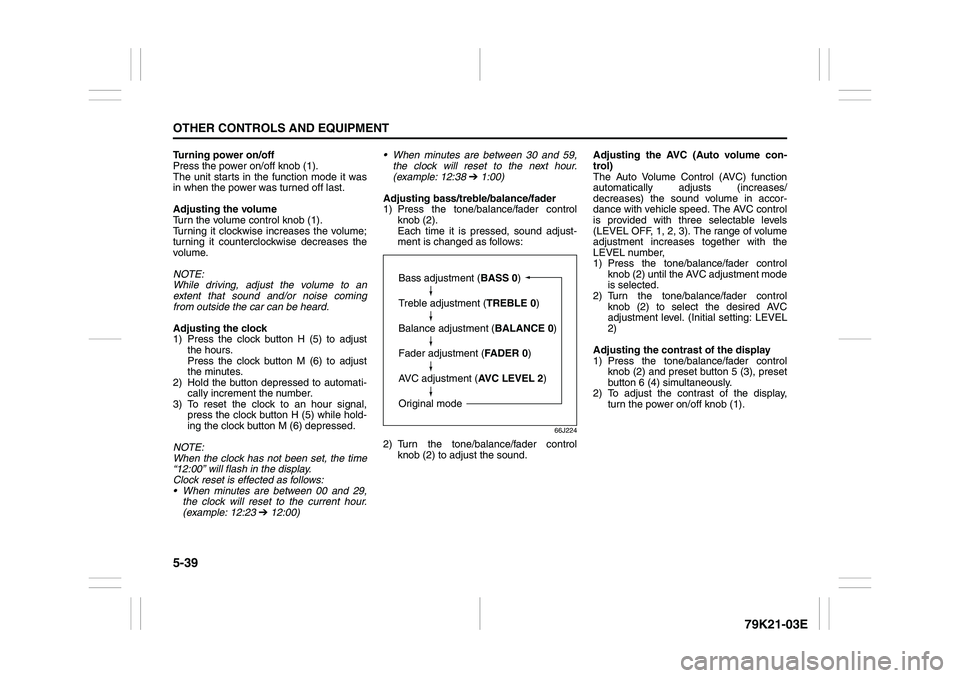
Adjusting bass/treble/balance/fader
1) Press the tone/balance/fader control
knob (2).
Each time it is pressed, sound adjust-
ment is changed as follows:
66J224
2) Turn the tone/balance/fader control
knob (2) to adjust the sound.Adjusting the AVC (Auto volume con-
trol)
The Auto Volume Control (AVC) function
automatically adjusts (increases/
decreases) the sound volume in accor-
dance with vehicle speed. The AVC control
is provided with three selectable levels
(LEVEL OFF, 1, 2, 3). The range of volume
adjustment increases together with the
LEVEL number,
1) Press the tone/balance/fader control
knob (2) until the AVC adjustment mode
is selected.
2) Turn the tone/balance/fader control
knob (2) to select the desired AVC
adjustment level. (Initial setting: LEVEL
2)
Adjusting the contrast of the display
1) Press the tone/balance/fader control
knob (2) and preset button 5 (3), preset
button 6 (4) simultaneously.
2) To adjust the contrast of the display,
turn the power on/off knob (1).
Bass adjustment (BASS 0)
Treble adjustment (TREBLE 0)
Balance adjustment (BALANCE 0)
Fader adjustment (FADER 0)
AVC adjustment (AVC LEVEL 2)
Original mode
Page 239 of 337
6-2
VEHICLE LOADING AND TOWING
79K21-03E
Trailer TowingYou can use your SUZUKI to tow a trailer,
but you should always observe the require-
ments and recommendations in this sec-
tion. If you intend to tow a trailer, it is
essential to select a trailer and trailer tow-
ing equipment which are compatible. A
reputable trailer dealer can help you.
For Automatic transmission vehicles, shift
into “3” (Low 2) or “L” (Low 1) (if necessary)
and frequently monitor the coolant temper-
ature gauge when towing up a steep hill. If
the gauge indicates overheating, park the
vehicle in a safe place and let the enginecool down. Refer to “If the Engine Over-
heats” section for details on how to deal
with overheating.
HitchesUse only a trailer hitch bracket that is
designed to bolt to the frame of your vehi-
cle, and a hitch that is designed to bolt to
this bracket. We recommend that you use
a genuine SUZUKI trailer hitch bracket and
trailer hitch (available as options), or equiv-
alent.Safety ChainsAlways attach safety chains between your
vehicle and trailer. Cross safety chains
under the tongue of the trailer so that the
tongue will not drop to the road if the trailer
becomes separated from the hitch. Follow
the manufacturer’s recommendation for
attaching safety chains. Always leave just
enough slack to permit full turning. Never
allow safety chains to drag on the road.
Trailer LightsMake sure your trailer is equipped with
lights which meet federal, state and local
requirements. Always check for the proper
operation of all trailer lights before you
start to tow.Brakes CAUTION
Trailer towing puts additional stress
on the engine, drive train and brakes
of your vehicle. Never tow a trailer
during the first 960 km (600 miles) of
vehicle operation.
CAUTION
Because towing a trailer puts addi-
tional stress on your vehicle, more
frequent maintenance will be
required than under normal driving
conditions. Follow the schedule for
Maintenance Recommended Under
Severe Driving Conditions or perform
more frequent maintenance as nec-
essary.
CAUTION
Towing in “D” range up a steep hill
can cause coolant overheating which
may result in engine/automatic trans-
mission damage.
WARNING
Never use a bumper hitch or a hitch
which attaches to the axle of your
vehicle.
WARNING
Never attach safety chains to the
bumper of your vehicle. Secure con-
nections so that they can’t come
loose.
WARNING
Never splice trailer lights directly into
your vehicle’s electrical system, or
electrical system damage may occur.
WARNING
If trailer brakes are used, you should
follow all instructions provided by the
manufacturer. Never tap into the
brake system of your vehicle.
Trailer Towing: 5, 11, 13