front light SUZUKI GRAND VITARA 2013 Owner's Manual
[x] Cancel search | Manufacturer: SUZUKI, Model Year: 2013, Model line: GRAND VITARA, Model: SUZUKI GRAND VITARA 2013Pages: 337, PDF Size: 6.21 MB
Page 121 of 337
3-20
OPERATING YOUR VEHICLE
79K21-03E
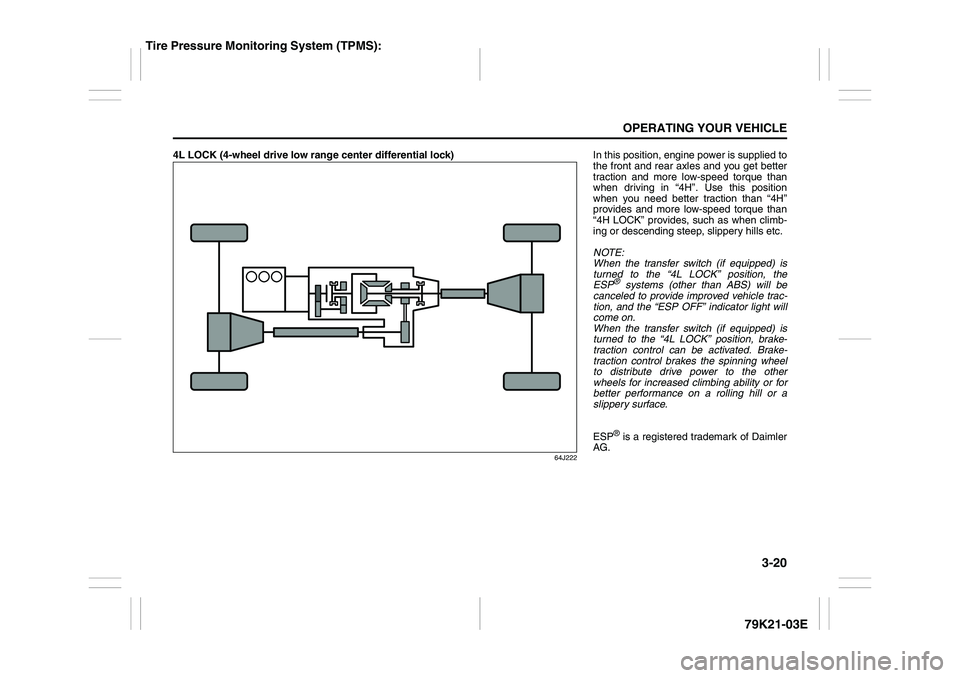
4L LOCK (4-wheel drive low range center differential lock)
64J222
In this position, engine power is supplied to
the front and rear axles and you get better
traction and more low-speed torque than
when driving in “4H”. Use this position
when you need better traction than “4H”
provides and more low-speed torque than
“4H LOCK” provides, such as when climb-
ing or descending steep, slippery hills etc.
NOTE:
When the transfer switch (if equipped) is
turned to the “4L LOCK” position, the
ESP
® systems (other than ABS) will be
canceled to provide improved vehicle trac-
tion, and the “ESP OFF” indicator light will
come on.
When the transfer switch (if equipped) is
turned to the “4L LOCK” position, brake-
traction control can be activated. Brake-
traction control brakes the spinning wheel
to distribute drive power to the other
wheels for increased climbing ability or for
better performance on a rolling hill or a
slippery surface.
ESP® is a registered trademark of Daimler
AG.
Tire Pressure Monitoring System (TPMS):
Page 153 of 337
OTHER CONTROLS AND EQUIPMENT
5
79K21-03E
60G407
OTHER CONTROLS AND EQUIPMENTAutomatic Heating and Air Conditioning System
(Climate Control) ................................................................. 5-1
Radio Antenna ..................................................................... 5-8
Audio Systems (Type A) ..................................................... 5-8
Audio Systems (Type B) ..................................................... 5-36
Fuel Filler Cap ..................................................................... 5-62
Engine Hood ........................................................................ 5-63
Sun Visor ............................................................................. 5-64
Interior Light Switch ........................................................... 5-64
Luggage Compartment Light ............................................. 5-65
Spot Light ............................................................................ 5-66
Accessory Socket (if equipped) ......................................... 5-66
Cigarette Lighter and Ashtray (if equipped) ..................... 5-67
Sunroof (if equipped) .......................................................... 5-68
Assist Grips (if equipped) .................................................. 5-70
Coat Hooks (if equipped) .................................................... 5-70
Glove Box ............................................................................ 5-71
Overhead Console Box (if equipped) ................................ 5-71
Cup Holder and Storage Bin (if equipped) ........................ 5-72
Front Seat Back Pocket (if equipped) ............................... 5-73
Shopping Hook (if equipped) ............................................. 5-73
Armrest ................................................................................ 5-73
Floor Mats (if equipped) ..................................................... 5-74
Luggage Compartment Cover ............................................ 5-74
Underfloor Bins (if equipped) ............................................ 5-77
Luggage Restraint Loops (if equipped) ............................ 5-78
Roof Rails or Roof Rack Anchors (if equipped) ............... 5-78
HomeLink® (if equipped) .................................................... 5-80
Frame Hooks ....................................................................... 5-83
Page 162 of 337
5-9OTHER CONTROLS AND EQUIPMENT
79K21-03E
Precautions When the inside of the car is very cold
and the player is used soon after switch-
ing on the heater, moisture may form on
the disc or the optical parts of the player
and proper playback may not be possi-
ble. If moisture forms on the disc, wipe it
off with a soft cloth. If moisture forms on
the optical parts of the player, do not use
the player for about one hour. This will
allow the condensation to disappear nor-
mally.
Driving on extremely bumpy roads which
cause severe vibrations may cause
sound to skip.
This unit uses a precision mechanism.
Even in the event that trouble arises,
never open the case, disassemble the
unit, or lubricate the rotating parts.
Please bring the unit to an authorized
SUZUKI dealer or a Clarion service
Department.
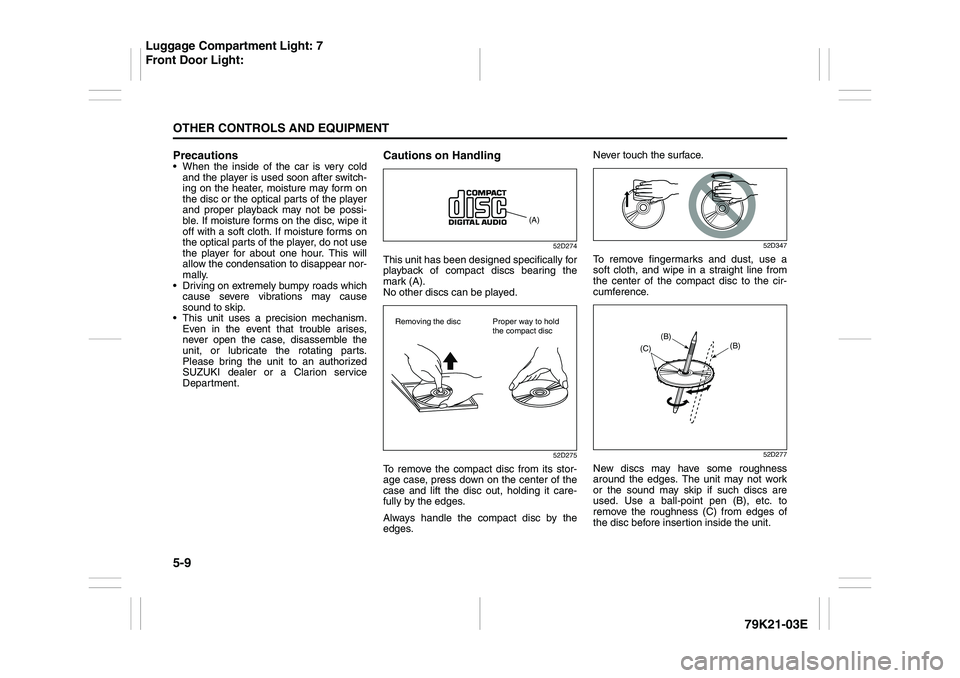
Cautions on Handling
52D274
This unit has been designed specifically for
playback of compact discs bearing the
mark (A).
No other discs can be played.
52D275
To remove the compact disc from its stor-
age case, press down on the center of the
case and lift the disc out, holding it care-
fully by the edges.
Always handle the compact disc by the
edges.Never touch the surface.
52D347
To remove fingermarks and dust, use a
soft cloth, and wipe in a straight line from
the center of the compact disc to the cir-
cumference.
52D277
New discs may have some roughness
around the edges. The unit may not work
or the sound may skip if such discs are
used. Use a ball-point pen (B), etc. to
remove the roughness (C) from edges of
the disc before insertion inside the unit.
(A)
Removing the disc Proper way to hold
the compact disc
(B)
(B)
(C)
Luggage Compartment Light: 7
Front Door Light:
Page 163 of 337
5-10
OTHER CONTROLS AND EQUIPMENT
79K21-03E
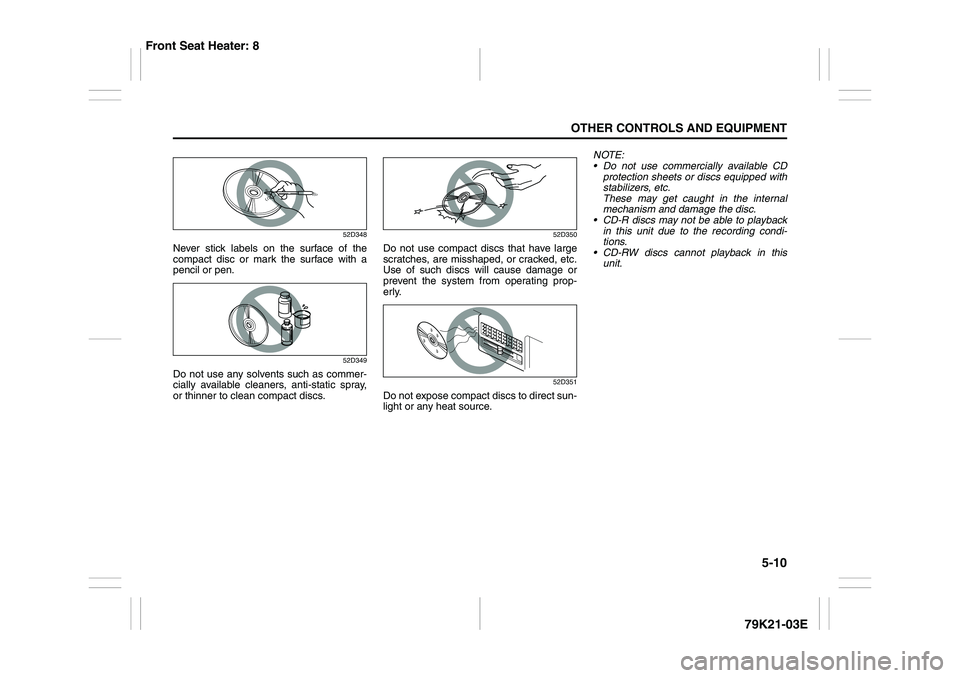
52D348
Never stick labels on the surface of the
compact disc or mark the surface with a
pencil or pen.
52D349
Do not use any solvents such as commer-
cially available cleaners, anti-static spray,
or thinner to clean compact discs.
52D350
Do not use compact discs that have large
scratches, are misshaped, or cracked, etc.
Use of such discs will cause damage or
prevent the system from operating prop-
erly.
52D351
Do not expose compact discs to direct sun-
light or any heat source.NOTE:
Do not use commercially available CD
protection sheets or discs equipped with
stabilizers, etc.
These may get caught in the internal
mechanism and damage the disc.
CD-R discs may not be able to playback
in this unit due to the recording condi-
tions.
CD-RW discs cannot playback in this
unit.
Front Seat Heater: 8
Page 172 of 337
5-19OTHER CONTROLS AND EQUIPMENT
79K21-03E
NOTE:
About Single CDs (8 cm CDs)
Since the unit is not compatible with a
single CD, do not load it into the unit.
Keep in mind the fact that a single CD
cannot be played even using a single CD
adaptor for the unit.
When a single CD is loaded into the unit
accidentally, it will be ejected immedi-
ately. Please be sure to remove it.
If you forcefully try to push it into the unit
without removing it, the CD cannot be
ejected. This will result in a damage to
the mechanism. Please never do this.Loading one CD
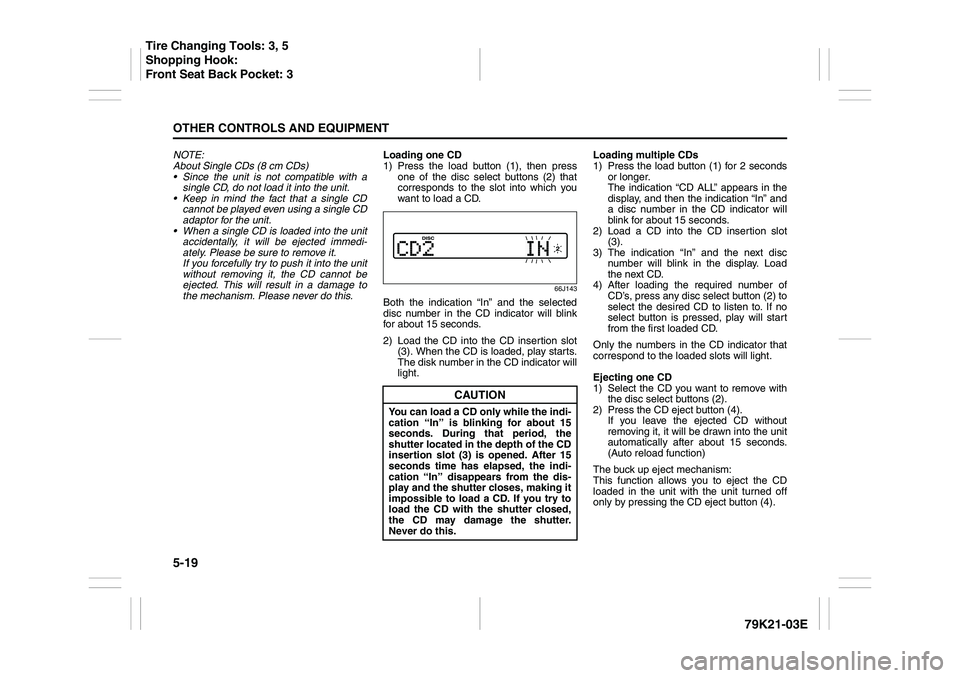
1) Press the load button (1), then press
one of the disc select buttons (2) that
corresponds to the slot into which you
want to load a CD.
66J143
Both the indication “In” and the selected
disc number in the CD indicator will blink
for about 15 seconds.
2) Load the CD into the CD insertion slot
(3). When the CD is loaded, play starts.
The disk number in the CD indicator will
light.Loading multiple CDs
1) Press the load button (1) for 2 seconds
or longer.
The indication “CD ALL” appears in the
display, and then the indication “In” and
a disc number in the CD indicator will
blink for about 15 seconds.
2) Load a CD into the CD insertion slot
(3).
3) The indication “In” and the next disc
number will blink in the display. Load
the next CD.
4) After loading the required number of
CD’s, press any disc select button (2) to
select the desired CD to listen to. If no
select button is pressed, play will start
from the first loaded CD.
Only the numbers in the CD indicator that
correspond to the loaded slots will light.
Ejecting one CD
1) Select the CD you want to remove with
the disc select buttons (2).
2) Press the CD eject button (4).
If you leave the ejected CD without
removing it, it will be drawn into the unit
automatically after about 15 seconds.
(Auto reload function)
The buck up eject mechanism:
This function allows you to eject the CD
loaded in the unit with the unit turned off
only by pressing the CD eject button (4).
CAUTION
You can load a CD only while the indi-
cation “In” is blinking for about 15
seconds. During that period, the
shutter located in the depth of the CD
insertion slot (3) is opened. After 15
seconds time has elapsed, the indi-
cation “In” disappears from the dis-
play and the shutter closes, making it
impossible to load a CD. If you try to
load the CD with the shutter closed,
the CD may damage the shutter.
Never do this.
Tire Changing Tools: 3, 5
Shopping Hook:
Front Seat Back Pocket: 3
Page 224 of 337
5-71OTHER CONTROLS AND EQUIPMENT
79K21-03E
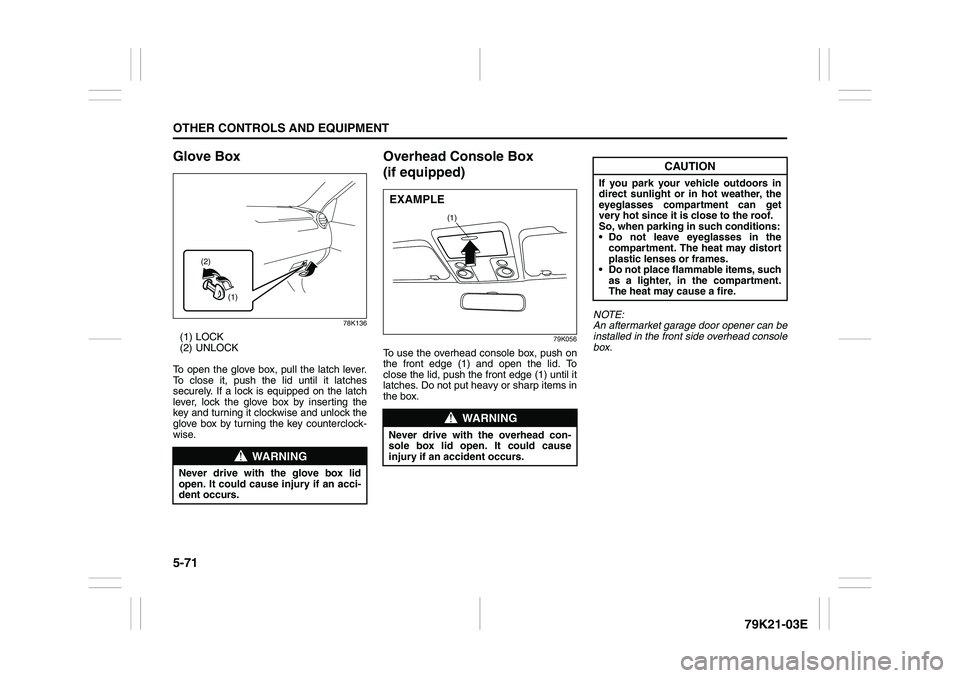
Glove Box
78K136
(1) LOCK
(2) UNLOCK
To open the glove box, pull the latch lever.
To close it, push the lid until it latches
securely. If a lock is equipped on the latch
lever, lock the glove box by inserting the
key and turning it clockwise and unlock the
glove box by turning the key counterclock-
wise.
Overhead Console Box
(if equipped)
79K056
To use the overhead console box, push on
the front edge (1) and open the lid. To
close the lid, push the front edge (1) until it
latches. Do not put heavy or sharp items in
the box.NOTE:
An aftermarket garage door opener can be
installed in the front side overhead console
box.
WARNING
Never drive with the glove box lid
open. It could cause injury if an acci-
dent occurs.
(1) (2)
WARNING
Never drive with the overhead con-
sole box lid open. It could cause
injury if an accident occurs.
(1)
EXAMPLE
CAUTION
If you park your vehicle outdoors in
direct sunlight or in hot weather, the
eyeglasses compartment can get
very hot since it is close to the roof.
So, when parking in such conditions:
Do not leave eyeglasses in the
compartment. The heat may distort
plastic lenses or frames.
Do not place flammable items, such
as a lighter, in the compartment.
The heat may cause a fire.
Page 226 of 337
5-73OTHER CONTROLS AND EQUIPMENT
79K21-03E
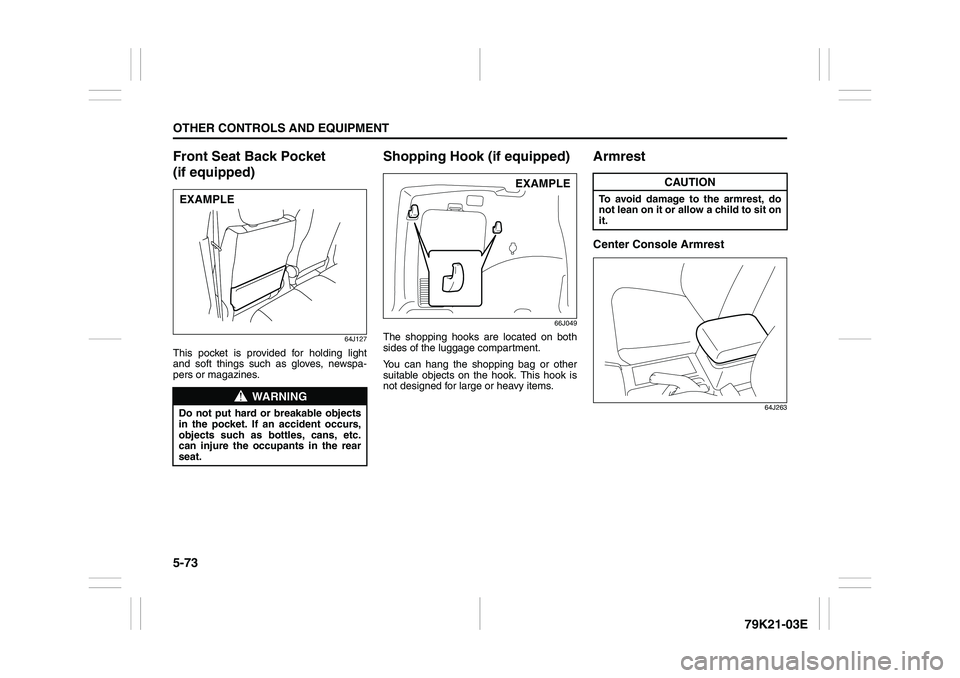
Front Seat Back Pocket
(if equipped)
64J127
This pocket is provided for holding light
and soft things such as gloves, newspa-
pers or magazines.
Shopping Hook (if equipped)
66J049
The shopping hooks are located on both
sides of the luggage compartment.
You can hang the shopping bag or other
suitable objects on the hook. This hook is
not designed for large or heavy items.
ArmrestCenter Console Armrest
64J263
WARNING
Do not put hard or breakable objects
in the pocket. If an accident occurs,
objects such as bottles, cans, etc.
can injure the occupants in the rear
seat.EXAMPLE
EXAMPLE
CAUTION
To avoid damage to the armrest, do
not lean on it or allow a child to sit on
it.
Page 242 of 337
6-5VEHICLE LOADING AND TOWING
79K21-03E
Additional Trailer Towing Warnings
WARNING
Never overload your trailer or your
vehicle. Gross Trailer Weight must
never exceed 1350 kg (3000 pounds).
Gross Combined Weight must never
exceed 3400 kg (7500 pounds) for
2WD or 3450 kg (7600 pounds) for
4WD.
Gross vehicle weight must never
exceed the Gross Vehicle Weight Rat-
ing (GVWR) listed on the Safety Certi-
fication Label. Gross axle weight for
the front and rear axles must not
exceed the Gross Axle Weight Rating
(GAWR) listed on the Safety Certifica-
tion Label.
WARNING
Do not tow a trailer having a gross
trailer weight greater than 450 kg
(1000 pounds) unless the trailer is
equipped with trailer brakes.
WARNING
Connect trailer lights and hook up
safety chains every time you tow.
WARNING
Your vehicle will handle differently
when towing a trailer. For your safety
and the safety of others, you should
observe the following precautions:
Practice turning, stopping and
backing up before you begin tow-
ing in traffic. Do not tow in traffic
until you are confident that you can
handle the vehicle and trailer
safely.
Never exceed posted towing speed
limits or 72 km/h (45 mph), which-
ever is lower.
Never drive at a speed that causes
shaking or swaying of the trailer. If
you notice even the slightest sign
of shaking or swaying, slow down.
Always have someone guide you
when backing.
(Continued)
WARNING
(Continued)
Allow adequate stopping distance.
Stopping distance is increased
when you tow a trailer. For each 16
km/h (10 mph) of speed, allow at
least one vehicle and trailer length
between you and the vehicle ahead.
Follow at a greater distance if roads
are wet or slippery.
Slow down when making turns.
Remember that a larger than nor-
mal turning radius is needed
because the trailer wheels will be
closer than the vehicle wheels to
the inside of the turn.
Avoid sudden acceleration and
stopping of the vehicle. Do not
make quick maneuvers unless they
are necessary.
Slow down in cross winds and be
prepared for wind blasts from large
passing vehicles.
Be careful when passing other
vehicles. Be sure to allow enough
room for your trailer before you
change lanes, and signal well in
advance.
Slow down and shift into a lower
gear before you reach long or steep
downhill grades. It is hazardous to
attempt downshifting while you are
descending a hill.
(Continued)
Trailer Towing: 5, 11, 13
Page 245 of 337
6-8
VEHICLE LOADING AND TOWING
79K21-03E
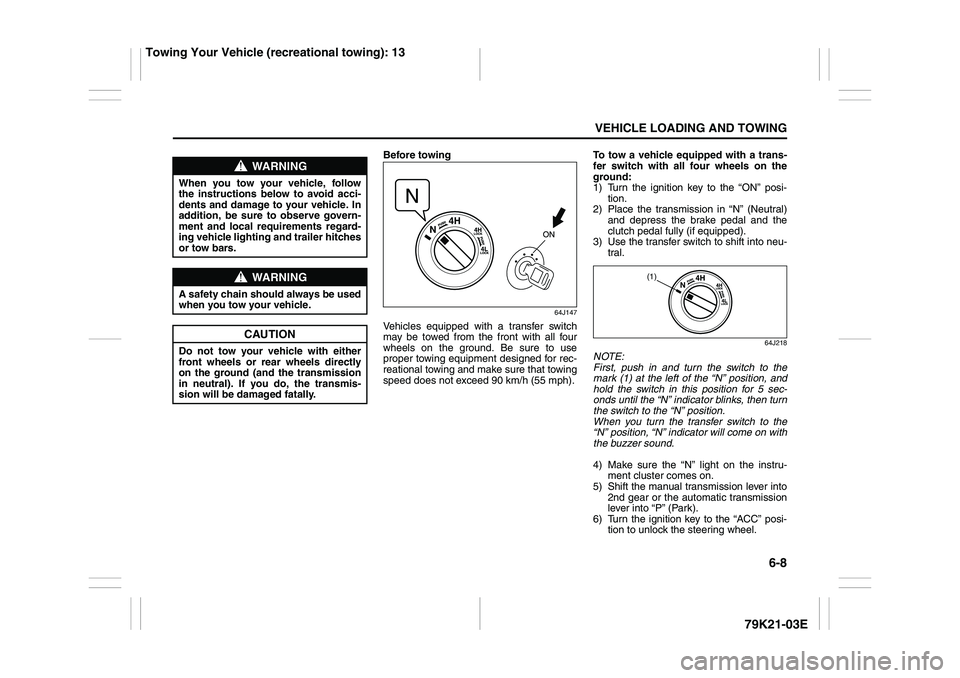
Before towing
64J147
Vehicles equipped with a transfer switch
may be towed from the front with all four
wheels on the ground. Be sure to use
proper towing equipment designed for rec-
reational towing and make sure that towing
speed does not exceed 90 km/h (55 mph).To tow a vehicle equipped with a trans-
fer switch with all four wheels on the
ground:
1) Turn the ignition key to the “ON” posi-
tion.
2) Place the transmission in “N” (Neutral)
and depress the brake pedal and the
clutch pedal fully (if equipped).
3) Use the transfer switch to shift into neu-
tral.
64J218
NOTE:
First, push in and turn the switch to the
mark (1) at the left of the “N” position, and
hold the switch in this position for 5 sec-
onds until the “N” indicator blinks, then turn
the switch to the “N” position.
When you turn the transfer switch to the
“N” position, “N” indicator will come on with
the buzzer sound.
4) Make sure the “N” light on the instru-
ment cluster comes on.
5) Shift the manual transmission lever into
2nd gear or the automatic transmission
lever into “P” (Park).
6) Turn the ignition key to the “ACC” posi-
tion to unlock the steering wheel.
WARNING
When you tow your vehicle, follow
the instructions below to avoid acci-
dents and damage to your vehicle. In
addition, be sure to observe govern-
ment and local requirements regard-
ing vehicle lighting and trailer hitches
or tow bars.
WARNING
A safety chain should always be used
when you tow your vehicle.
CAUTION
Do not tow your vehicle with either
front wheels or rear wheels directly
on the ground (and the transmission
in neutral). If you do, the transmis-
sion will be damaged fatally.
(1)
Towing Your Vehicle (recreational towing): 13
Page 276 of 337
7-27INSPECTION AND MAINTENANCE
79K21-03E Tire Inflation Pressure
Tire inflation pressure should be
checked when the tire is cold. “Cold
tire inflation pressure” is the pressure
in a tire that has been driven less than
1 mile (1.6 km) or has been standing
for three hours or more.
54G307
The front, rear and spare tire pressure
specifications for your vehicle are
shown below and are listed on the Tire
and Loading Information Label, which
is located on the driver’s door lock pil-
lar. The Tire and Loading Information
Label contains the following informa-
tion:
Seating Capacity
Maximum Allowed Combined
Weight of Occupants and Cargo
Original Tire Size Recommended Cold Tire Inflation
Pressure of Original Tires
NOTE:
The tire inflation pressure will change
due to changes in atmospheric pres-
sure, temperature or tire temperature
when driving. To reduce the chance
that the low tire pressure warning light
will come on due to normal changes in
temperature and atmospheric pres-
sure, it is important to check and
adjust the tire pressures when the tires
are cold. Tires that appear to be at the
specified pressure when checked after
driving, when the tires are warm, could
have pressure below the specification
when the tires cool down. Also, tires
that are inflated to the specified pres-
sure in a warm garage may have pres-
sure below the specification when the
vehicle is driven outside in very coldtemperature. If you adjust the tire
pressure in a garage that is warmer
than the outside temperature, you
should add 1 psi to the recommended
cold tire inflation pressure for every
10°F difference between garage tem-
perature and outside temperature.
Measuring air pressure
Use the following steps to achieve
proper tire inflation:
1) Identify the recommended tire pres-
sure on the vehicle’s Tire and Load-
ing Information Label or in the
owner’s manual.
2) Remove the valve cap from the tire
valve stem.
3) Using a reliable pressure gauge,
measure the tire inflation pressure
by pressing the tire gauge firmly
onto the valve to get a pressure
measurement. Remember that
inflation pressures should be
checked when the tires are “cold”,
meaning before they have been
driven one mile or after sitting for
three hours or more allowing the
tire to cool to ambient air tempera-
ture.
4) If the air pressure is too high, slowly
release the air by pressing on the
tire valve stem with the edge of the
Recommended Cold Tire Inflation
Pressures
Front Tires230 kPa
33 psi
Rear Tires230 kPa
33 psi
Spare230 kPa
33 psi
Tires: 6