display SUZUKI GRAND VITARA 2015 Owners Manual
[x] Cancel search | Manufacturer: SUZUKI, Model Year: 2015, Model line: GRAND VITARA, Model: SUZUKI GRAND VITARA 2015Pages: 482, PDF Size: 21 MB
Page 322 of 482
5-80
OTHER CONTROLS AND EQUIPMENT
54P00-01E
Selection of audio device (Select Audio)
Follow the instructions below to select an
audio device to be paired with from the
registered audio devices.
1) Press the Bluetooth
® setup button (6).
The Bluetooth® setup menu will be dis-
played.
2) Turn “TUNE/FLD PUSH SOUND” knob
(2) to select “Setup Bluetooth”, and
press the knob (2) to determine the
selection.
3) Turn “TUNE/FLD PUSH SOUND” knob
(2) to select “List Audio”, and press the
knob (2) to determine the selection.
4) Turn “TUNE/FLD PUSH SOUND” knob
(2) to select an audio device to be
used, and press the knob (2) to deter-
mine the selection.
5) Turn “TUNE/FLD PUSH SOUND” knob
(2) to select “Select”, and press the
knob (2) to determine the selection.
6) Turn “TUNE/FLD PUSH SOUND” knob
(2) to select “Confirm”, and press the
knob (2) to complete the pairing.
NOTE:
• When selecting “Go Back”, the previous
menu will be displayed.
• The phone will be disconnected when
the Bluetooth
® ready audio device is
selected.List of audio devices (List Audio)
Follow the instructions below to display the
names of the registered audio devices in
sequence.
1) Press the Bluetooth
® setup button (6).
The Bluetooth® setup menu will be dis-
played.
2) Turn “TUNE/FLD PUSH SOUND” knob
(2) to select “Setup Bluetooth”, and
press the knob (2) to determine the
selection.
3) Turn “TUNE/FLD PUSH SOUND” knob
(2) to select “List Audio”, and press the
knob (2) to determine the selection.
The names of registered audio devices
will be displayed in sequence.
NOTE:
When selecting “Go Back”, the previous
menu will be displayed.
Passkey setting (Set Passkey)
Follow the instructions below to set the
security number (Passkey).
1) Press the Bluetooth
® setup button (6).
The Bluetooth® setup menu will be dis-
played.
2) Turn “TUNE/FLD PUSH SOUND” knob
(2) to select “Setup Bluetooth”, and
press the knob (2) to determine the
selection.
3) Turn “TUNE/FLD PUSH SOUND” knob
(2) to select “Passkey”, and press the
knob (2) to determine the selection.4) Turn “TUNE/FLD PUSH SOUND” knob
(2) to select “New Passkey”, and press
the knob (2) to determine the selection.
5) Press or turn “TUNE/FLD PUSH
SOUND” knob (2) to select “Confirm”.
6) Turn “TUNE/FLD PUSH SOUND” knob
(2) to select a number for the first digit,
and press the knob (2) to determine the
selection. Select and determine num-
bers for the second, third and fourth
digits in order in the same manner.
When not entering up to the eighth
digit, enter blanks for the successive
digits.
7) Turn “TUNE/FLD PUSH SOUND” knob
(2) to determine the passkey setting.
NOTE:
When selecting “Go Back”, the previous
menu will be displayed.
Page 323 of 482
5-81
OTHER CONTROLS AND EQUIPMENT
54P00-01E
Deletion of audio device information
(Delete Audio)
Follow the instructions below to delete the
registered audio device information.
1) Press the Bluetooth
® setup button (6).
The Bluetooth® setup menu will be dis-
played.
2) Turn “TUNE/FLD PUSH SOUND” knob
(2) to select “Setup Bluetooth”, and
press the knob (2) to determine the
selection.
3) Turn “TUNE/FLD PUSH SOUND” knob
(2) to select “List Audio”, and press the
knob (2) to determine the selection.
4) Turn “TUNE/FLD PUSH SOUND” knob
(2) to select an audio device to be
deleted, and press the knob (2) to
determine the selection.
5) Turn “TUNE/FLD PUSH SOUND” knob
(2) to select “Delete”, and press the
knob (2) to determine the selection.
6) Turn “TUNE/FLD PUSH SOUND” knob
(2) to select “Delete?”, and press the
knob (2) to determine the selection.
7) Turn “TUNE/FLD PUSH SOUND” knob
(2) to select “Confirm”, and press the
knob (2) to complete the deletion.
NOTE:
When selecting “Go Back”, the previous
menu will be displayed.
Disclaimer for Bluetooth® function
• Depending on compatibility of mobile
phone models, no Bluetooth® function
can be used, or some Bluetooth® func-
tions may be restricted.
• Connectivity or voice quality may get
affected depending on circumstances.
• After the ignition switch is turned to “ON”
position or the engine switch is pressed
to change the ignition mode to “ON”, the
audio system takes few seconds to
detect and connect to the Bluetooth
®
device (if already paired).
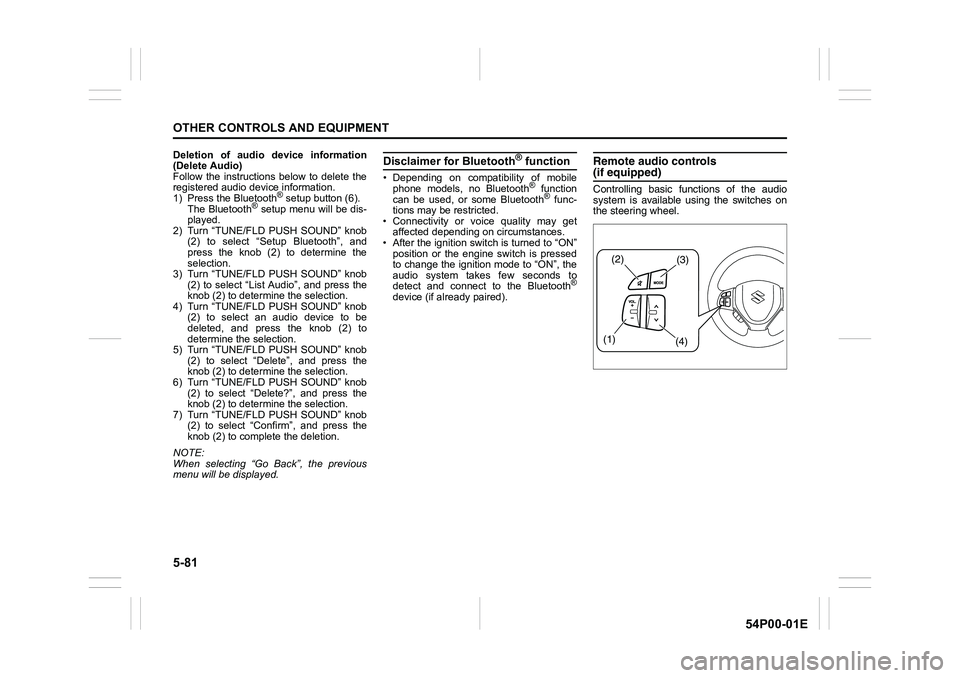
Remote audio controls(if equipped)
Controlling basic functions of the audio
system is available using the switches on
the steering wheel.
(2)(3)
(1)
(4)
Page 326 of 482
5-84
OTHER CONTROLS AND EQUIPMENT
54P00-01E
The anti-theft function is intended to dis-
courage thefts. For example, when the
audio system is installed in another vehi-
cle, it will become unable to operate.
This function works by entering a Personal
Identification Number (PIN).
When the unit is disconnected from its
power source, such as when the audio
system is removed or the battery is discon-
nected, the unit will become inoperable
until the PIN is reentered.Setting the anti-theft function
1) Press “VOL PUSH PWR” knob (1) to
power off.
2) Hold down the buttons numbered [1]
and [6] of PRESET buttons (2) and
press “VOL PUSH PWR” knob (1).
“SECURITY” will be displayed.
3) Press UP button (3) and the button
numbered [1] of PRESET buttons (2)
simultaneously.
4) Enter a 4-digit number to be registered
as PIN using the buttons numbered [1]
- [4] of PRESET buttons (2).
5) Hold down “TUNE/FLD PUSH
SOUND” knob (4) for 1 second or lon-
ger to set the anti-theft function.
NOTE:
Take a note of the registered PIN and keep
it for the future use. Canceling the anti-theft feature
To cancel the anti-theft function, delete the
registered PIN.
1) Press “VOL PUSH PWR” knob (1) to
power off.
2) Hold down the buttons numbered [1]
and [6] of PRESET buttons (2) and
press “VOL PUSH PWR” knob (1).
“PIN ENTRY” will be displayed.
3) Press UP button (3) and the button
numbered [1] of PRESET buttons (2)
simultaneously.
4) Enter a 4-digit number to be registered
as PIN using the buttons numbered [1]
- [4] of PRESET buttons (2).
5) Hold down “TUNE/FLD PUSH
SOUND” knob (4) for 1 second or lon-
ger to delete the registered PIN. The
indication “----” will be displayed and
the anti-theft function will be canceled.
NOTE:
To change your PIN, first delete your cur-
rent PIN, and then set a new one.
Page 327 of 482
5-85
OTHER CONTROLS AND EQUIPMENT
54P00-01E
Confirming the Personal Identification
Number (PIN)
When the main power source is discon-
nected such as when the battery is
replaced, etc, it is required to enter the PIN
to operate the unit again.
1) Set the ignition switch to “ACC” posi-
tion or the ignition mode to “ON”.
“SECURITY” will be displayed.
2) Press UP button (3) and the button
numbered [1] of PRESET buttons (2)
simultaneously.
3) Enter a 4-digit number to be registered
as PIN using the buttons numbered [1]
- [4] of PRESET buttons (2).
4) Hold down “TUNE/FLD PUSH
SOUND” knob (4) for 1 second or lon-
ger.
When the same PIN as registered is
entered, the power of the audio system
will be turned off automatically and it
will become operable again.
NOTE:
If an incorrect PIN is entered, “ERROR”
and the total number of incorrect entry
attempts will be displayed.
If an incorrect PIN is entered 10 times or
more, “HELP” will be displayed and the
audio system will become inoperable.
Page 328 of 482
5-86
OTHER CONTROLS AND EQUIPMENT
54P00-01E
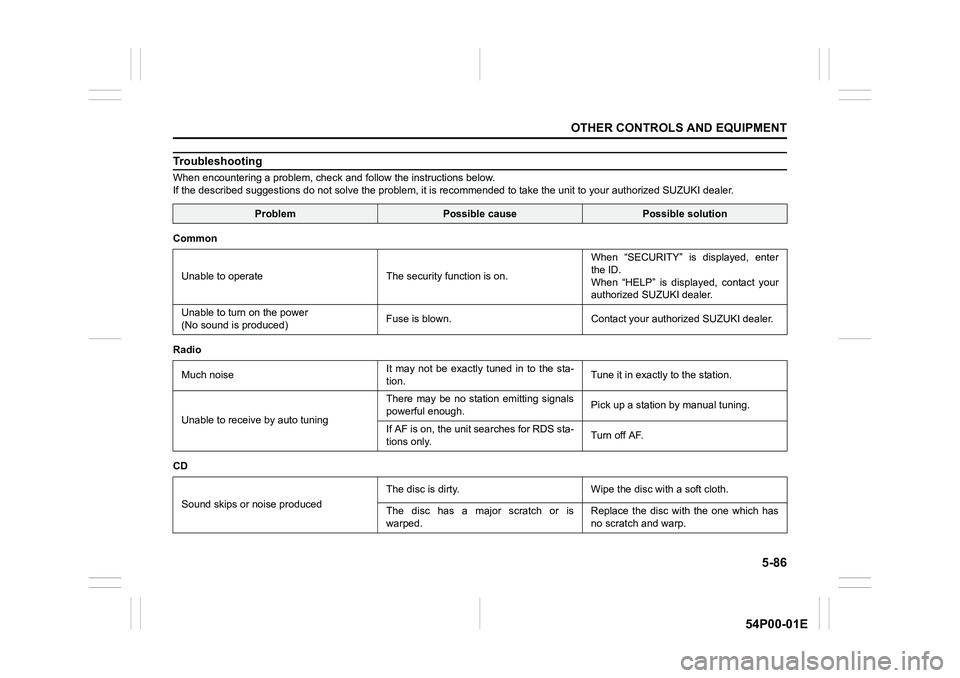
Troubleshooting
When encountering a problem, check and follow the instructions below.
If the described suggestions do not solve the problem, it is recommended to take the unit to your authorized SUZUKI dealer.
ProblemPossible causePossible solution
Common
Unable to operate The security function is on.When “SECURITY” is displayed, enter
the ID.
When “HELP” is displayed, contact your
authorized SUZUKI dealer.
Unable to turn on the power
(No sound is produced)Fuse is blown. Contact your authorized SUZUKI dealer.
Radio
Much noiseIt may not be exactly tuned in to the sta-
tion.Tune it in exactly to the station.
Unable to receive by auto tuningThere may be no station emitting signals
powerful enough.Pick up a station by manual tuning.
If AF is on, the unit searches for RDS sta-
tions only.Turn off AF.
CD
Sound skips or noise producedThe disc is dirty. Wipe the disc with a soft cloth.
The disc has a major scratch or is
warped.Replace the disc with the one which has
no scratch and warp.
Page 330 of 482
5-88
OTHER CONTROLS AND EQUIPMENT
54P00-01E
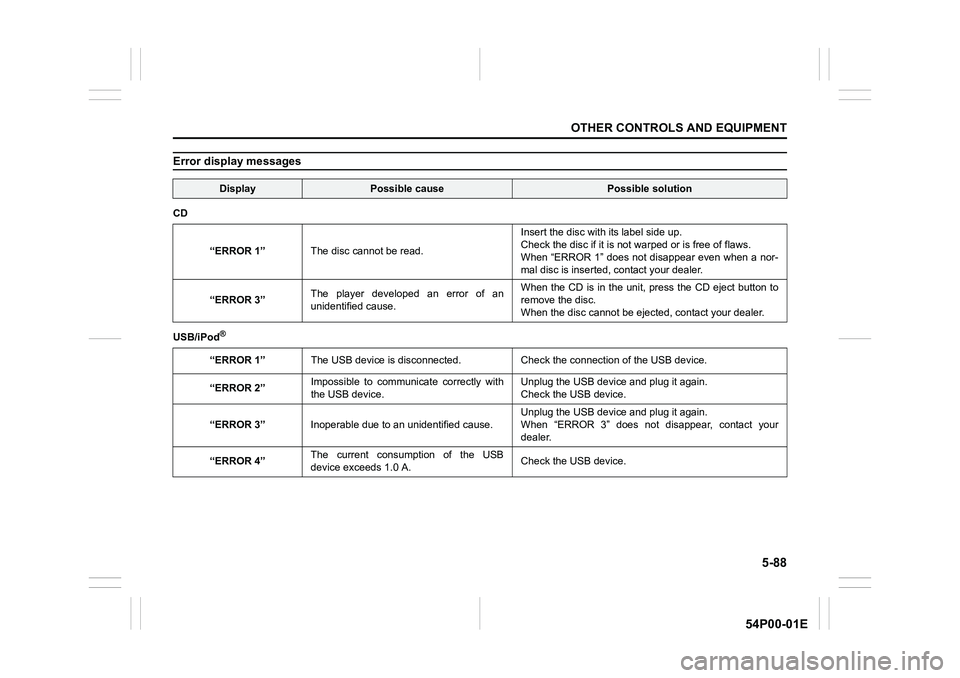
Error display messages
DisplayPossible causePossible solution
CD
“ERROR 1”The disc cannot be read.Insert the disc with its label side up.
Check the disc if it is not warped or is free of flaws.
When “ERROR 1” does not disappear even when a nor-
mal disc is inserted, contact your dealer.
“ERROR 3”The player developed an error of an
unidentified cause.When the CD is in the unit, press the CD eject button to
remove the disc.
When the disc cannot be ejected, contact your dealer.
USB/iPod
®
“ERROR 1”The USB device is disconnected. Check the connection of the USB device.
“ERROR 2”Impossible to communicate correctly with
the USB device.Unplug the USB device and plug it again.
Check the USB device.
“ERROR 3”Inoperable due to an unidentified cause. Unplug the USB device and plug it again.
When “ERROR 3” does not disappear, contact your
dealer.
“ERROR 4”The current consumption of the USB
device exceeds 1.0 A.Check the USB device.
Page 331 of 482
5-89
OTHER CONTROLS AND EQUIPMENT
54P00-01E
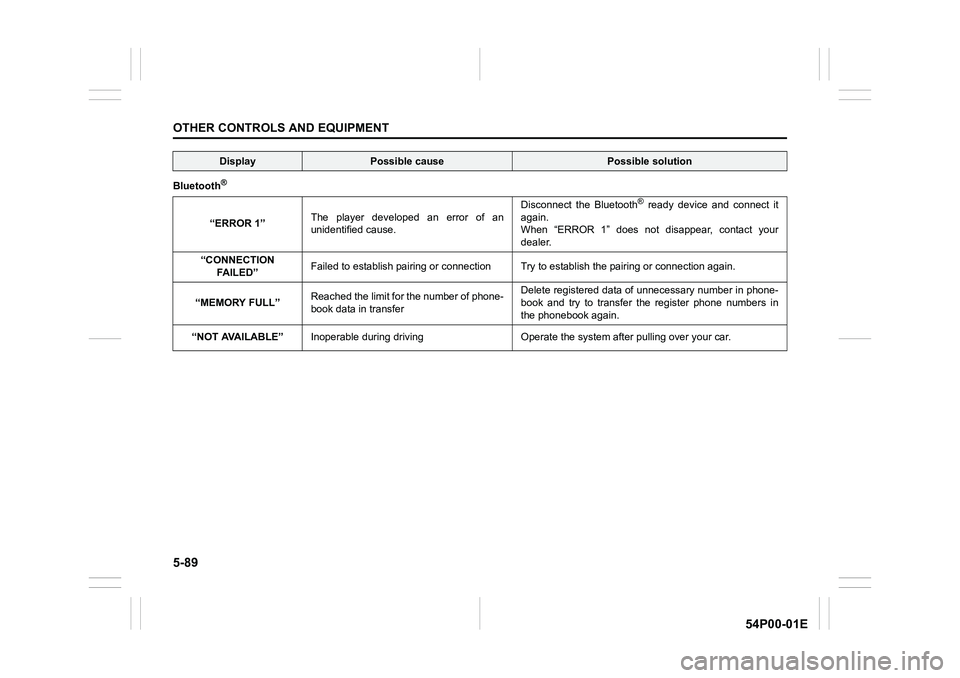
Bluetooth®
“ERROR 1”The player developed an error of an
unidentified cause.Disconnect the Bluetooth
® ready device and connect it
again.
When “ERROR 1” does not disappear, contact your
dealer.
“CONNECTION
FA I L E D ”Failed to establish pairing or connection Try to establish the pairing or connection again.
“MEMORY FULL”Reached the limit for the number of phone-
book data in transferDelete registered data of unnecessary number in phone-
book and try to transfer the register phone numbers in
the phonebook again.
“NOT AVAILABLE”Inoperable during driving Operate the system after pulling over your car.
DisplayPossible causePossible solution
Page 334 of 482
6-2
VEHICLE LOADING AND TOWING
54P00-01E
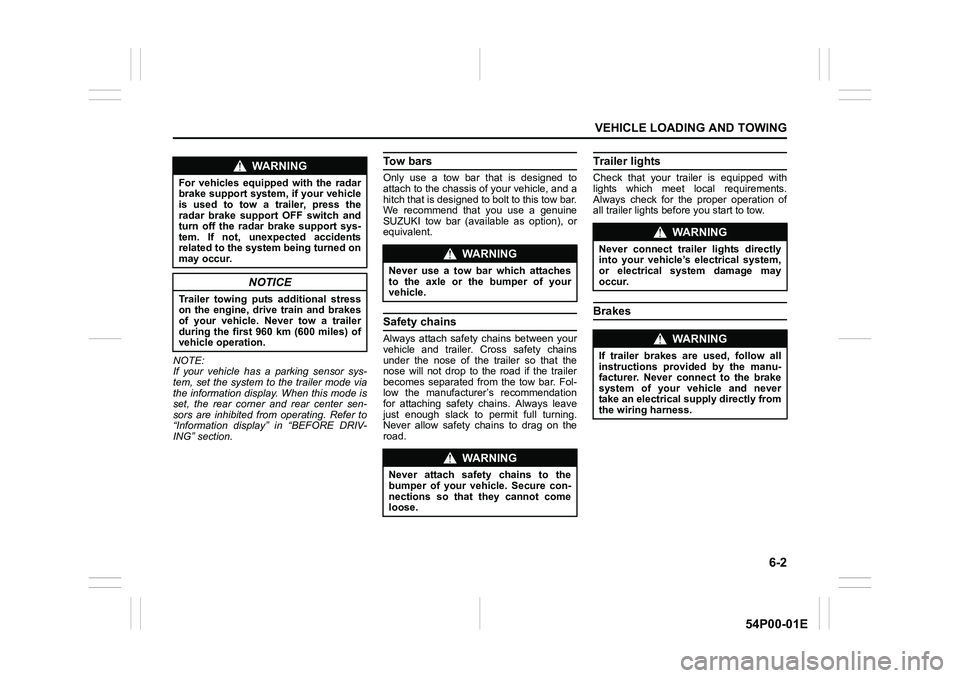
NOTE:
If your vehicle has a parking sensor sys-
tem, set the system to the trailer mode via
the information display. When this mode is
set, the rear corner and rear center sen-
sors are inhibited from operating. Refer to
“Information display” in “BEFORE DRIV-
ING” section.
To w b a r s
Only use a tow bar that is designed to
attach to the chassis of your vehicle, and a
hitch that is designed to bolt to this tow bar.
We recommend that you use a genuine
SUZUKI tow bar (available as option), or
equivalent.
Safety chains
Always attach safety chains between your
vehicle and trailer. Cross safety chains
under the nose of the trailer so that the
nose will not drop to the road if the trailer
becomes separated from the tow bar. Fol-
low the manufacturer’s recommendation
for attaching safety chains. Always leave
just enough slack to permit full turning.
Never allow safety chains to drag on the
road.
Trailer lights
Check that your trailer is equipped with
lights which meet local requirements.
Always check for the proper operation of
all trailer lights before you start to tow.
Brakes
WA R N I N G
For vehicles equipped with the radar
brake support system, if your vehicle
is used to tow a trailer, press the
radar brake support OFF switch and
turn off the radar brake support sys-
tem. If not, unexpected accidents
related to the system being turned on
may occur.
NOTICE
Trailer towing puts additional stress
on the engine, drive train and brakes
of your vehicle. Never tow a trailer
during the first 960 km (600 miles) of
vehicle operation.
WA R N I N G
Never use a tow bar which attaches
to the axle or the bumper of your
vehicle.
WA R N I N G
Never attach safety chains to the
bumper of your vehicle. Secure con-
nections so that they cannot come
loose.
WA R N I N G
Never connect trailer lights directly
into your vehicle’s electrical system,
or electrical system damage may
occur.
WA R N I N G
If trailer brakes are used, follow all
instructions provided by the manu-
facturer. Never connect to the brake
system of your vehicle and never
take an electrical supply directly from
the wiring harness.
Page 362 of 482
7-24
INSPECTION AND MAINTENANCE
54P00-01E
5) Reinstall the drain plug and gasket.
Tighten the plug with a wrench to the
specified torque.
NOTE:
• Whenever the engine oil is changed, the
oil life monitoring must be reset to moni-
tor the next oil change timing properly.
To reset the light, consult your SUZUKI
dealer. If you reset it by yourself, refer to
“Setting mode” in “BEFORE DRIVING”
section (for gasoline engine model).
• For more information of the oil change
request light and oil life monitoring, refer
to “Oil change request light (if equipped)”
and “Information display” in “BEFORE
DRIVING” section.
Oil filter replacement
NOTE:
(For diesel engine model)
Since special procedures and tools are
required, ask your authorized SUZUKI
dealer for this job.
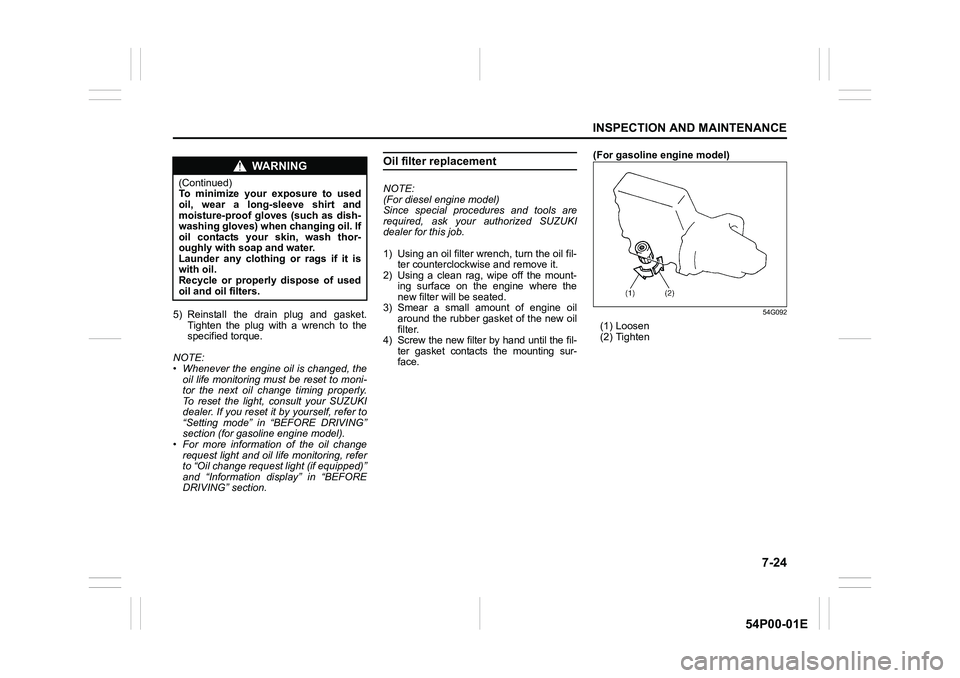
1) Using an oil filter wrench, turn the oil fil-
ter counterclockwise and remove it.
2) Using a clean rag, wipe off the mount-
ing surface on the engine where the
new filter will be seated.
3) Smear a small amount of engine oil
around the rubber gasket of the new oil
filter.
4) Screw the new filter by hand until the fil-
ter gasket contacts the mounting sur-
face.(For gasoline engine model)
54G092
(1) Loosen
(2) Tighten
WA R N I N G
(Continued)
To minimize your exposure to used
oil, wear a long-sleeve shirt and
moisture-proof gloves (such as dish-
washing gloves) when changing oil. If
oil contacts your skin, wash thor-
oughly with soap and water.
Launder any clothing or rags if it is
with oil.
Recycle or properly dispose of used
oil and oil filters.
Page 438 of 482
12-8
SUPPLEMENT
54P00-01E
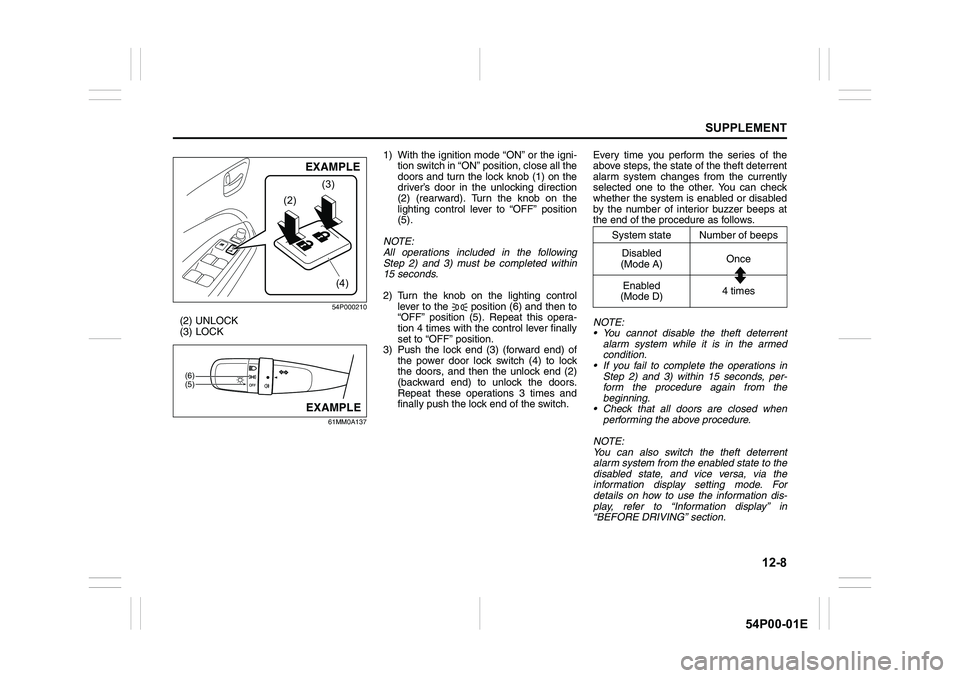
54P000210
(2) UNLOCK
(3) LOCK
61MM0A137
1) With the ignition mode “ON” or the igni-
tion switch in “ON” position, close all the
doors and turn the lock knob (1) on the
driver’s door in the unlocking direction
(2) (rearward). Turn the knob on the
lighting control lever to “OFF” position
(5).
NOTE:
All operations included in the following
Step 2) and 3) must be completed within
15 seconds.
2) Turn the knob on the lighting control
lever to the position (6) and then to
“OFF” position (5). Repeat this opera-
tion 4 times with the control lever finally
set to “OFF” position.
3) Push the lock end (3) (forward end) of
the power door lock switch (4) to lock
the doors, and then the unlock end (2)
(backward end) to unlock the doors.
Repeat these operations 3 times and
finally push the lock end of the switch.Every time you perform the series of the
above steps, the state of the theft deterrent
alarm system changes from the currently
selected one to the other. You can check
whether the system is enabled or disabled
by the number of interior buzzer beeps at
the end of the procedure as follows.
NOTE:
You cannot disable the theft deterrent
alarm system while it is in the armed
condition.
If you fail to complete the operations in
Step 2) and 3) within 15 seconds, per-
form the procedure again from the
beginning.
Check that all doors are closed when
performing the above procedure.
NOTE:
You can also switch the theft deterrent
alarm system from the enabled state to the
disabled state, and vice versa, via the
information display setting mode. For
details on how to use the information dis-
play, refer to “Information display” in
“BEFORE DRIVING” section.
(2)(3)
(4)
EXAMPLE
(5) (6)
EXAMPLE
System state Number of beeps
Disabled
(Mode A)Once
Enabled
(Mode D)4 times