key SUZUKI GRAND VITARA 2015 Workshop Manual
[x] Cancel search | Manufacturer: SUZUKI, Model Year: 2015, Model line: GRAND VITARA, Model: SUZUKI GRAND VITARA 2015Pages: 482, PDF Size: 21 MB
Page 286 of 482
5-44
OTHER CONTROLS AND EQUIPMENT
54P00-01E
The Bluetooth® word mark and logo are
registered trademarks and are owned by
the Bluetooth SIG, Ink.
Stop using this unit and a Bluetooth
®
ready device whenever requested.
This unit shares the communication fre-
quency with other private or public wireless
communication equipment such as a wire-
less LAN and other wireless communica-
tion radios.
You should stop using this unit whenever
you are notified that your unit disturbs
other wireless communication immediately.The latest “DECLARATION of CONFOR-
MITY” (DoC) is available at the following
address:
http://www.ptc.panasonic.eu/
To check DoC, access the above men-
tioned URL.
And then search DoC by entering the fol-
lowing Model No. into “Keyword Search”
box in “Downloads” page.
Model No. YEP0PTA606A0
WA R N I N G
This is a class I laser product. Use
of controls or adjustments or perfor-
mance of procedures other than
those specified herein may result in
hazardous radiation exposure.
Do not open covers and do not
attempt to repair this unit by your-
self.
Ask an authorized dealer for the
repair.
“Questo prodotto e’ conforme al DM
28/8/1955, N.548, ottemperando alle
prescrizioni di cui al DM 25/6/1985
(par. 3, All. A) e DM 27/8/1987 (All. I).”
Page 313 of 482
5-71
OTHER CONTROLS AND EQUIPMENT
54P00-01E
Phone registration
NOTE:
• Up to 5 phones can be registered.
To set up a new phone, disconnect the
audio player from the unit. Connect the
audio player again after phone setup is
completed if necessary.
When attempts to establish the pairing
fail within 120 seconds, the connecting
operation will be canceled. Try to estab-
lish the pairing again or refer to the man-
ual of the phone in use for how to
establish the pairing with the phone.
1) Press the Bluetooth
® setup button (4).
The Bluetooth® setup menu will be dis-
played.
2) Turn “TUNE/FLD PUSH SOUND” knob
(1) to select “Setup Bluetooth”, and
press the knob (1) to determine the
selection.
3) Turn “TUNE/FLD PUSH SOUND” knob
(1) to select “Pairing”, and press the
knob (1) to determine the selection.
4) Select “CAR AUDIO” from the Blue-
tooth
® menu of the phone and establish
the pairing.
Refer to the manual of the phone in use
for further information.
5) Enter the passkey displayed on the unit
to the phone.
6) Press ON HOOK button (6).NOTE:
When selecting “Go Back”, the previous
menu will be displayed.
When registering an additional phone,
repeat Step from 1).
Receiving a call
Press OFF HOOK button (5) to receive a
call.
Ending a call
Press ON HOOK button (6) to end a call.
Rejecting a call (only for supported
models)
Press ON HOOK button (6) to reject a
incoming call.
Adjusting the listening volume
Turn “VOL PUSH PWR” knob (2) during
a call.
Turning it clockwise increases the vol-
ume; turning it counterclockwise
decreases the volume.
Press “VOL” switch (7) during a call.
Pressing “+” of the switch increases the
volume; pressing “-” of the switch
decreases the volume.Adjusting the ring volume
Turn “VOL PUSH PWR” knob (2) while a
call is coming in.
Turning it clockwise increases the vol-
ume; turning it counterclockwise
decreases the volume.
Press “VOL” switch (7) during a call.
Pressing “+” of the switch increases the
volume; pressing “-” of the switch
decreases the volume.
Adjusting the call or ringtone volume
Follow the instructions below to adjust the
call or ringtone volume.
1) Press the Bluetooth
® setup button (4).
The Bluetooth® setup menu will be dis-
played.
2) Turn “TUNE/FLD PUSH SOUND” knob
(1) to select “Setup Telephone”, and
press the knob (1) to determine the
selection.
3) Turn “TUNE/FLD PUSH SOUND” knob
(1) to select “Sound Setting”, and press
the knob (1) to determine the selection.
4) Turn “TUNE/FLD PUSH SOUND” knob
(1) to select “Call Volume” or “Ringtone
Volume”, and press the knob (1) to
determine the selection.
The current call or ringtone volume will
be displayed.
5) Turn “TUNE/FLD PUSH SOUND” knob
(1) to select the desired call or ringtone
volume, and press the knob (1) to
determine the selection.
To use the hands-free function with this
unit, it is required to register the phone
in advance.
Page 318 of 482
5-76
OTHER CONTROLS AND EQUIPMENT
54P00-01E
Selection of phone (Select Phone)
Follow the instructions below to select a
phone to be paired with from the registered
phones.
1) Press the Bluetooth
® setup button (4).
The Bluetooth® setup menu will be dis-
played.
2) Turn “TUNE/FLD PUSH SOUND” knob
(1) to select “Setup Bluetooth”, and
press the knob (1) to determine the
selection.
3) Turn “TUNE/FLD PUSH SOUND” knob
(1) to select “List Phone”, and press the
knob (1) to determine the selection.
4) Turn “TUNE/FLD PUSH SOUND” knob
(1) to select a phone to be paired with,
and press the knob (1) to determine the
selection.
5) Turn “TUNE/FLD PUSH SOUND” knob
(1) to select “Select”, and press the
knob (1) to determine the selection.
NOTE:
• When selecting “Go Back”, the previous
menu will be displayed.
• The Bluetooth
® ready audio device will
be disconnected when the phone is
selected.List of phones (List Phones)
Follow the instructions below to display the
names of the registered phones in
sequence.
1) Press the Bluetooth
® setup button (4).
The Bluetooth® setup menu will be dis-
played.
2) Turn “TUNE/FLD PUSH SOUND” knob
(1) to select “Setup Bluetooth”, and
press the knob (1) to determine the
selection.
3) Turn “TUNE/FLD PUSH SOUND” knob
(1) to select “List Phone”, and press the
knob (1) to determine the selection.
The names of the registered phones
are displayed in sequence.
NOTE:
When selecting “Go Back”, the previous
menu will be displayed.
Passkey setting (Set Passkey)
Follow the instructions below to set the
security number (passkey).
1) Press the Bluetooth
® setup button (4).
The Bluetooth® setup menu will be dis-
played.
2) Turn “TUNE/FLD PUSH SOUND” knob
(1) to select “Setup Bluetooth”, and
press the knob (1) to determine the
selection.
3) Turn “TUNE/FLD PUSH SOUND” knob
(1) to select “Passkey”, and press the
knob (1) to determine the selection.4) Turn “TUNE/FLD PUSH SOUND” knob
(1) to select “New Passkey”, and press
the knob (1) to determine the selection.
5) Press or turn “TUNE/FLD PUSH
SOUND” knob (1) to select “Confirm”.
6) Turn “TUNE/FLD PUSH SOUND” knob
(1) to select a number for the first digit,
and press the knob (1) to determine the
selection. Select and determine num-
bers for the second, third and fourth
digits in order in the same manner.
When not entering up to the eighth
digit, enter blanks for the successive
digits.
7) Turn “TUNE/FLD PUSH SOUND” knob
(1) to determine the passkey setting.
NOTE:
When selecting “Go Back”, the previous
menu will be displayed.
Page 321 of 482
5-79
OTHER CONTROLS AND EQUIPMENT
54P00-01E
Registration of audio devices
NOTE:
• To set up a new audio player, disconnect
the phone from the unit. Connect the
phone after audio player setup is com-
pleted if necessary.
• When attempts to establish the pairing
fail within 120 seconds, the connecting
operation will be canceled. Try to estab-
lish the pairing again or refer to the audio
player manual for assistance with the
pairing process.
1) Press the Bluetooth
® setup button (6).
The Bluetooth® setup menu will be dis-
played.
2) Turn “TUNE/FLD PUSH SOUND” knob
(2) to select “Setup Bluetooth”, and
press the knob (2) to determine the
selection.
3) Turn “TUNE/FLD PUSH SOUND” knob
(2) to select “Pairing”, and press the
knob (2) to determine the selection.
4) Select “CAR AUDIO” from the Blue-
tooth
® menu of the audio player and
establish the pairing.
Refer to the manual of the audio player
in use for further information.
5) Enter the passkey displayed on the unit
to the audio player.NOTE:
• When selecting “Go Back”, the previous
menu will be displayed.
• When registering additional audio
devices, repeat Step from 1).
Selecting the Bluetooth
® audio mode
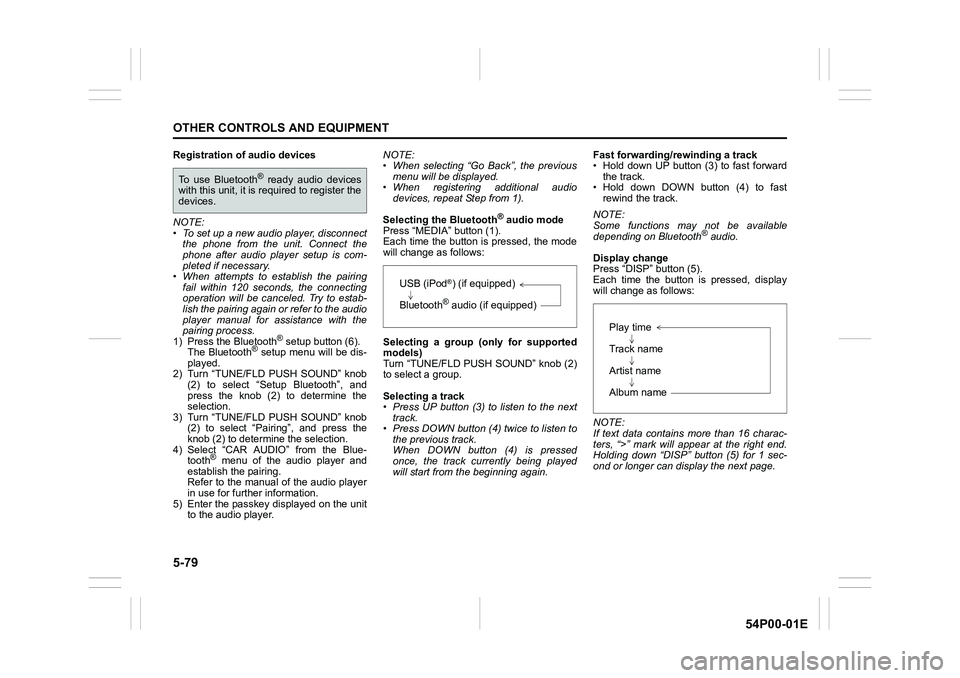
Press “MEDIA” button (1).
Each time the button is pressed, the mode
will change as follows:
Selecting a group (only for supported
models)
Turn “TUNE/FLD PUSH SOUND” knob (2)
to select a group.
Selecting a track
• Press UP button (3) to listen to the next
track.
• Press DOWN button (4) twice to listen to
the previous track.
When DOWN button (4) is pressed
once, the track currently being played
will start from the beginning again.Fast forwarding/rewinding a track
• Hold down UP button (3) to fast forward
the track.
• Hold down DOWN button (4) to fast
rewind the track.
NOTE:
Some functions may not be available
depending on Bluetooth
® audio.
Display change
Press “DISP” button (5).
Each time the button is pressed, display
will change as follows:
NOTE:
If text data contains more than 16 charac-
ters, “>” mark will appear at the right end.
Holding down “DISP” button (5) for 1 sec-
ond or longer can display the next page.
To use Bluetooth® ready audio devices
with this unit, it is required to register the
devices.
USB (iPod®) (if equipped)
Bluetooth
® audio (if equipped)
Play time
Track name
Artist name
Album name
Page 322 of 482
5-80
OTHER CONTROLS AND EQUIPMENT
54P00-01E
Selection of audio device (Select Audio)
Follow the instructions below to select an
audio device to be paired with from the
registered audio devices.
1) Press the Bluetooth
® setup button (6).
The Bluetooth® setup menu will be dis-
played.
2) Turn “TUNE/FLD PUSH SOUND” knob
(2) to select “Setup Bluetooth”, and
press the knob (2) to determine the
selection.
3) Turn “TUNE/FLD PUSH SOUND” knob
(2) to select “List Audio”, and press the
knob (2) to determine the selection.
4) Turn “TUNE/FLD PUSH SOUND” knob
(2) to select an audio device to be
used, and press the knob (2) to deter-
mine the selection.
5) Turn “TUNE/FLD PUSH SOUND” knob
(2) to select “Select”, and press the
knob (2) to determine the selection.
6) Turn “TUNE/FLD PUSH SOUND” knob
(2) to select “Confirm”, and press the
knob (2) to complete the pairing.
NOTE:
• When selecting “Go Back”, the previous
menu will be displayed.
• The phone will be disconnected when
the Bluetooth
® ready audio device is
selected.List of audio devices (List Audio)
Follow the instructions below to display the
names of the registered audio devices in
sequence.
1) Press the Bluetooth
® setup button (6).
The Bluetooth® setup menu will be dis-
played.
2) Turn “TUNE/FLD PUSH SOUND” knob
(2) to select “Setup Bluetooth”, and
press the knob (2) to determine the
selection.
3) Turn “TUNE/FLD PUSH SOUND” knob
(2) to select “List Audio”, and press the
knob (2) to determine the selection.
The names of registered audio devices
will be displayed in sequence.
NOTE:
When selecting “Go Back”, the previous
menu will be displayed.
Passkey setting (Set Passkey)
Follow the instructions below to set the
security number (Passkey).
1) Press the Bluetooth
® setup button (6).
The Bluetooth® setup menu will be dis-
played.
2) Turn “TUNE/FLD PUSH SOUND” knob
(2) to select “Setup Bluetooth”, and
press the knob (2) to determine the
selection.
3) Turn “TUNE/FLD PUSH SOUND” knob
(2) to select “Passkey”, and press the
knob (2) to determine the selection.4) Turn “TUNE/FLD PUSH SOUND” knob
(2) to select “New Passkey”, and press
the knob (2) to determine the selection.
5) Press or turn “TUNE/FLD PUSH
SOUND” knob (2) to select “Confirm”.
6) Turn “TUNE/FLD PUSH SOUND” knob
(2) to select a number for the first digit,
and press the knob (2) to determine the
selection. Select and determine num-
bers for the second, third and fourth
digits in order in the same manner.
When not entering up to the eighth
digit, enter blanks for the successive
digits.
7) Turn “TUNE/FLD PUSH SOUND” knob
(2) to determine the passkey setting.
NOTE:
When selecting “Go Back”, the previous
menu will be displayed.
Page 410 of 482
8-10
EMERGENCY SERVICE
54P00-01E
Towing
If you need to have your vehicle towed,
contact a professional service. Your dealer
can provide you with detailed towing
instructions.
2-wheel drive (2WD) manual tran-saxle
Manual transaxle vehicles may be towed
using either of the following methods.
1) From the front, with the front wheels
lifted and the rear wheels on the
ground. Before towing, check that the
parking brake is released.
2) From the rear, with the rear wheels
lifted and the front wheels on the
ground, provided the steering and
drivetrain are in operational condition.
Before towing, check that transaxle is in
neutral, the steering wheel is unlocked
(vehicle without keyless push start sys-
tem - the ignition key should be in
“ACC” position) (vehicle with keyless
push start system - the ignition mode is
“ACC”), and the steering wheel is
secured with a clamping device
designed for towing service.
4-wheel drive (4WD)
Your vehicle should be towed under one of
the following conditions:
1) With all four wheels on a flat-bed truck.
2) With the front or rear wheels lifted and a
dolly under the other wheels.
WA R N I N G
For vehicles equipped with the radar
brake support system, if your vehicle
is towed with the engine on, press
radar brake support OFF switch and
turn off the radar brake support sys-
tem. If not, unexpected accidents
related to the system being turned on
may occur.
NOTICE
Observe the following instructions
when towing your vehicle.
• To help avoid damage to your vehi-
cle during towing, proper equip-
ment and towing procedures must
be used.
• Using the frame hook, tow your
vehicle on paved roads for short
distances at low speed.
NOTICE
The steering column is not strong
enough to withstand shocks trans-
mitted from the front wheels during
towing. Always unlock the steering
wheel before towing.
Page 411 of 482
8-11
EMERGENCY SERVICE
54P00-01E
Engine trouble: Starter does
not operate
1) Try turning the ignition switch to
“START” position or try pressing the
engine switch to change the ignition
mode to “START” with the headlights
turned on to determine the battery con-
dition. If the headlights go excessively
dim or go off, it usually means that
either the battery is flat or the battery
terminal contact is poor. Recharge the
battery or correct battery terminal con-
tact as necessary.
2) If the headlights remain bright, check
the fuses. If the reason for failure of the
starter is not obvious, there may be a
major electrical problem. Have the vehi-
cle inspected by your authorized
SUZUKI dealer.
Engine trouble: Flooded
engine
(Vehicle without keyless push start sys-
tem)
If the engine is flooded with gasoline, it
may be hard to start. If this happens, press
the accelerator pedal all the way to the
floor and hold it there while cranking the
engine.
• For gasoline engine model, do not oper-
ate the starter motor for more than 12
seconds.
• For diesel engine model, do not operate
the starter motor for more than 30 sec-
onds.
(Vehicle with keyless push start sys-
tem)
If the engine is flooded with gasoline, it
may be hard to start. If this happens, press
the accelerator pedal all the way to the
floor and hold it there while cranking the
engine.
• For gasoline engine model, do not oper-
ate the starter motor for more than 12
seconds.
• For diesel engine model, do not operate
the starter motor for more than 30 sec-
onds.
NOTE:
If the engine refuses to start, the starter
motor automatically stops after a certain
period of time. After the starter motor hasautomatically stopped or if there is any-
thing abnormal in the engine starting sys-
tem, the starter motor runs only while the
engine switch is held pressed.
Page 435 of 482
12-5
SUPPLEMENT
54P00-01E
Tire rotation
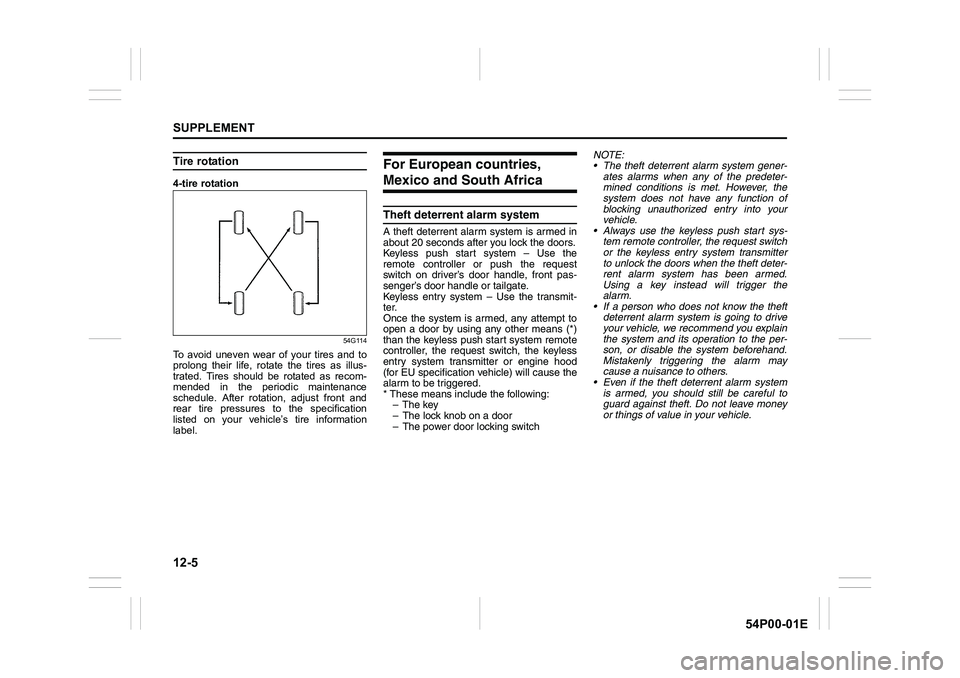
4-tire rotation
54G114
To avoid uneven wear of your tires and to
prolong their life, rotate the tires as illus-
trated. Tires should be rotated as recom-
mended in the periodic maintenance
schedule. After rotation, adjust front and
rear tire pressures to the specification
listed on your vehicle’s tire information
label.
For European countries,
Mexico and South Africa
Theft deterrent alarm system
A theft deterrent alarm system is armed in
about 20 seconds after you lock the doors.
Keyless push start system – Use the
remote controller or push the request
switch on driver’s door handle, front pas-
senger’s door handle or tailgate.
Keyless entry system – Use the transmit-
ter.
Once the system is armed, any attempt to
open a door by using any other means (*)
than the keyless push start system remote
controller, the request switch, the keyless
entry system transmitter or engine hood
(for EU specification vehicle) will cause the
alarm to be triggered.
* These means include the following:
–The key
– The lock knob on a door
– The power door locking switchNOTE:
The theft deterrent alarm system gener-
ates alarms when any of the predeter-
mined conditions is met. However, the
system does not have any function of
blocking unauthorized entry into your
vehicle.
Always use the keyless push start sys-
tem remote controller, the request switch
or the keyless entry system transmitter
to unlock the doors when the theft deter-
rent alarm system has been armed.
Using a key instead will trigger the
alarm.
If a person who does not know the theft
deterrent alarm system is going to drive
your vehicle, we recommend you explain
the system and its operation to the per-
son, or disable the system beforehand.
Mistakenly triggering the alarm may
cause a nuisance to others.
Even if the theft deterrent alarm system
is armed, you should still be careful to
guard against theft. Do not leave money
or things of value in your vehicle.
Page 436 of 482
12-6
SUPPLEMENT
54P00-01E
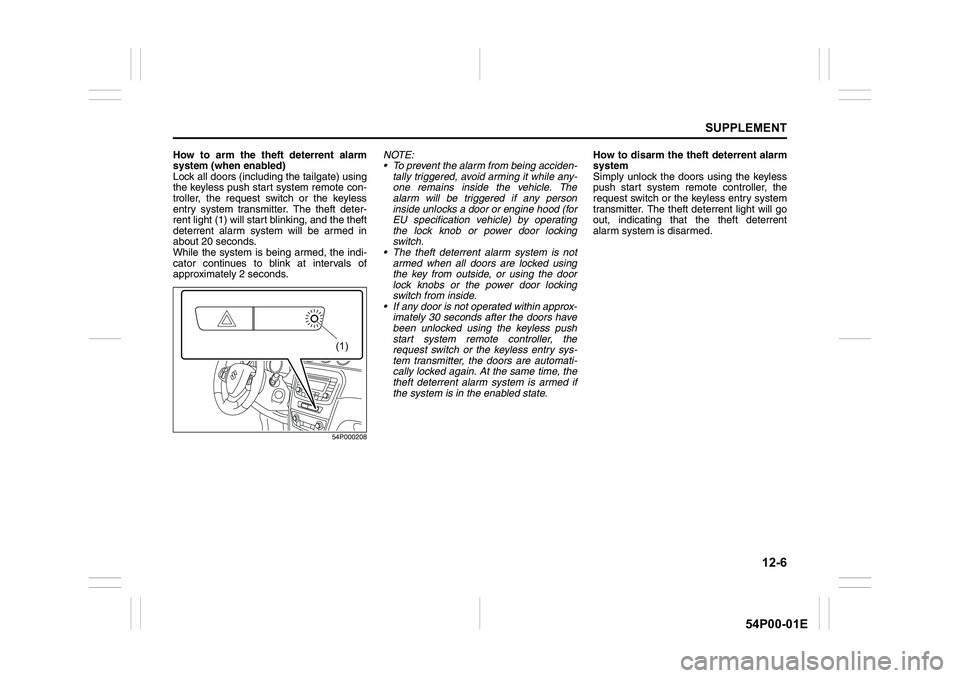
How to arm the theft deterrent alarm
system (when enabled)
Lock all doors (including the tailgate) using
the keyless push start system remote con-
troller, the request switch or the keyless
entry system transmitter. The theft deter-
rent light (1) will start blinking, and the theft
deterrent alarm system will be armed in
about 20 seconds.
While the system is being armed, the indi-
cator continues to blink at intervals of
approximately 2 seconds.
54P000208
NOTE:
To prevent the alarm from being acciden-
tally triggered, avoid arming it while any-
one remains inside the vehicle. The
alarm will be triggered if any person
inside unlocks a door or engine hood (for
EU specification vehicle) by operating
the lock knob or power door locking
switch.
The theft deterrent alarm system is not
armed when all doors are locked using
the key from outside, or using the door
lock knobs or the power door locking
switch from inside.
If any door is not operated within approx-
imately 30 seconds after the doors have
been unlocked using the keyless push
start system remote controller, the
request switch or the keyless entry sys-
tem transmitter, the doors are automati-
cally locked again. At the same time, the
theft deterrent alarm system is armed if
the system is in the enabled state.How to disarm the theft deterrent alarm
system
Simply unlock the doors using the keyless
push start system remote controller, the
request switch or the keyless entry system
transmitter. The theft deterrent light will go
out, indicating that the theft deterrent
alarm system is disarmed.
(1)
Page 437 of 482
12-7
SUPPLEMENT
54P00-01E
How to stop the alarm
Should the alarm be triggered accidentally,
unlock the doors using the keyless push
start system remote controller, the request
switch or the keyless entry system trans-
mitter, or press the engine switch to
change the ignition mode to “ON” or turn
the ignition switch to “ON” position. The
alarm will then stop.
NOTE:
Even after the alarm has stopped, if you
lock the doors using the keyless push
start system remote controller, the
request switch or the keyless entry sys-
tem transmitter, the theft deterrent alarm
system will be rearmed with a delay of
about 20 seconds.
If you disconnect the battery while the
theft deterrent alarm system is in the
armed condition or the alarm is actually
in operation, the alarm will be triggered
or re-triggered when the battery is then
reconnected, although, in the latter case,
the alarm remains stopped for the period
between disconnection and reconnec-
tion of the battery.
Even after the alarm has stopped at the
end of the predetermined operation time,
it will be triggered again if any door or
engine hood (for EU specification vehi-
cle) is opened without disarming the
theft deterrent alarm system.Checking whether the alarm has been
triggered during parking
If the alarm was triggered due to an unau-
thorized entry into the vehicle and you then
press the engine switch to change the igni-
tion mode to “ON” or turn the ignition
switch to “ON” position, the theft deterrent
light will blink rapidly for about 8 seconds
and a buzzer will beep 4 times during this
period. If this happens, check whether your
vehicle has been broken into while you
were away from it.
Enabling and disabling the theft deter-
rent alarm system
The theft deterrent alarm system can be
either enabled or disabled.
When enabled (factory setting)
When the system is enabled, it causes the
hazard warning lights to flash for about 40
seconds if any of the alarm trigger condi-
tions is met. The system also causes the
interior buzzer to beep intermittently for
about 10 seconds, which is followed by
intermittent sounding of the horn for about
30 seconds.
The theft deterrent light continues to blink
during this time.
When disabled
When the system is disabled, it stays dis-
armed even if you perform any system
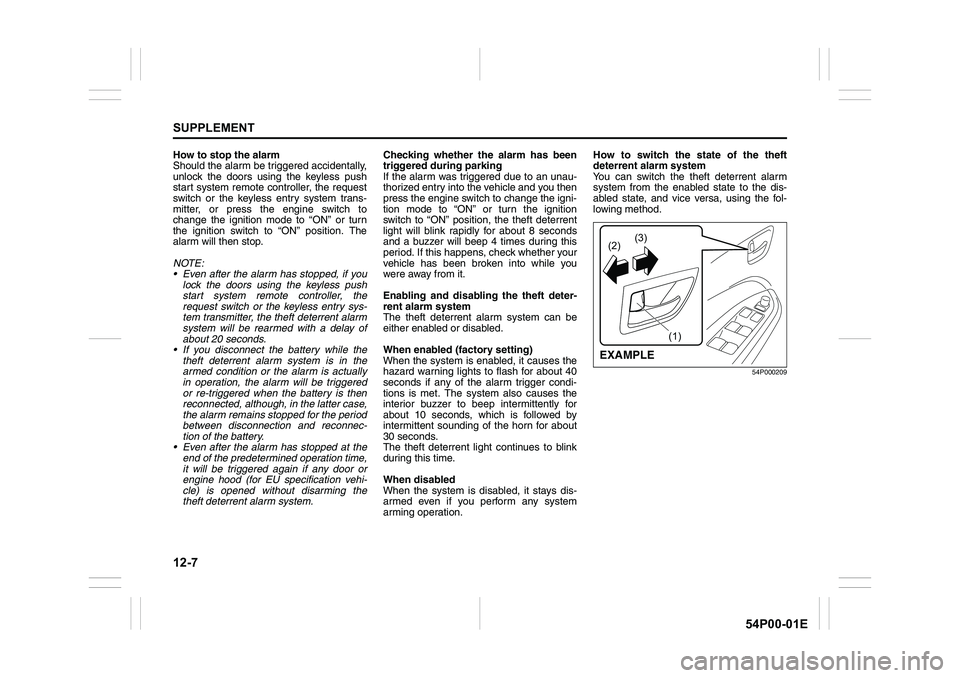
arming operation.How to switch the state of the theft
deterrent alarm system
You can switch the theft deterrent alarm
system from the enabled state to the dis-
abled state, and vice versa, using the fol-
lowing method.
54P000209
(2)(3)
(1)
EXAMPLE