ECU SUZUKI GRAND VITARA 2016 Owner's Manual
[x] Cancel search | Manufacturer: SUZUKI, Model Year: 2016, Model line: GRAND VITARA, Model: SUZUKI GRAND VITARA 2016Pages: 482, PDF Size: 21 MB
Page 239 of 482
4-5
DRIVING TIPS
54P00-01E
Stuck vehicle
If your vehicle gets stuck in snow, mud or
sand, follow the directions below:
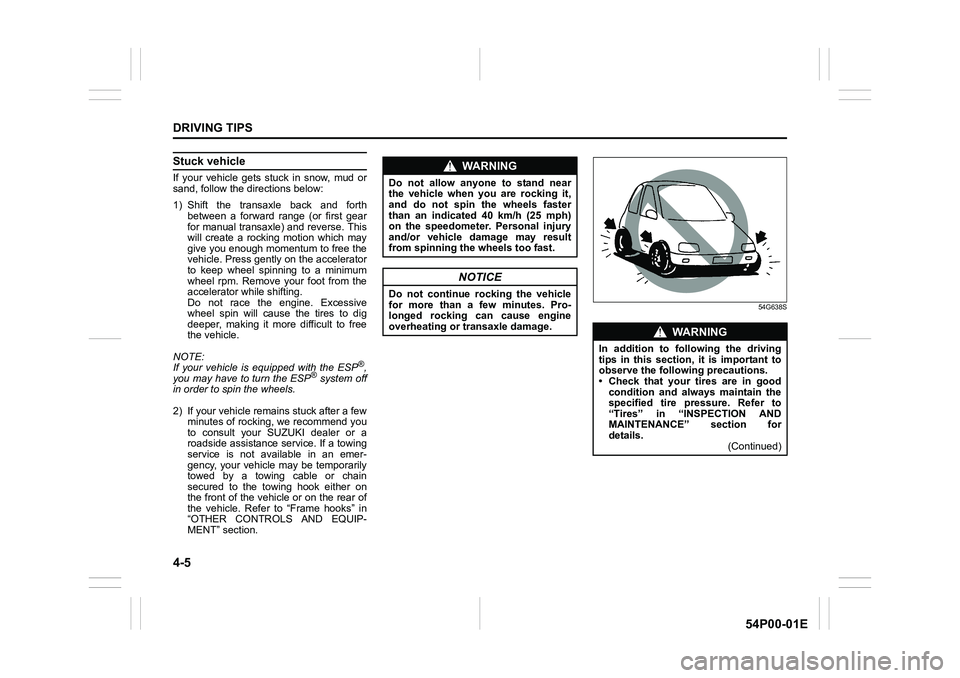
1) Shift the transaxle back and forth
between a forward range (or first gear
for manual transaxle) and reverse. This
will create a rocking motion which may
give you enough momentum to free the
vehicle. Press gently on the accelerator
to keep wheel spinning to a minimum
wheel rpm. Remove your foot from the
accelerator while shifting.
Do not race the engine. Excessive
wheel spin will cause the tires to dig
deeper, making it more difficult to free
the vehicle.
NOTE:
If your vehicle is equipped with the ESP
®,
you may have to turn the ESP® system off
in order to spin the wheels.
2) If your vehicle remains stuck after a few
minutes of rocking, we recommend you
to consult your SUZUKI dealer or a
roadside assistance service. If a towing
service is not available in an emer-
gency, your vehicle may be temporarily
towed by a towing cable or chain
secured to the towing hook either on
the front of the vehicle or on the rear of
the vehicle. Refer to “Frame hooks” in
“OTHER CONTROLS AND EQUIP-
MENT” section.
54G638S
WA R N I N G
Do not allow anyone to stand near
the vehicle when you are rocking it,
and do not spin the wheels faster
than an indicated 40 km/h (25 mph)
on the speedometer. Personal injury
and/or vehicle damage may result
from spinning the wheels too fast.
NOTICE
Do not continue rocking the vehicle
for more than a few minutes. Pro-
longed rocking can cause engine
overheating or transaxle damage.
WA R N I N G
In addition to following the driving
tips in this section, it is important to
observe the following precautions.
• Check that your tires are in good
condition and always maintain the
specified tire pressure. Refer to
“Tires” in “INSPECTION AND
MAINTENANCE” section for
details.
(Continued)
Page 245 of 482
5-3
OTHER CONTROLS AND EQUIPMENT
54P00-01E
54P000505
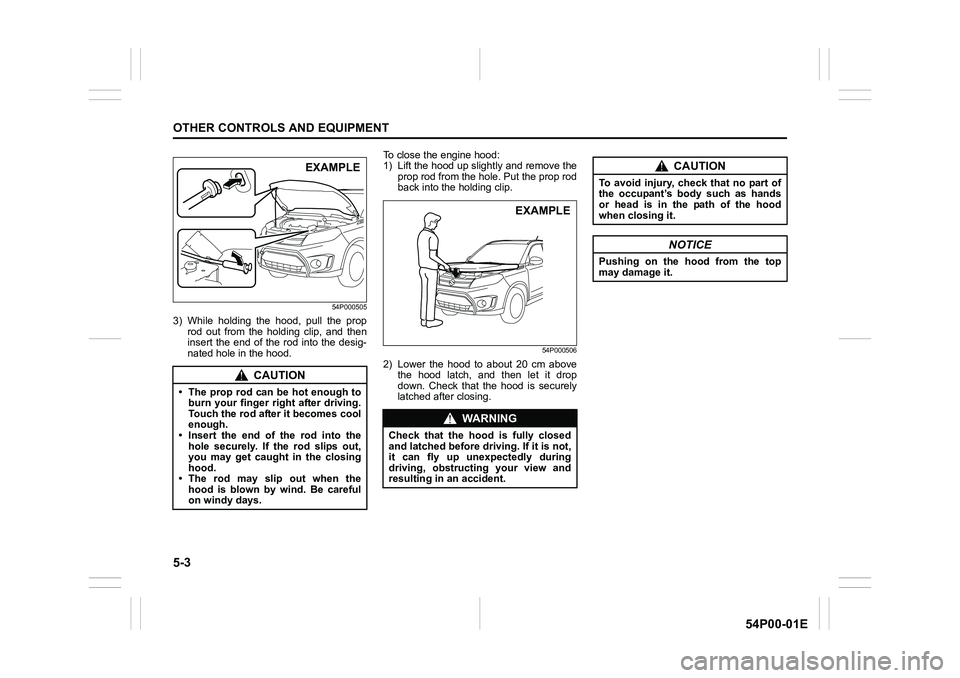
3) While holding the hood, pull the prop
rod out from the holding clip, and then
insert the end of the rod into the desig-
nated hole in the hood.To close the engine hood:
1) Lift the hood up slightly and remove the
prop rod from the hole. Put the prop rod
back into the holding clip.
54P000506
2) Lower the hood to about 20 cm above
the hood latch, and then let it drop
down. Check that the hood is securely
latched after closing.
CAUTION
• The prop rod can be hot enough to
burn your finger right after driving.
Touch the rod after it becomes cool
enough.
• Insert the end of the rod into the
hole securely. If the rod slips out,
you may get caught in the closing
hood.
• The rod may slip out when the
hood is blown by wind. Be careful
on windy days.
EXAMPLE
WA R N I N G
Check that the hood is fully closed
and latched before driving. If it is not,
it can fly up unexpectedly during
driving, obstructing your view and
resulting in an accident.
EXAMPLE
CAUTION
To avoid injury, check that no part of
the occupant’s body such as hands
or head is in the path of the hood
when closing it.
NOTICE
Pushing on the hood from the top
may damage it.
Page 254 of 482
5-12
OTHER CONTROLS AND EQUIPMENT
54P00-01E
Glove box
54P000513
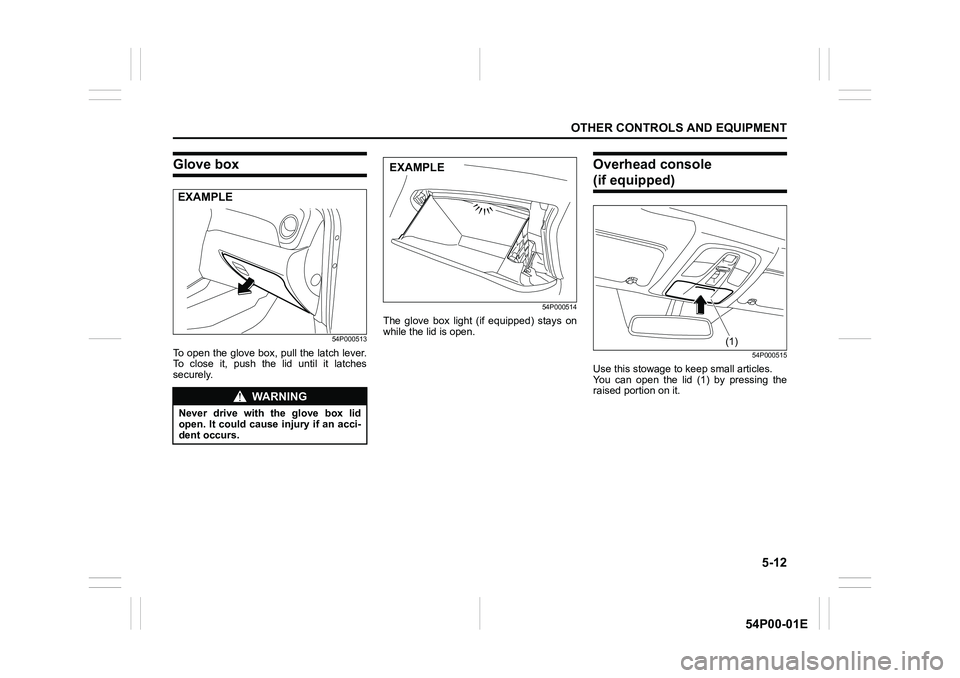
To open the glove box, pull the latch lever.
To close it, push the lid until it latches
securely.
54P000514
The glove box light (if equipped) stays on
while the lid is open.
Overhead console
(if equipped)
54P000515
Use this stowage to keep small articles.
You can open the lid (1) by pressing the
raised portion on it.
WA R N I N G
Never drive with the glove box lid
open. It could cause injury if an acci-
dent occurs.
EXAMPLE
EXAMPLE
(1)
Page 259 of 482
5-17
OTHER CONTROLS AND EQUIPMENT
54P00-01E
Cargo net hooks (if equipped)
54P000521
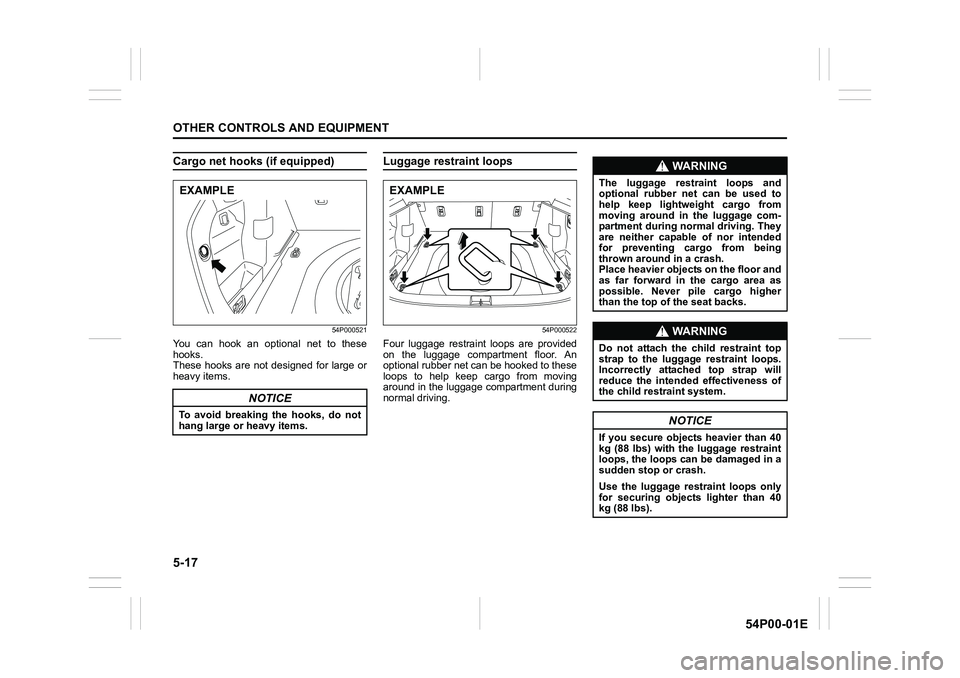
You can hook an optional net to these
hooks.
These hooks are not designed for large or
heavy items.
Luggage restraint loops
54P000522
Four luggage restraint loops are provided
on the luggage compartment floor. An
optional rubber net can be hooked to these
loops to help keep cargo from moving
around in the luggage compartment during
normal driving.
NOTICE
To avoid breaking the hooks, do not
hang large or heavy items.
EXAMPLEEXAMPLE
WA R N I N G
The luggage restraint loops and
optional rubber net can be used to
help keep lightweight cargo from
moving around in the luggage com-
partment during normal driving. They
are neither capable of nor intended
for preventing cargo from being
thrown around in a crash.
Place heavier objects on the floor and
as far forward in the cargo area as
possible. Never pile cargo higher
than the top of the seat backs.
WA R N I N G
Do not attach the child restraint top
strap to the luggage restraint loops.
Incorrectly attached top strap will
reduce the intended effectiveness of
the child restraint system.
NOTICE
If you secure objects heavier than 40
kg (88 lbs) with the luggage restraint
loops, the loops can be damaged in a
sudden stop or crash.
Use the luggage restraint loops only
for securing objects lighter than 40
kg (88 lbs).
Page 262 of 482
5-20
OTHER CONTROLS AND EQUIPMENT
54P00-01E
You can use the roof rails or the roof rack
anchors to attach the optional roof rack
which is available at your SUZUKI dealer.
If you use a roof rack, observe the instruc-
tions and precautions in this section and
provided with the roof rack.
• Check that the roof rack is securely
installed.
• To mount various types of cargo (such
as skis, bicycles, etc.) properly, use suit-
able attachments which are available at
your SUZUKI dealer. Install the attach-
ments properly and securely according
to the instructions provided. Do not
mount cargo directly on the roof panel.
The cargo can damage the roof panel.
• The gross weight of the roof rack plus
cargo must not exceed the loading
capacity.
– Roof rails: 75 kg (165 lbs)
– Roof rack anchors: 50 kg (110 lbs)
Also, do not let the gross vehicle weight
(fully loaded vehicle including driver,
passengers, cargo, roof load and trailer
tongue weight) exceed the Gross Vehi-
cle Weight Rating (GVWR) listed in
“SPECIFICATIONS” section.
• Mount and secure the cargo onto the
roof rack properly according to the
instructions provided. Stow the heaviest
items at the bottom and distribute the
cargo as evenly as possible.
• Do not carry large items that hang over
the bumpers or the sides of the vehicle.Otherwise, these items could block your
view.
• Secure the front and rear ends of long
items such as wood panels and surf-
boards, to both the front and rear of the
vehicle. You should protect the painted
surfaces of the vehicle from scuffing
caused by tie-down ropes.
• Check periodically that the roof rack is
securely installed and free from damage.
• For vehicles with roof rack anchors,
check that the anchors are covered with
the caps when not in use.Frame hooks
Your SUZUKI not recommend you use the
frame hooks for towing another vehicle.
SUZUKI was originally designed to tow
your vehicle on the road emergency tow-
ing.
If your vehicle needs to be towed in an
emergency, refer to “Towing” in “EMER-
GENCY SERVICE” section.
WA R N I N G
• Abrupt maneuvers or failure to
properly secure cargo can allow
the cargo to fly off the vehicle and
hit others, causing personal injury
or property damage.
• Mount cargo securely and avoid
abrupt maneuvers such as jackrab-
bit starts, sharp turns, fast corner-
ing and sudden braking. Check
periodically that cargo is securely
fastened.
• Large, bulky, long or flat items can
affect vehicle aerodynamics or be
caught by the wind, and can reduce
vehicle control resulting in an acci-
dent and personal injury. Drive cau-
tiously at a safely reduced speed
when carrying this type of cargo.
WA R N I N G
Observe the following instructions
when using frame hooks. The towing
hook or vehicle body may break and
cause serious injury or damage.
• Do not use the frame hooks for
towing another vehicle.
• Avoid pulling the vehicle to get out
of severe snowy, muddy or sandy
conditions, sudden starts or erratic
driving maneuvers which could
cause excessive stress on the tow-
ing hook.
In such case, we recommend that
you contact a professional service.
Page 264 of 482
5-22
OTHER CONTROLS AND EQUIPMENT
54P00-01E
54P000529
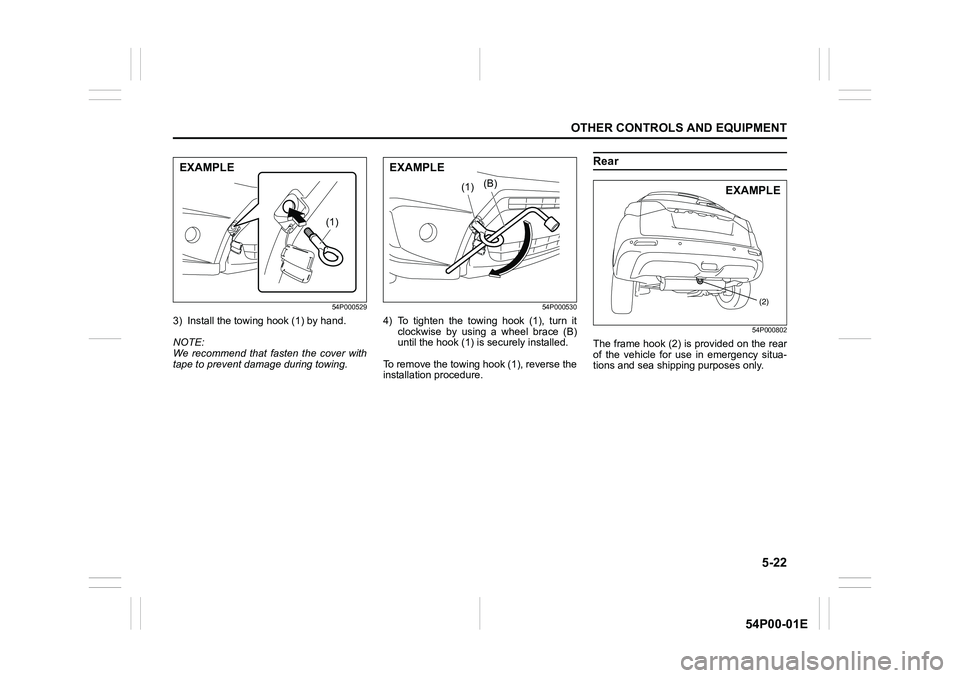
3) Install the towing hook (1) by hand.
NOTE:
We recommend that fasten the cover with
tape to prevent damage during towing.
54P000530
4) To tighten the towing hook (1), turn it
clockwise by using a wheel brace (B)
until the hook (1) is securely installed.
To remove the towing hook (1), reverse the
installation procedure.
Rear
54P000802
The frame hook (2) is provided on the rear
of the vehicle for use in emergency situa-
tions and sea shipping purposes only.
(1)
EXAMPLE
(B)(1)
EXAMPLE
(2)
EXAMPLE
Page 318 of 482
5-76
OTHER CONTROLS AND EQUIPMENT
54P00-01E
Selection of phone (Select Phone)
Follow the instructions below to select a
phone to be paired with from the registered
phones.
1) Press the Bluetooth
® setup button (4).
The Bluetooth® setup menu will be dis-
played.
2) Turn “TUNE/FLD PUSH SOUND” knob
(1) to select “Setup Bluetooth”, and
press the knob (1) to determine the
selection.
3) Turn “TUNE/FLD PUSH SOUND” knob
(1) to select “List Phone”, and press the
knob (1) to determine the selection.
4) Turn “TUNE/FLD PUSH SOUND” knob
(1) to select a phone to be paired with,
and press the knob (1) to determine the
selection.
5) Turn “TUNE/FLD PUSH SOUND” knob
(1) to select “Select”, and press the
knob (1) to determine the selection.
NOTE:
• When selecting “Go Back”, the previous
menu will be displayed.
• The Bluetooth
® ready audio device will
be disconnected when the phone is
selected.List of phones (List Phones)
Follow the instructions below to display the
names of the registered phones in
sequence.
1) Press the Bluetooth
® setup button (4).
The Bluetooth® setup menu will be dis-
played.
2) Turn “TUNE/FLD PUSH SOUND” knob
(1) to select “Setup Bluetooth”, and
press the knob (1) to determine the
selection.
3) Turn “TUNE/FLD PUSH SOUND” knob
(1) to select “List Phone”, and press the
knob (1) to determine the selection.
The names of the registered phones
are displayed in sequence.
NOTE:
When selecting “Go Back”, the previous
menu will be displayed.
Passkey setting (Set Passkey)
Follow the instructions below to set the
security number (passkey).
1) Press the Bluetooth
® setup button (4).
The Bluetooth® setup menu will be dis-
played.
2) Turn “TUNE/FLD PUSH SOUND” knob
(1) to select “Setup Bluetooth”, and
press the knob (1) to determine the
selection.
3) Turn “TUNE/FLD PUSH SOUND” knob
(1) to select “Passkey”, and press the
knob (1) to determine the selection.4) Turn “TUNE/FLD PUSH SOUND” knob
(1) to select “New Passkey”, and press
the knob (1) to determine the selection.
5) Press or turn “TUNE/FLD PUSH
SOUND” knob (1) to select “Confirm”.
6) Turn “TUNE/FLD PUSH SOUND” knob
(1) to select a number for the first digit,
and press the knob (1) to determine the
selection. Select and determine num-
bers for the second, third and fourth
digits in order in the same manner.
When not entering up to the eighth
digit, enter blanks for the successive
digits.
7) Turn “TUNE/FLD PUSH SOUND” knob
(1) to determine the passkey setting.
NOTE:
When selecting “Go Back”, the previous
menu will be displayed.
Page 322 of 482
5-80
OTHER CONTROLS AND EQUIPMENT
54P00-01E
Selection of audio device (Select Audio)
Follow the instructions below to select an
audio device to be paired with from the
registered audio devices.
1) Press the Bluetooth
® setup button (6).
The Bluetooth® setup menu will be dis-
played.
2) Turn “TUNE/FLD PUSH SOUND” knob
(2) to select “Setup Bluetooth”, and
press the knob (2) to determine the
selection.
3) Turn “TUNE/FLD PUSH SOUND” knob
(2) to select “List Audio”, and press the
knob (2) to determine the selection.
4) Turn “TUNE/FLD PUSH SOUND” knob
(2) to select an audio device to be
used, and press the knob (2) to deter-
mine the selection.
5) Turn “TUNE/FLD PUSH SOUND” knob
(2) to select “Select”, and press the
knob (2) to determine the selection.
6) Turn “TUNE/FLD PUSH SOUND” knob
(2) to select “Confirm”, and press the
knob (2) to complete the pairing.
NOTE:
• When selecting “Go Back”, the previous
menu will be displayed.
• The phone will be disconnected when
the Bluetooth
® ready audio device is
selected.List of audio devices (List Audio)
Follow the instructions below to display the
names of the registered audio devices in
sequence.
1) Press the Bluetooth
® setup button (6).
The Bluetooth® setup menu will be dis-
played.
2) Turn “TUNE/FLD PUSH SOUND” knob
(2) to select “Setup Bluetooth”, and
press the knob (2) to determine the
selection.
3) Turn “TUNE/FLD PUSH SOUND” knob
(2) to select “List Audio”, and press the
knob (2) to determine the selection.
The names of registered audio devices
will be displayed in sequence.
NOTE:
When selecting “Go Back”, the previous
menu will be displayed.
Passkey setting (Set Passkey)
Follow the instructions below to set the
security number (Passkey).
1) Press the Bluetooth
® setup button (6).
The Bluetooth® setup menu will be dis-
played.
2) Turn “TUNE/FLD PUSH SOUND” knob
(2) to select “Setup Bluetooth”, and
press the knob (2) to determine the
selection.
3) Turn “TUNE/FLD PUSH SOUND” knob
(2) to select “Passkey”, and press the
knob (2) to determine the selection.4) Turn “TUNE/FLD PUSH SOUND” knob
(2) to select “New Passkey”, and press
the knob (2) to determine the selection.
5) Press or turn “TUNE/FLD PUSH
SOUND” knob (2) to select “Confirm”.
6) Turn “TUNE/FLD PUSH SOUND” knob
(2) to select a number for the first digit,
and press the knob (2) to determine the
selection. Select and determine num-
bers for the second, third and fourth
digits in order in the same manner.
When not entering up to the eighth
digit, enter blanks for the successive
digits.
7) Turn “TUNE/FLD PUSH SOUND” knob
(2) to determine the passkey setting.
NOTE:
When selecting “Go Back”, the previous
menu will be displayed.
Page 326 of 482
5-84
OTHER CONTROLS AND EQUIPMENT
54P00-01E
The anti-theft function is intended to dis-
courage thefts. For example, when the
audio system is installed in another vehi-
cle, it will become unable to operate.
This function works by entering a Personal
Identification Number (PIN).
When the unit is disconnected from its
power source, such as when the audio
system is removed or the battery is discon-
nected, the unit will become inoperable
until the PIN is reentered.Setting the anti-theft function
1) Press “VOL PUSH PWR” knob (1) to
power off.
2) Hold down the buttons numbered [1]
and [6] of PRESET buttons (2) and
press “VOL PUSH PWR” knob (1).
“SECURITY” will be displayed.
3) Press UP button (3) and the button
numbered [1] of PRESET buttons (2)
simultaneously.
4) Enter a 4-digit number to be registered
as PIN using the buttons numbered [1]
- [4] of PRESET buttons (2).
5) Hold down “TUNE/FLD PUSH
SOUND” knob (4) for 1 second or lon-
ger to set the anti-theft function.
NOTE:
Take a note of the registered PIN and keep
it for the future use. Canceling the anti-theft feature
To cancel the anti-theft function, delete the
registered PIN.
1) Press “VOL PUSH PWR” knob (1) to
power off.
2) Hold down the buttons numbered [1]
and [6] of PRESET buttons (2) and
press “VOL PUSH PWR” knob (1).
“PIN ENTRY” will be displayed.
3) Press UP button (3) and the button
numbered [1] of PRESET buttons (2)
simultaneously.
4) Enter a 4-digit number to be registered
as PIN using the buttons numbered [1]
- [4] of PRESET buttons (2).
5) Hold down “TUNE/FLD PUSH
SOUND” knob (4) for 1 second or lon-
ger to delete the registered PIN. The
indication “----” will be displayed and
the anti-theft function will be canceled.
NOTE:
To change your PIN, first delete your cur-
rent PIN, and then set a new one.
Page 327 of 482
5-85
OTHER CONTROLS AND EQUIPMENT
54P00-01E
Confirming the Personal Identification
Number (PIN)
When the main power source is discon-
nected such as when the battery is
replaced, etc, it is required to enter the PIN
to operate the unit again.
1) Set the ignition switch to “ACC” posi-
tion or the ignition mode to “ON”.
“SECURITY” will be displayed.
2) Press UP button (3) and the button
numbered [1] of PRESET buttons (2)
simultaneously.
3) Enter a 4-digit number to be registered
as PIN using the buttons numbered [1]
- [4] of PRESET buttons (2).
4) Hold down “TUNE/FLD PUSH
SOUND” knob (4) for 1 second or lon-
ger.
When the same PIN as registered is
entered, the power of the audio system
will be turned off automatically and it
will become operable again.
NOTE:
If an incorrect PIN is entered, “ERROR”
and the total number of incorrect entry
attempts will be displayed.
If an incorrect PIN is entered 10 times or
more, “HELP” will be displayed and the
audio system will become inoperable.