audio SUZUKI GRAND VITARA 2017 Owner's Manual
[x] Cancel search | Manufacturer: SUZUKI, Model Year: 2017, Model line: GRAND VITARA, Model: SUZUKI GRAND VITARA 2017Pages: 482, PDF Size: 21 MB
Page 321 of 482
5-79
OTHER CONTROLS AND EQUIPMENT
54P00-01E
Registration of audio devices
NOTE:
• To set up a new audio player, disconnect
the phone from the unit. Connect the
phone after audio player setup is com-
pleted if necessary.
• When attempts to establish the pairing
fail within 120 seconds, the connecting
operation will be canceled. Try to estab-
lish the pairing again or refer to the audio
player manual for assistance with the
pairing process.
1) Press the Bluetooth
® setup button (6).
The Bluetooth® setup menu will be dis-
played.
2) Turn “TUNE/FLD PUSH SOUND” knob
(2) to select “Setup Bluetooth”, and
press the knob (2) to determine the
selection.
3) Turn “TUNE/FLD PUSH SOUND” knob
(2) to select “Pairing”, and press the
knob (2) to determine the selection.
4) Select “CAR AUDIO” from the Blue-
tooth
® menu of the audio player and
establish the pairing.
Refer to the manual of the audio player
in use for further information.
5) Enter the passkey displayed on the unit
to the audio player.NOTE:
• When selecting “Go Back”, the previous
menu will be displayed.
• When registering additional audio
devices, repeat Step from 1).
Selecting the Bluetooth
® audio mode
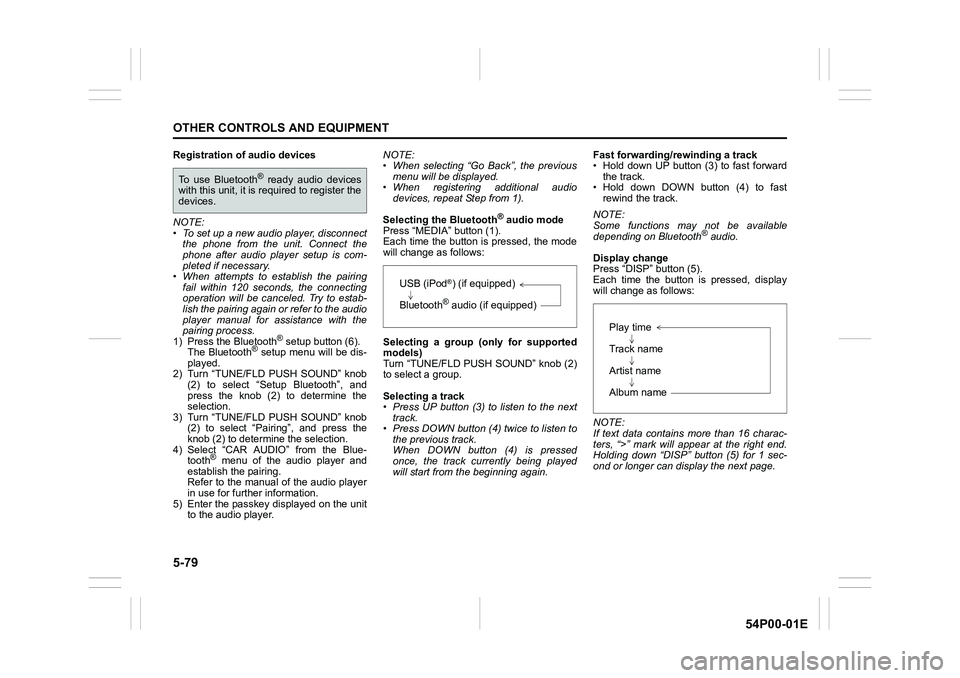
Press “MEDIA” button (1).
Each time the button is pressed, the mode
will change as follows:
Selecting a group (only for supported
models)
Turn “TUNE/FLD PUSH SOUND” knob (2)
to select a group.
Selecting a track
• Press UP button (3) to listen to the next
track.
• Press DOWN button (4) twice to listen to
the previous track.
When DOWN button (4) is pressed
once, the track currently being played
will start from the beginning again.Fast forwarding/rewinding a track
• Hold down UP button (3) to fast forward
the track.
• Hold down DOWN button (4) to fast
rewind the track.
NOTE:
Some functions may not be available
depending on Bluetooth
® audio.
Display change
Press “DISP” button (5).
Each time the button is pressed, display
will change as follows:
NOTE:
If text data contains more than 16 charac-
ters, “>” mark will appear at the right end.
Holding down “DISP” button (5) for 1 sec-
ond or longer can display the next page.
To use Bluetooth® ready audio devices
with this unit, it is required to register the
devices.
USB (iPod®) (if equipped)
Bluetooth
® audio (if equipped)
Play time
Track name
Artist name
Album name
Page 322 of 482
5-80
OTHER CONTROLS AND EQUIPMENT
54P00-01E
Selection of audio device (Select Audio)
Follow the instructions below to select an
audio device to be paired with from the
registered audio devices.
1) Press the Bluetooth
® setup button (6).
The Bluetooth® setup menu will be dis-
played.
2) Turn “TUNE/FLD PUSH SOUND” knob
(2) to select “Setup Bluetooth”, and
press the knob (2) to determine the
selection.
3) Turn “TUNE/FLD PUSH SOUND” knob
(2) to select “List Audio”, and press the
knob (2) to determine the selection.
4) Turn “TUNE/FLD PUSH SOUND” knob
(2) to select an audio device to be
used, and press the knob (2) to deter-
mine the selection.
5) Turn “TUNE/FLD PUSH SOUND” knob
(2) to select “Select”, and press the
knob (2) to determine the selection.
6) Turn “TUNE/FLD PUSH SOUND” knob
(2) to select “Confirm”, and press the
knob (2) to complete the pairing.
NOTE:
• When selecting “Go Back”, the previous
menu will be displayed.
• The phone will be disconnected when
the Bluetooth
® ready audio device is
selected.List of audio devices (List Audio)
Follow the instructions below to display the
names of the registered audio devices in
sequence.
1) Press the Bluetooth
® setup button (6).
The Bluetooth® setup menu will be dis-
played.
2) Turn “TUNE/FLD PUSH SOUND” knob
(2) to select “Setup Bluetooth”, and
press the knob (2) to determine the
selection.
3) Turn “TUNE/FLD PUSH SOUND” knob
(2) to select “List Audio”, and press the
knob (2) to determine the selection.
The names of registered audio devices
will be displayed in sequence.
NOTE:
When selecting “Go Back”, the previous
menu will be displayed.
Passkey setting (Set Passkey)
Follow the instructions below to set the
security number (Passkey).
1) Press the Bluetooth
® setup button (6).
The Bluetooth® setup menu will be dis-
played.
2) Turn “TUNE/FLD PUSH SOUND” knob
(2) to select “Setup Bluetooth”, and
press the knob (2) to determine the
selection.
3) Turn “TUNE/FLD PUSH SOUND” knob
(2) to select “Passkey”, and press the
knob (2) to determine the selection.4) Turn “TUNE/FLD PUSH SOUND” knob
(2) to select “New Passkey”, and press
the knob (2) to determine the selection.
5) Press or turn “TUNE/FLD PUSH
SOUND” knob (2) to select “Confirm”.
6) Turn “TUNE/FLD PUSH SOUND” knob
(2) to select a number for the first digit,
and press the knob (2) to determine the
selection. Select and determine num-
bers for the second, third and fourth
digits in order in the same manner.
When not entering up to the eighth
digit, enter blanks for the successive
digits.
7) Turn “TUNE/FLD PUSH SOUND” knob
(2) to determine the passkey setting.
NOTE:
When selecting “Go Back”, the previous
menu will be displayed.
Page 323 of 482
5-81
OTHER CONTROLS AND EQUIPMENT
54P00-01E
Deletion of audio device information
(Delete Audio)
Follow the instructions below to delete the
registered audio device information.
1) Press the Bluetooth
® setup button (6).
The Bluetooth® setup menu will be dis-
played.
2) Turn “TUNE/FLD PUSH SOUND” knob
(2) to select “Setup Bluetooth”, and
press the knob (2) to determine the
selection.
3) Turn “TUNE/FLD PUSH SOUND” knob
(2) to select “List Audio”, and press the
knob (2) to determine the selection.
4) Turn “TUNE/FLD PUSH SOUND” knob
(2) to select an audio device to be
deleted, and press the knob (2) to
determine the selection.
5) Turn “TUNE/FLD PUSH SOUND” knob
(2) to select “Delete”, and press the
knob (2) to determine the selection.
6) Turn “TUNE/FLD PUSH SOUND” knob
(2) to select “Delete?”, and press the
knob (2) to determine the selection.
7) Turn “TUNE/FLD PUSH SOUND” knob
(2) to select “Confirm”, and press the
knob (2) to complete the deletion.
NOTE:
When selecting “Go Back”, the previous
menu will be displayed.
Disclaimer for Bluetooth® function
• Depending on compatibility of mobile
phone models, no Bluetooth® function
can be used, or some Bluetooth® func-
tions may be restricted.
• Connectivity or voice quality may get
affected depending on circumstances.
• After the ignition switch is turned to “ON”
position or the engine switch is pressed
to change the ignition mode to “ON”, the
audio system takes few seconds to
detect and connect to the Bluetooth
®
device (if already paired).
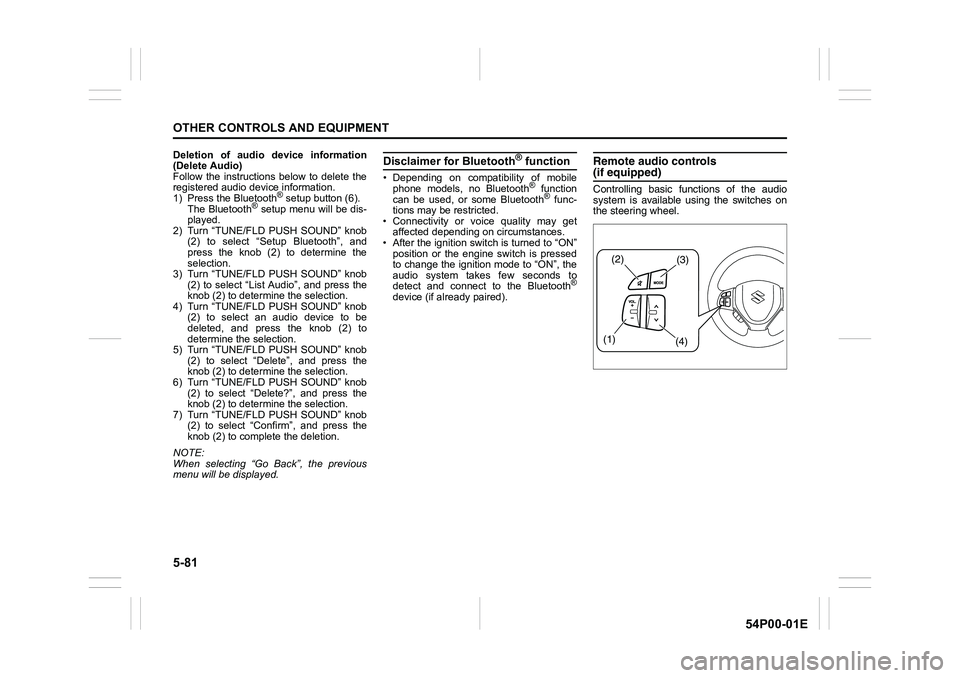
Remote audio controls(if equipped)
Controlling basic functions of the audio
system is available using the switches on
the steering wheel.
(2)(3)
(1)
(4)
Page 324 of 482
5-82
OTHER CONTROLS AND EQUIPMENT
54P00-01E
Adjusting the volume
To increase the volume, hold down “+” of
“VOL” switch (1). The volume will con-
tinue to increase until the switch is
released.
To decrease the volume, hold down “-” of
“VOL” switch (1). The volume will con-
tinue to decrease until the switch is
released.
To mute the sound, press the switch (2).
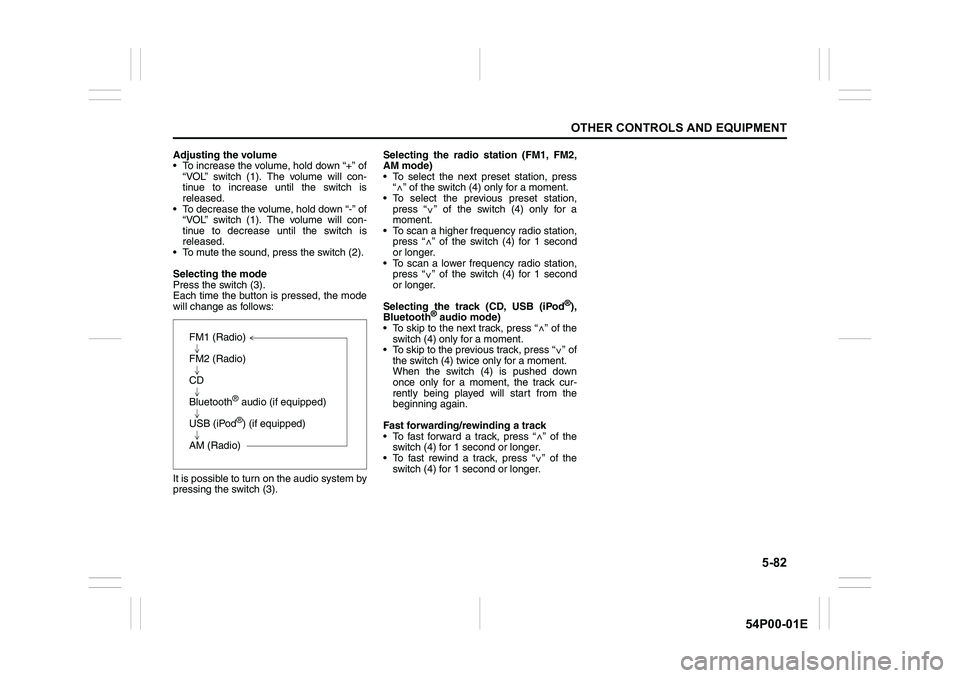
Selecting the mode
Press the switch (3).
Each time the button is pressed, the mode
will change as follows:
It is possible to turn on the audio system by
pressing the switch (3).Selecting the radio station (FM1, FM2,
AM mode)
To select the next preset station, press
“ ” of the switch (4) only for a moment.
To select the previous preset station,
press “ ” of the switch (4) only for a
moment.
To scan a higher frequency radio station,
press “ ” of the switch (4) for 1 second
or longer.
To scan a lower frequency radio station,
press “ ” of the switch (4) for 1 second
or longer.
Selecting the track (CD, USB (iPod
®),
Bluetooth® audio mode)
To skip to the next track, press “ ” of the
switch (4) only for a moment.
To skip to the previous track, press “ ” of
the switch (4) twice only for a moment.
When the switch (4) is pushed down
once only for a moment, the track cur-
rently being played will start from the
beginning again.
Fast forwarding/rewinding a track
To fast forward a track, press “ ” of the
switch (4) for 1 second or longer.
To fast rewind a track, press “ ” of the
switch (4) for 1 second or longer.
FM1 (Radio)
FM2 (Radio)
CD
Bluetooth
® audio (if equipped)
USB (iPod
®) (if equipped)
AM (Radio)
<
<
<
<
<
<
<
<
Page 326 of 482
5-84
OTHER CONTROLS AND EQUIPMENT
54P00-01E
The anti-theft function is intended to dis-
courage thefts. For example, when the
audio system is installed in another vehi-
cle, it will become unable to operate.
This function works by entering a Personal
Identification Number (PIN).
When the unit is disconnected from its
power source, such as when the audio
system is removed or the battery is discon-
nected, the unit will become inoperable
until the PIN is reentered.Setting the anti-theft function
1) Press “VOL PUSH PWR” knob (1) to
power off.
2) Hold down the buttons numbered [1]
and [6] of PRESET buttons (2) and
press “VOL PUSH PWR” knob (1).
“SECURITY” will be displayed.
3) Press UP button (3) and the button
numbered [1] of PRESET buttons (2)
simultaneously.
4) Enter a 4-digit number to be registered
as PIN using the buttons numbered [1]
- [4] of PRESET buttons (2).
5) Hold down “TUNE/FLD PUSH
SOUND” knob (4) for 1 second or lon-
ger to set the anti-theft function.
NOTE:
Take a note of the registered PIN and keep
it for the future use. Canceling the anti-theft feature
To cancel the anti-theft function, delete the
registered PIN.
1) Press “VOL PUSH PWR” knob (1) to
power off.
2) Hold down the buttons numbered [1]
and [6] of PRESET buttons (2) and
press “VOL PUSH PWR” knob (1).
“PIN ENTRY” will be displayed.
3) Press UP button (3) and the button
numbered [1] of PRESET buttons (2)
simultaneously.
4) Enter a 4-digit number to be registered
as PIN using the buttons numbered [1]
- [4] of PRESET buttons (2).
5) Hold down “TUNE/FLD PUSH
SOUND” knob (4) for 1 second or lon-
ger to delete the registered PIN. The
indication “----” will be displayed and
the anti-theft function will be canceled.
NOTE:
To change your PIN, first delete your cur-
rent PIN, and then set a new one.
Page 327 of 482
5-85
OTHER CONTROLS AND EQUIPMENT
54P00-01E
Confirming the Personal Identification
Number (PIN)
When the main power source is discon-
nected such as when the battery is
replaced, etc, it is required to enter the PIN
to operate the unit again.
1) Set the ignition switch to “ACC” posi-
tion or the ignition mode to “ON”.
“SECURITY” will be displayed.
2) Press UP button (3) and the button
numbered [1] of PRESET buttons (2)
simultaneously.
3) Enter a 4-digit number to be registered
as PIN using the buttons numbered [1]
- [4] of PRESET buttons (2).
4) Hold down “TUNE/FLD PUSH
SOUND” knob (4) for 1 second or lon-
ger.
When the same PIN as registered is
entered, the power of the audio system
will be turned off automatically and it
will become operable again.
NOTE:
If an incorrect PIN is entered, “ERROR”
and the total number of incorrect entry
attempts will be displayed.
If an incorrect PIN is entered 10 times or
more, “HELP” will be displayed and the
audio system will become inoperable.
Page 417 of 482
9-3
APPEARANCE CARE
54P00-01E
Leather upholstery
Remove loose dirt with a vacuum cleaner.
Using a mild soap or saddle soap solution,
wipe dirt off with a clean damp soft cloth.
To remove soap, wipe the areas again with
a soft cloth dampened with water. Wipe the
areas dry with a soft dry cloth. Repeat this
until the dirt or stain is removed, or use a
commercial leather cleaner for tougher dirt
or stains. If you use a leather cleaner,
carefully follow the manufacturer’s instruc-
tions and precautions. Do not use solvent
type cleaners or abrasive cleaners.
NOTE:
• In order to keep leather upholstery look-
ing good, it should be cleaned at least
twice a year.
• If leather upholstery becomes wet,
immediately wipe it dry with tissue paper
or a soft cloth. Water may cause leather
to harden and shrink if it is not wiped off.
• When parking on sunny days, select a
shady place or use a sunshade. If
leather upholstery is exposed to direct
sunlight for a long time, it may discolor
and shrink.
• As is common with natural materials,
leather is inherently irregular in grain and
cowhide has spots in its natural state.
These do not affect the performance of
the leather in any way.Seat belts
Clean seat belts with a mild soap and
water. Do not use bleach or dye on the
belts. They may weaken the fabric in the
belts.
Vinyl floor mats
Ordinary dirt can be removed from vinyl
with water or mild soap. Use a brush to
help loosen dirt. After the dirt is loosened,
rinse the mat thoroughly with water and
dry it in the shade.
Carpets
Remove dirt and soil as much as possible
with a vacuum cleaner. Using a mild soap
solution, rub stained areas with a clean
damp cloth. To remove soap, rub the areas
again with a cloth dampened with water.
Repeat this until the stain is removed, or
use a commercial carpet cleaner for
tougher stains. If you use a carpet cleaner,
carefully follow the manufacturer’s instruc-
tions and precautions.
Instrument panel and console
Remove loose dirt with a vacuum cleaner.
Gently wipe dirt off with a tightly squeezed
damp clean cloth. Repeat this until the dirt
is removed.
Cleaning exterior
Caring for aluminum wheels
NOTE:
• Do not use an acidic or alkaline deter-
gent, or a cleaner containing petroleum
solvent to wash aluminum wheels.
These types of cleaner will cause per-
manent spots, discoloration and cracks
on finished surfaces and damage to cen-
ter caps.
• Do not use a bristle brush and soap con-
taining an abrasive material. These will
damage finished surfaces.
NOTICE
Do not use chemical products that
contain silicon to wipe electrical
components such as the air condi-
tioning system, audio, navigation
system, or other switches. These will
cause damage to the components.
NOTICE
It is important that your vehicle be
kept clean and free from dirt. Failure
to keep your vehicle clean may result
in fading of the paint or corrosion to
various parts of the vehicle body.
Page 440 of 482
13-1
INDEX
13
54P00-01E
INDEX
Symbols
“ENG A-STOP OFF” light .................................................. 2-101
“ENG A-STOP” indicator light .......................................... 2-101
Numerics
4WD warning light ............................................................... 2-98
A
Accelerator pedal................................................................. 3-12
Accessory socket .................................................................. 5-8
Adding coolant..................................................................... 7-27
AIR BAG light .............................................................. 2-51, 2-93
Air cleaner ............................................................................ 7-28
Air conditioning system ...................................................... 7-59
AM/FM CD PLAYER ............................................................. 5-40
Anti-lock brake system (ABS) ................................... 3-75, 3-77
Anti-lock brake system (ABS) warning light ..................... 2-91
Anti-theft feature .................................................................. 5-83
Assist grips .......................................................................... 5-11
Audio system ....................................................................... 5-40
Automatic headlight leveling system warning light ......... 2-97
Automatic heating and air conditioning system
(climate control) ................................................................... 5-32
Automatic light operation ................................................. 2-104
Average fuel consumption.................................................. 2-67
Average speed ..................................................................... 2-67
B
Battery .................................................................................. 7-39
Battery replacement ................................................... 2-14, 7-39
Bluetooth
® audio ................................................................. 5-78
Bluetooth® hands-free......................................................... 5-70Brake assist system............................................................. 3-75
Brake fluid............................................................................. 7-33
Brake pedal ..................................................................3-12, 7-34
Brake system warning light ................................................ 2-90
Brakes ................................................................................... 7-33
Braking .................................................................................. 3-74
Brightness control ............................................................... 2-65
Built date ............................................................................... 12-1
Bulb replacement ................................................................. 7-45
C
Cargo net hooks ................................................................... 5-17
Catalytic converter ................................................................. 4-1
Central door locking system ................................................. 2-3
Changing engine oil and filter............................................. 7-23
Changing wheels.................................................................... 8-4
Charging light ....................................................................... 2-93
Chassis serial number ......................................................... 10-1
Child restraint ..............................................................2-40, 12-1
Child restraint system ......................................................... 2-40
Child restraint systems ....................................................... 2-37
Child-proof locks (rear door) ................................................ 2-5
Clock ............................................................................2-67, 5-15
Clutch pedal.................................................................3-12, 7-32
Coat hooks............................................................................ 5-11
Compact spare tire............................................................... 7-38
Coolant level check.............................................................. 7-27
Coolant replacement............................................................ 7-28
Corrosion prevention............................................................. 9-1
Cruise control ....................................................................... 3-42
Cup holder and storage area .............................................. 5-13
Page 443 of 482
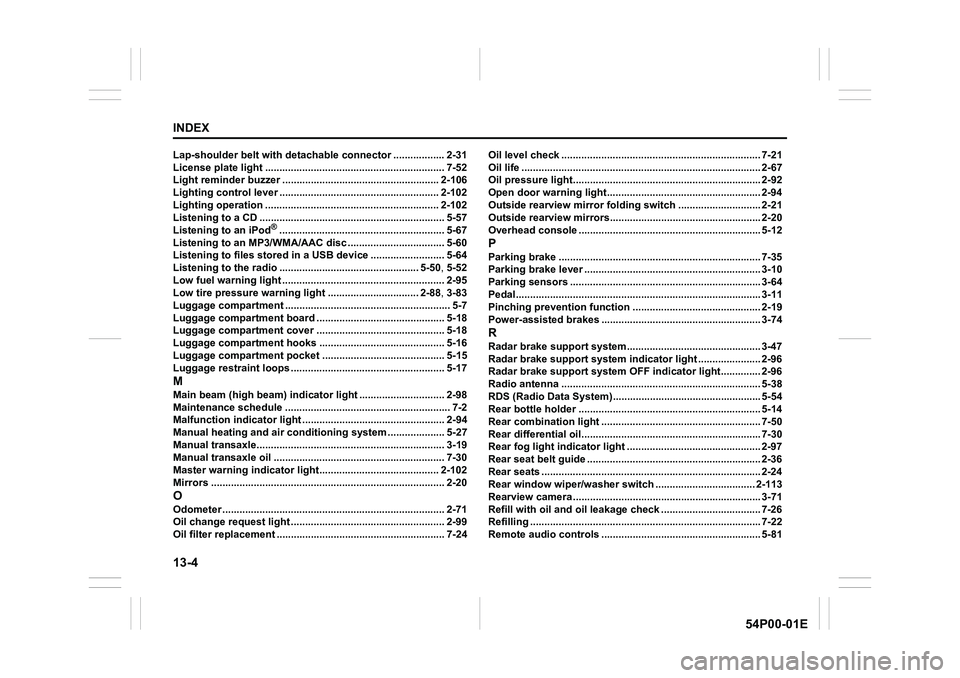
13-4
INDEX
54P00-01E
Lap-shoulder belt with detachable connector .................. 2-31
License plate light ............................................................... 7-52
Light reminder buzzer ....................................................... 2-106
Lighting control lever ........................................................ 2-102
Lighting operation ............................................................. 2-102
Listening to a CD ................................................................. 5-57
Listening to an iPod
®.......................................................... 5-67
Listening to an MP3/WMA/AAC disc .................................. 5-60
Listening to files stored in a USB device .......................... 5-64
Listening to the radio ................................................. 5-50, 5-52
Low fuel warning light ......................................................... 2-95
Low tire pressure warning light ................................ 2-88, 3-83
Luggage compartment .......................................................... 5-7
Luggage compartment board ............................................. 5-18
Luggage compartment cover ............................................. 5-18
Luggage compartment hooks ............................................ 5-16
Luggage compartment pocket ........................................... 5-15
Luggage restraint loops ...................................................... 5-17
M
Main beam (high beam) indicator light .............................. 2-98
Maintenance schedule .......................................................... 7-2
Malfunction indicator light .................................................. 2-94
Manual heating and air conditioning system .................... 5-27
Manual transaxle.................................................................. 3-19
Manual transaxle oil ............................................................ 7-30
Master warning indicator light.......................................... 2-102
Mirrors .................................................................................. 2-20
O
Odometer .............................................................................. 2-71
Oil change request light ...................................................... 2-99
Oil filter replacement ........................................................... 7-24Oil level check ...................................................................... 7-21
Oil life .................................................................................... 2-67
Oil pressure light.................................................................. 2-92
Open door warning light...................................................... 2-94
Outside rearview mirror folding switch ............................. 2-21
Outside rearview mirrors..................................................... 2-20
Overhead console ................................................................ 5-12
P
Parking brake ....................................................................... 7-35
Parking brake lever .............................................................. 3-10
Parking sensors ................................................................... 3-64
Pedal...................................................................................... 3-11
Pinching prevention function ............................................. 2-19
Power-assisted brakes ........................................................ 3-74
R
Radar brake support system............................................... 3-47
Radar brake support system indicator light ...................... 2-96
Radar brake support system OFF indicator light.............. 2-96
Radio antenna ...................................................................... 5-38
RDS (Radio Data System).................................................... 5-54
Rear bottle holder ................................................................ 5-14
Rear combination light ........................................................ 7-50
Rear differential oil............................................................... 7-30
Rear fog light indicator light ............................................... 2-97
Rear seat belt guide ............................................................. 2-36
Rear seats ............................................................................. 2-24
Rear window wiper/washer switch ................................... 2-113
Rearview camera .................................................................. 3-71
Refill with oil and oil leakage check ................................... 7-26
Refilling ................................................................................. 7-22
Remote audio controls ........................................................ 5-81