Ignition mode SUZUKI GRAND VITARA 2018 Owner's Manual
[x] Cancel search | Manufacturer: SUZUKI, Model Year: 2018, Model line: GRAND VITARA, Model: SUZUKI GRAND VITARA 2018Pages: 482, PDF Size: 21 MB
Page 83 of 482
2-61
BEFORE DRIVING
54P00-01E
58MS030
According to accident statistics, children
are safer when properly restrained in rear
seating positions than front seating posi-
tions. Whenever possible, SUZUKI recom-
mends that child restraint systems be
installed on the rear seat.
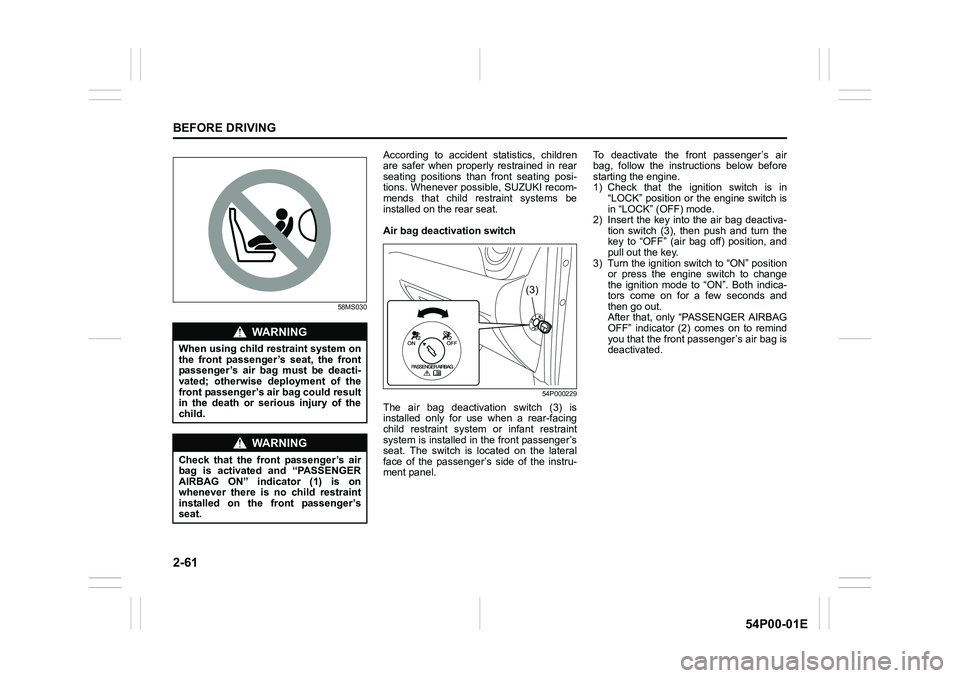
Air bag deactivation switch
54P000229
The air bag deactivation switch (3) is
installed only for use when a rear-facing
child restraint system or infant restraint
system is installed in the front passenger’s
seat. The switch is located on the lateral
face of the passenger’s side of the instru-
ment panel.To deactivate the front passenger’s air
bag, follow the instructions below before
starting the engine.
1) Check that the ignition switch is in
“LOCK” position or the engine switch is
in “LOCK” (OFF) mode.
2) Insert the key into the air bag deactiva-
tion switch (3), then push and turn the
key to “OFF” (air bag off) position, and
pull out the key.
3) Turn the ignition switch to “ON” position
or press the engine switch to change
the ignition mode to “ON”. Both indica-
tors come on for a few seconds and
then go out.
After that, only “PASSENGER AIRBAG
OFF” indicator (2) comes on to remind
you that the front passenger’s air bag is
deactivated.
WA R N I N G
When using child restraint system on
the front passenger’s seat, the front
passenger’s air bag must be deacti-
vated; otherwise deployment of the
front passenger’s air bag could result
in the death or serious injury of the
child.
WA R N I N G
Check that the front passenger’s air
bag is activated and “PASSENGER
AIRBAG ON” indicator (1) is on
whenever there is no child restraint
installed on the front passenger’s
seat.
(3)
Page 84 of 482
2-62
BEFORE DRIVING
54P00-01E
To activate the front passenger’s air bag,
follow the instructions below before start-
ing the engine.
1) Check that the ignition switch is in
“LOCK” position or the engine switch is
in “LOCK” (OFF) mode.
2) Insert the key into the air bag deactiva-
tion switch (3), then push and turn the
key to “ON” (air bag on) position, and
pull out the key.
3) Turn the ignition switch to “ON” position
or press the engine switch to change
the ignition mode to “ON”. Both indica-
tors come on for a few seconds and
then go out.
After that, only “PASSENGER AIRBAG
ON” indicator (1) comes on for about 1
minute and then goes out to remind you
that the front passenger’s air bag is
activated.
Page 86 of 482
2-64
BEFORE DRIVING
54P00-01E
Speedometer
The speedometer indicates vehicle speed.
Tachometer
The tachometer indicates engine speed in
revolutions per minute.
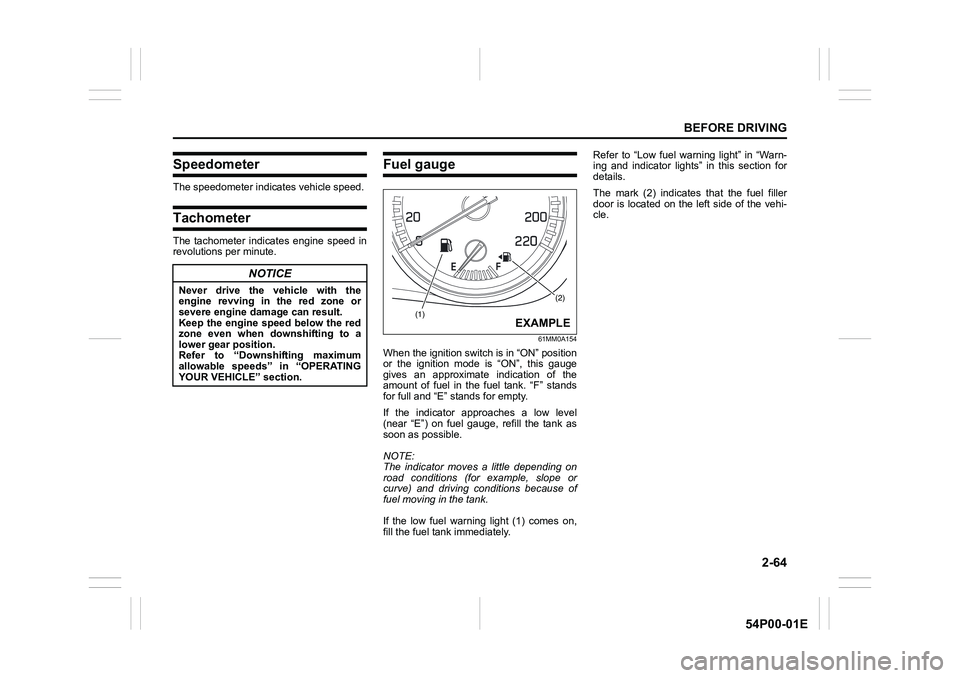
Fuel gauge
61MM0A154
When the ignition switch is in “ON” position
or the ignition mode is “ON”, this gauge
gives an approximate indication of the
amount of fuel in the fuel tank. “F” stands
for full and “E” stands for empty.
If the indicator approaches a low level
(near “E”) on fuel gauge, refill the tank as
soon as possible.
NOTE:
The indicator moves a little depending on
road conditions (for example, slope or
curve) and driving conditions because of
fuel moving in the tank.
If the low fuel warning light (1) comes on,
fill the fuel tank immediately.Refer to “Low fuel warning light” in “Warn-
ing and indicator lights” in this section for
details.
The mark (2) indicates that the fuel filler
door is located on the left side of the vehi-
cle.
NOTICE
Never drive the vehicle with the
engine revving in the red zone or
severe engine damage can result.
Keep the engine speed below the red
zone even when downshifting to a
lower gear position.
Refer to “Downshifting maximum
allowable speeds” in “OPERATING
YOUR VEHICLE” section.(2)
(1)EXAMPLE
Page 87 of 482
2-65
BEFORE DRIVING
54P00-01E
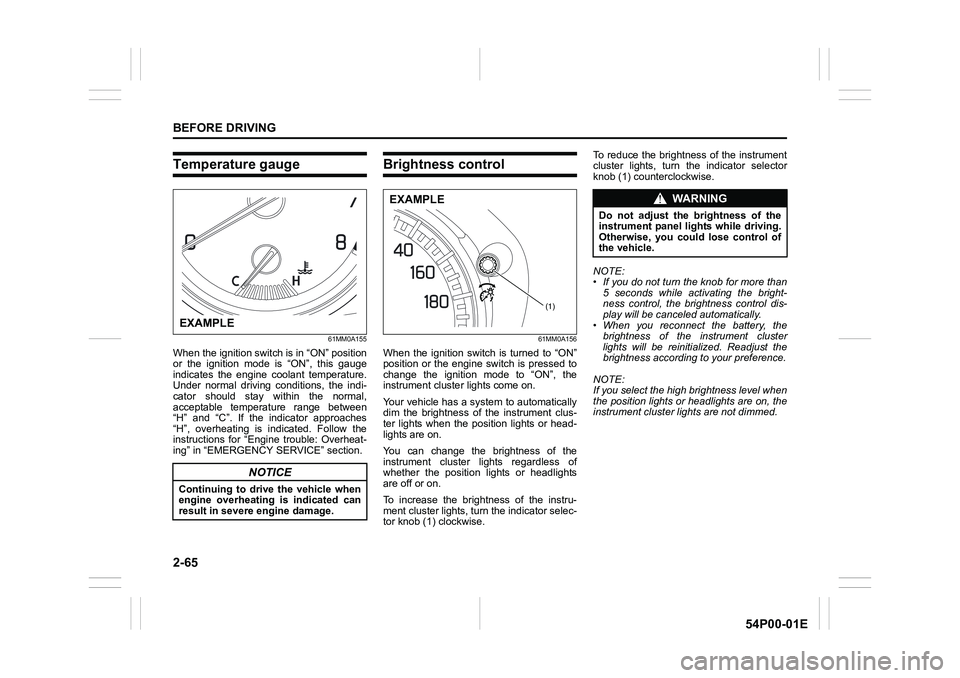
Temperature gauge
61MM0A155
When the ignition switch is in “ON” position
or the ignition mode is “ON”, this gauge
indicates the engine coolant temperature.
Under normal driving conditions, the indi-
cator should stay within the normal,
acceptable temperature range between
“H” and “C”. If the indicator approaches
“H”, overheating is indicated. Follow the
instructions for “Engine trouble: Overheat-
ing” in “EMERGENCY SERVICE” section.
Brightness control
61MM0A156
When the ignition switch is turned to “ON”
position or the engine switch is pressed to
change the ignition mode to “ON”, the
instrument cluster lights come on.
Your vehicle has a system to automatically
dim the brightness of the instrument clus-
ter lights when the position lights or head-
lights are on.
You can change the brightness of the
instrument cluster lights regardless of
whether the position lights or headlights
are off or on.
To increase the brightness of the instru-
ment cluster lights, turn the indicator selec-
tor knob (1) clockwise. To reduce the brightness of the instrument
cluster lights, turn the indicator selector
knob (1) counterclockwise.
NOTE:
• If you do not turn the knob for more than
5 seconds while activating the bright-
ness control, the brightness control dis-
play will be canceled automatically.
• When you reconnect the battery, the
brightness of the instrument cluster
lights will be reinitialized. Readjust the
brightness according to your preference.
NOTE:
If you select the high brightness level when
the position lights or headlights are on, the
instrument cluster lights are not dimmed.
NOTICE
Continuing to drive the vehicle when
engine overheating is indicated can
result in severe engine damage.
EXAMPLE
(1)
EXAMPLEWA R N I N G
Do not adjust the brightness of the
instrument panel lights while driving.
Otherwise, you could lose control of
the vehicle.
Page 88 of 482
2-66
BEFORE DRIVING
54P00-01E
Information display
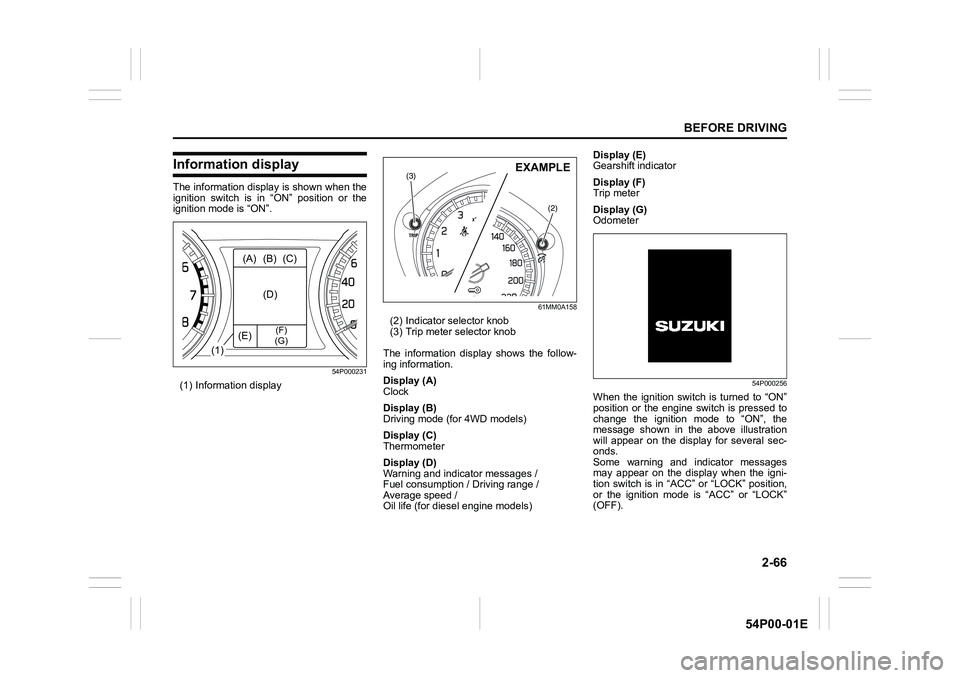
The information display is shown when the
ignition switch is in “ON” position or the
ignition mode is “ON”.
54P000231
(1) Information display
61MM0A158
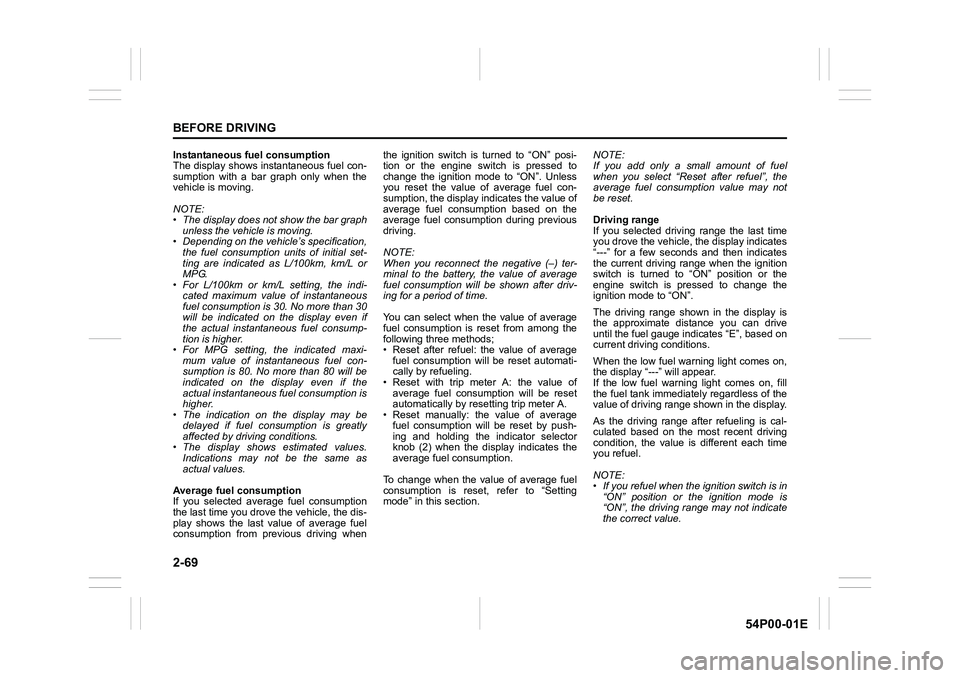
(2) Indicator selector knob
(3) Trip meter selector knob
The information display shows the follow-
ing information.
Display (A)
Clock
Display (B)
Driving mode (for 4WD models)
Display (C)
Thermometer
Display (D)
Warning and indicator messages /
Fuel consumption / Driving range /
Average speed /
Oil life (for diesel engine models)Display (E)
Gearshift indicator
Display (F)
Trip meter
Display (G)
Odometer
54P000256
When the ignition switch is turned to “ON”
position or the engine switch is pressed to
change the ignition mode to “ON”, the
message shown in the above illustration
will appear on the display for several sec-
onds.
Some warning and indicator messages
may appear on the display when the igni-
tion switch is in “ACC” or “LOCK” position,
or the ignition mode is “ACC” or “LOCK”
(OFF).
(1)(A) (B) (C)
(D)
(E)
(F)
(G)
(3)
(2)
EXAMPLE
Page 91 of 482
2-69
BEFORE DRIVING
54P00-01E
Instantaneous fuel consumption
The display shows instantaneous fuel con-
sumption with a bar graph only when the
vehicle is moving.
NOTE:
• The display does not show the bar graph
unless the vehicle is moving.
• Depending on the vehicle’s specification,
the fuel consumption units of initial set-
ting are indicated as L/100km, km/L or
MPG.
• For L/100km or km/L setting, the indi-
cated maximum value of instantaneous
fuel consumption is 30. No more than 30
will be indicated on the display even if
the actual instantaneous fuel consump-
tion is higher.
• For MPG setting, the indicated maxi-
mum value of instantaneous fuel con-
sumption is 80. No more than 80 will be
indicated on the display even if the
actual instantaneous fuel consumption is
higher.
• The indication on the display may be
delayed if fuel consumption is greatly
affected by driving conditions.
• The display shows estimated values.
Indications may not be the same as
actual values.
Average fuel consumption
If you selected average fuel consumption
the last time you drove the vehicle, the dis-
play shows the last value of average fuel
consumption from previous driving whenthe ignition switch is turned to “ON” posi-
tion or the engine switch is pressed to
change the ignition mode to “ON”. Unless
you reset the value of average fuel con-
sumption, the display indicates the value of
average fuel consumption based on the
average fuel consumption during previous
driving.
NOTE:
When you reconnect the negative (–) ter-
minal to the battery, the value of average
fuel consumption will be shown after driv-
ing for a period of time.
You can select when the value of average
fuel consumption is reset from among the
following three methods;
• Reset after refuel: the value of average
fuel consumption will be reset automati-
cally by refueling.
• Reset with trip meter A: the value of
average fuel consumption will be reset
automatically by resetting trip meter A.
• Reset manually: the value of average
fuel consumption will be reset by push-
ing and holding the indicator selector
knob (2) when the display indicates the
average fuel consumption.
To change when the value of average fuel
consumption is reset, refer to “Setting
mode” in this section. NOTE:
If you add only a small amount of fuel
when you select “Reset after refuel”, the
average fuel consumption value may not
be reset.
Driving range
If you selected driving range the last time
you drove the vehicle, the display indicates
“---” for a few seconds and then indicates
the current driving range when the ignition
switch is turned to “ON” position or the
engine switch is pressed to change the
ignition mode to “ON”.
The driving range shown in the display is
the approximate distance you can drive
until the fuel gauge indicates “E”, based on
current driving conditions.
When the low fuel warning light comes on,
the display “---” will appear.
If the low fuel warning light comes on, fill
the fuel tank immediately regardless of the
value of driving range shown in the display.
As the driving range after refueling is cal-
culated based on the most recent driving
condition, the value is different each time
you refuel.
NOTE:
• If you refuel when the ignition switch is in
“ON” position or the ignition mode is
“ON”, the driving range may not indicate
the correct value.
Page 92 of 482
2-70
BEFORE DRIVING
54P00-01E
• When you reconnect the negative (–)
terminal to the battery, the value of driv-
ing range will be shown after driving for a
period of time.
Average Speed
If you selected average speed the last time
you drove the vehicle, the display indicates
the last value of average speed from previ-
ous driving when the ignition switch is
turned to “ON” position or the engine
switch is pressed to change the ignition
mode to “ON”. Unless you reset the value
of average speed, the display indicates the
value of average speed which includes
average speed during previous driving.
To reset the value of average speed, push
and hold the indicator selector knob (2) for
about 2 seconds when the display indi-
cates an average speed. The display
shows “---” and then indicates a new aver-
age speed after driving for a short time.
NOTE:
When you reconnect the negative (–) ter-
minal to the battery, the value of average
speed will be shown after driving for a
period of time.Oil life (for diesel engine models)
The display indicates the remaining dis-
tance until the timing calculated for the
next engine oil and oil filter change. When
the remaining distance becomes 0 km, the
oil change request light in the instrument
cluster also starts blinking to alert that you
should change the engine oil and oil filter
immediately.
If you selected oil life the last time you
drove the vehicle, the display indicates “---”
for a few seconds and then indicates the
current distance until the next engine oil
change is due, when the ignition switch is
turned to “ON” position or the engine
switch is pressed to change the ignition
mode to “ON”.
Whenever the engine oil and oil filter are
changed, the oil life monitoring must be
reset in order to monitor the next oil and oil
filter change timing properly. To reset the
indicator, consult your SUZUKI dealer.
When the oil life monitoring is reset, the oil
life monitoring indicates 30000 km. If the
oil change request light was blinking, it will
go out.
NOTICE
Change the engine oil and oil filter
immediately when the remaining dis-
tance of the oil life monitoring indica-
tion becomes close to 0 km. If you
keep operating the engine with 0 km
indication of oil life monitoring,
severe engine damage can result.
Page 93 of 482
2-71
BEFORE DRIVING
54P00-01E
Gearshift indicator
The display (E) shows the gearshift indica-
tor.
54P000232
Refer to “Gearshift indicator” in “OPERAT-
ING YOUR VEHICLE” section.
Trip meter
The display (F) shows the trip meter.
The trip meter can be used to measure the
distance traveled on short trips or between
fuel stops.
You can use trip meter A or trip meter B
independently.
To reset the trip meter to zero, push and
hold the trip meter selector knob (3) for
about 2 seconds when the display shows
the trip meter.
Odometer
The display (G) shows the odometer.
The odometer records the total distance
the vehicle has been driven.
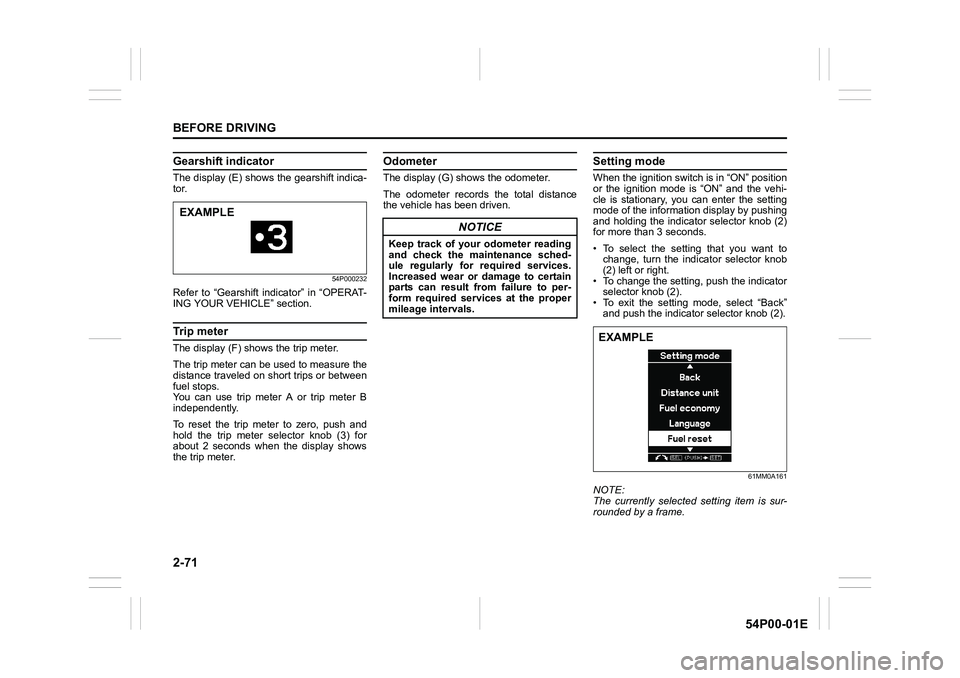
Setting mode
When the ignition switch is in “ON” position
or the ignition mode is “ON” and the vehi-
cle is stationary, you can enter the setting
mode of the information display by pushing
and holding the indicator selector knob (2)
for more than 3 seconds.
• To select the setting that you want to
change, turn the indicator selector knob
(2) left or right.
• To change the setting, push the indicator
selector knob (2).
• To exit the setting mode, select “Back”
and push the indicator selector knob (2).
61MM0A161
NOTE:
The currently selected setting item is sur-
rounded by a frame.
EXAMPLE
NOTICE
Keep track of your odometer reading
and check the maintenance sched-
ule regularly for required services.
Increased wear or damage to certain
parts can result from failure to per-
form required services at the proper
mileage intervals.
EXAMPLE
Page 94 of 482
2-72
BEFORE DRIVING
54P00-01E
NOTE:
• If you push and hold the indicator selec-
tor knob (2) to enter the setting mode
when the display (D) shows average fuel
consumption or average speed, the
value will be reset simultaneously. If you
do not want to reset the value, push the
indicator selector knob quickly to switch
the indication of the display.
• If you turn the ignition switch, press the
engine switch or start to move the vehi-
cle when the display is in the setting
mode, the setting mode will be canceled
automatically.
Distance unit
(Odometer / trip meter distance unit set-
ting)
You can change the units in which odome-
ter / trip meter distance is displayed.
NOTE:
When you change the units in which odom-
eter / trip meter distance is displayed, the
trip meter will be reset automatically.
Fuel economy
(Fuel consumption unit setting)
You can change the units that fuel con-
sumption is displayed in.
Language
You can change the language of the infor-
mation display.Fuel reset (Average fuel consumption
reset setting)
You can change when the value of aver-
age fuel consumption is reset.
Temperature
(Temperature unit setting)
You can change the units that temperature
is displayed in.
NOTE:
When you change the units that tempera-
ture is displayed in, the automatic heating
and air conditioning system (if equipped)
temperature display units will be changed
automatically.
Set sensors
(Parking sensor setting) (if equipped)
The parking sensor can be switched
between the normal mode and trailer
mode.Clock setting
• To change the hour indication, turn the
indicator selector knob (2) left or right
repeatedly when the hour indication
appears as reversed color. To change
the hour indication quickly, turn and hold
the indicator selector knob (2). To set the
hour indication, push the indicator selec-
tor knob (2) and the minute indication
appears as reversed color.
• To change the minute indication, turn the
indicator selector knob (2) left or right
repeatedly when the minute indication
appears as reversed color. To change
the minute indication quickly, turn and
hold the indicator selector knob (2). To
set the minute indication, push the indi-
cator selector knob (2).
You can also switch the time indication
between 12-hour and 24-hour format.
NOTE:
When the clock on the information display
is set, the clock in the instrument panel (if
equipped) is set in accordance with the
time of the clock on the information display.
Page 110 of 482
2-88
BEFORE DRIVING
54P00-01E
Warning and indicator lights
NOTE:
If warning and indicator lights blink or
come on, the corresponding messages
may be shown on the information display.
Low tire pressure warning light
(if equipped)
52D305
As an added fuel efficiency feature, your
vehicle is equipped with a tire pressure
monitoring system (TPMS) that uses a low
tire pressure warning light to inform you
when one or more of your tires is signifi-
cantly under-inflated.
When the ignition switch is turned to “ON”
position or the engine switch is pressed to
change the ignition mode to “ON”, this light
comes on briefly so you can check that the
light is working.
When the low tire pressure warning light is
lit, one or more of your tires is significantly
under-inflated. You should stop and check
your tires as soon as possible, and inflate
them to the proper pressure as indicatedon the vehicle’s tire information placard.
Driving on a significantly under-inflated tire
causes the tire to overheat and can lead to
tire failure. Under-inflation also reduces
fuel efficiency and tire tread life, and may
affect the vehicle’s handling and stopping
ability. Each tire, including the spare,
should be checked at least once a month
when cold and set to the recommended
inflation pressure as specified in the vehi-
cle placard.
The low tire pressure warning light is also
used to inform you of a TPMS malfunction.
When the system detects a malfunction,
this light will blink for about 75 seconds
and then remain continuously illuminated.
This sequence will be repeated after the
ignition switch is turned to “ON” position or
the engine switch is pressed to change the
ignition mode to “ON” as long as the mal-
function exists.
NOTE:
The low tire pressure warning light may not
come on immediately if you have a sudden
loss of air pressure.
WA R N I N G
Failure to take corrective action when
the low tire pressure warning light is
not working or when it comes on and
blinks while driving can lead to an
accident.
If the low tire pressure warning light
does not come on for 2 seconds after
the ignition switch is turned to “ON”
position or the engine switch is
pressed to change the ignition mode
to “ON”, or comes on and blinks
while driving, have your vehicle
inspected by an authorized SUZUKI
dealer. Even if the light turns off after
blinking, indicating that the monitor-
ing system has recovered, you
should still have the system checked
by your authorized SUZUKI dealer.