steering SUZUKI GRAND VITARA 2022 User Guide
[x] Cancel search | Manufacturer: SUZUKI, Model Year: 2022, Model line: GRAND VITARA, Model: SUZUKI GRAND VITARA 2022Pages: 482, PDF Size: 21 MB
Page 128 of 482
2-106
BEFORE DRIVING
54P00-01E
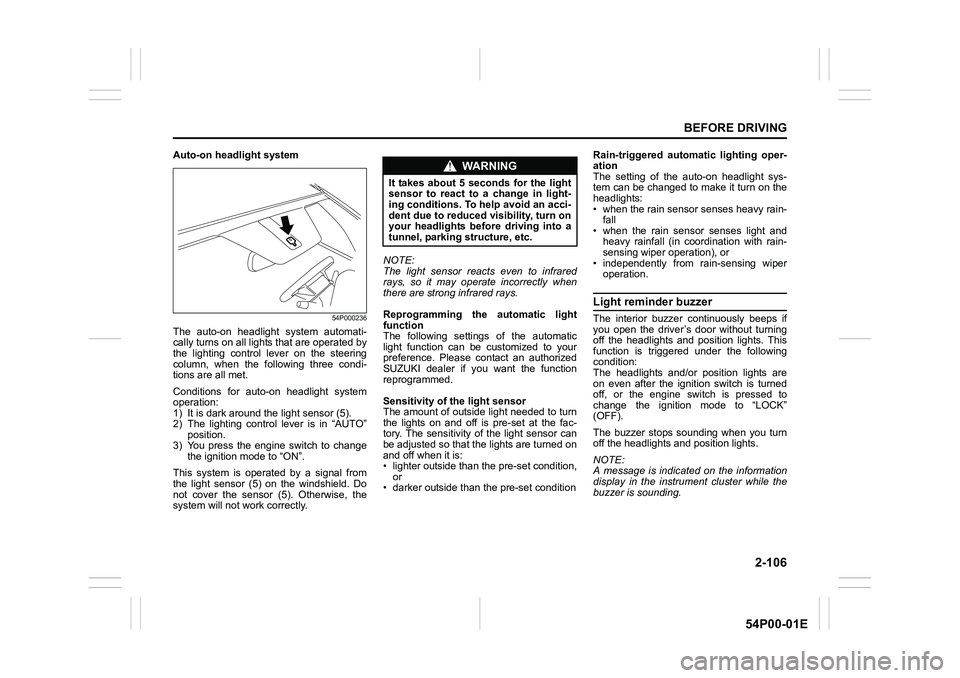
Auto-on headlight system
54P000236
The auto-on headlight system automati-
cally turns on all lights that are operated by
the lighting control lever on the steering
column, when the following three condi-
tions are all met.
Conditions for auto-on headlight system
operation:
1) It is dark around the light sensor (5).
2) The lighting control lever is in “AUTO”
position.
3) You press the engine switch to change
the ignition mode to “ON”.
This system is operated by a signal from
the light sensor (5) on the windshield. Do
not cover the sensor (5). Otherwise, the
system will not work correctly.NOTE:
The light sensor reacts even to infrared
rays, so it may operate incorrectly when
there are strong infrared rays.
Reprogramming the automatic light
function
The following settings of the automatic
light function can be customized to your
preference. Please contact an authorized
SUZUKI dealer if you want the function
reprogrammed.
Sensitivity of the light sensor
The amount of outside light needed to turn
the lights on and off is pre-set at the fac-
tory. The sensitivity of the light sensor can
be adjusted so that the lights are turned on
and off when it is:
• lighter outside than the pre-set condition,
or
• darker outside than the pre-set conditionRain-triggered automatic lighting oper-
ation
The setting of the auto-on headlight sys-
tem can be changed to make it turn on the
headlights:
• when the rain sensor senses heavy rain-
fall
• when the rain sensor senses light and
heavy rainfall (in coordination with rain-
sensing wiper operation), or
• independently from rain-sensing wiper
operation.
Light reminder buzzer
The interior buzzer continuously beeps if
you open the driver’s door without turning
off the headlights and position lights. This
function is triggered under the following
condition:
The headlights and/or position lights are
on even after the ignition switch is turned
off, or the engine switch is pressed to
change the ignition mode to “LOCK”
(OFF).
The buzzer stops sounding when you turn
off the headlights and position lights.
NOTE:
A message is indicated on the information
display in the instrument cluster while the
buzzer is sounding.
WA R N I N G
It takes about 5 seconds for the light
sensor to react to a change in light-
ing conditions. To help avoid an acci-
dent due to reduced visibility, turn on
your headlights before driving into a
tunnel, parking structure, etc.
Page 130 of 482
2-108
BEFORE DRIVING
54P00-01E
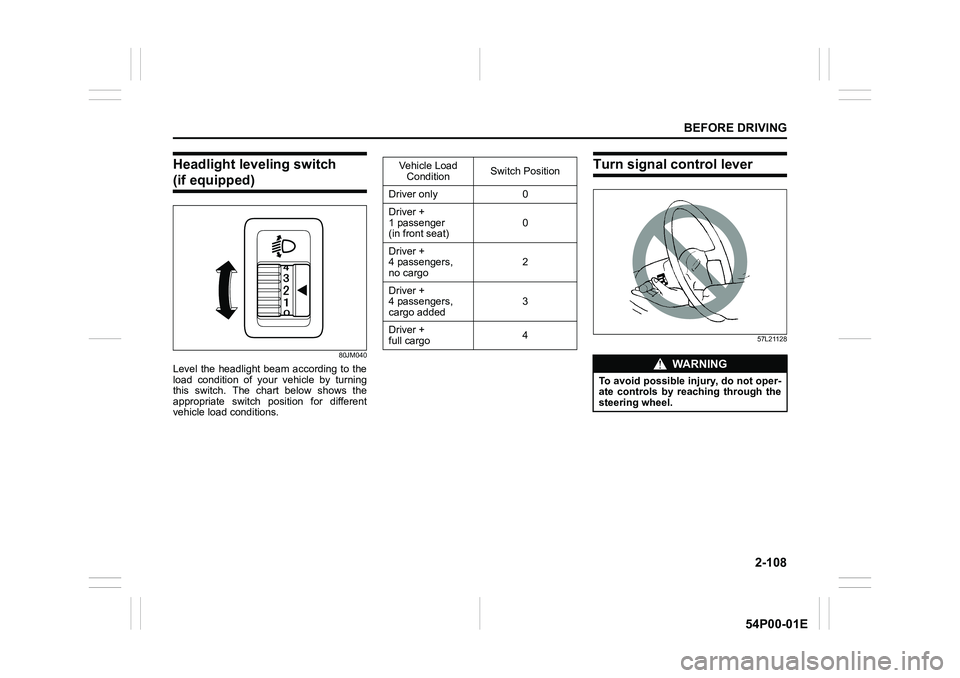
Headlight leveling switch
(if equipped)
80JM040
Level the headlight beam according to the
load condition of your vehicle by turning
this switch. The chart below shows the
appropriate switch position for different
vehicle load conditions.
Turn signal control lever
57L21128
Vehicle Load
ConditionSwitch Position
Driver only 0
Driver +
1 passenger
(in front seat)0
Driver +
4 passengers,
no cargo2
Driver +
4 passengers,
cargo added3
Driver +
full cargo4
WA R N I N G
To avoid possible injury, do not oper-
ate controls by reaching through the
steering wheel.
Page 132 of 482
2-110
BEFORE DRIVING
54P00-01E
Hazard warning switch
54P000242
Push in the hazard warning switch to acti-
vate the hazard warning lights. All turn sig-
nal lights and both turn signal indicators
will flash simultaneously. To turn off the
lights, push the switch again.
Use the hazard warning lights to warn
other drivers of possible risk of traffic haz-
ard when you park your vehicle in case of
emergency.
Windshield wiper and washer
lever
65D611
Wiper and washer operation
When the ignition switch is in “ON” position
or the ignition mode is “ON”, you can use
the wiper/washer lever or switch (if
equipped).
Windshield wipers
61MM0A079
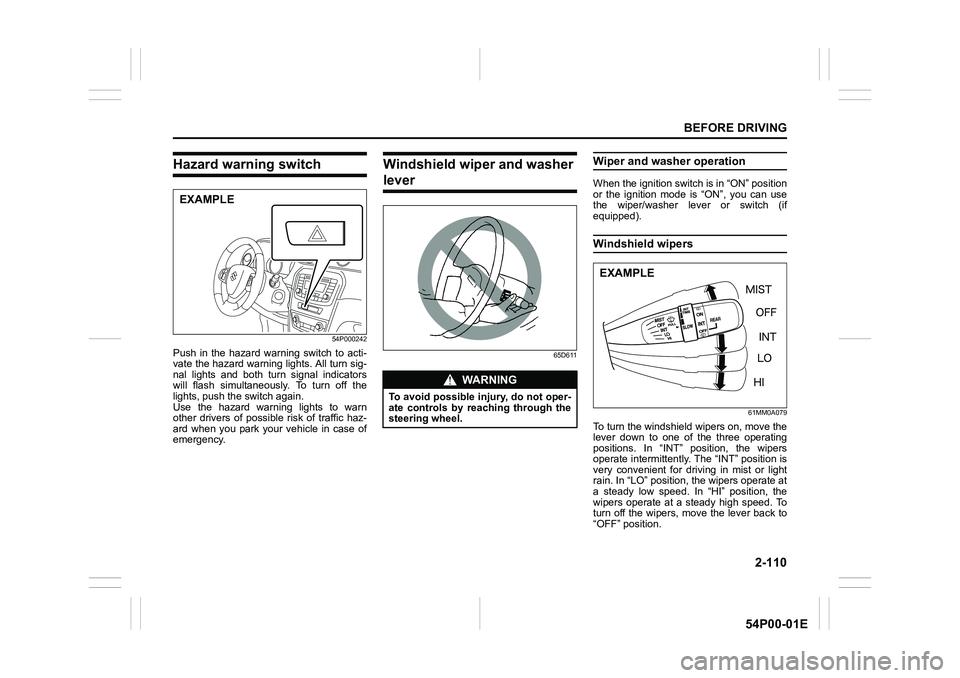
To turn the windshield wipers on, move the
lever down to one of the three operating
positions. In “INT” position, the wipers
operate intermittently. The “INT” position is
very convenient for driving in mist or light
rain. In “LO” position, the wipers operate at
a steady low speed. In “HI” position, the
wipers operate at a steady high speed. To
turn off the wipers, move the lever back to
“OFF” position.
EXAMPLE
WA R N I N G
To avoid possible injury, do not oper-
ate controls by reaching through the
steering wheel.
EXAMPLE
Page 136 of 482
2-114
BEFORE DRIVING
54P00-01E
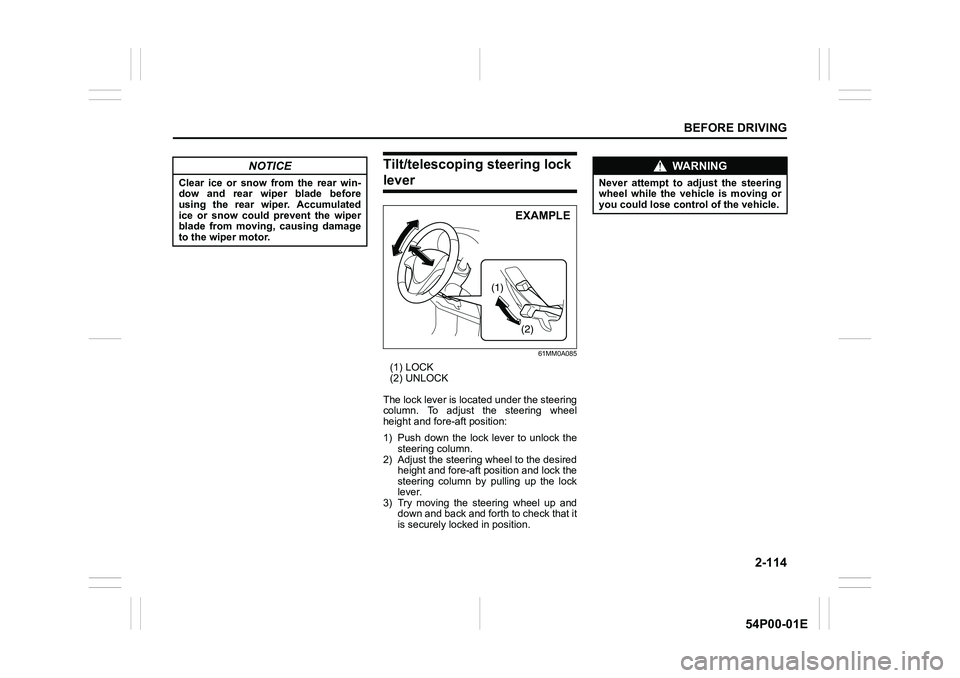
Tilt/telescoping steering lock
lever
61MM0A085
(1) LOCK
(2) UNLOCK
The lock lever is located under the steering
column. To adjust the steering wheel
height and fore-aft position:
1) Push down the lock lever to unlock the
steering column.
2) Adjust the steering wheel to the desired
height and fore-aft position and lock the
steering column by pulling up the lock
lever.
3) Try moving the steering wheel up and
down and back and forth to check that it
is securely locked in position.
NOTICE
Clear ice or snow from the rear win-
dow and rear wiper blade before
using the rear wiper. Accumulated
ice or snow could prevent the wiper
blade from moving, causing damage
to the wiper motor.
(1)
(2)
EXAMPLE
WA R N I N G
Never attempt to adjust the steering
wheel while the vehicle is moving or
you could lose control of the vehicle.
Page 137 of 482
2-115
BEFORE DRIVING
54P00-01E
Horn
68LM240
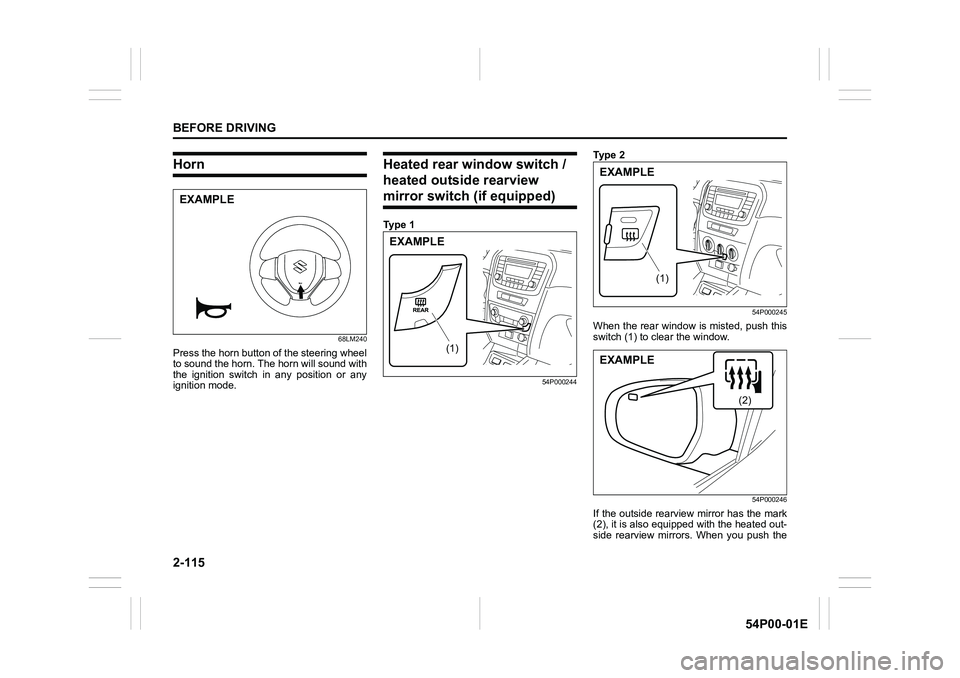
Press the horn button of the steering wheel
to sound the horn. The horn will sound with
the ignition switch in any position or any
ignition mode.
Heated rear window switch /
heated outside rearview
mirror switch (if equipped)
Ty p e 1
54P000244
Ty p e 2
54P000245
When the rear window is misted, push this
switch (1) to clear the window.
54P000246
If the outside rearview mirror has the mark
(2), it is also equipped with the heated out-
side rearview mirrors. When you push the
EXAMPLE
(1)
EXAMPLE
(1)
EXAMPLE
(2)
EXAMPLE
Page 143 of 482
3-3
OPERATING YOUR VEHICLE
54P00-01E
making it appear that the oil level has not
changed.
You should also be aware that the diluting
ingredients evaporate out when the vehicle
is subsequently driven at high speeds,
such as on an expressway, making it
appear that oil is excessively consumed
after high-speed driving.Ignition switch
(vehicle without keyless push
start system)
65D61160B041
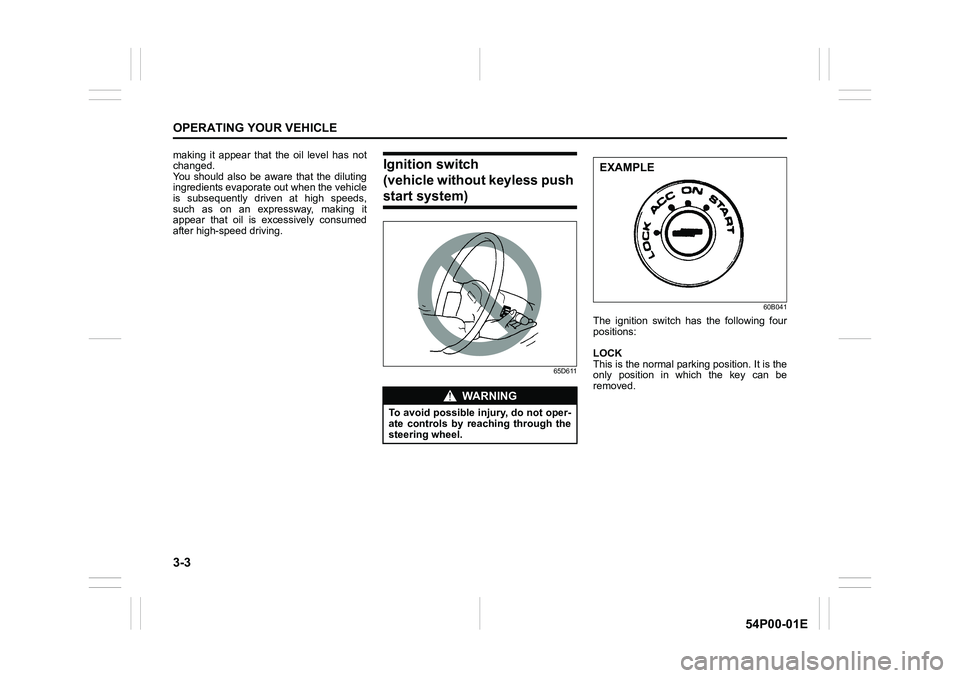
The ignition switch has the following four
positions:
LOCK
This is the normal parking position. It is the
only position in which the key can be
removed.
WA R N I N G
To avoid possible injury, do not oper-
ate controls by reaching through the
steering wheel.
EXAMPLE
Page 144 of 482
3-4
OPERATING YOUR VEHICLE
54P00-01E
Manual transaxle
60G033
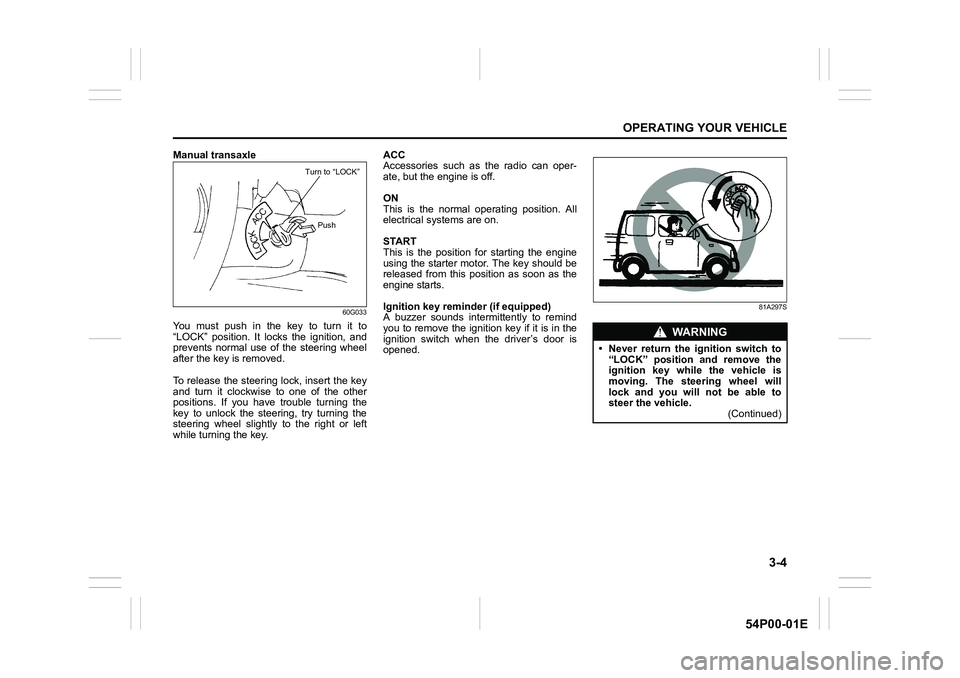
You must push in the key to turn it to
“LOCK” position. It locks the ignition, and
prevents normal use of the steering wheel
after the key is removed.
To release the steering lock, insert the key
and turn it clockwise to one of the other
positions. If you have trouble turning the
key to unlock the steering, try turning the
steering wheel slightly to the right or left
while turning the key.ACC
Accessories such as the radio can oper-
ate, but the engine is off.
ON
This is the normal operating position. All
electrical systems are on.
START
This is the position for starting the engine
using the starter motor. The key should be
released from this position as soon as the
engine starts.
Ignition key reminder (if equipped)
A buzzer sounds intermittently to remind
you to remove the ignition key if it is in the
ignition switch when the driver’s door is
opened.
81A297S
Turn to “LOCK”
Push
WA R N I N G
• Never return the ignition switch to
“LOCK” position and remove the
ignition key while the vehicle is
moving. The steering wheel will
lock and you will not be able to
steer the vehicle.
(Continued)
Page 146 of 482
3-6
OPERATING YOUR VEHICLE
54P00-01E
NOTE:
In the presence of strong radio signals or
noise, you may not be able to change the
ignition mode to “ACC” or “ON” or to start
the engine using the engine switch. In this
case, the information display in the instru-
ment cluster will show the following mes-
sage: KEY FOB NOT DETECTED.
Unreleased steering lock warning
If the steering lock remains engaged when
you press the engine switch to change the
ignition mode to “ON”, the information dis-
play in the instrument cluster shows the
message: “TRN. STEERING WHEEL TO
RELEASE LOCK”. Refer to “Information
display” in “BEFORE DRIVING” section for
details.
NOTE:
The steering lock may not be released if
some load is acting on the steering wheel.
If this happens, turn the steering wheel to
the right or left to relieve it from the load
before you press the engine switch again
to change to the desired ignition mode.
Keyless push start system
(if equipped)
Provided the keyless push start system
remote controller is within the interior work-
able area (refer to the related explanation
in this section), you can use the engine
switch for starting the engine and selecting
an ignition mode (“ACC” or “ON”). In addi-
tion, the following functions can be used:
• Keyless entry function. Refer to “Keyless
push start system remote controller /
keyless entry system transmitter” in
“BEFORE DRIVING” section for details.
• Locking and unlocking doors (including
the tailgate) using a request switch.
Refer to “Keyless push start system
remote controller / keyless entry system
transmitter” in “BEFORE DRIVING” sec-
tion for details.
• Immobilizer (anti-theft) function. Refer to
“Immobilizer system” in “BEFORE DRIV-
ING” section for details.
Engine switch illumination
The engine switch is illuminated (lit) in the
following situations:
• When the engine is off and the driver’s
door is open, or for 15 seconds after the
driver’s door is closed. The illumination
will fade out after 15 seconds passed.
NOTICE
Do not leave the engine switch in
“ACC” or “ON” mode when the
engine is not running. Avoid using
the radio or other electric accesso-
ries for a long time when the engine
switch is in “ACC” or “ON” mode
when the engine is not running, oth-
erwise the battery may discharge.
Page 155 of 482
3-15
OPERATING YOUR VEHICLE
54P00-01E
NOTE:
• You do not need to keep the engine
switch pressed to start the engine.
• The engine will not start unless the
clutch pedal is depressed.
• During the engine starting procedure,
messages on the information display will
help you. Refer to “Information display”
in “BEFORE DRIVING” section for
details.
• You should turn off such loads as the
headlights and air conditioning system to
facilitate starting of the engine.
• Even if you fail to start the engine, the
starter motor will stop turning automati-
cally after a short time. After the starter
motor has stopped or if there is some
problem with the system, the starter
motor will rotate only while the engine
switch is being pressed.
Stopping engine
• Depress the engine switch to stop the
engine after the vehicle stopped com-
pletely.
• In case of emergency, you can stop the
engine by quickly pushing the engine
switch more than 3 times, or pushing
and holding the engine switch for more
than 2 seconds while the vehicle is in
motion.
NOTE:
Except in cases of emergency, do not stop
the engine while the vehicle is in motion.
The steering and braking operation will
require more effort when the engine is
stopped.
Refer to “Braking” in this section.
• If the engine remains stopped for while
after it was stopped unexpectedly or was
raced before stopping, a clicking sound
may be heard from around the engine
when it is restarted. This is not a mal-
function. Always let the engine idle
before stopping it.
Starting a cold and warm engine
(For gasoline engine model)
With your foot taken off the accelerator
pedal, crank the engine by pressing the
engine switch to change the ignition mode
to “START”.
After pressing the engine switch to change
the ignition mode to “START”, the starter
cranks the engine for about 12 seconds
before it can start the engine. If the engine
fails to start at the first attempt, wait about
15 seconds, and then try again while keep-
ing the engine switch pressed while press-
ing down the accelerator pedal 1/3 of full
capacity. Release the accelerator pedal
when the engine starts.
If the engine still does not start, try holding
the accelerator pedal all the way to the
floor while cranking. This should clear the
engine if it is flooded.
If you are unable to start the engine using
this procedure, consult your SUZUKI
dealer.NOTICE
• Do not depress the accelerator
during the engine starting proce-
dure.
• If the engine does not respond
when you try to start it with the
engine switch or if the engine
switch repeats cycling through
“LOCK” (OFF) - “ACC” - “ON”
mode, the vehicle battery may be
discharged. Check the voltage of
the vehicle battery before trying
again.
NOTICE
Do not crank the engine for more
than 12 seconds at a time.
If the engine does not start on the
first try, wait about 15 seconds before
trying again.
Page 157 of 482
3-17
OPERATING YOUR VEHICLE
54P00-01E
NOTE:
• If you still cannot start the engine after
several attempts using the above
method, there may be a problem else-
where, such as a low battery. Contact
your SUZUKI dealer for inspection.
• The immobilizer/keyless push start sys-
tem warning light will come on for about
5 seconds while the master warning indi-
cator light is blinking. In addition, the
information display will show a certain
message during this time. Refer to
“Information display” in “BEFORE DRIV-
ING” section for details.
• You may customize the system to cause
the interior buzzer to sound once for
warning that remote controller is out of
sensing range. Please contact an autho-
rized SUZUKI dealer for the customiza-
tion.
• If the battery of the remote controller is
about to become completely discharged,
the corresponding message will appear
on the information display when you
press the engine switch to change the
ignition mode to “ON”. For details on
replacing the battery, refer to “Keyless
push start system remote controller /
keyless entry system transmitter” in
“BEFORE DRIVING” section.Returning ignition mode to “LOCK” (OFF)
NOTE:
Certain problems such as a fault in engine
system may prevent the engine switch
from going back to “LOCK” (OFF) mode. If
this happens, have the vehicle inspected
by an authorized SUZUKI dealer after
doing the following:
• Lock the doors using the key to prevent
theft. (The request switches and the key-
less push start system remote controller
cannot be used to lock them.)
• Disconnect the negative cable from the
battery to prevent discharge.“LOCK” (OFF) mode reminder buzzer
The buzzer will stop sounding if you then
push the engine switch twice, thus bringing
back the ignition mode to “LOCK” (OFF).
• If you open the driver’s door after press-
ing the engine switch to change the igni-
tion mode to “ACC”, the interior buzzer
beeps intermittently.
• The buzzer will stop sounding if you then
push the engine switch twice, thus bring-
ing it back the ignition mode to “LOCK”
(OFF).
NOTE:
Whenever you leave the vehicle, check
that you have returned the ignition mode to
“LOCK” (OFF) using the engine switch and
then lock the doors. Without returning the
ignition mode to “LOCK” (OFF), you can-
not use a request switch or keyless push
start system remote controller to lock the
doors.
Steering lock warning buzzer
If the steering lock fails to engage due to a
fault in the system when the ignition mode
is turned to “LOCK” (OFF) by pressing the
engine switch and any door (including the
tailgate) is opened or closed, the interior
buzzer will warn you of this condition with
repeated short beeps. If this happens,
have the vehicle inspected by an autho-
rized SUZUKI dealer.