Interior SUZUKI GRAND VITARA 2022 Owner's Guide
[x] Cancel search | Manufacturer: SUZUKI, Model Year: 2022, Model line: GRAND VITARA, Model: SUZUKI GRAND VITARA 2022Pages: 482, PDF Size: 21 MB
Page 198 of 482
3-58
OPERATING YOUR VEHICLE
54P00-01E
• In the following situations, the radar sen-
sor might not function properly. Turn it off
and have it inspected by an authorized
SUZUKI dealer.
– When there is a minor crash and the
radar sensor is damaged or hindered
– When the warning brake system and
automatic brake system are activated
more than necessary
54P000337
54P000336
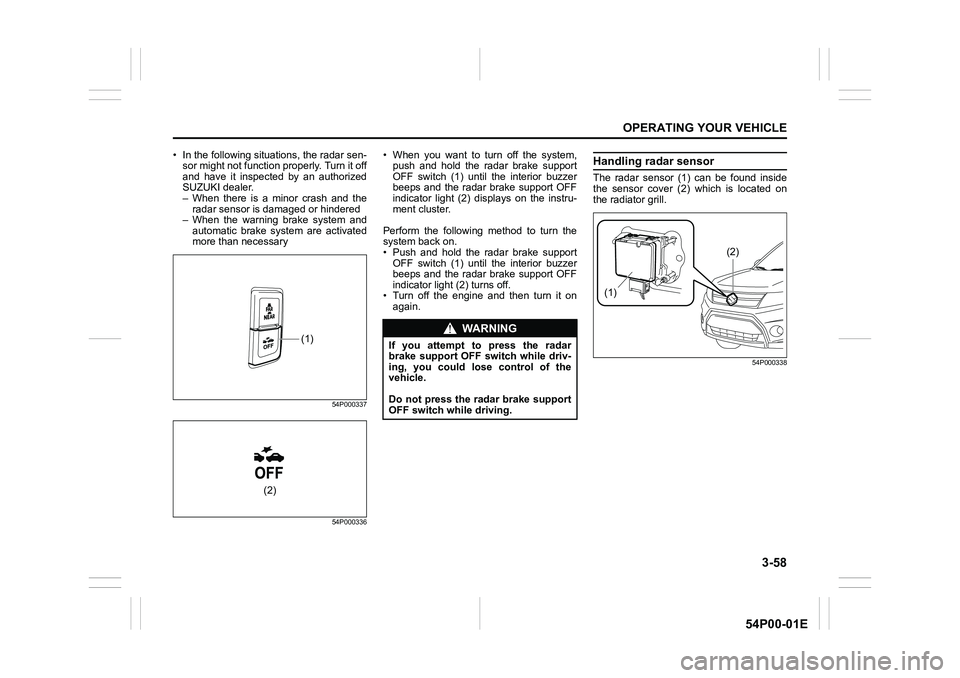
• When you want to turn off the system,
push and hold the radar brake support
OFF switch (1) until the interior buzzer
beeps and the radar brake support OFF
indicator light (2) displays on the instru-
ment cluster.
Perform the following method to turn the
system back on.
• Push and hold the radar brake support
OFF switch (1) until the interior buzzer
beeps and the radar brake support OFF
indicator light (2) turns off.
• Turn off the engine and then turn it on
again.Handling radar sensor
The radar sensor (1) can be found inside
the sensor cover (2) which is located on
the radiator grill.
54P000338
(1)
(2)
WA R N I N G
If you attempt to press the radar
brake support OFF switch while driv-
ing, you could lose control of the
vehicle.
Do not press the radar brake support
OFF switch while driving.
(1)
(2)
Page 201 of 482
3-61
OPERATING YOUR VEHICLE
54P00-01E
Warning and indicator messages
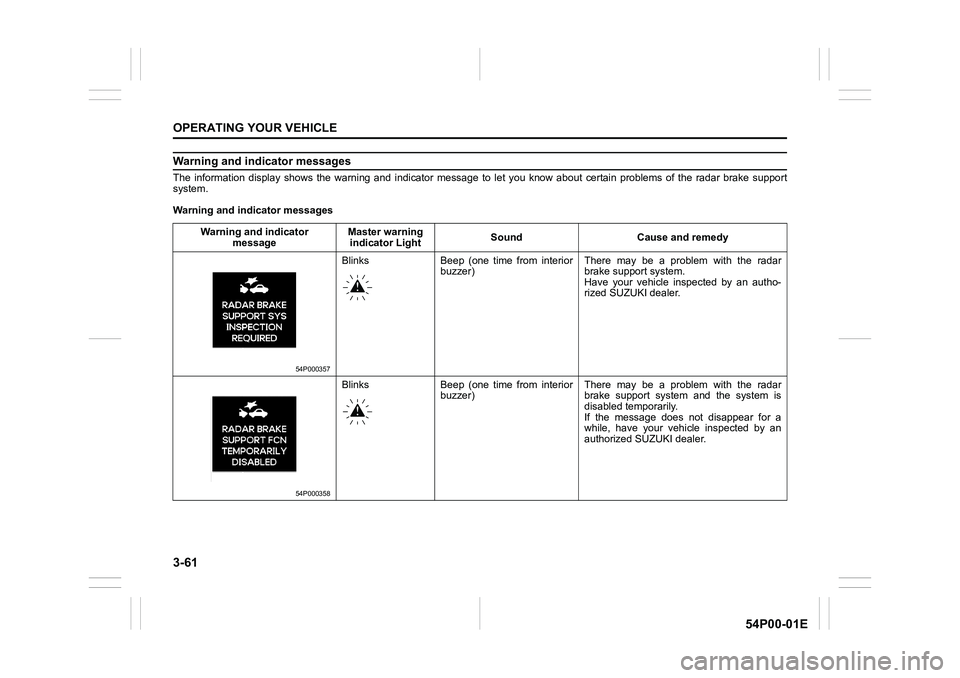
The information display shows the warning and indicator message to let you know about certain problems of the radar brake support
system.
Warning and indicator messages
Warning and indicator
messageMaster warning
indicator LightSound Cause and remedy
54P000357
Blinks Beep (one time from interior
buzzer)There may be a problem with the radar
brake support system.
Have your vehicle inspected by an autho-
rized SUZUKI dealer.
54P000358
Blinks Beep (one time from interior
buzzer)There may be a problem with the radar
brake support system and the system is
disabled temporarily.
If the message does not disappear for a
while, have your vehicle inspected by an
authorized SUZUKI dealer.
Page 202 of 482
3-62
OPERATING YOUR VEHICLE
54P00-01E
Warning and indicator
messageMaster warning
indicator lightSound Cause and remedy
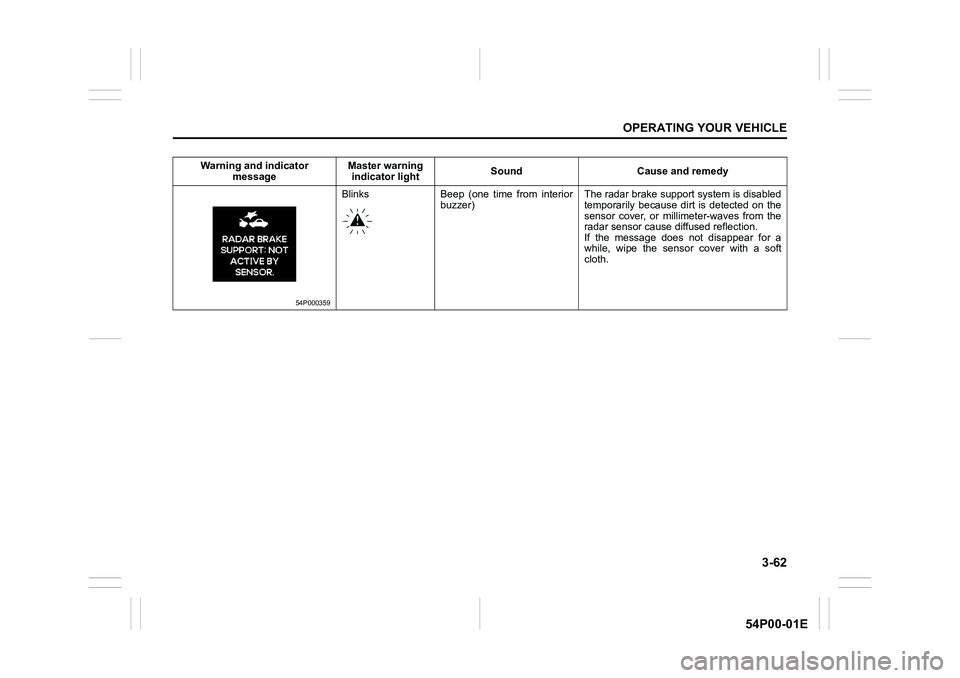
54P000359
Blinks Beep (one time from interior
buzzer)The radar brake support system is disabled
temporarily because dirt is detected on the
sensor cover, or millimeter-waves from the
radar sensor cause diffused reflection.
If the message does not disappear for a
while, wipe the sensor cover with a soft
cloth.
Page 208 of 482
3-68
OPERATING YOUR VEHICLE
54P00-01E
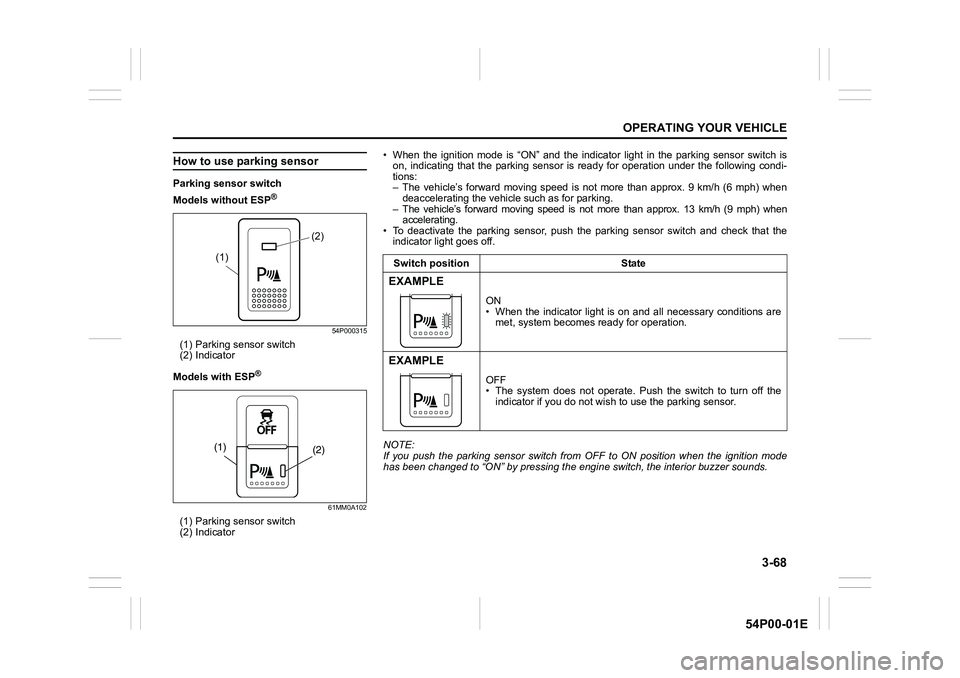
How to use parking sensor
Parking sensor switch
Models without ESP
®
54P000315
(1) Parking sensor switch
(2) Indicator
Models with ESP
®
61MM0A102
(1) Parking sensor switch
(2) Indicator
(2)
(1)
(2) (1)
• When the ignition mode is “ON” and the indicator light in the parking sensor switch is
on, indicating that the parking sensor is ready for operation under the following condi-
tions:
– The vehicle’s forward moving speed is not more than approx. 9 km/h (6 mph) when
deaccelerating the vehicle such as for parking.
– The vehicle’s forward moving speed is not more than approx. 13 km/h (9 mph) when
accelerating.
• To deactivate the parking sensor, push the parking sensor switch and check that the
indicator light goes off.
NOTE:
If you push the parking sensor switch from OFF to ON position when the ignition mode
has been changed to “ON” by pressing the engine switch, the interior buzzer sounds.Switch position State
EXAMPLE
ON
• When the indicator light is on and all necessary conditions are
met, system becomes ready for operation.
EXAMPLE
OFF
• The system does not operate. Push the switch to turn off the
indicator if you do not wish to use the parking sensor.
Page 209 of 482
3-69
OPERATING YOUR VEHICLE
54P00-01E
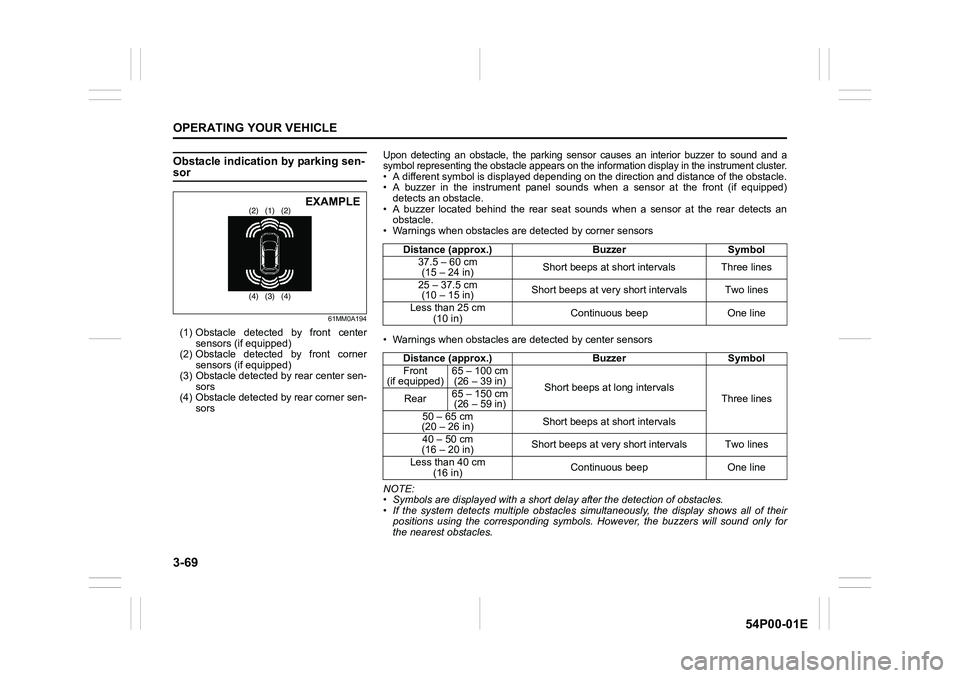
Obstacle indication by parking sen-sor
61MM0A194
(1) Obstacle detected by front center
sensors (if equipped)
(2) Obstacle detected by front corner
sensors (if equipped)
(3) Obstacle detected by rear center sen-
sors
(4) Obstacle detected by rear corner sen-
sors
(1) (2) (2)
(3) (4) (4)EXAMPLE
Upon detecting an obstacle, the parking sensor causes an interior buzzer to sound and a
symbol representing the obstacle appears on the information display in the instrument cluster.
• A different symbol is displayed depending on the direction and distance of the obstacle.
• A buzzer in the instrument panel sounds when a sensor at the front (if equipped)
detects an obstacle.
• A buzzer located behind the rear seat sounds when a sensor at the rear detects an
obstacle.
• Warnings when obstacles are detected by corner sensors
• Warnings when obstacles are detected by center sensors
NOTE:
• Symbols are displayed with a short delay after the detection of obstacles.
• If the system detects multiple obstacles simultaneously, the display shows all of their
positions using the corresponding symbols. However, the buzzers will sound only for
the nearest obstacles.Distance (approx.) Buzzer Symbol
37.5 – 60 cm
(15 – 24 in)Short beeps at short intervals Three lines
25 – 37.5 cm
(10 – 15 in)Short beeps at very short intervals Two lines
Less than 25 cm
(10 in)Continuous beep One line
Distance (approx.) Buzzer Symbol
Front
(if equipped)65 – 100 cm
(26 – 39 in)
Short beeps at long intervals
Three lines Rear65 – 150 cm
(26 – 59 in)
50 – 65 cm
(20 – 26 in)Short beeps at short intervals
40 – 50 cm
(16 – 20 in)Short beeps at very short intervals Two lines
Less than 40 cm
(16 in)Continuous beep One line
Page 242 of 482
OTHER CONTROLS AND EQUIPMENT
5
54P00-01E
60G407
OTHER CONTROLS AND EQUIPMENT
Fuel filler cap ....................................................................... 5-1
Engine hood ........................................................................ 5-2
Sun visor .............................................................................. 5-4
Interior light ......................................................................... 5-5
Accessory socket ................................................................ 5-8
USB socket (if equipped) .................................................... 5-9
Sunroof (if equipped) .......................................................... 5-9
Assist grips .......................................................................... 5-11
Glove box ............................................................................. 5-12
Overhead console (if equipped) ........................................ 5-12
Cup holder and storage area ............................................. 5-13
Footrest ................................................................................ 5-15
Clock (if equipped) .............................................................. 5-15
Floor mats (if equipped) ..................................................... 5-16
Luggage compartment hooks ............................................ 5-16
Luggage compartment cover ............................................. 5-18
Luggage compartment board (if equipped) ...................... 5-18
Roof rails or roof rack anchors (if equipped) ................... 5-19
Frame hooks ........................................................................ 5-20
Heating and air conditioning system ................................ 5-23
Heating system .................................................................... 5-25
Manual heating and air conditioning system ................... 5-27
Automatic heating and air conditioning system
(climate control) .................................................................. 5-32
Radio antenna ..................................................................... 5-38
Installation of radio frequency transmitters ..................... 5-39
Audio system (Type A / Type B) (if equipped) .................. 5-40
Page 247 of 482
5-5
OTHER CONTROLS AND EQUIPMENT
54P00-01E
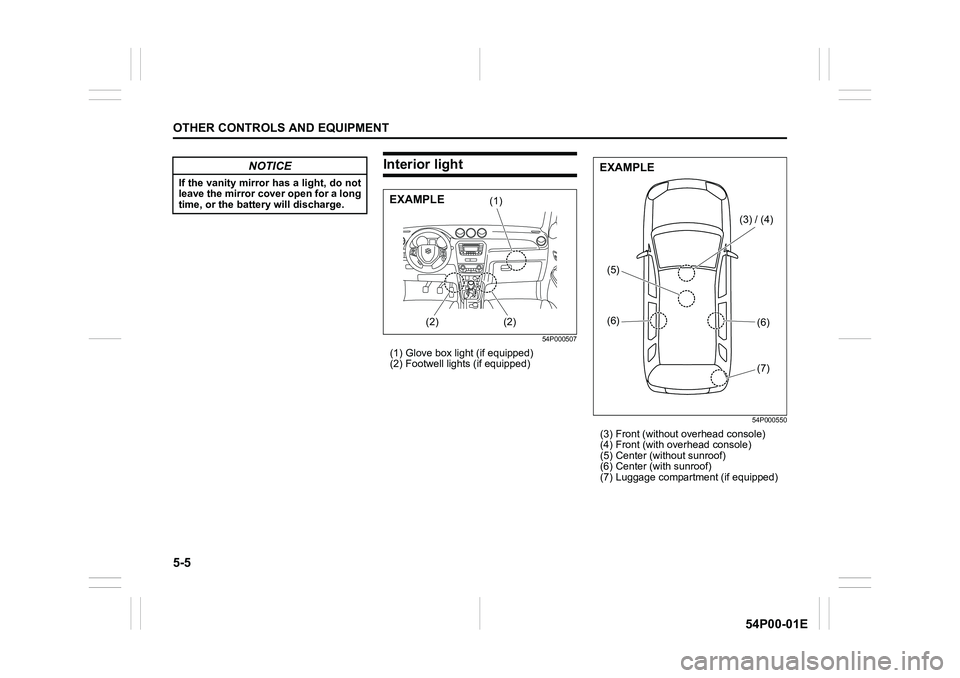
Interior light
54P000507
(1) Glove box light (if equipped)
(2) Footwell lights (if equipped)
54P000550
(3) Front (without overhead console)
(4) Front (with overhead console)
(5) Center (without sunroof)
(6) Center (with sunroof)
(7) Luggage compartment (if equipped)
NOTICE
If the vanity mirror has a light, do not
leave the mirror cover open for a long
time, or the battery will discharge.
(1)
(2) (2)EXAMPLE
(3) / (4)
(6)
(6)
(7) (5)
EXAMPLE
Page 250 of 482
5-8
OTHER CONTROLS AND EQUIPMENT
54P00-01E
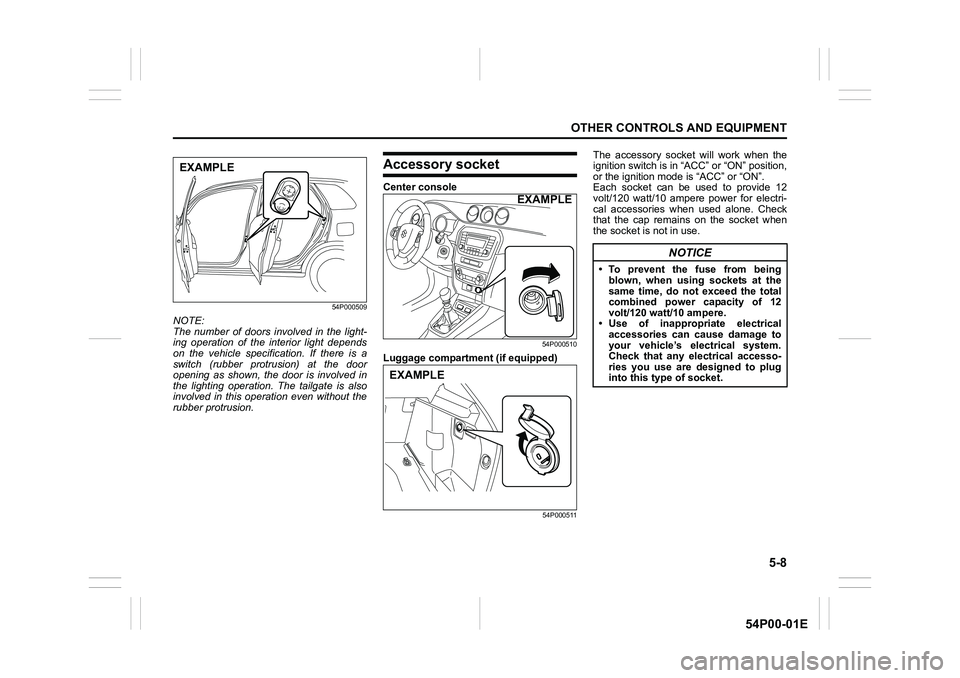
54P000509
NOTE:
The number of doors involved in the light-
ing operation of the interior light depends
on the vehicle specification. If there is a
switch (rubber protrusion) at the door
opening as shown, the door is involved in
the lighting operation. The tailgate is also
involved in this operation even without the
rubber protrusion.
Accessory socket
Center console
54P000510
Luggage compartment (if equipped)
54P000511
The accessory socket will work when the
ignition switch is in “ACC” or “ON” position,
or the ignition mode is “ACC” or “ON”.
Each socket can be used to provide 12
volt/120 watt/10 ampere power for electri-
cal accessories when used alone. Check
that the cap remains on the socket when
the socket is not in use.
EXAMPLE
EXAMPLE
EXAMPLE
NOTICE
• To prevent the fuse from being
blown, when using sockets at the
same time, do not exceed the total
combined power capacity of 12
volt/120 watt/10 ampere.
• Use of inappropriate electrical
accessories can cause damage to
your vehicle’s electrical system.
Check that any electrical accesso-
ries you use are designed to plug
into this type of socket.
Page 279 of 482
5-37
OTHER CONTROLS AND EQUIPMENT
54P00-01E
You can use the air conditioning switch (6)
to manually turn the air conditioner on or off
according to your preference. When you
turn the air conditioning switch off, the cli-
mate control system cannot lower the inside
temperature below outside temperature.
To turn the climate control system off, push
“OFF” switch (7).
NOTE:
If “AUTO” on the display blinks, there is a
problem in the heating system and/or air
conditioning system. You should have the
system inspected by an authorized
SUZUKI dealer.
NOTE:
• To find the temperature at which you are
most comfortable, start with the 22°C
(72°F) or 25°C (75°F) setting. (the tem-
perature vary depending on vehicle
specifications.).
• If you turn the temperature selector (1)
until “HI” or “LO” appears on the display,
the climate control system will operate at
maximum heating or cooling and the
blower will run at full speed.
• To avoid blowing cold air in cold weather
or hot air in hot weather, the system will
delay turning on the blower until warmed
or chilled air is available.
• If your vehicle has been left in the sun
with the windows closed, it will cool
faster if you open the windows briefly.
• Even under the automatic operation, you
can set individual selectors to the manualmode. The manually selected functions
are maintained, and the other functions
remain under automatic operation.
• If the windshield and/or the front door
windows are fogged, push the defrost
switch (5) to turn on the defroster, or
push the air flow selector (4) to change
the air flow to HEAT & DEFROST posi-
tion to defog the windows.
• To return the blower speed selector (2),
air intake selector (3), and air flow selec-
tor (4) to automatic operation, push
“AUTO” switch (8).
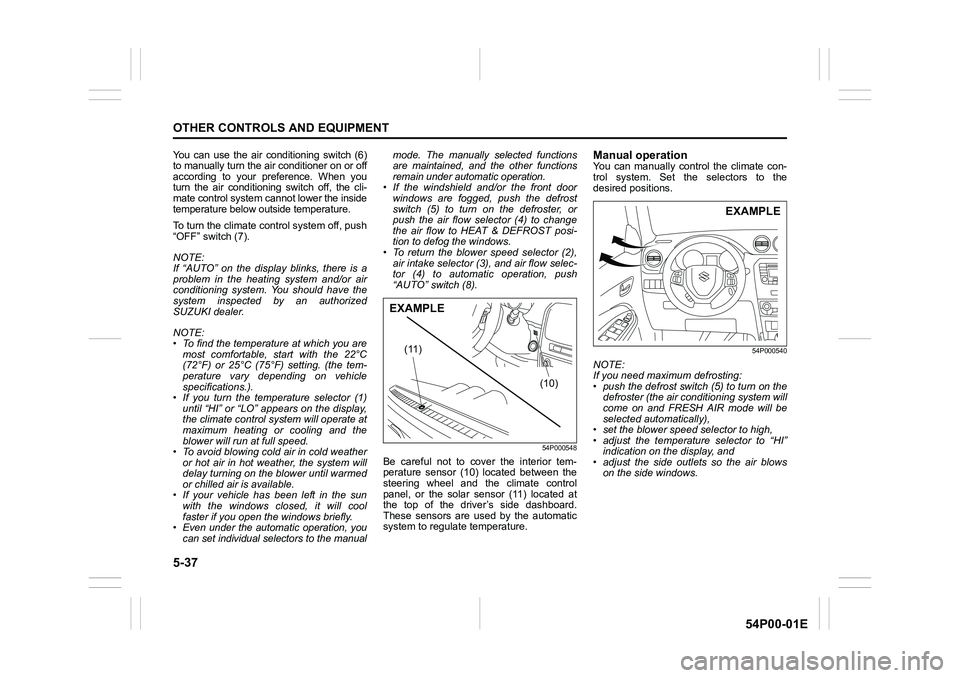
54P000548
Be careful not to cover the interior tem-
perature sensor (10) located between the
steering wheel and the climate control
panel, or the solar sensor (11) located at
the top of the driver’s side dashboard.
These sensors are used by the automatic
system to regulate temperature.
Manual operationYou can manually control the climate con-
trol system. Set the selectors to the
desired positions.
54P000540
NOTE:
If you need maximum defrosting:
• push the defrost switch (5) to turn on the
defroster (the air conditioning system will
come on and FRESH AIR mode will be
selected automatically),
• set the blower speed selector to high,
• adjust the temperature selector to “HI”
indication on the display, and
• adjust the side outlets so the air blows
on the side windows.
(10) (11)
EXAMPLE
EXAMPLE
Page 392 of 482
7-54
INSPECTION AND MAINTENANCE
54P00-01E
54P000727
(5) Removal
(6) Installation
3) To remove the bulb of the rear fog light
(4) from bulb holder, push in the bulb
and turn it counterclockwise. To install a
new bulb, push it in and turn it clock-
wise.
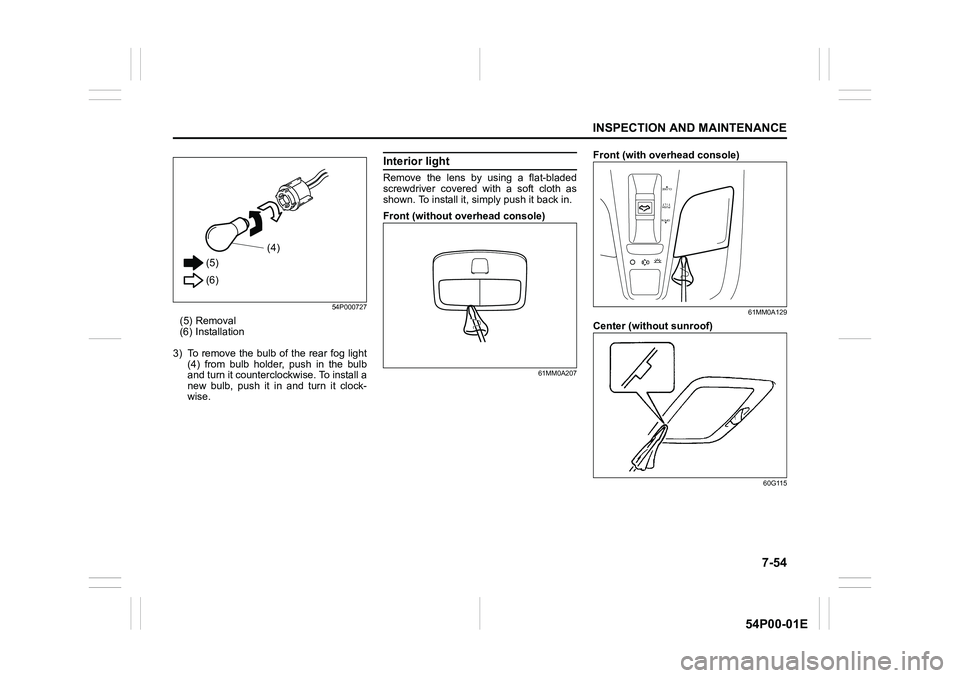
Interior light
Remove the lens by using a flat-bladed
screwdriver covered with a soft cloth as
shown. To install it, simply push it back in.
Front (without overhead console)
61MM0A207
Front (with overhead console)
61MM0A129
Center (without sunroof)
60G115
(5)
(6)(4)
OPEN
PUSH
TILT
CLOSE