ESP SUZUKI GRAND VITARA 2022 Service Manual
[x] Cancel search | Manufacturer: SUZUKI, Model Year: 2022, Model line: GRAND VITARA, Model: SUZUKI GRAND VITARA 2022Pages: 482, PDF Size: 21 MB
Page 229 of 482
3-89
OPERATING YOUR VEHICLE
54P00-01E
61MM0A232
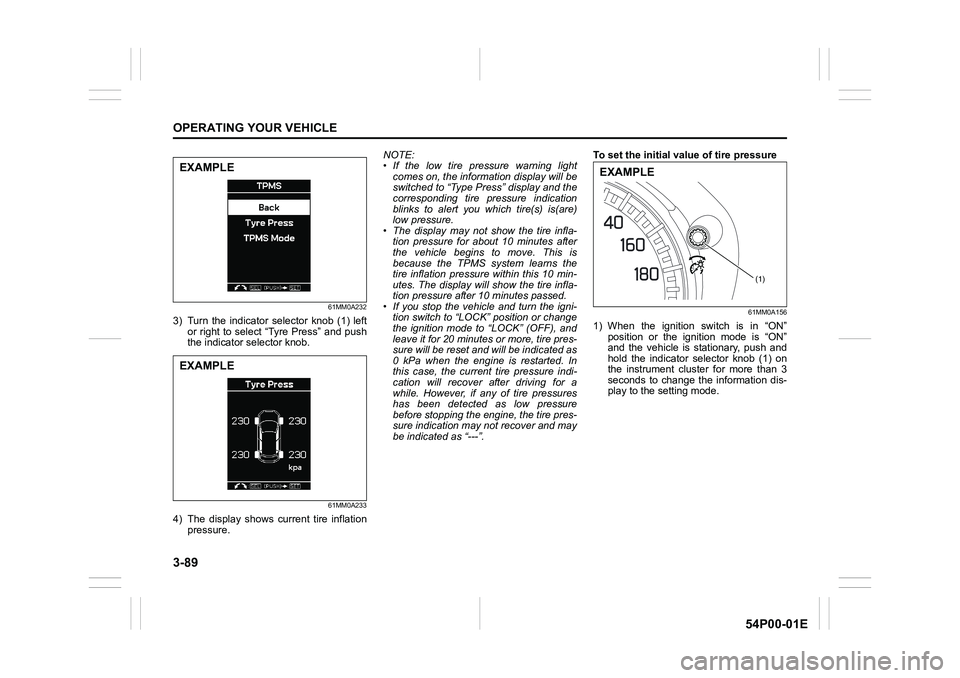
3) Turn the indicator selector knob (1) left
or right to select “Tyre Press” and push
the indicator selector knob.
61MM0A233
4) The display shows current tire inflation
pressure.NOTE:
• If the low tire pressure warning light
comes on, the information display will be
switched to “Type Press” display and the
corresponding tire pressure indication
blinks to alert you which tire(s) is(are)
low pressure.
• The display may not show the tire infla-
tion pressure for about 10 minutes after
the vehicle begins to move. This is
because the TPMS system learns the
tire inflation pressure within this 10 min-
utes. The display will show the tire infla-
tion pressure after 10 minutes passed.
• If you stop the vehicle and turn the igni-
tion switch to “LOCK” position or change
the ignition mode to “LOCK” (OFF), and
leave it for 20 minutes or more, tire pres-
sure will be reset and will be indicated as
0 kPa when the engine is restarted. In
this case, the current tire pressure indi-
cation will recover after driving for a
while. However, if any of tire pressures
has been detected as low pressure
before stopping the engine, the tire pres-
sure indication may not recover and may
be indicated as “---”.To set the initial value of tire pressure
61MM0A156
1) When the ignition switch is in “ON”
position or the ignition mode is “ON”
and the vehicle is stationary, push and
hold the indicator selector knob (1) on
the instrument cluster for more than 3
seconds to change the information dis-
play to the setting mode.
EXAMPLE
EXAMPLE
(1)
EXAMPLE
Page 235 of 482
4-1
DRIVING TIPS
54P00-01E
52D078S
Running-inCatalytic converter
80G106
The purpose of the catalytic converter is to
minimize the amount of harmful pollutants
in your vehicle’s exhaust. Use of leaded
fuel in vehicles equipped with catalytic
converters is prohibited, because lead
deactivates the pollutant-reducing compo-
nents of the catalyst system.
The converter is designed to last the life of
the vehicle under normal usage and when
unleaded fuel is used. No special mainte-
nance is required on the converter. How-
ever, it is very important to keep the engine
properly tuned. Engine misfiring, which can
result from an improperly tuned engine,
may cause overheating of the catalytic
converter. This may result in permanent
WA R N I N G
• Fasten your seat belts at all times.
Even though air bags are equipped
at the front seating positions, the
driver and all passengers should
be properly restrained at all times,
using the seat belts provided. Refer
to “Seat belts and child restraint
systems” section for instructions
on proper use of the seat belts.
• Never drive under the influence of
alcohol or other drugs. Alcohol and
drugs can seriously impair your
ability to drive safely, greatly
increasing the risk of injury to
yourself and others. You should
also avoid driving when you are
tired, sick, irritated or under stress.
NOTICE
The future performance and reliabil-
ity of the engine depends on the care
and restraint exercised during its
early life. It is especially important to
observe the following precautions
during the first 960 km (600 miles) of
vehicle operation.
• After starting, do not race the
engine. Warm it up gradually.
• Avoid prolonged vehicle operation
at a constant speed. Moving parts
will break in better if you vary your
speed.
• Start off from a stop slowly. Avoid
full throttle starts.
• Avoid hard braking, especially
during the first 320 km (200 miles)
of driving.
• Do not drive slowly with the trans-
axle in a high gear.
• Drive the vehicle at moderate
engine speeds.
• Do not tow a trailer during the first
960 km (600 miles) of vehicle oper-
ation.
Page 239 of 482
4-5
DRIVING TIPS
54P00-01E
Stuck vehicle
If your vehicle gets stuck in snow, mud or
sand, follow the directions below:
1) Shift the transaxle back and forth
between a forward range (or first gear
for manual transaxle) and reverse. This
will create a rocking motion which may
give you enough momentum to free the
vehicle. Press gently on the accelerator
to keep wheel spinning to a minimum
wheel rpm. Remove your foot from the
accelerator while shifting.
Do not race the engine. Excessive
wheel spin will cause the tires to dig
deeper, making it more difficult to free
the vehicle.
NOTE:
If your vehicle is equipped with the ESP
®,
you may have to turn the ESP® system off
in order to spin the wheels.
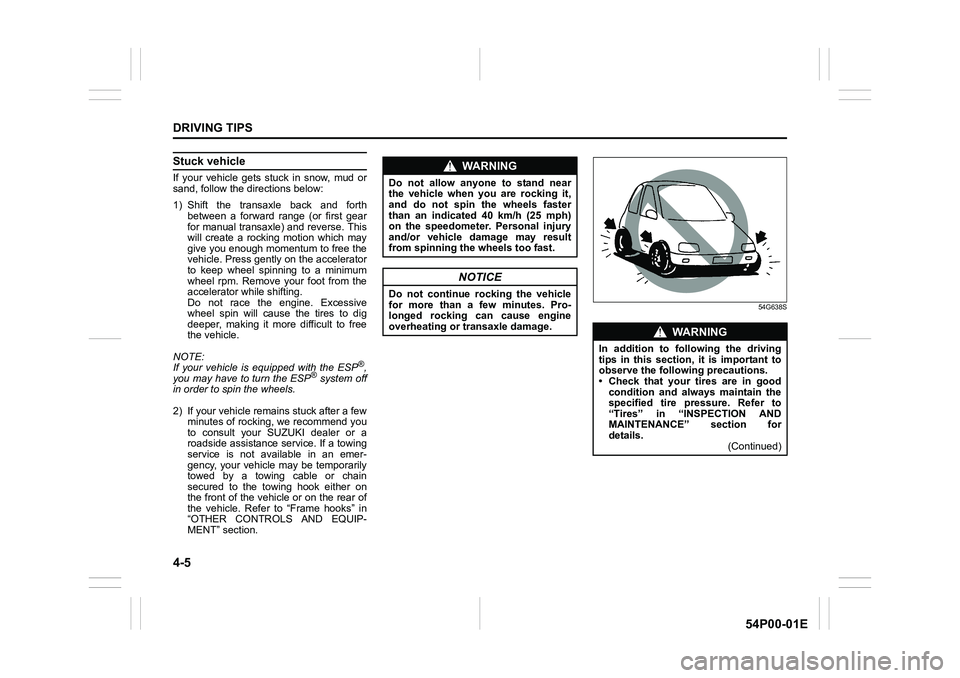
2) If your vehicle remains stuck after a few
minutes of rocking, we recommend you
to consult your SUZUKI dealer or a
roadside assistance service. If a towing
service is not available in an emer-
gency, your vehicle may be temporarily
towed by a towing cable or chain
secured to the towing hook either on
the front of the vehicle or on the rear of
the vehicle. Refer to “Frame hooks” in
“OTHER CONTROLS AND EQUIP-
MENT” section.
54G638S
WA R N I N G
Do not allow anyone to stand near
the vehicle when you are rocking it,
and do not spin the wheels faster
than an indicated 40 km/h (25 mph)
on the speedometer. Personal injury
and/or vehicle damage may result
from spinning the wheels too fast.
NOTICE
Do not continue rocking the vehicle
for more than a few minutes. Pro-
longed rocking can cause engine
overheating or transaxle damage.
WA R N I N G
In addition to following the driving
tips in this section, it is important to
observe the following precautions.
• Check that your tires are in good
condition and always maintain the
specified tire pressure. Refer to
“Tires” in “INSPECTION AND
MAINTENANCE” section for
details.
(Continued)
Page 308 of 482
5-66
OTHER CONTROLS AND EQUIPMENT
54P00-01E
Notes on USB device
Compatible USB devices
• USB mass storage class
For details as to whether your USB
memory/USB audio is compatible with
USB mass storage class, please contact
the USB memory/USB audio manufac-
turer.
• USB standard compatibility 1.1/2.0 full
speed
• File system FAT12/16/32, VFAT
• Maximum current less than 1.0 A
• If devices such as USB hub, extension
cable are connected to the audio sys-
tem, it may not be recognized. In such
case, connect the USB device directly to
the audio system.
• Devices such as MP3 player/mobile
phone/digital camera may not be recog-
nized by the audio system for playing
music.USB device connection
• When connecting a USB device, check
that the connector is pushed all the way
into the port.
• Do not leave the USB device for long
periods of time inside the vehicle where
the temperature can rise too high.
• Back up any important data beforehand.
We cannot accept responsibility for any
lost data.
• It is recommended not to connect a USB
device that contains data files other than
MP3/WMA/AAC format.
Recording MP3/WMA/AAC files on a
USB device
• Playback or display may not be possible
depending on the type of USB device in
use or the condition of the recording.
• Depending on the connected USB mem-
ory, the files may be played in different
order from the stored one.Compression formats
MP3
•Bit rate:
MPEG1 Audio Layer III: 32 k - 320 kbps
MPEG2 Audio Layer III: 8 k - 160 kbps
MPEG2.5 Audio Layer III: 8 k - 160 kbps
• Sampling frequency:MPEG1 Audio Layer III: 32 k/44.1 k/48 kHz
MPEG2 Audio Layer III: 16 k/22.05 k/24 kHz
MPEG2.5 Audio Layer III: 8 k/11.025 k/12 kHz
WMA (Ver. 7, Ver. 8, Ver. 9*)
• Bit rate: CBR 32 k - 320 kbps
• Sampling frequency: 32 k/44.1 k/48 kHz
* WMA 9 Professional/LossLess/Voice are
not supported.
AAC*
• Bit rate: ABR 16 k - 320 kbps
• Sampling frequency: 32 k/44.1 k/48 kHz
* Apple Lossless is not supported.
Maximum number of files/folders
• Maximum number of files: 2500
• Maximum number of files in a folder: 255
• Maximum depth of tree structure: 8
• Maximum number of folders: 255
(Root folder is included.)
Page 311 of 482
![SUZUKI GRAND VITARA 2022 Service Manual 5-69
OTHER CONTROLS AND EQUIPMENT
54P00-01E
Playing mode selection
1) Press the button numbered [6] of PRE-
SET buttons (8) for 1 second or longer.
2) Turn “TUNE/FLD PUSH SOUND” knob
(2).
Each tim](/img/20/43489/w960_43489-310.png "SUZUKI GRAND VITARA 2022 Service Manual 5-69
OTHER CONTROLS AND EQUIPMENT
54P00-01E
Playing mode selection
1) Press the button numbered [6] of PRE-
SET buttons (8) for 1 second or longer.
2) Turn “TUNE/FLD PUSH SOUND” knob
(2).
Each tim")
5-69
OTHER CONTROLS AND EQUIPMENT
54P00-01E
Playing mode selection
1) Press the button numbered [6] of PRE-
SET buttons (8) for 1 second or longer.
2) Turn “TUNE/FLD PUSH SOUND” knob
(2).
Each time the knob is turned, the mode
will change as follows:
3) Press “TUNE/FLD PUSH SOUND”
knob (2) to select the desired mode.
NOTE:
• When the button numbered [6] of PRE-
SET buttons (8) is pressed, the previous
mode will be displayed.Notes on iPod®
Supported iPod®
•iPod® touch (5th generation)
•iPod® touch (4th generation)
•iPod® touch (3rd generation)
•iPod® touch (2nd generation)
•iPod® touch (1st generation)
•iPod® classic
•iPod® nano (7th generation)
•iPod® nano (6th generation)
•iPod® nano (5th generation)
•iPod® nano (4th generation)
•iPod® nano (3rd generation)
•iPod® nano (2nd generation)
•iPod® nano (1st generation)
•iPod® (5th generation)
• iPhone® 5
• iPhone® 4S
• iPhone® 4
• iPhone® 3GS
• iPhone® 3G
• iPhone®
* Some functions may not be available
depending on the model of iPod®.
*iPod® is a trademark of Apple Inc., regis-
tered in the U.S. and other countries.
* iPhone
® is a trademark of Apple Inc.,
registered in the U.S. and other coun-
tries.
* Apple is not responsible for the opera-
tion of this device or its compliance with
safety and regulatory standards.iPod
® connection
• Make sure to detach the iPod® after
turning the ignition switch to “LOCK”
position or pressing the engine switch to
change the ignition mode to “LOCK”
(OFF). The iPod
® may not be shut down
when it is being connected and may
result in battery depletion.
• Do not connect iPod
® accessories such
as an iPod® remote control or head-
phones while connecting the iPod® with
the unit. The unit may not operate cor-
rectly.PLAYLIST
ARTIST
ALBUM
SONGS
GENRE
Page 314 of 482
5-72
OTHER CONTROLS AND EQUIPMENT
54P00-01E
NOTE:
When selecting “Go Back”, the previous
menu will be displayed.
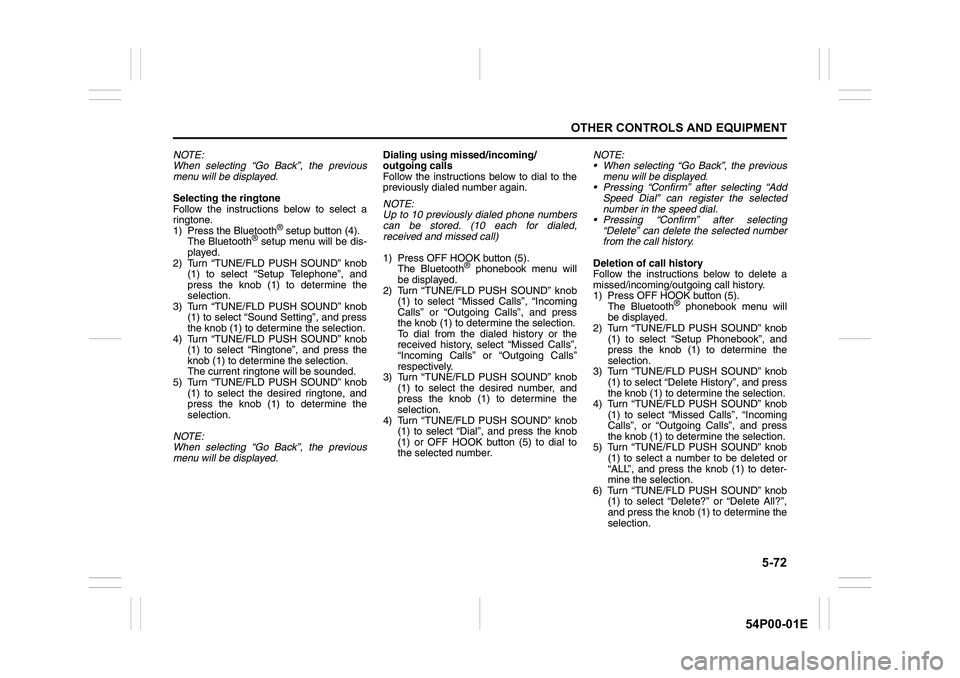
Selecting the ringtone
Follow the instructions below to select a
ringtone.
1) Press the Bluetooth
® setup button (4).
The Bluetooth® setup menu will be dis-
played.
2) Turn “TUNE/FLD PUSH SOUND” knob
(1) to select “Setup Telephone”, and
press the knob (1) to determine the
selection.
3) Turn “TUNE/FLD PUSH SOUND” knob
(1) to select “Sound Setting”, and press
the knob (1) to determine the selection.
4) Turn “TUNE/FLD PUSH SOUND” knob
(1) to select “Ringtone”, and press the
knob (1) to determine the selection.
The current ringtone will be sounded.
5) Turn “TUNE/FLD PUSH SOUND” knob
(1) to select the desired ringtone, and
press the knob (1) to determine the
selection.
NOTE:
When selecting “Go Back”, the previous
menu will be displayed.Dialing using missed/incoming/
outgoing calls
Follow the instructions below to dial to the
previously dialed number again.
NOTE:
Up to 10 previously dialed phone numbers
can be stored. (10 each for dialed,
received and missed call)
1) Press OFF HOOK button (5).
The Bluetooth
® phonebook menu will
be displayed.
2) Turn “TUNE/FLD PUSH SOUND” knob
(1) to select “Missed Calls”, “Incoming
Calls” or “Outgoing Calls”, and press
the knob (1) to determine the selection.
To dial from the dialed history or the
received history, select “Missed Calls”,
“Incoming Calls” or “Outgoing Calls”
respectively.
3) Turn “TUNE/FLD PUSH SOUND” knob
(1) to select the desired number, and
press the knob (1) to determine the
selection.
4) Turn “TUNE/FLD PUSH SOUND” knob
(1) to select “Dial”, and press the knob
(1) or OFF HOOK button (5) to dial to
the selected number.NOTE:
When selecting “Go Back”, the previous
menu will be displayed.
Pressing “Confirm” after selecting “Add
Speed Dial” can register the selected
number in the speed dial.
Pressing “Confirm” after selecting
“Delete” can delete the selected number
from the call history.
Deletion of call history
Follow the instructions below to delete a
missed/incoming/outgoing call history.
1) Press OFF HOOK button (5).
The Bluetooth
® phonebook menu will
be displayed.
2) Turn “TUNE/FLD PUSH SOUND” knob
(1) to select “Setup Phonebook”, and
press the knob (1) to determine the
selection.
3) Turn “TUNE/FLD PUSH SOUND” knob
(1) to select “Delete History”, and press
the knob (1) to determine the selection.
4) Turn “TUNE/FLD PUSH SOUND” knob
(1) to select “Missed Calls”, “Incoming
Calls”, or “Outgoing Calls”, and press
the knob (1) to determine the selection.
5) Turn “TUNE/FLD PUSH SOUND” knob
(1) to select a number to be deleted or
“ALL”, and press the knob (1) to deter-
mine the selection.
6) Turn “TUNE/FLD PUSH SOUND” knob
(1) to select “Delete?” or “Delete All?”,
and press the knob (1) to determine the
selection.
Page 359 of 482
7-21
INSPECTION AND MAINTENANCE
54P00-01E
NOTE:
• (For EU countries)
The replacement timing varies with the
type of engine oil that you choose.
Refer to “Maintenance schedule” in this
section for corresponding maintenance
schedule.
• (For Mexico)
For additional instruction, refer to “SUP-
PLEMENT” section in the end of this
book.
SAE 0W-20 (1) is the best choice for good
fuel economy and good starting in cold
weather.
NOTE:
We recommend that you use SUZUKI gen-
uine oil. To purchase it, see your SUZUKI
dealer.
(For diesel engine model)
Check that the engine oil you use comes
under the quality classification of ACEA
C2.
SAE 0W-30 is the best choice for good fuel
economy and good starting in cold
weather. Oil level check
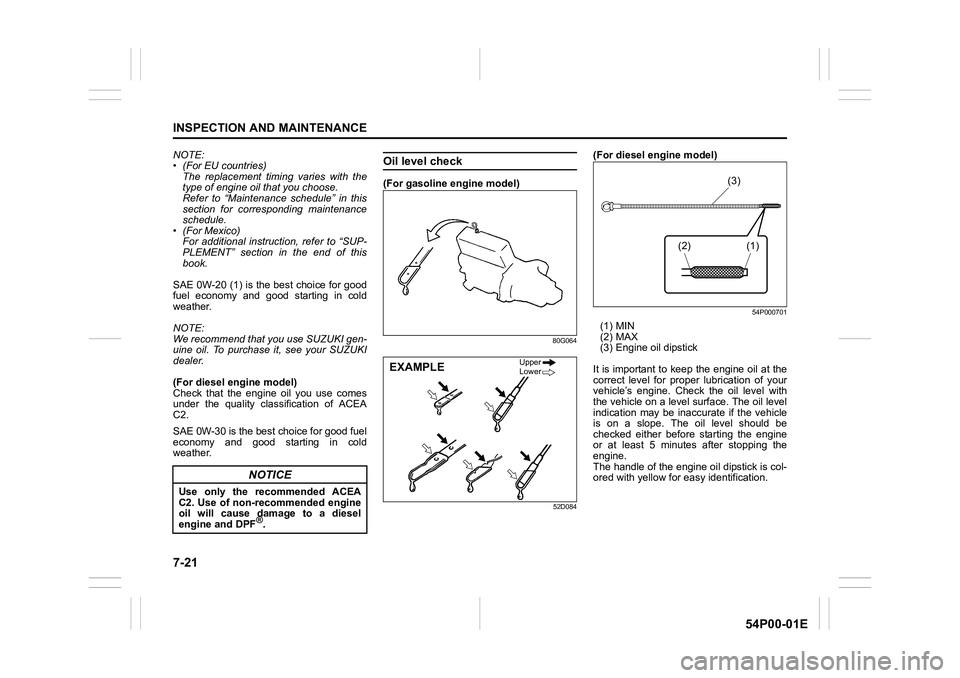
(For gasoline engine model)
80G064
52D084
(For diesel engine model)
54P000701
(1) MIN
(2) MAX
(3) Engine oil dipstick
It is important to keep the engine oil at the
correct level for proper lubrication of your
vehicle’s engine. Check the oil level with
the vehicle on a level surface. The oil level
indication may be inaccurate if the vehicle
is on a slope. The oil level should be
checked either before starting the engine
or at least 5 minutes after stopping the
engine.
The handle of the engine oil dipstick is col-
ored with yellow for easy identification.
NOTICE
Use only the recommended ACEA
C2. Use of non-recommended engine
oil will cause damage to a diesel
engine and DPF
®.
EXAMPLEUpper
Lower
(1) (3)
(2)
Page 380 of 482
7-42
INSPECTION AND MAINTENANCE
54P00-01E
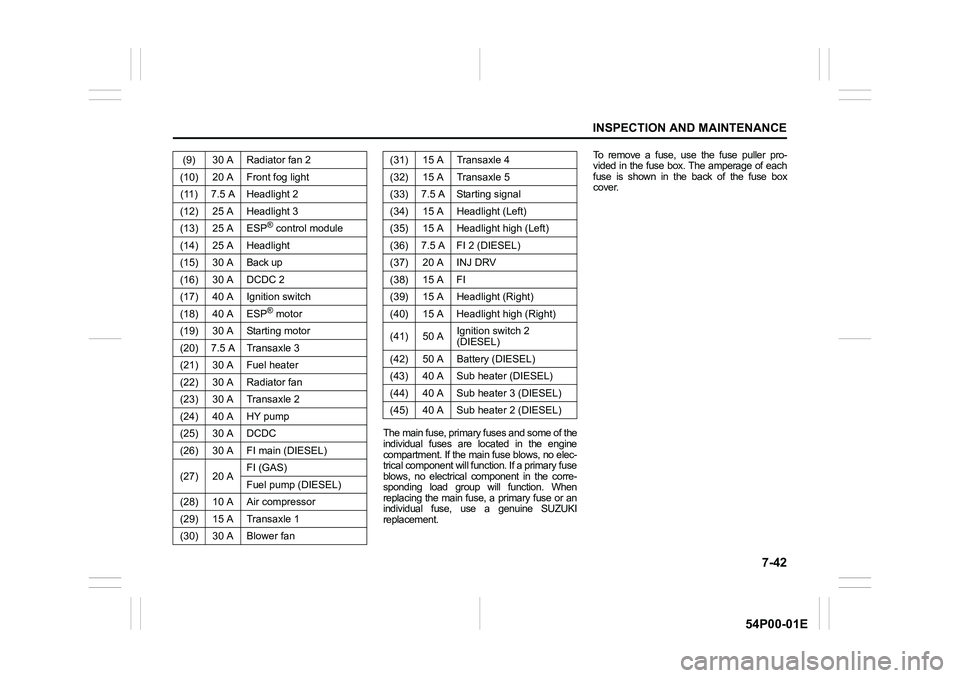
The main fuse, primary fuses and some of the
individual fuses are located in the engine
compartment. If the main fuse blows, no elec-
trical component will function. If a primary fuse
blows, no electrical component in the corre-
sponding load group will function. When
replacing the main fuse, a primary fuse or an
individual fuse, use a genuine SUZUKI
replacement.To remove a fuse, use the fuse puller pro-
vided in the fuse box. The amperage of each
fuse is shown in the back of the fuse box
cover. (9) 30 A Radiator fan 2
(10) 20 A Front fog light
(11) 7.5 A Headlight 2
(12) 25 A Headlight 3
(13) 25 A ESP
® control module
(14) 25 A Headlight
(15) 30 A Back up
(16) 30 A DCDC 2
(17) 40 A Ignition switch
(18) 40 A ESP
® motor
(19) 30 A Starting motor
(20) 7.5 A Transaxle 3
(21) 30 A Fuel heater
(22) 30 A Radiator fan
(23) 30 A Transaxle 2
(24) 40 A HY pump
(25) 30 A DCDC
(26) 30 A FI main (DIESEL)
(27) 20 AFI (GAS)
Fuel pump (DIESEL)
(28) 10 A Air compressor
(29) 15 A Transaxle 1
(30) 30 A Blower fan
(31) 15 A Transaxle 4
(32) 15 A Transaxle 5
(33) 7.5 A Starting signal
(34) 15 A Headlight (Left)
(35) 15 A Headlight high (Left)
(36) 7.5 A FI 2 (DIESEL)
(37) 20 A INJ DRV
(38) 15 A FI
(39) 15 A Headlight (Right)
(40) 15 A Headlight high (Right)
(41) 50 AIgnition switch 2
(DIESEL)
(42) 50 A Battery (DIESEL)
(43) 40 A Sub heater (DIESEL)
(44) 40 A Sub heater 3 (DIESEL)
(45) 40 A Sub heater 2 (DIESEL)
Page 383 of 482
7-45
INSPECTION AND MAINTENANCE
54P00-01E
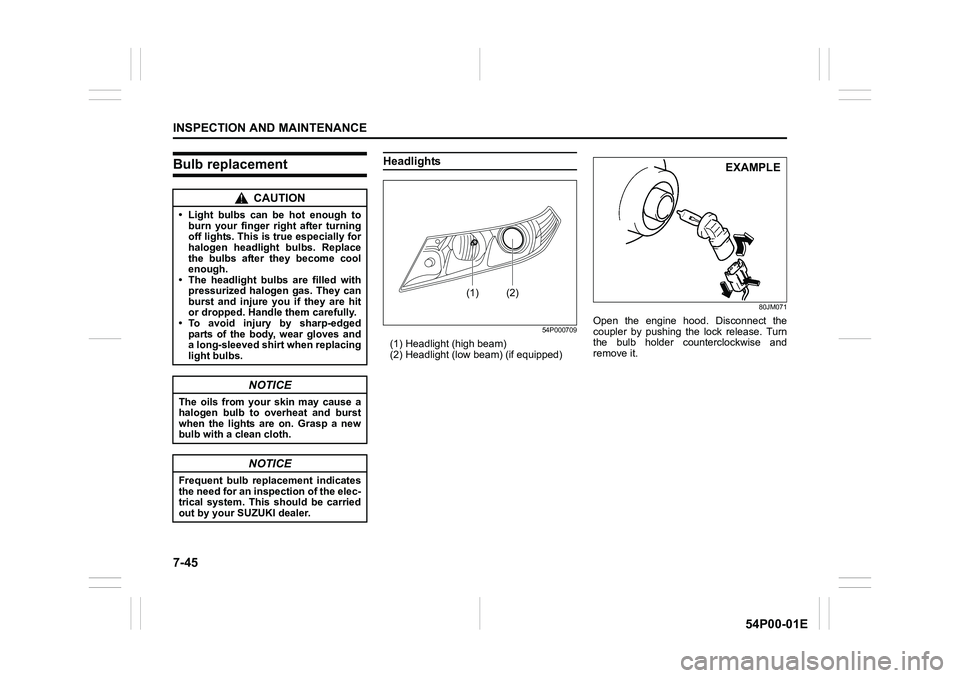
Bulb replacementHeadlights
54P000709
(1) Headlight (high beam)
(2) Headlight (low beam) (if equipped)
80JM071
Open the engine hood. Disconnect the
coupler by pushing the lock release. Turn
the bulb holder counterclockwise and
remove it.
CAUTION
• Light bulbs can be hot enough to
burn your finger right after turning
off lights. This is true especially for
halogen headlight bulbs. Replace
the bulbs after they become cool
enough.
• The headlight bulbs are filled with
pressurized halogen gas. They can
burst and injure you if they are hit
or dropped. Handle them carefully.
• To avoid injury by sharp-edged
parts of the body, wear gloves and
a long-sleeved shirt when replacing
light bulbs.
NOTICE
The oils from your skin may cause a
halogen bulb to overheat and burst
when the lights are on. Grasp a new
bulb with a clean cloth.
NOTICE
Frequent bulb replacement indicates
the need for an inspection of the elec-
trical system. This should be carried
out by your SUZUKI dealer.
(1) (2)
EXAMPLE
Page 434 of 482
12-4
SUPPLEMENT
54P00-01E
NOTE:
Oxygenated fuels are fuels which contain
oxygen-carrying additives such as MTBE
or alcohol.
If “RON 95” label is attached, you must use
unleaded gasoline with a minimum rating
of 91 pump octane ((R + M)/2 method).
Gasoline containing MTBE
Unleaded gasoline containing MTBE
(methyl tertiary butyl ether) may be used in
your vehicle if the MTBE content is not
greater than 15%. This oxygenated fuel
does not contain alcohol.
Gasoline-ethanol blends
Blends of unleaded gasoline and ethanol
(grain alcohol), also known as gasohol,
may be used in your vehicle if the ethanol
content is not greater than 10%.
Gasoline-methanol blends
Fuels containing 5% or less methanol
(wood alcohol) may be suitable for use in
your vehicle if they contain cosolvents and
corrosion inhibitors. Do not use fuels con-
taining more than 5% methanol under any
circumstances. Fuel system damage or
vehicle performance problems resulting
from the use of such fuels are not the
responsibility of SUZUKI and may not be
covered under the New Vehicle Limited
Warranty.
Fuel pump labeling
In some states, pumps that dispense oxy-
genated fuels are required to be labeled
for the type and percentage of oxygenate
and whether important additives are pres-
ent. Such labels may provide enough infor-
mation for you to determine if a particular
blend of fuels meets the requirements
listed above. In other areas, pumps may
not be clearly labeled as to the content or
type of oxygenate and additives. If you are
not sure that the fuel you intend to use
meets these requirements, check with the
service station operator or the fuel sup-
plier.
NOTE:
To help clean the air, SUZUKI recom-
mends you use the oxygenated fuels.
However, if you are not satisfied with the
driveability or fuel economy of your vehicle
when you are using an oxygenated fuel,
switch back to the regular unleaded gaso-
line.
Engine oil and filter
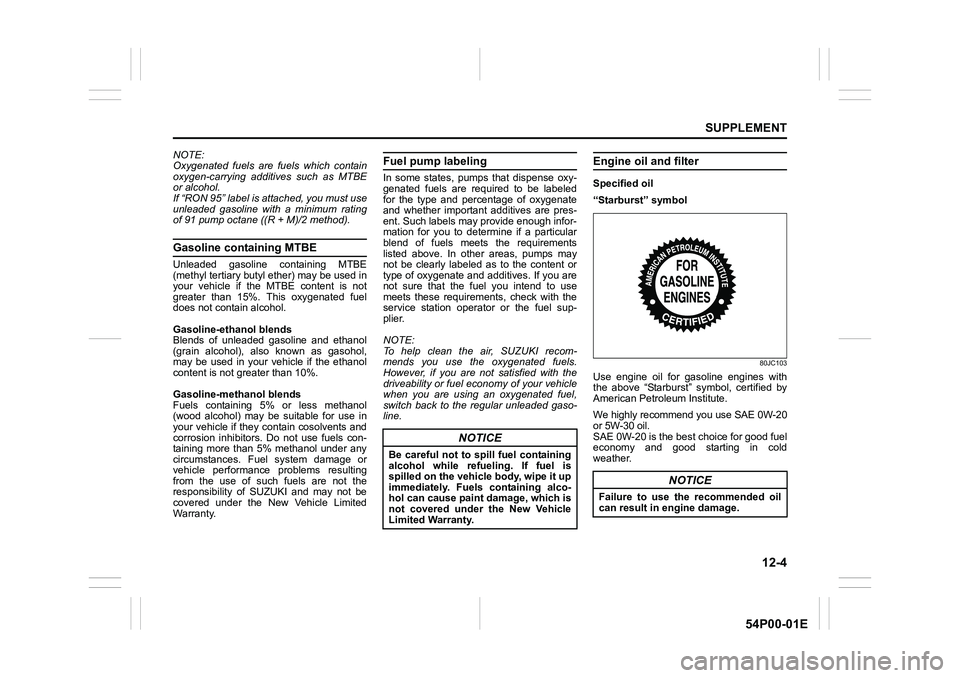
Specified oil
“Starburst” symbol
80JC103
Use engine oil for gasoline engines with
the above “Starburst” symbol, certified by
American Petroleum Institute.
We highly recommend you use SAE 0W-20
or 5W-30 oil.
SAE 0W-20 is the best choice for good fuel
economy and good starting in cold
weather.
NOTICE
Be careful not to spill fuel containing
alcohol while refueling. If fuel is
spilled on the vehicle body, wipe it up
immediately. Fuels containing alco-
hol can cause paint damage, which is
not covered under the New Vehicle
Limited Warranty.
NOTICE
Failure to use the recommended oil
can result in engine damage.