auto lock SUZUKI IGNIS 2017 Owner's Manual
[x] Cancel search | Manufacturer: SUZUKI, Model Year: 2017, Model line: IGNIS, Model: SUZUKI IGNIS 2017Pages: 505, PDF Size: 8.36 MB
Page 160 of 505
3-7OPERATING YOUR VEHICLE
75RM4-01E
Engine switch illuminationThe engine switch is illuminated (lit) in the
following situations:
• When the engine is off and the driver’sdoor is open, or for 15 seconds after the
driver’s door is closed. The illumination
will fade out after 15 seconds passed.
• When the engine is off and the position lights are on. The illumination will go out
when the position lig hts are turned off.
• When the engine is on and the position lights and/or the headlights are on. The
illumination will go out when the position
lights are turned off.
82K253
NOTE:
To save the lead-acid battery, the illumina-
tion will be automatically turned off when
both of the following conditions are simul-
taneously met:
• The headlights and position lights areturned off.
• 15 minutes has elapsed since opening
the driver’s door.
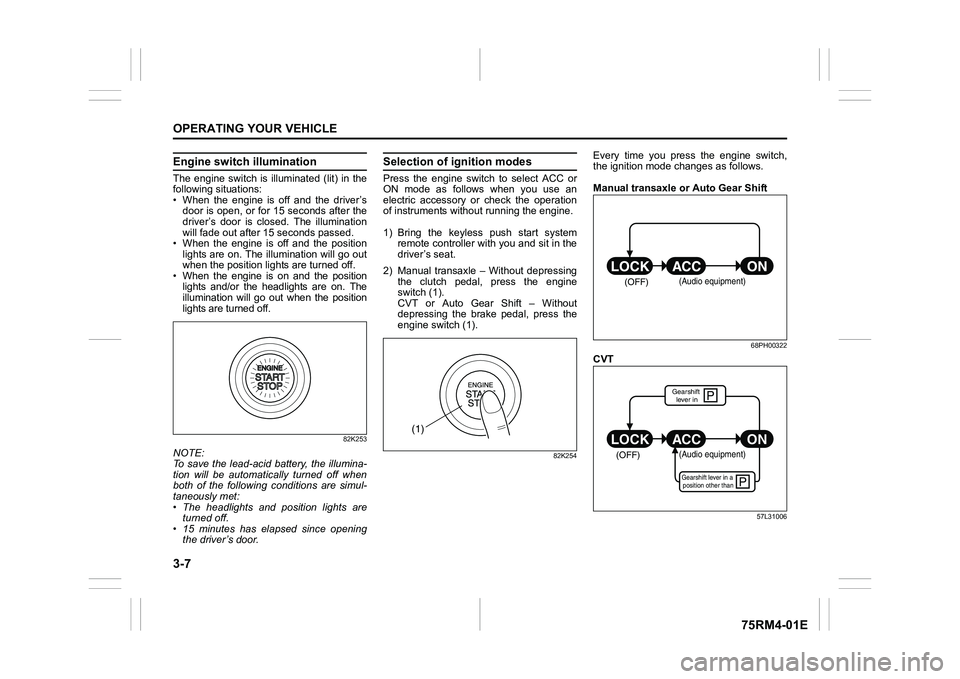
Selection of i gnition modesPress the engine switch to select ACC or
ON mode as follows when you use an
electric accessory or check the operation
of instruments without running the engine.
1) Bring the keyless push start system remote controller with you and sit in the
driver’s seat.
2) Manual transaxle – Without depressing the clutch pedal, press the engine
switch (1).
CVT or Auto Gear Shift – Without
depressing the brake pedal, press the
engine switch (1).
82K254
Every time you press the engine switch,
the ignition mode changes as follows.
Manual transaxle or Auto Gear Shift
68PH00322
CVT
57L31006
(1)
(OFF)
(Audio equipment)
çP
P
(OFF)
ON
ACC
LOCK
(Audio equipment)Gearshift lever in a
position other thanGearshift lever in
Page 166 of 505
3-13OPERATING YOUR VEHICLE
75RM4-01E
Starting engine
(vehicle without keyless push start system)Before starting engine
75RM256
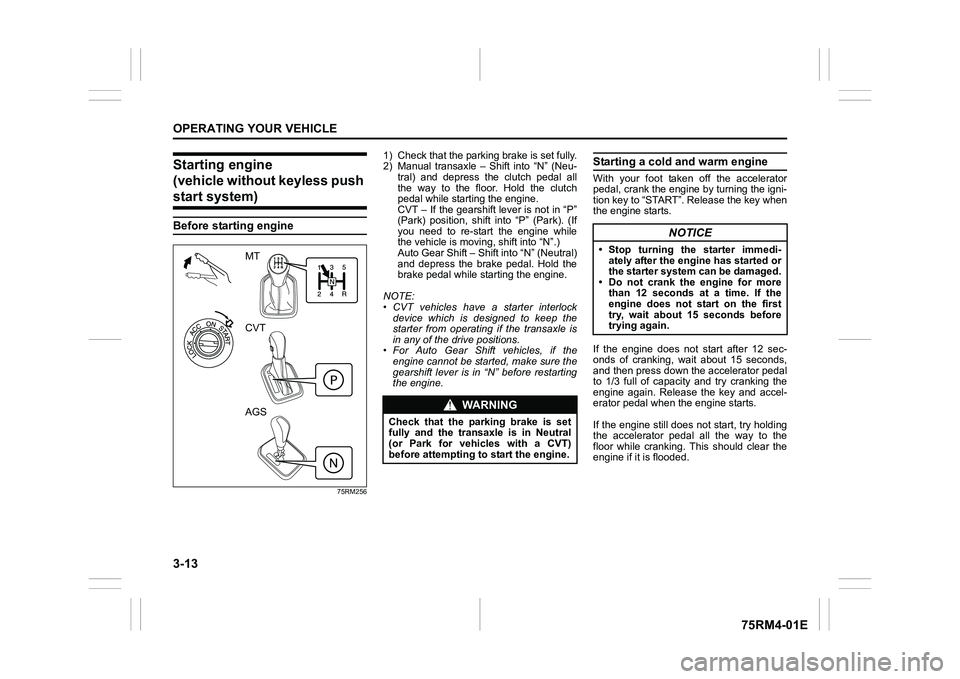
1) Check that the parking brake is set fully.
2) Manual transaxle – Shift into “N” (Neu- tral) and depress the clutch pedal all
the way to the floor. Hold the clutch
pedal while starting the engine.
CVT – If the gearshift lever is not in “P”
(Park) position, shift into “P” (Park). (If
you need to re-start the engine while
the vehicle is movi ng, shift into “N”.)
Auto Gear Shift – Shift into “N” (Neutral)
and depress the brake pedal. Hold the
brake pedal while starting the engine.
NOTE:
• CVT vehicles have a starter interlock device which is designed to keep the
starter from operating if the transaxle is
in any of the drive positions.
• For Auto Gear Shift vehicles, if the engine cannot be started, make sure the
gearshift lever is in “N” before restarting
the engine.
Starting a cold and warm engineWith your foot taken off the accelerator
pedal, crank the engine by turning the igni-
tion key to “START”. Release the key when
the engine starts.
If the engine does not start after 12 sec-
onds of cranking, wait about 15 seconds,
and then press down the accelerator pedal
to 1/3 full of capacity and try cranking the
engine again. Release the key and accel-
erator pedal when the engine starts.
If the engine still does not start, try holding
the accelerator pedal all the way to the
floor while cranking. This should clear the
engine if it is flooded.
MT
CVT
AGS
WA R N I N G
Check that the parking brake is set
fully and the transaxle is in Neutral
(or Park for vehicles with a CVT)
before attempting to start the engine.
NOTICE
• Stop turning the starter immedi-ately after the engine has started or
the starter system can be damaged.
• Do not crank the engine for more than 12 seconds at a time. If the
engine does not start on the first
try, wait about 15 seconds before
trying again.
Page 167 of 505
3-14
OPERATING YOUR VEHICLE
75RM4-01E
Starting engine
(vehicle with keyless push start system)Before starting engine
75RM257
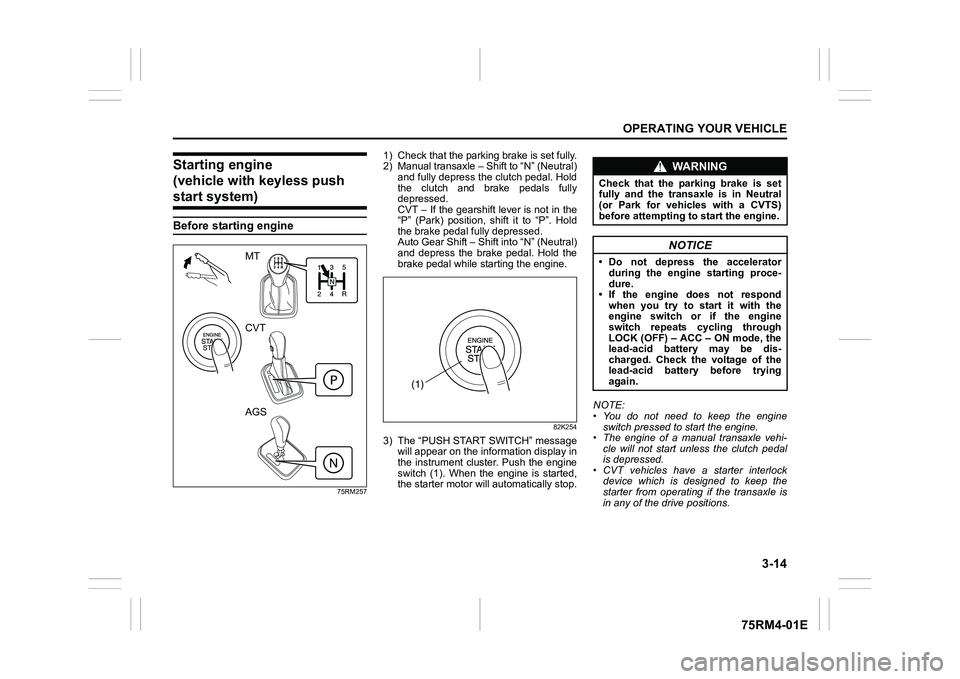
1) Check that the parking brake is set fully.
2) Manual transaxle – Shift to “N” (Neutral) and fully depress the clutch pedal. Hold
the clutch and brake pedals fully
depressed.
CVT – If the gearshift lever is not in the
“P” (Park) position, shift it to “P”. Hold
the brake pedal fully depressed.
Auto Gear Shift – Shift into “N” (Neutral)
and depress the brake pedal. Hold the
brake pedal while starting the engine.
82K254
3) The “PUSH START SWITCH” messagewill appear on the information display in
the instrument cluster. Push the engine
switch (1). When the engine is started,
the starter motor will automatically stop. NOTE:
• You do not need to keep the engine
switch pressed to start the engine.
• The engine of a manual transaxle vehi- cle will not start unless the clutch pedal
is depressed.
• CVT vehicles have a starter interlock device which is designed to keep the
starter from operating if the transaxle is
in any of the drive positions.
MT
CVT
AGS
(1)
WA R N I N G
Check that the parking brake is set
fully and the transaxle is in Neutral
(or Park for vehicles with a CVTS)
before attempting to start the engine.
NOTICE
• Do not depress the accelerator
during the engine starting proce-
dure.
• If the engine does not respond when you try to start it with the
engine switch or if the engine
switch repeats cycling through
LOCK (OFF) – ACC – ON mode, the
lead-acid battery may be dis-
charged. Check the voltage of the
lead-acid battery before trying
again.
Page 169 of 505
3-16
OPERATING YOUR VEHICLE
75RM4-01E
If the master warning indicator light
blinks and the engine cannot be started
Your keyless push start system remote
controller may not be sensed as being
within the interior workable area. Try again
after checking that you have the remote
controller with you. If the engine still can-
not be started, the battery of the remote
controller may be discharged. To start the
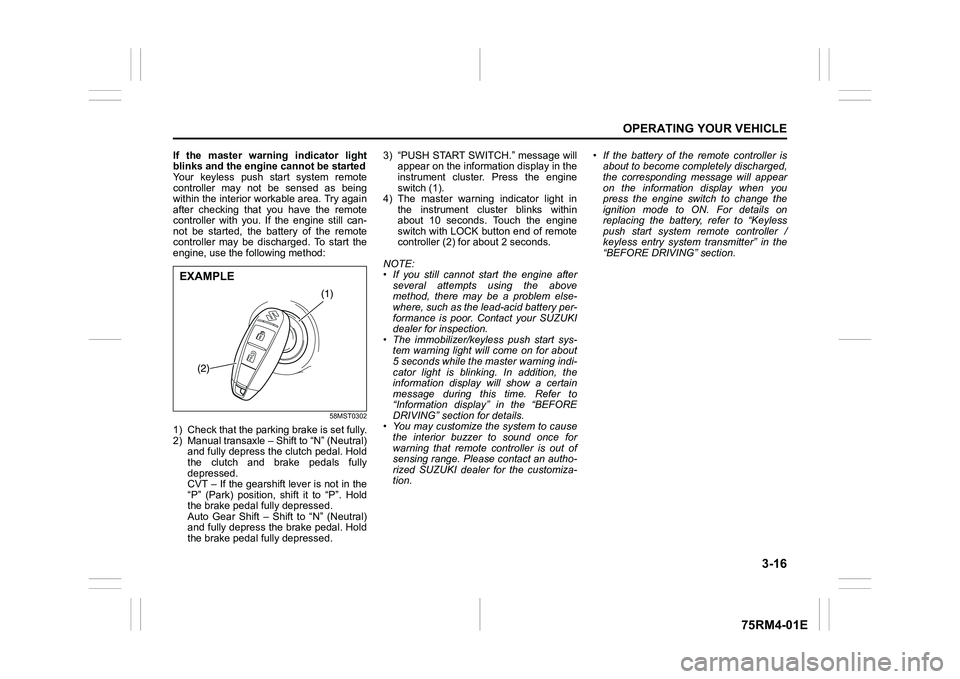
engine, use the following method:
58MST0302
1) Check that the parking brake is set fully.
2) Manual transaxle – Shift to “N” (Neutral) and fully depress the clutch pedal. Hold
the clutch and brake pedals fully
depressed.
CVT – If the gearshift lever is not in the
“P” (Park) position, shift it to “P”. Hold
the brake pedal fully depressed.
Auto Gear Shift – Shift to “N” (Neutral)
and fully depress the brake pedal. Hold
the brake pedal fully depressed. 3) “PUSH START SWITCH.” message will
appear on the information display in the
instrument cluster. Press the engine
switch (1).
4) The master warning indicator light in the instrument cluster blinks within
about 10 seconds. Touch the engine
switch with LOCK button end of remote
controller (2) for about 2 seconds.
NOTE:
• If you still cannot start the engine after several attempts using the above
method, there may be a problem else-
where, such as the lead-acid battery per-
formance is poor. Contact your SUZUKI
dealer for inspection.
• The immobilizer/keyless push start sys- tem warning light will come on for about
5 seconds while the master warning indi-
cator light is blinking. In addition, the
information display will show a certain
message during this time. Refer to
“Information display” in the “BEFORE
DRIVING” section for details.
• You may customize the system to cause
the interior buzzer to sound once for
warning that remote controller is out of
sensing range. Please contact an autho-
rized SUZUKI dealer for the customiza-
tion. • If the battery of the remote controller is
about to become completely discharged,
the corresponding message will appear
on the information display when you
press the engine switch to change the
ignition mode to ON. For details on
replacing the battery, refer to “Keyless
push start system remote controller /
keyless entry system transmitter” in the
“BEFORE DRIVING” section.
(1)
(2)
EXAMPLE
Page 173 of 505
3-20
OPERATING YOUR VEHICLE
75RM4-01E
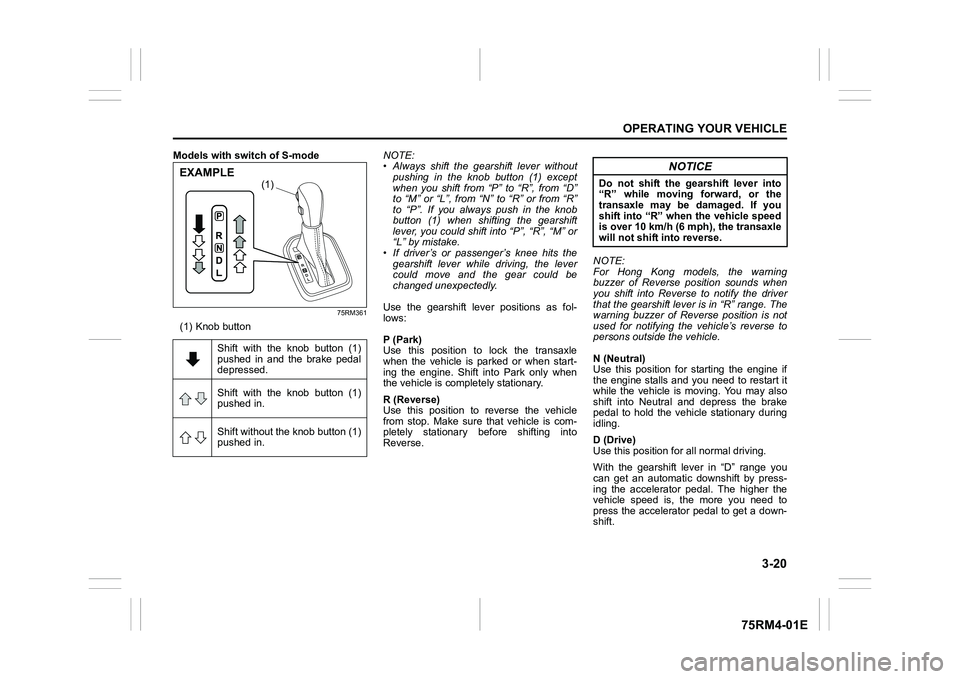
Models with switch of S-mode
75RM361
(1) Knob buttonNOTE:
• Always shift the gearshift lever without
pushing in the knob button (1) except
when you shift from “P” to “R”, from “D”
to “M” or “L”, from “N” to “R” or from “R”
to “P”. If you always push in the knob
button (1) when shifting the gearshift
lever, you could shift into “P”, “R”, “M” or
“L” by mistake.
• If driver’s or passenger’s knee hits the gearshift lever while driving, the lever
could move and the gear could be
changed unexpectedly.
Use the gearshift lever positions as fol-
lows:
P (Park)
Use this position to lock the transaxle
when the vehicle is parked or when start-
ing the engine. Shift into Park only when
the vehicle is completely stationary.
R (Reverse)
Use this position to reverse the vehicle
from stop. Make sure that vehicle is com-
pletely stationary before shifting into
Reverse. NOTE:
For Hong Kong models, the warning
buzzer of Reverse position sounds when
you shift into Reverse to notify the driver
that the gearshift lever is in “R” range. The
warning buzzer of Reverse position is not
used for notifying the vehicle’s reverse to
persons outside the vehicle.
N (Neutral)
Use this position for starting the engine if
the engine stalls and you need to restart it
while the vehicle is moving. You may also
shift into Neutral and depress the brake
pedal to hold the vehicle stationary during
idling.
D (Drive)
Use this position for all normal driving.
With the gearshift lever in “D” range you
can get an automatic downshift by press-
ing the accelerator pedal. The higher the
vehicle speed is, the more you need to
press the accelerator pedal to get a down-
shift.
Shift with the knob button (1)
pushed in and the brake pedal
depressed.
Shift with the knob button (1)
pushed in.
Shift without the knob button (1)
pushed in.
(1)
EXAMPLE
NOTICE
Do not shift the gearshift lever into
“R” while moving forward, or the
transaxle may be damaged. If you
shift into “R” when the vehicle speed
is over 10 km/h (6 mph), the transaxle
will not shift into reverse.
Page 176 of 505
3-23OPERATING YOUR VEHICLE
75RM4-01E
62R0145
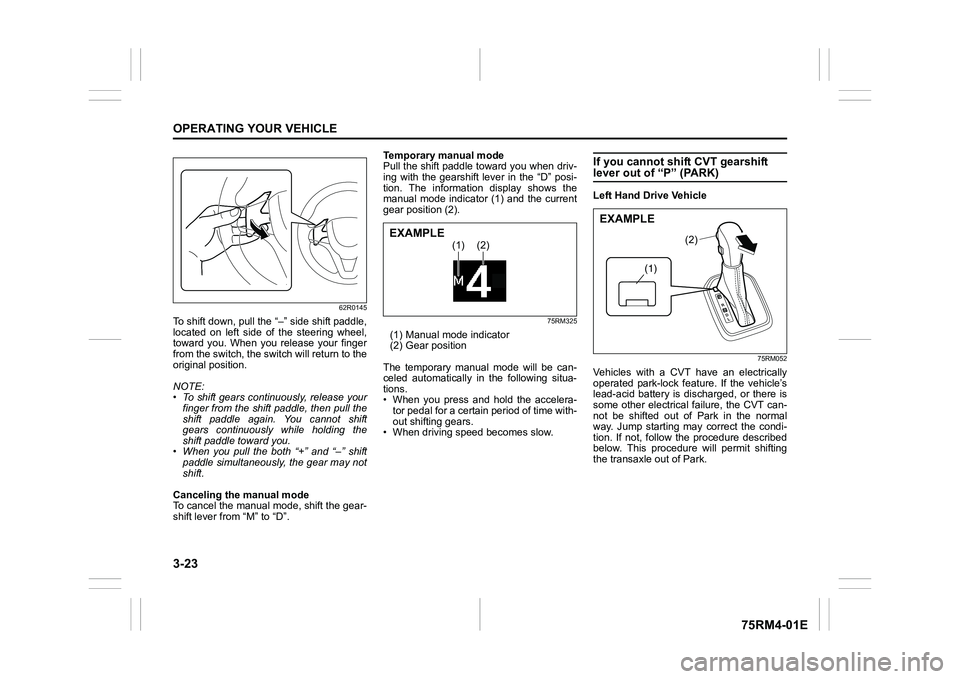
To shift down, pull the “–” side shift paddle,
located on left side of the steering wheel,
toward you. When you release your finger
from the switch, the switch will return to the
original position.
NOTE:
• To shift gears continuously, release yourfinger from the shift paddle, then pull the
shift paddle again. You cannot shift
gears continuously while holding the
shift paddle toward you.
• When you pull the both “+” and “ –” shift
paddle simultaneously, the gear may not
shift.
Canceling the manual mode
To cancel the manual mode, shift the gear-
shift lever from “M” to “D”. Temporary manual mode
Pull the shift paddle toward you when driv-
ing with the gearshift lever in the “D” posi-
tion. The information display shows the
manual mode indicator (1) and the current
gear position (2).
75RM325
(1) Manual mode indicator
(2) Gear position
The temporary manual mode will be can-
celed automatically in the following situa-
tions.
• When you press and hold the accelera- tor pedal for a certain period of time with-
out shifting gears.
• When driving spee d becomes slow.
If you cannot shift CVT gearshift lever out of “P” (PARK)Left Hand Drive Vehicle
75RM052
Vehicles with a CVT have an electrically
operated park-lock feat ure. If the vehicle’s
lead-acid battery is discharged, or there is
some other electrical failure, the CVT can-
not be shifted out of Park in the normal
way. Jump starting may correct the condi-
tion. If not, follow the procedure described
below. This procedure will permit shifting
the transaxle out of Park.
(1)
(2)
EXAMPLE
(1)
(2)
EXAMPLE
Page 185 of 505

3-32
OPERATING YOUR VEHICLE
75RM4-01E
Parking
Unlike an automatic transaxle, Auto Gear
Shift does not have a parking position.
Park the vehicle with a gear engaged.
1) Apply the parking brake firmly.
2) While depressing the brake pedal, shift
the gearshift lever to the “R” position on
a downhill slope, and to the 1st position
in the drive (D) mode or the “M” position
in the manual (M) mode on an uphill
slope and confirm the gear position by
checking the gear position indicator.
3) Stop the engine.
NOTE:
• After the engine is stopped, the gear in the transaxle does not change even if
you shift the gearshift lever in any posi-
tion. Always shift the gearshift lever
before stop the engine.
• Check the transaxle gear position by looking at the gear position indicator,
then turn the ignition switch to “LOCK”
position or press the engine switch to
change the ignition mode to LOCK
(OFF), to stop the engine. Release the
brake pedal after a few seconds. Parking cancel
Depress the brake pedal, turn the ignition
switch to “ON” position or press the engine
switch to change the ignition mode to ON,
and shift the gearshift lever to the “N” posi-
tion. The gear will be disengaged. Warning functions
A warning buzzer will sound or the indica-
tor will blink under the f
ollowing conditions.
Warning buzzer
• The clutch is heated due to excessive load.
• The creeping function is being activated for a long period of time.
• The ignition switch is turned to the “LOCK” position or the engine switch is
pressed to change the ignition mode to
LOCK (OFF) with the gear in 2nd, 3rd,
4th or 5th. In this case, turn the ignition
switch to “ON” position or press the
engine switch to change the ignition
mode to ON, and shift the gearshift lever
in the “N” position, shift it to the “D” or
“M” or “R” position, t hen turn the ignition
switch to “LOCK” position or press the
engine switch to change the ignition
mode to LOCK (OFF).
• During a stop, the driver’s door is opened with the gearshift lever in the
“R”, “D” or “M” positi on while the engine
is running.
WA R N I N G
• If the gear is not engaged properly and completely before the ignition
switch is turned to “LOCK” posi-
tion or the engine switch is pressed
to change the ignition mode to
LOCK (OFF), the vehicle may not
be parked with the gear engaged.
Always confirm the gear position
by checking the gear position indi-
cator when parking.
• On a downhill slope, the gear
should be put in reverse, and in 1st
gear on an uphill slope. Otherwise,
the vehicle may move, and cause
an unexpected accident. If the gear
is left in the “N” position, the vehi-
cle cannot be parked with a gear
engaged.
NOTICE
In the above cases, pull over to the
side of the road and stop the engine,
and then ask your SUZUKI dealer to
inspect your vehicle. Otherwise, the
clutch disc may be damaged.
Page 219 of 505
3-66
OPERATING YOUR VEHICLE
75RM4-01E
Temporary stop of the stereo camera
Under the following situations, the function
of the stereo camera stops temporarily.
When the situations are improved, the
temporary stop of the function will be can-
celed.
• When the visibility of the stereo camerais poor
• When the temperature of the body of
stereo camera i s low or high
• When the systems related the dual cam- era brake support stops temporarily
• When the lead-acid battery has a volt- age abnormality
• When the automatic adjustment of the
stereo camera is insufficient
Failure of the stereo camera
When the stereo camera is failure, the
function of the stereo camera stops until
the ignition switch is turned to “LOCK”
position or the engine switch is pressed to
change the ignition mode to LOCK (OFF).
Find a safe place to park and turn the igni-
tion switch to “LOCK” position or change
the ignition mode to LOCK (OFF) by press-
ing the engine switch.
Restart the engine, and check that the dual
camera brake support indicator light and
lane departure warning indicator light go
off.
• If both of the indicators stay on after restarting the engine, there may be a
failure of the stereo camera. Ask your
SUZUKI dealer to have the stereo cam-
era inspected. It is thought that the cause of failure is the
followings.
• When the stereo camera has an abnor-
mality
• When the temperature of the body of stereo camera is t oo low or too high
• When the mounting position of the ste- reo camera is shifted greatly
• When there are communication abnor-
malities among the engine, transaxle
and brake controller
• When the dual camera brake support
OFF switch has an abnormality
• When the steering angle sensor has an abnormality
• When the power supply of the stereo camera is cut
NOTE:
• Under the following situations, the dual camera brake support indicator light and
lane departure warning indicator light
come on after the engine has started, it
does not indicate a malfunction. Once
the ignition switch is turned to “LOCK”
position or the engine switch is pressed
to change the ignition mode to LOCK
(OFF) and then the engine is restarted,
these indicators will go off.
– When the automatic brake system hasbeen operating 3 times
– When the automatic brake system has
been operating for long periods • The function of the stereo camera stops
if the dual camera brake support indica-
tor light and lane departure warning indi-
cator light come on and there may be a
failure of the stereo camera, but it does
not hinder normal driving.
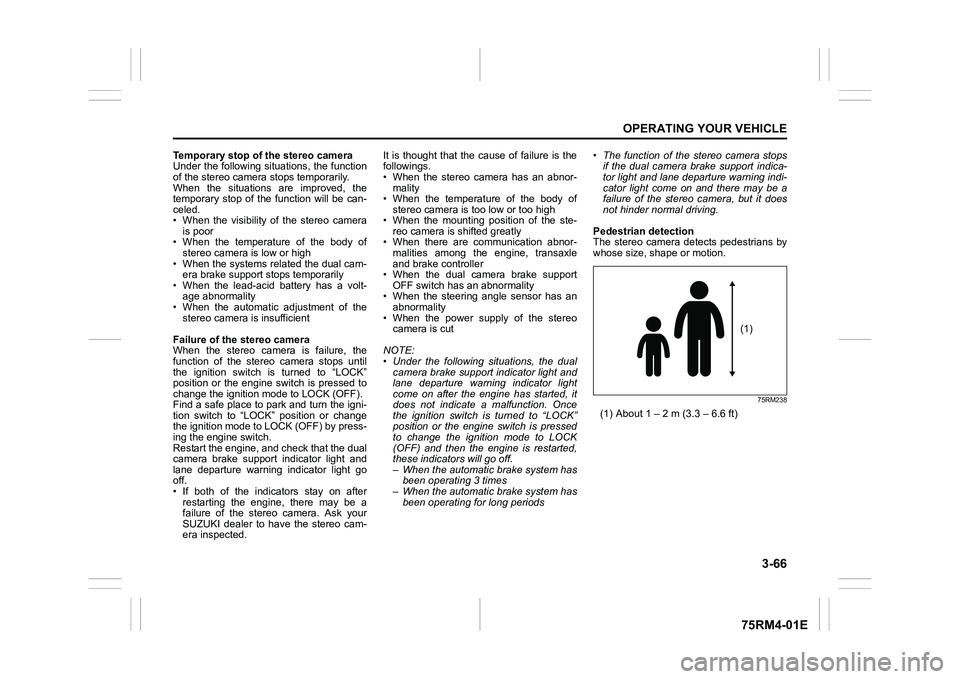
Pedestrian detection
The stereo camera detects pedestrians by
whose size, shape or motion.
75RM238
(1) About 1 – 2 m (3.3 – 6.6 ft)
(1)
Page 229 of 505
3-76
OPERATING YOUR VEHICLE
75RM4-01E
Brake assist systemWhen you slam the brakes on, the brake
assist system determines it to be an emer-
gency stop and provides more powerful
braking for a driver who cannot hold down
the brake pedal firmly.
NOTE:
If you quickly and forcefully depress the
brakes, you may hear clicking sound by
the brake assist system operation. This is
normal and indicates that the brake assist
system is activated properly.
Anti-lock brake system (ABS)ABS will help you avoid skidding by elec-
tronically controlling braking pressure. It
will also help you maintain steering control
when braking on slippery surfaces or when
braking hard.
The ABS works automatically, so you do
not need any special braking technique.
Just push the brake pedal down without
pumping. The ABS will operate whenever
it senses that the wheels are locking up.
You may feel the brake pedal move a little
while the ABS is operating.
NOTE:
• The ABS will not work if vehicle speed is under about 9 km/h (6 mph).
• If the ABS system is activated, you may
hear a clunking noise and/or feel pulsat-
ing in the brake pedal. This is normal
and indicates that the brake fluid pres-
sure is being controlled properly.
• You may hear an operation sound when you start the engine or after the vehicle
begins to move. This means that the
above systems are in the self-check
mode. This sound does not indicate a
malfunction.
WA R N I N G
Even without reserve power in the
brake system, you can still stop the
vehicle by pressing the brake pedal
harder than normally required. How-
ever, the stopping distance may be
longer.
WA R N I N G
• On some types of loose surfaces (such as gravel, snow-covered
roads, etc.), the stopping distance
required for a vehicle with ABS
may be slightly greater than the
one required for a comparable vehi-
cle with a conventional brake sys-
tem. With a conventional brake
system, skidding tires are able to
plow the gravel or snow layer,
shortening the stopping distance.
ABS minimizes this resistance
effect. Allow for extra stopping dis-
tance when driving on loose sur-
faces.
• On regular paved roads, some driv-
ers may be able to obtain slightly
shorter stopping distances with
conventional brake systems than
with ABS.
• In both of the above conditions, ABS will still offer the advantage of
helping you maintain directional
control. However, remember that
ABS will not compensate for bad
road or weather conditions or poor
driver judgment. Use good judg-
ment and do not drive too fast.
Page 231 of 505
3-78
OPERATING YOUR VEHICLE
75RM4-01E
Electronic stability program (ESP
®) (if equipped)
ESP
® is a registered trademark of Daimler
AG.
The Electronic Stability Program (ESP
®)
helps to control the vehicle during corner-
ing if front wheels or rear wheels skid. It
also assists you in maintaining traction
while accelerating on loose or slippery
road surfaces. It does this by regulating
the engine’s output, and by selectively
applying the brakes. In addition, ESP®
helps to avoid skidding by controlling brak-
ing pressure. The ESP
® has the following three sys-
tems:
Stability control systemThe vehicle stability control system helps
provide integrated control of systems such
as anti-lock brakes, traction control, engine
control, etc. This system automatically
controls the brakes and engine to help pre-
vent the vehicle from skidding when cor-
nering on a slippery road surface or when
turning the steering wheel abruptly.Traction control systemThe traction control system automatically
helps prevent the spinning of wheels when
the vehicle is started or accelerated on
slippery road surfaces. The system oper-
ates only if it senses that some of the
wheels are spinning or beginning to lose
traction. When this happens, the system
operates the front or rear brakes and
reduces engine power to limit wheel spin.
Anti-lock brake system (ABS)ABS will help you avoid skidding by elec-
tronically controlling braking pressure. It
will also help you maintain steering control
when braking on slippery surfaces or when
braking hard. The ABS works automati-
cally, so you do not have to use any spe-
cial braking technique. Just push the brake
pedal down wit hout pumping. The ABS will
operate whenever it senses that wheels
are locking up. You may feel the brake
pedal pulsate while the ABS is operating.
(For more information on ABS, see “Brak-
ing” in this section.)
NOTE:
The ABS will not work if vehicle speed is
under about 9 km/h (6 mph).
WA R N I N G
The ESP
® cannot enhance the vehi-
cle’s driving stability in all situations
and does not control your vehicle’s
entire braking system. The ESP
® can-
not prevent accidents, including
those resulting from excessive speed
in turns, or hydroplaning. Only safe
and attentive drive can prevent acci-
dents. The capabilities of an ESP
®-
equipped vehicle must never be used
as a substitute for careful driving.
WA R N I N G
• The ESP
® may not work properly if
tires or wheels other than those
specified in the owner’s manual are
used. When replacing tires or
wheels, use only the size and type
specified in this owner’s manual.
• The ESP® may not work properly if
tires are not inflated to the recom-
mended tire inflation pressure.
• The ESP® may not work properly if
tires are fitted wi th tire chains.
(Continued)