audio SUZUKI IGNIS 2018 User Guide
[x] Cancel search | Manufacturer: SUZUKI, Model Year: 2018, Model line: IGNIS, Model: SUZUKI IGNIS 2018Pages: 505, PDF Size: 8.36 MB
Page 288 of 505
5-33OTHER CONTROLS AND EQUIPMENT
75RM4-01E
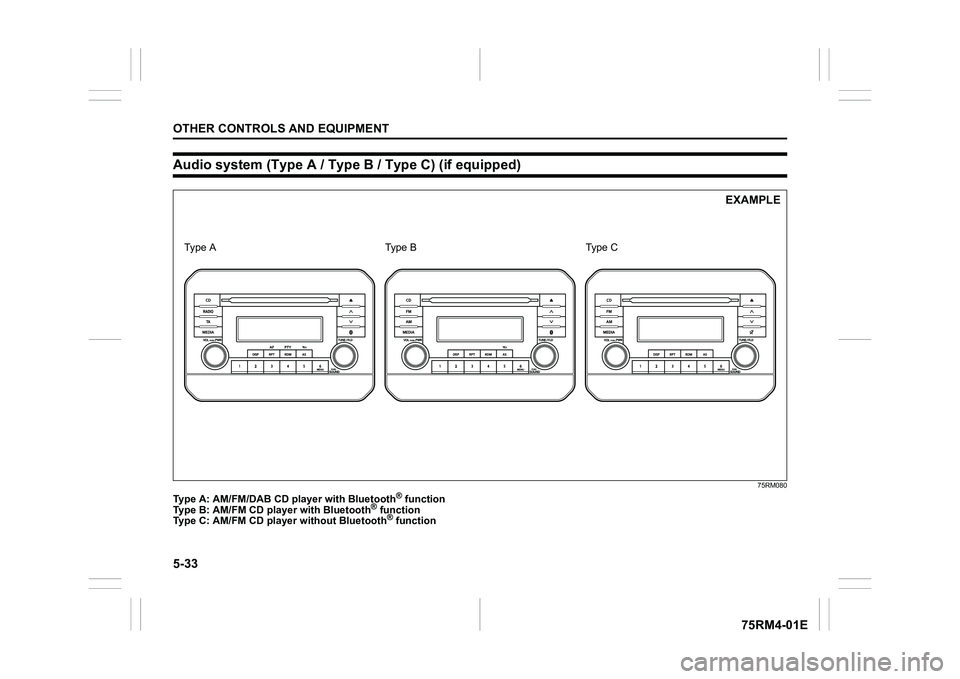
Audio system (Type A / Type B / Type C) (if equipped)
75RM080
Type A: AM/FM/DAB CD pl ayer with Bluetooth
® function
Type B: AM/FM CD player with Bluetooth
® function
Type C: AM/FM CD playe r without Bluetooth® function
EXAMPLE
Ty p e A Type C
Type B
Page 289 of 505
5-34
OTHER CONTROLS AND EQUIPMENT
75RM4-01E
Safety information
Notes on discsPrecautions
• When the inside of the vehicle is verycold and the player is used soon after
switching on the heater, condensation
may form on the disc or the optical
parts of the player and proper playback
may not be possible. If condensation
forms on the disc, wipe it off with a soft
cloth. If condensation forms on the opti-
cal parts of the player, do not use the
player for about one hour. This will
allow the condensation to disappear
normally.
• Driving on extremely bumpy roads which cause severe vibrations may
cause sound to skip.
• This unit uses a precision mechanism. Even in the event that trouble arises,
never open the case, disassemble the
unit, or lubricate the rotating parts.
Bring the unit to an authorized SUZUKI
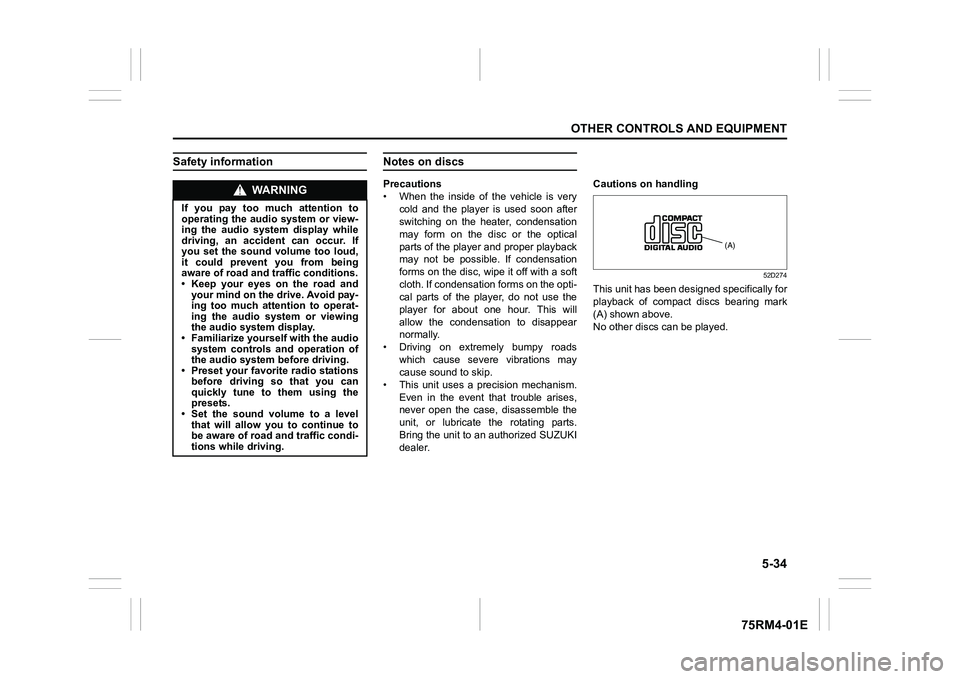
dealer. Cautions on handling
52D274
This unit has been designed specifically for
playback of compact discs bearing mark
(A) shown above.
No other discs
can be played.
WA R N I N G
If you pay too much attention to
operating the audio system or view-
ing the audio system display while
driving, an accident can occur. If
you set the sound volume too loud,
it could prevent you from being
aware of road and tr affic conditions.
• Keep your eyes on the road and your mind on the drive. Avoid pay-
ing too much attention to operat-
ing the audio system or viewing
the audio system display.
• Familiarize yourself with the audio
system controls and operation of
the audio system before driving.
• Preset your favorite radio stations
before driving so that you can
quickly tune to them using the
presets.
• Set the sound volume to a level that will allow you to continue to
be aware of road and traffic condi-
tions while driving.
(A)
Page 296 of 505
5-41OTHER CONTROLS AND EQUIPMENT
75RM4-01E
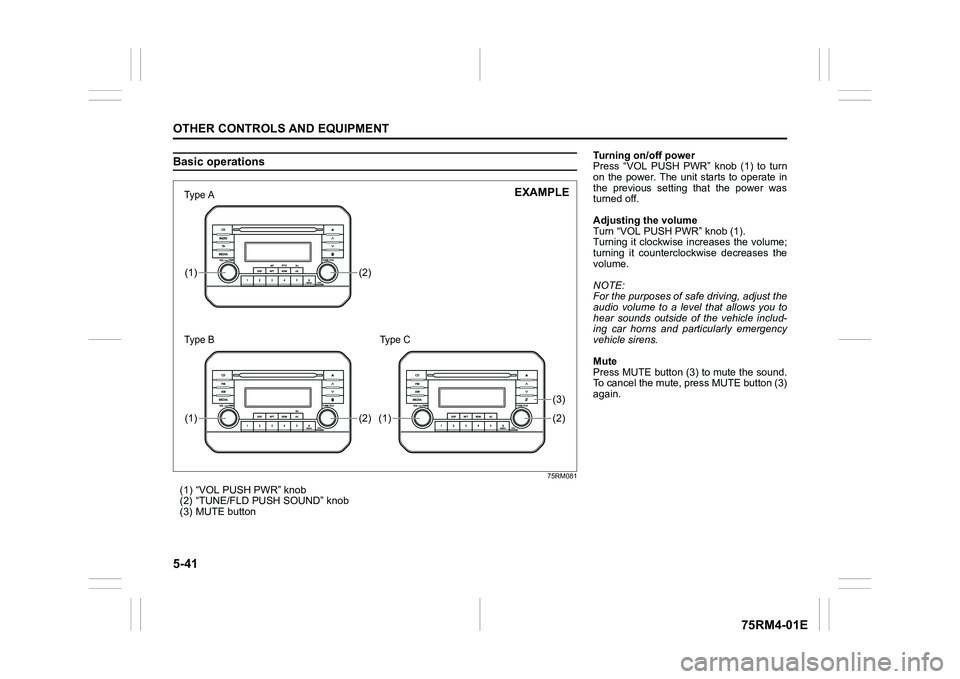
Basic operations
75RM081
(1) “VOL PUSH PWR” knob
(2) “TUNE/FLD PUSH SOUND” knob
(3) MUTE button
(2)
(1)(2)
(1)
(2)(3)
(1)
7śSHаΝ
7śSHаΠ
EXAMPLE
Type C
Turning on/off power
Press “VOL PUSH PWR” knob (1) to turn
on the power. The unit starts to operate in
the previous setting that the power was
turned off.
Adjusting the volume
Turn “VOL PUSH PWR” knob (1).
Turning it clockwise increases the volume;
turning it counterclockwise decreases the
volume.
NOTE:
For the purposes of safe driving, adjust the
audio volume to a level that allows you to
hear sounds outside of the vehicle includ-
ing car horns and particularly emergency
vehicle sirens.
Mute
Press MUTE button (3) to mute the sound.
To cancel the mute, press MUTE button (3)
again.
Page 304 of 505
5-49OTHER CONTROLS AND EQUIPMENT
75RM4-01E
TA standby
At the moment traffic information is
received while the source is set to CD,
USB, iPod
®, AUX, DAB, or Blue-
tooth
®audio with TA activated, the source
is automatically changed to radio. After
reception of traffic information, the source,
which was selected before being changed
to radio, resumes.
NOTE:
If no TP station can be received while the
unit stands by for TA, it automatically
searches for a TP station.
EON (Enhanced Other Network)
When the EON data is received with TP or
TA activated, “EON” indicator lights up,
and the traffic information from a network
other than the currently received station is
allowed to be received.
Emergency announcement reception
Emergency announcements are automati-
cally received and displayed.
Page 310 of 505
5-55OTHER CONTROLS AND EQUIPMENT
75RM4-01E
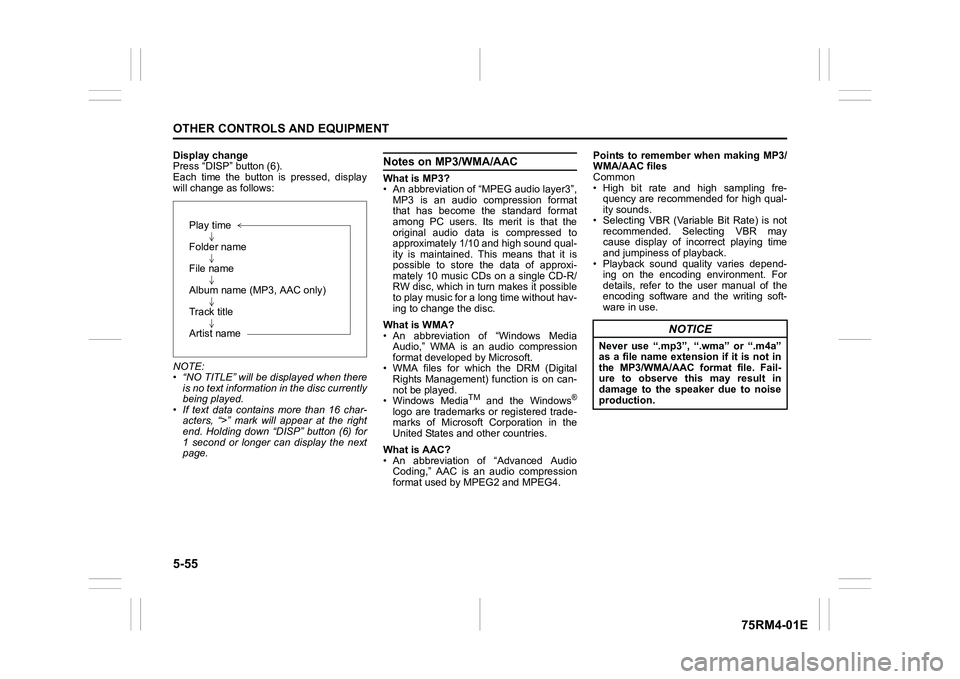
Display change
Press “DISP” button (6).
Each time the button is pressed, display
will change as follows:
NOTE:
• “NO TITLE” will be displayed when thereis no text information in the disc currently
being played.
• If text data contains more than 16 char- acters, “>” mark will appear at the right
end. Holding down “DISP” button (6) for
1 second or longer can display the next
page.
Notes on MP3/WMA/AACWhat is MP3?
• An abbreviation of “MPEG audio layer3”,
MP3 is an audio compression format
that has become the standard format
among PC users. Its merit is that the
original audio data is compressed to
approximately 1/10 and high sound qual-
ity is maintained. This means that it is
possible to store the data of approxi-
mately 10 music CDs on a single CD-R/
RW disc, which in turn makes it possible
to play music for a long time without hav-
ing to change the disc.
What is WMA?
• An abbreviation of “Windows Media Audio,” WMA is an audio compression
format developed by Microsoft.
• WMA files for which the DRM (Digital Rights Management) function is on can-
not be played.
• Windows Media
TM
and the Windows
®
logo are trademarks or registered trade-
marks of Microsoft Corporation in the
United States and other countries.
What is AAC?
• An abbreviation of “Advanced Audio Coding,” AAC is an audio compression
format used by MPEG2 and MPEG4. Points to remember when making MP3/
WMA/AAC files
Common
• High bit rate and high sampling fre-
quency are recommended for high qual-
ity sounds.
• Selecting VBR (Variable Bit Rate) is not recommended. Selecting VBR may
cause display of inc orrect playing time
and jumpiness of playback.
• Playback sound quality varies depend- ing on the encoding environment. For
details, refer to the user manual of the
encoding software and the writing soft-
ware in use.
Play time
Folder name
File name
Album name (MP3, AAC only)
Track title
Artist name
NOTICE
Never use “.mp3”, “.wma” or “.m4a”
as a file name extension if it is not in
the MP3/WMA/AAC format file. Fail-
ure to observe this may result in
damage to the speaker due to noise
production.
Page 311 of 505

5-56
OTHER CONTROLS AND EQUIPMENT
75RM4-01E
Recording MP3/WMA/AAC files on a CD
media
• It is recommended not to write both CD-DA files and MP3/WMA/AAC files on a
disc.
• If both CD-DA files and MP3/WMA/AAC
files are on the sa me disc, tracks may
not be played in the correct order or
some tracks may no t be played at all.
• When storing both MP3 data and WMA data on the same disc, sort and place
them in different folders.
• Do not write files other than MP3/WMA/ AAC files and unnecessary folders on a
disc.
• MP3/WMA/AAC files should be named to meet the standards and the file sys-
tem specifications as shown below.
• The file extension “.mp3”, “.wma” or “.m4a” should be assigned to files based
on their format independently.
• You may encounter a trouble in playing MP3/WMA/AAC files or displaying infor-
mation of MP3/WMA/AAC files depend-
ing on the writing software or CD
recorder in use.
• This unit does not have a playlist func- tion.
• It is recommended to write discs in Disc-
at-Once mode even though Multi-ses-
sion mode is supported. These modes
are the methods for writing audio data in
CD. Compression formats
MP3
• Bit rate
:
MPEG1 Audio Layer III: 32 k - 320 kbps
MPEG2 Audio Layer III: 8 k - 160 kbps
MPEG2.5 Audio Layer III: 8 k - 160 kbps
• Sampling frequency
:
MPEG1 Audio Layer III: 32 k/44.1 k/
48 kHz
MPEG2 Audio Layer III: 16 k/22.05 k/
24 kHz
MPEG2.5 Audio Layer III: 8 k/11.025 k/
12 kHz
WMA (Ver. 7, Ver. 8, Ver. 9*)
• Bit rate: CBR 32 k - 320 kbps
• Sampling frequency: 32 k/44.1 k/48 kHz
* WMA 9 Professional/LossLess/Voice are not supported.
AAC*
• Bit rate: ABR 16 k - 320 kbps
• Sampling frequency: 32 k/44.1 k/48 kHz
* Apple Lossless is not supported.
Supported file systems
ISO 9660 Level 1/Lev el 2, Joliet, Romeo
Maximum number o f files/folders
• Maximum number of files: 512
• Maximum number of files in a folder: 255
• Maximum depth of tree structure: 8
• Maximum number of folders: 255 (Root folder is included.)
Page 312 of 505
5-57OTHER CONTROLS AND EQUIPMENT
75RM4-01E
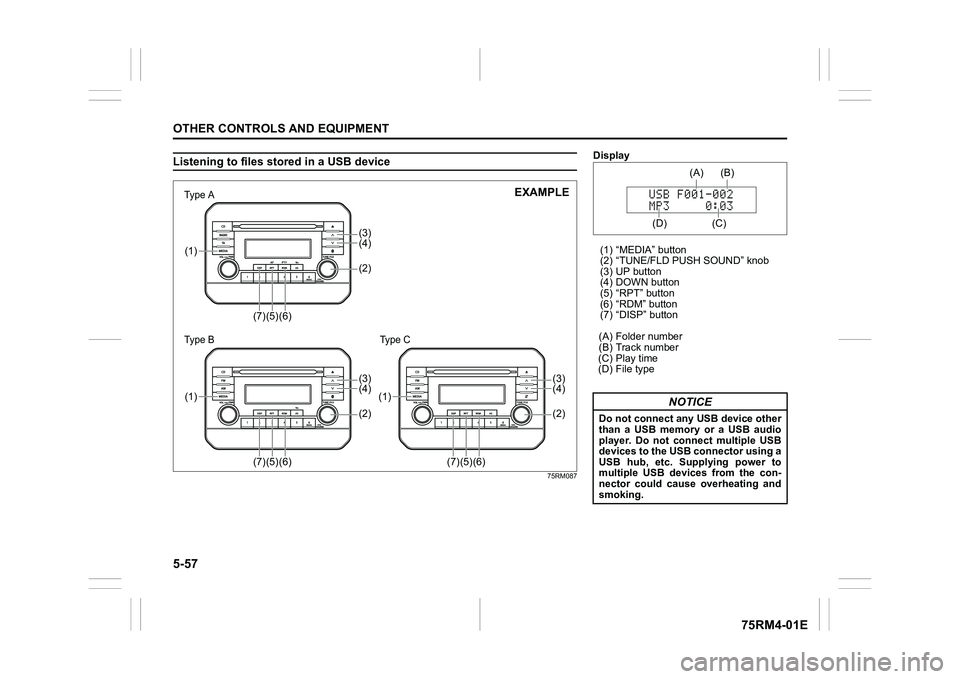
Listening to files stored in a USB device
75RM087
(4)(3)(2)
(7)
(5)
(6)
(1)
(4)(3)(2)
(7)
(5)
(6)
(1)
(4)(3)(2)
(7)
(5)
(6)
(1)
7śSHаΝ
7śSHаΠ
EXAMPLE
Type C
Display
(1) “MEDIA” button
(2) “TUNE/FLD PUSH SOUND” knob
(3) UP button
(4) DOWN button
(5) “RPT” button
(6) “RDM” button
(7) “DISP” button
(A) Folder number
(B) Track number
(C) Play time
(D) File type
NOTICE
Do not connect any USB device other
than a USB memory or a USB audio
player. Do not connect multiple USB
devices to the USB connector using a
USB hub, etc. Supplying power to
multiple USB devices from the con-
nector could cause overheating and
smoking.
(C) (B)
(A)
(D)
Page 313 of 505
5-58
OTHER CONTROLS AND EQUIPMENT
75RM4-01E
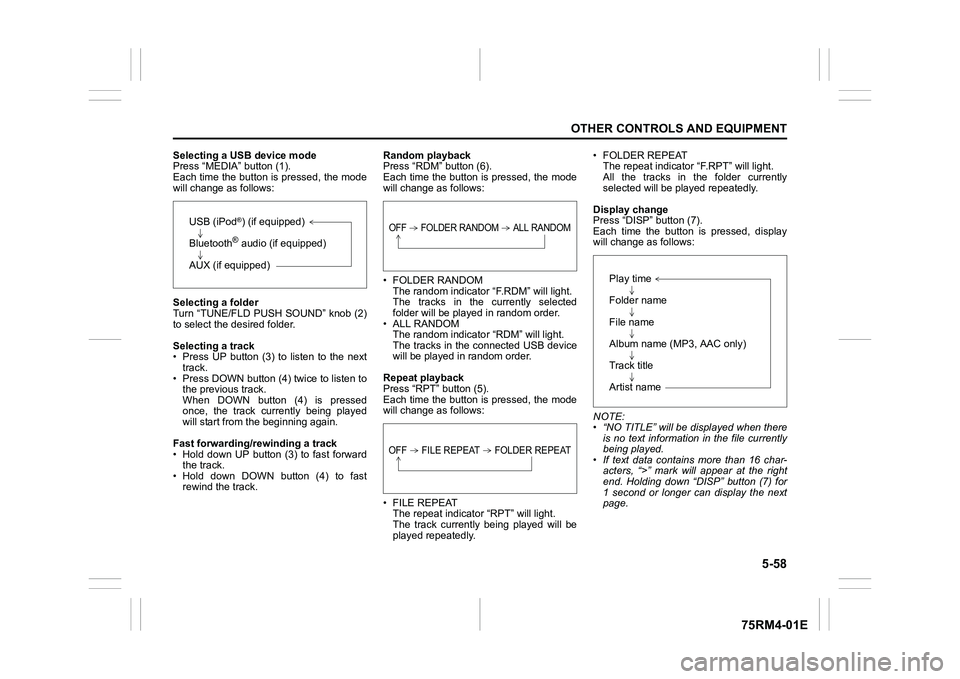
Selecting a USB device mode
Press “MEDIA” button (1).
Each time the button is pressed, the mode
will change as follows:
Selecting a folder
Turn “TUNE/FLD PUSH SOUND” knob (2)
to select the desired folder.
Selecting a track
• Press UP button (3) to listen to the next track.
• Press DOWN button (4) twice to listen to the previous track.
When DOWN button (4) is pressed
once, the track currently being played
will start from the beginning again.
Fast forwarding/rewinding a track
• Hold down UP button (3) to fast forward the track.
• Hold down DOWN button (4) to fast rewind the track. Random playback
Press “RDM” button (6).
Each time the button is pressed, the mode
will change as follows:
• FOLDER RANDOM
The random indicator “F.RDM” will light.
The tracks in the currently selected
folder will be played in random order.
•ALL RANDOM The random indicato r “RDM” will light.
The tracks in the connected USB device
will be played in random order.
Repeat playback
Press “RPT” button (5).
Each time the button is pressed, the mode
will change as follows:
• FILE REPEAT The repeat indicator “RPT” will light.
The track currently being played will be
played repeatedly. • FOLDER REPEAT
The repeat indicator “F.RPT” will light.
All the tracks in t he folder currently
selected will be played repeatedly.
Display change
Press “DISP” button (7).
Each time the button is pressed, display
will change as follows:
NOTE:
• “NO TITLE” will be displayed when there is no text information in the file currently
being played.
• If text data contains more than 16 char- acters, “>” mark will appear at the right
end. Holding down “DISP” button (7) for
1 second or longer can display the next
page.
USB (iPod
®) (if equipped)
Bluetooth® audio (if equipped)
AUX (if equipped)
OFF FOLDER RANDOM ALL RANDOMOFF FILE REPEAT FOLDER REPEAT
Play time
Folder name
File name
Album name (MP3, AAC only)
Track title
Artist name
Page 314 of 505
5-59OTHER CONTROLS AND EQUIPMENT
75RM4-01E
Notes on USB deviceCompatible USB devices
• USB mass storage classFor details as to whether your USB
memory/USB audio is compatible with
USB mass storage class, please contact
the USB memory/USB audio manufac-
turer.
• USB standard compatibility 1.1/2.0 full
speed
• File system FAT12/16/32, VFAT
• Maximum current less than 1.0 A
• If devices such as USB hub, extension cable are connected to the audio sys-
tem, it may not be recognized. In such
case, connect the USB device directly to
the audio system.
• Devices such as MP3 player/mobile
phone/digital camera may not be recog-
nized by the audio system for playing
music. USB device connection
• When connecting a USB device, check
that the connector is pushed all the way
into the port.
• Do not leave the USB device for long periods of time inside the vehicle where
the temperature can rise too high.
• Back up any important data beforehand. We cannot accept responsibility for any
lost data.
• It is recommended not to connect a USB device that contains data files other than
MP3/WMA/AAC format.
Recording MP3/WMA/AAC files on a
USB device
• Playback or display may not be possible depending on the type of USB device in
use or the condition of the recording.
• Depending on the connected USB mem-
ory, the files may be played in different
order from the stored one. Compression formats
MP3
• Bit rate
:
MPEG1 Audio Layer III: 32 k - 320 kbps
MPEG2 Audio Layer III: 8 k - 160 kbps
MPEG2.5 Audio Layer III: 8 k - 160 kbps
• Sampling frequency
:
MPEG1 Audio Layer III: 32 k/44.1 k/48 kHz
MPEG2 Audio Layer III: 16 k/22.05 k/24 kHz
MPEG2.5 Audio Layer III: 8 k/11.025 k/12 kHzWMA (Ver. 7, Ver. 8, Ver. 9*)
• Bit rate: CBR 32 k - 320 kbps
• Sampling frequency: 32 k/44.1 k/48 kHz
* WMA 9 Professional/LossLess/Voice are
not supported.
AAC*
• Bit rate: ABR 16 k - 320 kbps
• Sampling frequency: 32 k/44.1 k/48 kHz
* Apple Lossless is not supported.
Maximum number o f files/folders
• Maximum number of files: 2500
• Maximum number of files in a folder: 255
• Maximum depth of tree structure: 8
• Maximum number of folders: 255 (Root folder is included.)
Page 316 of 505
5-61OTHER CONTROLS AND EQUIPMENT
75RM4-01E
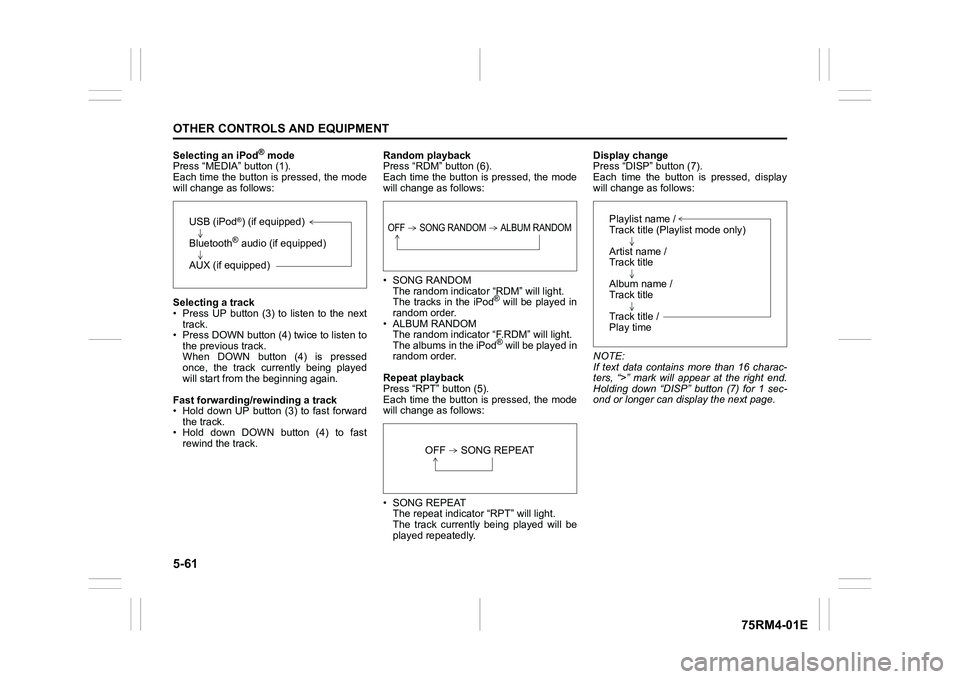
Selecting an iPod
® mode
Press “MEDIA” button (1).
Each time the button is pressed, the mode
will change as follows:
Selecting a track
• Press UP button (3) to listen to the next track.
• Press DOWN button (4) twice to listen to
the previous track.
When DOWN button (4) is pressed
once, the track currently being played
will start from the beginning again.
Fast forwarding/rewinding a track
• Hold down UP button (3) to fast forward the track.
• Hold down DOWN button (4) to fast
rewind the track. Random playback
Press “RDM” button (6).
Each time the button is pressed, the mode
will change as follows:
• SONG RANDOM
The random indicato r “RDM” will light.
The tracks in the iPod
® will be played in
random order.
• ALBUM RANDOM The random indicator “F.RDM” will light.
The albums in the iPod® will be played in
random order.
Repeat playback
Press “RPT” button (5).
Each time the button is pressed, the mode
will change as follows:
• SONG REPEAT The repeat indicator “RPT” will light.
The track currently being played will be
played repeatedly. Display change
Press “DISP” button (7).
Each time the button is pressed, display
will change as follows:
NOTE:
If text data contains more than 16 charac-
ters, “>” mark will appear at the right end.
Holding down “DISP” button (7) for 1 sec-
ond or longer can display the next page.
USB (iPod
®) (if equipped)
Bluetooth® audio (if equipped)
AUX (if equipped)
OFF SONG RANDOM ALBUM RANDOM
OFF SONG REPEAT
Playlist name /
Track title (Playlist mode only)
Artist name /
Track title
Album name /
Track title
Track title /
Play time