ESP SUZUKI IGNIS 2018 Owner's Manual
[x] Cancel search | Manufacturer: SUZUKI, Model Year: 2018, Model line: IGNIS, Model: SUZUKI IGNIS 2018Pages: 505, PDF Size: 8.36 MB
Page 167 of 505
3-14
OPERATING YOUR VEHICLE
75RM4-01E
Starting engine
(vehicle with keyless push start system)Before starting engine
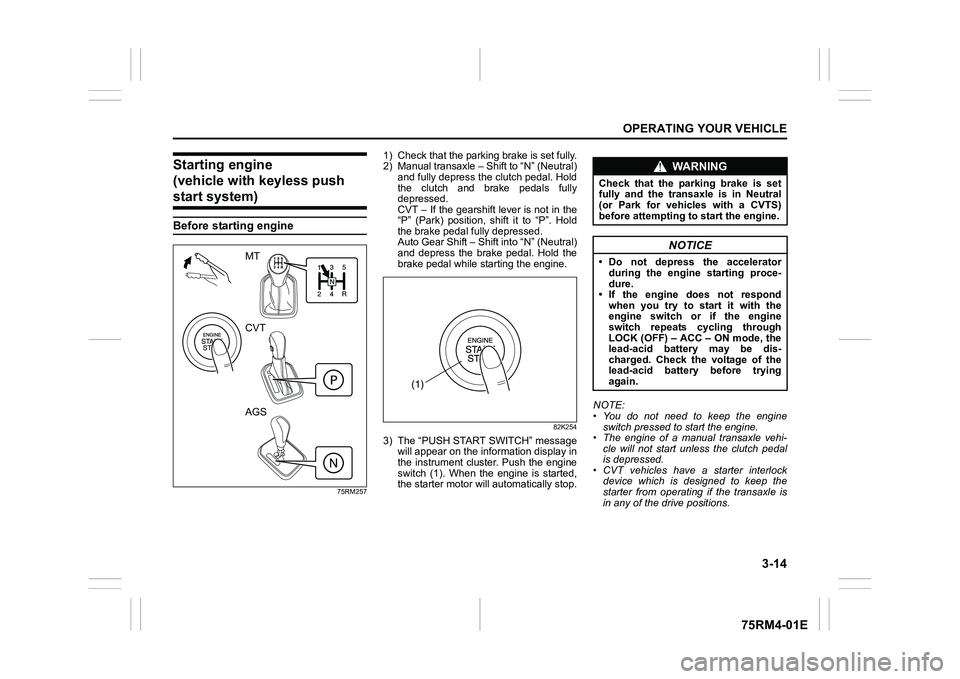
75RM257
1) Check that the parking brake is set fully.
2) Manual transaxle – Shift to “N” (Neutral) and fully depress the clutch pedal. Hold
the clutch and brake pedals fully
depressed.
CVT – If the gearshift lever is not in the
“P” (Park) position, shift it to “P”. Hold
the brake pedal fully depressed.
Auto Gear Shift – Shift into “N” (Neutral)
and depress the brake pedal. Hold the
brake pedal while starting the engine.
82K254
3) The “PUSH START SWITCH” messagewill appear on the information display in
the instrument cluster. Push the engine
switch (1). When the engine is started,
the starter motor will automatically stop. NOTE:
• You do not need to keep the engine
switch pressed to start the engine.
• The engine of a manual transaxle vehi- cle will not start unless the clutch pedal
is depressed.
• CVT vehicles have a starter interlock device which is designed to keep the
starter from operating if the transaxle is
in any of the drive positions.
MT
CVT
AGS
(1)
WA R N I N G
Check that the parking brake is set
fully and the transaxle is in Neutral
(or Park for vehicles with a CVTS)
before attempting to start the engine.
NOTICE
• Do not depress the accelerator
during the engine starting proce-
dure.
• If the engine does not respond when you try to start it with the
engine switch or if the engine
switch repeats cycling through
LOCK (OFF) – ACC – ON mode, the
lead-acid battery may be dis-
charged. Check the voltage of the
lead-acid battery before trying
again.
Page 169 of 505
3-16
OPERATING YOUR VEHICLE
75RM4-01E
If the master warning indicator light
blinks and the engine cannot be started
Your keyless push start system remote
controller may not be sensed as being
within the interior workable area. Try again
after checking that you have the remote
controller with you. If the engine still can-
not be started, the battery of the remote
controller may be discharged. To start the
engine, use the following method:
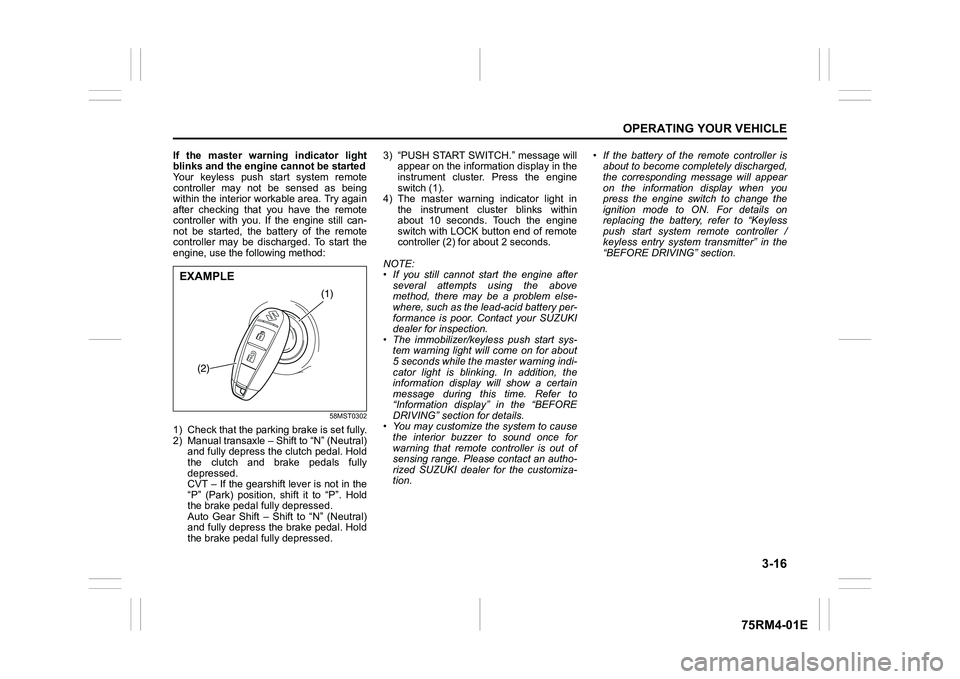
58MST0302
1) Check that the parking brake is set fully.
2) Manual transaxle – Shift to “N” (Neutral) and fully depress the clutch pedal. Hold
the clutch and brake pedals fully
depressed.
CVT – If the gearshift lever is not in the
“P” (Park) position, shift it to “P”. Hold
the brake pedal fully depressed.
Auto Gear Shift – Shift to “N” (Neutral)
and fully depress the brake pedal. Hold
the brake pedal fully depressed. 3) “PUSH START SWITCH.” message will
appear on the information display in the
instrument cluster. Press the engine
switch (1).
4) The master warning indicator light in the instrument cluster blinks within
about 10 seconds. Touch the engine
switch with LOCK button end of remote
controller (2) for about 2 seconds.
NOTE:
• If you still cannot start the engine after several attempts using the above
method, there may be a problem else-
where, such as the lead-acid battery per-
formance is poor. Contact your SUZUKI
dealer for inspection.
• The immobilizer/keyless push start sys- tem warning light will come on for about
5 seconds while the master warning indi-
cator light is blinking. In addition, the
information display will show a certain
message during this time. Refer to
“Information display” in the “BEFORE
DRIVING” section for details.
• You may customize the system to cause
the interior buzzer to sound once for
warning that remote controller is out of
sensing range. Please contact an autho-
rized SUZUKI dealer for the customiza-
tion. • If the battery of the remote controller is
about to become completely discharged,
the corresponding message will appear
on the information display when you
press the engine switch to change the
ignition mode to ON. For details on
replacing the battery, refer to “Keyless
push start system remote controller /
keyless entry system transmitter” in the
“BEFORE DRIVING” section.
(1)
(2)
EXAMPLE
Page 187 of 505

3-34
OPERATING YOUR VEHICLE
75RM4-01E
NOTE:
• For manual transaxle vehicle, the gear-shift indicator is not indicated when the
gear position is in “N” (Neutral).
• For manual transaxle vehicle, if you depress the clutch pedal while UP/
DOWN arrow is indicated, the indication
will disappear.
• For Auto Gear Shif t vehicle, if you
release your foot from the accelerator
pedal while UP arrow is indicated, the
indication will display the currently
selected gear position.
• The indication of gearshift indicator tim- ing may differ depending on the vehicle
condition and/or driv ing situation even in
the same vehicle speed and engine rev-
olution.
• If any of the electrical systems such as the dual camera brake support or the
ESP
® (if equipped) is working, the gear-
shift indicator will disappear temporarily. Example of the gearshift indicator
Manual transaxle
Auto Gear Shift (when using the manual mode)
Indication Description
Lower gear position is selected for the vehicle speed and/
or engine revolution. Changing to a higher gear position is
recommended.
Higher gear position is sele cted for the vehicle speed
and/or engine revolution. Chan ging to a lower gear posi-
tion is recommended.
Indication Description Lower gear position is selected for the vehicle speed and/
or engine revolution. Changing to a higher gear position is
recommended.
• In this case, shifting up 5th or upper gear position isrecommended.
Page 195 of 505
3-42
OPERATING YOUR VEHICLE
75RM4-01E
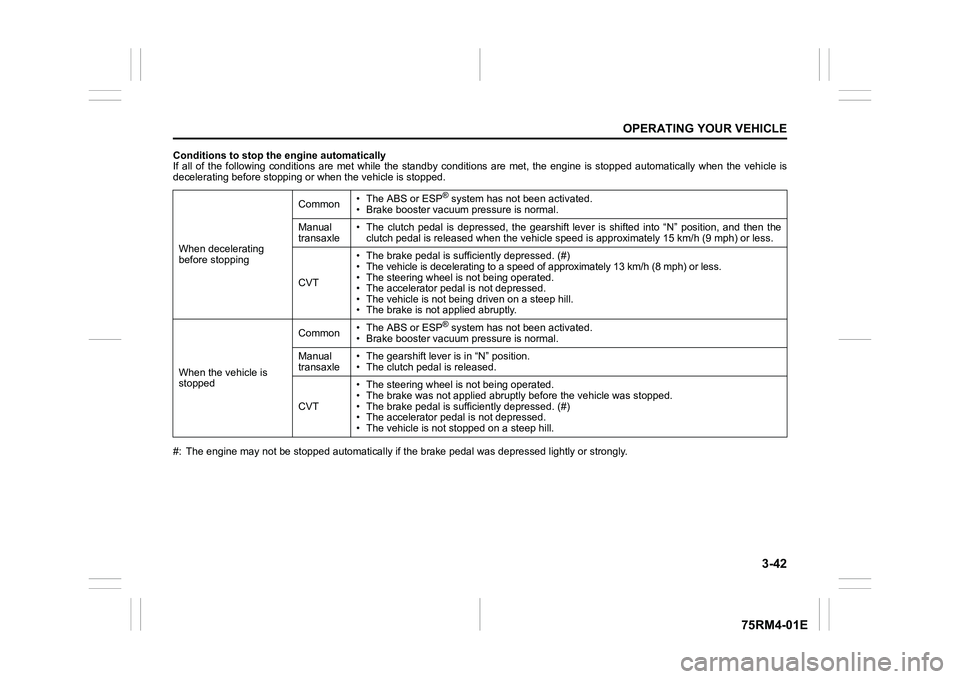
Conditions to stop the engine automatically
If all of the following conditions are met while the standby conditions are met, the engine is stopped automatically when the vehicle is
decelerating before stopping or when the vehicle is stopped.
#: The engine may not be stopped automatically if the brake peda l was depressed lightly or strongly.
When decelerating
before stopping
Common
• The ABS or ESP
® system has not been activated.
• Brake booster vacuum pressure is normal.
Manual
transaxle • The clutch pedal is depressed, the gearshift lever is shifted
into “N” position, and then the
clutch pedal is released when the vehicle speed is approximately 15 km/h (9 mph) or less.
CVT • The brake pedal is sufficiently depressed. (#)
• The vehicle is decelerating to a speed of approximately 13 km/
h (8 mph) or less.
• The steering wheel is not being operated.
• The accelerator pedal is not depressed.
• The vehicle is not being driven on a steep hill.
• The brake is not applied abruptly.
When the vehicle is
stopped Common
• The ABS or ESP® system has not been activated.
• Brake booster vacuum pressure is normal.
Manual
transaxle • The gearshift lever is in “N” position.
• The clutch pedal is released.
CVT • The steering wheel is not being operated.
• The brake was not app
lied abruptly before the vehicle was stop ped.
• The brake pedal is sufficiently depressed. (#)
• The accelerator pedal is not depressed.
• The vehicle is not s topped on a steep hill.
Page 200 of 505
3-47OPERATING YOUR VEHICLE
75RM4-01E
• The motor assistance function is func-tioning during moderate accelerating:
The ISG assists the engine.
81P40300
If all of the following conditions are met,
the motor assistance function is function-
ing.
• To accelerate, the accelerator pedal is a
bit more depressed.
• For manual transaxle, the gearshift lever is in a position other than “N” (Neutral).
• For CVT, the gearshift lever is in the “D” position.
• The brake pedal and/or clutch pedal (if
equipped) is(are) not depressed.
• For CVT, when driving with the vehicle speed from right after starting to about
100 km/h and the engine revolution is
lower than about 3900 rpm.
• The time has elapsed one second or
more from the previous operation of the
motor assistance function.
• The ABS or ESP
® system has not been
activated. • The lithium-ion battery is charged more
than a certain amount, and the tempera-
ture inside the battery is within the speci-
fied range.
• The engine coolant temperature is within the specified range.
NOTE:
When the accelerator pedal is depressed
all the way down for quickly accelerating,
the motor assistance function will not oper-
ate.
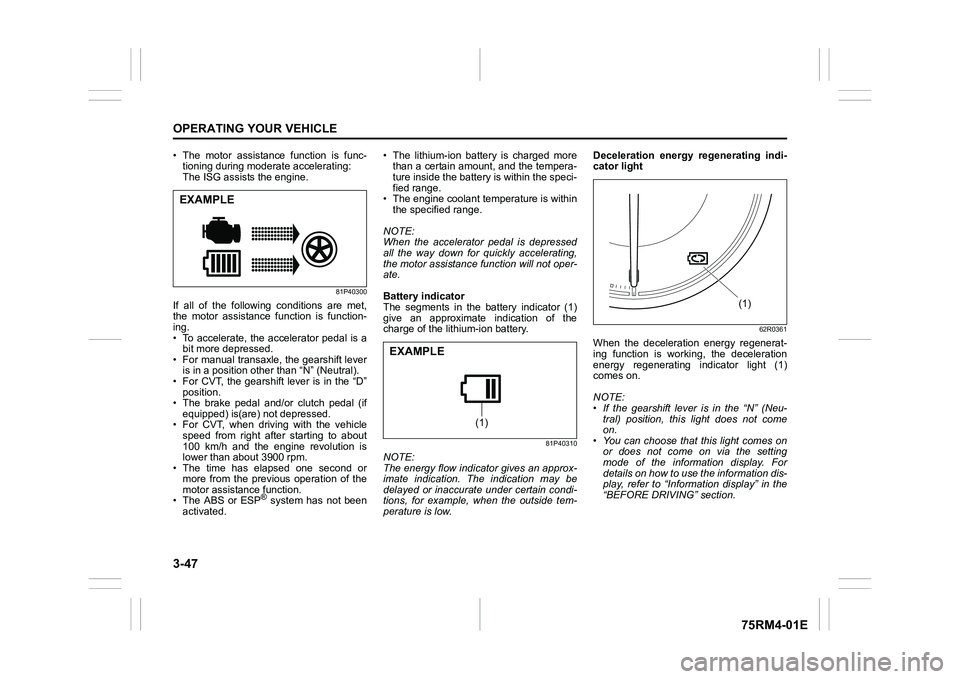
Battery indicator
The segments in the battery indicator (1)
give an approximate indication of the
charge of the lithium-ion battery.
81P40310
NOTE:
The energy flow indicator gives an approx-
imate indication. The indication may be
delayed or inaccurate under certain condi-
tions, for example, when the outside tem-
perature is low. Deceleration energy regenerating indi-
cator light
62R0361
When the deceleration energy regenerat-
ing function is working, the deceleration
energy regenerating indicator light (1)
comes on.
NOTE:
• If the gearshift lever is in the “N” (Neu-
tral) position, this light does not come
on.
• You can choose that this light comes on or does not come on via the setting
mode of the information display. For
details on how to use the information dis-
play, refer to “Informa tion display” in the
“BEFORE DRIVING” section.
EXAMPLE
(1)
EXAMPLE
(1)
Page 204 of 505
3-51OPERATING YOUR VEHICLE
75RM4-01E
NOTE:
You can adjust the set speed by approxi-
mately 1.5 km/h (0.9 mph) by pushing
“RES +/SET –” switch quickly.Canceling cruise controlThe set indicator (5) or “SET” indicator light
(7) will go off and the cruise control will be
canceled temporarily with the following
conditions:
• Push “CANCEL” switch (2).
• Depress the brake pedal.
• For manual transaxle, depress the clutch pedal.
• For CVT, downshift from 3rd to 2nd in the manual mode (if equipped).
• For Auto Gear Shift, downshift from 3rd to
2nd in the manual mode.
• The vehicle speed falls more than about 20 percent from the set speed.
• Any time the vehicle speed falls below 40 km/h (25 mph).
• When the vehicle skids and ESP
® (if
equipped) is activated.
To resume the previously set speed, push
up the “RES +/SET –” switch (3) and turn
on the set indicator (5) or “SET” indicator
light (7). The vehicle speed must be above
45 km/h (28 mph) when the vehicle is not
under the above conditions. To turn off the cruise control system, push
cruise switch (1) and check that the cruise
indicator (4) or cruise indicator light (6) is
off.
Also, if the malfunction indicator light in the
instrument cluster comes on or blinks, the
cruise control system will be turned off.
NOTE:
If you turn off the cruise control system, the
previously set speed in the memory is
cleared. Reset your cruising speed again.
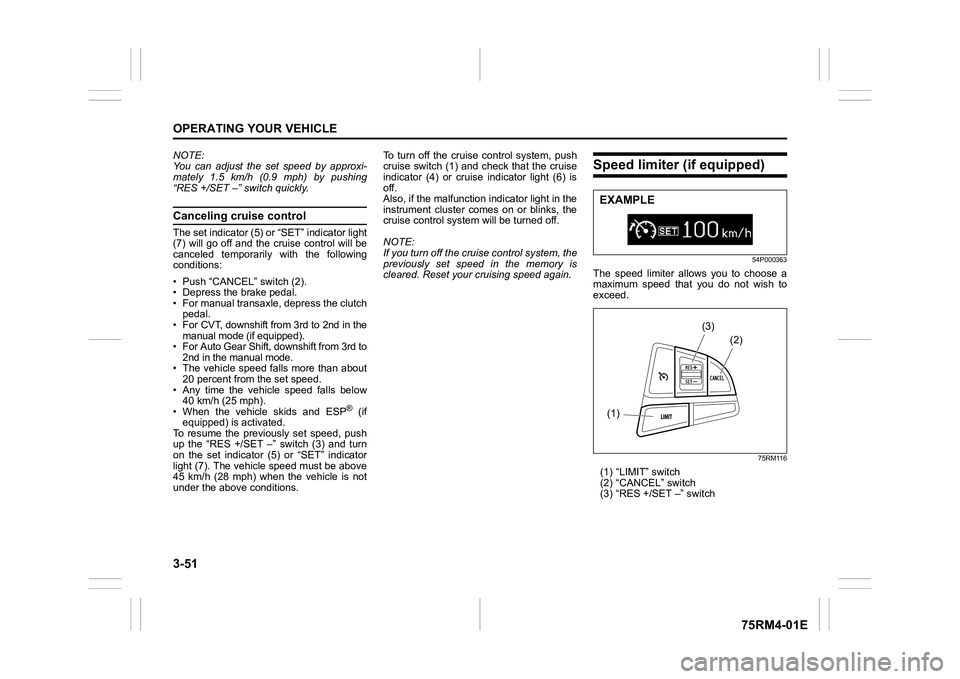
Speed limiter (if equipped)
54P000363
The speed limiter allows you to choose a
maximum speed that you do not wish to
exceed.
75RM116
(1) “LIMIT” switch
(2) “CANCEL” switch
(3) “RES +/SET –” switchEXAMPLE(1)
(2)
(3)
Page 209 of 505
3-56
OPERATING YOUR VEHICLE
75RM4-01E
Situations where the system does not activateUnder the following situations, the system
does not activate.
• When the engine is off (except when theengine is automatically stopped by the
ENG A-STOP system)
• After several seconds from starting the
engine
• When the gearshift lever is in reverse gear
• When the ESP
® system is activated
(except the frontal collision warning)
• When the following switches are pushed
and the system is turned off:
– Dual camera brake support OFFswitch
– ESP
® OFF switch
• When the stereo camera is temporarily stopped or malfunctioning
Situations where the system may not activate properlyUnder the following situations, the system
may not activate.
• When the stereo camera cannot detectobstacles in front of your vehicle
• When you take evasive action with the
steering wheel or a ccelerator pedal
Situations where the vehicle may not decelerate properlyUnder the following situations, the vehicle
may not decelerate properly even when
the system is activated.
• When the outside temperature is low, or
when the temperature of the brake is low
such as right after starting
• When the brake is overheating and the brake effect is deteriorated due to con-
tinuing to travel on a downhill road
• When the brake effect is deteriorated due to passing over puddles or washing
the vehicle
• When driving on the following roads – On sharp curves or extremely roughsurfaces
– On a steep slope
• When driving on the following slippery surfaces
– Frozen or snow-covered surfaces
– Over manholes or metal constructionplates
–Gravel
• When driving in a rainy day
Situations where the system may activate by chanceUnder the following situations, the stereo
camera may judge that there is an obstacle
in front of you, and the system may acti-
vate. Drive carefully and calmly.
• When passing through a toll booth with more than recommended speeds
• Before the parking lot gates or railroad crossing gates are opened fully
• When operating on hills that have vary-
ing slopes
• When you suddenly accelerate and approach the vehicle in front of you or on
neighboring lane
• Front visibility is poor due to that there is water vapor, sand or smoke or when the
vehicle in front of you or on oncoming
lane is surrounded by exhaust, water or
snow
• When passing through masses of water vapor or smoke
• When stopping close to an obstacle in
front of you
• When passing through near a vehicle or obstacle
Page 212 of 505
3-59OPERATING YOUR VEHICLE
75RM4-01E
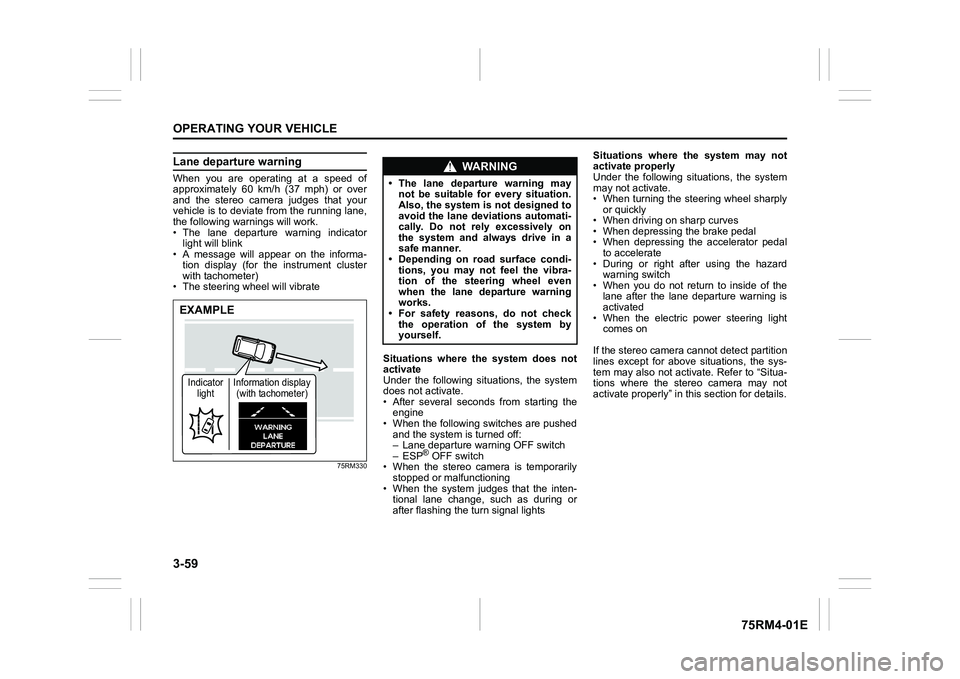
Lane departure warningWhen you are operating at a speed of
approximately 60 km/h (37 mph) or over
and the stereo camera judges that your
vehicle is to deviate from the running lane,
the following warnings will work.
• The lane departure warning indicatorlight will blink
• A message will appear on the informa-
tion display (for the instrument cluster
with tachometer)
• The steering wheel will vibrate
75RM330
Situations where the system does not
activate
Under the following situations, the system
does not activate.
• After several seconds from starting the engine
• When the following switches are pushed and the system is turned off:
– Lane departure warning OFF switch
– ESP
® OFF switch
• When the stereo camera is temporarily stopped or malfunctioning
• When the system judges that the inten- tional lane change, such as during or
after flashing the turn signal lights Situations where the system may not
activate properly
Under the following situations, the system
may not activate.
• When turning the steering wheel sharply
or quickly
• When driving on sharp curves
• When depressing the brake pedal
• When depressing the accelerator pedal to accelerate
• During or right after using the hazard warning switch
• When you do not return to inside of the lane after the lane departure warning is
activated
• When the electric power steering light comes on
If the stereo camera cannot detect partition
lines except for above situations, the sys-
tem may also not activ ate. Refer to “Situa-
tions where the stereo camera may not
activate properly” in this section for details.
EXAMPLEIndicator light Information display
(with tachometer)
WA R N I N G
• The lane departure warning may not be suitable for every situation.
Also, the system is not designed to
avoid the lane deviations automati-
cally. Do not rely excessively on
the system and always drive in a
safe manner.
• Depending on road surface condi-
tions, you may not feel the vibra-
tion of the steering wheel even
when the lane departure warning
works.
• For safety reasons, do not check
the operation of the system by
yourself.
Page 213 of 505
3-60
OPERATING YOUR VEHICLE
75RM4-01E
Situations where the system may acti-
vate by chance
Under the following situations, the system
may activate.
• When there is a shadow of guard rail
• When partition lines are drawn doubly
• When there is a liner paint on the road of a construction zone because the previ-
ous line has not been erased completely
• When there is repair marks on the road or a boundary between asphalt and
snow
• When there is tire marks on snow-cov- ered or wet road
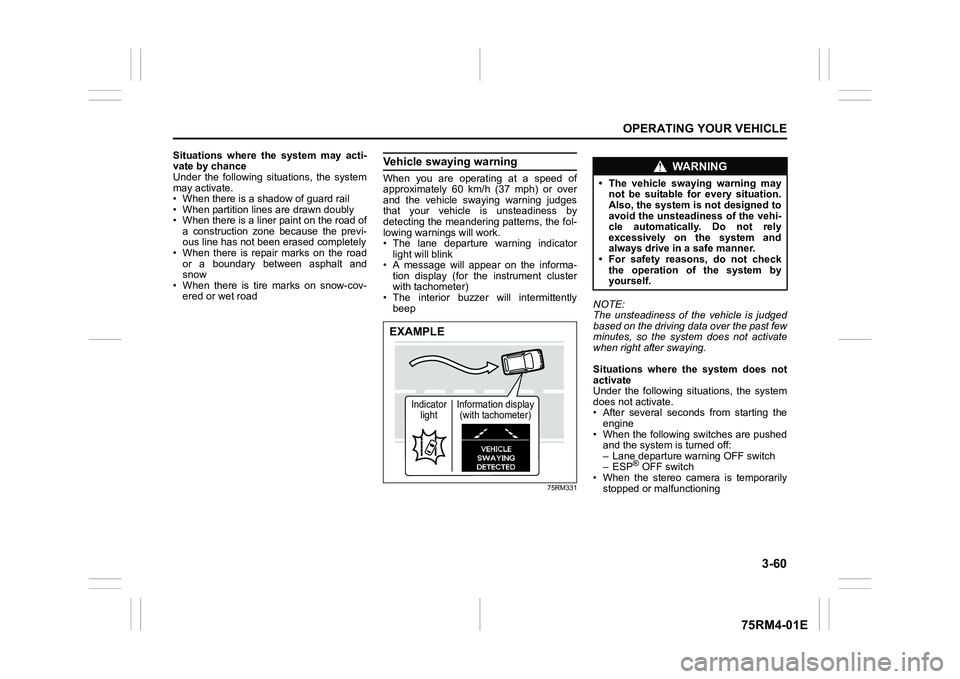
Vehicle swaying warningWhen you are operating at a speed of
approximately 60 km/h (37 mph) or over
and the vehicle swaying warning judges
that your vehicle is unsteadiness by
detecting the meandering patterns, the fol-
lowing warnings will work.
• The lane departure warning indicatorlight will blink
• A message will appear on the informa- tion display (for the instrument cluster
with tachometer)
• The interior buzzer will intermittently beep
75RM331
NOTE:
The unsteadiness of the vehicle is judged
based on the driving data over the past few
minutes, so the system does not activate
when right after swaying.
Situations where the system does not
activate
Under the following situations, the system
does not activate.
• After several seconds from starting the
engine
• When the following switches are pushed and the system is turned off:
– Lane departure warning OFF switch
– ESP
® OFF switch
• When the stereo camera is temporarily
stopped or malfunctioning
EXAMPLE
Indicator light Information display
(with tachometer)
WA R N I N G
• The vehicle swaying warning may not be suitable for every situation.
Also, the system is not designed to
avoid the unsteadiness of the vehi-
cle automatically. Do not rely
excessively on the system and
always drive in a safe manner.
• For safety reasons, do not check
the operation of the system by
yourself.
Page 225 of 505
3-72
OPERATING YOUR VEHICLE
75RM4-01E
Rearview camera (if equipped)When the gearshift lever is shifted to “R”
position while the ignition switch is in “ON”
position or the ignition mode is ON, the
rearview camera system automatically
shows the view behind the vehicle on the
display.
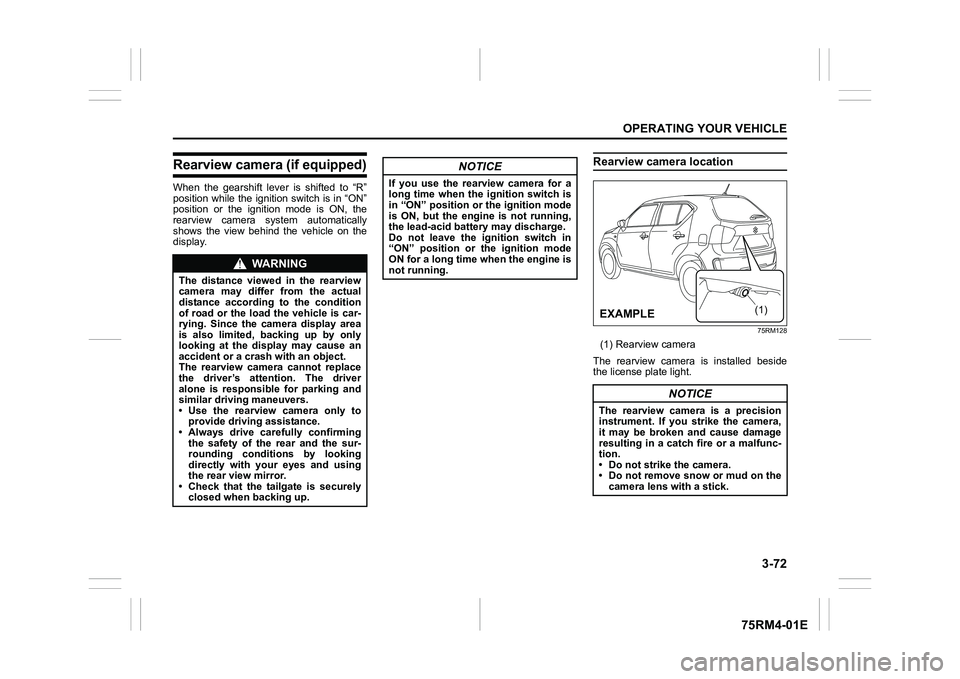
Rearview camera location
75RM128
(1) Rearview camera
The rearview camera is installed beside
the license plate light.
WA R N I N G
The distance viewed in the rearview
camera may differ from the actual
distance according to the condition
of road or the load the vehicle is car-
rying. Since the camera display area
is also limited, backing up by only
looking at the display may cause an
accident or a crash with an object.
The rearview camera cannot replace
the driver’s attention. The driver
alone is responsible for parking and
similar driving maneuvers.
• Use the rearview camera only to provide driving assistance.
• Always drive carefully confirming
the safety of the rear and the sur-
rounding conditions by looking
directly with your eyes and using
the rear view mirror.
• Check that the tailgate is securely closed when backing up.
NOTICE
If you use the rearview camera for a
long time when the ignition switch is
in “ON” position or the ignition mode
is ON, but the engine is not running,
the lead-acid battery may discharge.
Do not leave the ignition switch in
“ON” position or the ignition mode
ON for a long time when the engine is
not running.
NOTICE
The rearview camera is a precision
instrument. If you strike the camera,
it may be broken and cause damage
resulting in a catch fire or a malfunc-
tion.
• Do not strike the camera.
• Do not remove snow or mud on thecamera lens with a stick.
(1)
(ΟΝ03/(