Warning on display SUZUKI IGNIS 2018 Owner's Manual
[x] Cancel search | Manufacturer: SUZUKI, Model Year: 2018, Model line: IGNIS, Model: SUZUKI IGNIS 2018Pages: 505, PDF Size: 8.36 MB
Page 169 of 505
3-16
OPERATING YOUR VEHICLE
75RM4-01E
If the master warning indicator light
blinks and the engine cannot be started
Your keyless push start system remote
controller may not be sensed as being
within the interior workable area. Try again
after checking that you have the remote
controller with you. If the engine still can-
not be started, the battery of the remote
controller may be discharged. To start the
engine, use the following method:
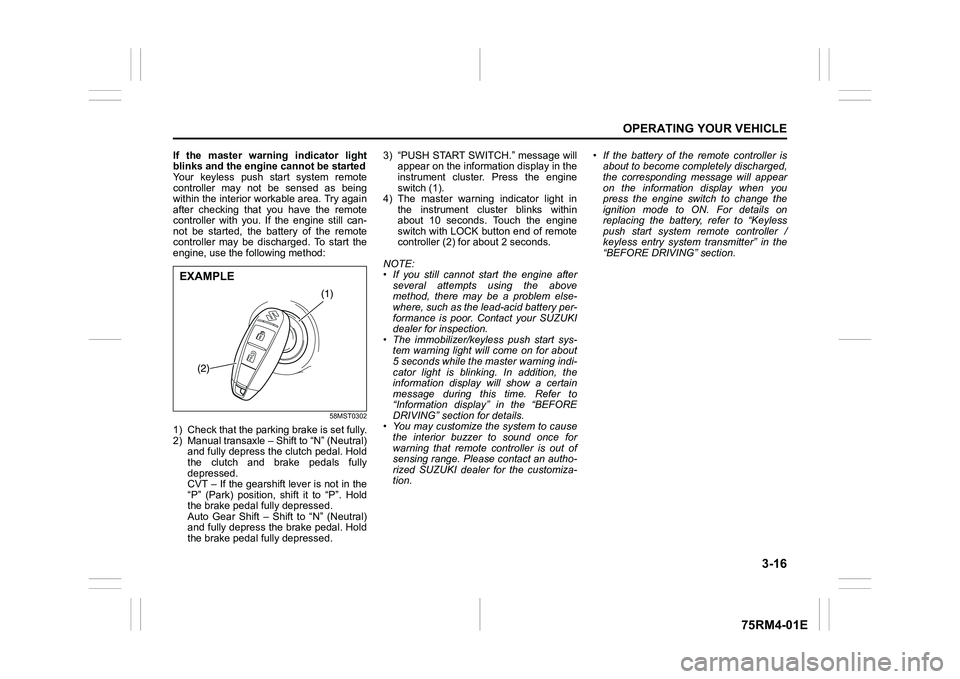
58MST0302
1) Check that the parking brake is set fully.
2) Manual transaxle – Shift to “N” (Neutral) and fully depress the clutch pedal. Hold
the clutch and brake pedals fully
depressed.
CVT – If the gearshift lever is not in the
“P” (Park) position, shift it to “P”. Hold
the brake pedal fully depressed.
Auto Gear Shift – Shift to “N” (Neutral)
and fully depress the brake pedal. Hold
the brake pedal fully depressed. 3) “PUSH START SWITCH.” message will
appear on the information display in the
instrument cluster. Press the engine
switch (1).
4) The master warning indicator light in the instrument cluster blinks within
about 10 seconds. Touch the engine
switch with LOCK button end of remote
controller (2) for about 2 seconds.
NOTE:
• If you still cannot start the engine after several attempts using the above
method, there may be a problem else-
where, such as the lead-acid battery per-
formance is poor. Contact your SUZUKI
dealer for inspection.
• The immobilizer/keyless push start sys- tem warning light will come on for about
5 seconds while the master warning indi-
cator light is blinking. In addition, the
information display will show a certain
message during this time. Refer to
“Information display” in the “BEFORE
DRIVING” section for details.
• You may customize the system to cause
the interior buzzer to sound once for
warning that remote controller is out of
sensing range. Please contact an autho-
rized SUZUKI dealer for the customiza-
tion. • If the battery of the remote controller is
about to become completely discharged,
the corresponding message will appear
on the information display when you
press the engine switch to change the
ignition mode to ON. For details on
replacing the battery, refer to “Keyless
push start system remote controller /
keyless entry system transmitter” in the
“BEFORE DRIVING” section.
(1)
(2)
EXAMPLE
Page 180 of 505
3-27OPERATING YOUR VEHICLE
75RM4-01E
3) Release the parking brake and brakepedal.
4) Depress the accelerator pedal slowly. Starting off on an uphill/downhill:
Uphill
1) Apply the parking brake firmly so that
the vehicle does no t roll backwards.
2) Shift the gearshift lever to the “D” posi-
tion while depressing the brake pedal.
Make sure that the gea r position indica-
tor in the instrumental cluster displays
1st gear.
3) Release the brake pedal and depress the accelerator pedal gradually, and
when the vehicle starts to move,
release the parking brake and depress
the accelerator pedal to start off.
WA R N I N G
• While driving the vehicle, do notshift the gearshift lever to the “N”
position. The engine brake may not
work and you may get involved in
an unexpected accident. If you
return the gearshift lever from “N”
to “D” because of unintended shift-
ing, the gear position will be shifted
according to the current vehicle
speed.
• Always keep your foot on the brake pedal while stopped with the
engine running. This operation pre-
vents the vehicle from moving due
to unintended activation of the
creeping function.
NOTICE
If the gearshift lever cannot shift into
any position, or the gear is changed
to “N” position au tomatically when
the vehicle speed becomes less than
10 km/h (6 mph), there may be a sys-
tematic malfunction. In this case, ask
your SUZUKI dealer to inspect the
Auto Gear Shift system as soon as
possible.
NOTICE
Do not operate the system as
described below. The life cycle of the
clutch may be reduced.
• Using the accelerator pedal to hold the vehicle on an uphill slope with
the gearshift lever in the “D” or “M”
position. If you perform this opera-
tion for a certain period of time, a
warning buzzer will sound.
• Shifting the gearshift lever to the “D”, “M” or “R” position while rac-
ing the engine.
• Driving at low speed using a high
gear.
• Holding the vehicle on an uphill slope using the creeping function.
If you perform this operation for a
certain period of time, a warning
buzzer will sound.
NOTICE
On an uphill slope, never hold the
vehicle at a stop using only the accel-
erator pedal or the creeping function.
If you perform this operation for a
certain period of time, a warning
buzzer will sound, and in some cases
the engine will stall. This can also
cause excessive damage to the
clutch.
Page 183 of 505
3-30
OPERATING YOUR VEHICLE
75RM4-01E
3) Release the parking brake and brakepedal. Depress the accelerator pedal
slowly for smooth starting. Starting off on an uphill/downhill slope:
Uphill
1) Apply the parking brake firmly so that
the vehicle does no t roll backwards.
2) Shift the gearshift lever to the “M” posi-
tion while depressing the brake pedal.
Make sure that the ge ar position indica-
tor in the instrumental cluster displays
1st gear.
3) Release the brake pedal and depress the accelerator pedal gradually, and
when the vehicle starts to move,
release the parking brake and depress
the accelerator pedal to start off.
Downhill
1) Depress the brake pedal and shift the gearshift lever to the “M” position.
Check the gear position indicator to
make sure that the gear is in 1st.
2) Release the brake pedal and depress the accelerator pedal slowly. Even
though the accelerator pedal is not
depressed, the clutch will be engaged
when the vehicle speed increases. Backing up
After the vehicle has stopped completely,
depress the brake pedal and shift the gear-
shift lever to the “R” position. Depress the
accelerator pedal slowly as when starting
off in 1st gear. Before backing up, make
sure that reverse gear is selected by
checking the gear position indicator.
NOTE:
• If reverse gear cannot be engaged even
though the gearshift lever has been
shifted from the “N” to the “R” position,
the system will re-try shifting automati-
cally. This will take some time, noise
may be heard from the gears, and shift-
ing gear shock may occur. However,
they do not indicate malfunction.
• The “N” indicator will flush, the depress brake pedal indicator will come on and a
warning buzzer (long pulse sound) will
sound if any of the following cases
occur;
– If you shift the gearshift lever from the “N” to the “R” position without depress-
ing the brake pedal
– If the system is unable to re-try shifting
You should depress the brake pedal and
shift the gearshift lever to “N” position,
then shift to “R” position again a few sec-
onds later.
WA R N I N G
Always keep your foot on the brake
pedal while stopped with the engine
running. These operations prevent
the vehicle from starting due to unin-
tended activation of the creeping
function.
NOTICE
Do not operate the system as
described below. The life cycle of the
clutch may be reduced.
• Using the accelerator pedal to hold the vehicle on an uphill slope oper-
ation with the gearshift lever in the
“M” or “D” position. If you perform
this operation for a certain period
of time, a warning buzzer will
sound.
• Shifting the gearshift lever to the
“M”, “D” or “R” po sition while rac-
ing the engine.
• Driving at low speed using a high
gear.
• Stopping on a slope using the creeping function. If you perform
this operation for a certain period
of time, a warning buzzer will
sound.
NOTICE
On an uphill slope, never hold the
vehicle at a stop using only the accel-
erator pedal or creeping function. If
you perform this operation for a cer-
tain period of time, a warning buzzer
will sound, and in some cases the
engine will stall. This can also cause
excessive damage to the clutch.
Page 207 of 505

3-54
OPERATING YOUR VEHICLE
75RM4-01E
Frontal collision warning
When there is a risk of a frontal crash, a warning will be given through the information dis-
play and sound.
75RM282
Warning brake system
If the driver cannot take or is insufficient to take evasive ac tion such as brake operation
and steering operation after frontal collision warning activate s, the system applies brake
lightly.
75RM283
EXAMPLE
buzzer
with tachometer without
tachometer
Information display
EXAMPLE
buzzer
with tachometer without
tachometer
Information display
Indicator
light
Page 208 of 505
3-55OPERATING YOUR VEHICLE
75RM4-01E
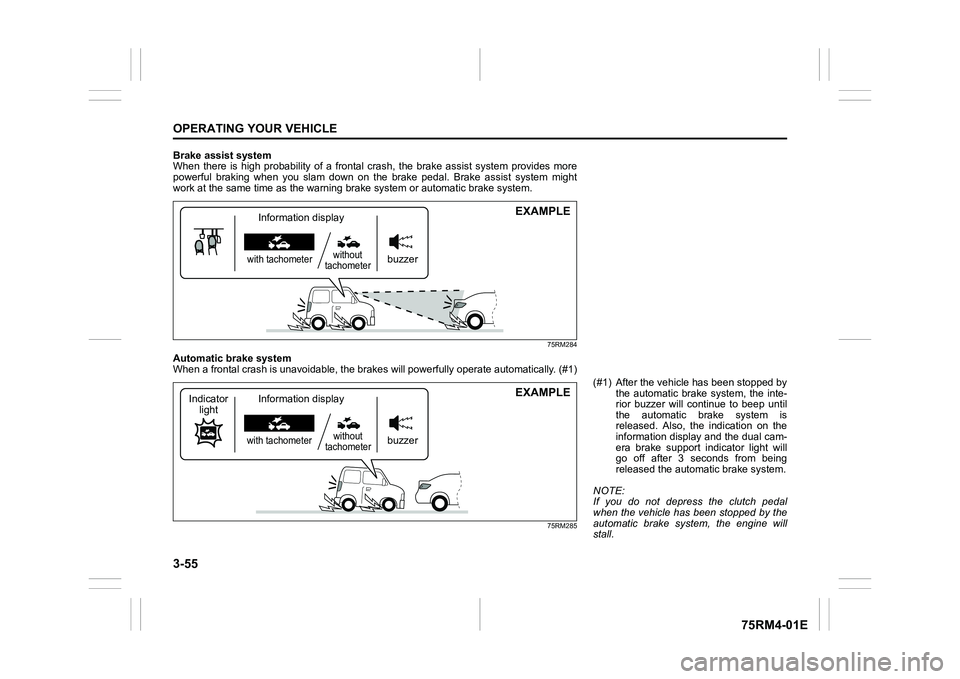
Brake assist system
When there is high probability of a frontal crash, the brake assist system provides more
powerful braking when you slam down on the brake pedal. Brake a ssist system might
work at the same tim e as the warning brak e system or automatic brake system.
75RM284
Automatic brake system
When a frontal crash is unavoidable, the brakes will powerfully operate automatically. (#1)
75RM285
EXAMPLE
buzzer
with tachometerwithout
tachometerInformation display
EXAMPLE
buzzer
with tachometer without
tachometer
Information display
Indicator
light
(#1) After the vehicl e has been stopped by
the automatic brake system, the inte-
rior buzzer will continue to beep until
the automatic brake system is
released. Also, the indication on the
information display and the dual cam-
era brake support indicator light will
go off after 3 seconds from being
released the automatic brake system.
NOTE:
If you do not depress the clutch pedal
when the vehicle has been stopped by the
automatic brake system, the engine will
stall.
Page 210 of 505
3-57OPERATING YOUR VEHICLE
75RM4-01E
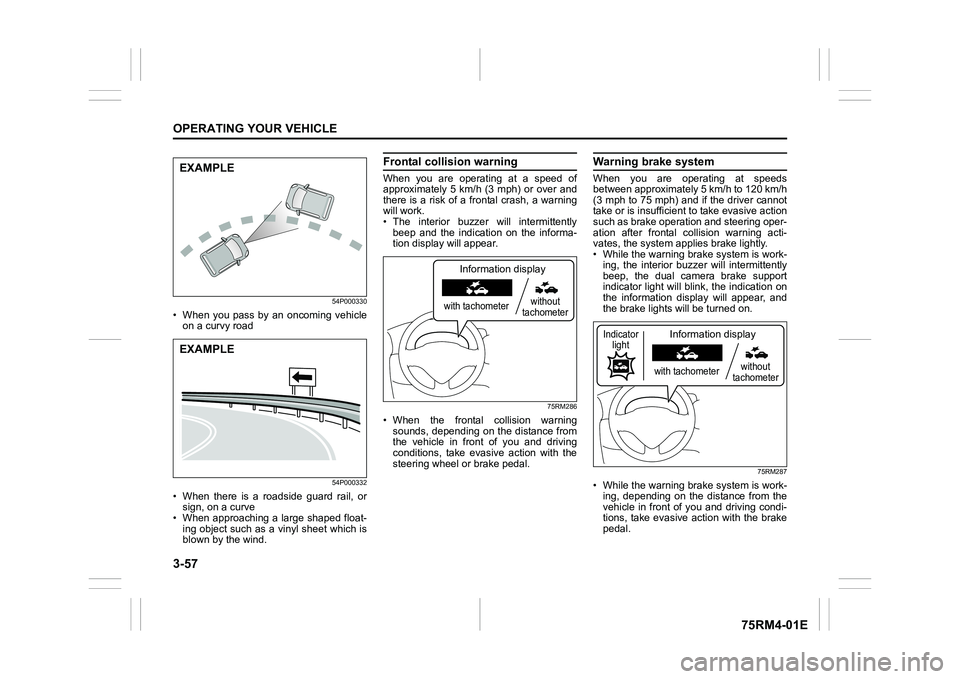
54P000330
• When you pass by an oncoming vehicleon a curvy road
54P000332
• When there is a roadside guard rail, orsign, on a curve
• When approaching a large shaped float-
ing object such as a vinyl sheet which is
blown by the wind.
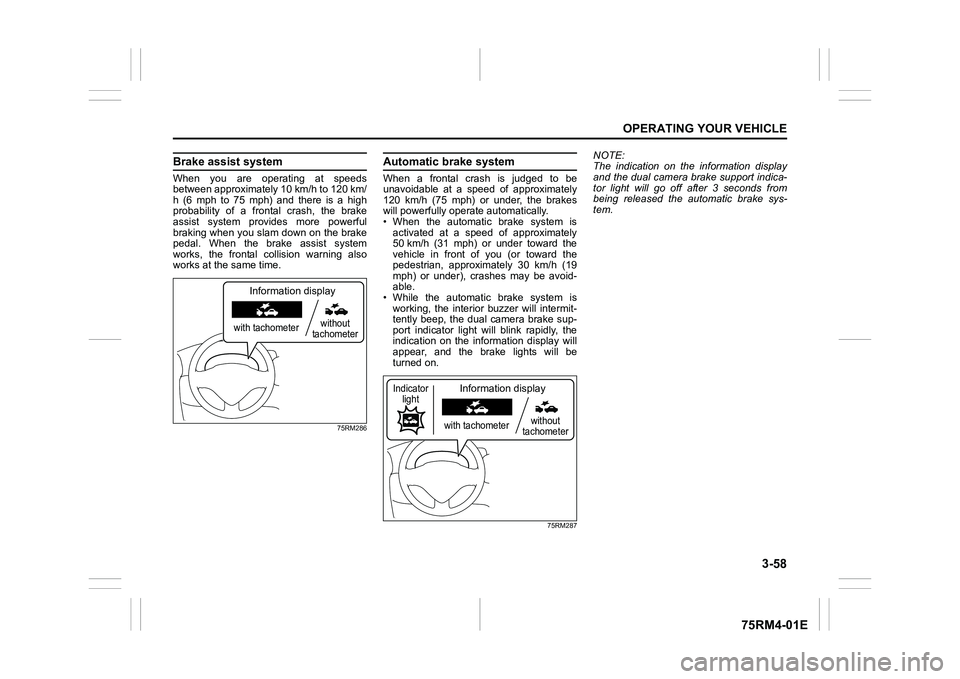
Frontal colli sion warningWhen you are operating at a speed of
approximately 5 km/h (3 mph) or over and
there is a risk of a frontal crash, a warning
will work.
• The interior buzzer will intermittently
beep and the indication on the informa-
tion display will appear.
75RM286
• When the frontal collision warningsounds, depending on the distance from
the vehicle in front of you and driving
conditions, take evasive action with the
steering wheel or brake pedal.
Warning brake systemWhen you are operating at speeds
between approximately 5 km/h to 120 km/h
(3 mph to 75 mph) and if the driver cannot
take or is insufficient t o take evasive action
such as brake operation and steering oper-
ation after frontal collision warning acti-
vates, the system appl ies brake lightly.
• While the warning brake system is work-
ing, the interior buzz er will intermittently
beep, the dual camera brake support
indicator light will blink, the indication on
the information display will appear, and
the brake lights will be turned on.
75RM287
• While the warning brake system is work-
ing, depending on the distance from the
vehicle in front of you and driving condi-
tions, take evasive action with the brake
pedal.
EXAMPLEEXAMPLE
with tachometer without
tachometer
Information display
with tachometer without
tachometer
Information display
Indicator light
Page 211 of 505
3-58
OPERATING YOUR VEHICLE
75RM4-01E
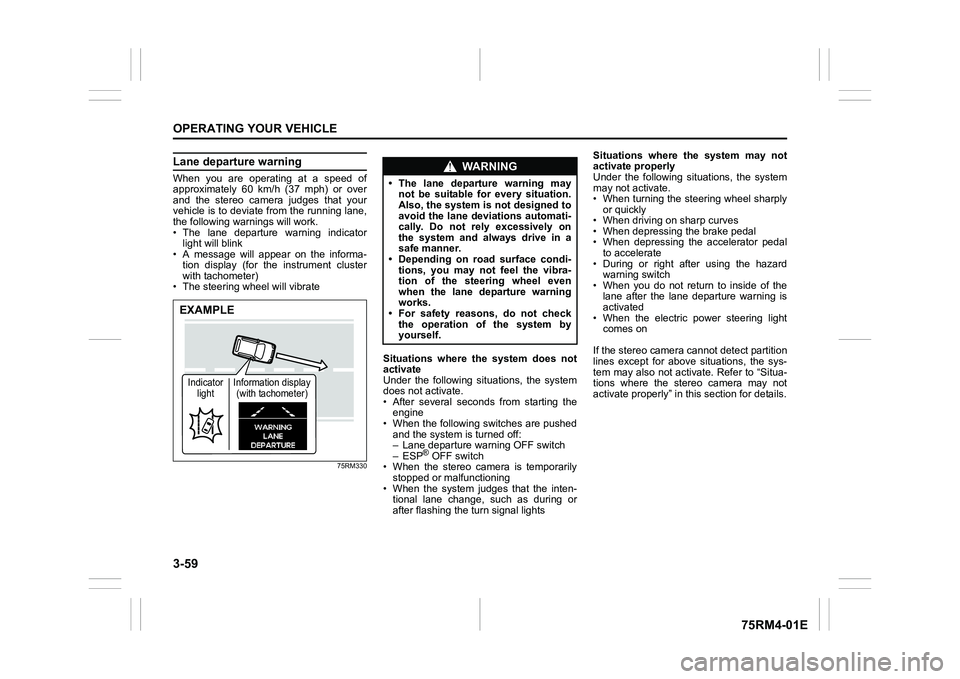
Brake assist systemWhen you are operating at speeds
between approximately 10 km/h to 120 km/
h (6 mph to 75 mph) and there is a high
probability of a frontal crash, the brake
assist system provides more powerful
braking when you slam down on the brake
pedal. When the brake assist system
works, the frontal collision warning also
works at the same time.
75RM286
Automatic brake systemWhen a frontal crash is judged to be
unavoidable at a speed of approximately
120 km/h (75 mph) or under, the brakes
will powerfully operate automatically.
• When the automatic brake system is
activated at a speed of approximately
50 km/h (31 mph) or under toward the
vehicle in front of you (or toward the
pedestrian, approximately 30 km/h (19
mph) or under), crashes may be avoid-
able.
• While the automatic brake system is working, the interior buzzer will intermit-
tently beep, the dual camera brake sup-
port indicator light will blink rapidly, the
indication on the information display will
appear, and the brake lights will be
turned on.
75RM287
NOTE:
The indication on the information display
and the dual camera brake support indica-
tor light will go off after 3 seconds from
being released the automatic brake sys-
tem.
with tachometer without
tachometer
Information display
with tachometer without
tachometer
Information display
Indicator light
Page 212 of 505
3-59OPERATING YOUR VEHICLE
75RM4-01E
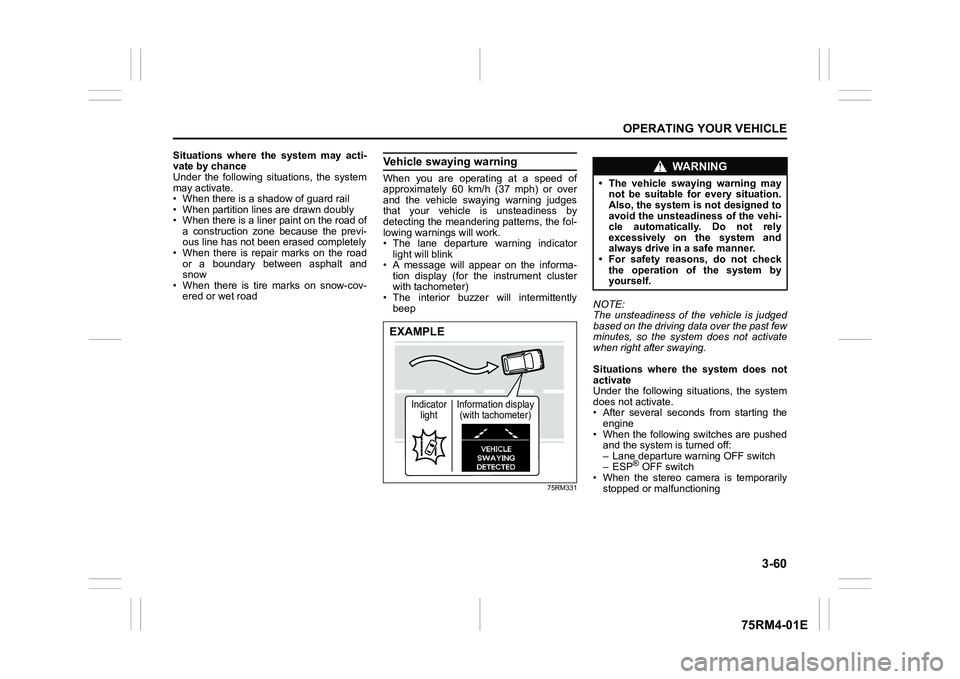
Lane departure warningWhen you are operating at a speed of
approximately 60 km/h (37 mph) or over
and the stereo camera judges that your
vehicle is to deviate from the running lane,
the following warnings will work.
• The lane departure warning indicatorlight will blink
• A message will appear on the informa-
tion display (for the instrument cluster
with tachometer)
• The steering wheel will vibrate
75RM330
Situations where the system does not
activate
Under the following situations, the system
does not activate.
• After several seconds from starting the engine
• When the following switches are pushed and the system is turned off:
– Lane departure warning OFF switch
– ESP
® OFF switch
• When the stereo camera is temporarily stopped or malfunctioning
• When the system judges that the inten- tional lane change, such as during or
after flashing the turn signal lights Situations where the system may not
activate properly
Under the following situations, the system
may not activate.
• When turning the steering wheel sharply
or quickly
• When driving on sharp curves
• When depressing the brake pedal
• When depressing the accelerator pedal to accelerate
• During or right after using the hazard warning switch
• When you do not return to inside of the lane after the lane departure warning is
activated
• When the electric power steering light comes on
If the stereo camera cannot detect partition
lines except for above situations, the sys-
tem may also not activ ate. Refer to “Situa-
tions where the stereo camera may not
activate properly” in this section for details.
EXAMPLEIndicator light Information display
(with tachometer)
WA R N I N G
• The lane departure warning may not be suitable for every situation.
Also, the system is not designed to
avoid the lane deviations automati-
cally. Do not rely excessively on
the system and always drive in a
safe manner.
• Depending on road surface condi-
tions, you may not feel the vibra-
tion of the steering wheel even
when the lane departure warning
works.
• For safety reasons, do not check
the operation of the system by
yourself.
Page 213 of 505
3-60
OPERATING YOUR VEHICLE
75RM4-01E
Situations where the system may acti-
vate by chance
Under the following situations, the system
may activate.
• When there is a shadow of guard rail
• When partition lines are drawn doubly
• When there is a liner paint on the road of a construction zone because the previ-
ous line has not been erased completely
• When there is repair marks on the road or a boundary between asphalt and
snow
• When there is tire marks on snow-cov- ered or wet road
Vehicle swaying warningWhen you are operating at a speed of
approximately 60 km/h (37 mph) or over
and the vehicle swaying warning judges
that your vehicle is unsteadiness by
detecting the meandering patterns, the fol-
lowing warnings will work.
• The lane departure warning indicatorlight will blink
• A message will appear on the informa- tion display (for the instrument cluster
with tachometer)
• The interior buzzer will intermittently beep
75RM331
NOTE:
The unsteadiness of the vehicle is judged
based on the driving data over the past few
minutes, so the system does not activate
when right after swaying.
Situations where the system does not
activate
Under the following situations, the system
does not activate.
• After several seconds from starting the
engine
• When the following switches are pushed and the system is turned off:
– Lane departure warning OFF switch
– ESP
® OFF switch
• When the stereo camera is temporarily
stopped or malfunctioning
EXAMPLE
Indicator light Information display
(with tachometer)
WA R N I N G
• The vehicle swaying warning may not be suitable for every situation.
Also, the system is not designed to
avoid the unsteadiness of the vehi-
cle automatically. Do not rely
excessively on the system and
always drive in a safe manner.
• For safety reasons, do not check
the operation of the system by
yourself.
Page 218 of 505

3-65OPERATING YOUR VEHICLE
75RM4-01E
Temporary stop or failure of the stereo camera
The following chart shows the temporary stop or failure of the stereo camera.
Stereo camera
Temporary Stop Failure
(1) On
(2) On
(3) (#1) On Off
Off On
(4) Blinking
(5) On Off
(1) Dual camera brake support indicator light
(2) Lane departure warning indicator light
(3) Indication of information display (with tachometer)
(4) Master warning indicator light
(if equipped)/
Dual camera brake support warning
light (if equipped)
(5) Indication of information display (without tachometer)
#1: Depending on the cause of the tem- porary stop or failure, the following
message may appear simultaneously.
75RM350
NOTE:
When the function of the stereo camera is
temporarily stopped or malfunctioning, all
of following functions will be turned off.
• Dual camera brake support
• Lane departure warning
• Vehicle swaying warningEXAMPLE