brake SUZUKI IGNIS 2018 Owner's Manual
[x] Cancel search | Manufacturer: SUZUKI, Model Year: 2018, Model line: IGNIS, Model: SUZUKI IGNIS 2018Pages: 505, PDF Size: 8.36 MB
Page 159 of 505
3-6
OPERATING YOUR VEHICLE
75RM4-01E
CVT – Provided you have the keyless
push start system remote controller with
you, the engine automatically starts when
you press the engine switch to select this
ignition mode after placing the gearshift
lever in the “P” position and depressing the
brake pedal. (If you need to re-start the
engine while the vehicle is moving, shift
into “N”.)
NOTE:
You do not need to keep the engine switch
pressed to start the engine.
NOTE:
In the presence of strong radio signals or
noise, you may not be able to change the
ignition mode to ACC or ON or to start the
engine using the engine switch. In this
case, the information display in the instru-
ment cluster will show the following mes-
sage: KEY FOB NOT DETECTED.
Unreleased steering lock warningIf the steering lock remains engaged when
you press the engine switch to change the
ignition mode to ON, the information dis-
play in the instrument cluster shows the
message: “TRN. STEERING WHEEL TO
RELEASE LOCK”. Refer to “Information
display” in the “BEFORE DRIVING” sec-
tion for details.
NOTE:
The steering lock may not be released and
the immobilizer/keyless push start system
warning light turns on if some load is acting
on the steering wheel . If this happens, turn
the steering wheel to the right or left to
relieve it from the load before you press
the engine switch again to change to the
desired ignition mode.
Keyless push start system (if equipped)Provided the keyless push start system
remote controller is within the interior work-
able area (refer to the related explanation
in this section), you can use the engine
switch for starting the engine and selecting
an ignition mode (ACC or ON). In addition,
the following functions can be used:
• Keyless entry function. Refer to “Keyless push start system r emote controller /
keyless entry system transmitter” in the
“BEFORE DRIVING” se ction for details.
• Locking and unlocking doors (including the tailgate) using a request switch.
Refer to “Keyless push start system
remote controller / keyless entry system
transmitter” in the “BEFORE DRIVING”
section for details.
• Immobilizer (anti-thef t) function. Refer to
“Immobilizer syste m” in the “BEFORE
DRIVING” section for details.
NOTICE
Do not leave the engine switch in
ACC or ON mode when the engine is
not running. Avoid using the radio or
other electric accessories for a long
time when the engine switch is in
ACC or ON mode when the engine is
not running, other wise the lead-acid
battery may discharge.
Page 160 of 505
3-7OPERATING YOUR VEHICLE
75RM4-01E
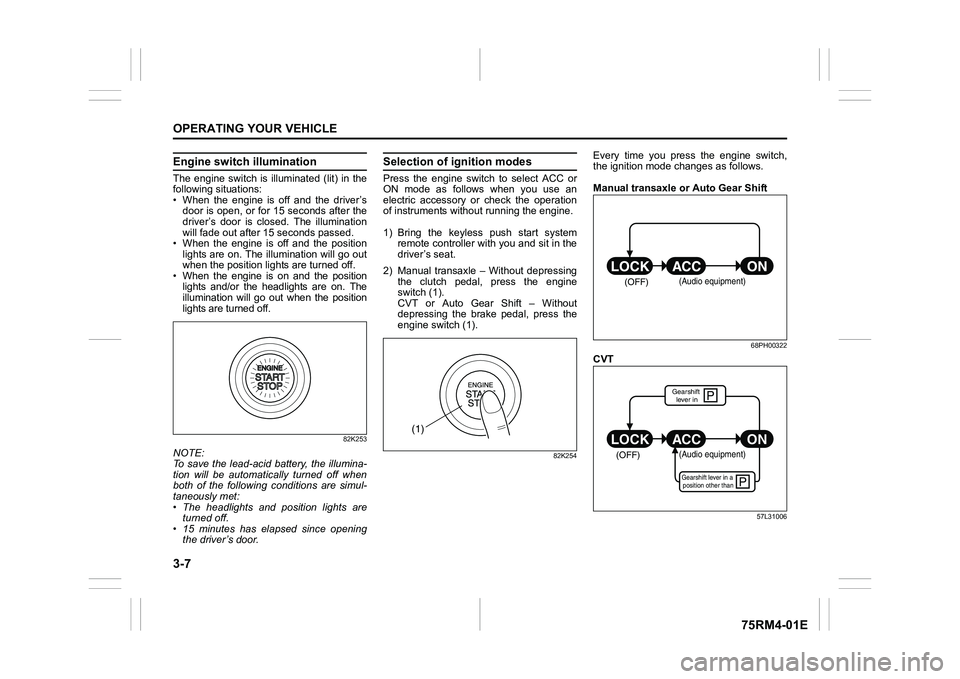
Engine switch illuminationThe engine switch is illuminated (lit) in the
following situations:
• When the engine is off and the driver’sdoor is open, or for 15 seconds after the
driver’s door is closed. The illumination
will fade out after 15 seconds passed.
• When the engine is off and the position lights are on. The illumination will go out
when the position lig hts are turned off.
• When the engine is on and the position lights and/or the headlights are on. The
illumination will go out when the position
lights are turned off.
82K253
NOTE:
To save the lead-acid battery, the illumina-
tion will be automatically turned off when
both of the following conditions are simul-
taneously met:
• The headlights and position lights areturned off.
• 15 minutes has elapsed since opening
the driver’s door.
Selection of i gnition modesPress the engine switch to select ACC or
ON mode as follows when you use an
electric accessory or check the operation
of instruments without running the engine.
1) Bring the keyless push start system remote controller with you and sit in the
driver’s seat.
2) Manual transaxle – Without depressing the clutch pedal, press the engine
switch (1).
CVT or Auto Gear Shift – Without
depressing the brake pedal, press the
engine switch (1).
82K254
Every time you press the engine switch,
the ignition mode changes as follows.
Manual transaxle or Auto Gear Shift
68PH00322
CVT
57L31006
(1)
(OFF)
(Audio equipment)
çP
P
(OFF)
ON
ACC
LOCK
(Audio equipment)Gearshift lever in a
position other thanGearshift lever in
Page 161 of 505
3-8
OPERATING YOUR VEHICLE
75RM4-01E
NOTE:
• CVT – If the gearshift lever is in anyposition other than “P”, or if the knob but-
ton is pushed when the gearshift lever is
in “P” position the ignition mode cannot
be returned to LOCK (OFF).
• When selecting the ignition modes, the information display in the instrument
cluster shows certain messages. Refer
to “Information display” in the “BEFORE
DRIVING” section for details.
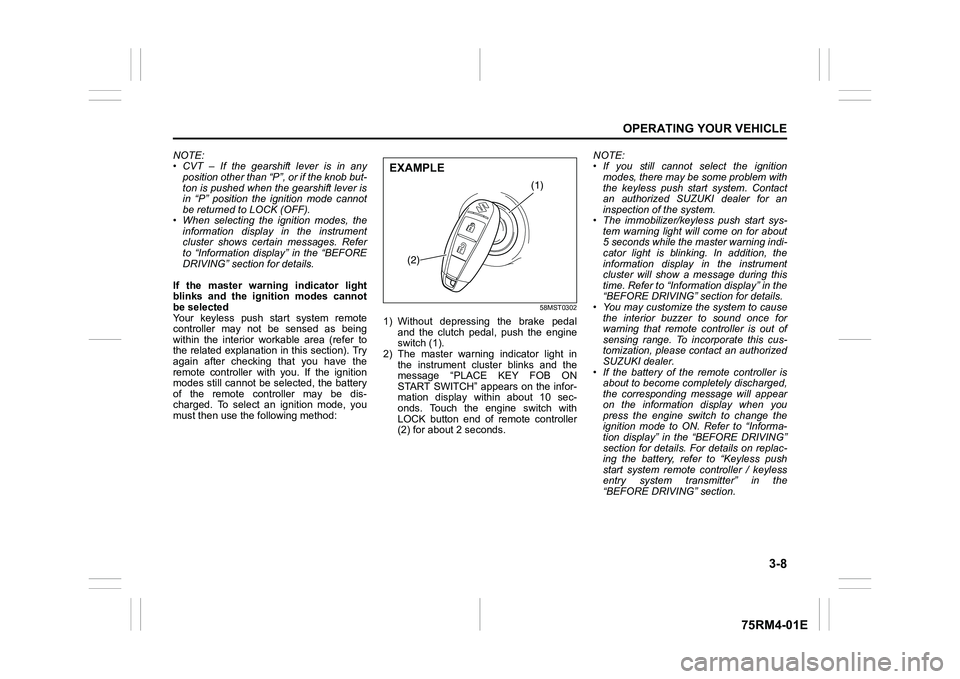
If the master warning indicator light
blinks and the ignition modes cannot
be selected
Your keyless push start system remote
controller may not be sensed as being
within the interior wo rkable area (refer to
the related explanation in this section). Try
again after checking that you have the
remote controller with you. If the ignition
modes still cannot be selected, the battery
of the remote controller may be dis-
charged. To select an ignition mode, you
must then use the following method:
58MST0302
1) Without depressing the brake pedal
and the clutch pedal, push the engine
switch (1).
2) The master warning indicator light in the instrument cluster blinks and the
message “PLACE KEY FOB ON
START SWITCH” appears on the infor-
mation display within about 10 sec-
onds. Touch the engine switch with
LOCK button end of remote controller
(2) for about 2 seconds. NOTE:
• If you still cannot
select the ignition
modes, there may be some problem with
the keyless push start system. Contact
an authorized SUZUKI dealer for an
inspection of the system.
• The immobilizer/keyless push start sys- tem warning light will come on for about
5 seconds while the master warning indi-
cator light is blinking. In addition, the
information display in the instrument
cluster will show a message during this
time. Refer to “Informa tion display” in the
“BEFORE DRIVING” section for details.
• You may customize the system to cause
the interior buzzer to sound once for
warning that remote controller is out of
sensing range. To incorporate this cus-
tomization, please contact an authorized
SUZUKI dealer.
• If the battery of the remote controller is about to become completely discharged,
the corresponding message will appear
on the information display when you
press the engine switch to change the
ignition mode to ON. Refer to “Informa-
tion display” in the “BEFORE DRIVING”
section for details. For details on replac-
ing the battery, refer to “Keyless push
start system remote controller / keyless
entry system transmitter” in the
“BEFORE DRIVING” section.
(1)
(2)
EXAMPLE
Page 163 of 505
3-10
OPERATING YOUR VEHICLE
75RM4-01E
NOTE:
• Even when the remote controller is in theinterior workable area, if it is in any of the
following conditions, you may not be
able to start the engine or select the igni-
tion modes, and the REMOTE CON-
TROLLER OUTSIDE warning may be
given.
– The remote controller’s battery is low.
– The remote controller is affected by strong radio signals or noise.
– The remote controller is in contact with
or covered by a metallic object.
– The remote controller is in stowage such as the glove box or a door
pocket.
– The remote controller is in the sun
visor pocket or on the floor.
• Even when the remote controller is out- side the interior workable area, if it is in
any of the following conditions, you may
be able to start the engine or select the
ignition mode. The REMOTE CON-
TROLLER OUTSIDE warning may not
be given at that time.
– The remote controller is outside the
vehicle but very close to a door.
– The remote controller is on the instru-
ment panel.
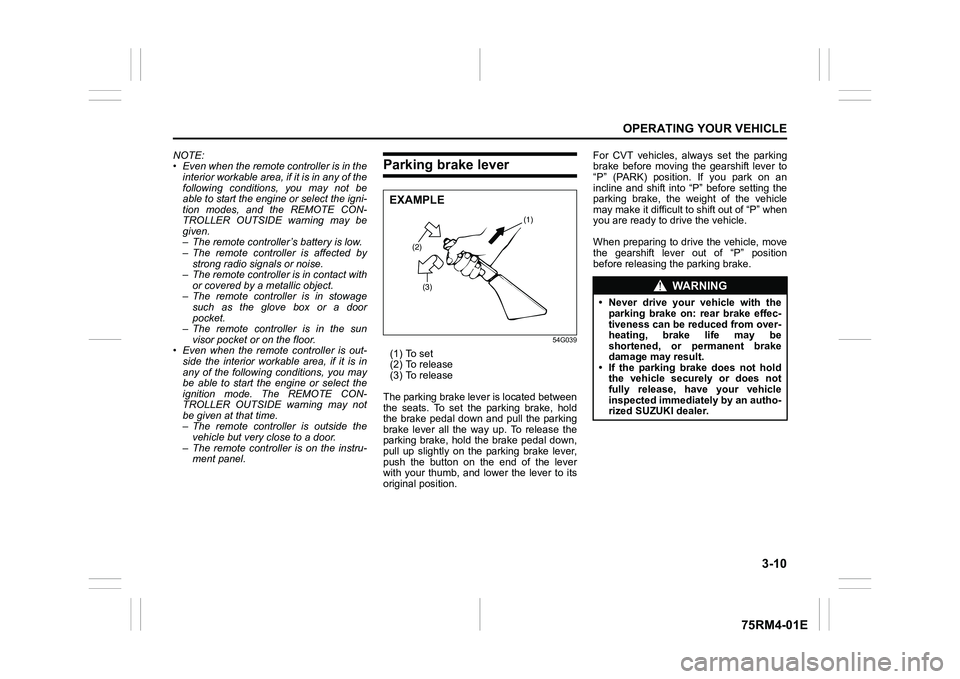
Parking brake lever
54G039
(1) To set
(2) To release
(3) To release
The parking brake lever is located between
the seats. To set the parking brake, hold
the brake pedal down and pull the parking
brake lever all the way up. To release the
parking brake, hold the brake pedal down,
pull up slightly on the parking brake lever,
push the button on the end of the lever
with your thumb, and lower the lever to its
original position. For CVT vehicles, always set the parking
brake before moving the gearshift lever to
“P” (PARK) position. If you park on an
incline and shift into “P” before setting the
parking brake, the weight of the vehicle
may make it difficult to shift out of “P” when
you are ready to drive the vehicle.
When preparing to drive the vehicle, move
the gearshift lever out of “P” position
before releasing the parking brake.
(2)
(3) (1)
EXAMPLE
WA R N I N G
• Never drive your vehicle with the
parking brake on: rear brake effec-
tiveness can be reduced from over-
heating, brake life may be
shortened, or permanent brake
damage may result.
• If the parking brake does not hold the vehicle securely or does not
fully release, have your vehicle
inspected immediately by an autho-
rized SUZUKI dealer.
Page 164 of 505
3-11OPERATING YOUR VEHICLE
75RM4-01E
NOTE:
(For Auto Gear Shift Model)
For details on how to use the gearshift
lever to park the vehicle, refer to “Parking”
in “Auto Gear Shift” in this section.
Parking brake reminder buzzerA buzzer sounds intermittently to remind
you to release the parking brake if you
start the vehicle without releasing the park-
ing brake. Check that the parking brake is
fully released and the brake system warn-
ing light turns off.
WA R N I N G
Always set the parking brake fully
before leaving your vehicle or it may
move, causing injury or damage.
When parking, check that the gear-
shift lever is in one of the following
positions;
• 1st gear or “R” (Reverse) for man-ual transaxle vehicles.
• “P” (Park) for CVT vehicles.
• “D”, “M” or “R” for Auto Gear Shift vehicles. Also, check the instru-
ment cluster to make sure that the
transaxle is engaged in “1” or “R”
position.
Remember, even though the tran-
saxle is in gear or in Park, you must
set the parking brake fully.
WA R N I N G
When parking the vehicle in
extremely cold weather, the following
procedure should be used:
1) Set the parking brake.
2) Manual transaxle – turn off the
engine, then shift into reverse or
first gear.
Auto Gear Shift – shift into “D”,
“M” or “R” and check the gear
position indicator in the instru-
ment cluster to make sure that the
transaxle is engaged in “1” or “R”
position, then tur n off the engine.
CVT – shift into “P” (Park) and
turn off the engine.
3) Get out of the vehicle and put
chocks under the wheels.
4) Release the parking brake. When you return to your vehicle,
first set the parking brake, and
then remove the wheel chocks.
WA R N I N G
Do not leave cigarette lighters, spray
cans, soft drink cans or plastic arti-
cles (such as glasses, CD cases, etc.)
in sun-heated vehicle. The tempera-
ture inside the vehicle may cause as
follows:
• Gas may leak from a cigarette lighter or spray can and may lead
to a fire.
• The glasses, plastic cards or CD cases, etc. may deform or crack.
• Soft drink cans may fracture.
Page 165 of 505
3-12
OPERATING YOUR VEHICLE
75RM4-01E
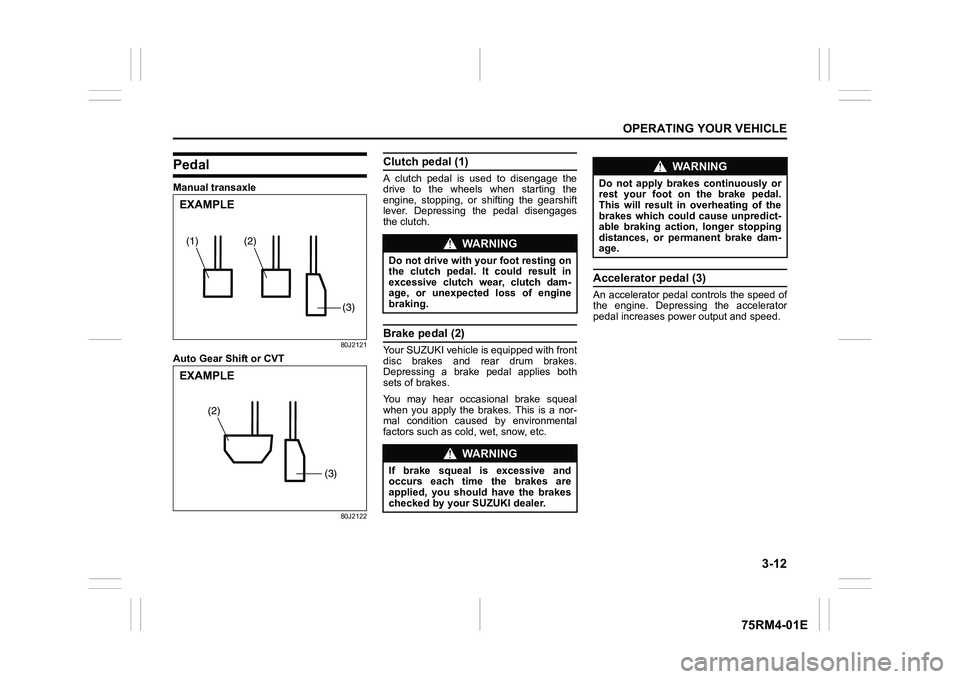
PedalManual transaxle
80J2121
Auto Gear Shift or CVT
80J2122
Clutch pedal (1)A clutch pedal is used to disengage the
drive to the wheels when starting the
engine, stopping, or shifting the gearshift
lever. Depressing the pedal disengages
the clutch.Brake pedal (2)Your SUZUKI vehicle is equipped with front
disc brakes and rear drum brakes.
Depressing a brake pedal applies both
sets of brakes.
You may hear occasional brake squeal
when you apply the brakes. This is a nor-
mal condition caused by environmental
factors such as cold, wet, snow, etc.
Accelerator pedal (3)An accelerator pedal controls the speed of
the engine. Depressing the accelerator
pedal increases power output and speed.
(2)
(1)(3)EXAMPLE
(3)
(2)
EXAMPLE
WA R N I N G
Do not drive with your foot resting on
the clutch pedal. It could result in
excessive clutch wear, clutch dam-
age, or unexpected loss of engine
braking.
WA R N I N G
If brake squeal is excessive and
occurs each time the brakes are
applied, you should have the brakes
checked by your SUZUKI dealer.
WA R N I N G
Do not apply brakes continuously or
rest your foot on the brake pedal.
This will result in overheating of the
brakes which could cause unpredict-
able braking action, longer stopping
distances, or permanent brake dam-
age.
Page 166 of 505
3-13OPERATING YOUR VEHICLE
75RM4-01E
Starting engine
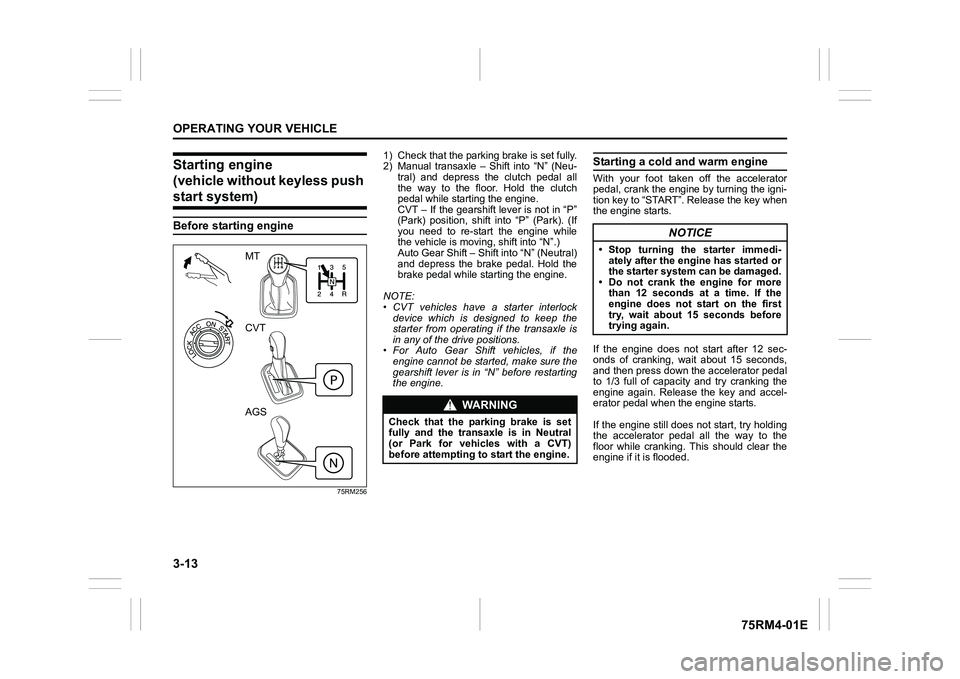
(vehicle without keyless push start system)Before starting engine
75RM256
1) Check that the parking brake is set fully.
2) Manual transaxle – Shift into “N” (Neu- tral) and depress the clutch pedal all
the way to the floor. Hold the clutch
pedal while starting the engine.
CVT – If the gearshift lever is not in “P”
(Park) position, shift into “P” (Park). (If
you need to re-start the engine while
the vehicle is movi ng, shift into “N”.)
Auto Gear Shift – Shift into “N” (Neutral)
and depress the brake pedal. Hold the
brake pedal while starting the engine.
NOTE:
• CVT vehicles have a starter interlock device which is designed to keep the
starter from operating if the transaxle is
in any of the drive positions.
• For Auto Gear Shift vehicles, if the engine cannot be started, make sure the
gearshift lever is in “N” before restarting
the engine.
Starting a cold and warm engineWith your foot taken off the accelerator
pedal, crank the engine by turning the igni-
tion key to “START”. Release the key when
the engine starts.
If the engine does not start after 12 sec-
onds of cranking, wait about 15 seconds,
and then press down the accelerator pedal
to 1/3 full of capacity and try cranking the
engine again. Release the key and accel-
erator pedal when the engine starts.
If the engine still does not start, try holding
the accelerator pedal all the way to the
floor while cranking. This should clear the
engine if it is flooded.
MT
CVT
AGS
WA R N I N G
Check that the parking brake is set
fully and the transaxle is in Neutral
(or Park for vehicles with a CVT)
before attempting to start the engine.
NOTICE
• Stop turning the starter immedi-ately after the engine has started or
the starter system can be damaged.
• Do not crank the engine for more than 12 seconds at a time. If the
engine does not start on the first
try, wait about 15 seconds before
trying again.
Page 167 of 505
3-14
OPERATING YOUR VEHICLE
75RM4-01E
Starting engine
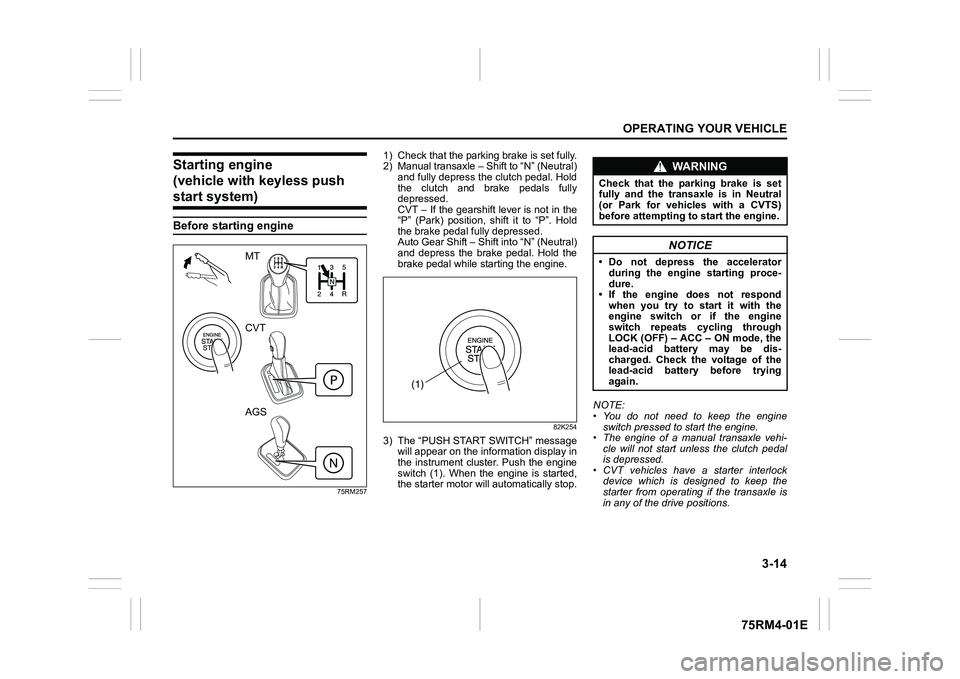
(vehicle with keyless push start system)Before starting engine
75RM257
1) Check that the parking brake is set fully.
2) Manual transaxle – Shift to “N” (Neutral) and fully depress the clutch pedal. Hold
the clutch and brake pedals fully
depressed.
CVT – If the gearshift lever is not in the
“P” (Park) position, shift it to “P”. Hold
the brake pedal fully depressed.
Auto Gear Shift – Shift into “N” (Neutral)
and depress the brake pedal. Hold the
brake pedal while starting the engine.
82K254
3) The “PUSH START SWITCH” messagewill appear on the information display in
the instrument cluster. Push the engine
switch (1). When the engine is started,
the starter motor will automatically stop. NOTE:
• You do not need to keep the engine
switch pressed to start the engine.
• The engine of a manual transaxle vehi- cle will not start unless the clutch pedal
is depressed.
• CVT vehicles have a starter interlock device which is designed to keep the
starter from operating if the transaxle is
in any of the drive positions.
MT
CVT
AGS
(1)
WA R N I N G
Check that the parking brake is set
fully and the transaxle is in Neutral
(or Park for vehicles with a CVTS)
before attempting to start the engine.
NOTICE
• Do not depress the accelerator
during the engine starting proce-
dure.
• If the engine does not respond when you try to start it with the
engine switch or if the engine
switch repeats cycling through
LOCK (OFF) – ACC – ON mode, the
lead-acid battery may be dis-
charged. Check the voltage of the
lead-acid battery before trying
again.
Page 169 of 505
3-16
OPERATING YOUR VEHICLE
75RM4-01E
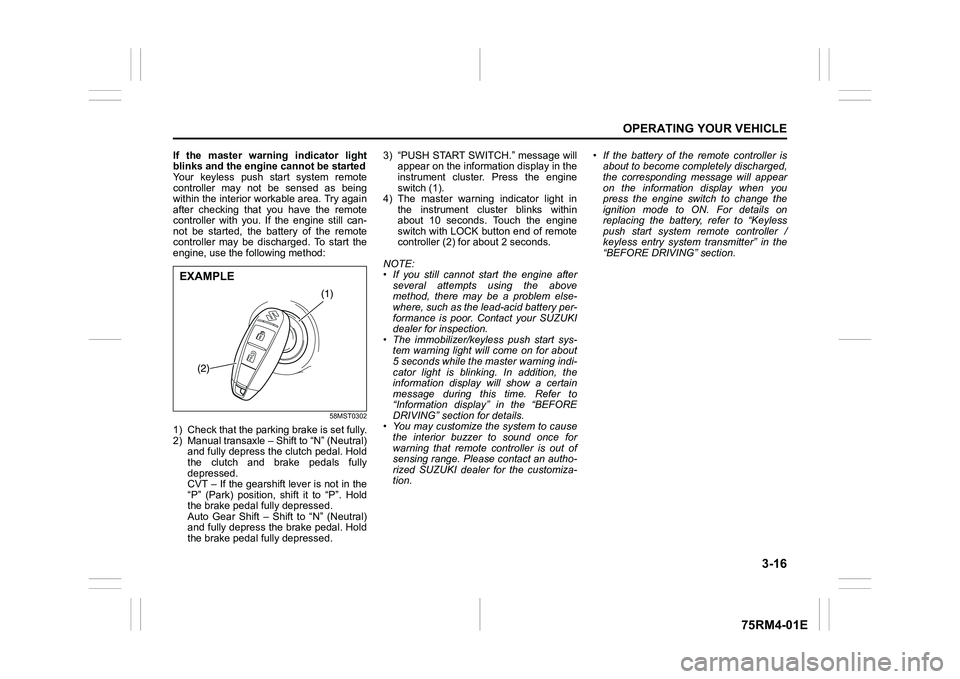
If the master warning indicator light
blinks and the engine cannot be started
Your keyless push start system remote
controller may not be sensed as being
within the interior workable area. Try again
after checking that you have the remote
controller with you. If the engine still can-
not be started, the battery of the remote
controller may be discharged. To start the
engine, use the following method:
58MST0302
1) Check that the parking brake is set fully.
2) Manual transaxle – Shift to “N” (Neutral) and fully depress the clutch pedal. Hold
the clutch and brake pedals fully
depressed.
CVT – If the gearshift lever is not in the
“P” (Park) position, shift it to “P”. Hold
the brake pedal fully depressed.
Auto Gear Shift – Shift to “N” (Neutral)
and fully depress the brake pedal. Hold
the brake pedal fully depressed. 3) “PUSH START SWITCH.” message will
appear on the information display in the
instrument cluster. Press the engine
switch (1).
4) The master warning indicator light in the instrument cluster blinks within
about 10 seconds. Touch the engine
switch with LOCK button end of remote
controller (2) for about 2 seconds.
NOTE:
• If you still cannot start the engine after several attempts using the above
method, there may be a problem else-
where, such as the lead-acid battery per-
formance is poor. Contact your SUZUKI
dealer for inspection.
• The immobilizer/keyless push start sys- tem warning light will come on for about
5 seconds while the master warning indi-
cator light is blinking. In addition, the
information display will show a certain
message during this time. Refer to
“Information display” in the “BEFORE
DRIVING” section for details.
• You may customize the system to cause
the interior buzzer to sound once for
warning that remote controller is out of
sensing range. Please contact an autho-
rized SUZUKI dealer for the customiza-
tion. • If the battery of the remote controller is
about to become completely discharged,
the corresponding message will appear
on the information display when you
press the engine switch to change the
ignition mode to ON. For details on
replacing the battery, refer to “Keyless
push start system remote controller /
keyless entry system transmitter” in the
“BEFORE DRIVING” section.
(1)
(2)
EXAMPLE
Page 171 of 505
3-18
OPERATING YOUR VEHICLE
75RM4-01E
Starting off
To start off, depress the clutch pedal all the
way to the floor and shift into 1st gear.
After releasing the parking brake, gradually
release the clutch. When you hear a
change in the engine’s sound, slowly press
the accelerator while continuing to gradu-
ally release the clutch.
Shifting
All forward gears are synchronized and
provide quiet and easy shifting. Always
depress the clutch pedal all the way to the
floor before shifting gears. Keep the
engine speed from rising into the red zone
of the tachometer (if equipped).Downshifting maximum allowable speedsK12C engine modelK12M engine model
*NOTE:
You may not accelerate to the maximum
allowable speed because of the driving sit-
uation and/or the vehicle condition.
Downshifting km/h (mph)
2nd to 1st 45 (28)
3rd to 2nd 80 (50)
4th to 3rd 130 (81)
5th to 4th 175 (109)*
Downshifting km/h (mph)
2nd to 1st 45 (28)
3rd to 2nd 85 (53)
4th to 3rd 130 (81)
5th to 4th 175 (109)*
NOTICE
Do not downshift to a lower gear at
the speed faster than the maximum
allowable speeds for the next lower
speed, or severe damage to engine
and transaxle can result.
WA R N I N G
• Reduce your speed and downshift to a lower gear before going down
a long or steep hill. A lower gear
will allow the engine to provide
braking. Avoid riding the brakes or
they may overheat, resulting in
brake failure.
• When driving on slippery roads,
slow down before downshifting.
Excessive and/or sudden changes
in engine speed may cause loss of
traction, which could cause you to
lose control.
NOTICE
Check that the vehicle is completely
stationary before you shift into
reverse.
NOTICE
• To help avoid clutch damage, donot use the clutch pedal as a foot-
rest while driving or use the clutch
to keep the vehicle stationary on a
slope. Depress the clutch fully
when shifting.
• When shifting or starting off, do not race the engine. Racing the engine
can shorten engine life and cause
negative effect to smooth shifting.