change time SUZUKI IGNIS 2018 Repair Manual
[x] Cancel search | Manufacturer: SUZUKI, Model Year: 2018, Model line: IGNIS, Model: SUZUKI IGNIS 2018Pages: 505, PDF Size: 8.36 MB
Page 313 of 505
5-58
OTHER CONTROLS AND EQUIPMENT
75RM4-01E
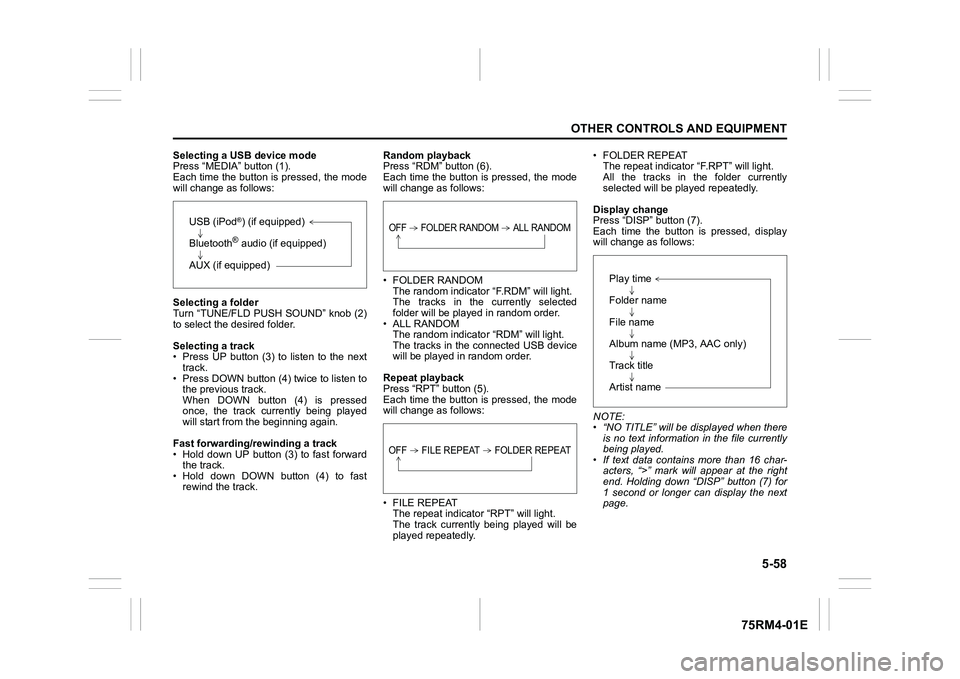
Selecting a USB device mode
Press “MEDIA” button (1).
Each time the button is pressed, the mode
will change as follows:
Selecting a folder
Turn “TUNE/FLD PUSH SOUND” knob (2)
to select the desired folder.
Selecting a track
• Press UP button (3) to listen to the next track.
• Press DOWN button (4) twice to listen to the previous track.
When DOWN button (4) is pressed
once, the track currently being played
will start from the beginning again.
Fast forwarding/rewinding a track
• Hold down UP button (3) to fast forward the track.
• Hold down DOWN button (4) to fast rewind the track. Random playback
Press “RDM” button (6).
Each time the button is pressed, the mode
will change as follows:
• FOLDER RANDOM
The random indicator “F.RDM” will light.
The tracks in the currently selected
folder will be played in random order.
•ALL RANDOM The random indicato r “RDM” will light.
The tracks in the connected USB device
will be played in random order.
Repeat playback
Press “RPT” button (5).
Each time the button is pressed, the mode
will change as follows:
• FILE REPEAT The repeat indicator “RPT” will light.
The track currently being played will be
played repeatedly. • FOLDER REPEAT
The repeat indicator “F.RPT” will light.
All the tracks in t he folder currently
selected will be played repeatedly.
Display change
Press “DISP” button (7).
Each time the button is pressed, display
will change as follows:
NOTE:
• “NO TITLE” will be displayed when there is no text information in the file currently
being played.
• If text data contains more than 16 char- acters, “>” mark will appear at the right
end. Holding down “DISP” button (7) for
1 second or longer can display the next
page.
USB (iPod
®) (if equipped)
Bluetooth® audio (if equipped)
AUX (if equipped)
OFF FOLDER RANDOM ALL RANDOMOFF FILE REPEAT FOLDER REPEAT
Play time
Folder name
File name
Album name (MP3, AAC only)
Track title
Artist name
Page 316 of 505
5-61OTHER CONTROLS AND EQUIPMENT
75RM4-01E
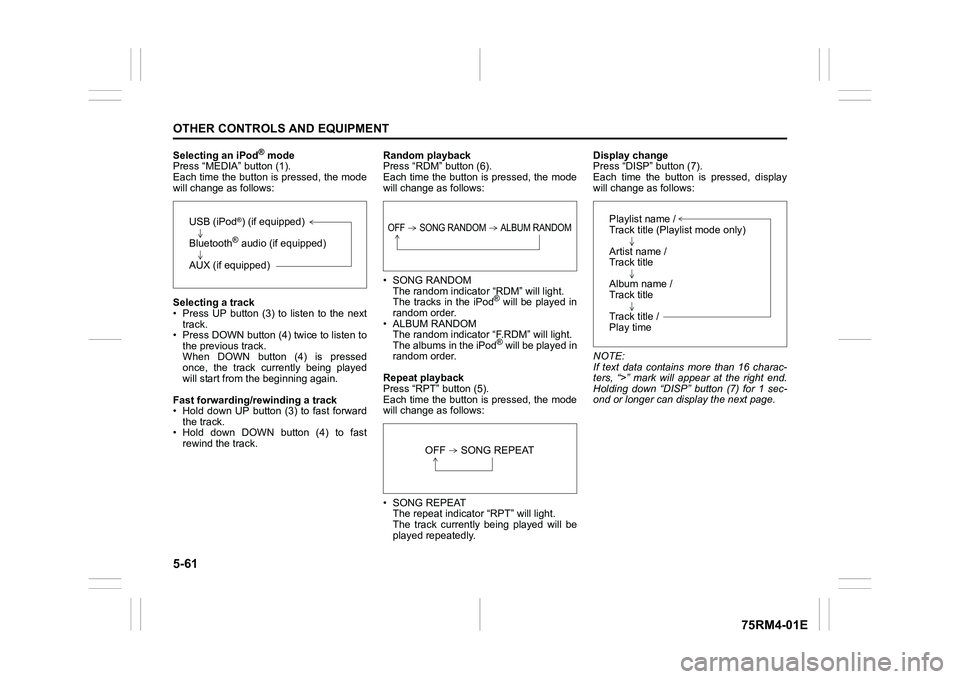
Selecting an iPod
® mode
Press “MEDIA” button (1).
Each time the button is pressed, the mode
will change as follows:
Selecting a track
• Press UP button (3) to listen to the next track.
• Press DOWN button (4) twice to listen to
the previous track.
When DOWN button (4) is pressed
once, the track currently being played
will start from the beginning again.
Fast forwarding/rewinding a track
• Hold down UP button (3) to fast forward the track.
• Hold down DOWN button (4) to fast
rewind the track. Random playback
Press “RDM” button (6).
Each time the button is pressed, the mode
will change as follows:
• SONG RANDOM
The random indicato r “RDM” will light.
The tracks in the iPod
® will be played in
random order.
• ALBUM RANDOM The random indicator “F.RDM” will light.
The albums in the iPod® will be played in
random order.
Repeat playback
Press “RPT” button (5).
Each time the button is pressed, the mode
will change as follows:
• SONG REPEAT The repeat indicator “RPT” will light.
The track currently being played will be
played repeatedly. Display change
Press “DISP” button (7).
Each time the button is pressed, display
will change as follows:
NOTE:
If text data contains more than 16 charac-
ters, “>” mark will appear at the right end.
Holding down “DISP” button (7) for 1 sec-
ond or longer can display the next page.
USB (iPod
®) (if equipped)
Bluetooth® audio (if equipped)
AUX (if equipped)
OFF SONG RANDOM ALBUM RANDOM
OFF SONG REPEAT
Playlist name /
Track title (Playlist mode only)
Artist name /
Track title
Album name /
Track title
Track title /
Play time
Page 317 of 505
![SUZUKI IGNIS 2018 Repair Manual 5-62
OTHER CONTROLS AND EQUIPMENT
75RM4-01E
Playing mode selection
1) Press the button numbered [6] of PRE-SET buttons (8) for 1 second or longer.
2) Turn “TUNE/FLD PUSH SOUND” knob (2).
Eac](/img/20/43482/w960_43482-316.png "SUZUKI IGNIS 2018 Repair Manual 5-62
OTHER CONTROLS AND EQUIPMENT
75RM4-01E
Playing mode selection
1) Press the button numbered [6] of PRE-SET buttons (8) for 1 second or longer.
2) Turn “TUNE/FLD PUSH SOUND” knob (2).
Eac")
5-62
OTHER CONTROLS AND EQUIPMENT
75RM4-01E
Playing mode selection
1) Press the button numbered [6] of PRE-SET buttons (8) for 1 second or longer.
2) Turn “TUNE/FLD PUSH SOUND” knob (2).
Each time the knob is turned, the mode
will change as follows:
3) Press “TUNE/FLD PUSH SOUND” knob (2) to select the desired mode.
NOTE:
• When the button numbered [6] of PRE- SET buttons (8) is pressed, the previous
mode will be displayed.
Notes on iPod
®
Supported iPod
®
•iPod
® touch (6th generation)
•iPod® touch (5th generation)
•iPod® touch (4th generation)
•iPod® touch (3rd generation)
•iPod® touch (2nd generation)
•iPod® touch (1st generation)
•iPod® classic
•iPod® nano (7th generation)
•iPod® nano (6th generation)
•iPod® nano (5th generation)
•iPod® nano (4th generation)
•iPod® nano (3rd generation)
•iPod® nano (2nd generation)
•iPod® nano (1st generation)
•iPod® (5th generation)
• iPhone® 6S Plus
• iPhone® 6S
• iPhone® 6 Plus
• iPhone® 6
• iPhone® 5S
• iPhone® 5C
• iPhone® 5
• iPhone® 4S
• iPhone® 4
• iPhone® 3GS
• iPhone® 3G
• iPhone®
* Some functions may not be available depending on the model of iPod
®.
*iPod
® is a trademark of Apple Inc., regis-
tered in the U.S. and other countries.
* iPhone® is a trademark of Apple Inc.,
registered in the U.S. and other coun-
tries.
* Apple is not responsible for the opera- tion of this device or its compliance with
safety and regulatory standards.
iPod
® connection
• Make sure to detach the iPod
® after
turning the ignition switch to “LOCK”
position or pressing the engine switch to
change the ignition mode to LOCK
(OFF). The iPod
® may not be shut down
when it is being connected and may
result in battery depletion.
• Do not connect iPod
® accessories such
as an iPod
® remote control or head-
phones while connecting the iPod
® with
the unit. The unit may not operate cor-
rectly.
PLAYLIST
ARTIST
ALBUM
SONGS
PODCAST
GENRE
AUDIOBOOK
Page 318 of 505
5-63OTHER CONTROLS AND EQUIPMENT
75RM4-01E
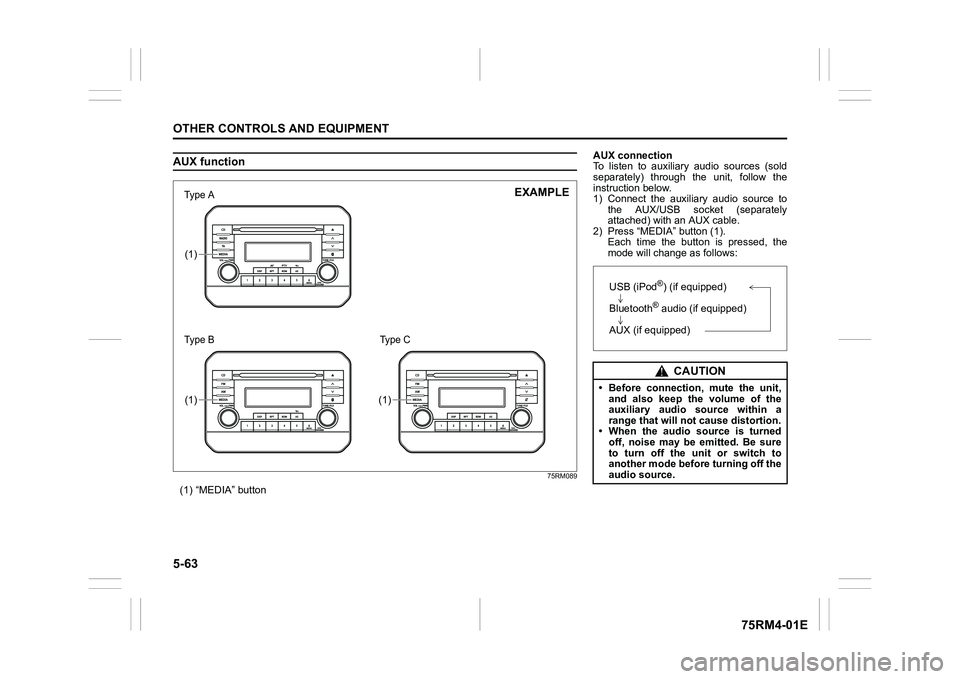
AUX function
75RM089
(1) “MEDIA” button(1)(1)
(1)
7śSHаΝ
7śSHаΠ
EXAMPLE
Type C
AUX connection
To listen to auxiliary audio sources (sold
separately) through the unit, follow the
instruction below.
1) Connect the auxiliary audio source tothe AUX/USB socket (separately
attached) with an AUX cable.
2) Press “MEDIA” button (1). Each time the button is pressed, the
mode will change as follows:
CAUTION
• Before connection, mute the unit,and also keep the volume of the
auxiliary audio source within a
range that will not cause distortion.
• When the audio source is turned
off, noise may be emitted. Be sure
to turn off the unit or switch to
another mode before turning off the
audio source.USB (iPod
®) (if equipped)
Bluetooth® audio (if equipped)
AUX (if equipped)
Page 330 of 505
5-75OTHER CONTROLS AND EQUIPMENT
75RM4-01E
Registration of audio devices
NOTE:
• To set up a new audio player, disconnectthe phone from the unit. Connect the
phone after audio player setup is com-
pleted if necessary.
• When attempts to establish the pairing fail within 60 seconds, the connecting
operation will be canceled. Try to estab-
lish the pairing again or refer to the audio
player manual for assistance with the
pairing process.
1) Press the Bluetooth
® setup button (7)
or (8).
The Bluetooth
® setup menu will be dis-
played.
2) Turn “TUNE/FLD PUSH SOUND” knob
(2) to select “Setup Bluetooth”, and
press the knob (2) to determine the
selection.
3) Turn “TUNE/FLD PUSH SOUND” knob (2) to select “Pairi ng”, and press the
knob (2) to determine the selection.
4) Select “My Car” from the Bluetooth
®
menu of the audio player and establish
the pairing.
Refer to the manual of the audio player
in use for further information.
5) Enter the passkey displayed on the unit
to the audio player. NOTE:
• When selecting “Go Back” or pressing
BACK button (6), the previous menu will
be displayed.
• When registering additional audio devices, repeat Step from 1).
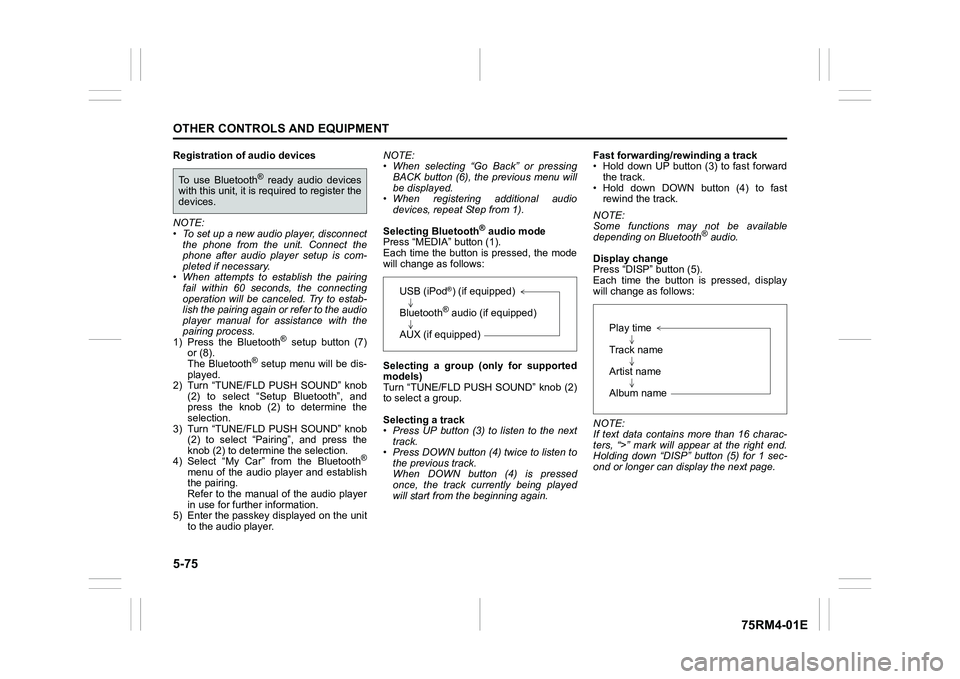
Selecting Bluetooth
® audio mode
Press “MEDIA” button (1).
Each time the button is pressed, the mode
will change as follows:
Selecting a group (only for supported
models)
Turn “TUNE/FLD PUSH SOUND” knob (2)
to select a group.
Selecting a track
• Press UP button (3) to listen to the next track.
• Press DOWN button (4) twice to listen to the previous track.
When DOWN button (4) is pressed
once, the track currently being played
will start from the beginning again. Fast forwarding/rewinding a track
• Hold down UP button (3) to fast forward
the track.
• Hold down DOWN button (4) to fast rewind the track.
NOTE:
Some functions may not be available
depending on Bluetooth
® audio.
Display change
Press “DISP” button (5).
Each time the button is pressed, display
will change as follows:
NOTE:
If text data contains more than 16 charac-
ters, “>” mark will appear at the right end.
Holding down “DISP” button (5) for 1 sec-
ond or longer can display the next page.
To use Bluetooth
® ready audio devices
with this unit, it is r equired to register the
devices.
USB (iPod
®) (if equipped)
Bluetooth® audio (if equipped)
AUX (if equipped)
Play time
Track name
Artist name
Album name
Page 333 of 505
5-78
OTHER CONTROLS AND EQUIPMENT
75RM4-01E
Adjusting the volume
• To increase the volume, press the “VOL”switch (1) up. The volume will continue
to increase until the switch is released.
• To decrease the volume, press the “VOL” switch (1) down. The volume will
continue to decrease until the switch is
released.
• To mute the sound, pr ess the switch (2).
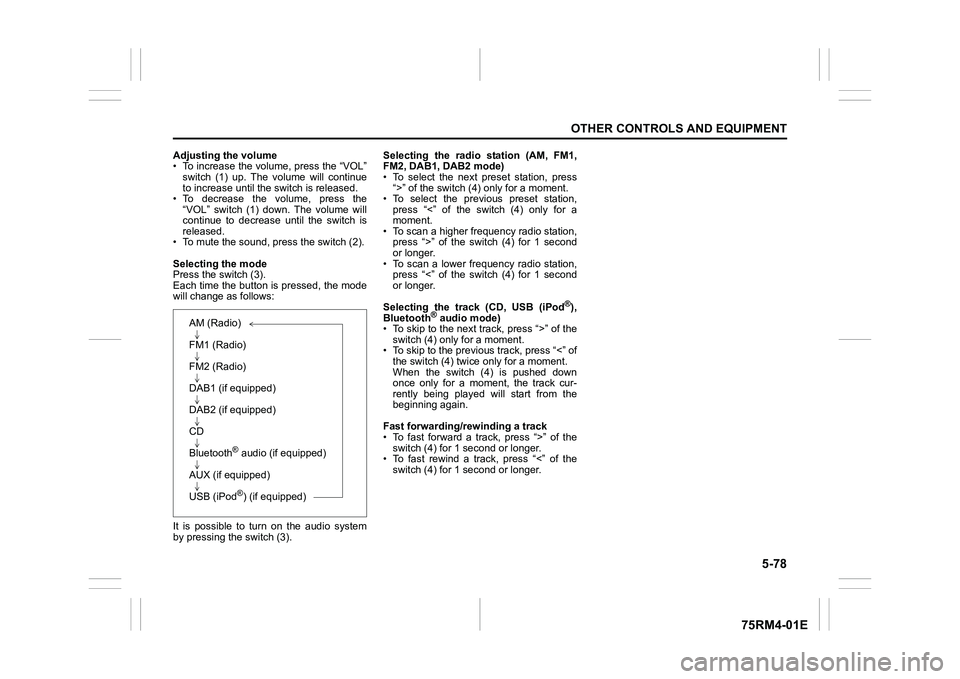
Selecting the mode
Press the switch (3).
Each time the button is pressed, the mode
will change as follows:
It is possible to turn on the audio system
by pressing the switch (3). Selecting the radio station (AM, FM1,
FM2, DAB1, DAB2 mode)
• To select the next preset station, press
“>” of the switch (4 ) only for a moment.
• To select the previous preset station, press “<” of the switch (4) only for a
moment.
• To scan a higher frequency radio station, press “>” of the switch (4) for 1 second
or longer.
• To scan a lower frequency radio station, press “<” of the switch (4) for 1 second
or longer.
Selecting the track (CD, USB (iPod
®),
Bluetooth
® audio mode)
• To skip to the next track, press “>” of the
switch (4) only for a moment.
• To skip to the previous track, press “<” of the switch (4) twice only for a moment.
When the switch (4) is pushed down
once only for a moment, the track cur-
rently being played will start from the
beginning again.
Fast forwarding/rewinding a track
• To fast forward a track, press “>” of the switch (4) for 1 second or longer.
• To fast rewind a track, press “<” of the
switch (4) for 1 second or longer.
AM (Radio)
FM1 (Radio)
FM2 (Radio)
DAB1 (if equipped)
DAB2 (if equipped)
CD
Bluetooth
® audio (if equipped)
AUX (if equipped)
USB (iPod®) (if equipped)
Page 335 of 505
![SUZUKI IGNIS 2018 Repair Manual 5-80
OTHER CONTROLS AND EQUIPMENT
75RM4-01E
Setting the anti-theft function
1) Press “VOL PUSH PWR” knob (1) to power off.
2) Hold down the buttons numbered [1] and [6] of PRESET b](/img/20/43482/w960_43482-334.png "SUZUKI IGNIS 2018 Repair Manual 5-80
OTHER CONTROLS AND EQUIPMENT
75RM4-01E
Setting the anti-theft function
1) Press “VOL PUSH PWR” knob (1) to power off.
2) Hold down the buttons numbered [1] and [6] of PRESET b")
5-80
OTHER CONTROLS AND EQUIPMENT
75RM4-01E
Setting the anti-theft function
1) Press “VOL PUSH PWR” knob (1) to power off.
2) Hold down the buttons numbered [1] and [6] of PRESET buttons (2) and
press “VOL PUSH PWR” knob (1).
“SECURITY” will be displayed.
3) Press UP button (3) and the button numbered [1] of P RESET buttons (2)
simultaneously.
4) Enter a 4-digit number to be registered as PIN using the buttons numbered [1]
- [4] of PRESET buttons (2).
5) Hold down “TUNE/FLD PUSH
SOUND” knob (4) for 1 second or lon-
ger to set the anti-theft function.
NOTE:
Take a note of the registered PIN and keep
it for the future use. Canceling the anti-theft feature
To cancel the anti-theft function, delete the
registered PIN.
1) Press “VOL PUSH PWR” knob (1) to
power off.
2) Hold down the buttons numbered [1]
and [6] of PRESET buttons (2) and
press “VOL PUSH PWR” knob (1).
“PIN ENTRY” will be displayed.
3) Press UP button (3) and the button numbered [1] of P RESET buttons (2)
simultaneously.
4) Enter a 4-digit number to be registered as PIN using the buttons numbered [1]
- [4] of PRESET buttons (2).
5) Hold down “TUNE/FLD PUSH SOUND” knob (4) for 1 second or lon-
ger to delete the registered PIN. The
indication “----” will be displayed and
the anti-theft function will be canceled.
NOTE:
To change your PIN, first delete your cur-
rent PIN, and then set a new one. Confirming the Personal Identification
Number (PIN)
When the main power source is discon-
nected such as when the lead-acid battery
is replaced, etc, it is required to enter the
PIN to operate
the unit again.
1) Set the ignition switch to “ACC” posi- tion or the ignition mode to ON.
“SECURITY” will be displayed.
2) Press UP button (3) and the button numbered [1] of P RESET buttons (2)
simultaneously.
3) Enter a 4-digit number to be registered as PIN using the buttons numbered [1]
- [4] of PRESET buttons (2).
4) Hold down “TUNE/FLD PUSH SOUND” knob (4) for 1 second or lon-
ger.
When the same PIN as registered is
entered, the power of the audio system
will be turned off automatically and it
will become operable again.
NOTE:
If an incorrect PIN is entered, “ERROR”
and the total number of incorrect entry
attempts will be displayed.
If an incorrect PIN is entered 10 times or
more, “HELP” will be displayed and the
audio system will become inoperable.
Page 337 of 505
5-82
OTHER CONTROLS AND EQUIPMENT
75RM4-01E
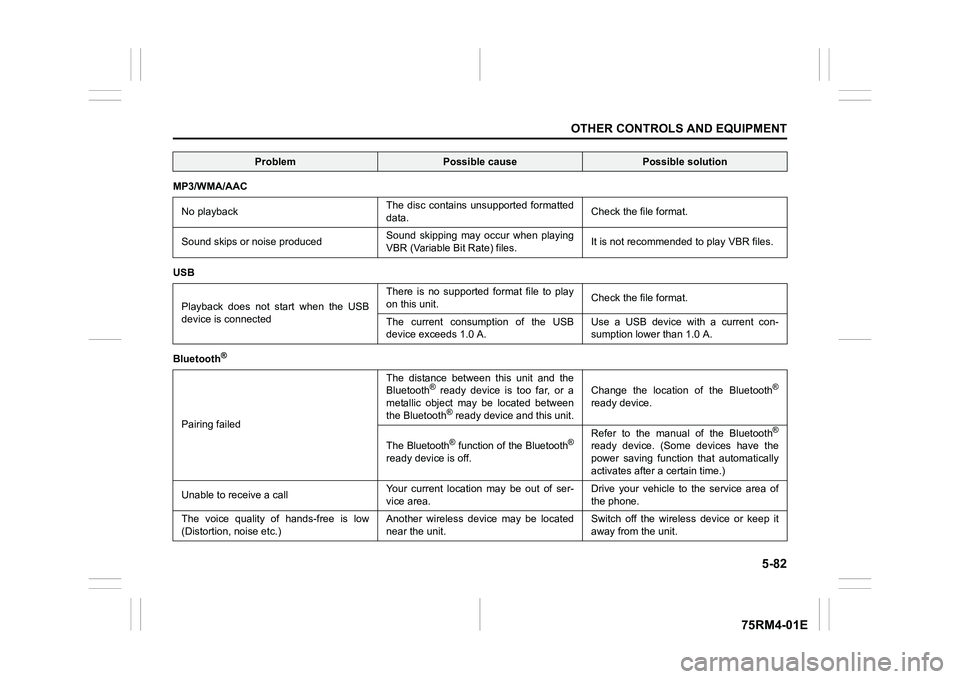
MP3/WMA/AACNo playback The disc contains unsupported formatted
data.
Check the file format.
Sound skips or noise produced Sound skipping may occur when playing
VBR (Variable Bit Rate) files.It is not recommended
to play VBR files.
USB
Playback does not start when the USB
device is connected There is no supported format file to play
on this unit.
Check the file format.
The current consumption of the USB
device exce eds 1.0 A. Use a USB device with a current con-
sumption lower than 1.0 A.
Bluetooth
®
Pairing failed The distance between this unit and the
Bluetooth
® ready device is too far, or a
metallic object may be located between
the Bluetooth® ready device and this unit. Change the location of the Bluetooth
®
ready device.
The Bluetooth
® function of the Bluetooth
®
ready device is off. Refer to the manual of the Bluetooth
®
ready device. (Some devices have the
power saving function that automatically
activates after a certain time.)
Unable to receive a call Your current location may be out of ser-
vice area. Drive your vehicle to the service area of
the phone.
The voice quality of hands-free is low
(Distortion, noise etc.) Another wireless device may be located
near the unit.Switch off the wireless device or keep it
away from the unit.
Problem
Possible cause
Possible solution
Page 363 of 505
7-14
INSPECTION AND MAINTENANCE
75RM4-01E
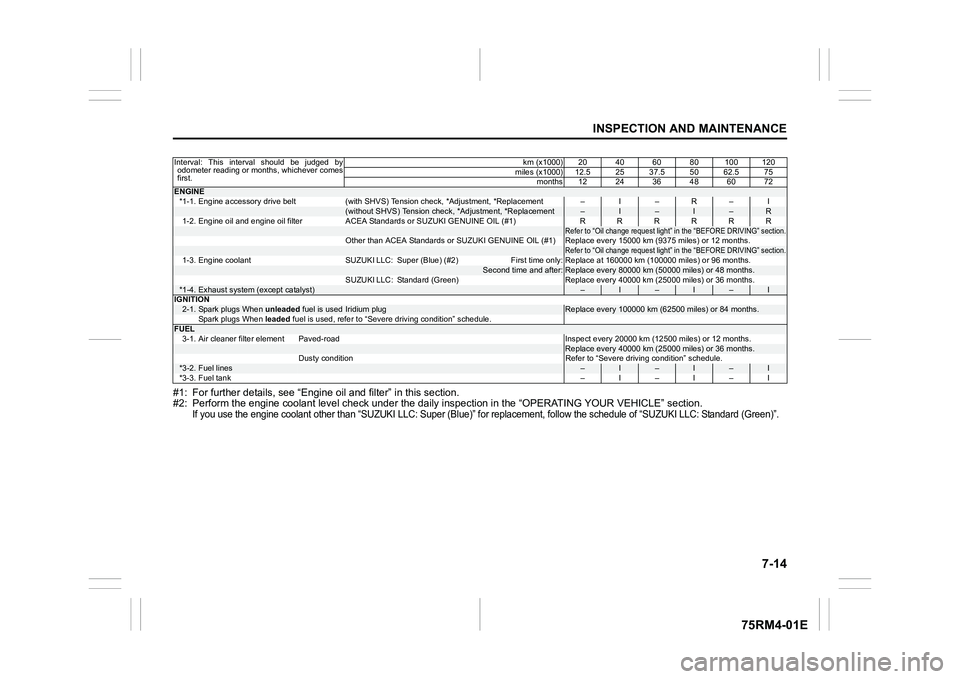
#1: For further details, see “Engine oil and filter” in this section.
#2: Perform the engine coolant l evel check under the daily inspection in the “OPERATING YOUR VEHICLE” section.
If you use the engine coolant other than “SUZUKI LLC: Super (Bl ue)” for replacement, follow the schedule of “SUZUKI LLC: Standard (Green)”.
Interval: This interval should be judged by
odometer reading or months, whichever comes
first. km (x1000) 20 40 60 80 100 120
miles (x1000) 12.5 25 37.5 50 62.5 75 months 12 24 36 48 60 72ENGINE*1-1. Engine accessory drive belt (with SHVS) Tension check, *Adjustment, *Replacement – I – R – I
(without SHVS) Tension check, *Adjustment, *Replacement
–
I
–
I
–
R
1-2. Engine oil and engine oil filter ACEA Standards or SUZUKI G ENUINE OIL (#1) RRRRRR
Refer to “Oil change request light” in the “BEFORE DRIVING” section.
Other than ACEA Standards or SUZUKI GENUINE OIL (#1) Replace eve ry 15000 km (9375 miles) or 12 months.
Refer to “Oil change request light” in the “BEFORE DRIVING” section.
1-3. Engine coolant SUZUKI LLC: Super (Blue) (#2) First time only : Replace at 160000 km (100000 miles) or 96 months.
Second time and after:
Replace every 80000 km (50000 miles) or 48 months.
SUZUKI LLC: Standard (Green) Replace every 40000 km (25000 mile s) or 36 months.
*1-4.
Exhaust system (except catalyst)
–
I
–
I
–
I
IGNITION
2-1.
Spark plugs When unleaded fuel is used
Iridium plug
Replace every 100000 km (62500 miles) or 84 months.
Spark plugs When leaded fuel is used, refer to “Severe driving condition” schedule.
FUEL
3-1. Air cleaner filter element Paved-road Inspect every 20000 k m (12500 miles) or 12 months.
Replace every 40000 km (25000 miles) or 36 months.
Dusty condition Refer to “Severe driving condition” schedule.
*3-2.
Fuel lines
–
I
–
I
–
I
*3-3. Fuel tank –I–I–I
Page 364 of 505
7-15INSPECTION AND MAINTENANCE
75RM4-01E
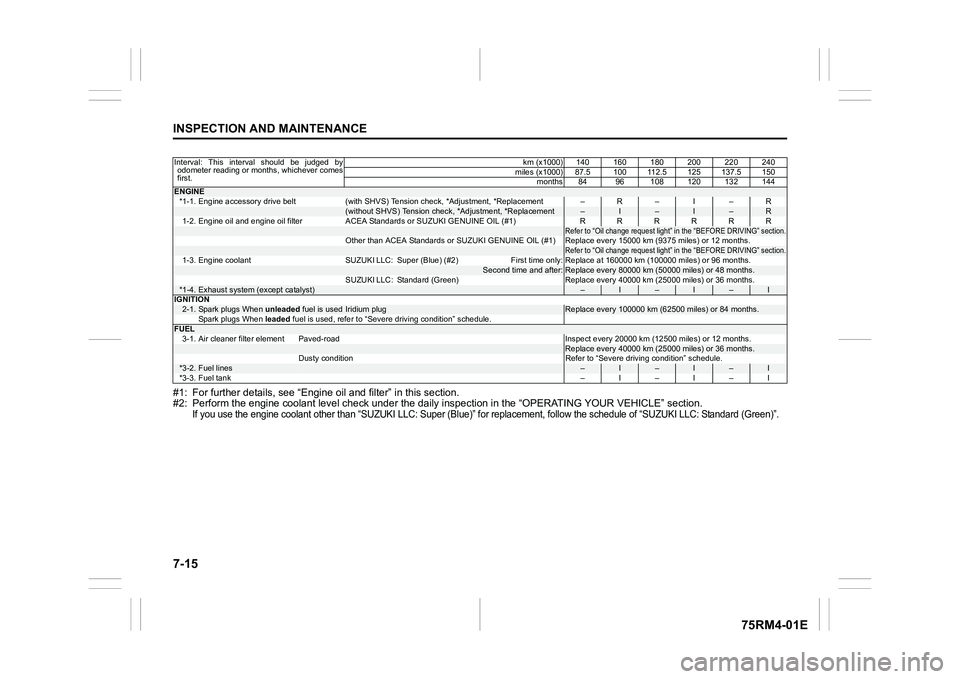
#1: For further details, see “Engine oil and filter” in this section.
#2: Perform the engine coolant l evel check under the daily inspection in the “OPERATING YOUR VEHICLE” section.
If you use the engine coolant other than “SUZUKI LLC: Super (Bl ue)” for replacement, follow the schedule of “SUZUKI LLC: Standard (Green)”.
Interval: This interval should be judged by
odometer reading or months, whichever comes
first. km (x1000) 140 160 180 200 220 240
miles (x1000) 87.5 100 112.5 125 137.5 150 months 84 96 108 120 132 144ENGINE*1-1. Engine accessory drive belt (with SHVS) Tension check, *Adjustment, *Replacement – R – I – R
(without SHVS) Tension check, *Adjustment, *Replacement
–
I
–
I
–
R
1-2. Engine oil and engine oil filter ACEA Standards or SUZUKI G ENUINE OIL (#1) RRRRRR
Refer to “Oil change request light” in the “BEFORE DRIVING” section.
Other than ACEA Standards or SUZUKI GENUINE OIL (#1) Replace eve ry 15000 km (9375 miles) or 12 months.
Refer to “Oil change request light” in the “BEFORE DRIVING” section.
1-3. Engine coolant SUZUKI LLC: Super (Blue) (#2) First time only : Replace at 160000 km (100000 miles) or 96 months.
Second time and after:
Replace every 80000 km (50000 miles) or 48 months.
SUZUKI LLC: Standard (Green) Replace every 40000 km (25000 mile s) or 36 months.
*1-4.
Exhaust system (except catalyst)
–
I
–
I
–
I
IGNITION
2-1.
Spark plugs When unleaded fuel is used
Iridium plug
Replace every 100000 km (62500 miles) or 84 months.
Spark plugs When leaded fuel is used, refer to “Severe driving condition” schedule.
FUEL
3-1. Air cleaner filter element Paved-road Inspect every 20000 k m (12500 miles) or 12 months.
Replace every 40000 km (25000 miles) or 36 months.
Dusty condition Refer to “Severe driving condition” schedule.
*3-2.
Fuel lines
–
I
–
I
–
I
*3-3. Fuel tank –I–I–I