Drive SUZUKI IGNIS 2019 User Guide
[x] Cancel search | Manufacturer: SUZUKI, Model Year: 2019, Model line: IGNIS, Model: SUZUKI IGNIS 2019Pages: 505, PDF Size: 8.36 MB
Page 32 of 505
2-9BEFORE DRIVING
75RM4-01E
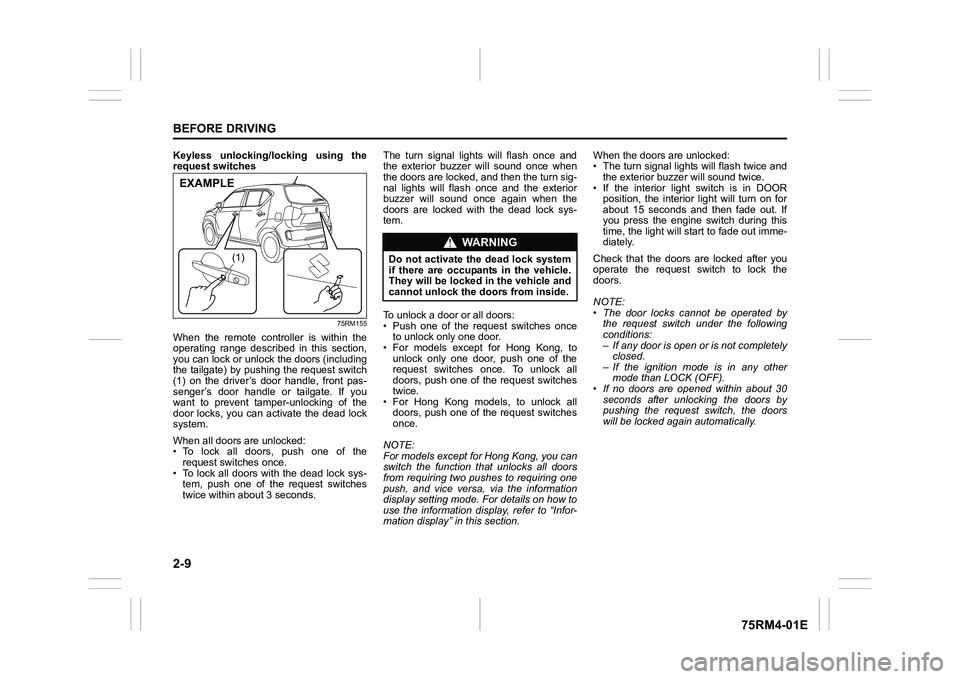
Keyless unlocking/locking using the
request switches
75RM155
When the remote controller is within the
operating range described in this section,
you can lock or unlock the doors (including
the tailgate) by pushing the request switch
(1) on the driver’s door handle, front pas-
senger’s door handle or tailgate. If you
want to prevent tamper-unlocking of the
door locks, you can activate the dead lock
system.
When all doors are unlocked:
• To lock all doors, push one of the request switches once.
• To lock all doors with the dead lock sys- tem, push one of the request switches
twice within abou t 3 seconds. The turn signal lights will flash once and
the exterior buzzer will sound once when
the doors are locked, and then the turn sig-
nal lights will flash once and the exterior
buzzer will sound once again when the
doors are locked with the dead lock sys-
tem.
To unlock a door or all doors:
• Push one of the request switches once
to unlock only one door.
• For models except for Hong Kong, to
unlock only one door, push one of the
request switches once. To unlock all
doors, push one of the request switches
twice.
• For Hong Kong models, to unlock all doors, push one of the request switches
once.
NOTE:
For models except for Hong Kong, you can
switch the function that unlocks all doors
from requiring two pushes to requiring one
push, and vice versa, via the information
display setting mode. For details on how to
use the information display, refer to “Infor-
mation display” in this section. When the doors are unlocked:
• The turn signal lights will flash twice and
the exterior buzzer will sound twice.
• If the interior light switch is in DOOR position, the interior light will turn on for
about 15 seconds and then fade out. If
you press the engine switch during this
time, the light will start to fade out imme-
diately.
Check that the doors are locked after you
operate the request switch to lock the
doors.
NOTE:
• The door locks cannot be operated by the request switch under the following
conditions:
– If any door is open or is not completelyclosed.
– If the ignition mode is in any other mode than LOCK (OFF).
• If no doors are opened within about 30
seconds after unlocking the doors by
pushing the request switch, the doors
will be locked again automatically.
(1)
EXAMPLE
WA R N I N G
Do not activate the dead lock system
if there are occupants in the vehicle.
They will be locked in the vehicle and
cannot unlock the doors from inside.
Page 33 of 505
2-10
BEFORE DRIVING
75RM4-01E
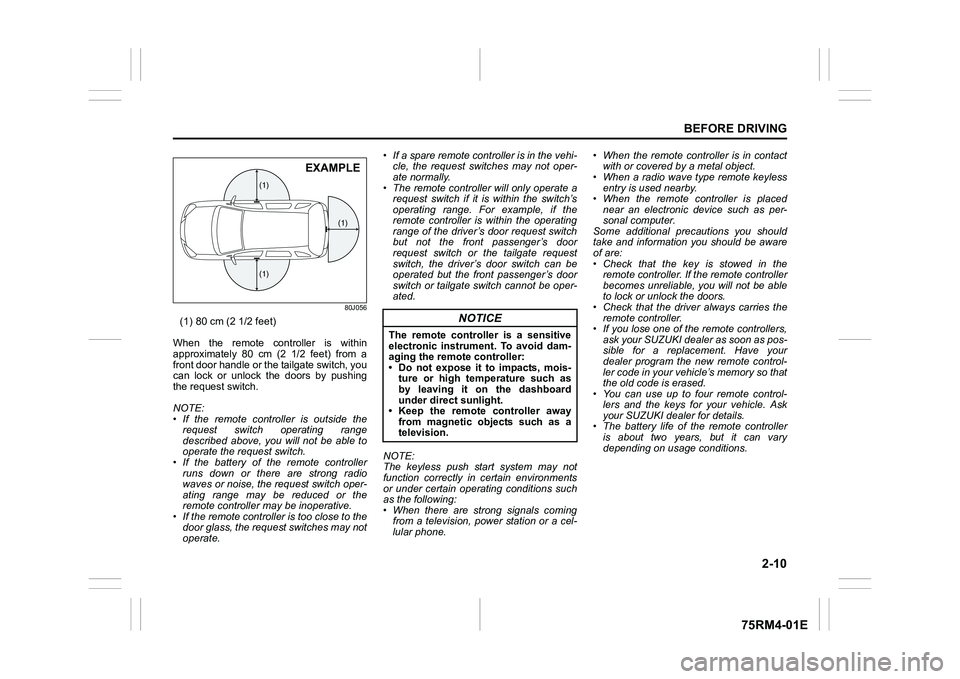
80J056
(1) 80 cm (2 1/2 feet)
When the remote controller is within
approximately 80 cm (2 1/2 feet) from a
front door handle or the tailgate switch, you
can lock or unlock the doors by pushing
the request switch.
NOTE:
• If the remote controller is outside the request switch operating range
described above, you will not be able to
operate the request switch.
• If the battery of th e remote controller
runs down or there are strong radio
waves or noise, the request switch oper-
ating range may be reduced or the
remote controller may be inoperative.
• If the remote controller is too close to the door glass, the request switches may not
operate. • If a spare remote controller is in the vehi-
cle, the request switches may not oper-
ate normally.
• The remote controller will only operate a request switch if it is within the switch’s
operating range. For example, if the
remote controller is within the operating
range of the driver’s door request switch
but not the front passenger’s door
request switch or the tailgate request
switch, the driver’s door switch can be
operated but the front passenger’s door
switch or tailgate switch cannot be oper-
ated.
NOTE:
The keyless push start system may not
function correctly in certain environments
or under certain operating conditions such
as the following:
• When there are strong signals coming from a television, power station or a cel-
lular phone. • When the remote controller is in contact
with or covered by a metal object.
• When a radio wave type remote keyless
entry is used nearby.
• When the remote controller is placed near an electronic device such as per-
sonal computer.
Some additional precautions you should
take and information you should be aware
of are:
• Check that the key is stowed in the remote controller. If the remote controller
becomes unreliable, you will not be able
to lock or unlock the doors.
• Check that the driver always carries the
remote controller.
• If you lose one of the remote controllers,
ask your SUZUKI dealer as soon as pos-
sible for a replacement. Have your
dealer program the new remote control-
ler code in your vehicle’s memory so that
the old code is erased.
• You can use up to four remote control-
lers and the keys for your vehicle. Ask
your SUZUKI dealer for details.
• The battery life of the remote controller
is about two years, but it can vary
depending on usage conditions.
(1)
(1)
(1)
EXAMPLE
NOTICE
The remote controller is a sensitive
electronic instrument. To avoid dam-
aging the remo te controller:
• Do not expose it to impacts, mois- ture or high temperature such as
by leaving it on the dashboard
under direct sunlight.
• Keep the remote controller away
from magnetic objects such as a
television.
Page 35 of 505
2-12
BEFORE DRIVING
75RM4-01E
If the remote controller is left in the vehicle
and you lock the driver’s door or front pas-
senger’s door as described below, the door
will be automatically unlocked.
• If you open the driver’s door and lock thedoor by turning the lock knob forward or
pushing the power door locking switch,
the driver’s door will be automatically
unlocked.
• If you open the front passenger’s door and lock the door by turning the lock
knob forward or pushing the power door
locking switch, the front passenger’s
door will be automat ically unlocked.
NOTE:
• The reminder will not operate when the remote controller is on the instrument
panel, in the glove box, in a storage
compartment, in the sun visor or on the
floor, etc.
• Check that the driver always carries the remote controller.
• Do not leave the remote controller in the vehicle when leaving the vehicle. Battery replacement
If the remote controller becomes unreli-
able, replace the battery.
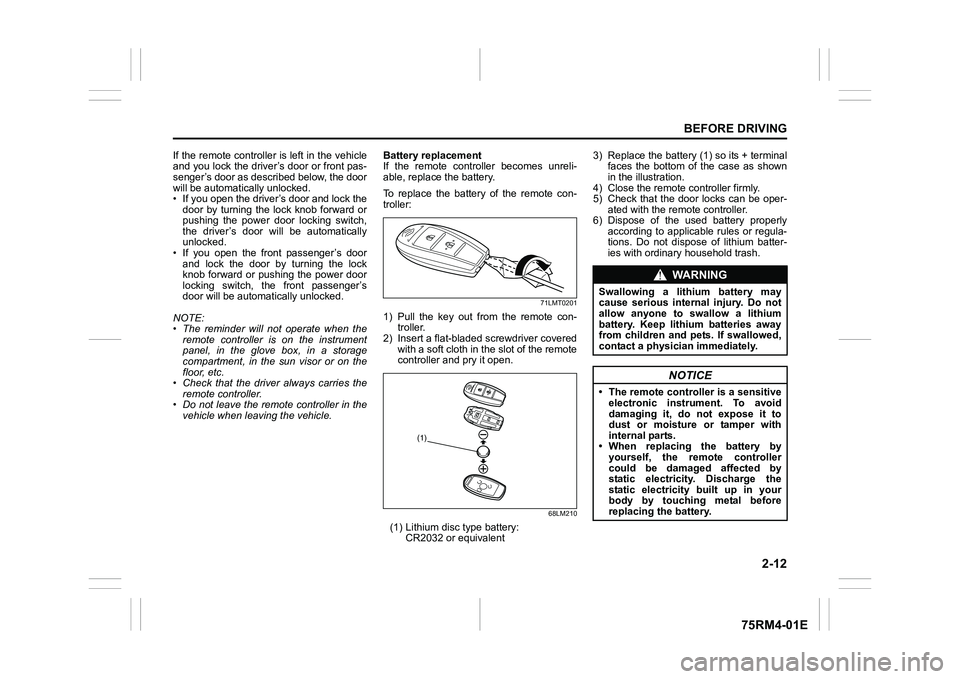
To replace the battery of the remote con-
troller:
71LMT0201
1) Pull the key out from the remote con-
troller.
2) Insert a flat-bladed screwdriver covered with a soft cloth in the slot of the remote
controller and pry it open.
68LM210
(1) Lithium disc type battery:
CR2032 or equivalent 3) Replace the battery (1) so its + terminal
faces the bottom of the case as shown
in the illustration.
4) Close the remote controller firmly.
5) Check that the door locks can be oper- ated with the remote controller.
6) Dispose of the used battery properly according to applicable rules or regula-
tions. Do not dispose of lithium batter-
ies with ordinary household trash.
(1)
WA R N I N G
Swallowing a lithium battery may
cause serious internal injury. Do not
allow anyone to swallow a lithium
battery. Keep lithium batteries away
from children and pets. If swallowed,
contact a physici an immediately.
NOTICE
• The remote controller is a sensitive
electronic instrument. To avoid
damaging it, do not expose it to
dust or moisture or tamper with
internal parts.
• When replacing the battery by yourself, the re mote controller
could be damaged affected by
static electricity. Discharge the
static electricity built up in your
body by touching metal before
replacing th e battery.
Page 37 of 505
2-14
BEFORE DRIVING
75RM4-01E
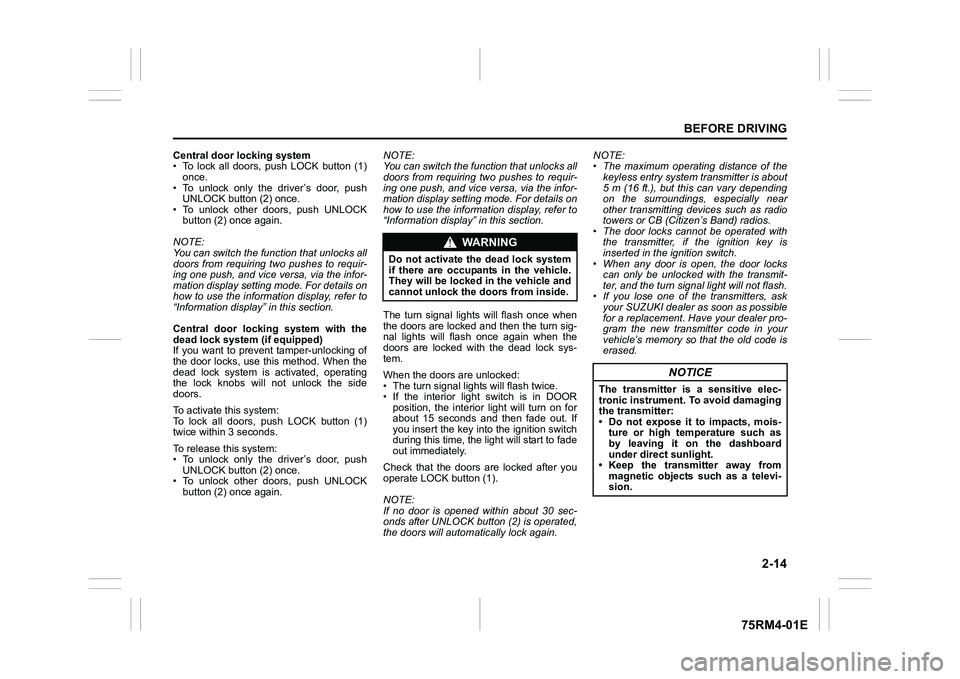
Central door locking system
• To lock all doors, push LOCK button (1)once.
• To unlock only the driver’s door, push UNLOCK button (2) once.
• To unlock other doors, push UNLOCK
button (2) once again.
NOTE:
You can switch the fu nction that unlocks all
doors from requiring two pushes to requir-
ing one push, and vice versa, via the infor-
mation display setting mode. For details on
how to use the informati on display, refer to
“Information display” in this section.
Central door locking system with the
dead lock system (if equipped)
If you want to prevent tamper-unlocking of
the door locks, use this method. When the
dead lock system is activated, operating
the lock knobs will not unlock the side
doors.
To activate this system:
To lock all doors, push LOCK button (1)
twice within 3 seconds.
To release this system:
• To unlock only the driver’s door, push UNLOCK button (2) once.
• To unlock other doors, push UNLOCK
button (2) once again. NOTE:
You can switch the fu
nction that unlocks all
doors from requiring two pushes to requir-
ing one push, and vice versa, via the infor-
mation display setting mode. For details on
how to use the informati on display, refer to
“Information display” in this section.
The turn signal lights will flash once when
the doors are locked and then the turn sig-
nal lights will flash once again when the
doors are locked with the dead lock sys-
tem.
When the doors are unlocked:
• The turn signal lights will flash twice.
• If the interior light switch is in DOOR position, the interior light will turn on for
about 15 seconds and then fade out. If
you insert the key into the ignition switch
during this time, the light will start to fade
out immediately.
Check that the doors are locked after you
operate LOCK button (1).
NOTE:
If no door is opened within about 30 sec-
onds after UNLOCK button (2) is operated,
the doors will automatically lock again. NOTE:
• The maximum operating distance of the
keyless entry system transmitter is about
5 m (16 ft.), but this can vary depending
on the surroundings, especially near
other transmitting devices such as radio
towers or CB (Citizen’s Band) radios.
• The door locks cannot be operated with the transmitter, if the ignition key is
inserted in the ignition switch.
• When any door is open, the door locks can only be unlocked with the transmit-
ter, and the turn signal light will not flash.
• If you lose one of the transmitters, ask your SUZUKI dealer as soon as possible
for a replacement. Have your dealer pro-
gram the new transmitter code in your
vehicle’s memory so that the old code is
erased.
WA R N I N G
Do not activate the dead lock system
if there are occupants in the vehicle.
They will be locked in the vehicle and
cannot unlock the doors from inside.
NOTICE
The transmitter is a sensitive elec-
tronic instrument. To avoid damaging
the transmitter:
• Do not expose it to impacts, mois-ture or high temperature such as
by leaving it on the dashboard
under direct sunlight.
• Keep the transmitter away from magnetic objects such as a televi-
sion.
Page 38 of 505
2-15BEFORE DRIVING
75RM4-01E
Battery replacement
If the transmitter becomes unreliable,
replace the battery.
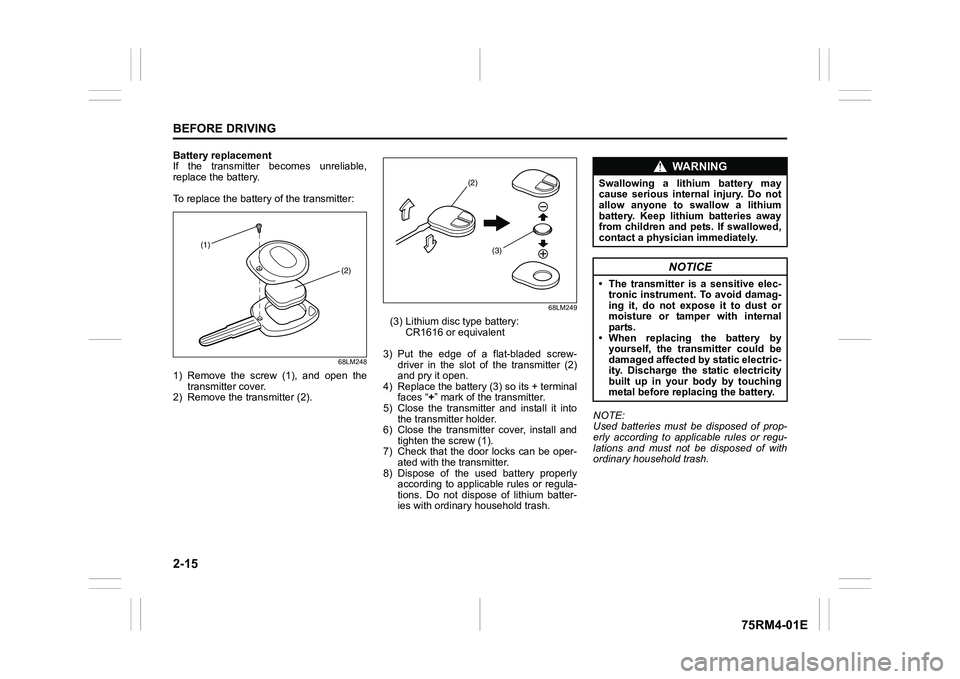
To replace the battery of the transmitter:
68LM248
1) Remove the screw (1), and open thetransmitter cover.
2) Remove the transmitter (2).
68LM249
(3) Lithium disc type battery: CR1616 or equivalent
3) Put the edge of a flat-bladed screw- driver in the slot of the transmitter (2)
and pry it open.
4) Replace the battery (3) so its + terminal faces “ +” mark of the transmitter.
5) Close the transmitter and install it into the transmitter holder.
6) Close the transmitter cover, install and
tighten the screw (1).
7) Check that the door locks can be oper- ated with the transmitter.
8) Dispose of the used battery properly according to applicable rules or regula-
tions. Do not dispose of lithium batter-
ies with ordinary household trash. NOTE:
Used batteries must be disposed of prop-
erly according to applicable rules or regu-
lations and must not be disposed of with
ordinary household trash.
(1)
(2)
(2)
(3)
WA R N I N G
Swallowing a lithium battery may
cause serious internal injury. Do not
allow anyone to swallow a lithium
battery. Keep lithium batteries away
from children and pets. If swallowed,
contact a physici an immediately.
NOTICE
• The transmitter is a sensitive elec-
tronic instrument. To avoid damag-
ing it, do not expose it to dust or
moisture or tamper with internal
parts.
• When replacing the battery by yourself, the transmitter could be
damaged affected by static electric-
ity. Discharge the static electricity
built up in your body by touching
metal before repla cing the battery.
Page 39 of 505
2-16
BEFORE DRIVING
75RM4-01E
80JM133
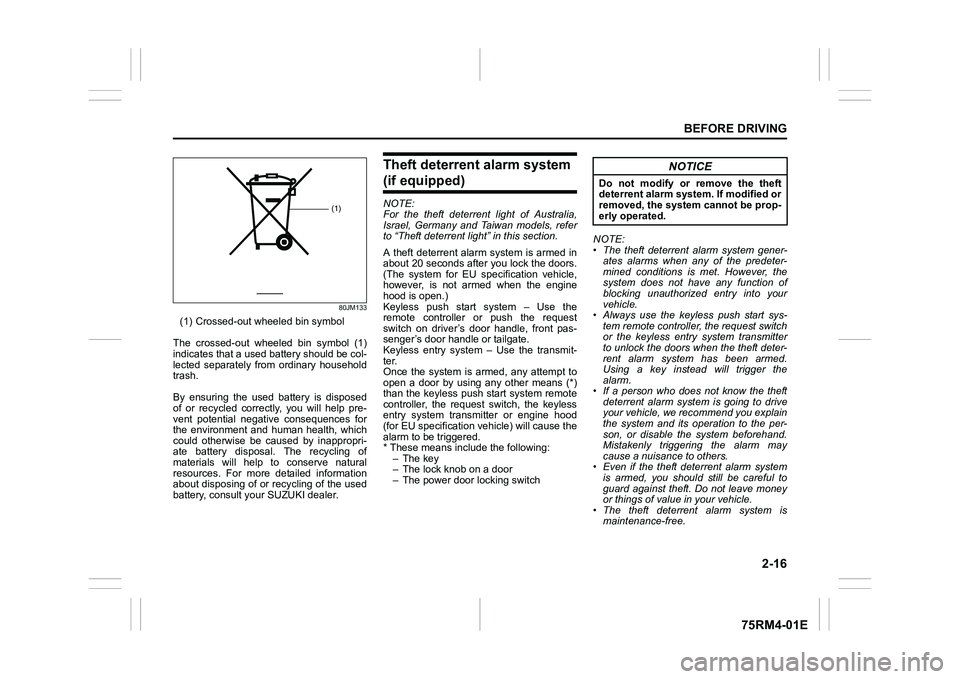
(1) Crossed-out wheeled bin symbol
The crossed-out wheeled bin symbol (1)
indicates that a used battery should be col-
lected separately from ordinary household
trash.
By ensuring the used battery is disposed
of or recycled correctly, you will help pre-
vent potential negative consequences for
the environment and human health, which
could otherwise be caused by inappropri-
ate battery disposal. The recycling of
materials will help to conserve natural
resources. For more detailed information
about disposing of or recycling of the used
battery, consult your SUZUKI dealer.
Theft deterrent alarm system (if equipped)NOTE:
For the theft deterrent light of Australia,
Israel, Germany and Taiwan models, refer
to “Theft deterrent light” in this section.
A theft deterrent alarm system is armed in
about 20 seconds after you lock the doors.
(The system for EU spec ification vehicle,
however, is not armed when the engine
hood is open.)
Keyless push start system – Use the
remote controller or push the request
switch on driver’s door handle, front pas-
senger’s door handle or tailgate.
Keyless entry system – Use the transmit-
ter.
Once the system is armed, any attempt to
open a door by using any other means (*)
than the keyless push start system remote
controller, the request switch, the keyless
entry system transmitter or engine hood
(for EU specification vehicle) will cause the
alarm to be triggered.
* These means include the following:
–The key
– The lock knob on a door
– The power door locking switch NOTE:
• The theft deterrent alarm system gener-
ates alarms when any of the predeter-
mined conditions is met. However, the
system does not have any function of
blocking unauthorized entry into your
vehicle.
• Always use the keyless push start sys-
tem remote controller, the request switch
or the keyless entry system transmitter
to unlock the doors when the theft deter-
rent alarm system has been armed.
Using a key instead will trigger the
alarm.
• If a person who does not know the theft deterrent alarm system is going to drive
your vehicle, we recommend you explain
the system and its operation to the per-
son, or disable the system beforehand.
Mistakenly triggering the alarm may
cause a nuisance to others.
• Even if the theft deterrent alarm system is armed, you should still be careful to
guard against theft. Do not leave money
or things of value in your vehicle.
• The theft deterrent alarm system is
maintenance-free.
(1)
NOTICE
Do not modify or remove the theft
deterrent alarm system. If modified or
removed, the system cannot be prop-
erly operated.
Page 42 of 505
2-19BEFORE DRIVING
75RM4-01E
1) Close all the doors and turn the lockknob (1) on the driver’s door in the
unlocking direction (2) (rearward). Turn
the knob on the lighting control lever to
“OFF” position (5).
NOTE:
All operations included in the following
Step 2) and 3) must be completed within
15 seconds.
2) Turn the knob on the lighting control lever to the position (6) and then to
“OFF” position (5). Repeat this opera-
tion 4 times with the control lever finally
set to “OFF” position.
3) Push the lock end (3) (forward end) of
the power door lock switch (4) to lock
the doors, and then the unlock end (2)
(backward end) to unlock the doors.
Repeat these operations 3 times and
finally push the lock end of the switch. Every time you perform the series of the
above steps, the state of the theft deterrent
alarm system changes from the currently
selected one to the other. You can check
whether the system is
enabled or disabled
by the number of interior buzzer beeps at
the end of the procedure as follows.
NOTE:
• You cannot disable the theft deterrent
alarm system while it is in the armed
condition.
• If you fail to complete the operations in
Step 2) and 3) within 15 seconds, per-
form the procedure again from the
beginning.
• Check that all doors are closed when performing the above procedure.
NOTE:
You can also switch the theft deterrent
alarm system from the enabled state to the
disabled state, and vice versa, via the
information display setting mode. For
details on how to use the information dis-
play, refer to “Informa tion display” in this
section.
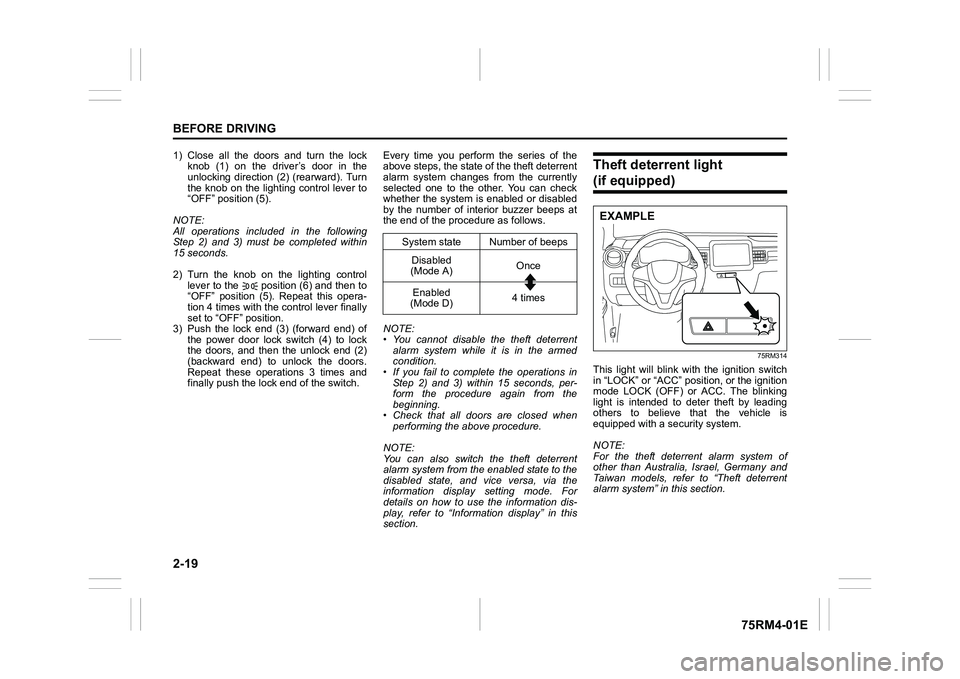
Theft deterrent light (if equipped)
75RM314
This light will blink with the ignition switch
in “LOCK” or “ACC” pos ition, or the ignition
mode LOCK (OFF) or ACC. The blinking
light is intended to deter theft by leading
others to believe that the vehicle is
equipped with a security system.
NOTE:
For the theft deterrent alarm system of
other than Australia, Israel, Germany and
Taiwan models, refer to “Theft deterrent
alarm system” in this section.
System state Number of beeps Disabled
(Mode A) Once
Enabled
(Mode D) 4 times
EXAMPLE
Page 43 of 505
2-20
BEFORE DRIVING
75RM4-01E
WindowsManual window control (if equipped)
60G010A
Raise or lower the door windows by turning
the handle located on the door panel.
Electric window controls (if equipped)The electric windows can only be operated
when the ignition switch is in “ON” position
or the ignition mode is ON.
Driver’s side (Type A)
75RM159
Driver’s side (Type B)
75RM160
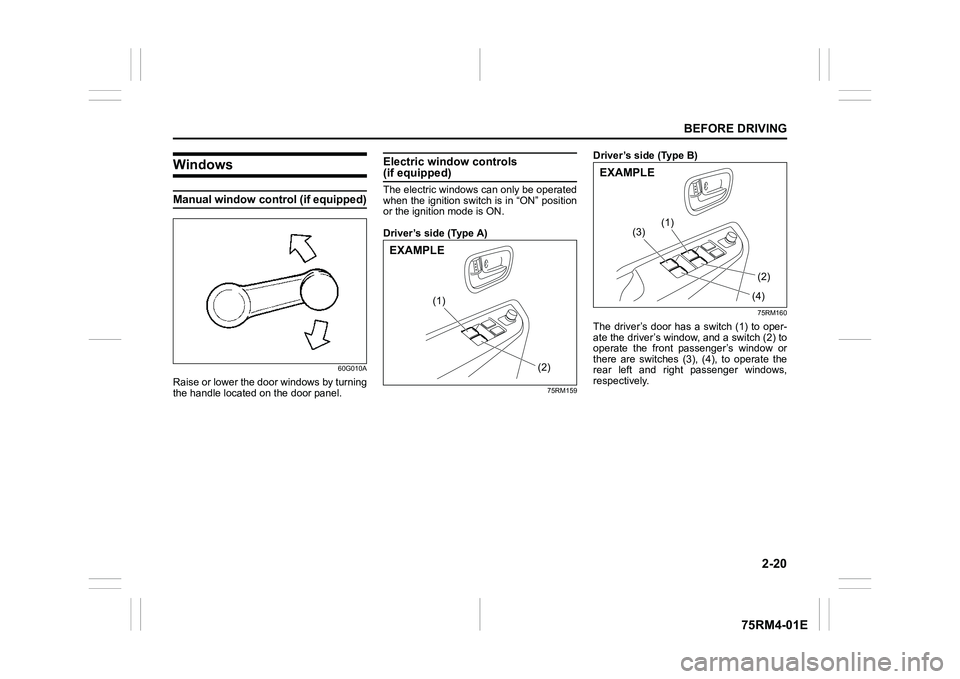
The driver’s door has a switch (1) to oper-
ate the driver’s window, and a switch (2) to
operate the front passenger’s window or
there are switches (3), (4), to operate the
rear left and right passenger windows,
respectively.
(2)
(1)
EXAMPLE
(2F(4F
(1F
(3F
EXAMPLE
Page 44 of 505
2-21BEFORE DRIVING
75RM4-01E
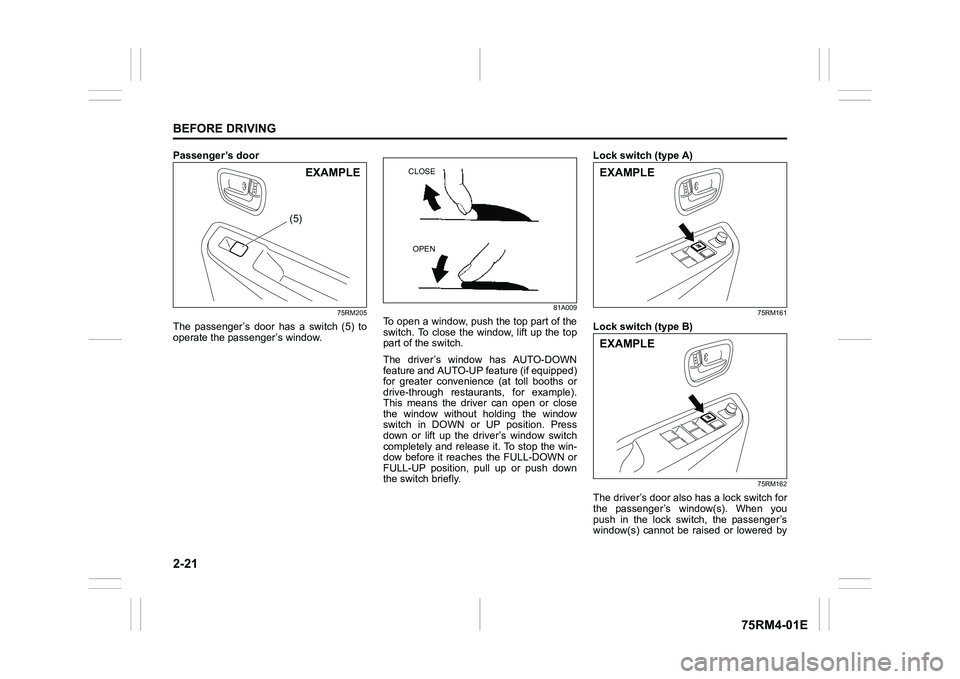
Passenger’s door
75RM205
The passenger’s door has a switch (5) to
operate the passenger’s window.
81A009
To open a window, push the top part of the
switch. To close the window, lift up the top
part of the switch.
The driver’s window has AUTO-DOWN
feature and AUTO-UP feature (if equipped)
for greater convenience (at toll booths or
drive-through restaurants, for example).
This means the driver can open or close
the window without holding the window
switch in DOWN or UP position. Press
down or lift up the driver’s window switch
completely and release it. To stop the win-
dow before it reaches the FULL-DOWN or
FULL-UP position, pull up or push down
the switch briefly. Lock switch (type A)
75RM161
Lock switch (type B)
75RM162
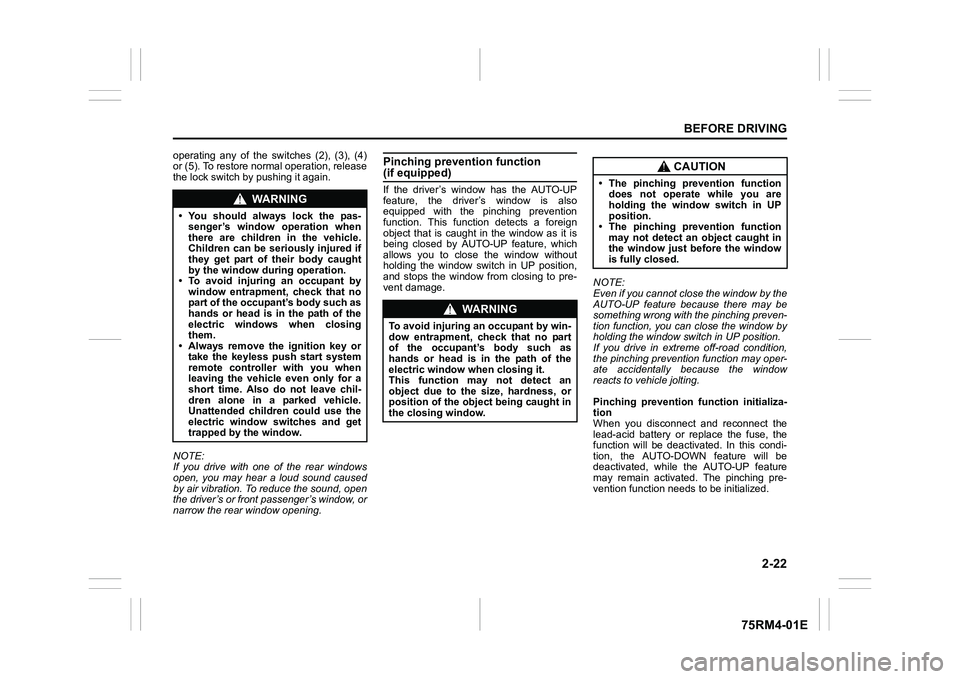
The driver’s door also has a lock switch for
the passenger’s window(s). When you
push in the lock switch, the passenger’s
window(s) cannot be raised or lowered by
(5)
EXAMPLE
CLOSE
OPEN
EXAMPLEEXAMPLE
Page 45 of 505
2-22
BEFORE DRIVING
75RM4-01E
operating any of the switches (2), (3), (4)
or (5). To restore normal operation, release
the lock switch by pushing it again.
NOTE:
If you drive with one of the rear windows
open, you may hear a loud sound caused
by air vibration. To reduce the sound, open
the driver’s or front passenger’s window, or
narrow the rear window opening.
Pinching prevention function (if equipped)If the driver’s window has the AUTO-UP
feature, the driver’s window is also
equipped with the pinching prevention
function. This function detects a foreign
object that is caught in the window as it is
being closed by AUTO-UP feature, which
allows you to close the window without
holding the window switch in UP position,
and stops the window from closing to pre-
vent damage. NOTE:
Even if you cannot close the window by the
AUTO-UP feature because there may be
something wrong with the pinching preven-
tion function, you can close the window by
holding the window switch in UP position.
If you drive in extreme off-road condition,
the pinching prevention function may oper-
ate accidentally because the window
reacts to vehicle jolting.
Pinching prevention function initializa-
tion
When you disconnect and reconnect the
lead-acid battery or replace the fuse, the
function will be deactivated. In this condi-
tion, the AUTO-DOWN feature will be
deactivated, while the AUTO-UP feature
may remain activated. The pinching pre-
vention function needs to be initialized.
WA R N I N G
• You should always lock the pas-
senger’s window operation when
there are children in the vehicle.
Children can be seriously injured if
they get part of their body caught
by the window during operation.
• To avoid injuring an occupant by window entrapment, check that no
part of the occupant’s body such as
hands or head is in the path of the
electric windows when closing
them.
• Always remove the ignition key or
take the keyless push start system
remote controller with you when
leaving the vehicle even only for a
short time. Also do not leave chil-
dren alone in a parked vehicle.
Unattended children could use the
electric window switches and get
trapped by the window.
WA R N I N G
To avoid injuring an occupant by win-
dow entrapment, check that no part
of the occupant’s body such as
hands or head is in the path of the
electric window when closing it.
This function may not detect an
object due to the size, hardness, or
position of the object being caught in
the closing window.
CAUTION
• The pinching prevention functiondoes not operate while you are
holding the window switch in UP
position.
• The pinching prevention function
may not detect an object caught in
the window just before the window
is fully closed.