Second battery SUZUKI IGNIS 2022 User Guide
[x] Cancel search | Manufacturer: SUZUKI, Model Year: 2022, Model line: IGNIS, Model: SUZUKI IGNIS 2022Pages: 505, PDF Size: 8.36 MB
Page 160 of 505
3-7OPERATING YOUR VEHICLE
75RM4-01E
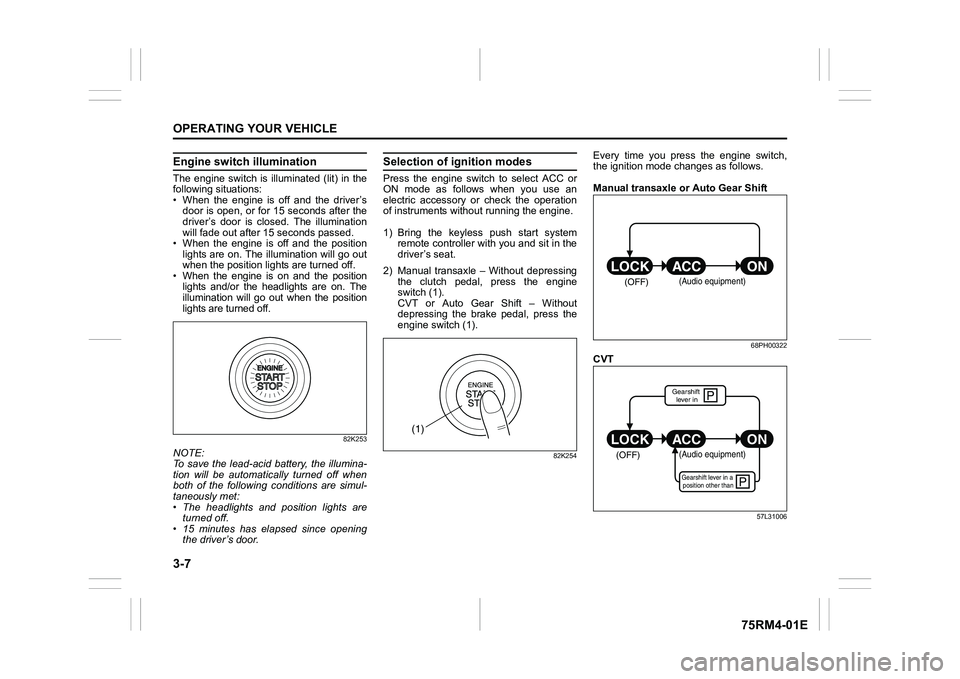
Engine switch illuminationThe engine switch is illuminated (lit) in the
following situations:
• When the engine is off and the driver’sdoor is open, or for 15 seconds after the
driver’s door is closed. The illumination
will fade out after 15 seconds passed.
• When the engine is off and the position lights are on. The illumination will go out
when the position lig hts are turned off.
• When the engine is on and the position lights and/or the headlights are on. The
illumination will go out when the position
lights are turned off.
82K253
NOTE:
To save the lead-acid battery, the illumina-
tion will be automatically turned off when
both of the following conditions are simul-
taneously met:
• The headlights and position lights areturned off.
• 15 minutes has elapsed since opening
the driver’s door.
Selection of i gnition modesPress the engine switch to select ACC or
ON mode as follows when you use an
electric accessory or check the operation
of instruments without running the engine.
1) Bring the keyless push start system remote controller with you and sit in the
driver’s seat.
2) Manual transaxle – Without depressing the clutch pedal, press the engine
switch (1).
CVT or Auto Gear Shift – Without
depressing the brake pedal, press the
engine switch (1).
82K254
Every time you press the engine switch,
the ignition mode changes as follows.
Manual transaxle or Auto Gear Shift
68PH00322
CVT
57L31006
(1)
(OFF)
(Audio equipment)
çP
P
(OFF)
ON
ACC
LOCK
(Audio equipment)Gearshift lever in a
position other thanGearshift lever in
Page 161 of 505
3-8
OPERATING YOUR VEHICLE
75RM4-01E
NOTE:
• CVT – If the gearshift lever is in anyposition other than “P”, or if the knob but-
ton is pushed when the gearshift lever is
in “P” position the ignition mode cannot
be returned to LOCK (OFF).
• When selecting the ignition modes, the information display in the instrument
cluster shows certain messages. Refer
to “Information display” in the “BEFORE
DRIVING” section for details.
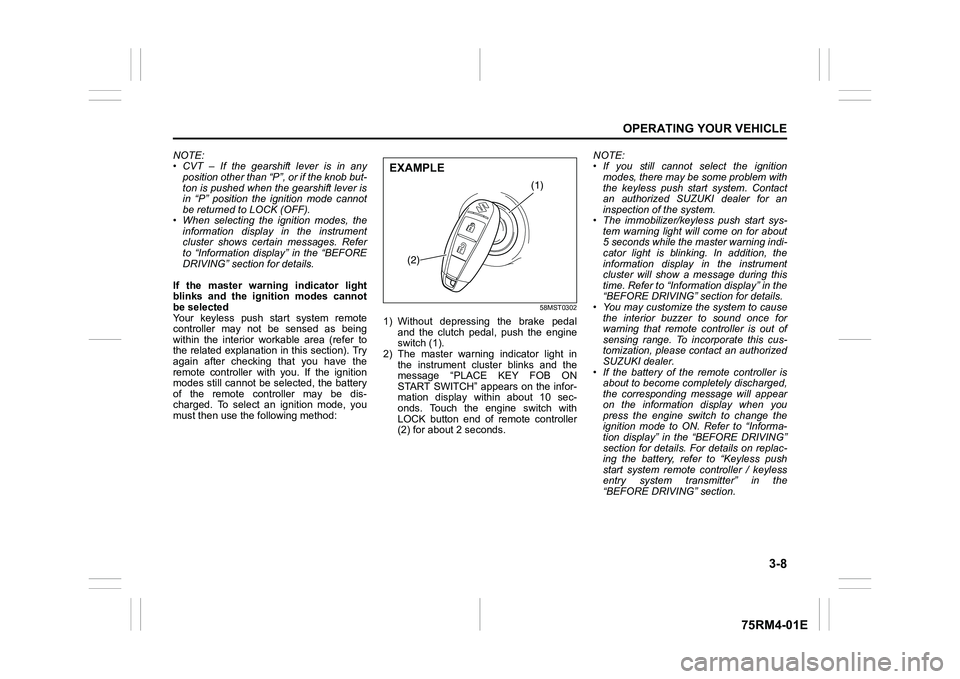
If the master warning indicator light
blinks and the ignition modes cannot
be selected
Your keyless push start system remote
controller may not be sensed as being
within the interior wo rkable area (refer to
the related explanation in this section). Try
again after checking that you have the
remote controller with you. If the ignition
modes still cannot be selected, the battery
of the remote controller may be dis-
charged. To select an ignition mode, you
must then use the following method:
58MST0302
1) Without depressing the brake pedal
and the clutch pedal, push the engine
switch (1).
2) The master warning indicator light in the instrument cluster blinks and the
message “PLACE KEY FOB ON
START SWITCH” appears on the infor-
mation display within about 10 sec-
onds. Touch the engine switch with
LOCK button end of remote controller
(2) for about 2 seconds. NOTE:
• If you still cannot
select the ignition
modes, there may be some problem with
the keyless push start system. Contact
an authorized SUZUKI dealer for an
inspection of the system.
• The immobilizer/keyless push start sys- tem warning light will come on for about
5 seconds while the master warning indi-
cator light is blinking. In addition, the
information display in the instrument
cluster will show a message during this
time. Refer to “Informa tion display” in the
“BEFORE DRIVING” section for details.
• You may customize the system to cause
the interior buzzer to sound once for
warning that remote controller is out of
sensing range. To incorporate this cus-
tomization, please contact an authorized
SUZUKI dealer.
• If the battery of the remote controller is about to become completely discharged,
the corresponding message will appear
on the information display when you
press the engine switch to change the
ignition mode to ON. Refer to “Informa-
tion display” in the “BEFORE DRIVING”
section for details. For details on replac-
ing the battery, refer to “Keyless push
start system remote controller / keyless
entry system transmitter” in the
“BEFORE DRIVING” section.
(1)
(2)
EXAMPLE
Page 169 of 505
3-16
OPERATING YOUR VEHICLE
75RM4-01E
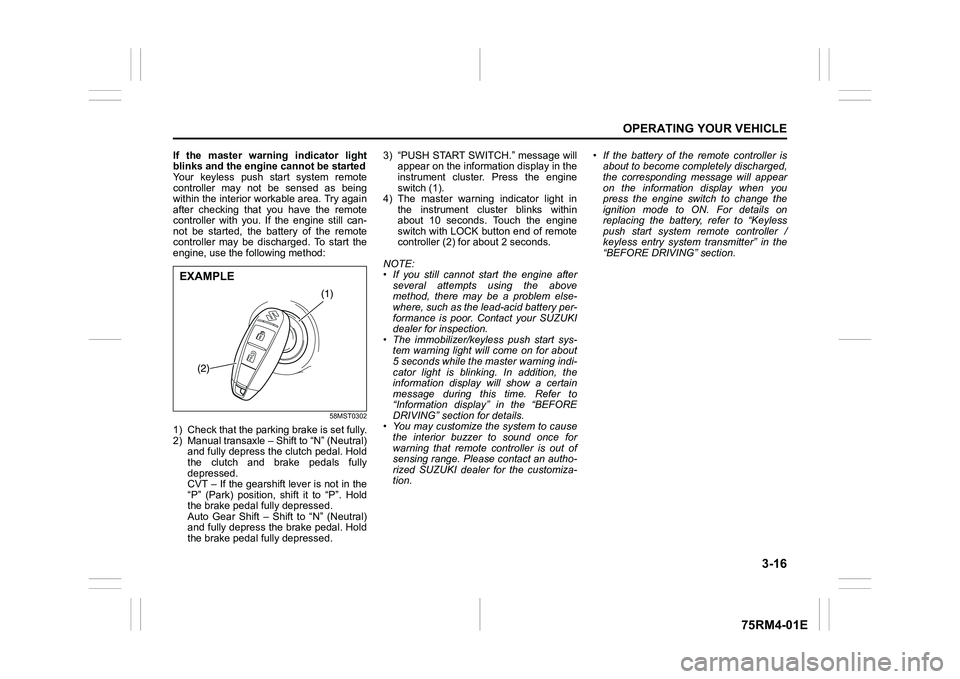
If the master warning indicator light
blinks and the engine cannot be started
Your keyless push start system remote
controller may not be sensed as being
within the interior workable area. Try again
after checking that you have the remote
controller with you. If the engine still can-
not be started, the battery of the remote
controller may be discharged. To start the
engine, use the following method:
58MST0302
1) Check that the parking brake is set fully.
2) Manual transaxle – Shift to “N” (Neutral) and fully depress the clutch pedal. Hold
the clutch and brake pedals fully
depressed.
CVT – If the gearshift lever is not in the
“P” (Park) position, shift it to “P”. Hold
the brake pedal fully depressed.
Auto Gear Shift – Shift to “N” (Neutral)
and fully depress the brake pedal. Hold
the brake pedal fully depressed. 3) “PUSH START SWITCH.” message will
appear on the information display in the
instrument cluster. Press the engine
switch (1).
4) The master warning indicator light in the instrument cluster blinks within
about 10 seconds. Touch the engine
switch with LOCK button end of remote
controller (2) for about 2 seconds.
NOTE:
• If you still cannot start the engine after several attempts using the above
method, there may be a problem else-
where, such as the lead-acid battery per-
formance is poor. Contact your SUZUKI
dealer for inspection.
• The immobilizer/keyless push start sys- tem warning light will come on for about
5 seconds while the master warning indi-
cator light is blinking. In addition, the
information display will show a certain
message during this time. Refer to
“Information display” in the “BEFORE
DRIVING” section for details.
• You may customize the system to cause
the interior buzzer to sound once for
warning that remote controller is out of
sensing range. Please contact an autho-
rized SUZUKI dealer for the customiza-
tion. • If the battery of the remote controller is
about to become completely discharged,
the corresponding message will appear
on the information display when you
press the engine switch to change the
ignition mode to ON. For details on
replacing the battery, refer to “Keyless
push start system remote controller /
keyless entry system transmitter” in the
“BEFORE DRIVING” section.
(1)
(2)
EXAMPLE
Page 198 of 505
3-45OPERATING YOUR VEHICLE
75RM4-01E
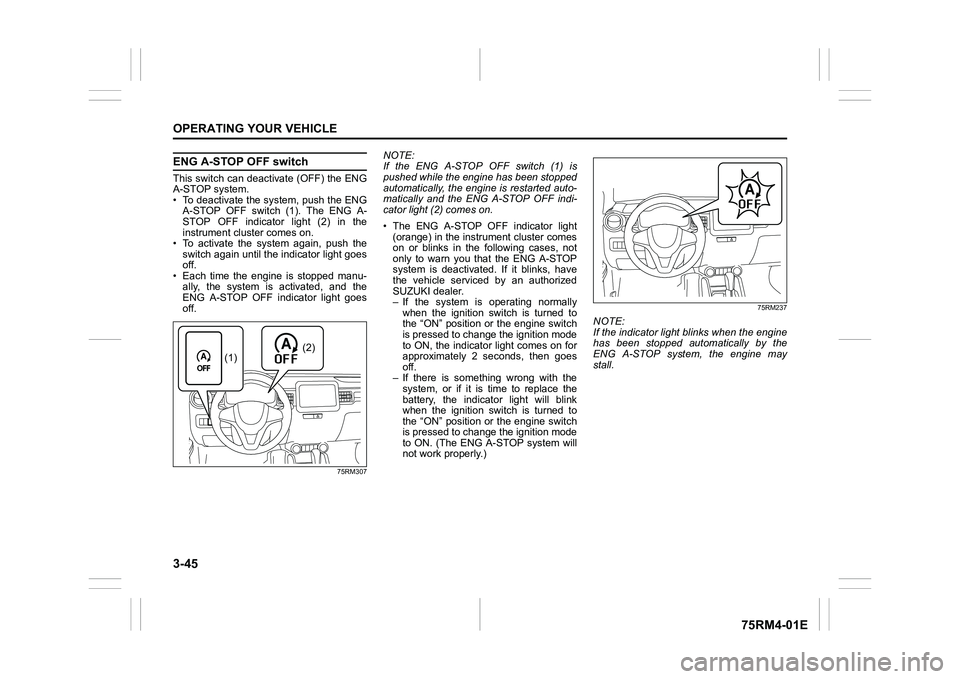
ENG A-STOP OFF switchThis switch can deactivate (OFF) the ENG
A-STOP system.
• To deactivate the system, push the ENGA-STOP OFF switch (1). The ENG A-
STOP OFF indicator light (2) in the
instrument cluster comes on.
• To activate the system again, push the switch again until the indicator light goes
off.
• Each time the engine is stopped manu- ally, the system is activated, and the
ENG A-STOP OFF indicator light goes
off.
75RM307
NOTE:
If the ENG A-STOP OFF switch (1) is
pushed while the engine has been stopped
automatically, the engine is restarted auto-
matically and the ENG A-STOP OFF indi-
cator light (2) comes on.
• The ENG A-STOP OFF indicator light (orange) in the instrument cluster comes
on or blinks in the following cases, not
only to warn you that the ENG A-STOP
system is deactivated. If it blinks, have
the vehicle serviced by an authorized
SUZUKI dealer.
– If the system is operating normally
when the ignition switch is turned to
the “ON” position or the engine switch
is pressed to change the ignition mode
to ON, the indicator light comes on for
approximately 2 seconds, then goes
off.
– If there is something wrong with the system, or if it is time to replace the
battery, the indicator light will blink
when the ignition switch is turned to
the “ON” position or the engine switch
is pressed to change the ignition mode
to ON. (The ENG A-STOP system will
not work properly.)
75RM237
NOTE:
If the indicator light blinks when the engine
has been stopped automatically by the
ENG A-STOP system, the engine may
stall.
(2)
(1)
Page 200 of 505
3-47OPERATING YOUR VEHICLE
75RM4-01E
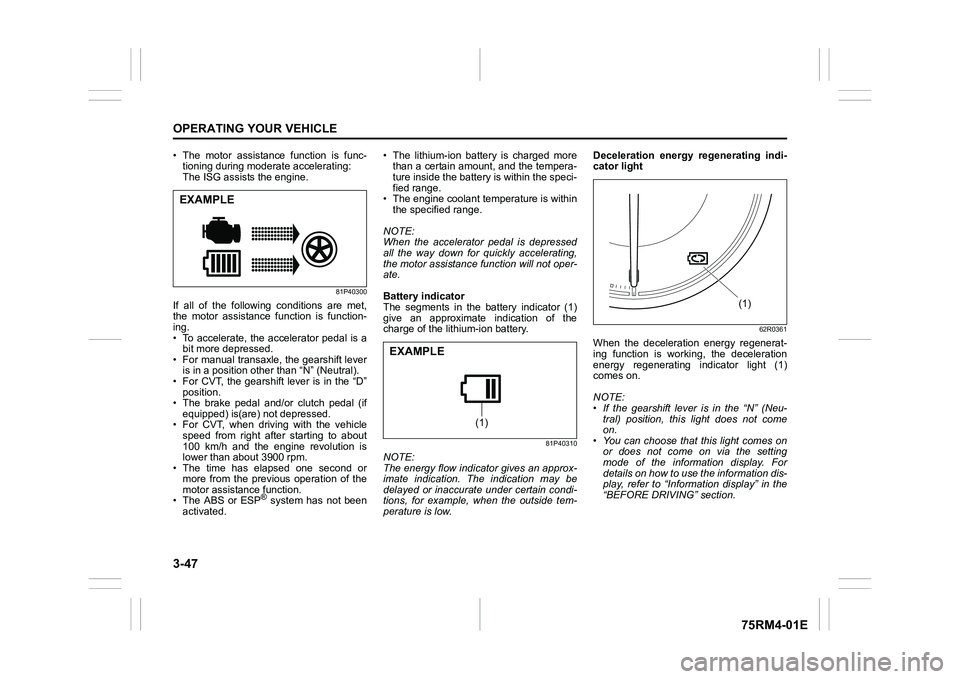
• The motor assistance function is func-tioning during moderate accelerating:
The ISG assists the engine.
81P40300
If all of the following conditions are met,
the motor assistance function is function-
ing.
• To accelerate, the accelerator pedal is a
bit more depressed.
• For manual transaxle, the gearshift lever is in a position other than “N” (Neutral).
• For CVT, the gearshift lever is in the “D” position.
• The brake pedal and/or clutch pedal (if
equipped) is(are) not depressed.
• For CVT, when driving with the vehicle speed from right after starting to about
100 km/h and the engine revolution is
lower than about 3900 rpm.
• The time has elapsed one second or
more from the previous operation of the
motor assistance function.
• The ABS or ESP
® system has not been
activated. • The lithium-ion battery is charged more
than a certain amount, and the tempera-
ture inside the battery is within the speci-
fied range.
• The engine coolant temperature is within the specified range.
NOTE:
When the accelerator pedal is depressed
all the way down for quickly accelerating,
the motor assistance function will not oper-
ate.
Battery indicator
The segments in the battery indicator (1)
give an approximate indication of the
charge of the lithium-ion battery.
81P40310
NOTE:
The energy flow indicator gives an approx-
imate indication. The indication may be
delayed or inaccurate under certain condi-
tions, for example, when the outside tem-
perature is low. Deceleration energy regenerating indi-
cator light
62R0361
When the deceleration energy regenerat-
ing function is working, the deceleration
energy regenerating indicator light (1)
comes on.
NOTE:
• If the gearshift lever is in the “N” (Neu-
tral) position, this light does not come
on.
• You can choose that this light comes on or does not come on via the setting
mode of the information display. For
details on how to use the information dis-
play, refer to “Informa tion display” in the
“BEFORE DRIVING” section.
EXAMPLE
(1)
EXAMPLE
(1)
Page 260 of 505
5-5OTHER CONTROLS AND EQUIPMENT
75RM4-01E
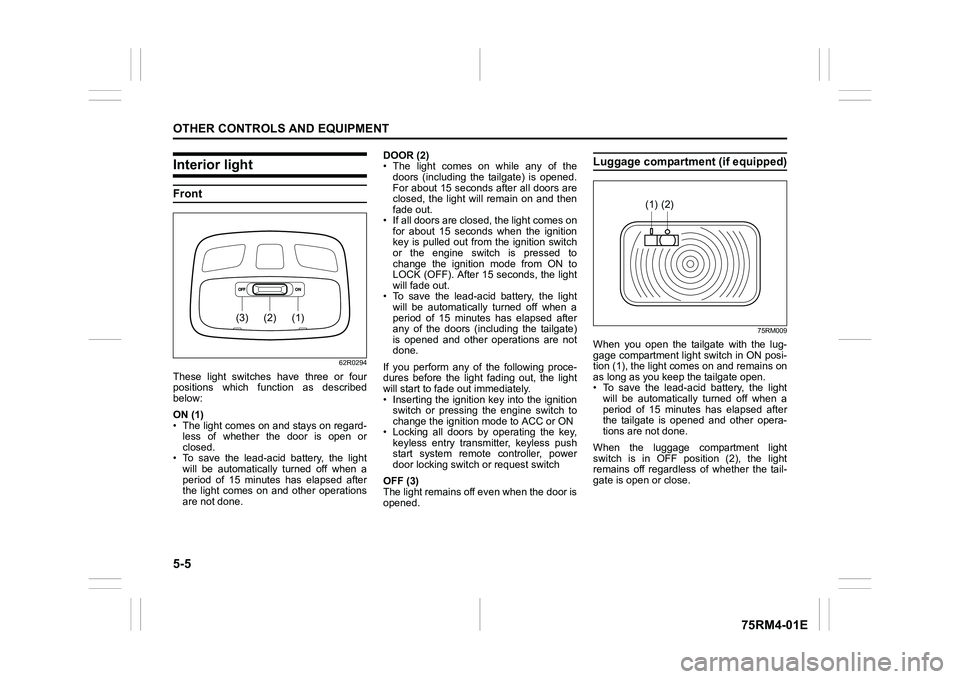
Interior lightFront
62R0294
These light switches have three or four
positions which function as described
below:
ON (1)
• The light comes on and stays on regard-less of whether the door is open or
closed.
• To save the lead-acid battery, the light
will be automatically turned off when a
period of 15 minutes has elapsed after
the light comes on and other operations
are not done. DOOR (2)
• The light comes on while any of the
doors (including the tailgate) is opened.
For about 15 seconds after all doors are
closed, the light will remain on and then
fade out.
• If all doors are closed, the light comes on for about 15 seconds when the ignition
key is pulled out from the ignition switch
or the engine switch is pressed to
change the ignition mode from ON to
LOCK (OFF). After 15 seconds, the light
will fade out.
• To save the lead-acid battery, the light will be automatically turned off when a
period of 15 minutes has elapsed after
any of the doors (including the tailgate)
is opened and other operations are not
done.
If you perform any of the following proce-
dures before the light fading out, the light
will start to fade out immediately.
• Inserting the ignition key into the ignition switch or pressing the engine switch to
change the ignition mode to ACC or ON
• Locking all doors by operating the key, keyless entry transmitter, keyless push
start system remote controller, power
door locking switc h or request switch
OFF (3)
The light remains off even when the door is
opened.
Luggage compartment (if equipped)
75RM009
When you open the tailgate with the lug-
gage compartment light switch in ON posi-
tion (1), the light com es on and remains on
as long as you keep the tailgate open.
• To save the lead-acid battery, the light
will be automatically turned off when a
period of 15 minutes has elapsed after
the tailgate is opened and other opera-
tions are not done.
When the luggage compartment light
switch is in OFF position (2), the light
remains off regardless of whether the tail-
gate is open or close.
(1)
(2)
(3)
(2)
(1)
Page 317 of 505
![SUZUKI IGNIS 2022 User Guide 5-62
OTHER CONTROLS AND EQUIPMENT
75RM4-01E
Playing mode selection
1) Press the button numbered [6] of PRE-SET buttons (8) for 1 second or longer.
2) Turn “TUNE/FLD PUSH SOUND” knob (2).
Eac](/img/20/43482/w960_43482-316.png "SUZUKI IGNIS 2022 User Guide 5-62
OTHER CONTROLS AND EQUIPMENT
75RM4-01E
Playing mode selection
1) Press the button numbered [6] of PRE-SET buttons (8) for 1 second or longer.
2) Turn “TUNE/FLD PUSH SOUND” knob (2).
Eac")
5-62
OTHER CONTROLS AND EQUIPMENT
75RM4-01E
Playing mode selection
1) Press the button numbered [6] of PRE-SET buttons (8) for 1 second or longer.
2) Turn “TUNE/FLD PUSH SOUND” knob (2).
Each time the knob is turned, the mode
will change as follows:
3) Press “TUNE/FLD PUSH SOUND” knob (2) to select the desired mode.
NOTE:
• When the button numbered [6] of PRE- SET buttons (8) is pressed, the previous
mode will be displayed.
Notes on iPod
®
Supported iPod
®
•iPod
® touch (6th generation)
•iPod® touch (5th generation)
•iPod® touch (4th generation)
•iPod® touch (3rd generation)
•iPod® touch (2nd generation)
•iPod® touch (1st generation)
•iPod® classic
•iPod® nano (7th generation)
•iPod® nano (6th generation)
•iPod® nano (5th generation)
•iPod® nano (4th generation)
•iPod® nano (3rd generation)
•iPod® nano (2nd generation)
•iPod® nano (1st generation)
•iPod® (5th generation)
• iPhone® 6S Plus
• iPhone® 6S
• iPhone® 6 Plus
• iPhone® 6
• iPhone® 5S
• iPhone® 5C
• iPhone® 5
• iPhone® 4S
• iPhone® 4
• iPhone® 3GS
• iPhone® 3G
• iPhone®
* Some functions may not be available depending on the model of iPod
®.
*iPod
® is a trademark of Apple Inc., regis-
tered in the U.S. and other countries.
* iPhone® is a trademark of Apple Inc.,
registered in the U.S. and other coun-
tries.
* Apple is not responsible for the opera- tion of this device or its compliance with
safety and regulatory standards.
iPod
® connection
• Make sure to detach the iPod
® after
turning the ignition switch to “LOCK”
position or pressing the engine switch to
change the ignition mode to LOCK
(OFF). The iPod
® may not be shut down
when it is being connected and may
result in battery depletion.
• Do not connect iPod
® accessories such
as an iPod
® remote control or head-
phones while connecting the iPod
® with
the unit. The unit may not operate cor-
rectly.
PLAYLIST
ARTIST
ALBUM
SONGS
PODCAST
GENRE
AUDIOBOOK
Page 335 of 505
![SUZUKI IGNIS 2022 User Guide 5-80
OTHER CONTROLS AND EQUIPMENT
75RM4-01E
Setting the anti-theft function
1) Press “VOL PUSH PWR” knob (1) to power off.
2) Hold down the buttons numbered [1] and [6] of PRESET b](/img/20/43482/w960_43482-334.png "SUZUKI IGNIS 2022 User Guide 5-80
OTHER CONTROLS AND EQUIPMENT
75RM4-01E
Setting the anti-theft function
1) Press “VOL PUSH PWR” knob (1) to power off.
2) Hold down the buttons numbered [1] and [6] of PRESET b")
5-80
OTHER CONTROLS AND EQUIPMENT
75RM4-01E
Setting the anti-theft function
1) Press “VOL PUSH PWR” knob (1) to power off.
2) Hold down the buttons numbered [1] and [6] of PRESET buttons (2) and
press “VOL PUSH PWR” knob (1).
“SECURITY” will be displayed.
3) Press UP button (3) and the button numbered [1] of P RESET buttons (2)
simultaneously.
4) Enter a 4-digit number to be registered as PIN using the buttons numbered [1]
- [4] of PRESET buttons (2).
5) Hold down “TUNE/FLD PUSH
SOUND” knob (4) for 1 second or lon-
ger to set the anti-theft function.
NOTE:
Take a note of the registered PIN and keep
it for the future use. Canceling the anti-theft feature
To cancel the anti-theft function, delete the
registered PIN.
1) Press “VOL PUSH PWR” knob (1) to
power off.
2) Hold down the buttons numbered [1]
and [6] of PRESET buttons (2) and
press “VOL PUSH PWR” knob (1).
“PIN ENTRY” will be displayed.
3) Press UP button (3) and the button numbered [1] of P RESET buttons (2)
simultaneously.
4) Enter a 4-digit number to be registered as PIN using the buttons numbered [1]
- [4] of PRESET buttons (2).
5) Hold down “TUNE/FLD PUSH SOUND” knob (4) for 1 second or lon-
ger to delete the registered PIN. The
indication “----” will be displayed and
the anti-theft function will be canceled.
NOTE:
To change your PIN, first delete your cur-
rent PIN, and then set a new one. Confirming the Personal Identification
Number (PIN)
When the main power source is discon-
nected such as when the lead-acid battery
is replaced, etc, it is required to enter the
PIN to operate
the unit again.
1) Set the ignition switch to “ACC” posi- tion or the ignition mode to ON.
“SECURITY” will be displayed.
2) Press UP button (3) and the button numbered [1] of P RESET buttons (2)
simultaneously.
3) Enter a 4-digit number to be registered as PIN using the buttons numbered [1]
- [4] of PRESET buttons (2).
4) Hold down “TUNE/FLD PUSH SOUND” knob (4) for 1 second or lon-
ger.
When the same PIN as registered is
entered, the power of the audio system
will be turned off automatically and it
will become operable again.
NOTE:
If an incorrect PIN is entered, “ERROR”
and the total number of incorrect entry
attempts will be displayed.
If an incorrect PIN is entered 10 times or
more, “HELP” will be displayed and the
audio system will become inoperable.
Page 350 of 505
7-1INSPECTION AND MAINTENANCE
75RM4-01E
60B128S
WA R N I N G
Take extreme care when working on
your vehicle to prevent accidental
injury. Carefully observe the follow-
ing precautions:
• To prevent damage or unintendedactivation of the air bag system or
seat belt pretensioner system, check
that the lead-acid battery is discon-
nected and the ignition switch has
been in “LOCK” position or the igni-
tion mode has been LOCK (OFF) for
at least 90 seconds before perform-
ing any electrical service work on
your SUZUKI vehicle. Do not touch
air bag system components, seat
belt pretensioner system compo-
nents or wires.
The wires are wrapped with yellow
tape or yellow tubing, and the cou-
plers are yellow for easy identifica-
tion.
• Do not leave the engine running in garages or other confined areas. (Continued)
WA R N I N G
(Continued)
• When the engine is running, keep
hands, clothing, tools, and other
objects away from the fan and drive
belt. Even though the fan may not
be moving, it can automatically
turn on without warning.
• When it is necessary to perform
service work with the engine run-
ning, check that the parking brake
is set fully and the transaxle is in
Neutral (for manual transaxle or
Auto Gear Shift vehicles) or Park
(for CVT vehicles).
• Do not touch ignition wires or other ignition system parts when starting
the engine or when the engine is
running, or you could receive an
electric shock.
•Be careful not to touch a hot engine, exhaust manifold and
pipes, muffler, radiator and water
hoses.
• Do not allow smoking, sparks, or flames around fuel or the battery.
Flammable fumes are present.
• Do not get under your vehicle if it is supported only with the portable
jack provided in your vehicle.
• Be careful not to cause accidental short circuits between the positive
and negative battery terminals. (Continued)
WA R N I N G
(Continued)
• Keep used oil, coolant, and other
fluids away from children and pets.
Dispose of used fluids properly;
never pour them on the ground,
into sewers, etc.
Page 420 of 505
8-11EMERGENCY SERVICE
75RM4-01E
54P000804
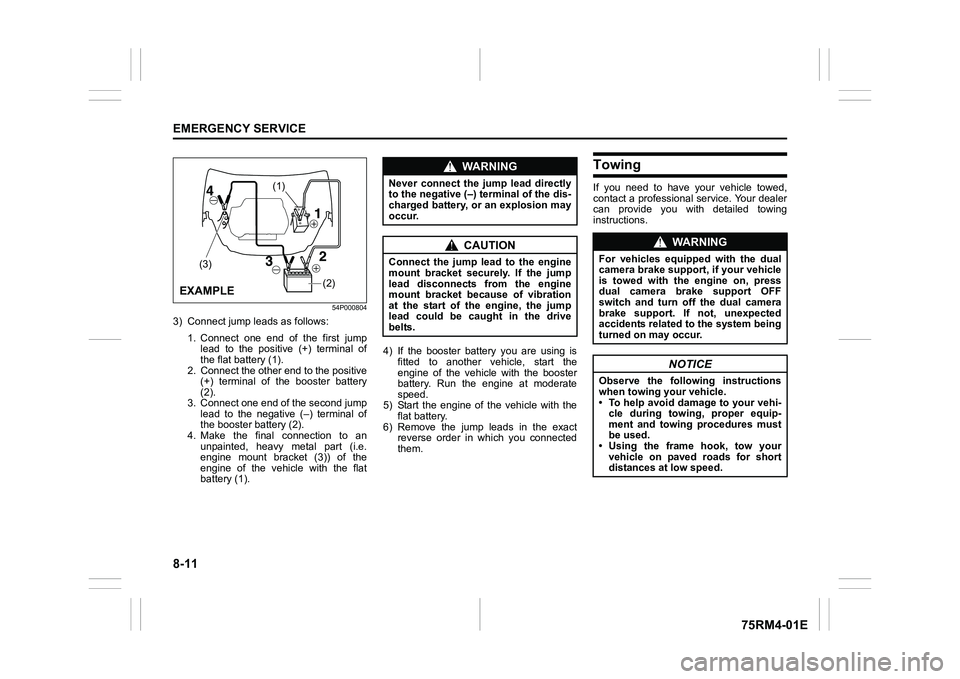
3) Connect jump leads as follows:1. Connect one end of the first jumplead to the positive (+) terminal of
the flat battery (1).
2. Connect the other end to the positive (+) terminal of the booster battery
(2).
3. Connect one end of the second jump lead to the negative (–) terminal of
the booster battery (2).
4. Make the final connection to an unpainted, heavy metal part (i.e.
engine mount bracket (3)) of the
engine of the vehicle with the flat
battery (1). 4) If the booster battery you are using is
fitted to another vehicle, start the
engine of the vehicle with the booster
battery. Run the engine at moderate
speed.
5) Start the engine of the vehicle with the flat battery.
6) Remove the jump leads in the exact reverse order in which you connected
them.
TowingIf you need to have your vehicle towed,
contact a professional service. Your dealer
can provide you with detailed towing
instructions.
(2)
(1)
(3)
EXAMPLE
WA R N I N G
Never connect the jump lead directly
to the negative (–) terminal of the dis-
charged battery, or an explosion may
occur.
CAUTION
Connect the jump l ead to the engine
mount bracket securely. If the jump
lead disconnects from the engine
mount bracket because of vibration
at the start of the engine, the jump
lead could be caught in the drive
belts.
WA R N I N G
For vehicles equipped with the dual
camera brake support, if your vehicle
is towed with the engine on, press
dual camera brake support OFF
switch and turn off the dual camera
brake support. If not, unexpected
accidents related to the system being
turned on may occur.
NOTICE
Observe the following instructions
when towing your vehicle.
• To help avoid damage to your vehi- cle during towing, proper equip-
ment and towing procedures must
be used.
• Using the frame hook, tow your
vehicle on paved roads for short
distances at low speed.