brake light SUZUKI JIMNY 2020 User Guide
[x] Cancel search | Manufacturer: SUZUKI, Model Year: 2020, Model line: JIMNY, Model: SUZUKI JIMNY 2020Pages: 421, PDF Size: 6.35 MB
Page 123 of 421
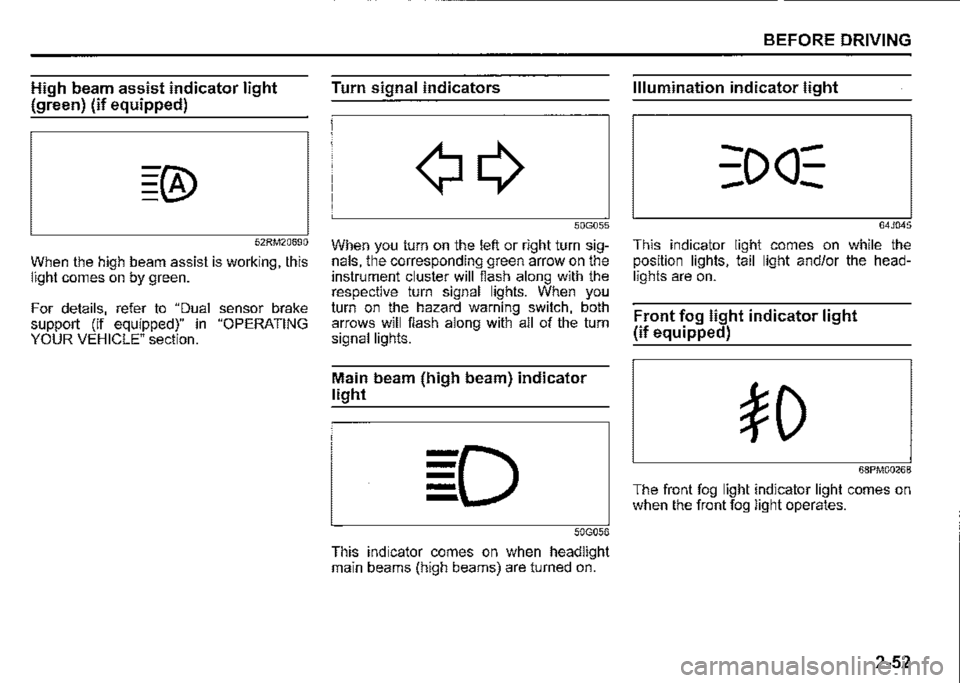
High beam assist indicator light
(green) (if equipped)
52RM20690
When the high beam assist is working, this light comes on by green.
For details, refer to "Dual sensor brake support (if equipped)" in "OPERATING YOUR VEHICLE" section.
Turn signal indicators
50G055
When you turn on the left or right turn signals, the corresponding green arrow on the instrument cluster will flash along with the respective turn signal lights. When you turn on the hazard warning switch, both arrows will flash along with all of the turn signal lights.
Main beam (high beam) indicator
light
50G056
This indicator comes on when headlight main beams (high beams) are turned on.
BEFORE DRIVING
Illumination indicator light
64J045
This indicator light comes on while the position lights, tail light and/or the headlights are on.
Front fog light indicator light
(if equipped)
68PM00268
The front fog light indicator light comes on when the front fog light operates.
2-52
Page 145 of 421
Tow bars
Only use a tow bar that is designed to attach to the chassis of your vehicle, and a hitch that is designed to bolt to this tow bar. We recommend that you use a genuine SUZUKI tow bar kit (available as an option), or equivalent.
A WARNING
Never use a tow bar which attaches to the axle or the bumper of your vehicle.
Safety chains
Always attach safety chains between your vehicle and the trailer. Cross safety chains under the nose of the trailer so that the nose will not drop to the road if the trailer becomes separated from the tow bar. Follow the manufacturer's recommendation for attaching safety chains. Always leave just enough slack to permit full turning. Never allow safety chains to drag on the road.
A WARNING
Never attach safety chains to the bumper of your vehicle. Secure connections so that they cannot come loose.
-----------------------
Trailer lights
Check that your trailer is equipped with lights which meet local requirements. Always check for the proper operation of all trailer lights before you start to tow.
A WARNING
Never connect trailer lights directly into your vehicle's electrical system, or electrical system damage may occur.
Brakes
A WARNING
If the trailer is equipped with the brakes, follow all instructions provided by the manufacturer. Never connect to the brake system of your vehicle and never take an electrical supply directly from the wiring har
ness.
BEFORE DRIVING
Tyres
A WARNING
When towing a trailer, it is very important for your vehicle and trailer to have properly inflated tyres. Your vehicle's tyres should be inflated to the pressures listed on your vehicle's tyre information label. The tyres should be inflated to the laden pressures. Inflate trailer tyres according to the specifications provided by the trailer manufacturer.
Mirrors
Check if your vehicle's mirrors meet local requirements for mirrors used on towing vehicles. If they do not, you must install the required mirrors before you tow.
2-74
Page 147 of 421
A WARNING
Your vehicle should be handled in a different way when towing a trailer. For the safety of yourself and others, observe the following precautions: Practice turning, stopping, and reversing before you begin towing a trailer in traffic. Do not tow a trailer in traffic until you are confident that you can handle the vehicle and trailer safely. Never exceed local towing speed limits or 80 km/h (50 mph), whichever is lower. Never drive at a speed that causes shaking or swaying of the trailer. If you notice even the slightest sign of shaking or swaying, slow down. • When roads are wet, slippery or rough, drive at a slower speed than you would on dry or smooth roads. Failure to slow down when road conditions are bad can result in loss of control. Always have someone guide you when reversing. (Continued)
A WARNING
(Continued) Always admit greater stopping distance. Stopping distance is increased when you tow a trailer. For each 16 km/h (10 mph) of speed, allow at least one vehicle and trailer length between you and the vehicle ahead. Allow a greater stopping distance if roads are wet or slippery. If the trailer has over-run brakes, apply the brakes gradually to avoid snatching caused by the trailer wheels locking. Slow down before corners and maintain a steady speed while cornering. Deceleration or acceleration while cornering can result in loss of control. Remember that a larger than normal turning radius is needed because the trailer wheels will go inside than vehicle's wheels. Avoid sudden acceleration and stopping of the vehicle. Do not make quick maneuvers unless they are necessary. Slow down in cross winds and be prepared for gusts of wind from large passing vehicles. (Continued)
BEFORE DRIVING
A WARNING
(Continued) Be careful when overtaking other vehicles. Allow enough room for your trailer before changing lanes, and use turn signal lights properly in advance. Slow down and shift into a lower gear for better engine braking before you reach long or steep downhill grades. It is hazardous to attempt downshifting while you are descending a hill. Do not step on the brake pedal excessively. This could cause the brakes to over-heat resulting in reduced braking efficiency. Use engine braking as much as possible. Because of the added trailer weight, your engine may overheat on hot days when going up long or steep hills. Pay attention to your engine coolant temperature. If it indicates overheating, pull off the road and stop the vehicle in a safe place. Refer to "Engine trouble: Overheating" in "EMERGENCY SERVICE" section.
2-76
Page 152 of 421
OPERATING YOUR VEHICLE
Daily inspection checklist
Before driving
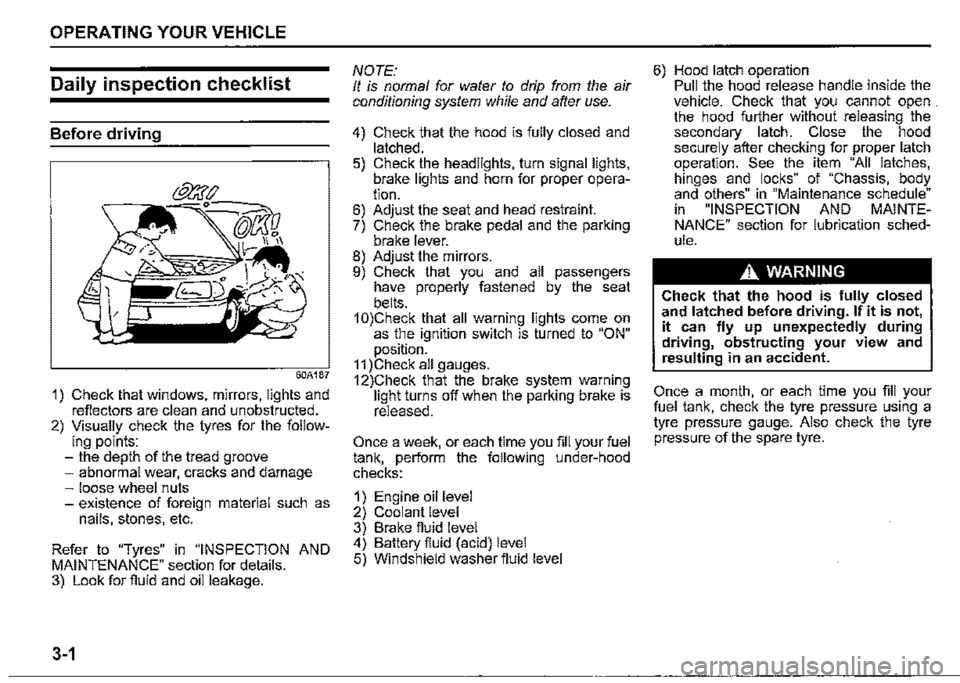
60A187
1) Check that windows, mirrors, lights and reflectors are clean and unobstructed. 2) Visually check the tyres for the follow-ing points: -the depth of the tread groove -abnormal wear, cracks and damage -loose wheel nuts -existence of foreign material such as nails, stones, etc.
Refer to "Tyres" in "INSPECTION AND MAINTENANCE" section for details. 3) Look for fluid and oil leakage.
3-1
NOTE: It is normal for water to drip from the air conditioning system while and after use.
4) Check that the hood is fully closed and latched. 5) Check the headlights, turn signal lights, brake lights and horn for proper operation. 6) Adjust the seat and head restraint. 7) Check the brake pedal and the parking brake lever. 8) Adjust the mirrors. 9) Check that you and all passengers have properly fastened by the seat belts. 1 0)Check that all warning lights come on as the ignition switch is turned to "ON" position. 11 )Check all gauges. 12)Check that the brake system warning light turns off when the parking brake is released.
Once a week, or each time you fill your fuel tank, perform the following under-hood checks:
1) Engine oil level 2) Coolant level 3) Brake fluid level 4) Battery fluid (acid) level 5) Windshield washer fluid level
6) Hood latch operation Pull the hood release handle inside the vehicle. Check that you cannot open . the hood further without releasing the secondary latch. Close the hood securely after checking for proper latch operation. See the item "All latches, hinges and locks" of "Chassis, body and others" in "Maintenance schedule" in "INSPECTION AND MAINTENANCE" section for lubrication schedule.
A WARNING
Check that the hood is fully closed and latched before driving. If it is not, it can fly up unexpectedly during driving, obstructing your view and resulting in an accident.
Once a month, or each time you fill your fuel tank, check the tyre pressure using a tyre pressure gauge. Also check the tyre pressure of the spare tyre.
Page 156 of 421
OPERATING YOUR VEHICLE
Parking brake lever
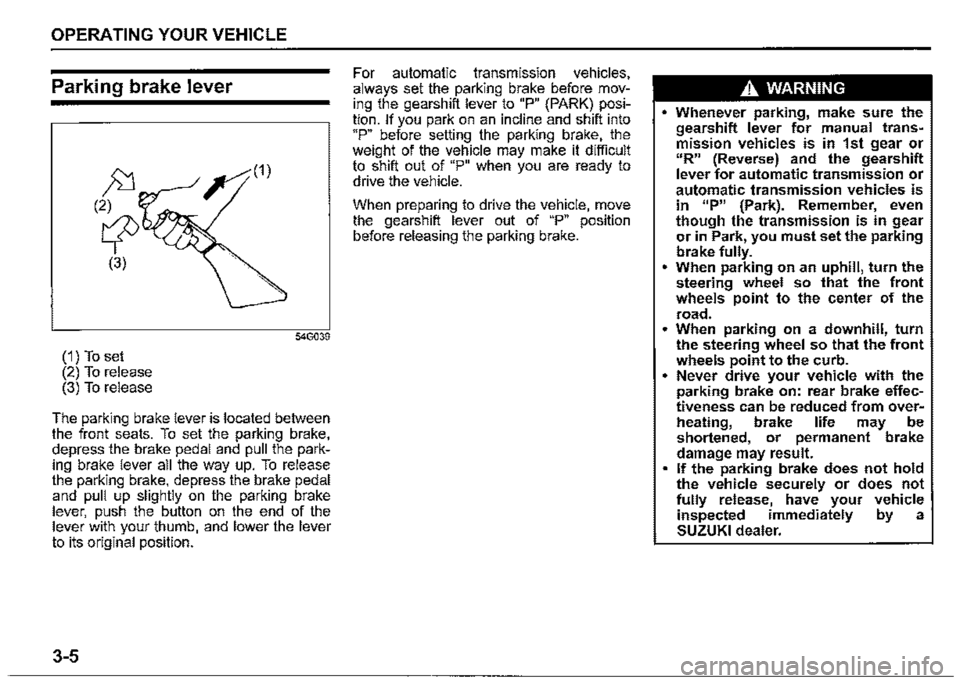
(1) To set (2) To release (3) To release
The parking brake lever is located between the front seats. To set the parking brake, depress the brake pedal and pull the parking brake lever all the way up. To release the parking brake, depress the brake pedal and pull up slightly on the parking brake lever, push the button on the end of the lever with your thumb, and lower the lever to its original position.
3-5
For automatic transmission vehicles, always set the parking brake before moving the gearshift lever to "P" (PARK) position. If you park on an incline and shift into "P" before setting the parking brake, the weight of the vehicle may make it difficult to shift out of "P" when you are ready to drive the vehicle.
When preparing to drive the vehicle, move the gearshift lever out of "P" position before releasing the parking brake.
A WARNING
• Whenever parking, make sure the gearshift lever for manual transmission vehicles is in 1st gear or "R" (Reverse) and the gearshift lever for automatic transmission or automatic transmission vehicles is in 11P" {Park). Remember, even though the transmission is in gear or in Park, you must set the parking brake fully. • When parking on an uphill, turn the steering wheel so that the front wheels point to the center of the
road. • When parking on a downhill, turn the steering wheel so that the front wheels point to the curb. • Never drive your vehicle with the parking brake on: rear brake effectiveness can be reduced from overM heating, brake life may be shortened, or permanent brake damage may result. • If the parking brake does not hold the vehicle securely or does not fully release, have your vehicle inspected immediately by a SUZUKI dealer.
Page 157 of 421

A WARNING
Always set the parking brake fully before leaving your vehicle or it may move, causing injury or damage. When parking, make sure the gearshift lever for manual transmission vehicles is in 1st gear or "R" (Reverse) and the gearshift lever for automatic transmission vehicles is in "P" (Park). Remember, even though the transmission is in gear or in Park, you must set the parking brake fully.
A WARNING
When parking the vehicle in extremely cold weather, the following procedure should be used: 1) Set the parking brake. 2) Manual transmission -turn off the engine, then shift into reverse or first gear. Automatic transmission -shift into "P" (Park) and turn off the engine. 3) Get out of the vehicle and put chocks under the wheels. 4) Release the parking brake. When you return to your vehicle, first set the parking brake, and then remove the wheel chocks.
A WARNING
Do not leave cigarette lighters, spray cans, soft drink cans or plastic arti~ cles (such as glasses, CD case, etc.) in sun-heated vehicle. The temperature inside the vehicle may cause as follows: Gas may leak from a cigarette lighter or spray can and may lead to a fire. The glasses, plastic cards or CD cases, etc. may deform or crack. Soft drink cans may fracture.
Parking brake reminder buzzer
A buzzer sounds intermittently to remind you to release the parking brake if you start the vehicle without fully releasing the parking brake. Check that the parking brake is fully released and the brake system warning light turns off.
OPERATING YOUR VEHICLE
Pedal
Manual transmission
80J2121
Automatic transmission
80J2122
3-6
Page 169 of 421
OPERATING YOUR VEHICLE
Transfer lever Indicator light
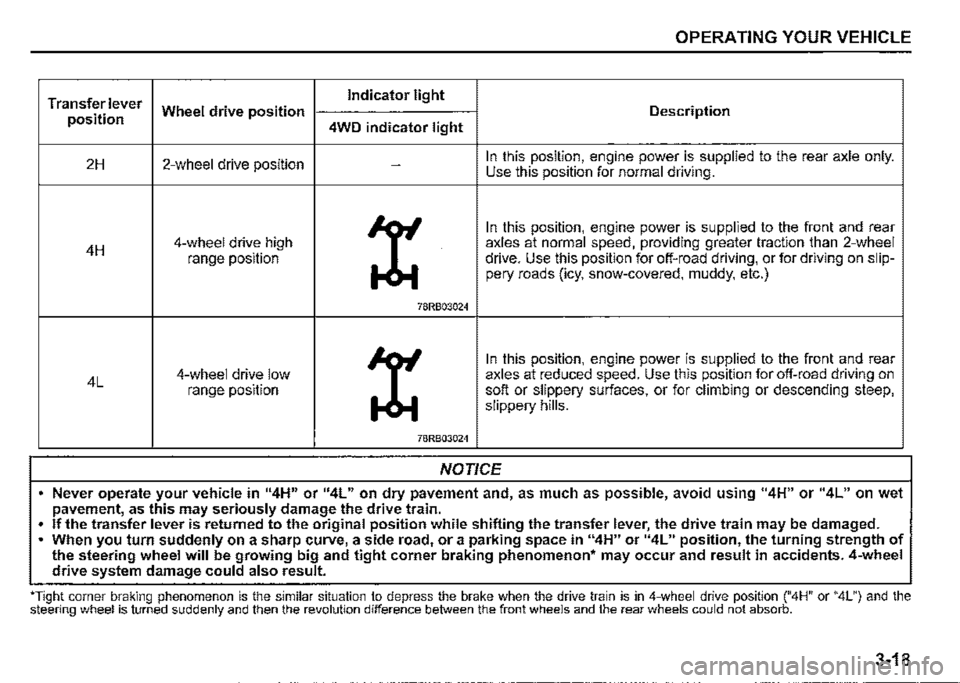
position Wheel drive position Description
4WD indicator light
2H 2-wheel drive position -In this position, engine power is supplied to the rear axle only. Use this position for normal driving.
X
In this position, engine power is supplied to the front and rear
4H 4-wheel drive high axles at normal speed, providing greater traction than 2-wheel
range position drive. Use this position for off-road driving, or for driving on slip-pery roads (icy, snow-covered, muddy, etc.)
78RB03024
X
In this position, engine power is supplied to the front and rear
4L 4-wheel drive low axles at reduced speed. Use this position for off-road driving on range position soft or slippery surfaces, or for climbing or descending steep, slippery hills.
78RB03024
NOTICE
• Never operate your vehicle in 114H" or 114L" on dry pavement and, as much as possible, avoid using "4H" or "4L" on wet pavement, as this may seriously damage the drive train.
• If the transfer lever is returned to the original position while shifting the transfer lever, the drive train may be damaged . . When you turn suddenly on a sharp curve, a side road, or a parking space in "4H" or 114L" position, the turning strength of the steering wheel will be growing big and tight corner braking phenomenon• may occur and result in accidents. 4-wheel drive system damage could also result.
''Tight corner braking phenomenon is the similar situation to depress the brake when the drive train is in 4-wheel drive position ("4H" or "4L") and the steering wheel is turned suddenly and then the revolution difference between the front wheels and the rear wheels could not absorb.
3-18
Page 170 of 421
OPERATING YOUR VEHICLE
NOTE: When you select the "4L" position the ESF'® systems (other than ABS) w/11 be canceled to provide improved vehicle traction, and the ESF'® OFF indicator light, dual sensor brake support OFF indicator light and lane departure warning OFF indicator light will come on. When you select the "4L" position braketraction control can be activated'. Braketraction control brakes the spinning wheel to distribute drive power to the other wheels for increased climbing ability or for better performance on a rolling hill or a slippery surface. If dual sensor brake support OFF indicator light and lane departure warning OFF indicator light come on or go off, the intenor buzzer beeps. This is not a ma/function.
3-19
Transfer lever operation
NOTICE
Unevenly worn tyres can cause problems in the operation of the transfer lever. Be sure to rotate the tyres according to the maintenance schedule. Refer to "Tyres" and "Maintenance Schedule" in the "INSPECTION AND MAINTENANCE" section for proper tyre rotation procedures. If a problem exists during the shifting function, all lights of the 4WD indicator will blink continuously and the transfer lever operation will not work. If the shift function does not work after trying the shifting operation several times, it may be the result of a system failure. Have the system inspected by a SUZUKI dealer.
NOTE: When the temperature of 4-whee/ drive system or the transmission is not warm ':'nder the low temperature, you may feel ,t hard to shift the transfer lever or gear n01se may occur. Unless you can shift the transfer lever drive your vehicle for a while and the/2 shift the transfer lever again.
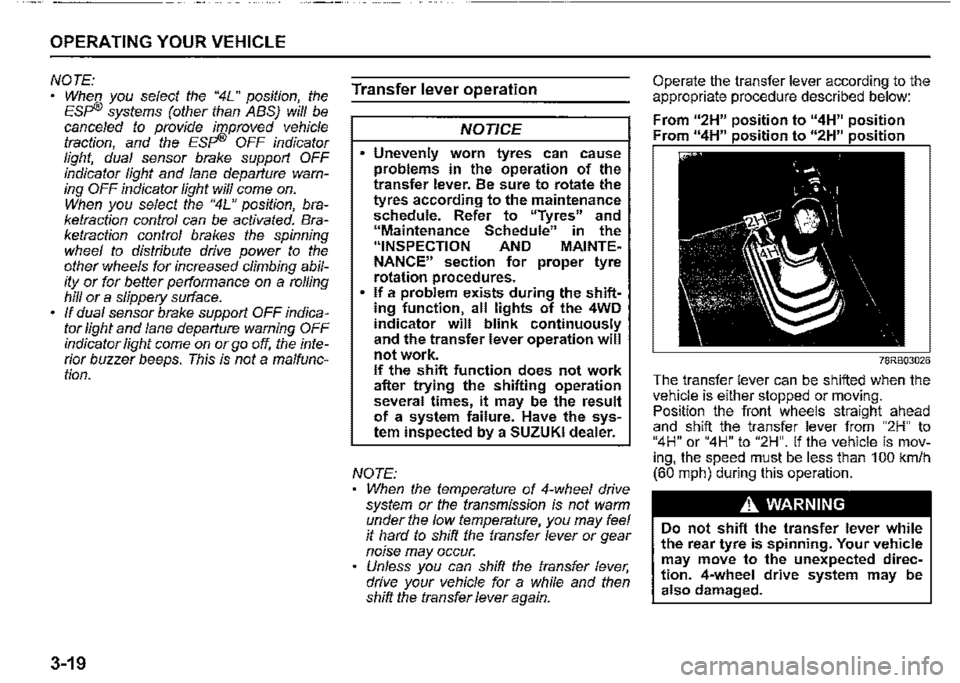
Operate the transfer lever according to the appropriate procedure described below:
From u2H" position to "4H" position Fr " 11 • • " " • •
78RB03026
The transfer lever can be shifted when the vehi_c_le is either stopped or moving. Pos1t1on the front wheels straight ahead and shift the transfer lever from "2H" to "4H" or "4H" to "2H". If the vehicle is moving, the speed must be less than 100 km/h (60 mph) during this operation.
A WARNING
Do not shift the transfer lever while the rear tyre is spinning. Your vehicle may move to the unexpected direction. 4-wheel drive system may be also damaged.
Page 174 of 421

OPERATING YOUR VEHICLE
Setting cruising speed
Cruise control switch
(1)
(1) Cruise switch (2) "CANCEL" switch (3) "RES +/SET-" switch
(4) Cruise indicator light (5) "SET" indicator light
3-23
52RM30190
75RM329
78R803029
(6) Cruise indicator (7) Set indicator
1) Turn on the cruise control system by pushing cruise switch (1). When the cruise indicator light (4) (type A) or cruise indicator (6) (type B) comes on, you can set cruising speed. 2) Accelerate or decelerate to the desired speed. 3) Push down the "RES +/SET -" switch (3) and turn on the "SET" indicator light (5) (type A) or set indicator (7) (type B). Take your foot off the accelerator pedal and the set speed will be maintained.
A WARNING
If the cruising speed is set by accident, you cannot decelerate or could loose control of the vehicle. This could lead to an accident, resulting in severe injury or death. Turn off the cruise control system and check that cruise indicator (6) is off when the system is not in use.
Changing speed temporarily
When the cruising speed is maintained, you can temporarily accelerate or decelerate.
To accelerate, depress the accelerator pedal. When you take your foot off the pedal, your vehicle will return to the set speed.
To decelerate, depress the brake pedal. The set speed will be canceled and "SET" indicator light (5) or set indicator (7) will go off. To resume the previously set speed, push up the "RES +/SET -" switch (3) and turn on "SET" indicator light (5) or set indicator (7) again when vehicle speed is above 40 km/h (25 mph). The vehicle will accelerate to the previously set speed and maintain its speed.
Page 175 of 421

Changing cruising speed
Using the accelerator pedal To reset at a faster cruising speed, accelerate to the desired speed using the accelerator pedal and push down the "RES +/SET-" switch (3). The new speed will be main
tained.
Using the brake pedal To reset at a slower cruising speed, decelerate to the desired speed using the brake pedal and push down the "RES +/SET -" switch (3). The new speed will be main
tained.
NOTE: When the brake pedal is depressed, "SET" indicator light (5) or set indicator (7) goes off until the cruising speed is reset.
Using "RES +/SET-" switch To reset at a faster cruising speed, press repeatedly or hold push up the "RES +/ SET -" switch (3). Vehicle speed will steadily increase. When you release the switch, the new speed will be maintained.
To reset at a slower cruising speed, press repeatedly or hold push down the "RES +/ SET -" switch (3) until the vehicle has slowed to the desired speed, and then release the switch. The new speed will be maintained.
NOTE: You can adjust the set speed by approximately 1 km/h (1 mph) by pushing "RES +/ SET-" switch quickly
Cancelling cruise control
"SET' indicator light (5) or set indicator (7) will go off and the cruise control will be canceled temporarily with the following conditions:
Push "CANCEL" switch (2). Depress the brake pedal. For manual transmission vehicle, depress the clutch pedal. For automatic transmission vehicle, the gear position is changed to "L" When the transfer lever is operated, The vehicle speed falls more than about 20 percent from the set speed. Any time the vehicle speed falls below 40 km/h (25 mph). When the vehicle skids and ESP® is activated.
To resume the previously set speed, push up the "RES +/SET-" switch (3) and turn on "SET' indicator light (5) or set indicator (7). The vehicle speed must be above 40 km/h (25 mph) when the vehicle is not under the above conditions.
OPERATING YOUR VEHICLE
To turn off the cruise control system, push cruise switch (1) and check that the cruise indicator light (4) or cruise indicator (6)
goes off.
Also, if the malfunction indicator light in the instrument cluster comes on or blinks, the cruise control system will be turned off.
NOTE: If you turn off the cruise control system, the previously set speed in the memory is cleared. Reset your cruising speed again.
3-24