ignition SUZUKI JIMNY 2020 Repair Manual
[x] Cancel search | Manufacturer: SUZUKI, Model Year: 2020, Model line: JIMNY, Model: SUZUKI JIMNY 2020Pages: 421, PDF Size: 6.35 MB
Page 163 of 421
The transmission is a 4-speed (3-speed plus overdrive) automatic transmission. By operating the overdrive off switch, the transmission can be converted to a 3-speed automatic transmission that will not move to the overdrive position. To convert the transmission to the 3-speed mode, push in the overdrive off switch and release it.
To return the transmission to the 4-speed mode, push in the overdrive off switch again:
When the ignition switch is turned to the "ACC" position, the transmission in the 3-speed mode is converted to the 4-speed mode automatically. The 3-speed mode is suitable for the following driving conditions: Driving on hilly, winding roads -You can drive more smoothly with less frequent gear changing Going down a steep hill -Some engine braking is provided
If you cannot shift automatic trans
mission gearshift lever out of "P"
(PARK)
Left hand drive vehicle
(1)
□
78RB03005
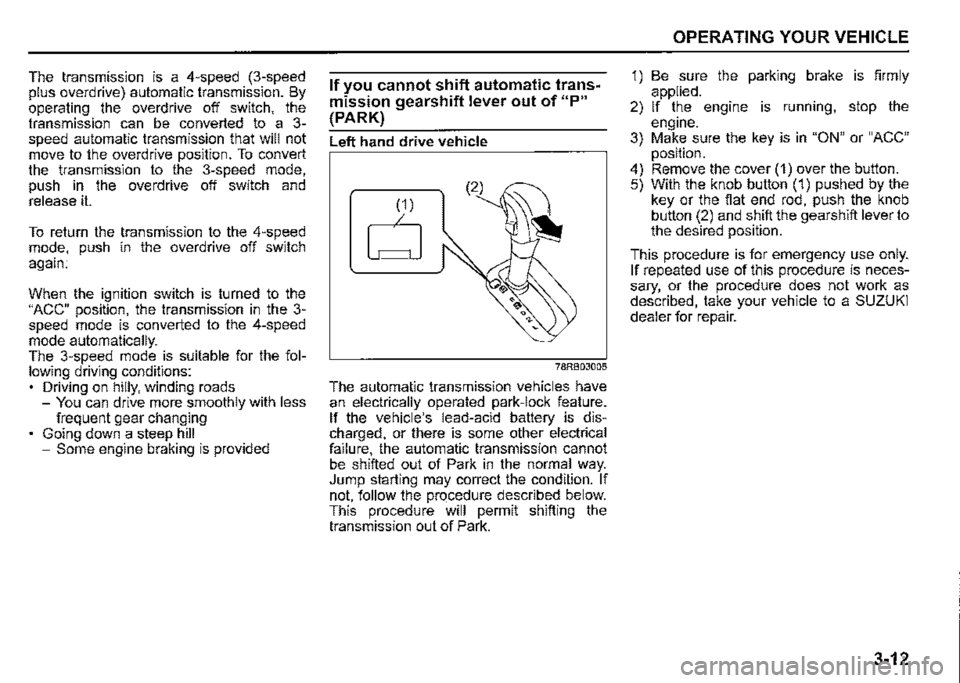
The automatic transmission vehicles have an electrically operated park-lock feature. If the vehicle's lead-acid battery is discharged, or there is some other electrical failure, the automatic transmission cannot be shifted out of Park in the normal way. Jump starting may correct the condition. If not, follow the procedure described below. This procedure will permit shifting the transmission out of Park.
OPERATING YOUR VEHICLE
1) Be sure the parking brake is firmly applied. 2) If the engine is running, stop the engine. 3) Make sure the key is in "ON" or "ACC" position. 4) Remove the cover (1) over the button. 5) With the knob button (1) pushed by the key or the flat end rod, push the knob button (2) and shift the gearshift lever to the desired position.
This procedure is for emergency use only. If repeated use of this procedure is necessary, or the procedure does not work as described, take your vehicle to a SUZUKI dealer for repair.
3-12
Page 164 of 421
OPERATING YOUR VEHICLE
Right hand drive vehicle
(2)
78RB03006
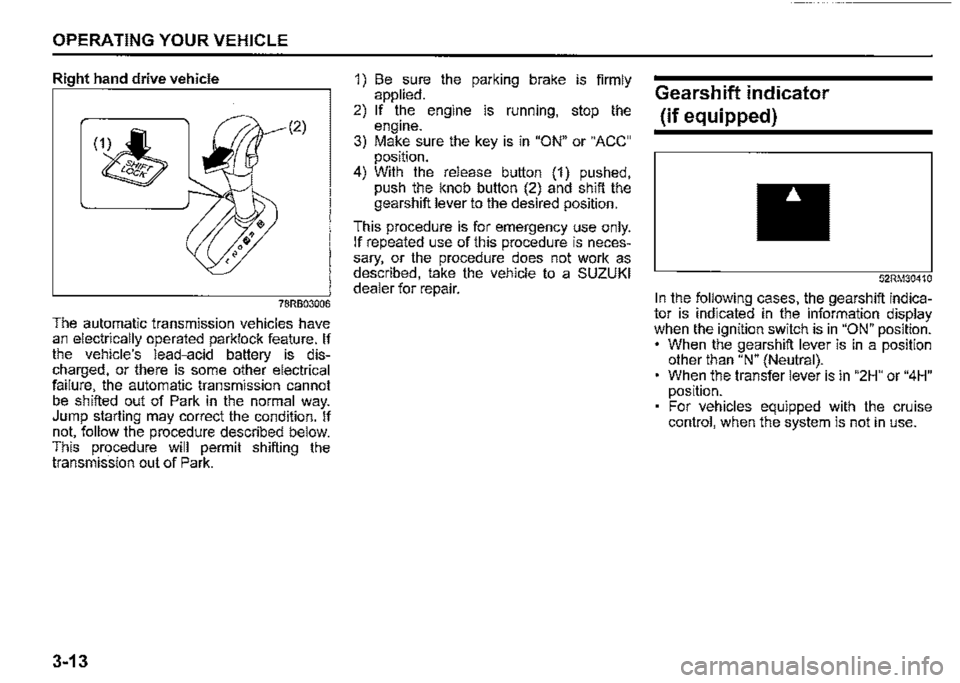
The automatic transmission vehicles have an electrically operated parklock feature. If the vehicle's lead-acid battery is discharged, or there is some other electrical failure, the automatic transmission cannot be shifted out of Park in the normal way. Jump starting may correct the condition. If not, follow the procedure described below. This procedure will permit shifting the transmission out of Park.
3-13
1) Be sure the parking brake is firmly applied. 2) If the engine is running, stop the engine. 3) Make sure the key is in "ON" or "ACC" position. 4) With the release button (1) pushed, push the knob button (2) and shift the gearshift lever to the desired position.
This procedure is for emergency use only. If repeated use of this procedure is necessary, or the procedure does not work as described, take the vehicle to a SUZUKI dealer for repair.
Gearshift indicator
(if equipped)
52RM30410
In the following cases, the gearshift indicator is indicated in the information display when the ignition switch is in "ON" position. • When the gearshift lever is in a position other than "N" (Neutral). When the transfer lever is in "2H" or "4H" position. For vehicles equipped with the cruise control, when the system is not in use.
Page 171 of 421

NOTICE
Pay attention to shifting the transfer lever safely when driving your vehicle.
NOTE: After shifting the transfer lever from "2H'" to "4H", check that the 4WD indicator
light comes on. After shifting the transfer lever from "4H" to "2H", check that the 4WD indicator goes off. ·
When 4WD indicator fight is blinking after shifting the transfer fever to "4H" position, accelerate, slow down your vehicle or stop and reverse your vehicle a little to shift the transfer lever. Pay attention to the vehicles and the circumference toward or backward your vehicle when shifting the transfer fever. When you shift the transfer fever while turning the steering wheel or depressing the accelerator pedal, shifting the transfer fever may be difficult. Operate the transfer fever while driving at low speed if it may be difficult to shift the transfer fever from "2H" position to "4H" position when the vehicle is stopped.
Shift the transfer fever again after decelerating or stopping the vehicle if it may be difficult to shift the transfer fever from "2H" position to "4H" position while driving or when the gear noise occurs. There may be a case to operate the transfer fever heavily when shifting the transfer lever from "4H" position to "2H" P_Osition while driving. In this case, position the front wheels straight ahead and drive for a while and then operate shifting the transfer fever again. When the transfer lever is shifted from 2H" position to "4H" position or from "4H" position to 2H" position and the air locking hubs are activated, the air conditioning system may not be operated for several seconds. This is not a malfunction. When the ignition switch is turned "ON" after the transfer fever is shifted from 2H" position to "4H" position or from "4H" position to 2H" position while stopping the engine, 4WD indicator light may blink. This is not a malfunction.
OPERATING YOUR VEHICLE
78RB03027
Stop the vehicle completely, place the transmission in "N" (Neutral) or depress the clutch pedal fully (if equipped), then shift the transfer lever from "4H" position to "4L" position by pressing the transfer lever.
3-20
Page 172 of 421

OPERATING YOUR VEHICLE
A WARNING
When you turn off the engine while the transfer is not finished to shift into "4L" position, follow instructions below. 1) Depress the brake pedal* fully. 2) Turn the ignition switch to "OFF" position. • Depress the brake pedal until the engine is started again. Even though the gearshift lever is shifted into 1st gear or "R" (Reverse) gear for manual transmission vehicles or shifted into "P" (Park) position for automatic transmission vehicles, there may be a case that the wheels of the vehicle is not stationary. When you turn off the engine in this situation, start the engine again and move the vehicle forward or backward slowly.
3-21
A CAUTION
Do not operate the transfer lever while driving. Do not operate the transfer lever while making a left or right turn or while holding rear wheels slipped on icy, snow-covered, or muddy roads. Your vehicle may move to the unexpected direction. 4-wheel drive system may be also damaged.
NOTE: There may be a case that you will feel the difficulty to operate the transfer lever when shifting the transfer lever from "4H" position to "4L" position. Operate the transfer lever into "4L" position surely. When shifting the transfer lever from "4H" position to "4L" position, the buzzer will sound and the function of the ES?® system and the vehicle stability control system will be deactivated. There may be a case that shifting into "4L" position is not completed when the transfer system or the transmission is not warm in the cold weather. There may be a possibility of difficulty to shift especially for automatic transmission vehicles in the cold weather. Follow instructions below in this case and operate the transfer lever again. -Stop the vehicle completely. -Place the transmission in "N" (Neu-tral). -Depress the brake pedal* fully. -Release the parking brake. -Turn the ignition switch to "OFF" posi-tion. -Shift the transfer lever from "4H" position to "4L" position by pressing the transfer lever. -Check whether the vehicle can be moved by moving the vehicle forward or backward slowly. • Depress the brake pedal until the engine is started again.
Page 181 of 421
Situations where the system does not activate Under the following situations, the system does not activate. When the engine is off When dual sensor brake support indicator light and lane departure warning indicator light are initially lighting immediately after the ignition switch is turned to "ON". When the gearshift lever is in reverse gear When the ESP® system is activated (except the frontal collision warning) When the following switches are pushed and the system is turned off: -Dual sensor brake support OFF switch -ESP® OFF switch
When the dual sensor is temporarily stopped or malfunctioning
Situations where the system may not activate properly Under the following situations, the system may not activate. When the dual sensor cannot detect a vehicle or a pedestrian in front of your vehicle Refer to "Handling dual sensor" in the "OPERATING YOUR VEHICLE" section. When you take evasive action with the steering wheel or accelerator pedal
Situations where the vehicle may not decelerate properly Under the following situations, the vehicle may not decelerate properly even when the system is activated. When the outside temperature is low, or when the temperature of the brake is low such as right after starting When the brake is overheating and the brake effect is deteriorated due to continuing to travel on a downhill road When the brake effect is deteriorated due to passing over puddles or washing the vehicle When driving on the following roads -On sharp curves or extremely rough surfaces -On a steep slope When driving on the following slippery surfaces -Frozen or snow-covered surfaces -Over manholes or metal construction plates -Gravel When driving in a rainy day
OPERATING YOUR VEHICLE
Situations where the system may activate by chance Under the following situations, the dual sensor may judge that there is a vehicle or a pedestrian in front of you, and the system may activate. Drive carefully and calmly. When passing through a toll booth with more than recommended speeds Before the parking lot gates or railroad crossing gates are opened fully When operating on hills that have varying slopes When you suddenly accelerate and approach the vehicle in front of you or on neighboring lane Front visibility is poor due to that there is water vapor, sand or smoke or when the vehicle in front of you or on oncoming lane is surrounded by exhaust gas, water or snow When passing through masses of water vapor or smoke When stopping close to an obstacle in. front of you When passing through near a vehicle or obstacle
3-30
Page 184 of 421
OPERATING YOUR VEHICLE
Lane departure warning
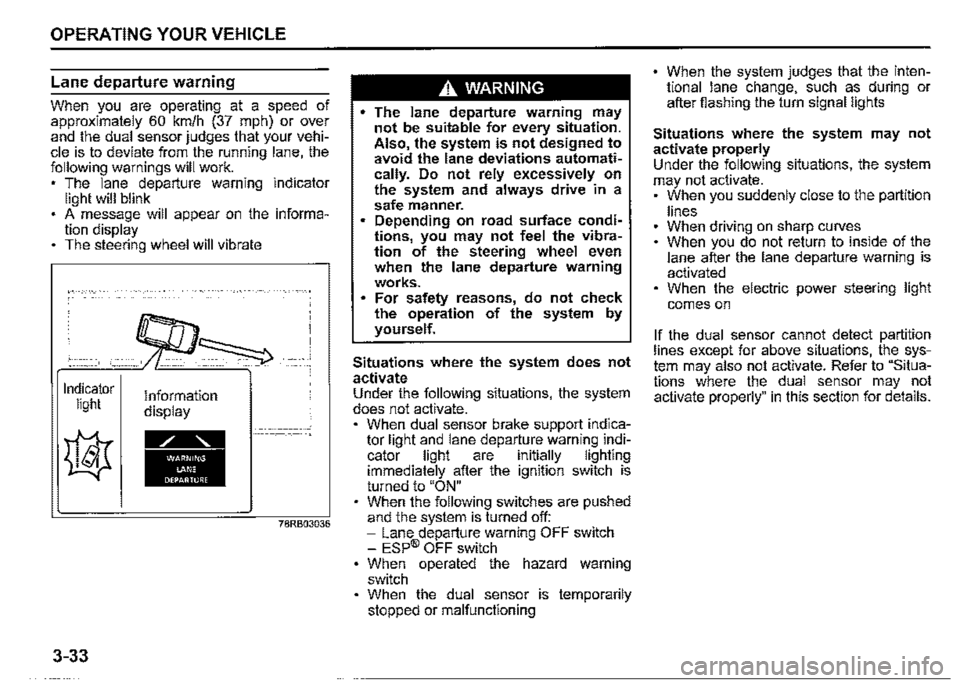
When you are operating at a speed of approximately 60 km/h (37 mph) or ov~r and the dual sensor judges that your vehicle is to deviate from the running lane, the following warnings will work. , The lane departure warning indicator light will blink . A message will appear on the information display The steering wheel will vibrate
Indicator light
3-33
Information display
78RB03036
A WARNING
• The lane departure warning may not be suitable for every situation. Also the system is not designed to avoid the lane deviations automati~ cally. Do not rely excessively on the system and always drive in a safe manner. Depending on road surface conditions, you may n~t feel the vibration of the steering wheel even when the lane departure warning works. For safety reasons, do not check the operation of the system by yourself.
Situations where the system does not activate Under the following situations, the system does not activate. , When dual sensor brake support indicator light and lane departu_re warni~g i~dicator light are 1nitially lighting immediately after the ignition switch is turned to "ON" When the following switches are pushed and the system is turned off: -Lane departure warning OFF switch -ESP® OFF switch When operated the hazard warning switch When the dual sensor is temporarily stopped or malfunctioning
When the system judges that the intentional lane change, such as during or after fiashing the turn signal lights
Situations where the system may not activate properly Under the following situations, the system may not activate. , When you suddenly close to the partition
lines When driving on sharp curves When you do not return to inside of th_e lane after the lane departure warning 1s activated When the electric power steering light
comes on
If the dual sensor cannot detect partition lines except for above situations, t~~ _system may also not activate. Refer to Situations where the dual sensor may not activate properly" in this section for details.
Page 185 of 421

Situations where the system may activate by chance Under the following situations, the system may activate. • When there are a lot of lines in the running lane When there is a shadow (for example, the shadow of the guardrail) parallel to the partition line When partition line is in the shadows When partition lines are drawn doubly When there is a liner paint on the road of a construction zone because the previous line has not been erased completely When there is repair marks on the road or a boundary between asphalt and snow When there is tyre marks on snow-covered or wet road When driving in the place without partition lines (such as a tailgate or checkpoint, or at an intersection, etc.) When driving on the road diverges, merges, etc. When driving on an unpaved or rough road
Vehicle swaying warning
When you are operating at a speed of approximately 60 km/h (37 mph) or over and the vehicle swaying warning judges that your vehicle is unsteadiness by detecting the meandering patterns or lane departure warning is activate_d in a s_hort period of time in a row following warnings will work. The lane departure warning indicator light will blink A message will appear on the information display The interior buzzer will intermittently beep
~CO)
A
Indicator Information light display
~
• 78RB03037
OPERATING YOUR VEHICLE
.A. WARNING
The vehicle swaying warning may not be suitable for every situation. Also, the system is not designed t? avoid the unsteadiness of the vehicle automatically. Do not rely excessively on the system and always drive in a safe manner. For safety reasons, do not check the operation of the system by yourself.
NOTE: Vehicle swaying warning by the meandering pattern of the vehicle in the lane is judged based on the driving data over the past several tens of minutes, so the system does not activate when right after swaying.
Situations where the system does not activate Under the following situations, the system does not activate. When dual sensor brake support indicator light and lane departure warning indicator light are initially lighting immediately after the ignition switch is turned to "ON". When the following switches are pushed and the system is turned off: -Lane departure warning OFF switch -ESP® OFF switch When the dual sensor is temporarily stopped or malfunctioning
3-34
Page 186 of 421
OPERATING YOUR VEHICLE
Situations where the system may not activate properly Under the following situations, the system may not activate. • Right after lane changing
If the dual sensor cannot detect partition lines except for above situations, the system may also not activate. Refer to "Situations where the dual sensor may not activate properly" in this section for details.
High beam assist
After the auto high beam switch operation, head light is turned ON with the lighting control lever on "Auto" position when the ambient becomes dark, the system is activated. When the high beam assist is activated, high beam assist indicator light (green) comes on.
Under the any of following situations, the low beam turns on. • When vehicle speed is approximately 35 km/h (21.7 mph) or under When the front of the vehicle is bright When the vehicle in front of you turned on the lights There are many street lamps in front of you
Under the all of the following conditions are met, the high beams (main beams) turns on.
3-35
When vehicle speed is approximately 40 km/h (24.9 mph) or over When the front of the vehicle is dark When the vehicle in front of you is driving without lights • There is few street lamps in front of you
A. WARNING
• High beam assist has limits and may not function properly depending on the surrou.nding environment. Always drive in a safe manner, switch manually to the low beams and high beams (main beams), if necessary. Switching of the low beams and high beams (main beams) it might not match the feeling of the driver.
NOTE: Light vehicle such as a bicycle might not detect. When the sudden acceleration, high beam assist might not operate for a few seconds, even if vehicle speed exceeds 40kmlh (24.9 mph).
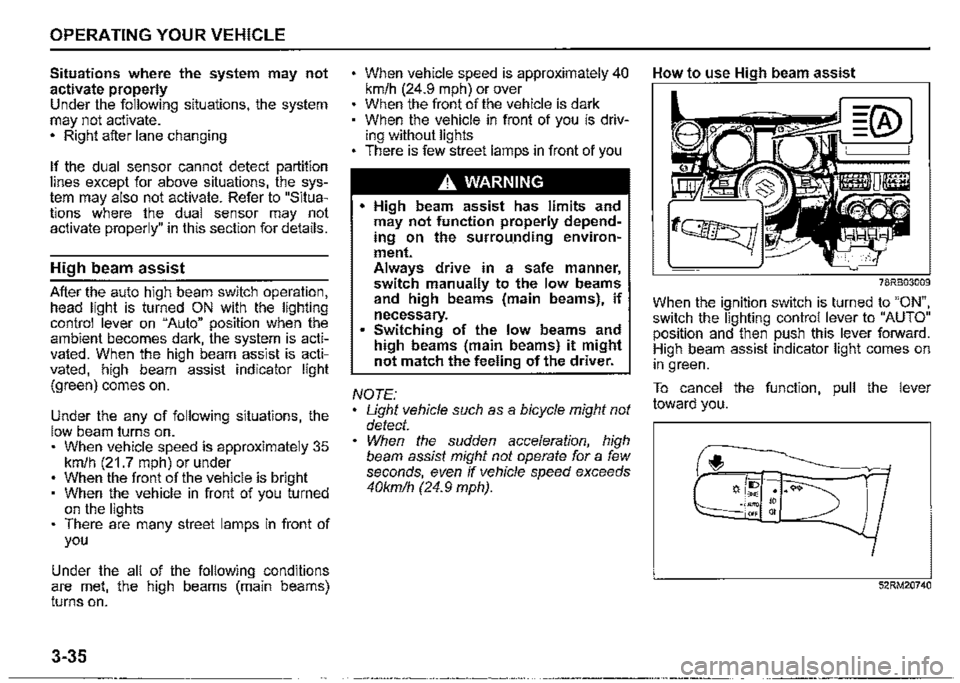
How to use High beam assist
78RB03009
When the ignition switch is turned to "ON", switch the lighting control lever to "AUTO" position and then push this lever forward. High beam assist indicator light comes on in green.
To cancel the function, pull the lever toward you.
f,
52RM20740
Page 187 of 421
Situations where the system does not activate When the high beam assist warning light (orange) comes on by the temporary stop or malfunction of system.
NOTE: When the function of the dual sensor brake support is temporarily stopped, high beam assist will be temporarily stopped. Refer to "Temporary stop or failure of the dual sensor'' in this section for details.
When high beam assist warning light (orange) is initially lighting immediately after the ignition switch is turned to "ON".
Under the following situations, high beam may not automatically switched to low beam. When you pass by an oncoming vehicle on a curvy road where the visibility is poor When another vehicle crosses in front of you When the vehicle in front of you glimpses due to continuous curves, medial strip or street trees When the vehicle in front of you approaches towards you from the far lane When the vehicle in front of you is driving without lights
For the following cause, there is case where the switching timing of the high beam and low beam is varied. When the lights of the vehicle in front of you is dark When only one side of the lights of the vehicle in front of you is turned on The directions and movements of the vehicle in front of you When the vehicle in front of you is a motorcycle When driving on the following roads -On sharp curves or extremely rough surfaces -On a steep slope
When your vehicle is weighed down by heavy items in the luggage compartment or rear seat
OPERATING YOUR VEHICLE
Under the following situations, the brightness of the surrounding area can not be detected accurately, and there is a case where the high beam is a nuisance to pedestrians or the vehicle ahead, or low beam will remain to continue. In these cases, change high beam or low beam manually. When lights are similar to headlights or taillights are around When the vehicle in front of you is driving without lights When the headlights of oncoming vehicle are covered in dirt or discolored When the optical axis of the headlight of oncoming vehicle is deviated When the brightness is changed extremely and continuously When driving on an undulated or bumpy road When driving on the road with a lot of curves When there are things that strongly reflect light, such as road signs or mirrors in front of the vehicle When the rear part of the preceding vehicle strongly reflects light, such as containers When the headlights of your car are damaged or covered in dirt When the vehicle is tilted due to the flat tyres or being towed
3-36
Page 190 of 421
OPERATING YOUR VEHICLE
Traffic sign recognition
(if equipped)
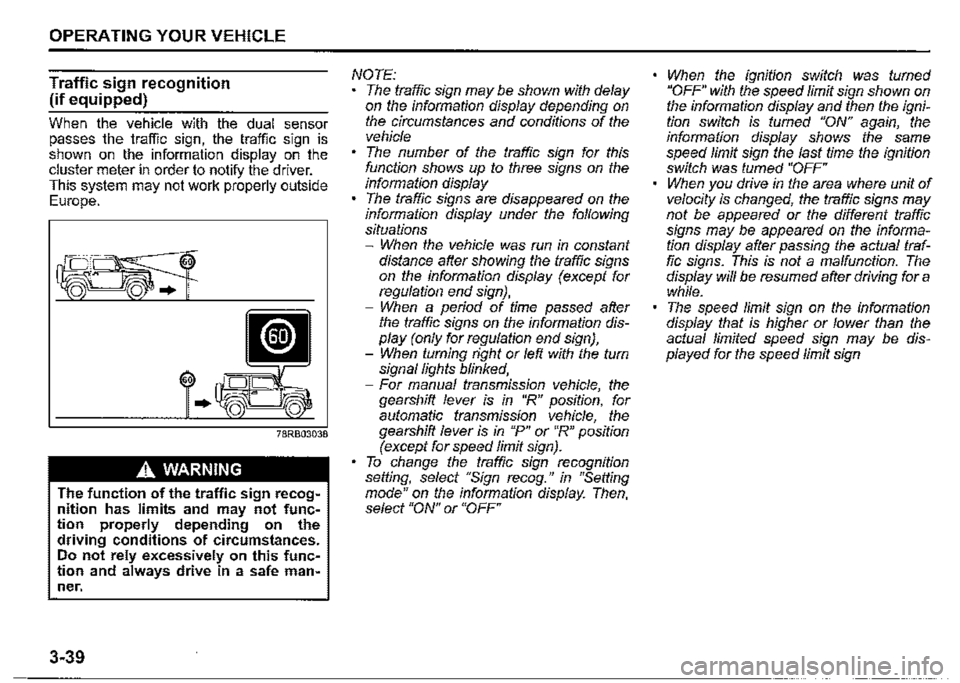
When the vehicle with the dual sensor passes the traffic sign, the traffic sign is shown on the information display on the cluster meter in order to notify the driver. This system may not work properly outside Europe.
60
..
A WARNING
The function of the traffic sign recognition has limits and may not function properly depending on the driving conditions of circumstances. Do not rely excessively on this function and always drive in a safe man~ ner.
3-39
NOTE: The traffic sign may be shown with delay on the information display depending on the circumstances and conditions of the vehicle The number of the traffic sign for this function shows up to three signs on the information display The traffic signs are disappeared on the information display under the following situations -When the vehicle was run in constant distance after showing the traffic signs on the information display (except for regulation end sign}, -When a period of time passed after the traffic signs on the information display (only for regulation end sign), -When turning right or left with the turn signal lights blinked, -For manual transmission vehicle, the gearshift lever is in "R" position, for automatic transmission vehicle, the gearshift lever is in "P" or "R" position (except for speed limit sign). To change the traffic sign recognition setting, select "Sign recog." in "Setting mode" on the information display. Then, select "ON" or "OFF"
When the ignition switch was turned "OFF" with the speed limit sign shown on the information display and then the ignition switch is fumed "ON" again, the information display shows the same speed limit sign the last time the ignition switch was fumed "OFF" When you drive in the area where unit of velocity is changed, the traffic signs may not be appeared or the different traffic signs may be appeared on the information display after passing the actual traffic signs. This is not a malfunction. The display will be resumed after driving for a while. The speed limit sign on the information display that is higher or lower than the actual limited speed sign may be displayed for the speed limit sign